



Understanding the salary slip format is important for both employees and employers. The following blog will consist of the various ready-to-use salary slip templates in Excel, Word, and PDF formats, and also highlight a list of the key components to ensure that a valid, professional, and legal salary slip is produced.
People often find it difficult to create or understand a standard salary slip format due to missing information, incorrect calculations, or poorly arranged formats, resulting in confusion as well as issues with compliance. Without properly formatted salary slips, keeping track of payroll records and verifying income becomes extremely difficult and time-consuming.
Using the correct salary slip format will help to simplify payroll processes by providing transparency as well as reducing the risk of making costly mistakes. Free templates allow for quicker and more consistent salary slip production, producing a clear and professional salary slip that is acceptable for both organizations and employees.
What is Salary Slip Format?
A salary slip format refers to the standardised document prepared by an employer outlining an employee’s gross or total earnings, any deductions made from gross earnings, and the employee’s net earnings for a specific pay period. It includes basic salary, allowances, taxes, etc., which is presented in a clear and standardised format.
The benefit of having an accurate and clear salary slip format is that it provides both the employer and the employee with a clear and reliable breakdown of how the employee’s salary is calculated. A well-defined salary slip format may also ease record-keeping, verifying income, and assisting both the employer and employee with compliance to various payroll and legal obligations.
If you are looking for a solution to generate salary slips for your employees, you can use Savvy HRMS, an easy-to-use HRMS tool that helps you manage payroll effortlessly and easily every month.
Salary Slip Format in Excel: Download Free Template
Using an Excel format to prepare and manage payroll and salary slip records is, of course, one of the easiest ways to achieve these tasks since you can perform automated functions, create custom designs, and complete various calculations through the use of formulas.
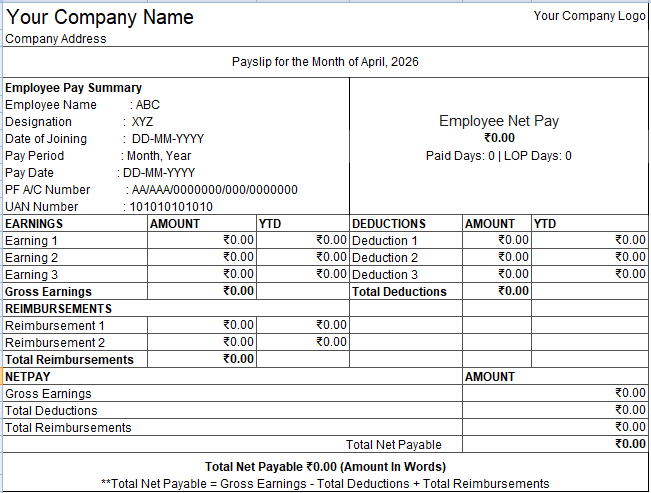
Below is a sample image of an Excel format for preparing a salary slip:
How to create a Salary Slip Format in Excel?
Step 1: Add Company and Employee Details
To begin your paycheck, you will need your company name, logo, and address at the very top. Follow that by inputting employee information such as employee name, employee ID, job title, and the period for which the employee will be paid for their work.
Step 2: Create Earnings Section
Include in the earnings section all of the components that make up your employee’s earnings, including their base salary, HRA, allowances, bonuses, or any other earnings. Then provide a column for the amount and also a column for the employee’s earned-to-date amount.
Step 3: Include Deductions Breakdown
Be certain to create a separate section for all deductions from the employee’s pay, such as PF, professional tax, and income tax, and list out the amounts for each type of deduction in the same manner as listed in the earnings section, including earned-to-date amounts.
Step 4: Calculate Total Earnings and Deductions
Utilize Excel formulas to calculate total earnings and total deductions automatically rather than manually; this will reduce errors and increase your ability to ensure accurate payroll processing each time.
Step 5: Add Reimbursed Amounts and Net Pay Section
Provide the employee with the ability to add reimbursed amounts in order to arrive at an accurate net pay amount through the subtraction of any deductions from earnings, while adding in any reimbursements to arrive at a final amount that can be paid to the employee.
Step 6: Format and Finalise the Layout
Once all required information is added to the salary slip sheet, apply page borders and appropriate headings to the sheet, and align the edges consistently so that it displays a professional format similar to the sample image above and displays an appropriate level of reading, consistency, and understanding for any employee.
Salary Slip Format in Word: Download Free Template
The ideal format to create easy-to-customise & good-looking payroll documents is a Word Salary Slip Format because it allows the creation of structured salary slips using basic formatted data but without complicated formulas, making it a great choice for a smaller business or organization that uses a clean & simple way to complete payroll, instead of creating payroll in an organized format.
How to create a Salary Slip Format in Word?
1. Insert Company & Salary Details
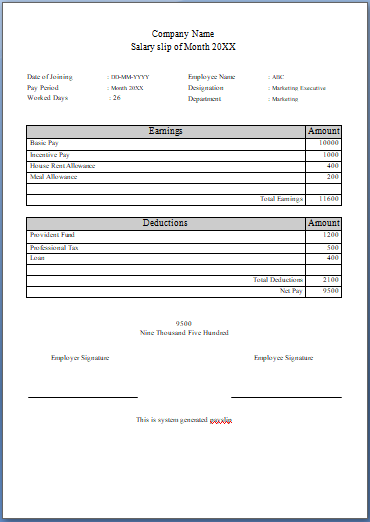
To start creating your own salary slip, you need to first add the company name and title at the top, followed by the month and year for which you are creating the salary slip.
2. Add Employee Information Section
You need to include the employee’s name, job designation, department, date of joining, period of remuneration, and number of days worked in a structured format in the employee details section.
3. Create the Earnings Table
You will have to create an earnings table for basic salary, HRA, and allowances with the corresponding amounts (one column) and total earnings.
4. Create the Deductions Table
You will have to create an additional table for deductions as per contributions (to be distributed collectively) with the corresponding amounts and total deductions.
5. Calculate the Net Pay Amount in Words
Net pay is calculated by subtracting the total amount from earnings. The final net pay amount should be mentioned twice: one numerically and one in words.
6. Signature Space and Footer Note
At the bottom of the document, you need to have appropriate space for both the employer’s and the employee’s signature, along with a note that indicates that this document has been generated by a computer.
Salary Slip Format in PDF: Free Download
We already created the salary slip format in Excel as well as in Word above; you can customize it according to your organizational needs. We are adding the PDF format of both Excel and Word documents for what a salary slip actually looks like:
Why Salary Slips Are Important for Every Organization?
1. Ensures Salary Transparency
Taking note of all earnings and deductions on a paycheck lets the employee see how their pay is constructed, which builds a sense of trust and confidence in the company.
2. Acts as Proof of Employment
A salary slip is the best proof of income for an employee when applying for a loan, credit card, rental property, or other such needs.
3. Helps in Tax Filing
The paycheck provides the employee with sufficient detail about their deductions, making it easy for the employee to complete and submit their income tax return.
4. Supports Legal and Compliance Requirements
Keeping your payroll records up-to-date helps ensure that you are compliant with all federal and state wage and hour laws and regulations, and will give you the proper record-keeping you need to protect yourself from potential legal issues.
5. Simplifies Record-Keeping
Both employees and employers have a record of the salary history for their employees at their fingertips. In the event of employee and employer issues, both parties will have the documentation readily available to review for the parties involved.
6. Enhances Employee Confidence
The issuance of structured pay slips provides the employee with the peace of mind that they are being paid fairly and are satisfied and comfortable with company’s payroll practices. Ultimately, building an environment of trust and transparency in the workplace.
Some Fundamentals of Salary Slip
What are Deductions?
Deductions refer to those amounts that are deducted from the gross income of an individual before the final calculation of their net salary. These can be in the form of statutory deductions, such as tax and provident fund, among others.
Deductions may also be personal or company-specific deductions, such as loan repayments and other benefits provided by the company to its employees.
Formula for Calculating Salary
The calculation of the final salary of an employee includes the deduction of all expenses from the total income received, and adding the refunds where necessary.
Basic Formula for Salary Calculation:
Net Salary = Gross Earnings – Total Deductions + Reimbursements
For Example:
If,
Gross Earnings = ₹40,000
Total Deductions = ₹5,000
Reimbursements = ₹2,000
Net Salary = ₹40,000 – ₹5,000 + ₹2,000 = ₹37,000
CTC vs Gross Salary vs Net Salary
| Component | CTC (Cost to Company) | Gross Salary | Net Salary |
| Definition | Total cost incurred by the employer for the employee | Total earnings before deductions | Final take-home salary after deductions |
| Includes | Salary + benefits + bonuses + employer PF | Basic salary + allowances + bonuses | Gross salary minus all deductions |
| Deductions | Not directly deducted | Deductions applied after this | Already deducted |
| Purpose | Shows total compensation package | Shows earning structure | Shows the actual payable amount |
| Take-home Amount | Not applicable | Not final | Final amount received by employee |
What are the Components in a Salary Slip?
There are various components of a salary slip that help in distinguishing one’s earnings and deductions. It is important to know about each of these components so as to understand the salary slip better.
1. Employee details
It includes the employee’s name, ID number, his/her designation in the company, the department they work in, and the pay period.
2. Company details
This consists of the company’s name, logo, and address to certify the salary slip as authentic and legal.
3. Basic salary
It is the most important part of the salary structure that constitutes a total of your earnings. It serves as a base for other allowances, too.
4. Allowances
These include various other types of earnings like HRA, conveyance, medical, or other allowances given to an employee.
5. Deductions
They refer to amounts deducted from one’s earnings, like provident fund, professional tax, income tax, etc.
6. Gross salary
Gross salary is basically the earnings earned by an individual before making any deductions.
7. Net salary
The final salary that an individual earns in a month after making all kinds of deductions is known as the net salary.
8. Reimbursements (if any)
Reimbursements are expenses that are covered by the company for an employee.
Conclusion
The best-designed structure of a salary slip helps in proper payroll accounting and increases trust in the organization. With the help of the correct templates in Excel, Word, or PDF, businesses can simplify their salary slip management process to eliminate mistakes. For added convenience, software solutions such as Savvy HRMS can assist businesses in automating payroll, creating salary slips easily, and being compliant without any manual intervention.
Ready to grow your HR career?
Get started with creating perfect salary slips easily with Savvy HRMS, payroll management made easy!
Book a Demo TodayFAQ
1. Simple Salary Slip Format in Excel
A format of a simple salary slip in Excel is easily customizable with the use of formulas for calculations. The user will be able to customize such things as basic salary, allowances, and deductions, and all calculations will be made automatically.
2. Simple Salary Slip Format Word
Format of a salary slip in Word will come in handy for those who want an easily printable document, free from any complicated spreadsheet features.
3. Salary Slip Format PDF
The format of a salary slip in PDF provides you with a convenient way to ensure that your document is always safe, since it cannot be edited by others.
4. Salary Slip Format Download
There are different ways to get access to various formats of salary slips. One may easily find formats of salary slips to download in different file types.
5. Monthly Salary Slip Format Free Download PDF
The formats of monthly salary slips in the form of PDF documents can be immediately downloaded for immediate use. These documents are very useful when you want to distribute them without losing the aspect of professionalism.
6. Simple Salary Slip Format Word Free Download
Using a free downloadable template for the salary slip in Word format is an easy option for any business.