How to Reduce Proxy Attendance and Payroll Errors with Attendance Software


-
AuthorSalilendra Kumar
-
 Last Updated
October 28, 2026
Last Updated
October 28, 2026
-
 Reading Time
14 Mins
Reading Time
14 Mins
TL;DR
Attendance software helps businesses reduce proxy attendance and payroll errors by making employee time records easier to verify and manage.
- Biometric verification and face recognition help confirm employee identity and reduce buddy punching.
- Digital attendance records help HR teams track working hours and identify missing punches.
- Payroll integration reduces manual data entry and helps prevent errors in payable days, overtime, and deductions.
- Shift tracking helps managers spot late arrivals, early departures, and overtime discrepancies.
- Reports and approval workflows help HR teams review unusual entries and correct mistakes before payroll is processed.
- Clear attendance policies and regular record checks help businesses maintain accurate records and process salaries more reliably.
What happens when an employee gets paid for hours they never worked, or a missed punch leads to an incorrect salary? Such issues can create payroll discrepancies, employee disputes, and extra work for HR teams.
Accurate attendance records are essential for tracking working hours, calculating salaries, and managing overtime. However, manual registers and spreadsheets can make it difficult to verify employee attendance and catch errors before payroll is processed.
That’s where attendance software helps businesses record working hours, verify employee identities, manage shifts, and connect attendance data with payroll. These capabilities can help reduce proxy attendance and minimize errors caused by missing or inaccurate records.
This guide explores how businesses can prevent attendance fraud, improve time tracking, and make payroll processing more accurate with the right software and practices.
What Is Proxy Attendance?
Proxy attendance occurs when one employee marks attendance on behalf of another employee who is not present or has not started work. It is a form of attendance fraud commonly associated with buddy punching, where a colleague clocks in or out for someone who is late, absent, or leaving early.
For example, imagine an employee whose shift starts at 9:00 AM. The employee arrives at 9:20 AM but asks a colleague to mark attendance at 9:00 AM. If the system accepts that entry without verifying the employee’s identity, the attendance record may show an incorrect start time.
Proxy attendance can occur in workplaces that use manual registers, shared punch cards, PIN-based systems, or other attendance methods that do not adequately verify the person recording the entry. It can affect offices, factories, warehouses, retail outlets, and businesses with employees working across multiple locations.
How Does Proxy Attendance Create Problems?
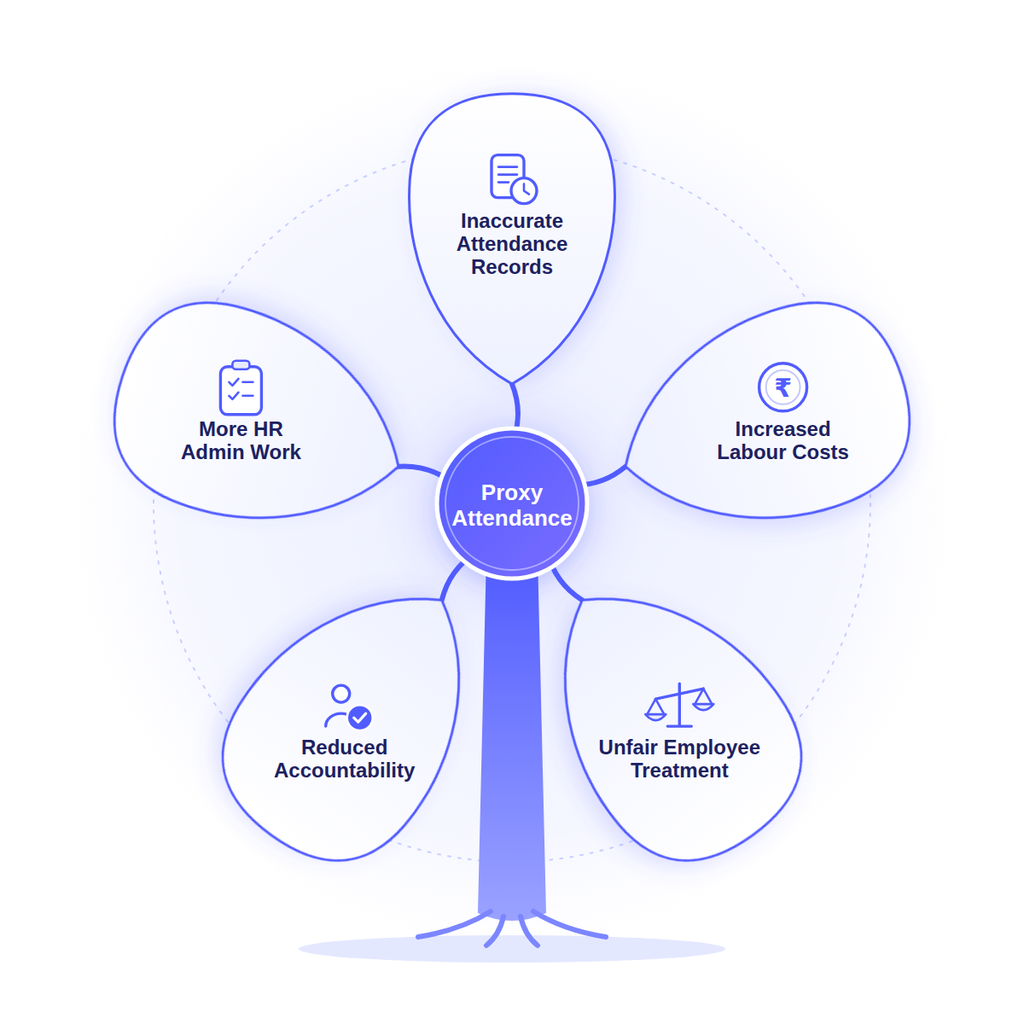
Proxy attendance can create problems beyond inaccurate punch-in records. It affects workforce visibility, attendance accountability, and the information HR teams use to process salaries.
Here are the main ways it can affect a business.
1. Inaccurate Attendance Records
When one employee marks attendance for another, the system may record an incorrect arrival time, departure time, or presence status. HR teams may then depend on records that do not reflect the employee’s actual working hours.
Over time, repeated discrepancies can make it difficult to identify attendance patterns and verify whether employees followed their assigned schedules.
2. Increased Labour Costs
When employees are paid for hours they haven’t worked, businesses end up spending more than necessary. These small errors can add up over time, especially in large teams.
For example, if an employee’s attendance is repeatedly recorded as starting 15 minutes earlier than their actual arrival, those extra minutes may affect payable hours when the payroll system uses the recorded time to calculate wages.
3. Unfair Employee Treatment
Proxy attendance can create inconsistencies between employees who follow attendance policies and those whose records are inaccurately adjusted. This may affect attendance-linked incentives, punctuality assessments, overtime eligibility, or disciplinary decisions.
However, reliable records help HR teams apply workplace policies consistently rather than relying on assumptions or incomplete information.
4. Reduced Accountability
When employees can mark attendance for colleagues without verification, managers may find it harder to establish who was present at a particular time.
This can be particularly challenging in manufacturing units, warehouses, construction sites, and multi-location operations where supervisors cannot personally verify every employee’s arrival and departure.
5. More HR Admin Work
HR teams may need to compare attendance registers, shift rosters, supervisor reports, and employee explanations to resolve discrepancies. This creates additional work during attendance reconciliation and payroll preparation.
The main problem is that proxy attendance weakens the reliability of employee time records. Using identity verification, clear attendance policies, and regular checks can help HR teams catch these issues before they affect payroll.
How Do Attendance Errors Lead to Payroll Problems?
Payroll calculations depend on accurate attendance records, including working days, leave, shift timings, overtime, and deductions. If attendance data is incorrect, employees may receive more or less salary than they should.
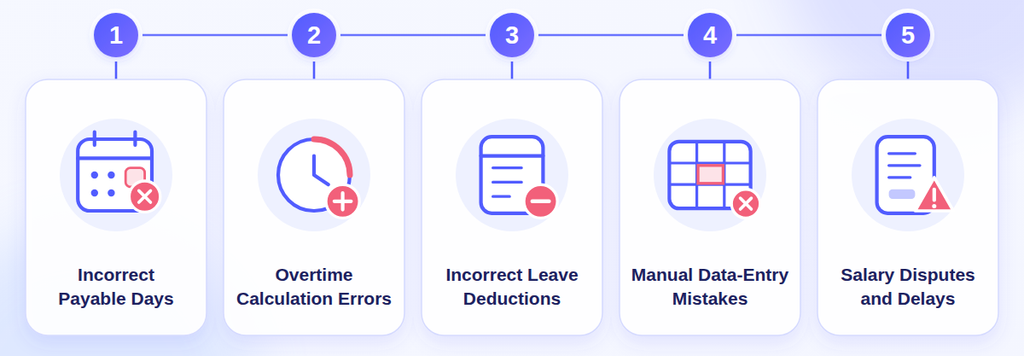
Here are some common ways attendance errors affect payroll:
1. Incorrect Payable Days
If an employee is wrongly marked present or absent, their payable days may be calculated incorrectly. This can lead to extra salary payments, incorrect deductions, or salary adjustments.
2. Overtime Calculation Errors
Missing punches or incorrect shift timings can affect overtime records. As a result, employees may receive less or more overtime pay than they are eligible for.
3. Incorrect Leave and Absence Deductions
If approved leave is not updated in the system, an employee may be marked absent and have money deducted from their salary. Missing leave management records can also create problems during payroll processing.
4. Manual Data-Entry Mistakes
When HR teams transfer attendance details from registers or spreadsheets to payroll software, mistakes can happen like duplicate entries, incorrect figures, or missed updates can affect salary calculations.
5. Salary Disputes and Processing Delays
When employees notice errors in their salaries, HR teams need to check attendance records, verify approvals, and correct the data. This takes extra time and can delay salary corrections.
For example, an employee may have worked 24 payable days in a month, but the attendance system records 26 days. If payroll uses this incorrect data, the salary calculation may be wrong. The same can happen when valid attendance records are missing.
This is why accurate attendance data is important for payroll processing meanwhile automated payroll processing can reduce manual work and calculation errors, but HR teams still need to check attendance records to catch missing or incorrect information.
How Can Attendance Software Reduce Proxy Attendance and Payroll Errors?
Attendance software helps businesses capture, verify, and manage employee attendance in a structured system. Depending on the solution and its configuration, it can combine identity verification, digital time records, shift rules, approval workflows, and payroll integration.
Below are some ways attendance software can help your business to reduce proxy attendance and payroll mistakes:
1. Use a Biometric Attendance System to Verify Employee Identity
A biometric attendance system uses identifiers such as fingerprints or facial recognition to verify an employee when they record attendance. This makes it harder for one employee to clock in on behalf of another than it would be with a shared register or punch card.
For example, if a factory employee try to mark attendance for an absent colleague, a configured biometric system can check the identity of the person presenting themselves at the device.
Biometric verification is not a guarantee against every form of attendance fraud, and its effectiveness depends on the technology and implementation. However, it provides an additional layer of identity verification that can support buddy punching prevention.
Businesses should also consider data security, access restrictions, appropriate retention practices, and alternative procedures for employees who cannot use a particular biometric method.
2. Track Employee Attendance in Real-Time
Digital attendance systems record employee punch-in and punch-out times as they happen. Managers can check attendance, spot missing punches, and identify late arrivals or early departures without waiting for manual reports. This helps HR teams catch attendance issues early and resolve them before payroll processing.
For example, if an employee’s shift starts at 8:00 AM but they punch in at 8:25 AM, the manager can check the entry against the shift schedule and applicable grace period.
However, a late punch does not always mean a policy violation so managers should review the details before taking action.
3. Automate Shift and Overtime Tracking
Employees may work over different shifts, rotating schedules, night shifts, or approved overtime hours so managing these arrangements manually can be difficult to compare actual attendance with scheduled working hours.
Attendance software can apply configured shift rules, track punch timings, flag deviations, and help calculate eligible working hours. It can also support the review of overtime entries against approved policies.
For example, when an employee records working hours beyond their scheduled shift, the system can flag the entry for verification rather than automatically treating every additional hour as approved overtime.
This helps reduce errors caused by inconsistent shift records and unverified overtime claims.
4. Integrate Attendance Software With Payroll Software
Attendance and payroll integration connects employee time records with the payroll process. Instead of repeatedly copying attendance figures from one system to another, businesses can transfer supported attendance data to the payroll system.
Depending on the integration and payroll configuration, this data may help determine:
- Payable days and attendance-linked salary calculations.
- Approved leave and loss-of-pay inputs.
- Eligible overtime hours and shift-related allowances.
- Late marks or other deductions where applicable under company policy.
- Attendance discrepancies that need to be resolved before salary processing.
For example, if the attendance system records an approved absence and the payroll rules require a corresponding adjustment, integrated systems can help carry the relevant information into payroll.
The HR or payroll team should still review exceptions, confirm approvals, and validate salary calculations before finalizing payroll because integration reduces duplicate work but it does not remove the need for payroll controls.
For a closer look at how these technologies work in manufacturing environments, read our guide on how AI-powered attendance systems improve payroll accuracy.
5. Use GPS and Geofencing for Location-Based Attendance
For businesses with field employees, distributed teams, or multiple work sites, confirming where attendance is recorded may be as important as verifying who recorded it.
GPS-enabled attendance and geofencing can help organizations apply location-based attendance rules. A geofence defines a permitted geographic area, while GPS-enabled attendance can record location information when an employee punches in or out, depending on the application.
These capabilities can be useful for employees working at client locations, warehouses, construction sites, or different company branches.
However, location verification does not replace identity verification. Businesses should choose the right combination of controls for their work environment and define clear rules about location-data collection and access.
6. Set Up Attendance Correction and Approval Workflows
Attendance errors are not always intentional. Employees may forget to punch in or out, face device issues, or need to correct a genuine mistake.
Attendance software allows employees to submit correction requests with an explanation. Managers can review these requests and approve or reject them before the attendance records are updated. Some systems also keep a record of all changes and approvals.
For example, if an employee forgets to punch out, they can submit a correction request. The manager can verify the details and approve the change before it affects payroll.
This process helps HR teams handle genuine mistakes fairly and identify suspicious attendance changes more easily.
With the right attendance software, businesses can reduce proxy attendance and avoid many payroll errors. Verifying employee identity, keeping accurate attendance records, and connecting attendance data with payroll make salary calculations easier and more reliable.
What Features Should You Look for in Attendance Software?
Choosing the right attendance software involves more than checking whether it can record punch-in and punch-out times. Businesses should evaluate whether the system can verify employee identity, handle different work schedules, identify discrepancies, and support accurate payroll processing.
Consider these essential features before selecting a solution.
| Feature | Why it Matters |
| Biometric attendance and face recognition | Helps to verify employee identity and reduce buddy punching. |
| Real-time attendance tracking | Makes it easier to monitor attendance and identify missing or unusual entries. |
| Shift and overtime management | Helps to track scheduled hours, shift changes, and overtime exceptions. |
| Attendance and payroll integration | Reduces duplicate data entry and supports consistent payroll calculations. |
| Attendance correction workflows | Allows employees to request corrections and managers to review them. |
| Reports and audit trails | Helps HR to investigate discrepancies and review attendance changes. |
| Access controls and data security | Helps to protect employee records and restrict access to authorized users. |
Businesses should also evaluate device compatibility, ease of use, reporting options, integration requirements, and scalability.
For example, a manufacturing company with rotating shifts may prioritize biometric verification, shift management, overtime tracking, and payroll integration. A business with field employees may need GPS-based attendance and location verification.
The best attendance software is the one that fits your workforce, attendance policies, and payroll process.
How Does Savvy HRMS Attendance Software Help Prevent Attendance Errors?
Savvy HRMS attendance software helps businesses record employee check-ins and check-outs, manage shifts, monitor overtime, and review attendance discrepancies. It supports biometric devices, face recognition, mobile attendance, and web check-ins with IP restrictions, giving HR teams different ways to record and verify employee attendance.
Key features that can help your businesses to manage attendance more accurately include:
- Biometric attendance and face recognition: Supports attendance marking through biometric and face recognition devices to help verify employee identity.
- Real-time punch tracking: Processes biometric punches in real time, helping HR teams access attendance records and monitor working hours.
- Shift and roster management: Supports fixed, flexible, automatic, break, and round-the-clock shifts along with roster assignment and shift-specific rules.
- Mobile attendance with location controls: Allows employees to mark attendance through the mobile app using real-time location, geofencing, geotagging, face recognition, or selfie-based attendance.
- Attendance correction and approval workflows: Supports punch regularization requests, overtime and compensatory-off approvals, and configurable approval levels.
- Overtime and compensatory-off management: Helps HR teams compare planned and actual overtime, configure overtime policies, and manage compensatory-off calculations.
- Attendance reports and analytics: Provides daily attendance reports, graphs, absenteeism information, and live workforce views, with report exports available in formats such as Excel and PDF.
- Integration with other systems: Supports integration with biometric devices and business systems such as SAP, Oracle, and ERP platforms to help streamline attendance data flow.
These features can help your HR teams to identify missing punches, review attendance exceptions, and check overtime records before payroll is processed.
Conclusion
Proxy attendance and payroll errors often arise when businesses cannot reliably verify employee attendance or when inaccurate time records move into payroll without proper review. These problems can result in incorrect payable days, overtime discrepancies, additional administrative work, and salary disputes.
Attendance software helps reduce these risks by combining identity verification, digital attendance records, shift management, correction workflows, and attendance-to-payroll integration. Businesses can improve the process further by establishing clear policies, reviewing exceptions, and validating payroll data before processing salaries.
The goal is not simply to automate attendance tracking but to ensure that employee working hours are recorded accurately, attendance discrepancies are addressed promptly, and payroll calculations are based on reliable information.
Frequently Asked Questions (FAQs)
1. How does attendance software prevent proxy attendance?
Attendance software can help prevent proxy attendance through biometric verification, facial recognition, and other identity checks. These features make it harder for employees to record attendance on behalf of colleagues. Clear policies and regular exception reviews provide additional safeguards.
2. Can attendance software reduce payroll errors?
Yes. Attendance software can reduce payroll errors by maintaining digital time records, tracking shifts, identifying missing punches, and transferring attendance data to payroll systems. Payroll teams must still verify exceptions, approved leave, and salary calculations before processing payments.
3. What is the difference between proxy attendance and buddy punching?
Proxy attendance is the broader practice of recording attendance on behalf of another employee. Buddy punching is a common form of proxy attendance in which one employee clocks in or out for a colleague who is not present or is not recording their own time.
4. How does a biometric attendance system improve payroll accuracy?
A biometric attendance system uses identifiers such as fingerprints or facial recognition to verify employee identity. This helps reduce unauthorized attendance entries, improving the reliability of time records used for payroll calculations. It does not automatically prevent every attendance or payroll error.
5. Can attendance software integrate with payroll software?
Yes. Many attendance systems support payroll integration through APIs, built-in connectors, or data exports. Integration can transfer attendance information into payroll workflows, reducing manual entry. Compatibility and the accuracy of data mapping should be checked before implementation.
6. How can businesses reduce time theft in the workplace?
Businesses can reduce time theft by using reliable attendance tracking, identity verification, clear working-hour policies, approved overtime procedures, and regular attendance reviews. Software can help identify suspicious discrepancies, but managers should investigate the circumstances before taking action.
7. Is attendance software useful for businesses with multiple locations?
Yes. Attendance software with location-based tracking, centralized reports, and configurable shift rules can help businesses manage attendance across multiple offices, factories, warehouses, or field locations. The required features depend on the workforce and the organization’s attendance policies.