

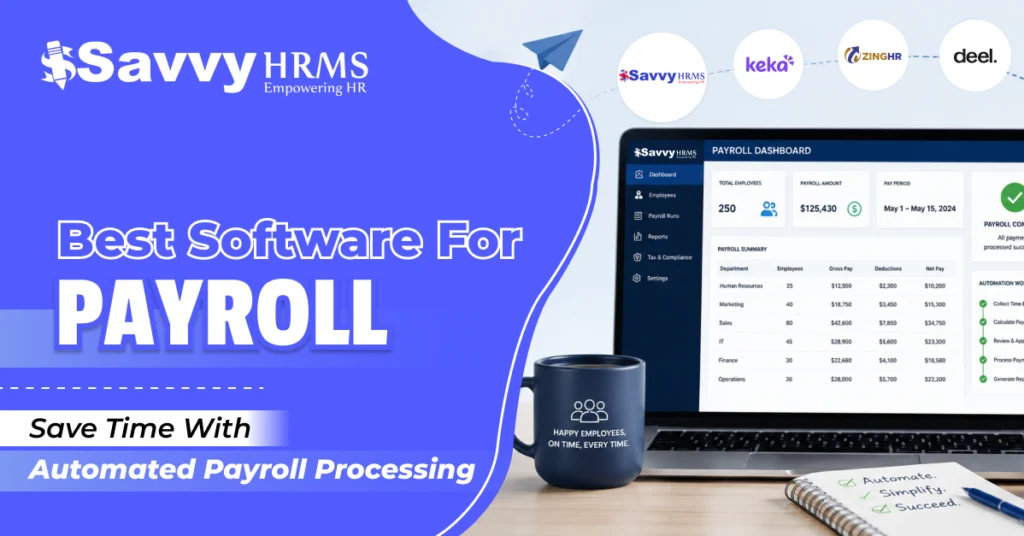
Best Software for Payroll: Save Time With Automated Payroll Processing


-
AuthorRuchika Rajput
-
 Last Updated
June 22, 2026
Last Updated
June 22, 2026
-
 Reading Time
9 Mins
Reading Time
9 Mins
Payroll days shouldn’t feel stressful. But for many businesses, handling salaries, deductions, taxes, and compliance manually still takes hours every month. That’s exactly why more companies are switching to software for payroll that automates the entire process and saves valuable time for HR teams.
With the right payroll software, businesses can process salaries faster, reduce errors, improve compliance, and create a smoother employee experience.
In this blog, we will explore why businesses need payroll software, the key features to look for, the benefits of payroll automation, and the best software for payroll in India.
Why Do Businesses Need Software for Payroll?
Payroll is one of the most important HR functions in any organization. Employees expect salaries to be processed accurately and on time every month. However, managing payroll manually using spreadsheets or outdated systems often leads to errors, delays, and compliance issues.
Using software for payroll helps businesses automate salary processing and simplify payroll management. It reduces manual calculations, improves accuracy, and saves valuable time for HR and finance teams.
Here’s why businesses are investing in payroll software:
- Automates salary calculations and deductions
- Reduces payroll processing time
- Ensures compliance with labor laws and tax regulations
- Minimizes human errors in payroll calculations
- Simplifies attendance and leave management integration
- Generates payslips automatically
- Improves payroll data security
- Enhances employee satisfaction with timely salary payments
Whether it’s a startup, SME, or enterprise, payroll software has become an important tool for modern workforce management.
Key Features of the Best Software for Payroll
Choosing the right payroll software can make a big difference in operational efficiency. The best software for payroll comes with features that simplify payroll processing while improving compliance and employee experience.
Here are some important features to look for:
1. Automated Salary Processing
Automated salary processing helps businesses calculate salaries, deductions, bonuses, overtime, and reimbursements accurately while reducing manual work and saving valuable payroll processing time.
2. Attendance and Leave Integration
Attendance and leave integration ensure accurate payroll calculations by syncing employee attendance, leaves, shifts, and working hours directly with payroll software automatically.
3. Tax and Compliance Management
Payroll software simplifies PF, ESI, TDS, professional tax, and statutory compliance management by automatically updating regulations and reducing risks of compliance errors.
4. Payslip Generation
Automated payslip generation helps HR teams create and distribute employee payslips quickly while improving transparency and reducing repetitive manual payroll tasks every month.
5. Employee Self-Service Portal
Employee self-service portals allow employees to access payslips, tax documents, salary details, leave balances, and other payroll information anytime without HR assistance.
6. Multi-Location Payroll Management
Multi-location payroll management helps businesses process payroll centrally for employees working across multiple offices, branches, or locations while maintaining payroll consistency efficiently.
7. Real-Time Reporting and Analytics
Real-time payroll reports and analytics provide valuable insights into salary expenses, payroll trends, compliance updates, and workforce costs for better decision-making processes.
8. Cloud-Based Accessibility
Cloud-based payroll software enables HR teams to access payroll data securely from anywhere while improving flexibility, collaboration, and operational efficiency across businesses.
9. Data Security
Strong payroll data security features help protect sensitive employee information through secure access controls, encrypted storage, backups, and advanced cybersecurity protection measures.
Benefits of Automated Payroll Processing
Automated payroll processing offers several advantages for businesses of all sizes. It helps organizations improve efficiency while reducing the burden on HR teams.
1. Saves Time
Manual payroll processing involves repetitive tasks that consume a lot of time every month. Payroll software automates calculations, deductions, and report generation, allowing HR teams to focus on strategic tasks.
2. Reduces Errors
Even a small payroll mistake can impact employee trust. Automated payroll software minimizes calculation errors and improves payroll accuracy.
3. Improves Compliance
Keeping up with changing labor laws and tax regulations can be challenging. Payroll software automatically updates compliance rules and reduces the risk of penalties.
4. Enhances Employee Experience
Employees appreciate timely salary payments and easy access to payslips and tax documents. Payroll software improves transparency and employee satisfaction.
5. Better Data Security
Payroll information is highly sensitive. Cloud-based payroll software provides secure data storage, access control, and backups.
6. Simplifies Payroll Management
From onboarding to salary processing, payroll software simplifies the entire payroll cycle and improves operational efficiency.
List of Best Software for Payroll in India
1. Savvy HRMS
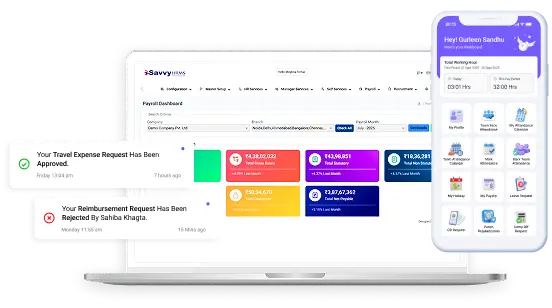
Savvy HRMS is one of the leading software solutions for payroll designed to simplify payroll and HR management for modern businesses. It offers a user-friendly platform that automates payroll processing, compliance management, attendance tracking, and employee management in one place.
The software is designed for businesses looking for a scalable and efficient payroll solution. With automation-driven features and strong compliance capabilities, Savvy HRMS helps organizations reduce manual workload and improve payroll accuracy significantly.
Key Features of Savvy HRMS include:
- Automated payroll processing
- Attendance and leave integration
- PF, ESI, TDS, and statutory compliance management
- Employee self-service portal
- Payslip generation and salary revisions
- Real-time payroll reports and analytics
- Cloud-based access
- Multi-location payroll management
- Secure employee database management
Best For
Startups, SMEs, enterprises, and businesses looking for an all-in-one HR and payroll management solution.
2. ZingHR
ZingHR is a cloud-based payroll software that helps businesses automate payroll operations and workforce management. It offers payroll processing along with employee engagement and HR automation features.
Key Features of ZingHR include:
- Automated payroll processing
- Compliance management
- Attendance integration
- Mobile accessibility
- Employee self-service
Best For
Mid-sized and large enterprises.
3. Keka HR
Keka HR is a popular payroll software known for its modern interface and employee-centric features. It simplifies payroll, attendance, and performance management for growing companies.
Key Features of Keka HR include:
- Payroll automation
- Leave and attendance management
- Expense claims management
- Employee portal
- Compliance tracking
Best For
Startups and growing businesses.
4. Darwinbox
Darwinbox is an HR and payroll platform designed for enterprises looking to automate workforce operations. It combines HR, payroll, and employee engagement tools in a single platform.
Key Features of Darwinbox Include:
- Payroll management
- HR automation
- Workforce analytics
- Mobile HR solutions
- Compliance management
Best For
Large enterprises and enterprises with distributed teams.
5. HRMantra
HRMantra offers payroll software with advanced HR automation features. It helps businesses simplify payroll, compliance, recruitment, and workforce management.
Key Features of HRMantra include:
- Payroll automation
- Statutory compliance
- Attendance tracking
- Employee lifecycle management
- HR analytics
Best For
Medium and large businesses.
6. Deel
Deel is a global payroll and compliance platform designed for companies managing international teams. It helps businesses process payroll across multiple countries.
Key Features of Deel include:
- Global payroll management
- International compliance
- Contractor payments
- Automated invoicing
- Multi-currency support
Best For
Remote and global workforce management.
7. Qandle
Qandle is an HR and payroll software solution that offers automation tools for attendance, payroll, recruitment, and employee management.
Key Features of Qandle include:
- Payroll processing
- Attendance management
- Employee self-service
- HR automation
- Compliance tracking
Best For
Small and medium-sized businesses.
How to Choose the Best Software for Payroll?
Selecting the right payroll software depends on your business needs and workforce size. Before making a decision, businesses should evaluate different factors carefully.
1. Understand Your Requirements
Before choosing payroll software, businesses should evaluate workforce size, payroll complexity, industry requirements, and future growth plans to select the most suitable solution.
2. Check Compliance Features
Payroll software should support statutory compliance requirements like PF, ESI, TDS, professional tax, and labor law updates to reduce compliance-related risks and penalties.
3. Look for Integration Capabilities
Choose payroll software that integrates smoothly with attendance, leave, accounting, and HR systems to simplify operations and improve overall payroll processing accuracy efficiently.
4. Prioritize Ease of Use
User-friendly payroll software helps HR teams process payroll faster, reduces training efforts, minimizes operational confusion, and improves overall productivity across daily payroll tasks.
5. Evaluate Scalability
Businesses should choose payroll software capable of supporting workforce expansion, additional locations, and increasing payroll demands without affecting performance or operational efficiency.
6. Compare Support and Pricing
Reliable customer support, transparent pricing, implementation assistance, and regular software updates are essential factors businesses should consider before selecting payroll software solutions.
Common Payroll Challenges Solved by Payroll Software
| Payroll Challenge | How Payroll Software Solves It |
| Manual Calculation Errors | Payroll software automates salary calculations, deductions, bonuses, and taxes to reduce human errors and improve payroll accuracy. |
| Delayed Salary Processing | Automated payroll workflows help businesses process salaries faster and ensure employees receive payments on time every month. |
| Compliance Management Issues | Payroll software automatically updates statutory regulations like PF, ESI, TDS, and labor laws to reduce compliance risks and penalties. |
| Attendance and Leave Mismatches | Integration with attendance and leave systems ensures accurate salary calculations based on employee working days and leave. |
| Payslip Generation Delays | Automated payslip generation allows HR teams to create and distribute employee payslips quickly without manual effort. |
| Managing Multi-Location Employees | Cloud-based payroll software enables centralised payroll management for employees working across multiple branches or locations efficiently. |
| Payroll Data Security Risks | Advanced security features like encrypted storage, access controls, and backups help protect sensitive employee payroll information securely. |
| Time-Consuming Payroll Processes | Payroll automation reduces repetitive manual tasks and saves valuable time for HR and finance teams every payroll cycle. |
| Lack of Payroll Transparency | Employee self-service portals provide easy access to salary details, tax documents, and payslips, improving transparency and employee satisfaction. |
| Difficulty Generating Reports | Real-time payroll analytics and reports help businesses track payroll expenses, compliance status, and workforce costs more effectively. |
Tips for Successfully Implementing Payroll Software
1. Train HR and Payroll, Teams
Proper training helps HR and payroll teams understand software features, improve efficiency, reduce operational errors, and ensure smooth payroll processing across the organization.
2. Migrate Data Carefully
Businesses should transfer employee records, salary structures, and payroll history accurately to avoid payroll errors, data loss, and operational issues during implementation processes.
3. Set Clear Payroll Policies
Clearly defined payroll policies for salaries, deductions, attendance, overtime, and leave management help ensure accurate payroll processing and better organizational consistency overall.
4. Test the Payroll System
Running payroll tests before implementation helps identify calculation errors, compliance issues, or configuration problems, ensuring smooth and accurate payroll operations after implementation.
5. Monitor Payroll Performance
Regularly reviewing payroll reports, employee feedback, and compliance updates helps businesses improve payroll accuracy, operational efficiency, and overall payroll management processes continuously.
6. Choose Reliable Software
Choosing reliable payroll software like Savvy HRMS helps businesses simplify payroll processing, improve compliance management, reduce manual workload, and support long-term business growth
Conclusion
Managing payroll manually is no longer practical for growing businesses. Modern software for payroll helps organizations automate salary processing, improve compliance, reduce errors, and save valuable time for HR teams.
Choosing the right payroll software can significantly improve operational efficiency and employee satisfaction. Whether you’re a startup, SME, or enterprise, investing in payroll automation can simplify workforce management and support long-term business growth.
Among the many options available, Savvy HRMS stands out as a reliable and scalable payroll software solution that combines payroll automation, compliance management, attendance integration, and employee management in one platform.










Looking for smarter and more efficient payroll management?
Explore how Savvy HRMS can help your business automate payroll processing, improve compliance, and save valuable HR time today