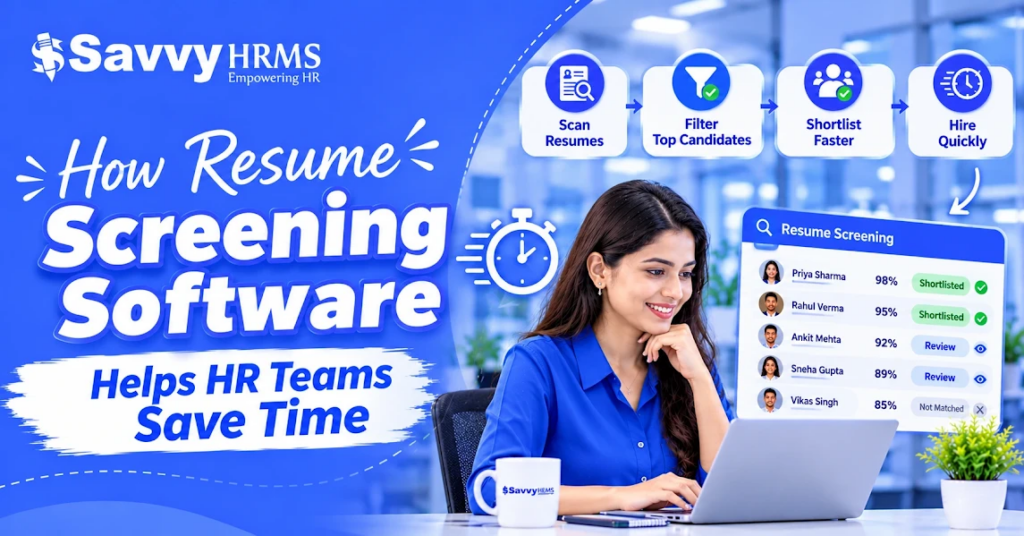
How Resume Screening Software Helps HR Teams Save Time


-
AuthorRaghvendra Bhardwaj
-
 Last Updated
November 16, 2026
-
 Reading Time
11 Mins
TL;DR
Resume screening software makes it easier for HR teams to manage large volumes of job applications and reduce time spent on manual screening. Here’s what you need to know:
- It automates repetitive resume reviews and reduces manual effort.
- Resume parsing extracts candidate details, skills, qualifications and work experience.
- It helps recruiters find candidates who match job requirements.
- Candidate filtering and ranking make shortlisting easier.
- It helps manage applications across multiple job openings.
- Recruiters still need to review candidates and make the final hiring decisions.
Recruiters often receive hundreds of applications every day for a single job opening. Analyzing each resume, checking qualifications, comparing skills and preparing candidate shortlists can take considerable time.
When companies have multiple vacancies to fill then managing these tasks manually becomes even more challenging.
That’s where Resume screening software helps HR teams to simplify this process by automating repetitive screening activities. It can extract candidate information, identify relevant skills, match profiles against job requirements and help recruiters shortlist suitable applicants.
Instead of spending hours reviewing every application individually, recruiters can focus more on evaluating qualified candidates, conducting interviews and improving the overall hiring process.
In this guide, we’ll explore how resume screening software works, its key benefits for HR teams, the features to look for and practical ways to screen resumes faster without missing qualified candidates.
Why Does Manual Resume Screening Take So Much Time?
Manual resume screening takes time because recruiters have to review each application, verify candidate qualifications, compare skills with job requirements and organize shortlisted profiles. When multiple vacancies are open, these repetitive activities increase the recruitment team’s workload.
Let’s explore why manual resume screening takes much time to review, as explained below:
1. Reviewing Individual Resumes
Recruiters need to open and read each resume to understand a candidate’s educational qualifications, previous work experience, skills and certifications.
However, reviewing a large number of applications individually can take considerable time, particularly when hiring for more than one role.
2. Checking Candidates Against Job Requirements
Every application needs to be compared with the job description to determine whether the candidate meets the essential requirements. Recruiters must check factors such as experience, qualifications, technical knowledge and role-specific skills before moving an application forward.
3. Identifying Relevant Skills and Experience
Candidates may describe similar skills and responsibilities using different terms in their resumes. Recruiters need to identify relevant technical skills, certifications and industry experience to understand whether a profile matches the position.
4. Organizing Candidate Information
Recruiters need to collect candidate details and store them in spreadsheets or recruitment system databases. So, maintaining contact information, qualifications, experience and application status manually creates additional administrative work and makes information management more difficult.
5. Comparing Multiple Candidate Profiles
When more applicants meet the basic job requirements, recruiters need to compare their qualifications, experience and skills to identify the most relevant profiles. This requires reviewing information across multiple resumes and evaluating candidates against consistent criteria.
6. Preparing Candidate Shortlists
After reviewing applications, recruiters need to organize suitable profiles and share them with hiring managers for further evaluation. They may also need to update application statuses and maintain records of shortlisted candidates, adding another step to the recruitment process.
When these activities are repeated across multiple vacancies, manual screening becomes difficult to manage.
That’s where resume screening software helps reduce this workload by automating repetitive tasks such as resume parsing, candidate filtering and application organization.
How Does Resume Screening Software Work?
Resume screening software helps recruiters review job applications by extracting candidate information, matching skills with job requirements and organizing relevant profiles for further evaluation. It uses technologies such as resume parsing, keyword matching and AI-based candidate analysis to reduce repetitive screening work.
The exact process may vary depending on the software and its features. However, a typical resume screening workflow includes the following steps.
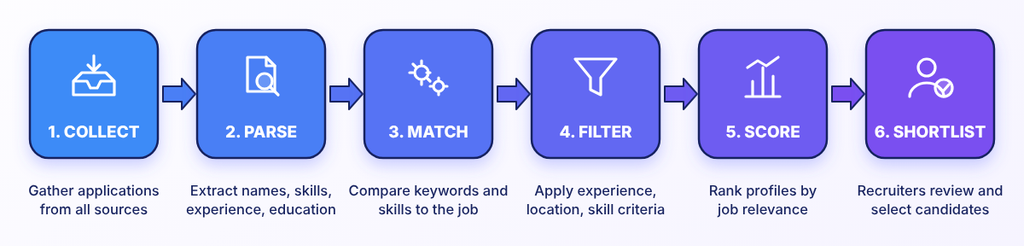
1. Resume Collection
The software starts collecting candidate applications from supported sources such as company career pages, job portals, recruitment platforms and other application channels. This brings candidate resumes together in one place which makes them easier for recruiters to access and manage.
2. Resume Parsing
The system then scans uploaded resumes and extracts key information, including candidate names, contact details, educational qualifications, work experience, skills and certifications. This reduces the need to open each resume and enter candidate details manually.
3. Keyword and Skills Matching
Next, the software identifies relevant keywords, qualifications and skills in candidate profiles and compares them with the requirements of the open position. Some AI-enabled tools can also identify related skills and relevant experience beyond exact keyword matches.
4. Candidate Filtering
Now, recruiters can apply predefined criteria such as years of experience, educational qualifications, location and specific technical skills to narrow down the applicant pool. This helps them to focus on candidates who meet the essential requirements of the role.
5. Candidate Scoring and Ranking
Depending on the software, candidates may receive relevance scores or rankings based on how closely their profiles match the job requirements. These scores help recruiters to organize applications, but they should be treated as decision-support information rather than a final assessment of a candidate’s suitability.
6. Candidate Shortlisting
Recruiters can review the filtered and ranked profiles, check candidate details and select suitable applicants for the next stage of recruitment. The shortlisted candidates can then move forward for interviews or further evaluation.
This whole process makes the initial screening process easier by reducing repetitive manual work. Recruiters can spend less time sorting through applications and more time evaluating suitable candidates.
Benefits of Resume Screening Software for HR Teams
Resume screening software helps Core HR teams save time by automating repetitive tasks such as reviewing resumes, extracting candidate details, filtering applications and organizing shortlists. Here are six ways it can make the recruitment process more efficient.
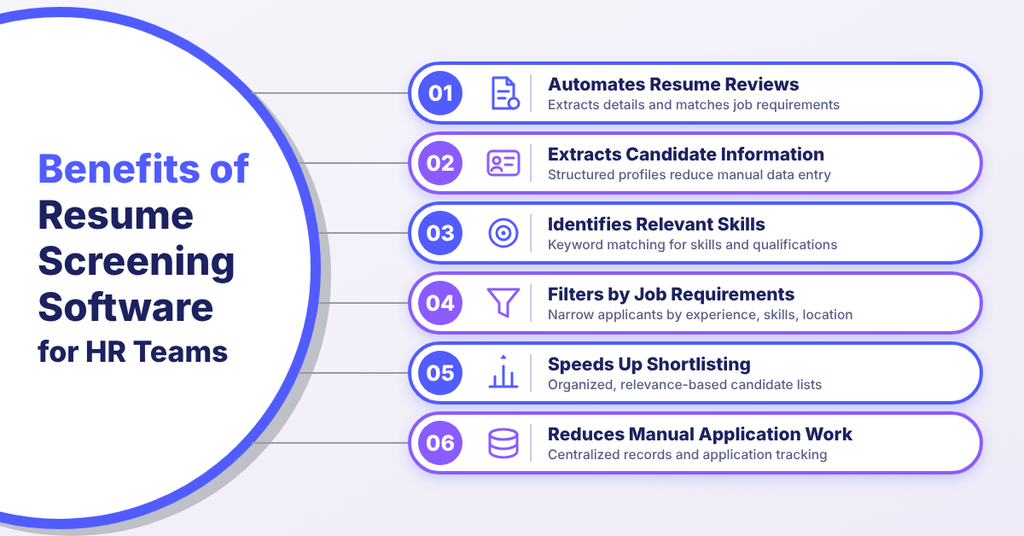
1. Automates Repetitive Resume Reviews
Manually opening and reviewing every resume can take up a significant amount of a recruiter’s working day, especially when a vacancy attracts many applications.
Resume screening software helps to automate the initial review by extracting candidate information and identifying profiles that match predefined job requirements.
For example, when hiring an accountant, recruiters can use the software to identify applications mentioning relevant qualifications, accounting skills and work experience.
This reduces the need to search through every application manually and allows recruiters to focus on reviewing potentially suitable candidates.
2. Extracts Candidate Information Automatically
Resumes have different types of information, including contact details, educational qualifications, previous employment, technical skills and certifications. Extracting these details and entering them into spreadsheets or recruitment systems manually can add to a recruiter’s workload.
Resume parsing software automates this task by extracting relevant information from uploaded documents and organizing it into structured candidate profiles.
For example, the software may identify:
- Candidate name and contact information
- Educational qualifications
- Previous employment details
- Total work experience
- Technical and professional skills
- Certifications and training
This reduces manual data entry and makes candidate information easier to access, review and manage.
3. Identifies Relevant Skills and Qualifications
Sometimes recruiters need to search for specific skills, certifications and qualifications to determine whether a candidate meets the requirements of a role.
Automated resume screening software helps to identify these details through keyword matching and other candidate-matching capabilities.
For example, a company hiring a digital marketing executive may look for candidates with experience in SEO, Google Ads, social media marketing and content strategy. The software can help to identify resumes that mention these relevant skills.
This makes it easier to find potentially suitable applicants without checking every profile individually. However, recruiters should also review the context and depth of a candidate’s experience rather than relying only on keyword matches.
4. Filters Candidates Based on Job Requirements
Not every applicant will meet the essential requirements of an open position. Reviewing all applications in detail can therefore take time, even when some candidates do not meet the basic criteria.
Applicant screening software helps recruiters to narrow down applications using predefined requirements such as:
- Educational qualifications
- Relevant work experience
- Required technical skills
- Professional certifications
- Job location
- Other role-specific criteria
For example, if a company requires an accountant with at least three years of financial accounting experience, recruiters can configure relevant screening criteria to identify profiles that appear to meet this requirement.
This reduces the number of applications that need detailed manual review as recruiters should ensure that the selected criteria are genuinely relevant to the role and do not unnecessarily exclude qualified applicants.
5. Speeds Up Candidate Shortlisting
Creating a shortlist involves comparing candidate profiles and identifying applicants who best match the vacancy. This can become time-consuming when recruiters receive applications from many candidates.
Resume shortlisting software helps to organize applications according to their relevance to the job requirements. Depending on the system, it may also provide candidate scores or rankings to support the evaluation process.
For example, when hiring multiple sales executives, recruiters can organize applications based on relevant sales experience, industry knowledge and other role-related requirements.
Instead of creating candidate lists manually, recruiters can review organized profiles and decide which applicants should move to the next recruitment stage.
6. Reduces Manual Data Entry and Application Management
Recruitment involves more than reviewing resumes as recruiters also need to maintain candidate records, update application statuses and organize information throughout the hiring process.
Recruitment automation software can help to centralize candidate information and reduce repetitive administrative activities.
For example, recruiters may be able to manage candidate profiles, track application progress and maintain shortlisted applicant records within one recruitment system.
This reduces dependence on separate spreadsheets and scattered documents, making it easier to find and update candidate information when needed.
How to Screen Resumes Faster Without Missing Qualified Candidates
HR teams can screen resumes faster by using clear job requirements, consistent evaluation criteria and automation for repetitive screening tasks. Let’s see some practical ways to improve the process without overlooking suitable candidates.
1. Define Essential and Preferred Requirements
Separate mandatory qualifications and skills from preferred ones. This prevents recruiters from rejecting candidates who meet the core requirements but lack optional skills.
2. Use Consistent Screening Criteria
Apply the same job-related criteria to every applicant including experience, qualifications, technical skills and certifications. This makes candidate comparisons more consistent.
3. Automate Resume Parsing
Use resume screening software to extract candidate details, work history, qualifications and skills. This reduces manual data entry and saves time during initial reviews.
4. Look Beyond Exact Keyword Matches
Consider related skills, transferable experience and different terms candidates may use to describe similar responsibilities and try to avoid relying only on exact keyword matches.
5. Organise Applications by Job Opening
Maintain separate candidate pools for different vacancies. Applicant tracking tools can help to organize profiles and monitor application progress.
6. Review Automated Screening Results
Use automated filters and scores to prioritize applications, but do not make final decisions as always review candidate experience and relevant skills before shortlisting.
Manual Resume Screening vs Automated Resume Screening
Both manual and automated resume screening help recruiters to evaluate job applications. However, they differ in how candidate information is reviewed, organized and processed.
The following table highlights the key differences.
| Comparison factor | Manual resume screening | Automated resume screening |
| Resume review | Recruiters read applications individually | Software helps extract and organize candidate information |
| Data extraction | Candidate details are entered manually | Resume parsing extracts relevant details |
| Skills identification | Recruiters search for skills manually | Software identifies relevant keywords and skills |
| Candidate filtering | Applications are checked individually | Predefined criteria help filter applications |
| Candidate comparison | Recruiters compare profiles manually | Candidate profiles can be organized and ranked |
| Shortlisting | Recruiters prepare candidate lists manually | Software helps organize potential matches |
| Application management | Often involves spreadsheets and separate records | Candidate information can be managed centrally |
| Multiple vacancies | Requires repeated manual organization | Applications can be organized by job opening |
Automated screening does not remove the need for recruiter involvement. Instead, it reduces repetitive initial screening activities and helps recruiters spend more time evaluating candidates who meet the job requirements.
Can Resume Screening Software Replace Human Recruiters?
No. Resume screening software supports recruiters by automating repetitive screening activities, but it cannot independently handle every aspect of candidate evaluation and hiring.
Software can identify relevant skills, extract qualifications, filter applications and organize candidate profiles. However, recruiters still need to evaluate factors that require human judgement.
Recruiters should review shortlisted applications, assess the context of candidates’ experience and consider their suitability for the role.
Human involvement is particularly important for:
- Evaluating transferable skills and relevant experience.
- Understanding career changes and employment gaps.
- Assessing communication and interpersonal abilities.
- Reviewing unusual or non-traditional career backgrounds.
- Conducting interviews and evaluating candidate responses.
- Making final hiring decisions.
The best approach is to use automation for repetitive administrative work while keeping recruiters involved in candidate evaluation and selection.
Conclusion
Overall, Resume screening can become time-consuming when recruiters have to review large volumes of applications, extract candidate information and compare profiles manually. But resume screening software helps to simplify these activities through resume parsing, skills matching, candidate filtering and application management.
However, effective screening requires more than automation. HR teams should define relevant job requirements, apply consistent evaluation criteria and review shortlisted candidates before making hiring decisions.
By combining resume screening tools with human judgement, businesses can manage applications more efficiently and create a more organized recruitment process.
Frequently Asked Questions