





Office-Based Teams
Employees file a claim with digital proof, and their manager approves it in one location with the entire claim history. Records, limits, and policy all stay up-to-date and organized so HR spends less time on daily follow-ups.
Paper-based expense bills, lost email approvals, and slow reimbursements frustrate employees, while additional processes burden HR. Savvy HRMS reimbursement management software speeds up claim processing, syncs payments with payroll and ERP, and immediately transfers reimbursements to employee accounts, so claims are paid more quickly and services flow smoothly.
Book a Free Demo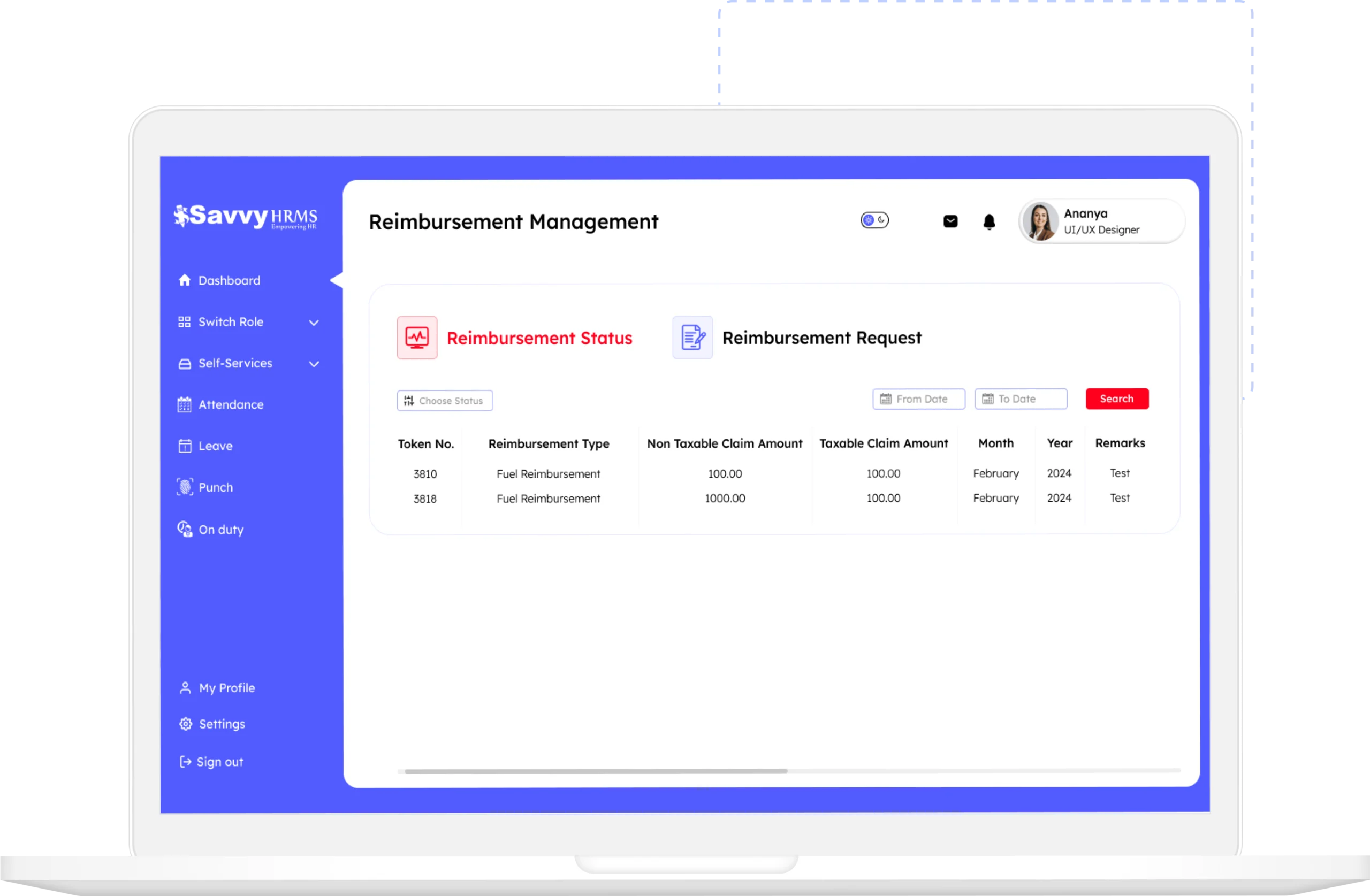
Manual claims and scattered processes delay reimbursements. Savvy HRMS handles all claims, rules, and payments on a single platform, which means quicker payouts for employees.
When reimbursement policies are stuck in emails and spreadsheets, employees have no idea what they are allowed to claim, and HR spends valuable hours explaining. Savvy HRMS reimbursement management software keeps every expense rule in one place, so every claim follows your compensation policy.
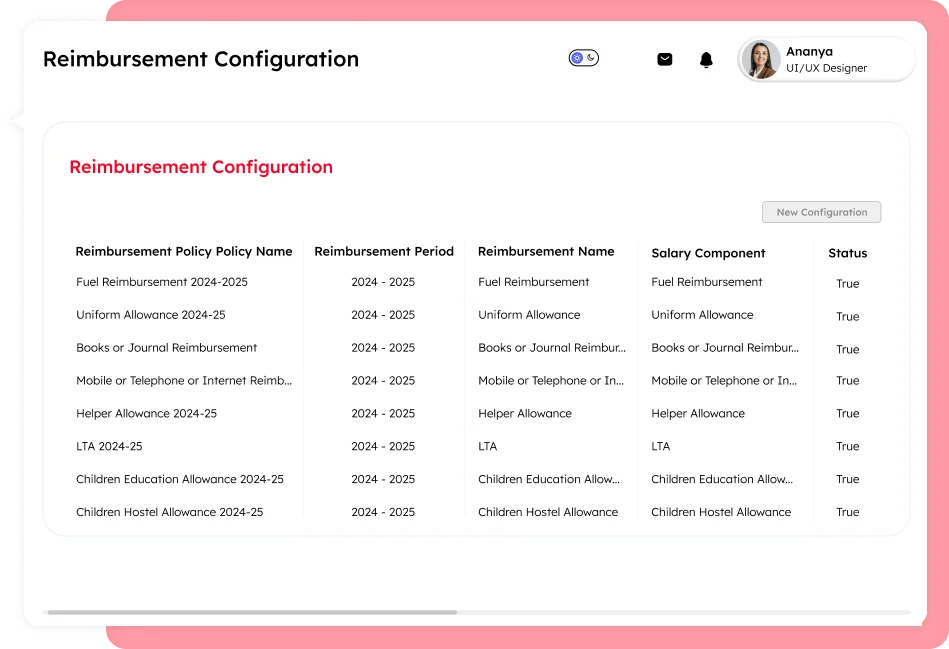
When limits, carry-forward, and advances are all tracked manually, balances get out of sync, and your payouts get delayed. Savvy HRMS reimbursement management software enables you to set the rules once and then process every claim and settlement in accordance with expense rules.
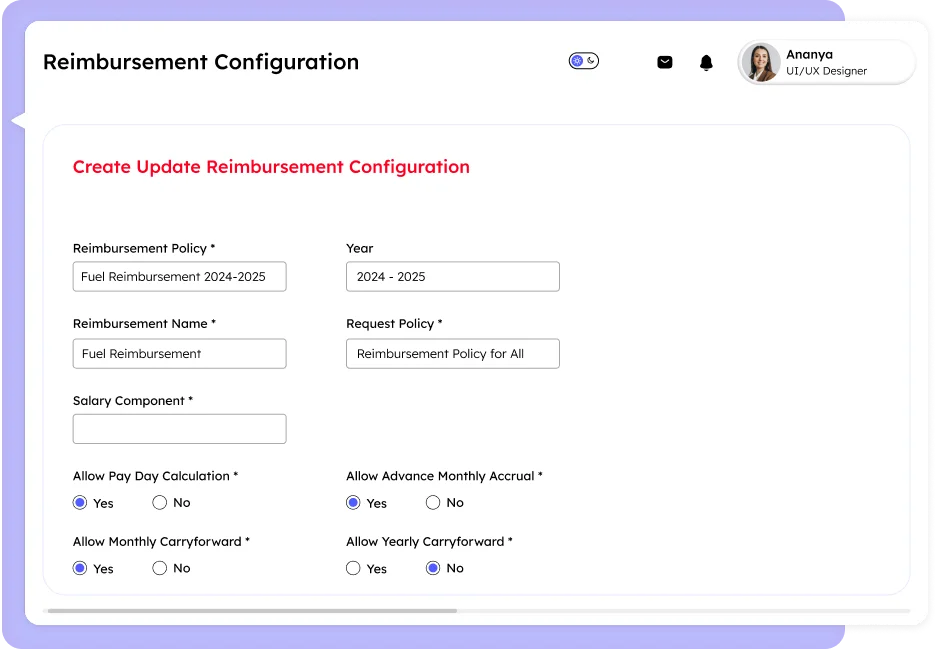
When employees submit paper or email claims, receipts get lost, and they keep asking for status updates. Savvy HRMS reimbursement management software enables employees to submit and track claims online, keeping the process transparent and quick.
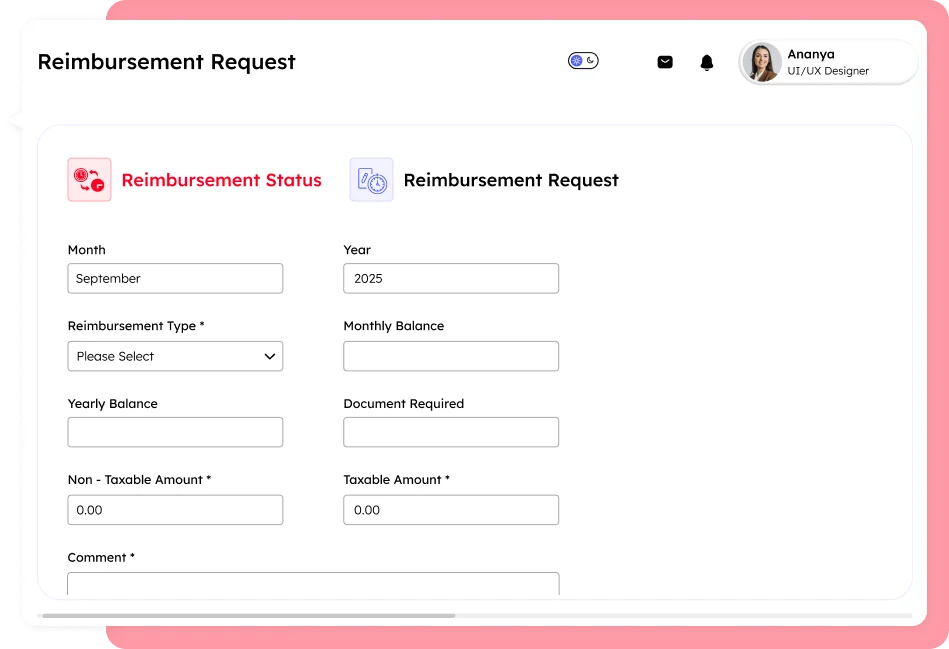
When approval depends on emails and manual follow-ups, claims are left waiting, and managers approve without complete information. Savvy HRMS reimbursement management software keeps all claims in one place, allowing managers to double-check and make an informed decision quickly.
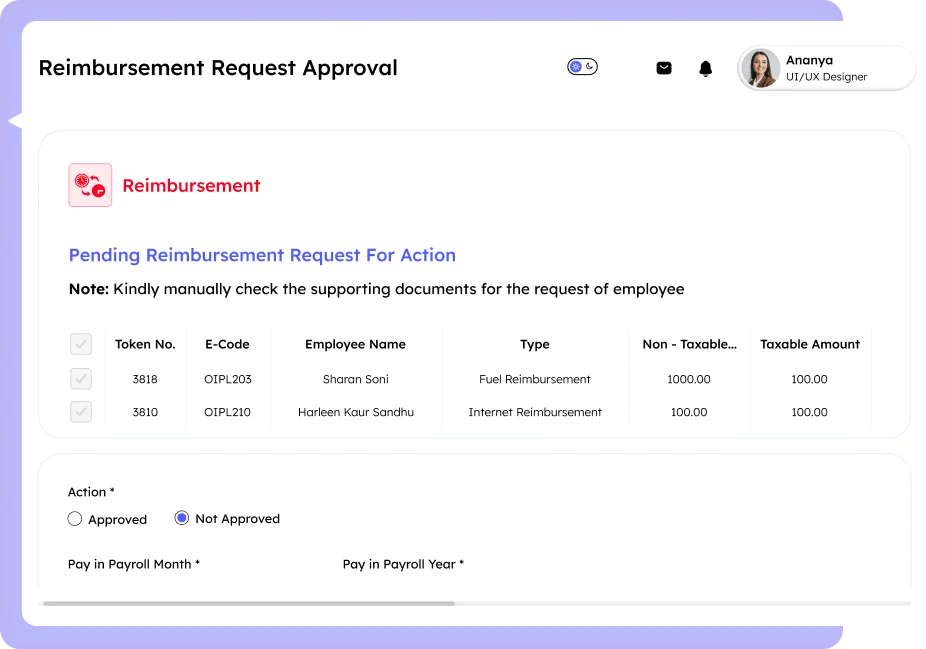
When approved claims are added to salary manually, it results in missed or delayed payments, and employees begin to inquire when they will receive their payments. Savvy HRMS reimbursement management software integrates claims with payroll software, so every approved claim reaches the payslip accurately.
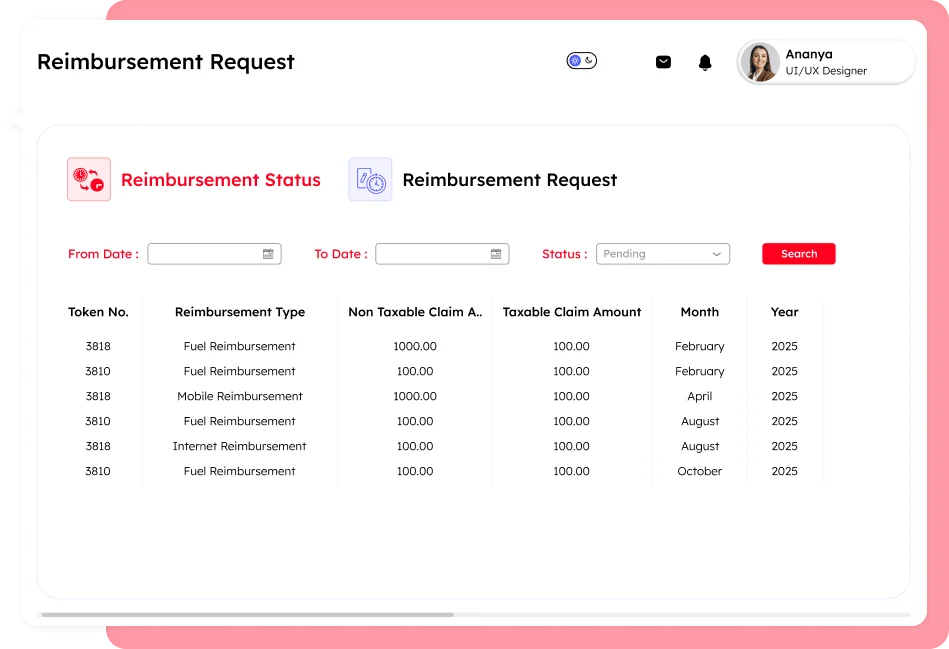
When claims data remains in spreadsheets and other scattered files, HR and finance cannot see where money goes or which expenses need to be controlled. Savvy HRMS reimbursement management software converts claims into reports with clarity, so decisions on expense rules and budgets are data-driven.
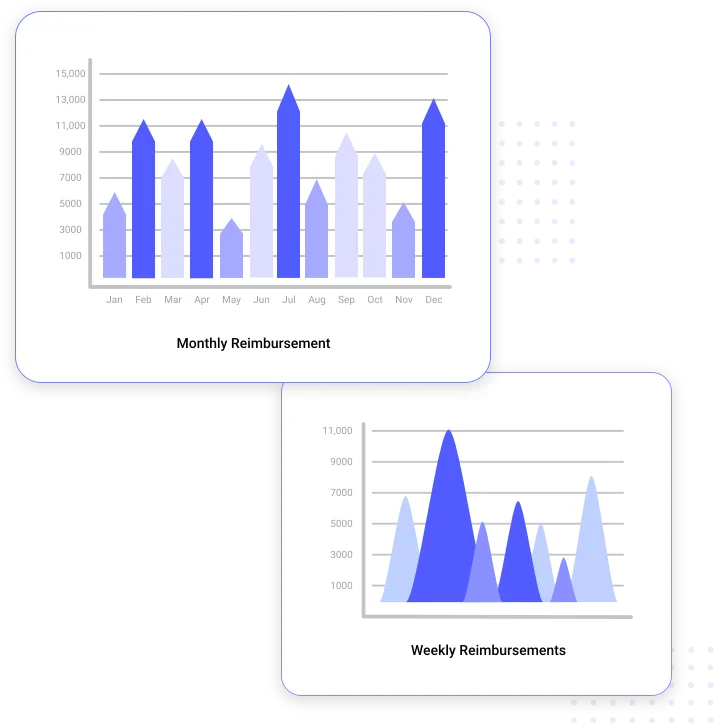
When employees and approvers are not notified, claims remain stuck, proofs go missing, and no one knows what is to be done. Savvy HRMS reimbursement management software alerts at all points of time, ensuring claims get done without any manual reminders.
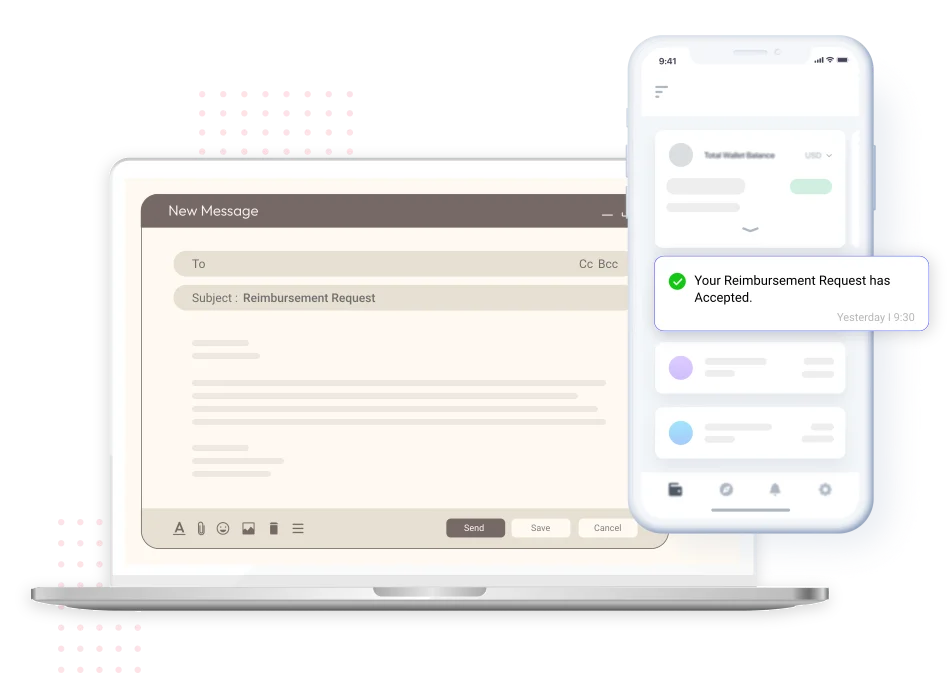
Reimbursement management software is a tool used by companies to manage employee expense claims, from submission to payment. Employees make claims with supporting documents, managers approve them according to expense guidelines, and approved amounts are synced with payroll software. Cloud-based reimbursement management software provides HR and finance teams with accurate, real-time reporting, ensuring claims are accurate, budgets are in line, and employees get paid on time.
The more your team expands, the more difficult it becomes to process claims, approvals, and payments. Savvy HRMS expense reimbursement management software provides organizations of all types and sizes with a single platform to submit, approve, and pay claims efficiently and accurately.
Savvy HRMS is ideal for small teams with a few claims per month to large enterprises with many departments, roles, and locations. Everything runs on one platform, without any third-party add-ons.
Create reimbursement types for your pay scale policy, with both taxable and non-taxable claims, and the ability to set claims for entire departments, titles, or groups. All claims adhere to your expense rules.
Set claim conditions, carry forward, and annual limits. Enable advances, ask for documentation where needed, and process monthly payments, both manually and automatically.
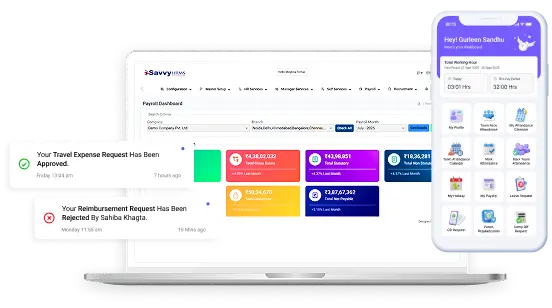
Employees submit taxable and non-taxable claims together. They can upload bills to the system digitally and monitor their status in real time using the web or mobile.
The approvers can make partial approvals, rejections, and modifications of the claims, reassign the requests, and do bulk approvals. They can see details of the employee's entire claim history before approving.
All approved claims automatically go to the payroll, and reimbursements based on CTC are synced automatically. You can see claims in the payslip even if they have not been entered manually, without duplication of data.
See claims by employee, department, or company, and make selections by type, status, or date. HR and finance will find out where the money is going and adjust policy and budgets.
Email and push notifications for approvals and rejections, reminders for pending proof, and follow-up for missing claims ensure no request gets lost.
Employees, approvers, and HR are all able to view claims, reports, and status from any device, at the office, in the field, or at home.
Savvy HRMS is HRMS software in India built for local reimbursement needs, including compliance with provisions. Our team helps with setup, so your company can start quickly.
The best reimbursement management software must include these seven features: policy setup, custom terms, claim requests, approvals, payroll processing, analytics, and alerts. Together, they manage every expense claim from submission to payslip on one cloud-based platform.

Create reimbursement types based on your compensation policy with taxable and non-taxable claims. Manage eligibility based on department, designation, or groups and continue to comply with Indian provisions such as LTA.

Specify claim rules, carry forward, and yearly limits. Allow advances, require verification where appropriate, and handle monthly payments automatically or manually so each claim is in line with your company policy.

Taxable & non-taxable claims are submitted together; upload scanned bills and photos, and view the status for every submission in real time. The entire history of claim submission can be accessed from the app and web.

The approvers can approve, reject, and change claims, reassign requests, and do group approvals. They can view the entire claim history of the employee before approving, reducing the time and increasing the accuracy of approvals.

Approved claims go directly to payroll, and CTC-based reimbursements are synced automatically. HR can view pending claims before the payroll runs, eliminating the need to enter them from the payslip manually.

See by employee, department, or organization and filter by type, status, or date. These insights are used by HR and finance teams to adjust policy and budgets with facts, not with guesswork.

Email and push notifications for approval and rejection, reminders for missing proof, and follow-ups for incomplete claim requests keep things moving on every approval, no matter where employees and approvers are.
With cloud-based reimbursement management software, all the expense claims go from initial claim to the Payslip on one platform. Employees, business owners, managers, HR, and finance all save time and effort, with fewer follow-ups and claims processed faster.
HR no longer has to answer paper and email requests for eligibility information or track down reimbursement claims. Because rules and history are maintained in a single system, every claim adheres to the same guidelines and is easier to audit.
Finance and payroll teams no longer need to add approved claims to salary manually. Approved claims automatically flow into payroll, ensuring the figures are correct, no double data entry occurs, and payslips are ready to send on time.
Approvers and managers view every claim in one view instead of searching through emails. With complete claim history and easy approve/reject actions, they can quickly make decisions and prevent collected requests from delaying payroll.
Employees know what they are allowed to claim and the status of every request. They can submit claims with digital receipts from any device, in real time, and get reimbursed without the need for multiple follow-ups.
Business owners get a clear view of where expense money goes. Faster, accurate reimbursements keep employees satisfied, while detailed reports and expense policies help keep spending within budgets for every team.
Different industries have different claims, from travel and conveyance to client visits and field expenses. Reimbursement management software allows you to define eligibility, limits, and approvals by roles so each claim is within your expense rules.
| Industry | Description |
|---|---|
| manufacturing Manufacturing | Plant workers, supervisors, and visiting engineers claim travel and on-site expenses. Define eligibility by department and position, require digital receipt submission, and use bulk approvals so that claims go to payroll without any delay. |
| corporate_fare IT and Corporate | IT employees raise claims for general company expenses such as travel, client visits, and business activities. Employees view their taxable and non-taxable claims together, get status updates in real time, and managers approve them with complete claim history. |
| shopping_bag_speed FMCG | Sales and field teams can claim Travel and field expenses. Mobile claim submission, along with photo proof and set limits by role, keeps reimbursement quick and consistent across various locations. |
| health_and_safety Healthcare | Hospital and clinic staff work in different shifts and are rarely at their seats. Claims can be easily raised from a mobile device, approvers get alerts, and pending proof reminders stop claims from stalling. |
| warehouse Logistics | Digital bill upload, advances, and automatic payroll settlement help drivers, field executives, and delivery team members be reimbursed on the go. |
| sell Retail and Hospitality | Multi-outlet teams want to keep it simple for staff and managers to claim. Role-based eligibility, bulk approval, and departmental claim snapshots help manage costs across outlets. |
| school Educational Institutions | Schools and colleges claim for faculty travel, training, and events. Yearly limits, carry forward rules, and claim history by department keep reimbursements organized for every academic cycle. |
Delayed claims, unclear expense policy, and manual payroll entries cost huge time for HR, finance and employees. Savvy HRMS offers Indian businesses a single expense reimbursement software where employees can submit, approve, and get reimbursed.
Savvy HRMS knows how Indian organizations reimburse their staff, with taxable and non-taxable claims and adherence to provisions like LTA. Your policy runs smoothly without any manual adjustments.
Set reimbursement types, eligibility by department, role, and group, and claim criteria, carry forward, and annual limits. All claims are processed according to your guidelines, so approvals are consistent and errors are fewer.
Employees submit taxable and non-taxable claims at the same time, upload bills online, and view the current claim status on the web and mobile, so claiming becomes easy and HR gets fewer queries.
Approvers can approve, reject, and modify claims, reassign requests, and approve on a bulk level. The historical claim information is right in front of them, so they can make informed, fast decisions.
Approved claims flow through to payroll, and CTC-based reimbursements sync automatically. Reimbursements are reflected on the payslip without double entry to ensure payroll closes on time.
View claims by employee, department, or company and sort by type, status, or date. HR and finance teams can see where money goes and adjust expense rules and budgets accordingly.
Email and push notifications, due date reminders for proof, and follow-ups for incomplete claims ensure that each request stays on track, so nothing is missed.
Savvy HRMS provides efficient implementation support services throughout Noida and India. Our team of experts will support you in setting up policies, approval flows, and payroll sync so your company can start quickly.
Employees spend expenses at the office, during client meetings, at plants, and from home. Yet expenses should be processed uniformly at all locations. Savvy HRMS expense reimbursement software maintains the accuracy of each claim, approval, and payment whether your employees work in offices, plants, or at home.
Employees file a claim with digital proof, and their manager approves it in one location with the entire claim history. Records, limits, and policy all stay up-to-date and organized so HR spends less time on daily follow-ups.

Remote and hybrid employees can submit claims online, upload bills and photos, and monitor their progress in real time. Approvers get alerts, so claims do not wait for someone to be in the office.

Field and on-site employees can easily submit claims by phone, attach pictures of invoices, and receive status alerts. Improvements and reimbursement through payroll allow them to be reimbursed without stepping into the office.

There are times when a shift worker can't make it to the office during business hours. They can claim at any time from anywhere, and reminders to finish incomplete claims help get them done on time.

Multiple branches, plants, and offices use one reimbursement policy with eligibility by department, role, or group. Department or company claim snapshots provide one view to leadership across all locations.

Contract and temporary workers come and go. By covering them according to role or group, their claims remain within the established limits. Their full claims history is stored for audit purposes and final payroll settlement.
Expense claim software is not the same everywhere. See how Savvy HRMS handles policy, claims, approvals, payroll, and reporting differently from general providers.
| Feature | Savvy HRMS Reimbursement Management Software | Other Expense Claim Software |
|---|---|---|
| Reimbursement Policy | Custom taxable and non-taxable reimbursements, with eligibility by department, role, or group and compliance with provisions such as LTA | Fixed claim categories with limited policy options and manual eligibility checks |
| Claim Terms and Limits | Claim conditions, carry forward, annual limits, advances, and automatic or manual monthly payouts | Basic limits, with advances and carry forward handled outside the system |
| Claim Submission | Taxable and non-taxable claims in one request, digital proof upload, real-time status, and full claim history on web and mobile | Separate forms for each claim type, with limited status visibility |
| Claim Approvals | Approve, reject, or modify claims, reassign requests, bulk approve, and check full employee claim history | One-by-one approvals with no bulk action or claim history view |
| Payroll Processing | Approved claims added directly to payroll, with CTC-based reimbursements synced automatically and pending claims visible before payroll runs | Claims exported and entered in payroll manually |
| Analytics | Claim snapshots by employee, department, or company, with filters by type, status, or date | Limited reports, with analysis done in spreadsheets |
| Alerts and Notifications | Email and push alerts, reminders for pending proof, and follow-ups for incomplete claims | Basic status emails with no reminders for pending proof |
Wherever your team works, Savvy HRMS reimbursement management software keeps claims, approvals, and payouts organized. Find HR software for your location below.
Teams across India use our reimbursement management software to save time and keep records accurate.
For a large manufacturing organization like ours, Savvy HRMS proved to be the right solution. Centralized attendance, smooth biometric integration, and automated payroll significantly reduced processing time, removed paperwork, and provided transparent, real-time reports supporting our workforce management and data-driven decisions.
Mr. Nirbhay Kumar Azad
IT Head, Astemo
Switching to Savvy HRMS was a game-changer for our HR operations. From automated payroll and compliance to mobile attendance and performance insights, everything is now simplified. Employee queries have reduced significantly, and HR has better data to drive decisions that positively impact our company.
Ms. Upasana Sachdeva
Manager HR, Kiwi Tech
What once took days of manual effort is now completed smoothly with Savvy HRMS. Automated attendance, one-day payroll processing, structured performance management, and quick approvals through email reduced HR workload significantly and improved employee experience across all locations.
Mr. Naveen Chaudhary
Head HR, Kalpakaaru
Every HR process connects to the next. Explore other Savvy HRMS modules that work together on one cloud-based HRM software platform.
Approved claims are directly credited to payroll, and CTC-based claims sync automatically. Employees get accurately paid on their payslips, with no manual entry or duplicate data.
Learn moreEmployee details, roles, departments, and groups stay in one record. Eligibility for each reimbursement follows this data, so claims are checked against the right policy.
Learn moreAttendance and working days are linked with claims so the approver can verify it by field visits and on-site work before approving expenses. Records are maintained up-to-date with respect to payroll.
Learn moreLeave records help approvers verify claim dates, such as travel or LTA, against approved leave. This keeps claims consistent with employee records and prevents errors in payouts.
Learn moreDepartments and teams with high or unusual claims can be reviewed alongside role and performance data. This helps managers keep expenses in line with business goals.
Learn moreReimbursement management software is a tool that facilitates the process of employee expense reimbursement from submission to payout. Employees submit claims with receipts, approvers check them against expense rules, approved amounts flow into payroll, while HR and finance get up-to-date status and reports, ensuring claims are paid out correctly and on time, with no paper forms or email chasing required.
Modern expense reimbursement software must include features such as custom reimbursement policies, taxable and non-taxable claim types, proof uploads, and the ability to submit claims on a mobile device. It must also have flexible approvals, payroll sync, statuses and alerts, real-time tracking, and analytics by employee or department to ensure claims are correct, compliant, auditable, and trackable.
Start with your claim types, policy, and approval flow and make sure the software offers them. Search for custom eligibility, digital proof, mobile access, payroll sync, reports, and alerts. Review ease of use, support, security, and pricing for your headcount, and give the software a try through a demo with real claims your team is experiencing.
Most international expense management software supports multiple currencies, so review vendor websites or request a demo. Ensure that the application supports your standard currency, including exchange rates and currency conversion, as well as payroll. If most of your claims are in rupees, then a reimbursement management software designed for Indian companies could be a better option. Confirm with all vendors before purchasing.
Businesses can reduce errors by replacing paper forms and spreadsheets with a single system. Create expense policies and limits, require digital proof, and let approvers check claim history before approving. When approved claims sync directly with payroll, there is no manual entry, duplicate data, or missed payouts, so reports stay accurate and audits are easier.
Some expense and reimbursement platforms integrate with accounting systems through API or export files. Determine what payroll, accounting, and ERP programs are supported and if the info syncs automatically or needs to be exported. Request a demo with your structure to make sure the integrations align so settlements aren't entered twice.
Small businesses in India should search for a budget-friendly, easy-to-implement software with technology that understands taxable and non-taxable claims, the best digital proof, approvals and payroll sync. Cloud-based software requires no IT support or servers. Savvy HRMS reimbursement management software is perfect for small companies and grows as the number of claims and staff members increase.
Claims are simply data points on a spreadsheet. Approvals, limits, and payments are therefore tracked manually. Reimbursement management software adds policy rules, written verification, workflow approvals, live claim status, payroll synchronization, and audits and analytics reports. This eliminates errors and reputation risk, version conflicts, and resubmissions and provides HR and finance with a complete audit trail of each claim.
Where approved claims go straight to payroll, no double entry. Automate CTC-based reimbursements and give HR insight into queries and approvals before payroll, with HR seeing what is awaiting approval or queries with the employee's payroll before processing CTC reimbursements, which appear on the payslip and prevent payroll errors and duplication each month.
Taxable reimbursements increase an employee's taxable income, but non-taxable reimbursements are tax-free when they meet requirements defined by law. You can configure your software to allow both, submit them in a single request, and pay them in payroll correctly. Consult with your finance or tax professional to confirm that the limits shown below are still valid.
Yes. Your team can submit claims from their phones whenever they wish, upload scanned bills or photos, and track live updates of their claim status. All of their claim activity is synced across the web and mobile. This is perfect for site teams, shift workers and remote teams that don't have a desk or can't claim directly from a desk. Mobile alerts keep everyone updated wherever they are.
An employee submits proof and a claim; the approver reviews it with the employee's claim history. The approver can approve, reject, or modify the claim, shift the claim to a different approver, or approve multiple receipts at once. The employee is notified of the approval or rejection of the claim, and approved claims go to payroll.
Yes. You are able to establish eligibility for each cost type by department, role, or employee group, as well as establish claim conditions, carry forward and annual limits. Approvers have simple guidelines in front of them, so reimbursements are consistent across teams, and employee claim limits are clearer.
Reimbursement software enables you to add either taxable or non-taxable reimbursements in compliance with the current Indian provisions like LTA. All supporting documents, claim history, and approvals are kept together, meaning that there's no need for the paper trail in audits or reviews. Please check with your finance and legal advisor for exact tax or legal rules.
A reimbursement pays back an employee after they have spent their own money on a business expense and submitted proof. An advance expense is money given before the expense. Reimbursement Software can manage both, allowing advances and settling any unused balance through payroll, so records stay clear for HR, finance, and the employee at every step.
Claim snapshots by employee, department, or across your company illustrate where cash is being spent. HR and finance can search claims by type, status, or date, and identify suspect expenses. Expense rule adjustments, expense thresholds, and budgeting are flexible and can reflect your decisions. Per-employee spending limits prevent cash from being wasted and surprises at month-end.
Using a trusted cloud-based provider ensures data is protected with role-based access, secure login, encryption, and backups. Audit logs keep a record of who accessed or edited a claim. Ask your vendor how it stores employee and financial data, who has access, and how it's deleted; get those details in writing, so your data stays protected.
Pricing is based on your number of users, features required, and in most cases, whether you are charged separately for setup and support. Most cloud vendors have a price for each user per month, sometimes with an additional implementation fee. See what is included, such as approvals, payroll sync, analytics, and support, and get a headcount quote.
Time will vary based on your headcount, location, and how many types of expenses and approval levels. Configuration includes expense policies, spend eligibility, expense limits, approval flows, roles and permissions, payroll sync, and training for HR and approvers. A good provider will assist with configuration and testing so you can quickly process live claims.
Yes, Savvy HRMS offers reimbursement management software for businesses in India. It covers reimbursement policy, custom terms, claim requests, approvals, payroll processing, analytics, and alerts on one platform, with implementation support and training from the Savvy HRMS team. Book a demo to see how it fits your claim process and expense rules.
SAAVY HRMS is an integrated HR management software that automates and simplifies your key HR operations.


Every HR Process. One Platform.
Book a Free Demo Today!