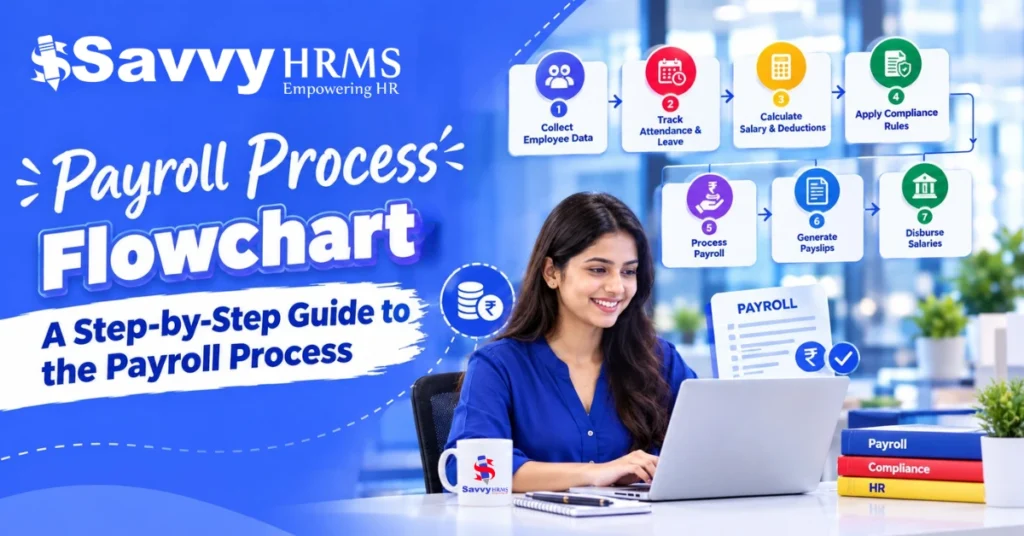
Payroll Process Flowchart: A Step-by-Step Guide to the Payroll Process


-
AuthorS.K. Gupta
-
 Last Updated
October 07, 2026
Last Updated
October 07, 2026
-
 Reading Time
15 Mins
Reading Time
15 Mins
Payroll may look like a simple calculation of salary, but behind every payslip is a chain of employee data, attendance, leave, deductions, taxes, approvals, compliance checks, and payment activities.
A payroll process flowchart turns this complicated chain into a visual roadmap. It helps HR and payroll teams understand what happens first, what comes next, who owns each task, and where errors can occur.
For businesses in India, payroll processing also involves statutory requirements such as PF, ESI, Professional Tax, TDS, and other applicable deductions. These requirements can vary according to employee eligibility, location, establishment, and applicable laws.
This guide explains the payroll process step by step, shows what a complete payroll flowchart should contain, compares linear and swimlane approaches, and explains how payroll software can make the entire process faster, more structured, and easier to monitor.
TL;DR
- A payroll process flowchart visually maps the complete payroll cycle from employee data collection to salary payment and reporting.
- The basic payroll process includes data collection → validation → payroll calculation → review/approval → payment and reporting.
- Attendance, leave, overtime, incentives, deductions, salary revisions, new hires, and exits should feed into payroll.
- Compliance checkpoints should cover applicable PF, ESI, Professional Tax, TDS, and other statutory requirements.
- A linear flowchart works well for simple payroll processes, while a swimlane flowchart is better when HR, payroll, finance, managers, employees, and software systems have different responsibilities.
- Payroll software can connect attendance, leave, employee data, salary structures, statutory calculations, approvals, and reporting.
- A good flowchart should include decision points, exception handling, approval stages, integrations, compliance checks, and audit trails.
- In India, payroll systems also need to stay aligned with regulatory changes. From April 1, 2026, salary TDS is governed under the Income Tax Act, 2025, with the relevant salary-TDS provision under Section 392.
What Is a Payroll Process Flowchart?
A payroll process flowchart is a visual representation of all the activities involved in processing employee salaries.
Instead of explaining payroll through several pages of instructions, a flowchart shows the process using boxes, arrows, decision points, and approval stages.
For example:
The biggest advantage is visibility.
An HR executive can quickly see where attendance data enters payroll. A payroll manager can identify where statutory calculations happen. Finance can see when the final payroll is approved and transferred for salary payment.
In other words, the flowchart answers a simple question:
“What happens to employee data between the start of the payroll cycle and the employee receiving their salary?”
A well-designed payroll process flowchart can also document responsibilities, identify bottlenecks, standardize payroll operations, and make employee payroll processes easier to audit.
Why Is a Payroll Process Flowchart Important for HR and Payroll Teams?
Payroll involves much more than calculating gross salary minus deductions.
A general monthly payroll cycle can involve attendance records, leave balances, overtime, incentives, reimbursements, salary revisions, loans, advances, new joiners, full-and-final settlements, tax declarations, statutory contributions, bank files, payslips, and accounting entries.
Without a clearly documented process, even a small change can create downstream problems.
For example, if an employee’s salary revision is approved but not updated in the payroll master, the payroll calculation may use outdated salary data.
A payroll flowchart makes these dependencies visible.
1. It standardizes the payroll process
Everyone follows the same sequence instead of depending on individual knowledge or spreadsheets.
2. It clarifies responsibilities
A swimlane payroll flowchart can show whether a particular activity belongs to:
- HR
- Employee
- Reporting Manager
- Payroll Team
- Finance Team
- IT/System
- Compliance Team
3. It identifies control points
Payroll teams can establish mandatory checks before payroll is finalized.
4. It makes onboarding easier
A new payroll executive can understand the company’s payroll process without learning everything from scratch.
5. It supports audits
A documented process provides evidence of how payroll data moves from source systems to final payment and reporting.
6. It helps identify automation opportunities
If the flowchart contains ten manual spreadsheet activities, it becomes easier to identify where payroll software or integrations can remove repetitive work.
This is particularly relevant in India. ADP’s 2026 Future of Pay research says 94% of surveyed organizations in India use payroll data for workforce decisions, while 96% are planning or adopting AI-enabled payroll capabilities. The research surveyed more than 300 HR, payroll, and finance leaders in India.
Payroll Automation Data Snapshot
According to ADP’s 2026 global payroll research, approximately half of organizations have already automated several core payroll activities:
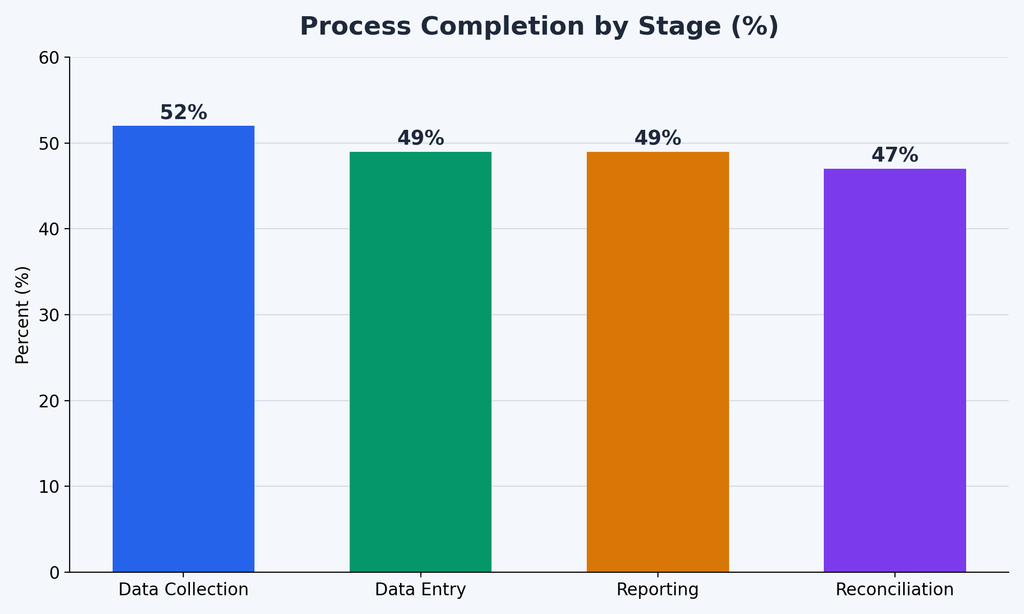
These figures illustrate why payroll process mapping is increasingly connected with payroll automation.
Which Payroll Flowchart Should You Choose: Linear or Swimlane?
There are two common ways to design a payroll process flowchart: a linear flowchart and a swimlane flowchart.
Linear Payroll Flowchart
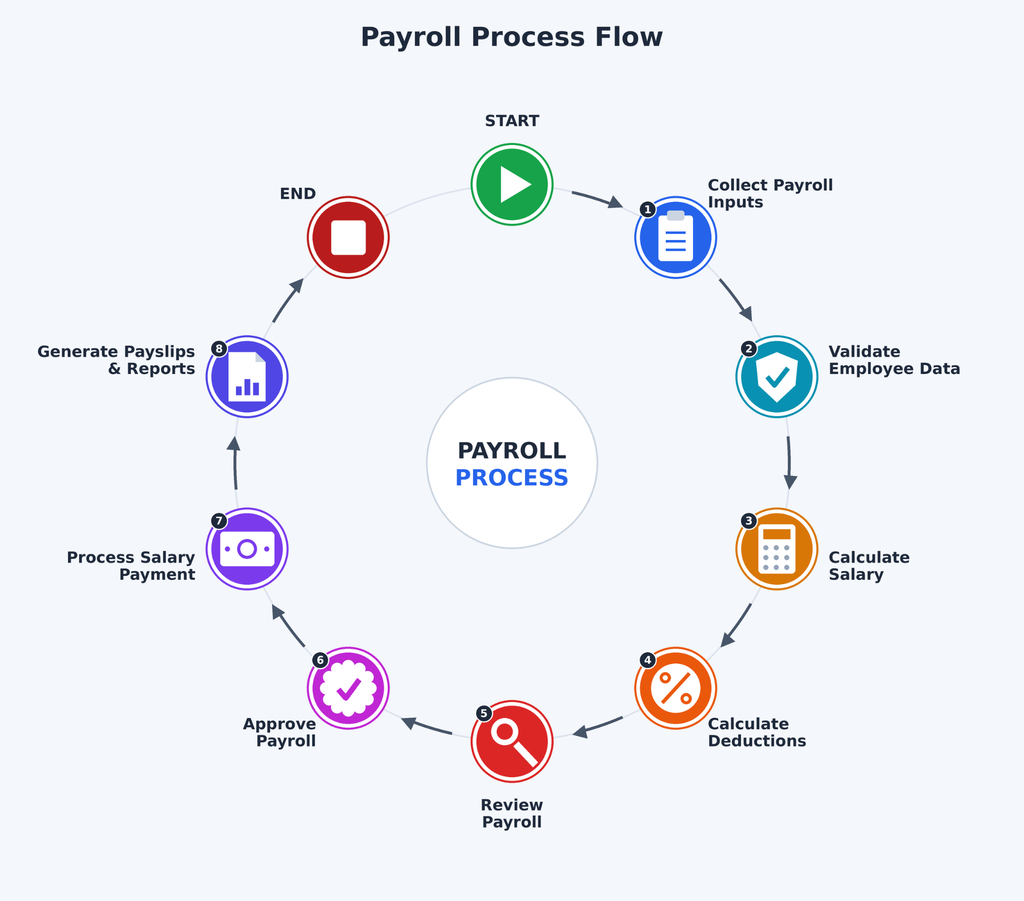
A linear flowchart shows payroll as a sequence of activities.
Payroll Inputs → Validation → Calculation → Review → Approval → Payment → Reporting
This format works particularly well for:
- Small businesses
- Simple payroll structures
- Single-location organizations
- Teams with clearly defined responsibilities
- Employee payroll processes with fewer exceptions
Example
Swimlane Payroll Flowchart
A swimlane flowchart adds ownership to the process.
For example:
| Stage | Employee | HR | Payroll | Finance | Software |
| Attendance | Punch/submit correction | Review | – | – | Capture |
| Leave | Apply | Approve | – | – | Update balance |
| Payroll Inputs | Submit claims | Validate | Review | – | Consolidate |
| Calculation | – | – | Calculate | – | Process |
| Approval | – | Review | Submit | Approve | Record |
| Payment | Receive salary | – | Generate file | Release payment | Update status |
Which should you choose?
Use a linear flowchart when the process itself is your priority.
Use a swimlane payroll flowchart when accountability is equally important.
For medium-sized and enterprise organizations, swimlane payroll flowchart are often more useful because payroll involves multiple departments, systems, approval levels, and external compliance activities.
What Are the 5 Basic Steps in Processing Payroll?
Although organizations may have dozens of individual payroll activities, the payroll process can be simplified into five broad stages.
Step 1: Collect Payroll Inputs
The process begins by collecting all information required to calculate employee pay.
Common inputs include:
- Employee master data
- Attendance
- Leave
- Overtime
- Shift details
- Incentives
- Bonuses
- Reimbursements
- Salary revisions
- Loans and advances
- New joiners
- Employee exits
- Tax declarations
The quality of payroll depends heavily on the quality of these inputs.
Step 2: Validate Payroll Data
Before calculating salary, payroll teams should verify whether the information is complete and accurate.
General validation checks include:
- Missing attendance
- Unapproved leave
- Duplicate employee records
- Incorrect bank information
- Incorrect salary structure
- Unprocessed increments
- Incorrect joining or exit dates
- Unusual overtime
- Unexpected salary variations
Step 3: Calculate Gross and Net Salary
The payroll system then calculates earnings and deductions.
A simplified calculation is:
Gross Salary = Basic Salary + Allowances + Incentives + Overtime + Other Earnings
Then:
Net Salary = Gross Salary − Employee Deductions − Applicable Taxes − Other Recoveries
The exact calculation depends on the company’s salary structure and applicable laws.
Step 4: Review and Approve Payroll
Payroll should not immediately move from calculation to payment.
A review stage allows HR, payroll, managers, or finance teams to identify unusual changes.
Useful payroll analytics include:
- Month-on-month salary variance
- Headcount change
- Total gross payroll
- Total deductions
- Net payroll
- Department-wise payroll cost
- Overtime cost
- New joiner cost
- Exit-related adjustments
Step 5: Pay Employees and Complete Reporting
Once payroll is approved:
- Salary payment is initiated.
- Payslips are generated.
- Payroll reports are prepared.
- Applicable statutory payments and filings are completed.
- Accounting records are updated.
- Payroll data is archived for audit and future reference.
What Should a Complete Payroll Process Flowchart Include?
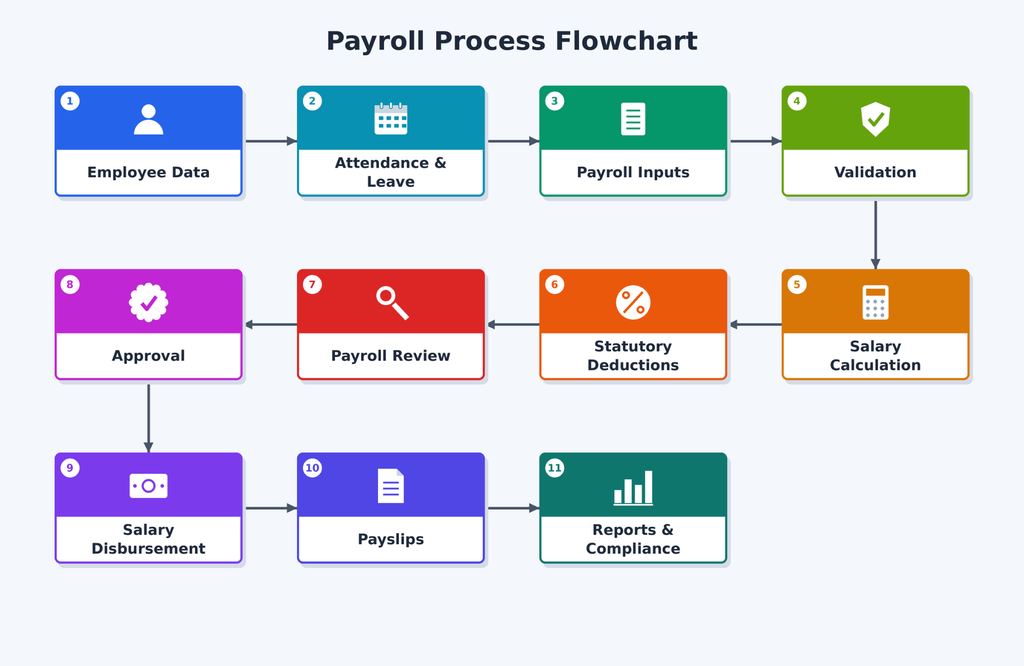
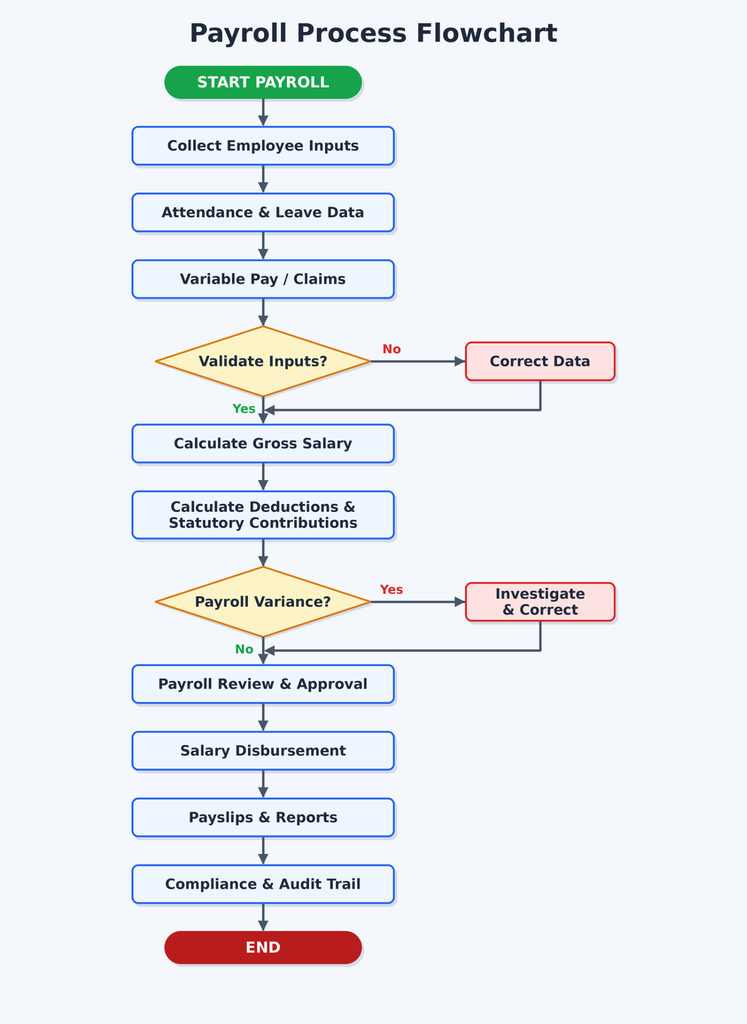
A complete payroll flowchart should represent the entire payroll lifecycle, not just salary calculation.
At minimum, include these components:
1. Employee Master Data
Employee master data provides the foundation for payroll processing, including employee ID, department, designation, joining date, location, employment status, bank details, tax information, and salary structure.
2. Attendance and Leave
Attendance and leave records determine payable working days and deductions, covering shifts, late marks, absences, overtime, holidays, and approved employee leave for each payroll cycle.
3. Variable Inputs
Variable payroll inputs include bonuses, incentives, commissions, reimbursements, advances, loans, deductions, and other earnings that can change an employee’s final monthly salary.
4. Payroll Calculation
The payroll calculation stage determines gross earnings, applicable deductions, taxes, statutory contributions, and the final net salary payable to each employee after processing all payroll inputs.
5. Compliance
The compliance stage checks applicable PF, ESI, Professional Tax, TDS, and other statutory obligations, ensuring payroll calculations and required payments follow relevant rules and requirements.
6. Validation
Payroll validation identifies missing information, unusual salary variations, negative salary values, incorrect deductions, duplicate inputs, and other employee-level exceptions before payroll receives final approval.
7. Approval
After calculations and validations are completed, HR or payroll teams review the payroll and send it through designated management or finance approval workflows before payment.
8. Payment
Once payroll receives final approval, the organization processes employee salary payments through bank transfers or other approved payment methods according to its payroll schedule.
9. Employee Communication
Employees receive important payroll information through payslips, tax documents, salary statements, and employee self-service portals, giving them convenient access to their compensation details.
10. Reporting and Audit
The final stage generates payroll registers, statutory reports, accounting records, reconciliation statements, and audit trails, helping organizations maintain accurate records and support future payroll reviews.
Payroll Process Flowchart: Complete End-to-End Example
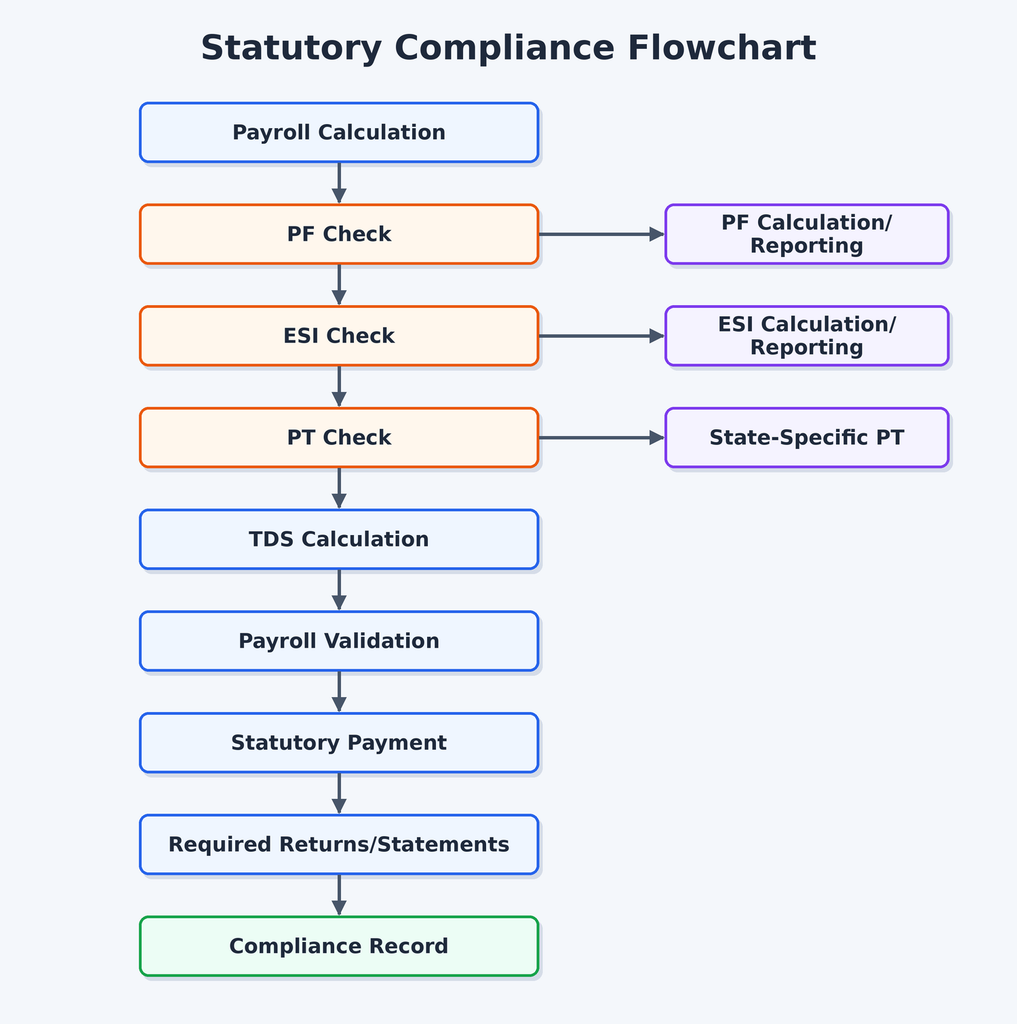
Which Compliance Steps Should a Payroll Process Flowchart Include?
For Indian businesses, compliance should not be shown as a single box called “Compliance.”
It should be broken into relevant checkpoints.
1. Provident Fund (PF)
Where applicable, payroll needs to calculate the employee and employer contributions according to the applicable rules and employee eligibility.
The payroll flowchart should therefore include:
PF Eligibility → PF Calculation → Validation → ECR/Applicable Reporting → Payment
EPFO‘s employer portal currently provides employer services and references UAN-based ECR processes.
2. Employees’ State Insurance (ESI)
Where applicable, the payroll process should calculate ESI contributions based on the relevant employee and wage eligibility rules and generate the necessary records.
3. Professional Tax
Professional Tax is state-specific. Therefore, a payroll flowchart for a multi-state organization should include a location-based decision point.
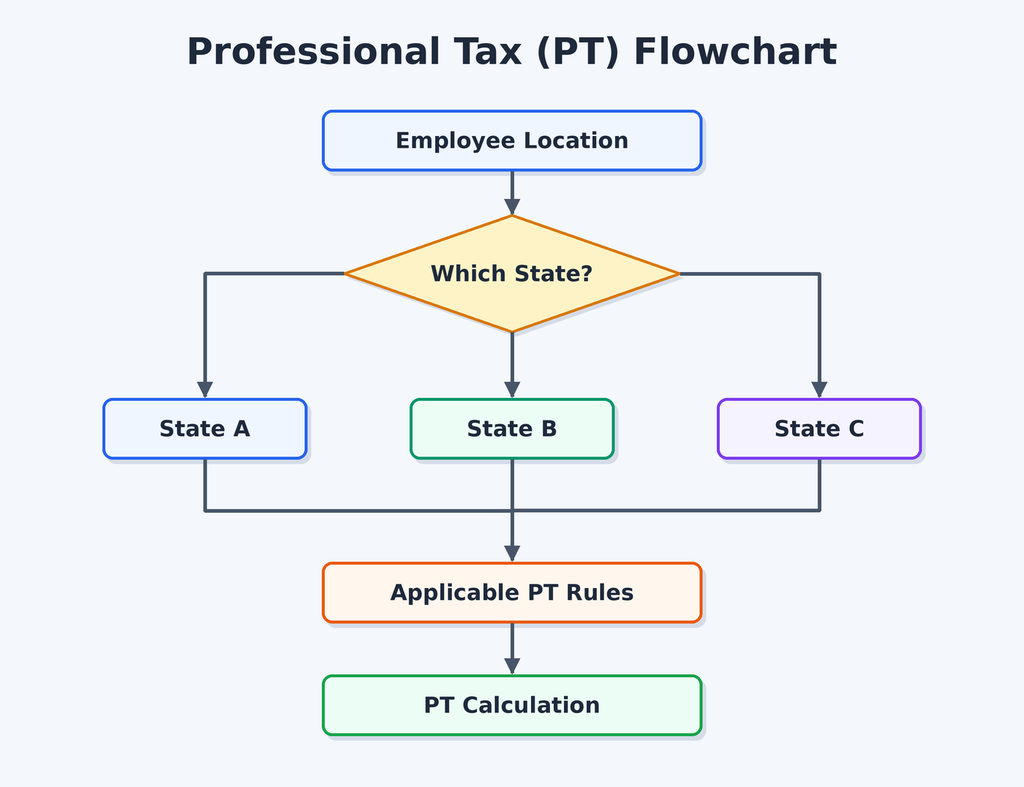
This is important because payroll compliance cannot always be handled through one identical rule for every employee.
4. Salary TDS
Salary TDS is another major payroll checkpoint.
India’s tax framework changed from April 1, 2026. The Income Tax Department states that salary paid from April 1, 2026 onward falls under the Income Tax Act, 2025, with salary TDS covered by Section 392(1). Payroll systems therefore need to reflect the new section numbering and applicable requirements.
The Income Tax Department also states that employers filing the quarterly salary-TDS statement, now Form 138, have quarterly due dates of July 31, October 31, January 31, and May 31 for the respective quarters.
Compliance Flow
Important: statutory requirements can change and may depend on employee eligibility, establishment type, location, wage components, and applicable law. Payroll teams should verify current requirements before processing or filing.
How Does a Payroll Flowchart Differ for Small Businesses and Enterprises?
The basic payroll logic remains similar, but complexity increases significantly as an organization grows.
Small Business Payroll Flowchart
A small organization may have:
- One location
- One payroll administrator
- Fewer salary structures
- Fewer approval levels
- Limited integrations
It could look like:
Employee Data → Attendance → Payroll Calculation → HR Review → Payment → Payslip
Enterprise Payroll Flowchart
An enterprise may have:
- Multiple locations
- Multiple legal entities
- Different salary structures
- Thousands of employees
- Multiple attendance systems
- Multiple approval levels
- Finance and ERP integrations
- State-specific compliance
- Contract workers
- Complex variable pay
- Multiple bank accounts
- Advanced reporting
The process may look like:
HRMS → Attendance → Leave → Workforce Systems → Payroll Engine → Compliance Engine → Validation → Approval → ERP → Bank → Employee → Accounting → Reporting
This is why a swimlane flowchart is particularly useful for enterprise payroll.
Where Should Payroll Software Integrations Appear in a Payroll Process Flowchart?
Integrations should appear where data enters or leaves the payroll system, rather than being placed in one generic “integration” box.
For example:
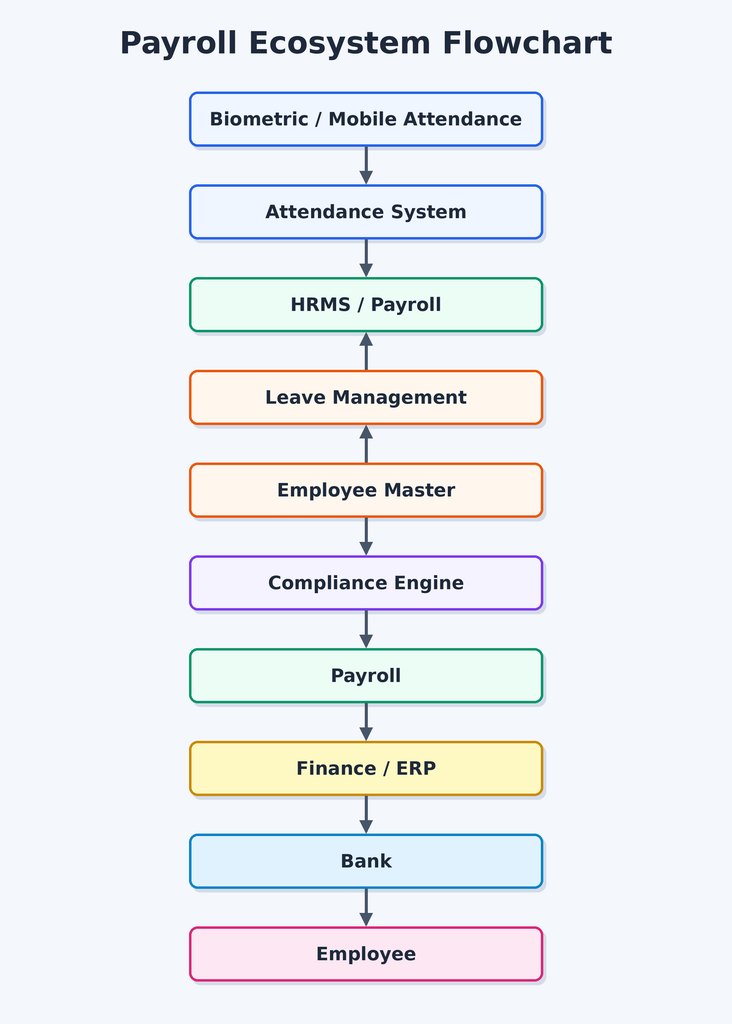
Common Payroll Integrations
A modern payroll process may integrate with:
- Attendance systems
- Biometric devices
- Mobile attendance apps
- Leave management
- HRMS
- Recruitment/onboarding systems
- Expense management
- Accounting software
- ERP systems
- Banking platforms
- Tax/compliance systems
- Employee self-service portals
The important principle is simple:
“Every integration should have a clear input, output, owner, and validation point.”
If attendance data automatically flows into payroll, the flowchart should show that connection.
What Are the Common Decision Points and Error Scenarios in a Payroll Flowchart?
A payroll process flowchart becomes much more useful when it shows what happens when something goes wrong.
A basic flowchart says:
Calculate → Approve → Pay
A practical flowchart asks:
What if the salary variance is unusually high?
What if attendance is missing?
What if a bank account is invalid?
What if an employee has an incorrect tax declaration?
Common Payroll Decision Points
Is employee data complete?
If no → send it back for correction.
Is attendance approved?
If no → send attendance for manager review.
Is the employee eligible for a particular statutory deduction?
If no → exclude the calculation.
Is payroll variance within the defined threshold?
If no → investigate.
Is payroll approved?
If no → return to payroll for correction.
Is the bank file validated?
If no → correct bank/payment information.
Is statutory data reconciled?
If no → investigate before filing/payment.
Common Payroll Errors
Some common error scenarios include:
- Incorrect employee master data
- Missing attendance
- Wrong leave balance
- Incorrect salary structure
- Duplicate variable pay
- Incorrect overtime
- Incorrect deduction
- Wrong tax treatment
- Invalid bank details
- Incorrect employee location
- Missing statutory eligibility
- Unapproved salary revision
ADP’s 2025 India payroll research found that 38% of surveyed businesses identified a lack of automated processes as the most common cause of payroll inaccuracies. The same research reported that 75% of surveyed Indian businesses with more than 1,000 employees were affected by payroll staff shortages.
That makes error-handling and automation important parts of the payroll process, not optional extras.
How Can Payroll Software Simplify the Payroll Process?
Payroll software brings salary calculations, attendance, leave, deductions, compliance, approvals, and reporting into one simplified workflow. Instead of managing multiple spreadsheets and manually transferring data, HR teams can automate repetitive payroll tasks and focus on reviewing exceptions.
Here’s how it simplifies payroll:
- Automates calculations: Processes salary, deductions, taxes, and net pay accurately.
- Connects attendance and leave: Automatically uses approved attendance, overtime, and leave data.
- Supports compliance: Helps manage applicable PF, ESI, Professional Tax, TDS, and related reports.
- Streamlines approvals: Moves payroll through predefined HR and finance approval workflows.
- Generates payslips: Employees can access payslips and salary statements through self-service portals.
- Provides payroll analytics: Tracks payroll costs, salary variations, deductions, overtime, and other key metrics.
- Maintains audit trails: Records payroll changes, approvals, and processing history for easier review.
In short, payroll software makes the payroll process faster, more organized, and less dependent on manual work, while giving HR and finance teams better control over every payroll cycle.
Key Benefits of Payroll Automation
- Faster payroll processing
- Fewer manual errors
- Automated salary calculations
- Easier statutory compliance
- Integrated attendance and leave data
- Streamlined approval workflows
- Automated payslip generation
- Real-time payroll visibility
- Better payroll reporting and analytics
- Secure employee self-service
- Reduced administrative workload
- Improved audit readiness
For example:
Payroll Cost per Employee = Total Payroll Cost ÷ Average Employee Headcount
Other useful metrics include:
- Payroll cost by department
- Overtime percentage
- Variable pay percentage
- Payroll variance
- Average salary
- Headcount cost
- Employer statutory contribution
- Cost of new hires
- Exit-related payroll cost
ADP’s 2026 research found that 94% of surveyed Indian organizations use payroll data for workforce decisions, showing how payroll is increasingly becoming a source of business intelligence rather than simply a monthly administrative function.
What Should a Payroll Dashboard Measure?
A payroll process flowchart tells you how the process works.
Payroll analytics tells you how well it works.
A useful payroll dashboard can track:
| Payroll Metric | What It Tells You |
| Total Payroll Cost | Overall salary expenditure |
| Net Payroll | Amount payable to employees |
| Payroll Variance | Difference from previous payroll |
| Overtime Cost | Cost of additional working hours |
| Payroll Error Count | Number of corrections required |
| Payroll Processing Time | Time required to close payroll |
| Approval Delay | Time spent waiting for approvals |
| New Joiner Cost | Cost impact of new employees |
| Exit Payroll | Full-and-final settlement impact |
| Statutory Liability | Employer/employee compliance amounts |
For example, if payroll variance suddenly rises from 3% to 12%, the payroll team can investigate the underlying reasons before releasing salary.
The flowchart and dashboard therefore work together:
Flowchart = Process visibility
Dashboard = Performance visibility
Conclusion
A payroll process flowchart turns payroll from a collection of disconnected tasks into a clear, repeatable workflow. From employee inputs and attendance to calculations, compliance, approvals, payment, and reporting, every stage becomes easier to understand.
For growing Indian businesses, combining a well-designed payroll flowchart with HRMS and payroll automation can improve visibility, reduce repetitive work, strengthen controls, and create better payroll analytics while keeping human review where it matters.











Ready to simplify your payroll workflow?
Explore Savvy HRMS to bring attendance, leave, payroll, compliance, reporting, and HR operations together on one platform.
Frequently Asked Questions (FAQs)
1. What is a payroll process flowchart?
A payroll process flowchart is a visual representation of the complete payroll workflow. It shows how employee data moves through attendance, salary calculations, deductions, compliance checks, approvals, payment, payslips, reporting, and final payroll reconciliation.
2. What are the basic steps in the payroll process?
The basic payroll process includes collecting employee and attendance data, validating payroll inputs, calculating earnings and deductions, checking statutory requirements, reviewing payroll, obtaining approvals, processing salary payments, and completing necessary reports.
3. Why is a payroll flowchart important?
A payroll flowchart helps HR and payroll teams understand each processing stage clearly. It assigns responsibilities, highlights important validation and approval points, reduces process confusion, identifies potential errors, and creates a consistent workflow for every payroll cycle.
4. Can payroll software automate the payroll process?
Yes, payroll software can automate several repetitive payroll activities, including salary calculations, attendance inputs, deductions, statutory calculations, approval workflows, payslip generation, reporting, and payroll data management, reducing manual effort for HR and payroll teams.
5. What should a payroll process flowchart include?
A complete payroll process flowchart should include employee master data, attendance and leave, variable pay, salary calculations, statutory compliance, validation, approvals, salary disbursement, employee communication, reporting, reconciliation, and an audit trail for better payroll control.