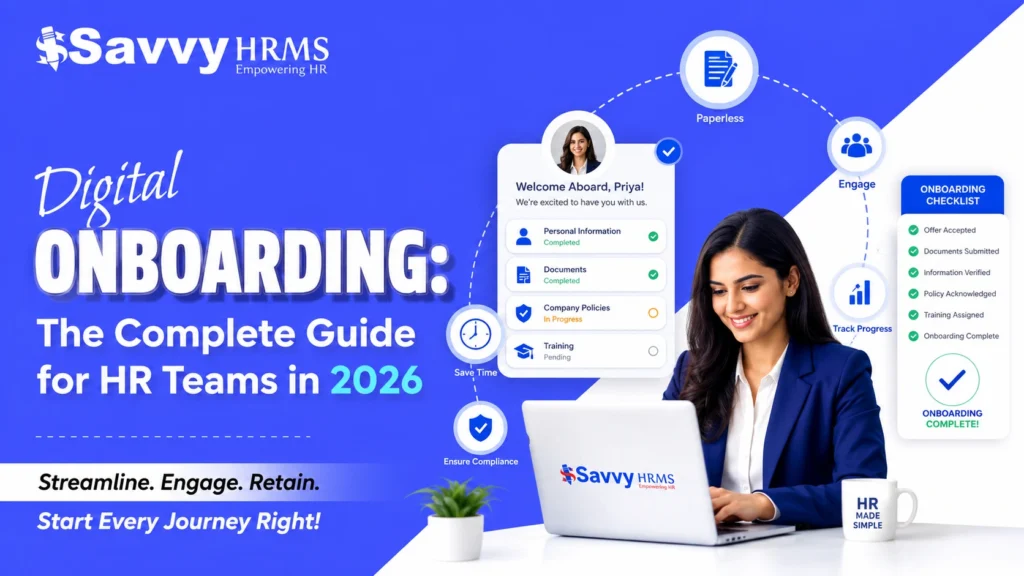
Digital Onboarding: The Complete Guide for HR Teams in 2026


-
AuthorAnkit Singh
-
 Last Updated
September 29, 2026
Last Updated
September 29, 2026
-
 Reading Time
11 Mins
Reading Time
11 Mins
Digital onboarding is the process of welcoming, verifying, training, and integrating a new employee entirely through online tools instead of paper forms and in-person paperwork. It covers offer-letter e-signature, compliance document collection, IT provisioning, and structured training – all managed inside one system rather than chased manually across departments. Companies that move to digital onboarding typically cut administrative onboarding time from weeks to days, since document collection, approvals, and record-keeping run in parallel instead of one after another.
This guide breaks down the process, the 5 C’s framework, and what to look for in digital employee onboarding software, based on patterns seen across HR teams implementing onboarding management systems in India.
What Is Digital Onboarding?
Digital onboarding refers to the end-to-end process of hiring, verifying, and integrating a new employee entirely through digital platforms – replacing physical paperwork, manual data entry, and in-person orientation with automated workflows, e-signatures, and online training modules. It spans pre-boarding (before day one) through the first 90 days of employment.
Digital onboarding is a process supported by technology, not a single tool. It typically includes a candidate-facing portal, document upload and verification, digital contract signing, payroll and statutory registration (PF, ESI, PAN linking), IT asset requests, and structured learning paths – all tracked in one dashboard so HR, IT, and the hiring manager see the same status in real time. The Savvy HRMS glossary definition of employee onboarding frames this similarly: a structured approach covering paperwork, orientation, training, and role clarity, not just document signing.
Core Components of Digital Onboarding
- Pre-boarding: offer letter, e-signature, welcome communication before joining
- Documentation: ID proof, education certificates, bank details, compliance forms collected online
- System access: email, HRMS login, and tool provisioning triggered automatically
- Training: role-specific and compliance courses assigned digitally
- Check-ins: scheduled manager and HR touchpoints at 30/60/90 days
Digital onboarding isn’t limited to permanent staff either – organizations with a blue-collar or gig workforce increasingly extend it to contract labour onboarding as well, since contractors need the same document verification and statutory compliance checks as full-time hires, just at higher volume and turnover.
Digital Onboarding vs. Traditional Onboarding
The main difference is that digital onboarding runs processes in parallel through software, while traditional onboarding runs them sequentially through physical paperwork – meaning digital onboarding is faster, generates fewer errors, and produces an audit trail automatically.
| Factor | Traditional Onboarding | Digital Onboarding |
| Document collection | Physical forms, in-person submission | Online upload, e-verification |
| Time to complete | 1–3 weeks | 1–3 days |
| Error rate | Higher (manual data entry) | Lower (validation built in) |
| Remote employees | Difficult to support | Fully supported |
| Record-keeping | Paper files, scattered folders | Centralized, searchable database |
| Compliance tracking | Manual follow-up | Automated reminders and audit logs |
| Cost per hire (admin time) | Higher | Lower after setup |
Traditional onboarding still has a place in highly regulated, low-volume hiring environments where in-person verification is mandated. For most organizations hiring at any scale – including the manufacturing and FMCG teams that Savvy HRMS commonly works with – digital onboarding procedures reduce both cost and risk as headcount grows.
What Are the 5 C’s of Onboarding?
The 5 C’s of onboarding – Compliance, Clarification, Culture, Connection, and Check-back – are a framework describing the five stages a new hire moves through to become a fully integrated employee. Originally proposed by Dr. Talya Bauer, the framework is widely used to design onboarding programs that go beyond paperwork.
- Compliance – Completing legal and policy requirements: contracts, tax forms, statutory registrations, code-of-conduct acknowledgment.
- Clarification – Ensuring the employee has a clear grasp of their role, responsibilities, and what’s expected of them in terms of performance.
- Culture – Introducing company values, norms, and unwritten rules of how work actually gets done.
- Connection – Building relationships with managers, team members, and cross-functional stakeholders.
- Check-back – Structured follow-ups (typically at 30, 60, and 90 days) to confirm the employee is settling in and to address gaps early.
Digital onboarding software maps naturally onto this framework: Compliance is handled through e-forms, Clarification through role-based learning paths, Culture through welcome content, Connection through automated introductions, and Check-back through scheduled pulse surveys. Savvy HRMS covers Culture and Connection specifically through its approach to onboarding and culture building, treating the first weeks as an engagement process rather than only a paperwork checklist.
How Does Digital Employee Onboarding Software Work?
Digital employee onboarding software works by triggering a pre-configured workflow the moment a candidate accepts an offer – automatically sending document requests, routing approvals, provisioning system access, and assigning training, all tracked on a single dashboard. HR no longer manually chases each step; the software does.
The Typical Workflow
- Recruiter marks candidate status as “Offer Accepted” in the ATS or HRMS.
- Software auto-generates the offer letter and sends it for e-signature.
- New hire receives a secure portal link to upload documents (ID, address proof, education, bank details).
- Documents are verified – either automatically (OCR/format checks) or routed to HR for manual review.
- Once verified, the system triggers parallel tasks: IT ticket for laptop/email, payroll registration, badge/access request.
- Training modules are auto-assigned based on role and department.
- Manager and HR receive a dashboard view of pending vs. completed steps.
- Automated check-in reminders fire at 30/60/90-day marks.
Some platforms take this further with AI-driven automation – Savvy HRMS’s AI Onboarding Automation module, for example, is built to flag missing documents and route exceptions automatically instead of relying on HR to manually track every pending item across every new hire. This parallel-processing model is the core efficiency gain over manual onboarding, where each step typically waits for the previous one to finish.
What Are the Steps in a Digital Onboarding Process?
A complete digital onboarding process has four phases: pre-boarding, day-one setup, first-week integration, and 90-day evaluation – each with specific, trackable tasks. This structure mirrors the phased approach outlined in the Savvy HRMS onboarding process guide, which covers pre-boarding preparation for both in-person and remote hires.
Phase 1: Pre-boarding (Offer Acceptance to Joining Date)
- Send digital offer letter with e-signature
- Collect KYC and compliance documents via secure portal
- Share welcome kit, company handbook, and FAQs
- Initiate background verification
Phase 2: Day One
- Auto-provision email, HRMS login, and required software access
- Deliver a structured welcome schedule (not just an orientation deck)
- Introduce the assigned onboarding buddy or manager
- Complete statutory paperwork confirmation (PF, ESI, tax declarations)
Phase 3: First Week
- Assign role-specific and compliance training modules
- Schedule meetings with key cross-functional stakeholders
- Set 30-60-90 day goals with the manager
- Collect early feedback via a short digital survey
Phase 4: 30/60/90-Day Check-ins
- Automated pulse surveys to measure engagement and clarity
- Manager review of goal progress
- HR review of any pending compliance or training gaps
- Formal probation/confirmation review where applicable
For distributed teams, this phased structure also applies at exit – Savvy HRMS documents the same discipline for the reverse journey in its employee onboarding and offboarding guide, since remote-first companies need equally structured digital workflows on the way out as on the way in.
Why Is Digital Onboarding Important for Companies?
Digital onboarding matters because it directly affects time-to-productivity, early attrition, and compliance risk – three metrics that have measurable cost impact on any organization.
- Faster time-to-productivity: Structured digital paths get new hires contributing sooner by removing administrative delays.
- Lower early attrition: Organizations with a strong onboarding process see a well-documented improvement in new-hire retention (Society for Human Resource Management research links structured onboarding to significantly better 12-month retention).
- Reduced compliance risk: Automated document tracking and audit trails reduce the chance of missing statutory paperwork.
- Better employee experience: A smooth first impression influences long-term engagement and employer brand.
- Scalability: Digital processes handle hiring surges (seasonal, expansion, M&A) without proportionally increasing HR headcount.
For distributed and hybrid teams – including IT and corporate workforces that hire across cities – digital onboarding is not optional; it’s the only practical way to onboard someone who may never visit a physical office before their first working day.
What Features Should Good Onboarding Software Have?
Good digital employee onboarding software should include e-signature, document management, task automation, role-based training assignment, and analytics dashboards – features that directly map to the 5 C’s framework above.
| Feature | Why It Matters |
| E-signature & offer management | Speeds up pre-boarding, legally binding |
| Document collection & verification | Reduces manual chasing, supports compliance |
| Workflow automation | Removes sequential bottlenecks (IT, payroll, HR run in parallel) |
| Role-based learning paths | Ensures Clarification and Culture stages aren’t skipped |
| Mobile access | Supports field, remote, and blue-collar workforces |
| Integration with payroll/HRMS | Avoids duplicate data entry |
| Analytics & reporting | Tracks bottlenecks, completion rates, time-to-productivity |
| Data security & access controls | Protects sensitive PII and statutory data |
When evaluating vendors, prioritize integration capability with your existing HRMS over standalone feature count – a disconnected onboarding tool that requires re-entering data elsewhere defeats the purpose. This is also where a dedicated Contract Labour Management System becomes relevant for businesses with a mixed permanent-and-contract workforce, since contractor onboarding, attendance, and billing need to run on the same platform as permanent-employee onboarding rather than a separate spreadsheet.
How Long Should Employee Onboarding Take?
Formal onboarding (documentation and system setup) should be completable within 1–3 days using digital tools, while full onboarding – covering role clarity, culture, and productivity – typically extends across the first 90 days. These are two different timelines that are often confused.
- Administrative onboarding: 1–3 days with digital tools (vs. 1–3 weeks manually)
- Role ramp-up: 2–4 weeks depending on role complexity
- Full integration: 90 days, aligned with the Check-back stage of the 5 C’s
Compressing administrative onboarding frees up the first week for actual role clarification and relationship-building rather than paperwork.
Is Digital Onboarding Secure for Sensitive Employee Data?
Digital onboarding is secure when the software uses encryption, role-based access controls, and compliance with data protection regulations – security depends on the platform’s architecture, not the fact that data is digital rather than paper.
Key security considerations for HR teams in India:
- Ensure the vendor complies with the Digital Personal Data Protection Act (DPDP Act, 2023) requirements for consent and data handling.
- Confirm data is encrypted both in transit and at rest.
- Check for role-based access so only authorized personnel view sensitive documents (Aadhaar, PAN, bank details).
- Review data retention and deletion policies, especially for rejected candidates.
- Ask whether the vendor is ISO 27001 certified or equivalent.
Digital records, when properly secured, are typically more auditable and traceable than paper files, which can be lost, duplicated, or accessed without a log.
Key Takeaways
- Digital onboarding replaces paper-based processes with software-driven workflows, cutting administrative time from weeks to days.
- The 5 C’s framework (Compliance, Clarification, Culture, Connection, Check-back) is the standard model for structuring a complete onboarding experience.
- A strong digital onboarding process has four phases: pre-boarding, day one, first week, and 90-day check-ins.
- Good onboarding software should integrate with your existing HRMS, not operate as a disconnected tool – and should extend to contract or contingent workers, not just permanent staff.
- Security depends on vendor architecture – check DPDP Act compliance, encryption, and access controls before choosing a platform.
If your current onboarding process still relies on spreadsheets and physical files, the fastest first step is mapping your existing steps against the 5 C’s framework above – book a free Savvy HRMS demo to see how that gap analysis translates into an actual digital workflow.











Ready to make Day One unforgettable for every new hire?
Start your journey with Savvy HRMS today and see how digital onboarding can save your HR team hours every week.
FAQs
What is the difference between onboarding and orientation?
Orientation is a single event – usually a day-one session covering policies and paperwork. Onboarding is the full process, extending over weeks or months, that helps an employee become productive and integrated into the team and culture.
Can small businesses use digital onboarding software?
Yes. Many onboarding platforms offer tiered, modular pricing based on headcount and selected features, making them accessible for small and mid-size businesses, not just large enterprises. Even a basic digital document and e-signature workflow removes significant manual effort at small scale.
What documents are typically collected during onboarding in India?
Common documents include Aadhaar or another government ID, PAN card, address proof, educational certificates, previous employment relieving letter, bank account details for salary, and passport-size photographs, along with signed compliance and policy acknowledgments.
Does digital onboarding work for remote or field employees?
Yes – this is one of its strongest use cases. Mobile-friendly portals let remote and field employees complete documentation, e-sign contracts, and start training without visiting an office, which is essential for distributed and logistics teams.
How is onboarding software different from an HRMS?
Onboarding software specifically manages the pre-hire-to-90-day process, while an HRMS (Human Resource Management System) manages the full employee lifecycle – payroll, attendance, performance, and exits. Many HRMS platforms include onboarding as one module rather than a separate tool.
What causes onboarding programs to fail?
Common causes include treating onboarding as a single-day event, missing role clarity, inconsistent training delivery, and no structured follow-up after the first week. Software helps, but a defined process is what actually prevents these failures.
Is e-signature legally valid for employment contracts in India?
Yes, electronic signatures are legally recognized under the Information Technology Act, 2000, for most employment documents, provided the signing method meets the Act’s authentication requirements. Organizations should confirm specific document types with legal counsel where needed.