

How to Withdraw PF Amount Online: Process, Rules and Eligibility


-
AuthorRuchika Rajput
-
 Last Updated
November 23, 2026
-
 Reading Time
19 Mins
TL;DR
- You can withdraw your eligible PF amount online through the EPFO Member Portal using your activated UAN.
- Keep your Aadhaar, registered mobile number, verified bank account and KYC details updated before applying.
- Use Form 19 for final PF settlement, Form 31 for partial withdrawal and Form 10C for eligible EPS withdrawal benefits.
- EPF withdrawal rules depend on your employment status, service period, withdrawal purpose and age.
- PF withdrawal before completing five years of continuous service may attract tax and TDS, subject to applicable exemptions.
- You can track your claim online and raise a grievance through EPFiGMS if it remains unresolved.
Your Provident Fund (PF) is more than just a monthly salary deduction. It is a savings fund that can support you during a job change, retirement or financial emergency. But when you need the money, knowing how to withdraw PF amount and which rules apply can make the process easier.
The good news is that you can complete most eligible PF withdrawal requests online through the EPFO Member Portal using your Universal Account Number (UAN). You can apply for a full PF settlement, request a partial withdrawal or claim eligible pension benefits, depending on your employment status and service history.
But before submitting a claim, it is important to understand the withdrawal forms, eligibility conditions, tax rules and common reasons for rejection.
In this guide, we explain the PF withdrawal online process step by step, including how to withdraw PF amount using your UAN, track your claim and apply offline when needed.
What Are the Requirements for Online PF Withdrawal?
Before applying for PF withdrawal online, make sure your UAN is active and your Aadhaar, bank and KYC details are updated in the EPFO portal. These details are required to verify your identity and process your claim.
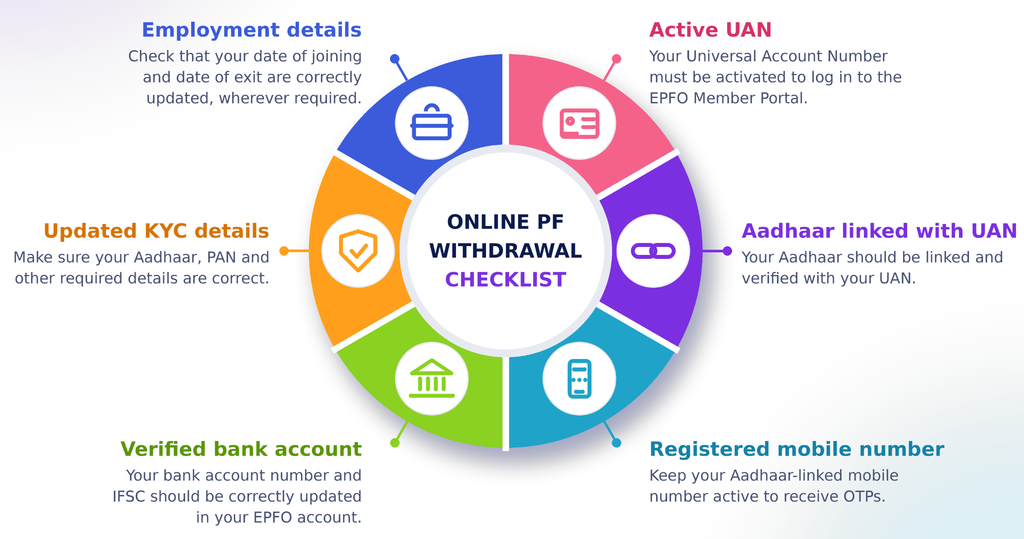
Find below the main things you need:
- Active UAN: Your Universal Account Number must be activated to log in to the EPFO Member Portal.
- Aadhaar linked with UAN: Your Aadhaar should be linked and verified with your UAN.
- Registered mobile number: Keep your Aadhaar-linked mobile number active to receive OTPs.
- Verified bank account: Your bank account number and IFSC should be correctly updated in your EPFO account.
- Updated KYC details: Make sure your Aadhaar, PAN and other required details are correct.
- Employment details: Check that your date of joining and date of exit are correctly updated, wherever required.
Completing these checks beforehand can make the PF withdrawal online procedure easier and reduce the chances of errors during claim submission.
What if your KYC details are incorrect?
Log in to the EPFO Member Portal and check your details under the Manage section. If you find any mistakes, get them corrected through the applicable EPFO process before submitting your withdrawal claim.
Also, check your previous employment details if you have worked with more than one organization.
How to Withdraw PF Amount Online with UAN?
You can withdraw your PF amount online by logging in to the EPFO Member Portal using your UAN and password. After verifying your bank details, navigate to the online claim section, select the appropriate withdrawal option, provide the required information and authenticate your request.
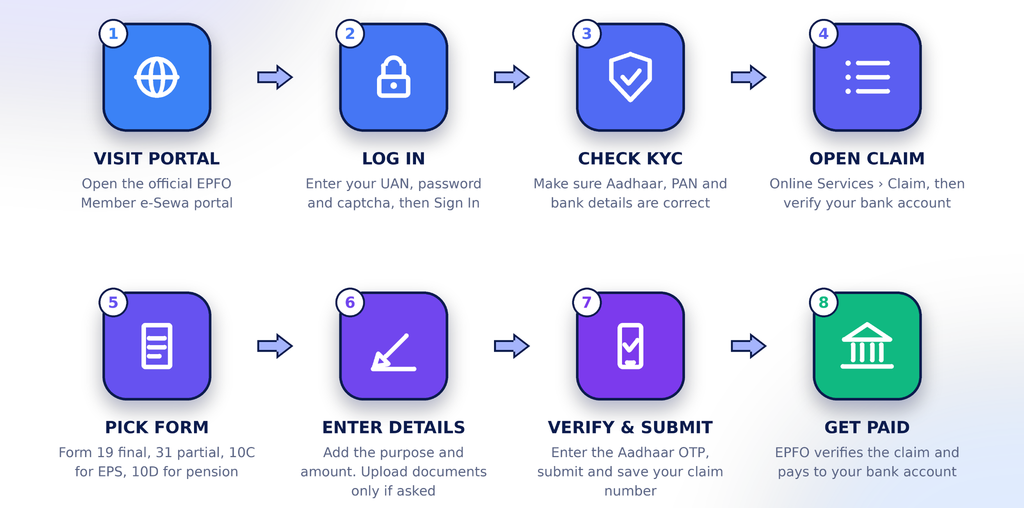
Follow these steps for the online PF withdrawal process.
Step 1: Visit the EPFO Member Portal
Visit the official EPFO Member e-Sewa Portal to access your EPF account and submit an online claim.
Step 2: Log in Using Your UAN and Password
Enter your activated UAN, password and the captcha shown on the screen. Click Sign In to access your account.
If you have forgotten your password, click on Forgot Password and follow the steps to reset it.
Step 3: Check Your KYC and Bank Details
Once you log in, check whether your Aadhaar, PAN and bank account details are updated correctly.
Make sure your bank account is verified and linked to your UAN. If you find any incorrect or missing details, get them corrected before applying for withdrawal.
Step 4: Navigate to Online Services and Select Claim
From the main dashboard:
- Click on the Online Services tab.
- Select Claim (Form-31, 19, 10C & 10D), where available.
- Review the member details displayed on the screen.
- Enter the requested bank account verification details, such as the last four digits of your registered bank account.
- Complete the bank verification and proceed.
Step 5: Select the Appropriate Withdrawal Form
After verification, the portal will show the claim options available for your account.
Choose the option that matches your requirement:
- Form 19: For final PF settlement.
- Form 31: For partial PF withdrawal or advance.
- Form 10C: For eligible EPS withdrawal benefits.
- Form 10D: For monthly pension claims, where eligible.
The options available to you depend on your employment status, service history and eligibility.
Step 6: Enter the Required Withdrawal Details
If you are applying for a partial withdrawal, select the applicable withdrawal purpose and enter the amount or other requested information.
For final settlement, verify that your employment and exit details are correct. Upload supporting documents only if the portal specifically asks for them.
Step 7: Complete Aadhaar OTP Verification and Submit Your Claim
Review your application to make sure all the details are correct.
Select the Aadhaar OTP verification option and enter the OTP sent to your Aadhaar-linked mobile number. Once the verification is successful, submit your claim.
Keep the acknowledgement or claim reference number so you can check your application status later.
The online withdrawal of PF amount is subject to EPFO verification, so check your employment details, KYC information and bank account before submitting the claim.
What happens after submitting the claim?
EPFO will verify your application and process it according to the applicable eligibility and claim conditions. Once the claim is approved and settled, the eligible amount is transferred to your registered bank account.
How to Withdraw PF Through the UMANG App?
You can also access eligible EPFO claim services through the UMANG app without using a desktop browser.
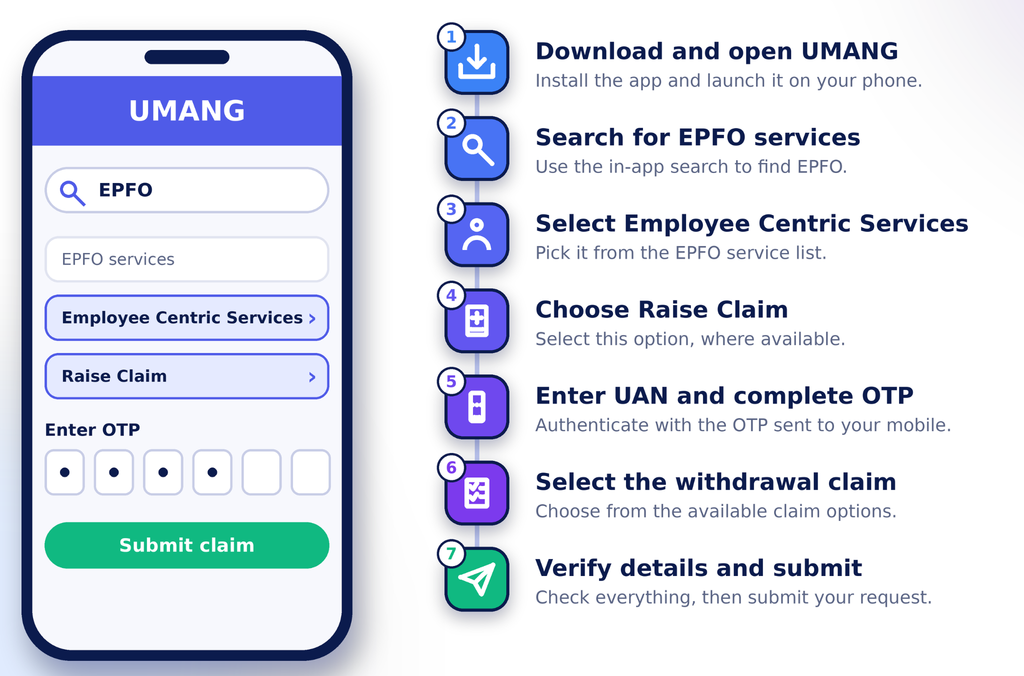
Follow these general steps:
- Download and open the UMANG app.
- Search for EPFO services.
- Select Employee Centric Services.
- Choose the Raise Claim option, where available.
- Enter your UAN and complete the required OTP authentication.
- Select the available withdrawal claim.
- Verify the required details and submit your request.
Keep your registered mobile number active to complete the authentication process.
What Are the Different Types of EPF Withdrawal Forms?
EPFO has different forms for PF withdrawal, pension claims and PF transfers. The form you need depends on whether you want to withdraw your full PF balance, take a partial advance, claim pension benefits or transfer your PF to a new employer.
Here is a quick comparison of the commonly used EPF and EPS forms.
| Form | Purpose | When it is used |
| Form 19 | Final PF settlement | When an employee is eligible to withdraw the accumulated EPF balance |
| Form 31 | Partial PF withdrawal | When an employee needs an eligible advance from their PF account |
| Form 10C | EPS withdrawal benefit or Scheme Certificate | When a member is eligible for an EPS withdrawal benefit or Scheme Certificate |
| Form 10D | Monthly pension claim | When a member qualifies for a monthly EPS pension |
| Form 13 | PF transfer | When an employee changes jobs and wants to transfer their existing PF balance |
Let’s understand what each form is used for.
1. Form 19 – Final PF Settlement
Form 19 is used to withdraw the accumulated EPF balance when an employee becomes eligible for final settlement. It generally applies when an employee leaves a job and meets the applicable PF withdrawal conditions or becomes eligible for retirement-related settlement.
The amount includes the eligible employee and employer EPF contributions, along with the applicable interest.
2. Form 31 – Partial PF Withdrawal
Form 31 is used when an employee wants to withdraw a part of their PF savings as an advance.
You can apply for an eligible advance for reasons such as:
- Medical treatment
- Education
- Marriage
- Housing-related expenses
- Other permitted circumstances
The withdrawal limit and frequency depend on the reason for withdrawal and the applicable EPFO rules.
3. Form 10C – EPS Withdrawal Benefit
Form 10C is used to claim an eligible withdrawal benefit under the Employees’ Pension Scheme (EPS) or obtain a Scheme Certificate.
It generally applies to members who have not completed the qualifying service period required for a monthly pension.
Members with 10 years or more of eligible pensionable service generally cannot withdraw their EPS benefit as a lump sum. They may instead receive a Scheme Certificate or claim a pension, depending on their age and eligibility.
4. Form 10D – Monthly Pension Claim
Form 10D is used to claim a monthly pension under the Employees’ Pension Scheme (EPS).
It applies to members who meet the applicable pension conditions, including the required pensionable service and age criteria.
5. Form 13 – PF Transfer
Form 13 is used to transfer your existing PF balance when you join a new organization.
It is not a withdrawal form. Instead, it helps to move your PF savings from your previous employer’s account to your current PF account. This also helps to maintain continuity of your eligible service period for applicable PF and pension benefits.
| Important: Eligible online claims can generally be submitted through the EPFO Member Portal’s online claim facility. You do not necessarily need to download and submit each physical form separately. |
What Are the Important EPF Withdrawal Rules You Should Know?
EPF withdrawal rules depend on why you are withdrawing the money, your employment status, service period and age. In October 2025, EPFO simplified its partial withdrawal framework by grouping withdrawals into three categories: essential needs, housing needs and special circumstances.
Here are the main rules to know before applying for a PF withdrawal.
1. Rules for Full PF Withdrawal
You can withdraw your full EPF balance when you meet the conditions for final settlement, such as eligible retirement or other permitted circumstances.
If you leave your job and remain unemployed, the revised rules generally require you to wait 12 months before applying for premature final settlement of the remaining PF balance.
However, eligible members can access a partial withdrawal during unemployment, subject to the applicable conditions. So, full settlement and partial withdrawal are two different options.
2. Rules for Partial PF Withdrawal
You can withdraw a part of your PF savings without closing your entire EPF account, provided you meet the applicable conditions.
Under the revised framework, partial withdrawals are grouped into three categories which are:
- Essential needs: Medical treatment, education and marriage-related expenses.
- Housing needs: Eligible house purchases, construction, home loan repayment and other permitted housing expenses.
- Special circumstances: Other situations covered under EPFO’s revised withdrawal provisions.
The minimum service requirement for partial withdrawals has been standardized at 12 months across the three categories.
3. PF Withdrawal Rules During Unemployment
If you lose your job, you do not necessarily have to wait 12 months to access your PF savings.
Under the revised rules, eligible members can withdraw up to 75% of their PF balance after leaving employment. The remaining 25% can be withdrawn after 12 months of continuous unemployment, subject to the applicable conditions.
This provision allows members to access some of their savings while retaining a portion for long-term retirement security.
4. Minimum Service Requirements
The minimum service period depends on the type of withdrawal or claim.
Here are the important requirements:
- Partial PF withdrawal: A minimum of 12 months of service is required under the revised framework.
- Premature final EPF settlement: The waiting period is generally 12 months after leaving employment.
- EPS withdrawal benefit: The waiting period for premature withdrawal has been extended to 36 months after leaving employment.
These are separate requirements so check which one applies to your claim before submitting an application.
5. EPS Withdrawal Rules
EPS withdrawal rules are different from EPF withdrawal rules because they relate to pension benefits.
Keep these points in mind:
- Members with less than 10 years of eligible pensionable service may qualify for an EPS withdrawal benefit, subject to the applicable conditions.
- Members with 10 years or more of eligible pensionable service generally cannot withdraw their pension benefit as a lump sum. They may qualify for a Scheme Certificate or monthly pension, depending on their age and eligibility.
- The waiting period for premature EPS withdrawal benefits is 36 months after leaving employment under the revised framework.
6. How Much PF Amount Can You Withdraw?
The amount you can withdraw depends on your reason for withdrawal and the applicable EPFO rules.
Under the revised framework, eligible members can generally withdraw up to 75% of their PF balance while retaining at least 25% as a minimum balance in their account. The actual amount available depends on the claim category and eligibility conditions.
The revised framework also increases the number of permitted withdrawals:
- Education: Up to 10 withdrawals during membership.
- Marriage: Up to 5 withdrawals during membership.
For full PF settlement, the amount is calculated under the applicable final settlement rules rather than the partial withdrawal limit.
Is PF Withdrawal Taxable? Understanding TDS
PF withdrawal may be taxable if you withdraw your accumulated balance before completing five years of continuous service. However, withdrawals after five years of continuous service are generally tax-exempt, subject to applicable conditions.
The tax treatment depends on your service duration, withdrawal amount and circumstances.
Tax Rules for PF Withdrawal Before Five Years of Service
If you withdraw your PF before completing five years of continuous service, the withdrawal may become taxable.
The taxable amount is considered under the applicable income-tax provisions and may include the employer’s contribution, interest and the employee’s contribution to the extent relevant under the tax rules.
Tax Exemption After Five Years of Continuous Service
If you complete five years of continuous service, your eligible PF withdrawal is generally exempt from tax.
The service period with previous employers can also be included when calculating continuous service if your PF balance has been transferred correctly from one employer to another.
When Is TDS Deducted on PF Withdrawal?
TDS may apply when an employee withdraws a taxable PF amount before completing five years of continuous service.
Under the applicable rules for taxable withdrawals, TDS is generally deducted at 10% when the withdrawal exceeds ₹50,000, subject to the applicable conditions.
TDS may not apply in certain cases, such as:
- Withdrawal after completing five years of continuous service.
- Transfer of the PF balance to another recognized provident fund.
- Termination due to circumstances beyond the employee’s control, where the exemption conditions are met.
- Eligible withdrawals where a valid nil-deduction declaration is furnished.
For payments during Tax Year 2026–27, eligible individuals may need to use Form 121 instead of the earlier Forms 15G and 15H when making a valid nil-TDS declaration.
Remember that the absence of TDS does not automatically mean that a withdrawal is tax-exempt. The final tax treatment depends on the applicable provisions.
What Are the Common Reasons for PF Withdrawal Claim Rejection?
A PF withdrawal claim may be rejected if the details submitted by the employee do not match the information available in EPFO records or if the member does not fulfil the applicable withdrawal conditions.
Here are some common reasons and how you can resolve them.
| Reason for rejection | How to resolve it |
| Incorrect bank details | Verify your bank account number and IFSC in your UAN profile |
| Aadhaar mismatch | Correct your personal details and complete Aadhaar verification |
| Incomplete KYC | Update and verify the required KYC details |
| Incorrect date of exit | Check your service history and follow the applicable date-of-exit correction process |
| Wrong claim form | Select the appropriate form based on your withdrawal requirement |
| Ineligible withdrawal request | Check the applicable service period and withdrawal conditions |
| Missing employment details | Verify your joining, exit and previous service records |
What should you do if your PF claim is rejected?
If your PF claim is rejected then:
- Log in to the EPFO Member Portal.
- Check the claim status and rejection reason.
- Identify whether the issue relates to KYC, bank details, service history or eligibility.
- Correct the relevant information through the applicable EPFO process.
- Submit a fresh claim if permitted.
If the rejection reason is unclear or remains unresolved then raise a grievance through the EPFO grievance portal.
How to Check PF Withdrawal Status Online?
After submitting your PF withdrawal request, you can track its progress through the EPFO Member Portal or other available EPFO services.
Follow these steps:
- Visit the official EPFO Member Portal.
- Log in using your UAN and password.
- Navigate to the relevant claim status section.
- Check your latest claim details.
- Review whether the claim is under process, settled or rejected.
You can also use the UMANG app to access eligible EPFO claim-tracking services.
What Do Different PF Claim Statuses Mean?
| Claim status | Meaning |
| Under Process | EPFO is reviewing or processing your claim |
| Settled | Your claim has been approved and processed for payment |
| Rejected | Your claim was not approved; check the rejection reason |
| Payment under process | The settlement has been processed and payment is being initiated |
If your claim remains pending beyond the applicable processing period, you can raise a grievance through the EPFiGMS portal.
Keep your UAN, claim reference and relevant details ready when submitting a grievance.
How Long Does It Take to Receive PF Withdrawal Amount?
The time required to receive your PF withdrawal depends on the claim type, verification requirements and processing method.
Under the EPF Scheme, claims generally have a settlement timeline of up to 20 days. However, EPFO’s Citizen’s Charter also specifies shorter aspirational service timelines for certain claims.
For eligible advance claims processed through auto-settlement, EPFO has increased the auto-settlement limit to ₹5 lakh. Such claims can be processed within three days, subject to eligibility and system verification.
If your claim is taking longer than expected, check the claim status and look for any pending verification or rejection information before submitting a grievance.
How to Withdraw PF Amount Offline?
If you cannot apply for PF withdrawal online, you can submit an offline claim using the applicable Composite Claim Form.
EPFO provides two types of Composite Claim Forms, depending on whether your Aadhaar details are verified in its records.
1. Composite Claim Form (Aadhaar)
This form is for members whose Aadhaar and bank details are updated and verified in the EPFO database.
In most eligible cases, you can submit this form without getting your employer’s attestation.
2. Composite Claim Form (Non-Aadhaar)
If your Aadhaar details are not verified with EPFO, you may need to use the Non-Aadhaar Composite Claim Form.
This form generally requires your employer’s attestation before you submit it to the concerned EPFO office.
3. Documents Required for Offline PF Withdrawal
The documents you need depend on your claim type. These may include:
- Completed Composite Claim Form
- Aadhaar details, where applicable
- Bank account proof
- PAN details, where applicable
- Supporting documents for the withdrawal purpose, if required
4. Where to Submit the PF Withdrawal Form?
Submit the completed form to the concerned EPFO Regional Office, following the applicable submission process.
If your PF account is maintained by an exempted establishment or private PF trust, contact your employer or the trust to understand the claim submission process.
Why Should You Consider Transferring PF Instead of Withdrawing It?
If you are changing jobs, transferring your PF balance to your new employer is generally preferable to withdrawing it immediately.
A PF transfer helps you to retain your accumulated retirement savings, preserve eligible service continuity and continue earning interest under the applicable EPF rules.
Here is how PF transfer compares with withdrawal.
| PF transfer | PF withdrawal |
| Moves the existing balance to the new PF account | Pays the eligible amount to your bank account |
| Helps maintain continuity of service | May affect continuous service if the amount is withdrawn |
| Preserves retirement savings | Reduces your accumulated retirement corpus |
| Usually preferred when joining another EPF-covered organisation | Suitable when an eligible withdrawal is genuinely required |
You can apply for a PF transfer through the EPFO Member Portal using the applicable transfer claim facility which is generally associated with Form 13.
Before withdrawing your PF after changing jobs, check whether transferring the accumulated balance is a better option for your long-term financial needs.
Conclusion
Overall, withdrawing your PF amount is easier when you understand the eligibility conditions, required documents and correct claim procedure. You can submit an request for eligible PF withdrawal online through the EPFO Member Portal using your UAN or follow the applicable offline process.
Before applying, check whether you need a full settlement, partial withdrawal or EPS benefit. Also review the latest EPFO withdrawal rules, verify your KYC details and consider transferring your PF if you are changing jobs. These steps can help you avoid claim rejection and make informed decisions about your retirement savings.










Looking to Simplify Employee PF and Payroll Management?
Frequently Asked Questions
1. How to withdraw PF amount from EPFO?
Log in to the EPFO Member Portal using your UAN and password. Navigate to Online Services, select the eligible claim option, verify your bank details, complete Aadhaar OTP authentication and submit your withdrawal request.
2. How to withdraw money from an EPF account?
You can withdraw money from your EPF account through the EPFO Member Portal or the applicable offline claim process. Select Form 19 for eligible final settlement or Form 31 for an eligible partial withdrawal.
3. Can I withdraw 100% of my PF amount?
Full withdrawal is permitted only when you meet the applicable final settlement conditions. For partial withdrawals, the revised framework generally allows access to up to 75% of the total PF balance while retaining a minimum 25% balance, subject to eligibility.
4. Can I withdraw PF while working?
Yes. Eligible employees can apply for partial PF withdrawal while continuing employment. The withdrawal must meet the applicable purpose, service and amount conditions.
5. Can I withdraw PF without employer approval?
Eligible Aadhaar-based online claims can generally be submitted directly through the EPFO Member Portal without separate employer attestation. However, the claim must meet EPFO’s verification and eligibility requirements.
6. Can I withdraw PF immediately after resignation?
Under the revised framework, premature final EPF settlement is subject to a 12-month waiting period after leaving employment. Eligible partial withdrawals may be available under the applicable conditions during this period.
7. How many days does online PF withdrawal take?
EPF claims generally have a settlement period of up to 20 days under the scheme. Eligible advance claims processed through auto-settlement may be processed within three days.
8. Can I withdraw PF without Aadhaar?
The standard Aadhaar-based online claim facility requires Aadhaar verification. If you cannot use this facility, check whether you are eligible to submit an offline Composite Claim Form (Non-Aadhaar) through the applicable process.
9. Can I withdraw PF from my previous employer?
Yes, subject to the applicable withdrawal conditions and your employment status. However, if you have joined another EPF-covered organisation, transferring the old PF balance is generally preferable.
10. How can I check my PF withdrawal status?
Log in to the EPFO Member Portal using your UAN and password and navigate to the claim status section. You can also use eligible tracking services through UMANG.