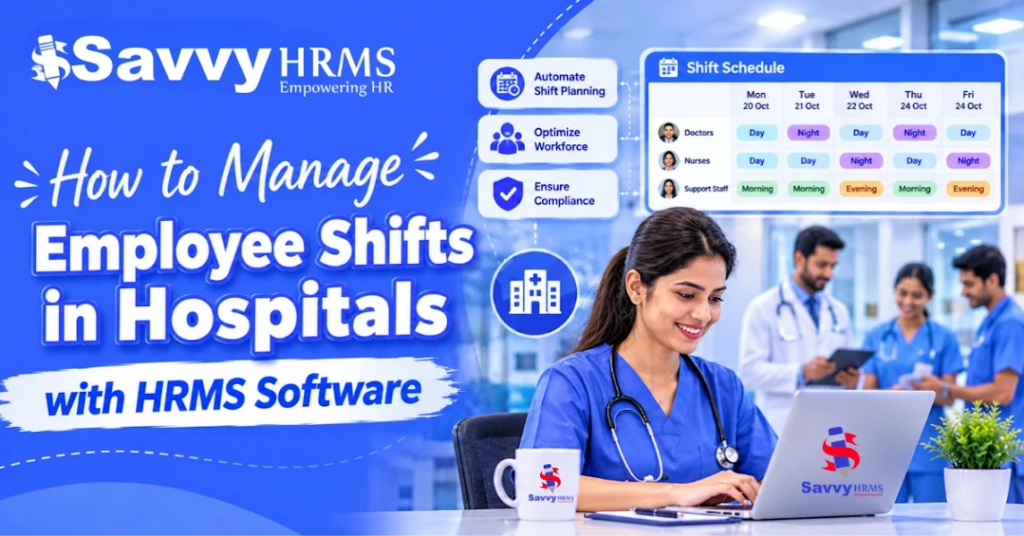
How to Manage Employee Shifts in Hospitals with HRMS Software


-
AuthorS.K. Gupta
-
 Last Updated
November 12, 2026
-
 Reading Time
21 Mins
TL;DR
Managing employee shifts in hospitals needs proper planning, clear communication and regular monitoring. Here are the key points to consider:
- Identify staffing requirements for each department before preparing employee schedules.
- Choose suitable shift patterns, including fixed, rotational, night, split and on-call shifts.
- Distribute duties fairly while considering employee availability and adequate rest periods.
- Coordinate leave requests, weekly offs and shift changes to avoid staffing gaps.
- Track attendance, overtime, late arrivals and absences across different shifts.
- Use HRMS software for healthcare industry to simplify shift scheduling, attendance, leave and payroll management.
- Monitor shift coverage, absenteeism and overtime to identify scheduling problems and improve workforce planning.
Hospitals operate 24/7, so managing employee shifts is important to ensure that the right staff is available when needed. HR teams must coordinate doctors, nurses and support staff across departments while handling rotating shifts, night duties, leave requests, attendance and unexpected absences.
According to the Ministry of Health and Family Welfare, India had 39.40 lakh registered nursing personnel as of February 2026, highlighting the scale of the healthcare workforce which stated that employee well-being is equally important. These factors make proper workforce planning essential. HRMS software for hospitals helps HR teams to manage employee schedules, track attendance, handle shift changes and coordinate payroll information more efficiently.
In this guide, we will explore the common types of hospital shifts, key scheduling challenges, best practices for creating employee rosters and how HRMS software can simplify hospital shift management.
What Is Hospital Shift Management?
Hospital shift management is the process of planning, assigning, and monitoring employee working schedules to ensure that hospitals have the required staff available across departments and operating hours. It involves creating duty rosters, managing shift rotations, tracking attendance, handling leave requests and arranging replacements when employees are unavailable.
Unlike conventional office scheduling, hospital shift management must support continuous operations and different staffing requirements across departments. For example, an emergency department may require round-the-clock coverage, while an outpatient department (OPD) may have staffing requirements based on consultation hours.
An effective hospital shift management process connects these activities so that HR teams can maintain staffing visibility, avoid scheduling conflicts and coordinate employee working hours more efficiently.
Why Is Effective Employee Shift Management Important in Hospitals?
Effective employee shift management helps hospitals to maintain adequate staffing, distribute workloads and ensure smooth operations across departments. It also helps HR teams coordinate employee availability, attendance, leave and overtime.
Let’s understand why structured shift management matters:
1. Maintains Continuous Hospital Operations
Hospitals operate around the clock, so departments such as emergency, ICU and general wards need staff across different shifts as proper scheduling helps managers to plan staff availability and avoid gaps in essential operations.
2. Improves Workload Distribution
When shifts are not planned properly, some employees may end up working more night duties, weekends or extended hours than others. A balanced rotation helps distribute working hours and responsibilities more fairly.
3. Helps Manage Employee Fatigue
Rotating night shifts can affect employees’ sleep and rest patterns. An Indian hospital-based SNORE study involving 293 healthcare professionals found that 82.3% reported sleeping for less than seven hours during night-shift periods. This makes it important to consider rest periods and consecutive night duties while preparing schedules.
4. Reduces Attendance and Payroll Discrepancies
Different shift timings, overnight duties and overtime hours can make attendance tracking complicated as maintaining accurate shift and attendance records helps HR teams to verify working hours and process payroll more reliably.
5. Simplifies Leave and Replacement Management
When employees request leave or need to exchange shifts, managers must consider department staffing requirements before approving changes. A clear process helps them to arrange replacements and avoid scheduling conflicts.
6. Supports Better Workforce Planning
Shift and attendance records help HR teams to identify recurring staffing gaps, overtime patterns and departments that may need additional employees. This information supports better workforce planning and resource allocation.
Overall, effective shift management helps hospitals coordinate employees more efficiently while supporting consistent workforce planning.
What Are the Different Types of Employee Shifts in Hospitals?
Hospitals follow different shift patterns depending on department timings, patient requirements, employee availability and the nature of healthcare services. While some employees work regular daytime hours, others follow rotating, night or on-call schedules to support round-the-clock operations.
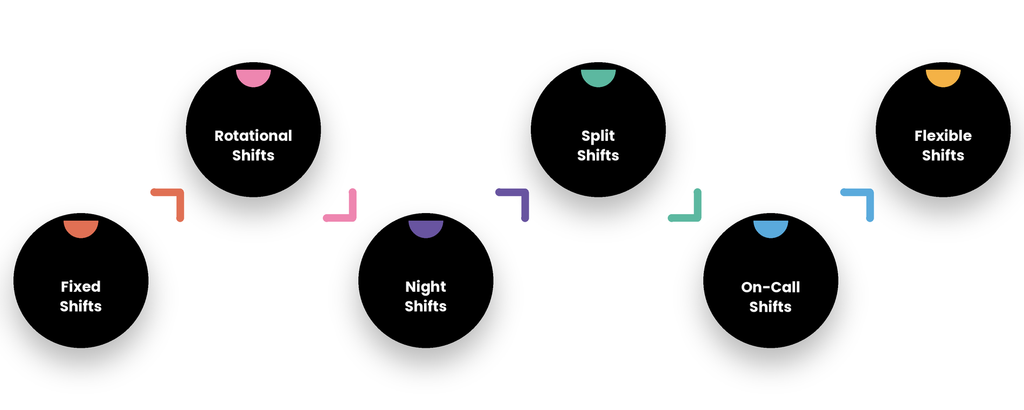
Let’s understand some of the common types of employee shifts used in hospitals.
1. Fixed Shifts
In a fixed shift, employees work the same scheduled hours every working day or week. This arrangement provides a predictable routine and makes it easier to plan employee availability.
Example: OPD staff working during regular daytime consultation hours.
2. Rotational Shifts
In rotational shifts, employees move between morning, evening and night duties according to a planned roster which helps hospitals to distribute shift responsibilities across teams.
Example: Nurses rotating between morning, evening and night shifts in hospital wards.
3. Night Shifts
Night shifts cover overnight working hours when hospitals still need staff to manage emergencies, monitor patients and provide essential services.
Example: Nurses, doctors and support staff assigned to overnight duties in emergency departments and ICUs.
4. Split Shifts
A split shift divides an employee’s working hours into two separate periods, with a break between them. Hospitals may use this arrangement when staffing requirements increase during specific hours.
Example: Support staff working during morning and evening service peaks.
5. On-Call Shifts
During on-call shifts, employees remain available to report for duty when their services are required. The schedule depends on the hospital’s operational needs and the nature of the role.
Example: Specialist doctors or emergency medical teams called in when needed.
6. Flexible Shifts
Flexible shifts allow working hours to vary according to operational requirements, agreed arrangements and the employee’s role. They are generally more suitable for roles where fixed coverage is not essential.
Example: Administrative, diagnostic or support teams with varying workloads.
The right shift pattern depends on department requirements, employee roles, applicable working-hour rules and the level of service coverage needed. Hospitals should also consider employee availability and adequate rest while preparing shift schedules.
How Do Shift Requirements Differ Across Hospital Departments?
Not every hospital department follows the same scheduling pattern. For example, an emergency department requires continuous coverage, whereas an OPD may follow scheduled consultation hours.
The following table explains how hospitals can approach department-wise shift planning.
| Hospital department | Shift management requirements | Scheduling considerations |
| Emergency department | Continuous staffing | Maintain coverage across all shifts and account for emergency replacements. |
| Intensive Care Unit (ICU) | Round-the-clock staffing | Allocate appropriately qualified doctors, nurses and support staff. |
| General wards | Morning, evening and night coverage | Balance employee availability, patient workload and shift rotation. |
| Outpatient Department (OPD) | Primarily scheduled shifts | Align staffing with consultation hours and patient appointments. |
| Laboratory | Scheduled and extended coverage, depending on services | Coordinate technicians and other personnel according to testing requirements. |
| Radiology | Scheduled and emergency coverage | Plan staffing around diagnostic appointments and emergency requirements. |
| Pharmacy | Daytime or extended operating hours | Maintain staff availability according to hospital operating schedules. |
| Administration | Primarily fixed or flexible shifts | Coordinate reception, billing, records and other administrative activities. |
For example, an ICU may need continuous nursing coverage, while an OPD may require more employees during consultation hours, so HR teams should prepare separate department-wise rosters instead of applying the same shift schedule to the entire hospital.
What Are the Common Challenges in Hospital Shift Management?
Hospital shift management becomes difficult when employee availability, patient demand, department requirements and working hours change frequently. Manual scheduling can make it harder to coordinate these changes, especially when HR teams manage multiple departments or hospital locations.
Let’s explore some of the common challenges hospitals face.
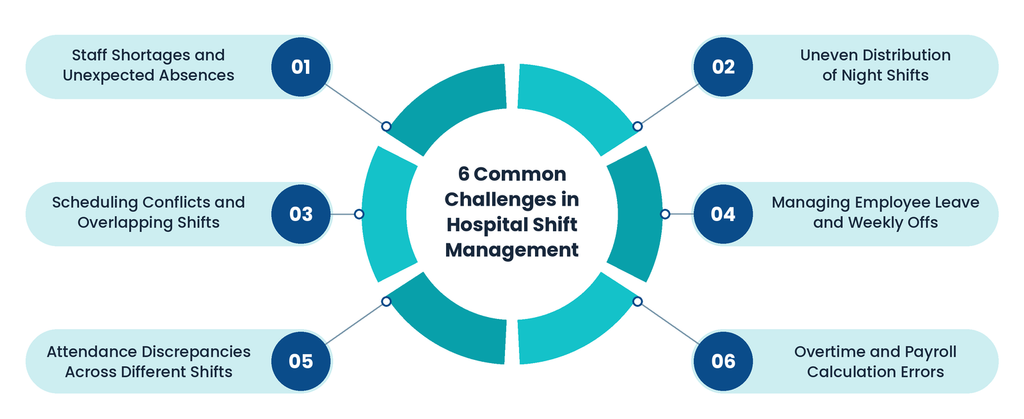
1. Staff Shortages and Unexpected Absences
Hospitals may experience sudden staffing gaps when employees call in sick, request emergency leave or become unavailable due to personal reasons.
For example, if two nurses assigned to a night shift in a general ward are absent then the HR team must identify available replacements without creating excessive workloads for other employees.
How to address it: Maintain updated employee availability records, identify eligible replacement staff and establish an approval process for emergency shift changes.
2. Uneven Distribution of Night Shifts
When night duties are not distributed systematically, some employees may end up working more Night shift management than others. Repeated night duties and insufficient recovery time can affect employee well-being.
How to address it: Establish transparent shift rotation rules, monitor consecutive night duties and review how night shifts are distributed across eligible employees.
3. Scheduling Conflicts and Overlapping Shifts
Scheduling conflicts happen when employees are assigned to overlapping shifts, the same duty or when a shift is left unfilled. These issues are common when departments manage schedules separately.
How to address it: Maintain one central shift roster with clear timings and employee assignments. Also, check for overlapping shifts and vacant slots before finalizing the schedule.
4. Managing Employee Leave and Weekly Offs
Hospitals need to manage employee leave, weekly offs and public holidays while ensuring enough staff are available in every department.
For example, if several nurses request leave on the same day, the manager may need to adjust the roster or arrange replacements.
How to address it: Check department-wise staff availability before approving leave requests and plan replacements in advance to avoid staffing gaps.
5. Attendance Discrepancies Across Different Shifts
Different shift timings, overnight duties and break schedules can make attendance tracking difficult.
For example, an employee working from 10 PM to 6 AM may have check-in and check-out records on two different dates.
How to address it: Use an attendance system that supports different shift timings and overnight schedules. Set clear rules for missing punches and attendance corrections.
6. Overtime and Payroll Calculation Errors
Last-minute shift changes, extended duties and extra working hours can make overtime and salary calculations difficult as missing or incorrect records may also delay payroll processing.
If overtime records are not properly maintained, HR teams may need to reconcile attendance sheets, approval records and payroll data manually.
How to address it: Maintain clear overtime approval rules and connect verified attendance and overtime information with payroll processing.
How Can Hospitals Create an Effective Employee Shift Schedule?
Hospitals can create effective employee shift schedules by assessing staffing requirements, reviewing employee availability, defining shift timings, allocating employees and regularly monitoring roster changes.
A structured scheduling process helps HR teams to maintain department coverage while considering employee working hours and rest requirements. Let’s see how hospital shift scheduling creates an effective employee shift schedule as defined below:
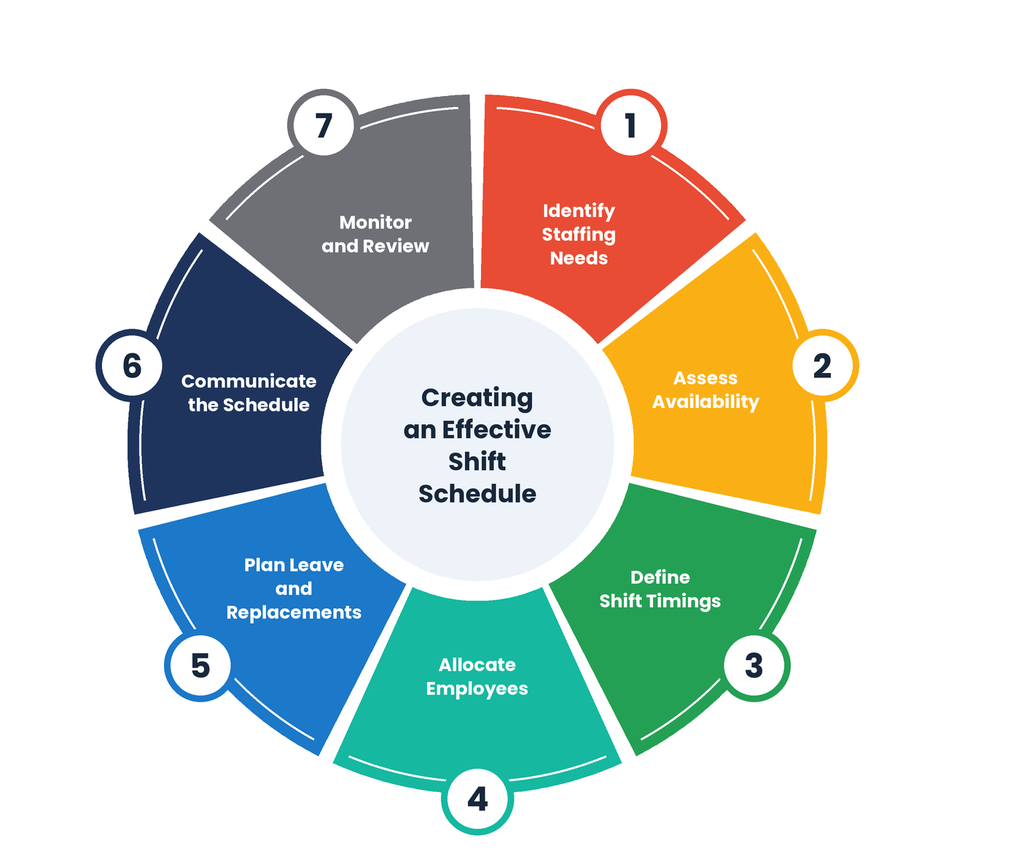
Step 1: Identify Department-Wise Staffing Requirements
Start by understanding how many employees each department needs during different operating hours.
For example, an emergency department may require continuous coverage, while an OPD may need additional employees during scheduled consultation hours.
HR teams should consider:
- Department operating hours.
- Expected patient workload.
- Required employee roles and qualifications.
- Existing employee availability.
- Peak operating periods.
- Emergency and replacement requirements.
This information provides a foundation for preparing department-wise shift schedules.
Step 2: Assess Employee Availability and Qualifications
Before assigning shifts, review employee availability, approved leave, weekly offs and role-specific requirements.
For instance, a hospital should assign employees to duties that match their professional qualifications and authorized responsibilities.
HR teams should maintain updated employee information, including:
- Employee designation and department.
- Work location.
- Employment status.
- Approved leave.
- Shift preferences, where applicable.
- Availability for rotational or night duties.
This helps to reduce scheduling conflicts and avoid unsuitable employee assignments.
Step 3: Define Shift Timings and Rotation Rules
Hospitals should establish clear shift timings based on department requirements and applicable working-hour policies.
For illustration, a hospital might use the following eight-hour shift pattern:
| Shift | Illustrative timing | Coverage period |
| Morning | 6:00 AM – 2:00 PM | Daytime |
| Evening | 2:00 PM – 10:00 PM | Evening |
| Night | 10:00 PM – 6:00 AM | Overnight |
These timings are examples, not prescribed hospital-wide standards. Actual schedules should account for applicable laws, breaks, handovers, overtime and department-specific requirements.
Step 4: Allocate Employees According to Department Requirements
Once shift timings are defined, allocate employees according to department staffing needs and role requirements.
For example, a hospital may assign separate nursing teams to morning, evening and night duties while maintaining the required coverage in each ward.
During allocation, HR teams should consider:
- Department-wise staffing requirements.
- Employee qualifications and responsibilities.
- Workload distribution.
- Previous shift assignments.
- Approved leave and weekly offs.
- Employee availability.
The objective is to maintain adequate coverage without repeatedly assigning inconvenient shifts to the same employees.
Step 5: Account for Leave, Holidays and Emergency Replacements
Employee availability can change after a roster has been prepared. Hospitals should therefore define a process for handling leave requests and unexpected absences.
For example, if a nurse assigned to the evening shift requests emergency leave, the department manager should be able to identify available replacement staff and approve the necessary adjustment.
Hospitals should define:
- Who can request a shift change.
- Who approves shift swaps.
- How emergency replacements are arranged.
- How weekly offs are adjusted.
- How employees are notified about roster changes.
Step 6: Communicate the Final Shift Schedule
Once the roster is approved, employees should receive clear information about their assigned shifts.
A shared scheduling process helps employees and department managers refer to the same updated roster.
Hospitals should communicate:
- Shift start and end times.
- Department and reporting location.
- Weekly offs and holidays.
- Changes to previously assigned shifts.
- Reporting and handover requirements.
Employees should also have a defined channel to raise scheduling concerns or request corrections.
Step 7: Monitor Attendance and Review the Roster
Preparing a shift schedule is not the end of the process as HR teams should regularly compare planned schedules with actual employee attendance.
Reviewing attendance records helps identify:
- Employees who frequently arrive late.
- Unplanned absences.
- Unfilled shifts.
- Excessive overtime.
- Repeated shift changes.
- Differences between scheduled and actual working hours.
Based on these records, HR managers can make adjustments to future schedules and improve workforce planning.
Sample Hospital Employee Shift Roster
The following is an illustrative roster showing how a hospital might distribute employees across three shifts. It is not a recommended staffing ratio or a complete clinical duty plan.
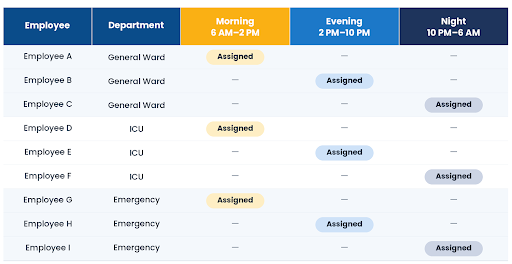
In an actual hospital roster, HR teams would also need to account for weekly offs, breaks, handovers, qualifications, workload and additional staffing requirements.
A digital roster can make these assignments easier to review and update when employee availability changes.
How Does HRMS Software for Hospitals Simplify Employee Shift Management?
HRMS software for hospitals helps HR teams to organize employee shifts, maintain attendance records, manage leave management requests and coordinate payroll-related information through a centralized system.
Instead of depending entirely on spreadsheets and manual approvals, hospitals can use automated scheduling rules and employee records to manage workforce activities more systematically.
For hospitals operating across multiple departments and shifts, an integrated HRMS can support the following processes.
1. Automated Shift Scheduling and Roster Management
Preparing employee duty rosters manually can become time-consuming when hospitals manage multiple departments, different shift timings and rotating schedules.
Healthcare HRMS software allows HR teams to define shift timings, assign employees and maintain digital rosters. Depending on the software, HR managers can create fixed schedules or use automated roster allocation based on predefined rules.
For example, a hospital can define morning, evening and night shifts for its nursing department and assign eligible employees to each shift.
How it helps:
- Simplifies daily, weekly and monthly roster preparation.
- Reduces repetitive manual scheduling work.
- Helps HR teams view employee shift assignments.
- Makes roster updates easier to manage.
2. Department-Wise and Location-Wise Shift Allocation
Different hospital departments and branches may follow different shift timings, weekly offs and attendance policies.
HRMS software with department-wise and location-wise configuration helps HR teams to manage these differences within a centralized platform.
For example, an HR manager can maintain separate attendance and shift rules for ICU staff, general ward employees and administrative teams.
How it helps:
- Organizes employee schedules by department.
- Supports different shift policies across locations.
- Makes workforce information easier to access.
- Helps central HR teams monitor multiple teams.
3. Employee Availability and Shift Management
Employee availability changes due to approved leave, weekly offs, shift exchanges and emergency absences.
An HRMS can provide access to employee records and assigned schedules, helping HR teams review availability before making changes.
For example, when a nurse requests a shift exchange, the manager can review the existing assignments and follow the defined approval process before updating the roster.
How it helps:
- Improves visibility into employee schedules.
- Helps coordinate shift changes.
- Supports approval-based workflows.
- Reduces confusion caused by outdated rosters.
4. Real-Time Attendance Tracking
Tracking attendance across morning, evening and night shifts can be challenging, especially when employees report at different times or work across midnight.
HRMS attendance management software can collect attendance records through supported channels such as biometric devices, web check-ins and mobile applications.
For example, when an employee reports for a night shift, the Hospital attendance management system can record the check-in and check-out information against the configured shift rules.
How it helps:
- Maintains centralized attendance records.
- Helps HR teams monitor employee presence and absence.
- Identifies late arrivals and missing punches.
- Provides attendance information for payroll processing.
5. Leave and Weekly-Off Management
Hospital HR teams must coordinate employee leave requests with existing shift schedules to avoid unnecessary staffing gaps.
HRMS software can help employees to submit leave requests and allow managers to review and approve them through defined workflows.
It can also help HR teams maintain weekly-off and holiday calendars according to applicable department and location policies.
How it helps:
- Simplifies leave applications and approvals.
- Maintains employee leave records.
- Helps coordinate weekly offs and holidays.
- Improves visibility into employee availability.
6. Overtime and Night-Shift Tracking
Employees may need to work beyond their scheduled hours because of emergencies, additional duties, or staffing requirements.
HRMS software can help record actual working hours, overtime and relevant attendance adjustments according to configured policies.
For example, if an employee extends their shift to cover an unexpected absence, the additional working hours can be reviewed and approved by the responsible manager.
How it helps:
- Maintains overtime records.
- Supports overtime approval workflows.
- Helps HR review extended working hours.
- Provides relevant information for payroll calculations.
7. Attendance-to-Payroll Integration
Shift schedules and attendance records directly influence payroll inputs. Missing punches, unapproved overtime and incorrect working-hour records can create salary discrepancies.
An integrated HRMS helps connect attendance and leave information with payroll processing, reducing the need to reconcile multiple spreadsheets.
For example, approved attendance records, leave information and eligible overtime can be used during monthly salary processing, subject to the organization’s payroll policies.
How it helps:
- Reduces repeated manual data entry.
- Helps maintain consistent attendance records.
- Supports accurate salary calculations.
- Simplifies payroll verification.
8. Employee Self-Service and Notifications
Employees working in different departments may not always be available to visit the HR office for routine requests.
Employee Self-Service (ESS) allows employees to access supported HR services through a digital platform.
Depending on the system, employees can:
- View assigned shift schedules.
- Check attendance records.
- Submit leave requests.
- Request attendance corrections.
- Track request approvals.
- Access relevant HR information.
This makes it easier for employees and managers to stay informed about scheduling and attendance updates.
9. Shift Reports and Workforce Insights
HRMS reporting capabilities help managers to review workforce information and identify recurring scheduling issues.
For example, if a department consistently records high overtime, HR can examine its staffing requirements and shift allocation patterns.
Reports can help track:
- Department-wise attendance.
- Employee absenteeism.
- Overtime hours.
- Late arrivals and early departures.
- Shift allocation.
- Attendance corrections.
- Leave utilization.
These insights help HR teams make better workforce planning decisions.
Which KPIs Should Hospitals Track to Improve Employee Shift Management?
Hospitals can improve shift management by tracking key workforce metrics such as shift coverage, employee absenteeism, overtime and unfilled shifts.
These KPIs help HR teams to understand staffing gaps, monitor workloads and identify areas where scheduling needs improvement. Let’s see some useful KPIs hospitals should monitor:
| KPI | What It Measures | Why It Matters |
| Shift Coverage Rate | Percentage of required shifts filled with the required staff | Helps to identify staffing shortages. |
| Employee Absenteeism Rate | How often employees are absent from scheduled shifts | Helps HR to identify attendance patterns. |
| Overtime Hours | Extra hours worked beyond scheduled duties | Helps to monitor employee workloads and payroll costs. |
| Unfilled Shift Rate | Percentage of shifts that remain vacant | Highlights scheduling and replacement gaps. |
| Last-Minute Shift Changes | Number of changes made shortly before a shift starts | Helps to identify frequent scheduling problems. |
| Night-Shift Distribution | How night duties are shared among employees | Helps to maintain a fairer shift rotation. |
| Attendance Regularization Frequency | Number of requests made to correct attendance records | Helps to identify recurring attendance issues. |
Hospitals should define each KPI clearly and review it regularly across departments. For example, if overtime hours keep increasing in one department, HR can check whether the reason is staff shortages, frequent absences or unexpected workload. This helps managers make informed scheduling decisions instead of relying only on assumptions.
What Are the Best Practices for Managing Employee Shifts in Hospitals?
Hospitals can improve employee shift management by defining clear scheduling policies, distributing duties fairly, monitoring attendance and reviewing staffing requirements regularly. The following practices can help HR teams to maintain more organized schedules.
1. Prepare Department-Specific Shift Policies
Avoid applying the same shift rules to every hospital department because Emergency, ICU, OPD and administrative teams may have different working-hour requirements.
Always define shift timings, weekly offs, reporting procedures and approval responsibilities according to department requirements.
2. Distribute Night Shifts Fairly
Create transparent night-shift rotation policies for eligible employees, monitor the number of night duties assigned to each employee and consider previous schedules when preparing new rosters.
This can help to avoid repeatedly assigning inconvenient shifts to the same employees.
3. Consider Rest Periods and Employee Well-Being
Avoid scheduling employees for consecutive duties without considering adequate recovery time. Review extended working hours, consecutive night duties and overtime patterns.
A 2026 study involving 349 nursing professionals in Kerala found that 36.1% of participants reported high burnout. Although the study does not establish shift scheduling as the sole cause but it reinforces the importance of monitoring employee workload and well-being.
4. Establish Clear Shift-Swap Rules
Employees may need to exchange shifts due to personal commitments or unexpected circumstances.
Hospitals should define:
- Who can request a shift swap.
- How much advance notice is preferred.
- Who approves the exchange.
- How employee eligibility is checked.
- How the updated roster is communicated.
Every approved change should be reflected in the official duty roster.
5. Coordinate Leave with Staffing Requirements
Review department-wise staffing availability before approving overlapping leave requests.
For example, if several employees from the same ward request leave during a festival period, managers should review the available workforce and arrange suitable coverage.
6. Monitor Overtime and Extended Working Hours
Regularly review overtime records to identify departments where employees frequently work beyond their scheduled hours.
This can help HR managers to investigate whether additional staffing, revised shift timings or better workload distribution is required.
7. Use a Centralized HRMS for Workforce Records
Maintain employee schedules, attendance information, leave records and payroll inputs in a centralized system.
This reduces dependency on disconnected spreadsheets and makes workforce information easier to access and review.
8. Review Shift Schedules Regularly
Hospital staffing requirements may change because of patient demand, employee availability and operational requirements.
Review rosters periodically and use attendance and overtime reports to identify areas that require adjustment.
Conclusion
Overall, managing employee shifts in hospitals requires more than preparing daily duty rosters. HR teams must coordinate department-wise staffing, employee availability, night duties, leave requests, attendance and overtime while maintaining continuous hospital operations.
A structured shift management process helps hospitals organize these activities, distribute workloads more effectively and maintain accurate workforce records. HRMS software for hospitals further simplifies these processes by bringing shift scheduling, attendance tracking, leave management and payroll information together.



Looking to simplify employee shift and attendance management?
Frequently Asked Questions
1. What is hospital shift management?
Hospital shift management is the process of planning and organizing employee working schedules to maintain adequate staffing across hospital departments. It includes shift allocation, employee availability, attendance tracking, leave management, shift rotation and overtime monitoring.
2. How do hospitals manage 24/7 employee shifts?
Hospitals manage 24/7 shifts by dividing working hours into different schedules, such as morning, evening and night shifts. HR teams allocate employees according to department requirements, qualifications and availability while coordinating weekly offs, leave and replacement arrangements.
3. What are the different types of hospital shifts?
Common hospital shifts include fixed, rotational, morning, evening, night, split and on-call shifts. Hospitals select suitable shift patterns according to department operating hours, employee responsibilities and staffing requirements.
4. How does HRMS software help hospitals manage employee shifts?
HRMS software helps hospitals create employee rosters, assign shifts, track attendance, manage leave requests and record overtime. It centralizes workforce information, making it easier for HR teams to coordinate employee schedules across different departments and locations.
5. How can hospitals manage last-minute shift changes?
Hospitals can manage last-minute shift changes through predefined approval workflows and updated employee availability records. Department managers should identify eligible replacements, approve schedule adjustments and communicate changes to affected employees.
6. How can hospitals reduce employee fatigue during night shifts?
Hospitals can reduce avoidable fatigue by monitoring consecutive night duties, distributing shifts fairly, considering adequate rest periods and reviewing extended working hours. Regularly reviewing employee workload can also help HR teams identify scheduling concerns.
7. How can hospitals manage employee attendance across different shifts?
Hospitals can use attendance management software to record employee check-ins and check-outs through supported biometric, mobile or web-based systems. Configured shift rules help HR teams review working hours, late arrivals, absences and overtime.
8. What features should hospitals look for in HRMS software?
Hospitals should look for shift scheduling, roster management, department-wise configuration, attendance tracking, leave management, overtime monitoring, employee self-service, payroll integration and workforce reporting. The software should also accommodate their existing working-hour policies and operational requirements.