How Does Task Management Software Improve Productivity?


-
AuthorS.K. Gupta
-
 Last Updated
November 12, 2026
-
 Reading Time
17 Mins
TL;DR
Task management software helps businesses to organize daily work, assign responsibilities and track progress from one place. It improves team productivity by:
- Keeping task details, deadlines and updates organized.
- Helping employees prioritize important assignments.
- Defining clear task ownership and accountability.
- Automating repetitive tasks and reminders.
- Improving team communication and collaboration.
- Tracking task progress, deadlines and workloads.
- Identifying workflow delays through reports and analytics.
- Supporting remote, hybrid and cross-functional teams.
Choosing the right task management software helps businesses reduce manual coordination, manage workloads more effectively and complete tasks on time.
Managing multiple tasks, meeting deadlines and coordinating team responsibilities can become challenging as businesses grow. Employees often spend considerable time switching between activities, searching for task updates, following up with colleagues and organizing their daily work. These activities leave less time for completing important assignments.
According to Microsoft’s 2025 Work Trend Index, 80% of the global workforce, including employees and leaders, say they lack enough time or energy to do their work. The report also highlights how frequent interruptions from meetings, emails and messages affect the working day.
Task management software helps businesses to address these challenges by providing a centralized platform to create, assign, prioritize and track tasks. In this guide, you will learn about how task management software helps teams to organize their work more effectively, improve accountability and complete assignments on time.
What Is Task Management Software?
Task management software is a digital solution that helps individuals and teams to create, assign, organize, prioritize and monitor tasks throughout their completion lifecycle. It provides a centralized workspace where employees can view their responsibilities, track deadlines, share updates and collaborate with other team members.
Businesses use task management tools to coordinate daily activities, manage workloads and monitor work progress without depending totally on spreadsheets, emails or manual follow-ups.
Common capabilities of task management software include:
- Task Creation and Assignment: Allows managers to create tasks, assign responsibilities and provide instructions to employees.
- Deadline Management: Helps teams to set due dates and monitor approaching deadlines.
- Task Prioritization: Enables employees to identify urgent and important assignments.
- Progress Tracking: Displays task statuses such as pending, in progress, under review and completed.
- Team Collaboration: Allows employees to share comments, documents and updates related to specific tasks.
- Workflow Automation: Automates recurring activities, notifications and routine task updates.
- Reporting and Analytics: Helps managers to review task completion, identify delays and monitor workload distribution.
For example, a marketing manager can use task management software to assign blog writing, graphic design, content review and publishing activities to different employees. Each task can have an assigned owner, deadline and status which allows the manager to monitor the entire content workflow from one place.
Why Do Businesses Need Task Management Software to Improve Productivity?
As businesses manage more projects and daily responsibilities, keeping track of work through emails, spreadsheets and messages can become challenging.
Employees may find it difficult to decide what to work on first, while managers may struggle to track progress and ensure tasks are completed on time.
Let’s see some of the common challenges businesses face include:
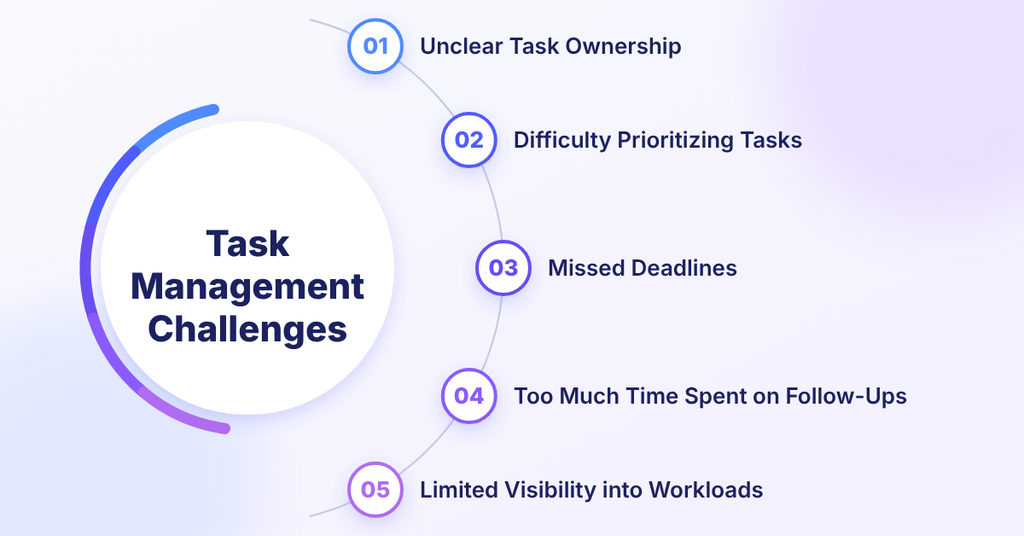
1. Unclear Task Ownership
When tasks are not assigned clearly then employees may assume someone else is responsible for completing them which can lead to confusion, repeated work and unnecessary delays.
2. Difficulty Prioritizing Tasks
Employees often handle multiple assignments at the same time. Without clear priorities, they may spend too much time on less important work while urgent tasks remain pending.
3. Missed Deadlines
Relying on manual reminders, emails or personal calendars makes it easy to overlook deadlines, particularly when several employees are working on related tasks.
4. Too Much Time Spent on Follow-Ups
Managers often have to contact employees through calls, emails or messages to check task progress. These repeated follow-ups take time away from important work and planning.
5. Limited Visibility into Workloads
Without a central system, managers may find it difficult to see who has too many assignments, which tasks are still pending and who has the capacity to take on more work.
How Does Task Management Software Improve Team Productivity?
Task management software helps teams stay organized, manage their workload and complete tasks on time. It brings assignments, deadlines, priorities and progress updates into one place, so employees know what needs to be done, when it needs to be done and how their work supports business goals.
Lest see the Benefits of Task Management Software which helps in improving team productivity.
1. Keeps Task Information Organized in One Place
Task management software gives employees a central place to view task details, deadlines, documents, comments and progress updates.
Instead of looking in emails, spreadsheets and different messaging platforms, employees can find the information they need in one system.
This helps teams:
- Organize daily tasks.
- Access important documents and instructions.
- Check pending and completed assignments.
- Spend less time searching for information.
- Keep task-related discussions in one place.
Example: A marketing team handling multiple campaigns can store content briefs, design requirements, approval updates and publishing deadlines within the same task management system. Everyone involved can access the required information without repeatedly contacting the manager.
As a result, employees spend less time in managing information and more time completing their work.
2. Helps Employees Prioritize Important Tasks
Not all tasks have the same level of urgency or importance. When employees have several assignments then it is difficult to decide what to complete first.
Task Tracking software helps employees to organize work based on priority, deadlines and business needs.
For example, managers can group tasks into different priority levels:
- High priority: Tasks that need immediate attention.
- Medium priority: Important tasks that should be completed within the planned timeline.
- Low priority: Tasks that can be scheduled after more urgent work.
Many tools also offer priority labels, deadline reminders and visual task boards to make important assignments easier to identify.
This helps employees to focus on the work that matters most instead of spending time deciding what to do next.
3. Makes Task Ownership and Responsibilities Clear
When several employees work on the same project, unclear responsibilities can result in duplicated work, missed assignments and confusion.
Task management software allows managers to assign specific tasks to individual employees or teams. Each task can include:
- Task details and expected results.
- Assigned employee or team.
- Start date and deadline.
- Priority level.
- Relevant documents.
- Current task status.
Employees can also update the task status as they make progress.
Example: An HR manager can assign onboarding documentation to an HR executive with a clear deadline. The employee knows what needs to be completed, while the manager can check progress through the system.
This gives employees a clear understanding of their responsibilities and makes it easier for managers to track task ownership.
4. Automates Repetitive Tasks and Saves Time
Employees often spend time on routine activities such as sending reminders, creating recurring tasks and updating task statuses. These activities can take more time and deviate employees from doing important work.
Task management software with workflow automation features can handle some of these activities automatically.
Businesses can use automation for:
- Creating recurring tasks.
- Sending deadline reminders.
- Assigning tasks based on predefined rules.
- Notifying employees when task statuses change.
- Sending alerts for overdue assignments.
- Managing routine approval workflows.
Example: An Core HR team can set up a recurring monthly payroll preparation task. The system can create the task according to the configured schedule and notify the responsible employee.
This reduces manual follow-ups and gives employees more time to focus on their core responsibilities.
5. Makes Team Collaboration and Communication Easier
When multiple employees or departments work on the same assignment, poor communication can slow down progress.
Task management tools provide a shared workspace where employees can discuss tasks, share documents and post updates. This keeps conversations connected to the work they relate to instead of storing them across multiple email threads.
Example: When a designer completes a campaign banner, they can attach the file to the assigned task and notify the marketing manager. The manager can review the design and share feedback in the same workspace.
This helps to reduce communication gaps, improves coordination and makes it easier for teams to work together.
6. Helps Managers Track Task Progress in Real Time
Managers need to know whether work is progressing as planned or whether any assignments are facing delays. Without regular updates, identifying problems can become difficult.
Task tracking software provides a clear view of ongoing work through dashboards, task boards and progress reports.
Managers can check:
- Newly assigned tasks.
- Tasks currently in progress.
- Completed assignments.
- Tasks waiting for approval.
- Overdue tasks.
- Tasks requiring employee action.
Example: A project manager handling a website redesign can track content writing, UI design, development and testing tasks from one dashboard.
If design approval is delayed then manager can identify the issue and take action before it affects the overall project timeline.
This gives managers better visibility into ongoing work and helps them respond to delays sooner.
7. Helps Distribute Workloads More Effectively
When work is not distributed properly, some employees may have too many assignments while others have the capacity to take on more work.
Task management software helps managers to review assigned tasks, pending work and employee workloads.
Managers can use this information to:
- Identify employees handling too many assignments.
- Review pending tasks across teams.
- Redistribute work when needed.
- Assign tasks based on employee availability.
- Avoid unnecessary workload imbalances.
Example: If one IT executive is handling several support requests while another has fewer pending assignments, the manager can redistribute suitable tasks to balance the workload.
This helps businesses to make better use of available resources and avoid delays caused by uneven work distribution.
8. Prevents Workflow Delays Through Better Task Coordination
Many business activities depend on the completion of earlier tasks. If one activity is delayed, the next stage may also be affected.
Task management software in India helps teams to organize related activities through task dependencies and workflow stages. Employees can see which tasks need to be completed before the next activity begins.
Example: Publishing a blog may involve several steps:
- Topic selection.
- Content research.
- Article writing.
- Content editing.
- Design preparation.
- Final approval.
- Publishing.
Each activity can be assigned to the responsible employee with a planned deadline. Task dependencies help team members to understand how their work connects with the next stage.
This makes handoffs clearer and helps teams complete work in a more organized manner.
9. Helps Managers Make Better Decisions Through Reports and Analytics
Managers need clear information about task progress and team performance to identify where work is getting delayed.
Task management software with reporting and analytics features can show task completion trends, overdue assignments, workload patterns and workflow progress.
These reports help businesses:
- Identify tasks that are frequently delayed.
- Understand how work is distributed.
- Review task completion trends.
- Find bottlenecks in workflows.
- Plan future assignments more effectively.
Example: If reports show that design approvals regularly delay marketing campaigns, managers can review the approval process and make changes to responsibilities or timelines.
This helps businesses to improve workflows using actual task information rather than assumptions.
10. Supports Productivity in Remote and Hybrid Teams
Managing employees who work from different locations or follow different schedules can make coordination difficult.
Task management software in India gives remote and hybrid teams a shared digital workspace where they can access assignments, check deadlines and update their progress.
It supports distributed teams through:
- Centralized task information.
- Remote access to assignments.
- Shared deadlines and priorities.
- Task-related comments and updates.
- Notifications about important changes.
- Visibility into ongoing work.
Example: A remote marketing team can coordinate content creation, design work and campaign approvals through an online task management system. Team members can stay updated on their responsibilities without being in the same office.
This helps distributed employees to stay connected, understand their priorities and keep work moving forward.
Which Task Management Software Features Help Improve Productivity?
Task management software includes features that help businesses to organize assignments, manage deadlines and coordinate team activities. While basic features help employees to create and track tasks, advanced capabilities make it easier to automate routine work, collaborate with team members and monitor progress.
Let’s see some important features that help to improve productivity.
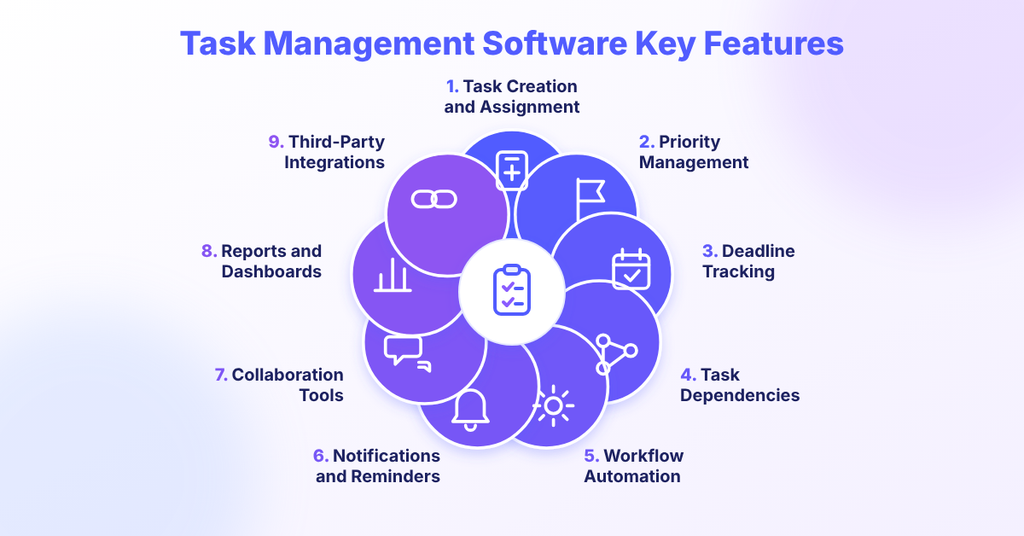
1. Task Creation and Assignment
This feature allows managers to create tasks and assign them to specific employees or teams. They can add task descriptions, responsibilities and deadlines so everyone knows what needs to be done and who is responsible for completing it.
2. Priority Management
Priority management helps employees to identify which tasks need immediate attention. Managers can assign priority levels, such as high, medium or low, so employees can organize their work and focus on important assignments first.
3. Deadline Tracking
Deadline tracking allows employees to view task due dates and monitor approaching deadlines. It helps teams to plan their work, avoid missed deadlines and complete assignments within the expected timeline.
4. Task Dependencies
Sometimes tasks cannot begin until other activities are completed. Task dependencies help employees to understand the order in which work needs to be done.
For example, a blog cannot be published until it has been written, edited and approved. Setting dependencies helps teams to coordinate these activities and avoid unnecessary delays.
5. Workflow Automation
Workflow automation reduces the time employees spend on repetitive administrative activities. Depending on the software, businesses can automate recurring task creation, deadline reminders, task assignments and status notifications.
This allows employees to spend more time on important work instead of handling routine updates manually.
6. Notifications and Reminders
Notifications and reminders keep employees informed about upcoming deadlines, new assignments, task changes and pending approvals. These alerts help team members to stay updated and reduce the chances of overlooking important tasks.
7. Collaboration Tools
Collaboration features allow employees to share files, add comments and discuss task-related updates within the same platform. This keeps communication connected to specific assignments and reduces the need to search through multiple email conversations.
8. Reports and Dashboards
Reports and dashboards give managers an overview of task completion, pending assignments, overdue work and team workloads. This information helps them to identify workflow bottlenecks, review progress and make better decisions about task allocation.
9. Third-Party Integrations
Integration capabilities allow task management software to connect with other business applications, such as attendance systems, calendars, payroll tools and project management systems.
This reduces the need to switch between multiple applications and helps teams manage their work more smoothly.
How Can Different Teams Improve Productivity Using Task Management Software?
Task management software helps different teams organize their daily work, assign responsibilities and track progress from one place. Each department can use it to manage its specific activities, reduce manual coordination and complete tasks on time.
Here is how different teams can use task management software to improve productivity.
1. Remote and Hybrid Teams
Remote and hybrid teams often work from different locations and schedules. Task management software provides a shared workspace where employees can access assignments, share updates and track work without depending on frequent meetings.
Teams can use it to:
- Manage tasks asynchronously
- Keep work organized
- Coordinate task handoffs
This helps remote and hybrid teams to stay aligned and maintain smooth coordination, even when employees are not working at the same time.
2. Marketing and Creative Teams
Marketing and creative teams manage multiple activities, including content creation, campaign planning, graphic design and approvals. Task management software helps them to organize these activities and keep campaigns on schedule.
Teams can use it to:
- Manage content calendars
- Track reviews and approvals
- Manage files and feedback
This makes campaign coordination easier and reduces delays caused by scattered communication.
3. IT and Software Development Teams
IT and software development teams handle several activities, such as feature development, bug fixing, software testing and product releases. Task management software helps them to break larger projects into smaller tasks and track each stage.
Teams can use it to:
- Manage sprints and backlogs
- Track task dependencies
- Monitor development progress
This helps teams to manage development work in a structured way and identify delays before they affect release timelines.
4. Sales and Telecalling Teams
Sales and telecalling teams manage leads, customer interactions, follow-ups and daily targets. Task tracking systems help them to organize these activities and ensure that important follow-ups are not missed.
Teams can use it to:
- Schedule lead follow-ups
- Track lead progress
- Monitor team activities
This helps sales teams to stay organized and manage customer follow-ups more effectively.
5. Customer Support Teams
Customer support teams handle multiple customer queries, complaints and service requests every day. Task software helps them to assign requests, set priorities and track each issue until it is resolved.
Teams can use it to:
- Track customer requests
- Prioritize tickets
- Automate notifications and escalations
- Monitor resolution timelines
This helps support teams to manage customer requests more efficiently and reduce delays in issue resolution.
How Can Businesses Measure Productivity Improvements After Implementing Task Management Software?
Businesses can measure productivity improvements by tracking task completion, deadline adherence, task cycle time and workload distribution. Comparing these indicators before and after implementation helps managers understand whether the software is improving work execution.
Here are some useful productivity KPIs to monitor:
| KPI | What it measures | Why it matters |
| Task Completion Rate | Percentage of assigned tasks completed during a defined period. | Shows how effectively teams execute assigned work. |
| On-Time Completion Rate | Percentage of tasks completed by their deadlines. | Evaluates deadline adherence. |
| Average Task Cycle Time | Average time taken to complete a task. | Helps identify workflow delays. |
| Overdue Task Percentage | Percentage of tasks that remain overdue. | Highlights scheduling and execution problems. |
| Workload Distribution | How assignments are distributed across employees. | Helps identify workload imbalances. |
| Task Rework Rate | Percentage of completed tasks that require corrections or repeated work. | Highlights potential quality and process issues. |
For example, if a marketing team regularly misses content publishing deadlines, managers can compare on-time completion rates before and after introducing task management software.
However, these metrics should be interpreted alongside task complexity, work quality and available resources. Completing more tasks does not necessarily mean employees are more productive if the quality of work declines.
Conclusion
Task management software helps businesses improve productivity by bringing daily assignments, deadlines, communication and progress tracking into one centralized workspace. It allows employees to understand their responsibilities, prioritize important activities and coordinate work with other team members.
From automating repetitive tasks and improving collaboration to monitoring workloads and identifying workflow delays, the right task management solution can help businesses organize work more effectively.
However, achieving these improvements also depends on clear responsibilities, realistic deadlines, suitable workflows and consistent employee adoption.
Ultimately, businesses should choose task management software that aligns with their operational requirements, simplifies everyday work and supports better team coordination as the organization grows.



Looking to improve team productivity and simplify daily work management?
Frequently Asked Questions
1. How does task management software improve productivity?
Task management software improves productivity by centralizing task information, assigning clear responsibilities, setting deadlines and tracking progress. It also helps teams to automate repetitive activities, improve collaboration and identify workflow delays.
2. What are the main benefits of task management software?
The main benefits include better task organization, improved time management, increased accountability, effective task prioritization, reduced manual work, better team collaboration and improved workload visibility.
3. How does task management software improve team collaboration?
It provides a shared workspace where employees can access assignments, share documents, post comments and view task updates. This keeps communication connected to the relevant work and helps teams coordinate responsibilities.
4. Can task management software reduce missed deadlines?
Yes. Task management software helps to reduce missed deadlines through due-date tracking, automated reminders, priority settings and progress monitoring. Managers can also identify overdue tasks and address delays earlier.
5. Which features help improve productivity in task management software?
Important features include task assignment, deadline management, priority settings, workflow automation, progress tracking, notifications, collaboration tools, reporting dashboards and task dependencies.
6. Is task management software useful for small businesses?
Yes. Small businesses can use task management software to organize daily assignments, distribute responsibilities, track deadlines and coordinate work without relying entirely on spreadsheets and manual follow-ups.