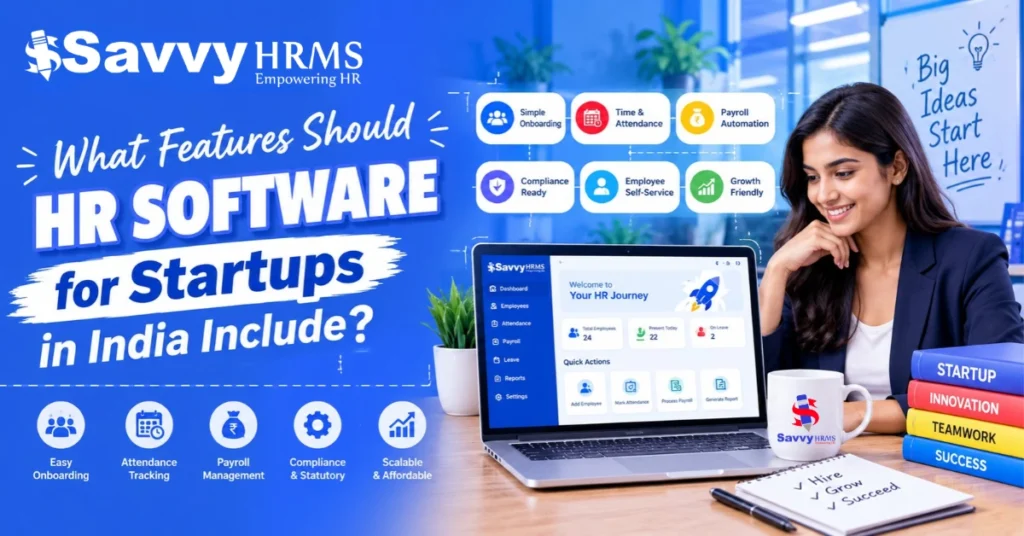
What Features Should HR Software for Startups in India Include?


-
AuthorS.K. Gupta
-
 Last Updated
October 31, 2026
Last Updated
October 31, 2026
-
 Reading Time
18 Mins
Reading Time
18 Mins
TL;DR
HR software for startups makes it easier to manage employees and handle daily HR tasks without depending on spreadsheets and manual work. Here are some important features to look for when choosing HR software for your startup:
- Employee Management: Keeps employee details, documents, and records organised in one place.
- Payroll Management: Helps in calculating salaries, managing deductions, and generating payslips.
- Attendance Management: Makes it easier to track working hours, shifts, and overtime.
- Leave Management: Helps employees to apply for leave and managers review and approve requests.
- Statutory Compliance: Supports payroll-related requirements such as PF, ESI, Professional Tax, and TDS, wherever applicable.
- Employee Self-Service: Lets employees check their payslips, apply for leave, and update personal information.
- Recruitment and Onboarding: Helps HR teams manage hiring activities and complete joining formalities.
- Performance Management: Makes it easier to set goals, review performance, and track employee progress.
- HR Reporting and Analytics: Helps HR teams understand employee data and keep track of workforce trends.
- Cloud Access and Integrations: Allows teams to access HR information online and connect HR software with other business tools.
Running a startup means handling several things at once, from building the business and serving customers to managing employees. As the team grows, tasks like maintaining employee records, processing salaries, tracking attendance, approving leave, and managing compliance also become part of the routine.
Handling everything through spreadsheets, emails, and manual records can become difficult and time-consuming. This is where HR software for startups can help by bringing important HR activities together in one place which makes it easier to manage employee information and handle everyday tasks.
But with so many options available, how do you know which features your startup actually needs? The right software should meet your current requirements, support Indian payroll and compliance processes, and grow along with your team. Let’s look at the essential features to consider when choosing HR software for your startup.
Why Do Startups in India Need HR Software?
HR software for startups helps startups to organize employee-related activities, reduce repetitive administrative work, and establish consistent HR processes as their teams grow.
In the beginning, founders or a small HR team may handle recruitment, payroll, attendance, and employee queries themselves. As the number of employees increases, managing these responsibilities manually can take time away from other business activities.
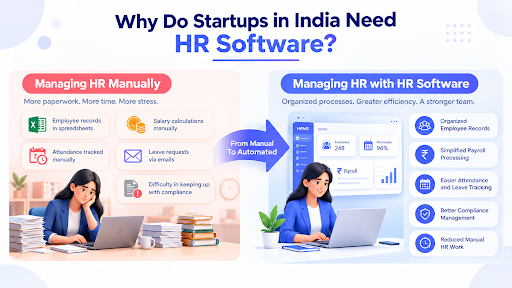
Here are some common challenges startups can address with HR software:
- Scattered employee information: Employee details, documents, and salary records may be stored in different spreadsheets and folders. HR software keeps these records organized in one place.
- Manual payroll calculations: Calculating salaries, deductions, reimbursements, and other components manually can increase the chances of errors. Payroll automation helps streamline these activities.
- Difficult attendance tracking: Managing working hours, late arrivals, shifts, and overtime through manual registers becomes challenging as teams expand.
- Time–consuming leave management: Handling leave requests through emails or messages makes it difficult to maintain accurate leave balances and approval records.
- Compliance-related responsibilities: Indian businesses need to understand and manage applicable payroll deductions, contributions, and statutory requirements.
- Limited workforce visibility: Without organized HR reports, founders and managers may find it difficult to understand employee headcount, attendance patterns, and workforce costs.
An HRMS brings these activities together, giving startups a more structured way to manage their employees without building separate processes for every HR function.
12 Essential Features to Look for in HR Software for Startups in India
The right HR software should cover the everyday requirements of managing employees while allowing startups to add more capabilities as their workforce expands.
Some features, such as employee records, payroll, attendance, and leave management, are useful from the beginning while others, such as advanced analytics and performance management, become more valuable as the organization grows.
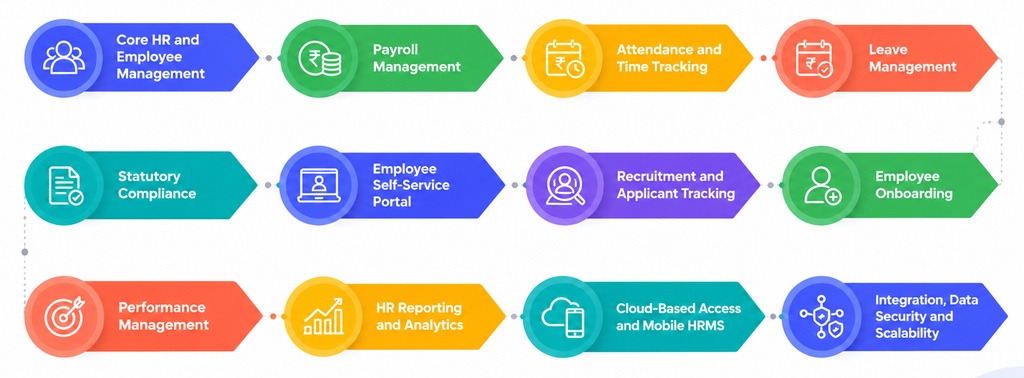
Here are 12 essential HR software features Indian startups should consider.
1. Core HR and Employee Database Management
Core HR management is one of the first features startups should look for in HR software. It provides a centralized place to store and manage employee information instead of maintaining separate spreadsheets and documents.
When employee details are stored across different files, updating records, finding documents, and checking employment information can become time-consuming. A centralized employee database helps HR teams maintain consistent and accessible records.
Key capabilities to look for:
- Employee profiles containing personal and contact information.
- Job titles, departments, reporting managers, and joining dates.
- Employment history and employee status.
- Digital storage of offer letters, appointment letters, and other documents.
- Employee ID and other relevant identification details.
- Easy updates to employee information.
Example: When a startup hires a new employee, HR can create a profile, upload joining documents, assign a department, and record the employee’s designation in one system. The information can then be used across other HR processes.
Why it matters for startups: A centralized employee database reduces dependency on spreadsheets and makes it easier to manage employee information as the workforce expands.
2. Automated Payroll Management
Payroll management is another essential feature of HR software for Indian startups. It helps businesses calculate employee salaries, manage deductions, and generate payslips without relying entirely on manual calculations.
Payroll can become complicated when businesses have different salary structures, allowances, reimbursements, incentives, and statutory deductions. A payroll management module helps organize these components and streamline monthly salary processing.
Key capabilities to look for:
- Customisable salary structures and CTC components.
- Basic salary, HRA, allowances, and other earnings.
- Salary deductions, loans, and advances.
- Reimbursement management.
- Leave without pay and attendance-based salary adjustments.
- Automated payslip generation.
- Payroll summaries and salary reports.
- Bank transfer statements or payment file generation.
For Indian startups, the software should also support applicable statutory payroll calculations and tax-related requirements.
Example: Suppose there is a startup with 40 employees. Each employee may have a different salary structure, leave balance, and reimbursement amount. Instead of calculating every salary separately, HR can use payroll software to process these components together and review the payroll before releasing salaries.
Why it matters for startups: Payroll automation helps reduce repetitive calculations, maintain salary records, and make monthly payroll processing more organized.
3. Attendance and Time Tracking
Attendance management software helps startups record employee working hours and track attendance without maintaining manual registers.
This feature becomes particularly useful when employees work from different locations, follow flexible schedules, or operate in multiple shifts.
Instead of collecting attendance data manually, startups can use HR software to record working hours and make attendance information available to HR and managers.
Key capabilities to look for:
- Web-based and mobile attendance marking.
- Biometric attendance integration.
- GPS-based attendance and geofencing.
- Employee check-in and check-out records.
- Shift and roster management.
- Late arrival and early departure tracking.
- Overtime calculation and reports.
- Attendance regularisation and approval workflows.
Example: A startup with employees working from an office and a client location can use different attendance methods to record working hours. HR can review the records centrally instead of collecting attendance information from separate sources.
Why it matters for startups: Accurate attendance records help HR teams monitor working hours and provide the information needed for leave and payroll processing.
4. Leave Management and Approval Workflows
Leave management is an important feature of HRMS for startups that want to maintain clear leave policies and simplify employee time-off requests.
Managing leave through emails or spreadsheets can make it difficult to track available balances, pending requests, and approved absences. A leave management system brings these activities together and provides a clear record of employee leave.
Key capabilities to look for:
- Customizable leave types and policies.
- Annual, casual, sick, and other applicable leave categories.
- Leave balance calculations.
- Leave application and approval workflows.
- Holiday calendar management.
- Leave accrual and carry-forward rules.
- Compensatory off management.
- Leave history and utilisation reports.
Example: An employee applies for three days of leave through the employee portal. The reporting manager receives the request, checks the employee’s available balance, and approves or rejects it. The updated leave balance is then reflected in the system.
Why it matters for startups: A structured leave process reduces manual follow-ups and helps employees and managers access accurate leave information.
5. Indian Statutory Compliance Management
Statutory compliance management is a particularly important feature when evaluating HR software for Indian startups. Businesses need to understand the employment-related laws and payroll requirements applicable to their establishment, workforce, and location.
Managing these requirements manually can involve multiple calculations, employee records, reports, and filing activities. HR software with compliance capabilities can help organize these processes and maintain relevant payroll information.
Key compliance areas to consider include:
- Employees’ Provident Fund (EPF): Supports applicable provident fund calculations, employee records, and contribution-related reports.
- Employees‘ State Insurance (ESI): Helps manage eligible employee information, contribution calculations, and supporting statements.
- Professional Tax (PT): Supports state-specific professional tax calculations based on applicable rules.
- Tax Deducted at Source (TDS): Helps calculate salary-related tax deductions using employee salary information and applicable tax rules.
- Labour Welfare Fund (LWF): Supports applicable state-specific contributions and records.
For example, EPFO publishes the applicable contribution framework, while ESIC provides employer and employee contribution information.
Startups should also check whether the payroll software is updated to reflect changes in tax rules. For instance, the Income Tax Act, 2025 came into effect from 1 April 2026, requiring employers to account for the applicable new tax provisions when processing salary TDS for the 2026–27 tax year.
Example: A startup operating in different Indian states may need to manage different Professional Tax requirements. Software with configurable state-wise compliance settings can help HR teams organize these calculations and records.
Why it matters for startups: Compliance features help businesses manage applicable statutory payroll requirements systematically and reduce dependence on manual calculations. However, software does not replace the need to verify legal applicability, maintain accurate employee information, and review filings.
6. Employee Self-Service Portal
An employee self-service (ESS) portal allows employees to access their HR information and complete routine activities without contacting HR for every request.
For startups with small HR teams, this feature can reduce repetitive administrative work and give employees more control over their information.
Key capabilities to look for:
- Payslip access and downloads.
- Leave applications and balance checks.
- Attendance records and regularisation requests.
- Personal information updates.
- Access to employment-related documents.
- Expense and reimbursement requests.
- HR-related request tracking.
Example: Instead of asking HR for their latest payslip or remaining leave balance, employees can log in to the ESS portal and access the information themselves.
Why it matters for startups: Employee self-service reduces routine HR queries and makes everyday HR services more accessible.
7. Recruitment and Applicant Tracking
Recruitment management helps startups organize their hiring activities, particularly when they need to fill multiple positions within a short period.
Without a structured recruitment process, candidate information, interview schedules, and hiring updates may be spread across emails, spreadsheets, and messaging platforms.
An applicant tracking system (ATS) helps bring these activities together.
Key capabilities to look for:
- Job requisition and vacancy management.
- Candidate profile management.
- Resume and application tracking.
- Interview scheduling.
- Recruitment pipeline visibility.
- Interview feedback management.
- Offer letter generation.
- Candidate status updates.
Example: A startup hiring software developers and sales executives can use recruitment software to maintain separate candidate pipelines, track interview progress, and check which candidates have received offers.
Why it matters for startups: Recruitment management helps hiring teams organize candidate information and maintain a more consistent hiring process.
8. Employee Onboarding Management
Employee onboarding software helps startups manage the activities involved in bringing new employees into the organization.
The onboarding process includes collecting employee details, verifying documents, completing joining formalities, and helping new hires understand company policies.
Managing these activities manually for every new employee can create unnecessary administrative work.
Key capabilities to look for:
- Digital employee information forms.
- Document collection and storage.
- Offer and appointment letter management.
- Joining checklists.
- Policy acknowledgement records.
- Task assignment to HR and reporting managers.
- Onboarding progress tracking.
Example: When a candidate accepts an offer, HR can initiate an onboarding checklist to collect documents, complete employee registration, assign joining tasks, and prepare the employee’s profile before the joining date.
Why it matters for startups: A structured onboarding process helps ensure that important joining activities are completed consistently and employee records are available from the beginning.
9. Performance Management and Goal Tracking
As startups expand, founders and managers need a structured way to understand employee performance and align individual contributions with business objectives.
Performance management software helps organizations set goals, collect feedback, and conduct employee reviews through a defined process.
Key capabilities to look for:
- Employee goal and KPI setting.
- Individual and team performance tracking.
- Periodic performance reviews.
- Manager and peer feedback.
- Employee self-assessments.
- Performance review history.
- Appraisal and evaluation reports.
Example: A startup can set quarterly goals for its sales team, review individual progress, collect manager feedback, and use the results during performance discussions.
Why it matters for startups: Performance management helps businesses to define clear expectations and introduce structured employee evaluation as teams expand.
10. HR Reporting and Analytics
HR reporting and analytics help startups understand workforce information through organized reports and dashboards.
Instead of manually combining data from different spreadsheets, HR teams can use reporting tools to review employee information and identify workforce trends.
Key capabilities to look for:
- Employee headcount reports.
- Department-wise employee information.
- Attendance and absenteeism reports.
- Leave utilisation reports.
- Payroll cost summaries.
- Employee turnover reports.
- Recruitment and hiring reports.
- Exportable Excel and PDF reports.
Example: A founder wants to understand monthly employee costs across different departments. HR can use payroll reports to review salary expenses and compare workforce costs.
Why it matters for startups: HR reports provide better visibility into employee-related information and help business owners make more informed workforce decisions.
11. Cloud-Based Access and Mobile HRMS
Startups often have employees working from offices, client locations, or remote environments. That’s where cloud-based HR software allows authorized users to access relevant HR information without depending on a single office computer.
Mobile accessibility also makes it easier for employees and managers to complete routine activities while working away from their desks.
Key capabilities to look for:
- Cloud-based employee records.
- Mobile attendance marking.
- Leave applications and approvals through mobile devices.
- Mobile payslip access.
- Manager approval notifications.
- Secure access to HR documents.
- Role-based access permissions.
Example: An employee working remotely can apply for leave through a mobile application, while the reporting manager can review and approve the request without logging in from an office computer.
Why it matters for startups: Cloud and mobile access make HR services more accessible to distributed teams and reduce dependence on location-specific processes.
12. Integration, Data Security and Scalability
An HRMS should not only support current HR activities but also accommodate changing business requirements. This makes integration, data security, and scalability important considerations when choosing software.
As startups expand, they may introduce new departments, offices, payroll processes, and business applications. The HR system should be able to support these changes without requiring businesses to replace their software immediately.
Key capabilities to look for:
- Integration with accounting and finance systems.
- Biometric device integration.
- ERP and other business software integrations.
- Role-based access controls.
- Secure employee data storage.
- Audit trails and activity logs.
- Data backup and recovery capabilities.
- Support for additional employees, departments, and locations.
Example: A startup initially managing one office may expand to three locations. Scalable HR software should allow the business to configure additional locations, employee groups, and attendance policies without maintaining separate HR databases.
Why it matters for startups: These capabilities help protect employee information, connect HR with other business operations, and support future workforce expansion.
Which HR Software Features Should Startups Prioritize at Different Growth Stages?
Not every startup needs all HR software features from the beginning. The requirements of a business with 10 employees can be different from those of a company managing 150 employees across multiple locations.
Startups should prioritize features based on their current workforce size, HR requirements, and business plans.
The following table provides an illustrative breakdown of which features businesses can prioritize at different stages.
| Startup stage | Recommended HR software features |
| Early-stage (1–20 employees) | Employee database, payroll, leave management, basic attendance |
| Growing startup (21–50 employees) | Automated payroll, compliance, employee self-service, onboarding, attendance |
| Scaling startup (51–200 employees) | Recruitment, performance management, HR analytics, workflow automation |
| Established startup (200+ employees) | Advanced reporting, integrations, multi-location management, configurable workflows |
These stages are indicative rather than fixed requirements. For example, a startup with 15 employees operating across multiple locations may need advanced attendance management earlier than a company with 50 employees working from one office.
Choose HR software that meets your current needs and can support your business as it grows.
How to Choose the Right HR Software for a Startup in India?
Choosing HR software requires more than comparing the number of features offered by different vendors. Startups should evaluate whether the software fits their business requirements, budget, and plans.
Below are some things you need to keep in mind when choosing proper HR software as explained below:
1. Check Indian Payroll and Compliance Support
Choose software that supports Indian payroll structures and applicable statutory requirements, including PF, ESI, Professional Tax, and TDS. Check how frequently compliance configurations are updated.
2. Evaluate Ease of Use
The software should be easy for HR teams, managers, and employees to navigate because a complicated interface can make implementation and everyday usage difficult.
3. Compare Pricing and Available Modules
Check whether the pricing plan includes essential features such as payroll, attendance, leave, and employee self-service. Also, find out if you need to pay extra for additional features or modules.
4. Check Integration Capabilities
Look for software that can integrate with relevant accounting systems, biometric devices, and other business applications which can reduce duplicate data entry.
5. Evaluate Data Security
Employee records contain personal and employment-related information so always check whether the software provides role-based access, secure data storage, audit logs, and appropriate data protection controls.
6. Consider Scalability
Your HR requirements may change as you hire more employees or expand into new locations so choose software that can accommodate additional employees, departments, and HR processes.
HR Software Evaluation Checklist for Indian Startups
Before choosing HR software, startups should compare different solutions based on their HR requirements, available features, and future business needs. A checklist helps founders and HR managers evaluate vendors without overlooking important capabilities.
Use the following checklist when shortlisting HR software:
| Evaluation criteria | What should startups check? |
| Employee management | Does it provide a centralized employee database and document storage? |
| Payroll management | Can it automate salary calculations, deductions, and payslips? |
| Indian statutory compliance | Does it support applicable PF, ESI, PT, and TDS requirements? |
| Attendance tracking | Does it support web, mobile, and biometric attendance? |
| Leave management | Can businesses configure leave policies and approval workflows? |
| Employee self-service | Can employees access payslips, apply for leave, and update information? |
| Recruitment and onboarding | Does it support candidate tracking and digital joining processes? |
| Reporting | Can HR teams generate attendance, payroll, and employee reports? |
| Data security | Does it offer role-based access, audit logs, and appropriate data protection? |
| Scalability | Can the software accommodate additional employees, departments, and locations? |
| Integrations | Can it connect with relevant accounting, ERP, or biometric systems? |
| Pricing | Are implementation costs, subscription fees, and additional module charges transparent? |
Practical tip: Startups should shortlist software based on essential requirements first. Avoid paying for advanced modules that the business may not need immediately.
Conclusion
Choosing the right HR software is an important step for startups looking to establish organized employee management processes. Features such as employee database management, payroll, attendance, leave management, and statutory compliance provide a foundation for handling everyday HR responsibilities.
Instead of choosing software based only on the number of available modules, startups should focus on solutions that meet their current needs, support Indian payroll requirements, and offer the flexibility to scale. The right HR software can help startups spend less time on repetitive administrative activities and more time focusing on building and growing their teams.











Make HR Management Easier as Your Startup Grows
As your startup grows, managing employee records, payroll, attendance, and leave can take up more time. Savvy HRMS brings these HR activities together in one platform
Frequently Asked Questions
1. What features should HR software for startups include?
HRMS software for startups should include employee database management, payroll processing, attendance tracking, leave management, statutory compliance support, and employee self-service. Some other useful features include recruitment, onboarding, performance management, and HR reporting.
2. Which HR software is best for Indian startups?
The right HR software depends on the startup’s workforce size, budget, payroll requirements, and HR processes. Businesses should compare solutions based on Indian payroll support, attendance and leave management, statutory compliance, ease of use, and scalability before making a decision.
3. Do small startups need HRMS software?
Yes, small startups can benefit from HRMS software, particularly when they want to organize employee information and simplify payroll, attendance, and leave management. They can start with essential modules and introduce additional features as their workforce expands.
4. Can HR software automate payroll and attendance?
Yes. HR software can automate several payroll and attendance activities, including employee check-in records, working-hour calculations, attendance reports, salary calculations, and payslip generation. The available automation depends on the software’s features and configuration.
5. Is cloud-based HR software suitable for startups?
Cloud-based HR software can be suitable for startups because it allows authorized users to access HR information through supported devices and locations. It can also reduce the need to maintain separate on-premises HR infrastructure.
6. How much does HR software cost for startups in India?
HR software pricing in India varies depending on the vendor, employee count, selected modules, deployment model, and support requirements. Some providers offer per-employee pricing, while others offer fixed subscription plans. Startups should compare the total cost and features included in each plan before choosing.
7. When should a startup invest in HR software?
A startup can consider investing in HR software when manual employee record management, payroll calculations, attendance tracking, and leave approvals start consuming significant time. There is no fixed employee count at which every startup needs an HRMS.
8. What is the difference between HRMS and HR software?
HR software is a broad term for digital tools that manage human resource activities. An HRMS (Human Resource Management System) generally combines multiple HR functions, such as employee management, payroll, attendance, leave, recruitment, and performance management, into one platform.