Best HRMS Software for Managing Employee Permissions and Access Across Teams


-
AuthorRuchika Rajput
-
 Last Updated
August 21, 2026
Last Updated
August 21, 2026
-
 Reading Time
18 Mins
Reading Time
18 Mins
Who should actually be able to see a colleague’s salary: their manager, their department head, or only HR and payroll? If you had to answer that for every role in your company right now, could you do it confidently?
When a business is small, this isn’t much of a problem. One founder or HR person usually knows exactly who needs what, and access gets handled informally: a quick conversation, a shared spreadsheet, an email attachment. But as teams grow, departments multiply, and managers get added, that informal system starts to break down. Access requests get lost in email threads, spreadsheets with sensitive data get shared more widely than intended, and former employees sometimes retain login access weeks after leaving.
None of this happens because anyone is careless; it happens because manual permission management simply doesn’t scale. This is where HRMS software becomes useful: it can centralize employee roles, departments, reporting lines, and permissions into one structured system, with defined approval workflows and access controls. Below, we’ll break down how this works in practice and compare leading HRMS platforms, including Savvy HRMS, for managing employee permissions and access as Indian businesses scale.
Why Does Employee Permission Management Become Difficult as Businesses Grow?
Permission management gets harder as businesses grow because roles, data types, and approval layers multiply faster than the people managing them. What works with one HR admin and 30 employees rarely works at 500.
Here’s what changes as headcount scales:
1. From One Admin to Many Stakeholders
A 30-person business often runs on one HR admin who personally knows everyone. At 500 employees, that single point of control is gone.
Department heads, payroll admins, location managers, and finance teams all need visibility now, but each needs a different slice of the same data.
2. More Roles, More Layers
Every new department or location adds another layer of approval. A request that once needed one “yes” may now need three.
This isn’t inefficiency for its own sake; it reflects real accountability. But without structure, it slows everything down.
3. Sensitive Data Multiplies
As the business grows, more data types enter the system, each needing its own visibility rules:
- Payroll and compensation details
- Personal identification documents
- Performance ratings and reviews
- Attendance and leave history
- Recruitment pipelines
- Disciplinary and grievance records
4. Constant Employee Lifecycle Changes
Promotions, transfers, new hires, and exits all touch permissions directly. Each event technically requires an access update, and at scale, these events happen constantly, not occasionally.
5. The Result: Manual Errors
Handled through spreadsheets and email approvals, mistakes become almost inevitable. Someone retains access they shouldn’t. A newly promoted manager doesn’t get what they now need.
How Does HRMS Make Team Structures and Permission Management Easier?
HRMS software makes permission management easier by connecting access directly to the organization’s actual structure, so permissions follow where someone sits in the company, not a separate, disconnected task.
1. The Access Chain
HRMS platforms follow a logical chain from the top of the organization down to individual permissions. Each layer determines the next:
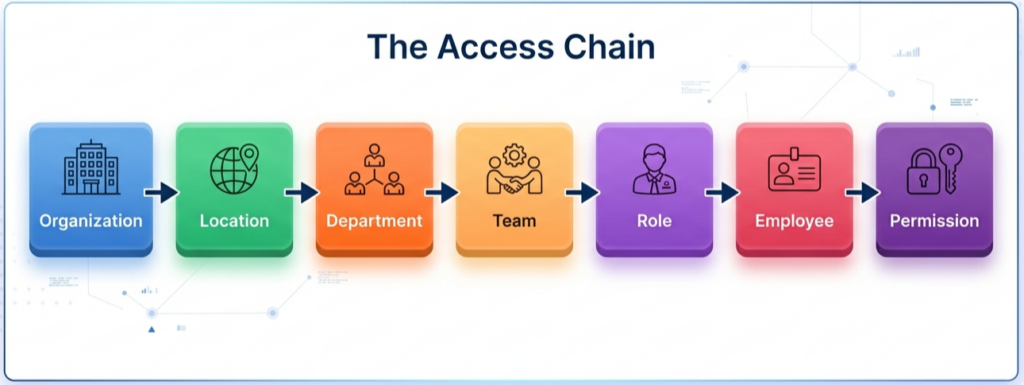
Instead of deciding “what can this person see,” HR defines what a role should see, and employees inherit that access automatically as they move through this chain.
2. What Gets Centralized
A well-configured HRMS brings together the data points access decisions actually depend on:
- Employee profiles and personal records
- Departments and designations
- Reporting managers and management chains
- Office locations and business units
- Organizational hierarchy
- Roles and permission sets
- Approval authorities
3. Access That Updates Itself
When someone changes departments or gets promoted, their access updates automatically, because it’s tied to their position, not configured individually.
No one needs to remember to email IT. The system already knows.
4. One Source of Truth
Without centralization, the same information lives in multiple places: an org chart here, a spreadsheet there, an email approval somewhere else.
HRMS collapses all of this into a single, reliable structure everyone works from.
5. Why This Reduces Errors
Centralized structures cut down manual work and permission mistakes because access decisions stop depending on memory. The system enforces the rule instead of a person having to recall it every time.
How Does Role-Based Access Control Simplify Team Permissions in HRMS?
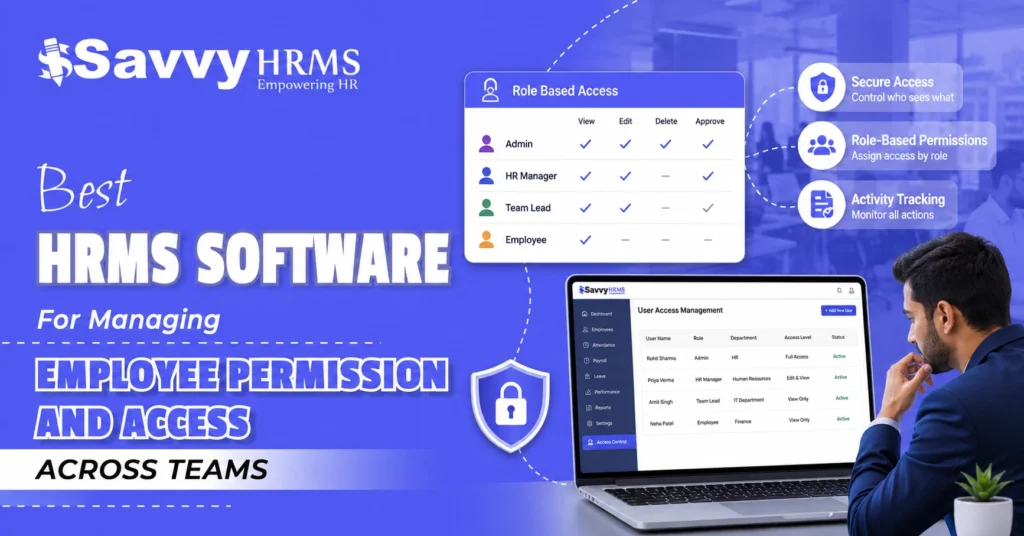
Role-based access control (RBAC) is a system where employees get access based on their job role rather than having permissions configured individually, one person at a time. Anyone placed into a role automatically assumes that role’s permissions.
A simple way to picture it inside an HRMS:
- HR Administrator → broader access across employee records
- Payroll Manager → payroll-related data, without necessarily needing recruitment pipelines
- Department Manager → their own team’s attendance, leave, and performance data
- Employee → their own information only
- Finance Manager → payroll or budget-related data relevant to financial planning
RBAC combines a few core concepts: role (a job function), permission (what that role can view, edit, or approve), access level (how much detail), scope (which department or location it applies to), and approval authority (whether the role can approve requests like leave). Combined, these let a system express precise rules, for example, “Department Managers can view attendance for direct reports only, in their assigned location.”
The practical benefit is that RBAC reduces two problems at once: over-permissioning, where people get more access than their job needs because it’s easier than configuring something precise, and under-permissioning, where people lack access they genuinely need and end up working around it, sharing logins or forwarding confidential files. Because access follows the role, updates are simple: change the role’s permissions once, and everyone in it updates automatically.
What Are the Key Benefits of Managing Employee Permissions Through HRMS?
The core benefit is that access control becomes systematic and auditable, rather than dependent on someone remembering to update a spreadsheet. That shift creates several downstream advantages:
- Better employee data security: sensitive data is only visible to roles that genuinely need it.
- Reduced unauthorized access: access tied to role and structure is harder to misassign.
- Easier administration: HR manages roles and groups, not hundreds of individual configurations.
- Faster onboarding: new hires get correct access from day one.
- Faster role changes: promotions update access automatically.
- Easier employee transfers: data visibility updates without a separate manual process.
- Automated access management: lifecycle events trigger permission changes automatically.
- Better compliance visibility: HR can see who has access to what, supporting audits.
- Clear approval workflows: sensitive requests follow a defined chain, not an ad hoc email.
- Reduced manual work: less time spent manually granting or double-checking access.
- Better auditability: logs record who approved what, and when.
- Consistent permission structures: the same role always gets the same access.
- Improved employee experience: employees and managers self-serve without long delays.
- Scalable team management: a framework built on structure extends from 100 to 1,000 employees.
- Reduced access-related errors: fewer manual steps mean fewer mistakes.
Which HRMS Features Help Businesses Manage Employee Access?
The features that matter most connect permissions directly to organizational structure and automate what happens when that structure changes:
1. Role-Based Access Control
This is the foundation of the entire system. Access is defined at the role level rather than the individual level, so permissions stay consistent no matter who fills a given role.
2. User Roles
Predefined, customizable roles map directly to real job functions like HR Manager or Payroll Admin. New hires and role changes simply plug into an existing role instead of needing custom setup.
3. Department- and Location-Level Access
Visibility can be scoped to a specific team or site. A regional manager sees only their location’s data, while HQ retains broader visibility across the organization.
4. Approval Hierarchies
These define who approves what, and in what order, for requests like leave, transfers, or sensitive data access, replacing informal, ad hoc sign-off with a structured chain.
5. Workflow Automation
Requests move through the approval chain automatically, with notifications triggered at each step. This removes the delays that happen when approvals sit unanswered in someone’s inbox.
6. Access Logs and Audit Trails
Every access change is recorded, including who approved it and when. This creates a reliable record for internal reviews, security investigations, and compliance audits.
7. Employee Lifecycle Triggers
Joining, promotion, transfer, and exit events automatically trigger permission changes. This closes one of the most common security gaps: former employees retaining access after they’ve left.
These features work best together; a role-based system not linked to lifecycle triggers still needs someone to remember to update access manually, which reintroduces the problem HRMS is meant to solve.
How Can HRMS Automate Permission Requests and Approval Workflows?
HRMS software automates permission requests by replacing manual, ad hoc approvals with a structured workflow that moves a request through defined steps automatically, notifying the right people and leaving a record behind.
A general flow:
Employee/Manager Request → HR/Manager Review → Approval → Permission Assignment → Notification → Audit Trail
In practice: an employee requests access to a new module and it routes automatically to their manager; a manager approves access for a team member without emailing HR separately; HR approves access to more sensitive personnel files; finance approves access to payroll data for budgeting; temporary access for a consultant expires automatically without anyone remembering to revoke it; role changes and transfers trigger a review of existing permissions rather than simply carrying them forward; and exits trigger automatic access removal.
Automating this removes delays; requests don’t sit unanswered for days, and it creates a record. Every approval is timestamped and attributed to a specific approver, so if a question comes up about who authorized a change, there’s a clear answer instead of a guess.
How Does HRMS Improve Security While Managing Employee Access?
HRMS software improves security primarily by enforcing least-privilege access, giving each employee only the information they need to do their job, not everything the system contains. RBAC is the mechanism that puts this into practice.
- Role-based access limits visibility and editing rights by job function.
- Restricted data visibility keeps sensitive fields, salary, bank details, and medical information limited to roles that need them.
- Audit logs record who accessed what, supporting internal reviews and investigations.
- Periodic access reviews let HR and IT check whether existing permissions still make sense.
- Employee lifecycle-based access ties changes to real events, so permissions don’t linger.
- Automated access removal closes accounts promptly on exit.
- Secure authentication controls, such as password policies and multi-factor authentication where available, add protection beyond permissions alone.
- Administrative controls limit system-wide configuration to a small, authorized group.
The underlying principle is simple: employees should have access to the information they need to do their jobs, not everything stored in the HR system. This is a design philosophy a well-configured HRMS supports; specific vendor security practices, hosting arrangements, and certifications should still be verified directly with the vendor.
How Can You Build Scalable and Automated Team Permission Workflows?
Start by mapping your actual organizational structure before configuring anything in software; access rules only make sense once you know who reports to whom and what each role genuinely needs.
- Map the organization structure: departments, locations, reporting lines.
- Identify employee roles: distinct job functions, not just titles.
- Classify sensitive HR data: payroll, PII, performance, medical records.
- Define permission levels: what each role can view, edit, and approve.
- Create role-based access groups: configure roles as reusable permission sets.
- Define approval authorities: who approves what, at which level.
- Automate onboarding permissions: new hires get correct access from day one.
- Automate role-change permissions: promotions and transfers trigger updates.
- Automate access removal during exits: offboarding as a system-triggered event.
- Review permissions regularly: catch drift, especially in fast-growing teams.
- Maintain audit trails: keep records for governance and audits.
- Update roles as the organization grows: revisit the framework itself periodically.
This approach scales because it’s built on structure rather than manual maintenance. A business growing from 50 to 1,000+ employees will add departments, locations, and management layers, but if permissions are tied to roles and lifecycle events from the start, each new hire, transfer, or exit is handled by the same system logic instead of requiring a new manual process each time.
What Indian Data Protection and Workplace Laws Affect HR Permissions?
Indian businesses managing HR data need to be aware of the Digital Personal Data Protection Act, 2023 (DPDP Act), along with workplace confidentiality obligations such as those under India’s POSH framework.
1. The DPDP Act, 2023
The DPDP Act received presidential assent in August 2023, with the accompanying DPDP Rules, 2025 notified in November 2025. Full enforcement is being rolled out in phases through mid-2027, and since employee data generally qualifies as “digital personal data,” HR functions are directly affected.
2. Core Principles of the Act
The Act centers on purpose limitation, data security safeguards, data principal rights, and breach notification. These principles shape how HR data should be collected, stored, accessed, and protected across an organization’s systems.
3. POSH and Confidentiality Obligations
India’s POSH Act, 2013, creates separate confidentiality requirements around complaint-related information, generally requiring such records to be restricted to a very limited set of authorized people within HR.
4. Legal Requirement vs. HRMS Capability
A legal requirement is a statutory obligation the organization itself is responsible for meeting. An HRMS access-control capability is a tool that helps implement it, software alone doesn’t create compliance.
What Should You Consider When Choosing an HRMS for Permission Management?
Here’s the thing: most HRMS vendors will tell you their platform “supports role-based access.” That’s not really the question worth asking. The real question is whether access control is actually built around your structure, your roles, your departments, your locations, your reporting lines, or whether it’s a generic setting that you’re expected to bend your business around.
So before you sign anything, it helps to walk through a few practical checks.
Start with the basics of the access model itself:
- Can you create custom roles, or are you stuck with predefined ones?
- Can access be scoped by department and by location separately?
- Does the system actually reflect your real manager hierarchy?
- Are multi-level approval workflows supported, or just single-step sign-off?
Then think about what happens automatically. This is where a lot of platforms quietly fall short. Ask yourself:
- Does access update on its own when someone changes roles or departments?
- Is onboarding and offboarding tied to permission changes, or does someone still need to remember to do it manually?
- Can you actually see a clear audit log if you ever need to check who accessed something?
Security and privacy matter too, but keep it grounded. Ask what the vendor’s data security practices actually look like, and whether their approach aligns with what’s expected under Indian data protection law, not just a”we’re secure” line.
And finally, think beyond day one. A system that works cleanly at 100 employees can get messy at 1,000 if it wasn’t built to scale. So it’s worth asking:
- Will this permission structure still make sense at 5x your current headcount?
- Can HR manage roles day-to-day without constantly looping in IT?
- Does it connect to your existing payroll, biometric, or ERP tools?
- Is there real mobile access for approvals and self-service?
- What does implementation actually involve, and how long does it realistically take?
- Is pricing transparent, or does it get complicated as you grow?
Honestly, the best way to cut through vendor pitches is to ask three direct questions before you decide anything: How is access structured- role, department, or both? What happens automatically when someone changes roles or exits? And what audit trail exists if we ever need to check who accessed something sensitive?
Which Core HRMS Is Best for Businesses Scaling Rapidly in India?
| HRMS Software | Best For | Permission & Access Capabilities | Core HR Features | Automation | Security/Access Controls | India Focus |
| Savvy HRMS | Growing/scaling Indian businesses needing connected HR + permissions | RBAC, configurable user hierarchy, department/role-based visibility | Core HR, payroll, attendance, leave, recruitment, performance, L&D | Bulk actions, promotion/transfer workflows, multi-level approvals | Role-based access, encrypted mobile access, multi-level authentication | Strong, built for PF, ESI, PT, TDS |
| Darwinbox | Large enterprises, complex org structures | RBAC, role-based document security, configurable reporting | Full HCM suite: onboarding, payroll, performance, succession | Workflow automation, digitized separations | Role-based access; permissions framework for enterprise compliance | Strong, used by large India/global enterprises |
| Zoho People | Zoho-ecosystem businesses wanting granular control | General/specific roles, record- and field-level permissions | Core HR, attendance, leave, performance | Approval-based workflows, service administrators | Detailed access control down to individual fields | Strong, India-headquartered |
| Keka HR | Mid-sized, tech-forward companies | Explicit + implicit (position-based) roles, custom roles | Core HR, payroll, performance, recruitment | Role-based approval and access automation | Role- and position-based access control | Strong, built for Indian payroll/compliance |
| ZingHR | Large or frontline/field workforces | Org-structure-driven permissions, configurable roles | Hire-to-retire suite, payroll, attendance, performance | Mobile-first workflow automation | Role-based access; vendor states GDPR alignment | Strong, India-based, frontline hiring focus |
| greytHR | Smaller Indian SMBs, payroll/compliance focus | Role-based permissions, expanding into more modules | Payroll, compliance, ESS/MSS, leave/attendance | Basic workflow automation | Role-based access for core modules | Strong, long-established India-first payroll platform |
| HROne | Mid-market businesses scaling from 50 to a few thousand | Multi-layer access control (page, action, data), auto role assignment | Hire-to-retire suite across 10+ modules | Rule-based automated role assignment, audit trails | Role-based access, audit logs, 2FA (per vendor) | Strong. India-built, DPDP-aligned per vendor |
Why Is Savvy HRMS a Strong Choice for Managing Employee Permissions?
Savvy HRMS is well suited to businesses that need permission management to keep up with growth, because access control isn’t a separate module; it’s built into the same system that manages employee records, org structure, payroll, and HR workflows.
Centralized employee data and hierarchy. Savvy HRMS’s Core HR module functions as a single platform for employee data, departments, and reporting structures, giving permission decisions a reliable, up-to-date foundation.
Role-based access with configurable hierarchy. The platform provides role-based access control along with user-level access rights, letting administrators set up a hierarchy so different user levels see only what’s relevant to their role.
Approval workflows built into HR processes. Savvy HRMS supports multi-level approval process flows, so requests like leave, transfers, or profile changes move through the appropriate chain of approvers rather than depending on informal sign-off.
Lifecycle-driven administration. Bulk employee confirmation, promotion and transfer, and bulk exit processing mean lifecycle events- the moments when access most often needs to change- are handled as structured workflows rather than one-off manual updates.
Employee self-service with role-based controls. Employees manage their own profile, documents, and requests, while mobile and web access apply role-based controls so each user only sees what’s appropriate for them.
Payroll and statutory processing in the same system. Because payroll, PF, ESI, professional tax, and TDS processing sit within the same platform as employee records, sensitive financial data can be scoped to roles like payroll administrators, rather than exported into spreadsheets that are harder to control.
As a business moves from 50 employees to several hundred or thousands, manually updating access for every promotion, transfer, or exit becomes increasingly hard to sustain. A structured HRMS like Savvy HRMS connects these employee changes directly to the appropriate workflows and access levels, so HR isn’t left tracking who needs what, department by department, as the organization keeps growing.
Specific claims around security certifications, exact client counts, or particular compliance frameworks should always be verified directly with the vendor, since these can change and are outside what can be independently confirmed here.
Conclusion
As businesses grow, deciding who can see what turns from an informal call into a real operational challenge: more roles, more sensitive data, more approval levels, and constant lifecycle changes like promotions and exits. Manual tracking through spreadsheets and email creates exactly the confusion and risk businesses want to avoid. HRMS software fixes this by connecting roles, structure, and approvals directly to access decisions, so permissions stay accurate as the organization changes.
Each platform here has its own strengths, from Darwinbox’s enterprise depth to Zoho People’s field-level control. For Indian businesses scaling fast and needing HR, payroll, and permissions in one system, Savvy HRMS stands out, built around the centralized structure that keeps access accurate as the company grows.











Ready to simplify employee access as your business grows?
Explore Savvy HRMS and see how a centralized HR platform can bring roles, workflows, employee data, and HR processes together.
Frequently Asked Questions (FAQs)
1. What is employee permission management in HRMS software?
Employee permission management in HRMS software controls who can view, edit, approve, or manage specific employee information based on roles, departments, locations, and reporting structures. It helps organizations protect sensitive HR data while giving employees the access they need.
2. How does HRMS software manage employee access across teams?
HRMS software uses role-based access controls, organizational hierarchies, department-level permissions, approval workflows, and access rules to determine what each employee can access. Permissions can also be updated when employees are promoted, transferred, onboarded, or exited.
3. What is role-based access control (RBAC) in HRMS?
Role-based access control assigns permissions according to an employee’s job role rather than configuring access individually. For example, HR administrators may access broader employee records, while department managers may only access information related to their teams.
4. Can HRMS automatically update permissions when an employee changes roles?
Yes, many modern HRMS platforms can connect employee lifecycle events such as promotions, transfers, department changes, onboarding, and exits with access management workflows. This reduces the need for HR teams to manually update permissions every time an employee’s role changes.
5. How does HRMS software improve employee data security?
HRMS software can improve security by restricting sensitive information according to roles and access levels, maintaining audit trails, supporting approval workflows, and removing or changing access when employees leave or change roles. Organizations should also verify the vendor’s specific security practices and controls.
6. What should businesses look for in HRMS software for employee permissions?
Businesses should look for customizable roles, department- and location-based access, approval hierarchies, lifecycle-based permission updates, audit trails, employee self-service, workflow automation, strong authentication controls, integrations, and the ability to scale as the organization grows.