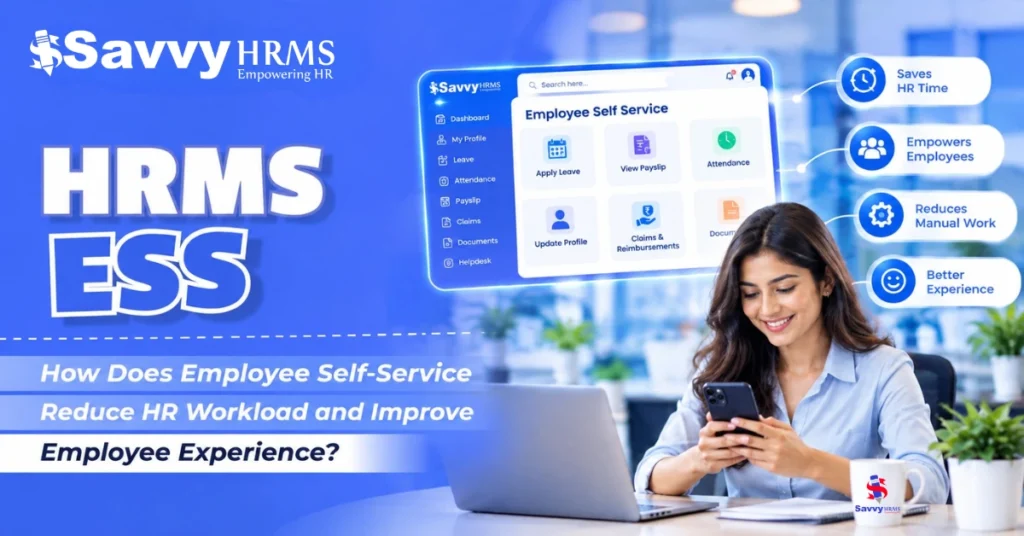
HRMS ESS: How Does Employee Self-Service Reduce HR Workload and Improve Employee Experience?


-
AuthorSalilendra Kumar
-
 Last Updated
October 23, 2026
Last Updated
October 23, 2026
-
 Reading Time
18 Mins
Reading Time
18 Mins
HR teams spend an important amount of time handling routine employee requests, checking leave balances, sharing payslips, correcting attendance records, updating employee information, answering policy questions, and responding to HR-related emails. As organizations grow, these small tasks can quickly become a major administrative burden. This is where HRMS ESS (Employee Self-Service) can make a difference.
An ESS portal gives employees direct access to common HR services through a centralized digital platform. Instead of contacting HR for every routine requirement, employees can apply for leave, view attendance, download payslips, update selected personal information, raise requests, and access important HR documents themselves.
For HR teams, the result is less repetitive administrative work and more time for strategic activities such as employee engagement, workforce planning, talent development, and compliance. For employees, HRMS ESS means faster access, greater transparency, and more control over everyday HR activities. In this guide, we explain what HRMS ESS is, how it works, how it reduces HR workload, and how it improves the overall employee experience.
TL;DR
- HRMS ESS allows employees to manage routine HR activities independently through an ESS portal.
- Employees can handle leave, attendance, payslips, documents, personal information, and HR requests without repeatedly contacting HR.
- Employee self-service reduces HR workload by minimizing repetitive queries, manual work, emails, and follow-ups.
- HRMS ESS improves employee experience through faster access, greater transparency, convenience, and employee autonomy.
- Mobile ESS allows employees to access HR services anytime and from anywhere.
- Automated workflows help improve request processing, approvals, notifications, and data accuracy.
- Businesses should look for ESS features such as payroll integration, leave and attendance, mobile access, workflows, analytics, security, and role-based access.
- A well-implemented HRMS ESS helps HR teams focus less on administrative tasks and more on employee engagement, workforce management, and strategic HR activities.
What Is HRMS ESS and How Does Employee Self-Service Work?
HRMS ESS stands for Human Resource Management System Employee Self-Service. It is a feature within an HRMS that allows employees to access and perform selected HR-related activities without depending on HR personnel for every transaction.
In a traditional HR process, an employee may need to send an email or contact HR to apply for leave, request a document, check a payslip, correct attendance, or ask about a reimbursement. With an employee self-service portal, these activities can be initiated and tracked digitally.
The basic HRMS ESS workflow looks like this:
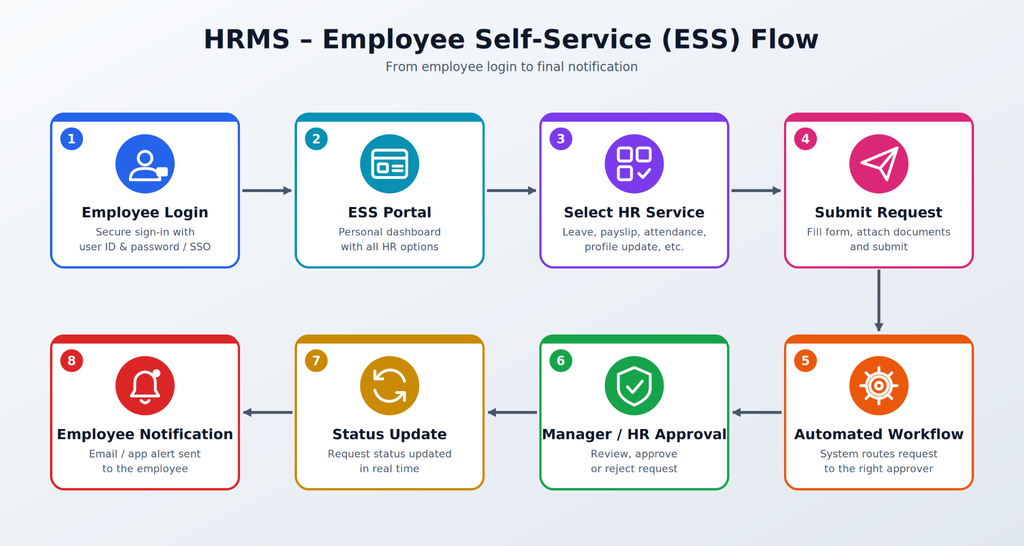
For example, an employee who wants to apply for leave can log in to the ESS portal, check their available leave balance, select the dates, submit the request, and track its approval status.
The same principle can be applied to attendance regularization, expense claims, reimbursement requests, document access, employee information, and other HR processes.
Modern HR technology is increasingly moving toward this self-service model. Gartner’s HR Technology Employee Experience research notes that employees continue to rank self-service HR portals above HR help desk portals, indicating a preference for greater autonomy in managing HR-related needs.
HRMS ESS in Simple Terms
Think of an ESS portal as a digital HR counter that employees can access themselves.
Instead of:
Employee → HR → Manual Processing → Approval → HR Response → Employee
the process becomes:
Employee → ESS Portal → Automated Workflow → Approval → Employee Notification
This simple shift can remove several unnecessary steps from everyday HR administration.
How Does HRMS ESS Reduce HR Workload?
The biggest advantage of HRMS ESS is that it moves routine HR transactions from HR-dependent processes to employee-driven processes.
HR teams receive various repetitive questions and requests every day. While each request may take only a few minutes, the cumulative time can be substantial in an organization with hundreds or thousands of employees.
For example, HR may repeatedly receive questions such as:
- How many leaves do I have left?
- Where can I download my payslip?
- Why is my attendance showing incorrectly?
- What is my salary breakup?
- How can I update my bank details?
- Where can I find my Form 16?
- What is the status of my leave request?
- How can I submit an expense claim?
- Where can I find the company’s HR policy?
An ESS portal allows employees to find or initiate many of these activities themselves.
Manual HR Process vs HRMS ESS
| Activity | Traditional Process | HRMS ESS Process |
| Leave application | Email/HR request | Employee applies online |
| Leave balance | Ask HR | View instantly |
| Payslip | HR shares document | Employee downloads |
| Attendance correction | Email HR | Submit regularization request |
| Personal details | HR updates manually | Employee updates permitted fields |
| Expense claim | Forms/emails | Digital submission |
| Request status | Follow-up with HR | Track in ESS portal |
| HR documents | Ask HR | Access through portal |
The efficiency opportunity is not limited to individual requests. A Deloitte case study involving a large workforce reported 35,000 self-service cases, reducing direct HR contact through telephone or email. The same organization recorded 1.5 million portal views and 19,000 active users.
Another Deloitte case reports that an employee service portal helped reduce calls to an HR support center by more than 50% while also simplifying the HR service catalog.
The HR Workload Shift
Before ESS:
Employee Query → HR Inbox → HR Checks Data → HR Responds → Employee Follows Up
With ESS:
Employee → ESS Portal → Self-Service/Automated Workflow → Resolution
This does not eliminate HR’s role. Instead, it allows HR professionals to spend less time on repetitive transactions and more time on complex employee issues and strategic work.
McKinsey’s HR Monitor 2025 also highlights the need for HR organizations to modernize their operating models through automation and other technology as they face increasing efficiency and employee-experience demands.
Which HR Tasks Can Employees Handle Through HRMS ESS?
The exact capabilities depend on the HRMS ESS solution and the organization’s configuration. However, a well-designed employee self-service portal can cover a wide range of everyday HR activities.
1. Leave Management
Employees can:
- Check available leave balances
- Apply for leave
- View previous leave requests
- Track approval status
- Cancel or modify requests where permitted
2. Attendance Management
Employees can:
- View attendance records
- Check working hours
- Submit attendance regularization requests
- View late marks or missing punches
- Track attendance-related requests
3. Payroll and Payslips
An ESS portal can allow employees to:
- View salary details
- Download payslips
- Access payroll-related documents
- View deductions
- Access tax-related information where configured
4. Employee Profile Management
Employees can review or request changes to information such as:
- Address
- Contact information
- Emergency contact
- Bank details
- Personal information
Organizations can control which fields employees are allowed to modify.
5. Expense and Reimbursement Requests
Employees can submit expense claims digitally, attach supporting documents, and track approval status.
6. HR Documents
Employees can access permitted documents such as:
- Payslips
- Tax documents
- Company policies
- Appointment-related documents
- Employee certificates
- Other HR records
7. HR Requests and Helpdesk
Employees can raise HR tickets and track their progress rather than repeatedly contacting HR through email or phone.
8. Manager Self-Service
In more advanced HRMS platforms, managers can also access employee information, approve requests, monitor attendance, and manage team-related activities.
How Does HRMS ESS Reduce Repetitive HR Queries?
One of the most important ways HRMS ESS reduces workload is by addressing the same questions repeatedly asked by different employees.
Imagine an HR team receiving 100 routine queries in a week.
If employees can independently answer even a portion of these questions through an ESS portal, HR can redirect that time toward more complex activities.
Example
Suppose employees frequently ask:
“How many leave days do I have?”
Without ESS:
Employee → Email HR → HR checks system → HR replies
With ESS:
Employee → Login → Leave Balance → Answer
The second process can take seconds instead of requiring HR intervention.
From HR Helpdesk to Employee Self-Service
A useful way to understand ESS is:
Information → Access → Action → Tracking
Employees don’t simply receive information. They can often take action themselves.
For example:
Leave Balance → Apply Leave → Manager Approval → Notification
or:
Payslip → Download → Save/Print
or:
Attendance Record → Identify Missing Punch → Submit Regularization → Track Status
This reduces unnecessary back-and-forth communication.
Why This Matters for Growing Businesses
The problem becomes more significant as employee numbers increase.
A process that works for 50 employees may become difficult to manage manually for 500 or 5,000 employees.
This is why HRMS ESS is particularly useful for:
- SMEs
- Large enterprises
- Multi-location organizations
- Distributed teams
- Manufacturing organizations
- Retail businesses
- IT companies
- Healthcare organizations
- Field-workforce businesses
The goal is simple: increase the number of employees HR can support without increasing repetitive administrative work at the same rate.
How Does HRMS ESS Improve the Employee Experience?
Employee experience is not only about workplace culture or benefits. It also includes how easy it is for employees to complete everyday work-related tasks.
If an employee has to wait several hours, or even days, to receive a payslip, get an attendance correction, or find their leave balance, the process creates friction.
HRMS ESS reduces this friction by giving employees a direct digital channel.
5 Ways ESS Improves Employee Experience
1. Convenience
HRMS ESS gives employees quick access to everyday HR services, allowing them to manage leave, attendance, payslips, and requests without contacting HR.
2. Faster Responses
Automated workflows process employee requests faster, while instant confirmations and notifications keep employees informed about approvals, updates, and pending actions.
3. Transparency
Employees can view request statuses, leave balances, attendance records, and approvals through the ESS portal, creating greater visibility and reducing uncertainty.
4. Accessibility
Mobile-enabled ESS allows employees to access important HR services anytime and anywhere, making HR processes more convenient for remote, field, and hybrid workers.
5. Employee Autonomy
ESS gives employees greater control over routine HR activities, enabling them to manage personal information, submit requests, access documents, and track updates independently.
Gartner’s research specifically notes that employees continue to value self-service HR portals highly, suggesting that autonomy is an important part of employee-facing HR technology.
Employee Experience Transformation
Traditional Experience:
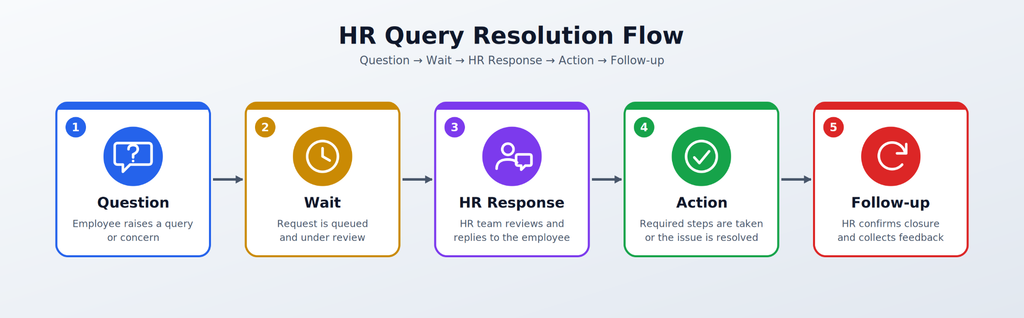
ESS Experience:
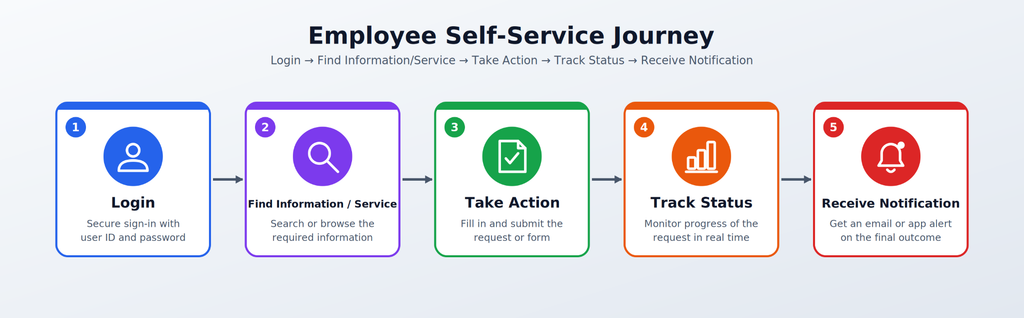
The difference may looks small for one transaction, but across hundreds of employee interactions, it can have a meaningful impact.
How Does HRMS ESS Give Employees Real-Time Access to HR Information?
One of the biggest advantages of a digital ESS portal is that it can provide employees with current HR information from a centralized system.
Instead of depending on spreadsheets, emails, printed documents, or HR responses, employees can access information directly based on their permissions.
Common examples include:
- Current leave balance
- Attendance information
- Payslips
- Salary information
- Tax information
- Employee profile
- Company policies
- Holiday calendars
- Request status
- Expense/reimbursement status
- HR documents
Centralized Information Flow
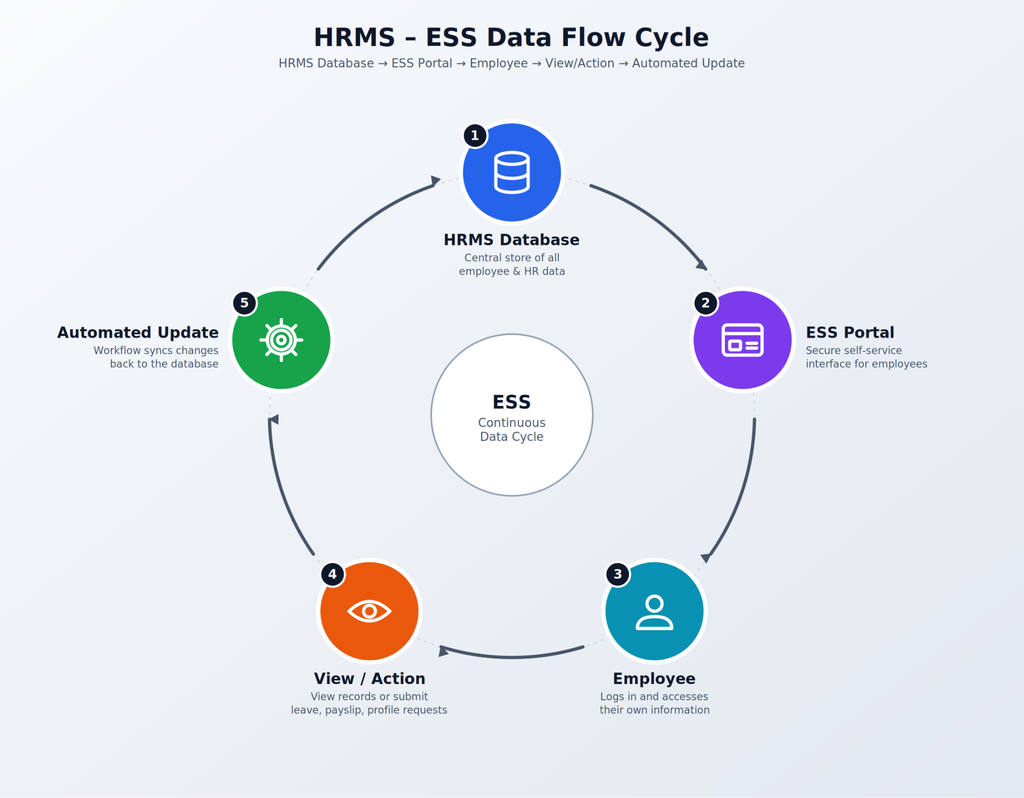
This creates a more connected HR ecosystem.
For example, when a leave request is approved, the employee can see the updated status. When a payslip is published, the employee can access it without asking HR to send it individually.
Savvy HRMS, for example, describes employee self-service as giving employees greater control over their work profile, tasks, and company information, while reducing HR workload. Its payroll functionality also allows employees to view and download payslips online.
Why Real-Time Access Matters
Real-time access helps reduce:
- Information delays
- Duplicate requests
- Manual communication
- Dependency on HR
- Confusion over request status
- Errors caused by outdated information
It also creates a more transparent employee experience.
How Does Mobile HRMS ESS Improve Employee Self-Service?
Employees are no longer limited to desktop computers when interacting with workplace technology.
A mobile HRMS ESS allows employees to access HR services through smartphones or mobile applications.
This is particularly valuable for employees who:
- Work remotely
- Work in the field
- Work across multiple locations
- Have limited desktop access
- Work shifts
- Frequently move between sites
Mobile ESS Use Cases
Employees may be able to:
Check Attendance → Apply Leave → View Payslip → Submit Claim → Raise Request → Receive Approval Notification
A mobile-first ESS approach makes HR services available when employees need them rather than restricting them to office hours or desktop access.
Savvy HRMS states that its platform is accessible across devices and offers a mobile application for employee HR activities. Its current product information also highlights mobile access for activities such as attendance, claims, leave requests, and approvals.
Mobile ESS Flow
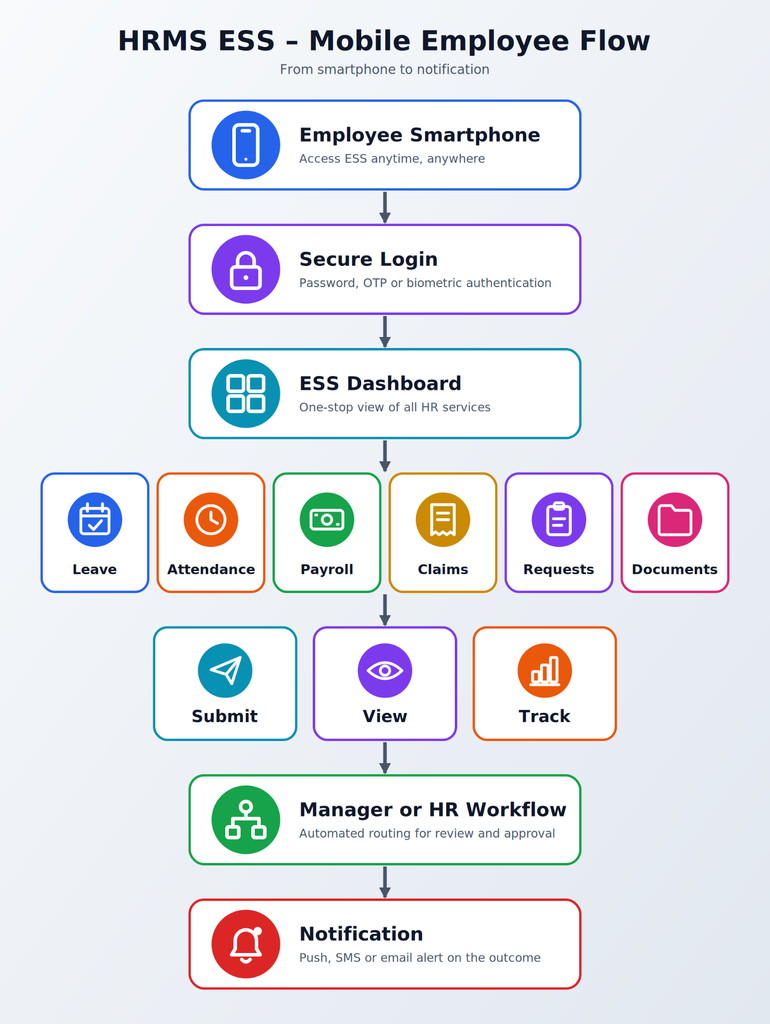
The future of employee self-service is therefore not simply about having an ESS portal. It is about making that portal accessible, intuitive, secure, and available across devices.
How Does HRMS ESS Improve Employee Data Accuracy?
Employee data becomes difficult to maintain when multiple people manually enter or update the same information.
For example, an employee may change their phone number or address. If they inform HR through email, HR has to locate the correct employee record, make the change, and potentially update another system.
An ESS portal can provide a controlled mechanism for employees to review and update permitted information themselves.
Employee Data Accuracy Flow
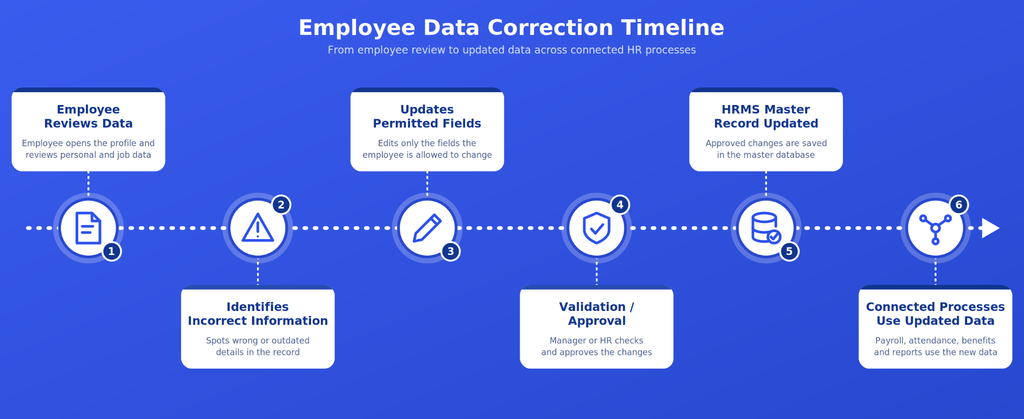
This creates a single source of employee information.
However, employee self-service does not mean employees should be allowed to change everything. Good HRMS ESS systems use role-based permissions and approval workflows.
For example:
| Data Type | Possible ESS Access |
| Phone number | Employee update |
| Address | Employee update/approval |
| Emergency contact | Employee update |
| Bank details | Controlled update |
| Salary | View only |
| Payroll configuration | HR/admin |
| Attendance | View + regularization request |
| Leave | Apply + view balance |
| Statutory data | Controlled workflow |
The objective is to combine employee ownership with organizational control.
This is important because centralized HR systems can also improve data consistency and reduce duplicate manual entry across HR processes.
What Are the Benefits of HRMS ESS for HR Teams and Employees?
HRMS ESS creates value for both sides of the HR process.
Benefits for HR Teams
- Reduced Administrative Work: Routine transactions can move to self-service workflows.
- Fewer Repetitive Queries: Employees can access commonly requested information themselves.
- Better Data Management: Employees can review and maintain permitted information.
- Faster Request Processing: Digital workflows can automatically route requests to the right approver.
- Better Tracking: HR can monitor requests, pending actions, and workflow status.
- Improved Scalability: HR can support a growing workforce without depending entirely on manual administration.
Benefits for Employees
- Faster Access: Employees can access information without waiting for HR.
- Greater Transparency: They can track requests and approvals.
- More Convenience: Common HR activities can be completed digitally.
- Better Accessibility: Mobile ESS enables access from different locations.
- Greater Autonomy: Employees have more control over everyday HR processes.
HRMS ESS Value at a Glance
| Area | Without ESS | With HRMS ESS |
| HR queries | HR-dependent | Self-service |
| Leave | Manual request | Digital workflow |
| Payslips | HR distribution | Employee access |
| Attendance | Email/manual correction | Online regularization |
| Documents | HR assistance | Portal access |
| Requests | Email/phone | Trackable workflow |
| Employee data | HR-maintained | Employee-assisted |
| Communication | Multiple channels | Centralized platform |
The business case is therefore not simply “automation.” It is about creating a more scalable HR operating model.
Deloitte’s case studies illustrate this potential: one organization serving around 19,000 employees recorded 1.5 million portal views and 35,000 self-service cases, while another reported more than a 50% reduction in HR support calls after introducing employee self-service.
What Features Should You Look for in an HRMS ESS Solution?
Not every ESS portal provides the same experience. Before selecting an HRMS ESS solution, organizations should evaluate both employee-facing features and backend workflow capabilities.
1. Employee Self-Service Portal
A centralized ESS portal should allow employees to access essential HR services from one place. Employees should be able to manage requests, view information, access documents, and track activities without depending on HR for routine tasks.
2. Leave and Attendance Management
Employees should be able to manage their leave and attendance directly through the ESS portal.
Key capabilities include:
- View leave balances
- Apply for leave
- View attendance records
- Submit attendance regularization requests
- Track leave and attendance approvals
3. Payroll and Payslip Access
An effective HRMS ESS solution should give employees secure access to their payroll information without requiring HR to share documents manually. Employees can view or download payslips and access relevant salary and tax information whenever required.
4. Employee Profile and Document Management
Employees should have controlled access to their personal information and important HR documents. The system should allow employees to update permitted details while keeping sensitive information protected.
Important capabilities include:
- Personal information updates
- Contact and emergency details
- HR document access
- Payslip and tax document downloads
- Secure document storage
5. Request and Approval Workflows
HRMS ESS should automate the movement of employee requests to the right manager or HR approver. This reduces manual follow-ups and provides employees with greater visibility into the status of their requests.
6. Mobile Access and Notifications
A modern ESS solution should work effectively across mobile devices, allowing employees to access HR services wherever they work. Notifications can also keep employees and managers informed about approvals, pending requests, attendance updates, and other important HR activities.
7. Role-Based Access and Security
Since an ESS portal handles sensitive employee information, organizations should have strong access controls. Employees, managers, HR teams, and administrators should only see the information and features relevant to their roles.
Important security capabilities include:
- Role-based permissions
- Secure authentication
- Access controls
- Audit trails
- Data protection
8. Analytics, Reporting and Integrations
The best HRMS ESS platforms should provide HR teams with insights into employee self-service usage and connect ESS with other HR functions.
HR teams can track:
- ESS adoption rate
- Number of employee requests
- Request turnaround time
- Pending approvals
- HR query volumes
- Frequently used services
Integration with payroll, attendance, leave, expenses, employee management, and other HRMS modules can create a more connected employee experience.
How Can Businesses Successfully Implement HRMS ESS?
Implementing an ESS portal is not simply a software installation. Employee adoption is equally important.
A technically capable ESS system will not deliver its full value if employees continue sending emails for every routine HR requirement.
Step 1: Identify Repetitive HR Processes
Start by identifying the questions and requests HR receives most frequently.
For example:
Leave → Attendance → Payslip → Documents → Profile → Expenses → HR Requests
Prioritize processes that have high volumes and straightforward workflows.
Step 2: Define Employee Permissions
Determine what employees can:
- View
- Edit
- Submit
- Approve
- Download
- Track
Step 3: Configure Workflows
Create clear approval routes.
For example:
Employee → Reporting Manager → HR → Completed
Not every request needs the same workflow.
Step 4: Integrate HR Data
Connect ESS with relevant HRMS modules so employees see consistent information.
Step 5: Make the Portal Easy to Use
Employees should not need extensive training to perform simple tasks.
Use:
- Simple navigation
- Clear labels
- Search
- Notifications
- Mobile accessibility
- Minimal steps
Step 6: Train Employees
Explain:
- What ESS is
- What employees can do
- How to submit requests
- Where to find documents
- How to track requests
- When HR intervention is required
Step 7: Measure Adoption
Track measurable indicators such as:
ESS Adoption Rate
= Employees actively using ESS ÷ Total eligible employees × 100
Self-Service Rate
= Requests resolved through ESS ÷ Total eligible HR requests × 100
HR Query Reduction
= (Baseline HR queries − Current HR queries) ÷ Baseline HR queries × 100
These metrics help HR determine whether the ESS implementation is actually reducing administrative workload.
HRMS ESS Implementation Flowchart
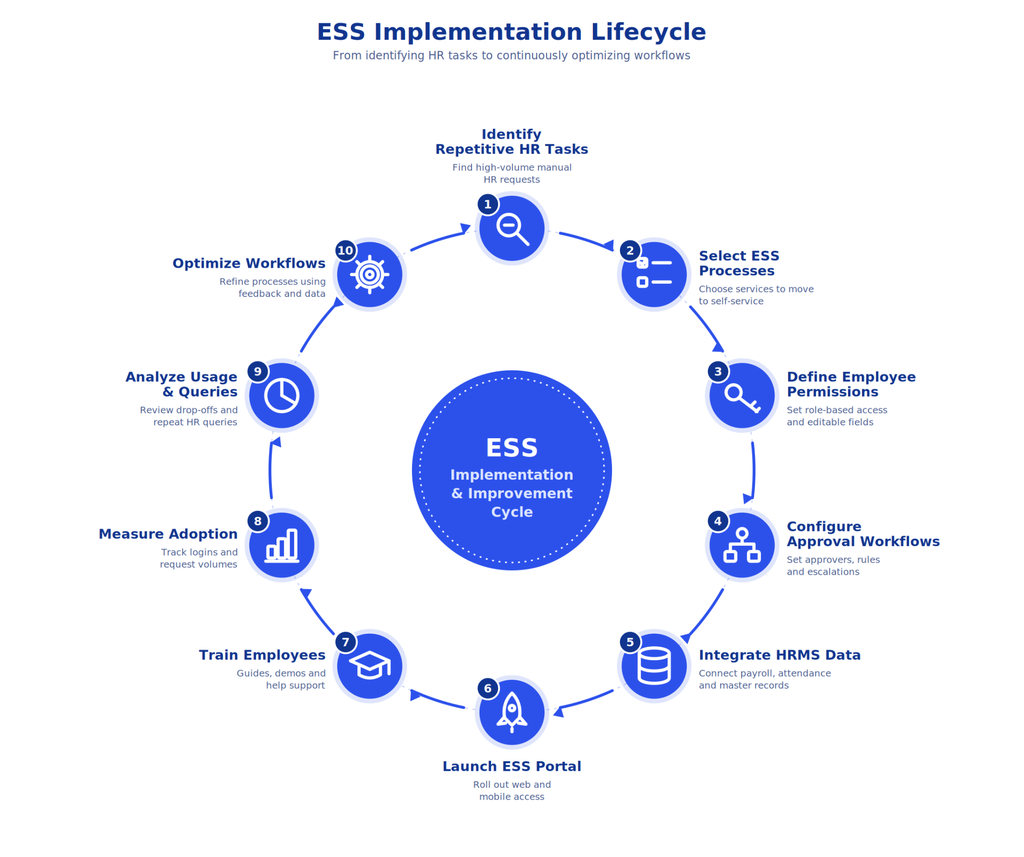
This should be treated as an ongoing improvement cycle rather than a one-time implementation.
HRMS ESS: Measuring the Impact With Data
The effectiveness of employee self-service should be measured rather than assumed.
A useful ESS dashboard can track metrics such as:
| KPI | What It Measures |
| ESS Adoption Rate | How many employees actively use ESS |
| Self-Service Completion Rate | How many eligible activities are completed digitally |
| HR Query Reduction | Reduction in routine HR questions |
| Average Request TAT | Time taken to process requests |
| Pending Requests | Workflow backlog |
| Mobile Adoption | Employee usage through mobile |
| Document Downloads | Usage of digital HR documents |
| Leave Requests | Volume of digital leave transactions |
| Attendance Requests | Volume of attendance-related requests |
| Employee Satisfaction | Employee perception of HR services |
Example ESS Performance Dashboard
Employee Adoption: 82%
Digital HR Requests: 76%
Routine HR Queries: ↓ 38%
Average Request TAT: ↓ 45%
Mobile ESS Usage: 64%
Note: These figures are illustrative KPI targets/examples, not industry benchmarks. Organizations should establish their own baseline before measuring improvement.
The key principle is to compare before and after implementation.
For example:
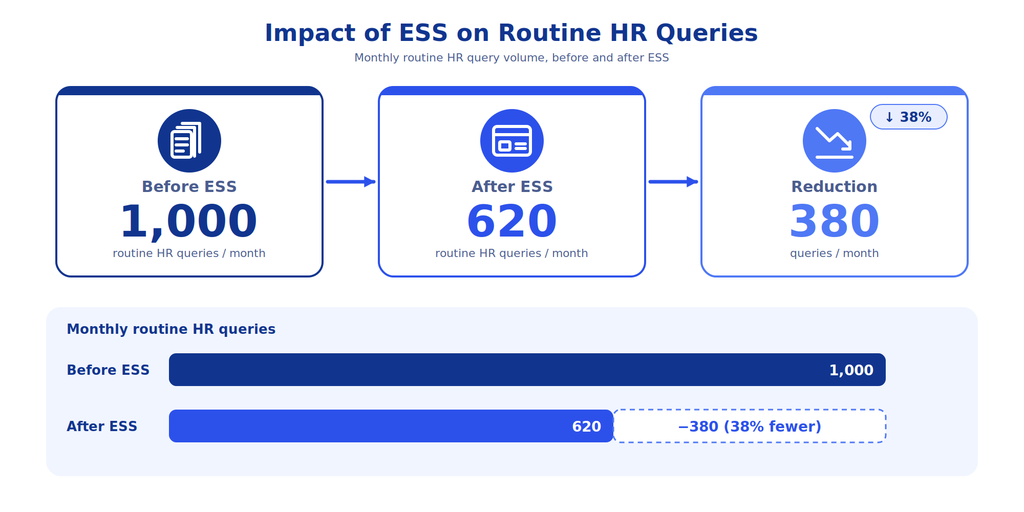
This represents a 38% reduction in routine queries.
The exact outcome will vary by workforce size, HR processes, employee adoption, integrations, and the capabilities of the chosen HRMS.
Why Is HRMS ESS Becoming Important for Modern HR Teams?
The role of HR is changing.
HR teams are increasingly expected to contribute to employee experience, workforce planning, analytics, talent development, and business strategy, not just administrative processing.
At the same time, managers are facing increasing workloads. Gartner reported in 2026 that 47% of surveyed managers said more was expected of them and they had to work harder than a year earlier.
This creates a strong case for reducing unnecessary administrative friction.
HRMS ESS can help create a model where:
- Employees handle routine requests
- Managers handle approvals
- HR handles exceptions and strategic activities
- HRMS handles workflows, data, notifications, and reporting
This is the larger purpose of employee self-service.
It is not about removing HR from the employee experience. It is about allowing HR to spend more time on the interactions where human expertise matters most.
Conclusion
HRMS ESS is more than an employee portal; it is a way to redesign everyday HR service delivery. By allowing employees to access information and complete routine tasks themselves, organizations can reduce repetitive HR workload, improve data accuracy, speed up request processing, and create a more transparent employee experience.
The best results come when ESS is connected with core HR, attendance, leave, payroll, expense, document management, workflows, and mobile access. When implemented correctly, the model becomes simple: employees handle routine requests, managers handle approvals, and HR focuses on higher-value work.











Want to reduce repetitive HR work and give employees a faster, more convenient HR experience?
Explore Savvy HRMS and book a free demo to see how HRMS ESS can transform your everyday HR operations.
Frequently Asked Questions (FAQs)
1. What is HRMS ESS?
HRMS ESS (Employee Self-Service) is a feature that allows employees to access and manage routine HR activities such as leave, attendance, payslips, personal information, and HR requests through an online portal.
2. How does HRMS ESS reduce HR workload?
HRMS ESS reduces HR workload by allowing employees to handle routine tasks themselves. This minimizes repetitive queries, manual data entry, emails, and follow-ups, allowing HR teams to focus on more strategic responsibilities.
3. What can employees do through an ESS portal?
Employees can generally apply for leave, view attendance and leave balances, download payslips, update permitted personal information, access HR documents, submit requests, and track approval statuses through an ESS portal.
4. Does HRMS ESS improve employee experience?
Yes. HRMS ESS provides employees with faster access to HR information, greater transparency, convenient self-service options, and mobile accessibility, making everyday HR processes simpler and more convenient.
5. What features should a good HRMS ESS solution have?
A good HRMS ESS solution should include an employee portal, leave and attendance management, payroll and payslip access, document management, approval workflows, mobile access, notifications, role-based security, analytics, and integrations with other HRMS modules.