


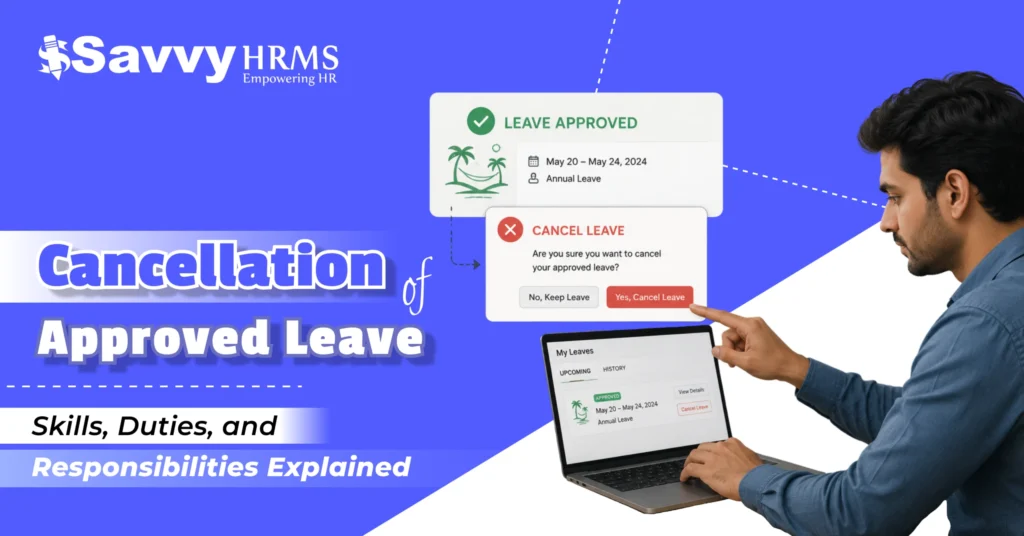

Imagine this scenario, you had your leave approved weeks back, your tickets have been booked, but now your boss asks you to cancel your leave because of work. Stressful, isn’t it?
Leaves that are already approved but need to be cancelled due to unexpected circumstances are something most people have to face at their workplaces today. While the reason for doing so may vary from urgent situations to personal matters or even health concerns, learning to handle the cancellation of approved leave process professionally is important for any employee or organisation.
On the other hand, it’s equally essential for an organisation to ensure it maintains fairness and respects its employees’ rights in the leave cancellation process.
In this blog post, we will cover everything related to leave cancellation, employee rights, organizational policies, formats, samples, HRMS, and more!
Here’s the Short Version
- Approved leave can sometimes be cancelled due to personal changes or urgent work situations.
- Both employees and employers may request a cancellation of approved leave depending on the situation.
- Companies usually follow specific HR policies and approval processes for leave cancellation.
- Employees should always inform their manager or HR team as early as possible.
- Using the right leave cancellation format helps keep the process professional and clear.
- HRMS software makes leave cancellation faster by automating approvals and leave balance updates.
- Proper communication during leave cancellation helps avoid confusion and workload issues.
- Tools like Savvy HRMS simplify the entire leave management and leave cancellation process for everyone.
What Does the Cancellation of Approved Leave Exactly Mean?
The cancellation of approved leave means the cancellation of the leave request, which was already sanctioned by the employer or HR personnel.
There are two possibilities for leave cancellation:
- The employee cancels the approved leave request
- The company requests cancellation of the approved leave
Generally, in most companies, the process of cancelling leaves should be done following the policy guidelines and rules of the organization to manage leave effectively.
For example:
- The employee withdraws his approved leave due to any change in the travel plan.
- The company asks for the withdrawal of the leave when there is an urgent business situation.
The process usually involves updating the HRMS system, notifying managers, and adjusting leave balances accordingly.
When Is Cancellation of Approved Leave Required?
There are different situations where the cancellation of approved leave becomes necessary. Let’s understand the most common scenarios.
1. Work Emergency or Business Urgency
When to Cancel Leave:
In case of urgent projects, urgent client issues, audits, and urgent company needs.
Reason
The company may face some unexpected circumstances where some employees must attend to something important.
Example:
An urgent meeting between the employee and an important client gets fixed during the employee’s leave period.
2. Change in Personal Plans
When to Cancel Leave
Where employees decide not to go through with their plans for personal time off.
Reason
The employee does not have any need to take the break anymore and chooses to work.
Example:
Where tickets are canceled or family plans change.
3. Medical Recovery Happens Earlier
When to Cancel Leave
Where the employee heals faster than anticipated and desires to come back to work early.
Reason
Employee is medically cleared to continue working before completing their leave period.
Example:
The doctor gives clearance earlier to come back to work.
4. Administrative or Scheduling Adjustments
When to Cancel Leave
Where there are scheduling problems or inadequate staffing.
Reason
Sometimes, there could be a need for sufficient labour force availability during peak times.
Example
Where several employees have requested leave on the same date.
5. Incorrect Leave Application
When to Cancel Leave
In cases where the leave has been filed by mistake, or the wrong dates have been selected.
Reason
There would be a need for resubmission of the leave application.
Example
Where an employee filed leave for 10 days instead of 2 days.
6. Project Deadline Changes
When to Cancel Leave
Where project deadlines are unexpectedly brought forward.
Reason
An employee’s involvement would become necessary to ensure the completion of the project within that deadline.
Example
Where a product launch date has been preponed.
Cancellation of Approved Leave Format
Using a professional leave cancellation format helps maintain proper communication between employees, managers, and HR teams.
Here’s a simple structure you can follow:
Leave Cancellation Format
Date: [DD/MM/YYYY]
To:
Manager’s Name or HR’s Name
Designation
Company Name
Subject: Request for Cancellation of Approved Leave
Dear [Manager/HR Name],
I hope you are doing well. I would like to request the cancellation of my approved leave scheduled from [start date] to [end date].
Reason for cancellation: [mention reason briefly].
I request you to kindly update the leave records accordingly.
Please let me know if further formalities are required from my side.
Thank you for your understanding.
Regards,
[Employee Name]
[Employee ID]
[Designation]
[Department]
[Contact Details]
5 Different Samples for Cancellation of Approved Leave
1. Simple Cancellation of Approved Leave
Date: [DD/MM/YYYY]
To:
Manager’s Name or HR’s Name
Designation
Company Name
Subject: Request for Cancellation of Approved Leave
Dear [Manager/HR Name],
I hope you are doing well. I would like to request the cancellation of my approved leave scheduled from [start date] to [end date]. As my plans have changed, I no longer require the leave during this period.
I kindly request you to update the leave records accordingly. Please let me know if any further formalities are required from my side.
Thank you for your understanding.
Regards,
[Employee Name]
[Employee ID]
[Designation]
[Department]
[Contact Details]
2. Personal Cancellation of Approved Leave
Date: [DD/MM/YYYY]
To:
Manager’s Name or HR’s Name
Designation
Company Name
Subject: Request for Personal Cancellation of Approved Leave
Dear [Manager/HR Name],
I hope you are doing well. I would like to request the cancellation of my approved leave scheduled from [start date] to [end date] due to changes in my personal plans. As the situation has changed, I will be able to continue my regular work duties during this period.
Kindly update the leave records accordingly. Please let me know if any additional steps are required from my side.
Thank you for your support and understanding.
Regards,
[Employee Name]
[Employee ID]
[Designation]
[Department]
[Contact Details]
3. Work Urgency Cancellation of Approved Leave
Date: [DD/MM/YYYY]
To:
Manager’s Name or HR’s Name
Designation
Company Name
Subject: Request for Cancellation of Approved Leave Due to Work Urgency
Dear [Manager/HR Name],
I hope you are doing well. I would like to request the cancellation of my approved leave scheduled from [start date] to [end date] due to urgent work requirements and ongoing project responsibilities that require my immediate attention.
Considering the current workload and business priorities, I will continue my duties during this period. Kindly update the leave records accordingly. Please let me know if any further formalities are required from my side.
Thank you for your understanding and support.
Regards,
[Employee Name]
[Employee ID]
[Designation]
[Department]
[Contact Details]
4. Cancellation of Approved Leave for Administrative Needs
Date: [DD/MM/YYYY]
To:
Manager’s Name or HR’s Name
Designation
Company Name
Subject: Request for Cancellation of Approved Leave for Administrative Needs
Dear [Manager/HR Name],
I hope you are doing well. I would like to request the cancellation of my approved leave scheduled from [start date] to [end date] due to administrative and operational requirements within the organization.
As discussed, my presence is required to support ongoing work and team coordination during this period. Kindly update the leave records accordingly. Please let me know if any additional formalities need to be completed from my side.
Thank you for your understanding and cooperation.
Regards,
[Employee Name]
[Employee ID]
[Designation]
[Department]
[Contact Details]
5. Medical Cancellation of Approved Leave
Date: [DD/MM/YYYY]
To:
Manager’s Name or HR’s Name
Designation
Company Name
Subject: Request for Medical Cancellation of Approved Leave
Dear [Manager/HR Name],
I hope you are doing well. I would like to request the cancellation of my approved medical leave scheduled from [start date] to [end date], as my health condition has improved and I am fit to resume work earlier than expected.
I kindly request you to update the leave records accordingly. Please let me know if any medical documents or additional formalities are required from my side.
Thank you for your understanding and support.
Regards,
[Employee Name]
[Employee ID]
[Designation]
[Department]
[Contact Details]
Best Practices to Submit a Leave Cancellation Request
Submitting a leave cancellation request professionally helps avoid confusion and ensures smooth coordination.
Here are some best practices employees should follow:
1. Inform as Early as Possible
Inform your supervisor or HR department about the leave cancellation process early enough to prevent scheduling conflicts.
2. Mention the Reason Clearly
Explain why you want to cancel your leave, as it makes things easier for your supervisor/HR department to handle your case.
3. Follow Company Policy
Before filing your leave cancellation request, make sure that you understand how leave cancellation is done in your company.
4. Use Proper Leave Cancellation Format
To be professional in requesting leave cancellation, apply the correct leave cancellation format so that the entire process becomes easier for HR and managers.
5. Update HRMS Immediately
In case your company utilises HRMS, update HRMS after submitting your leave cancellation request to make sure that the process is handled correctly.
6. Maintain Written Documentation
Maintain proper documentation by collecting copies of any document used when filing a leave cancellation request to your HR department.
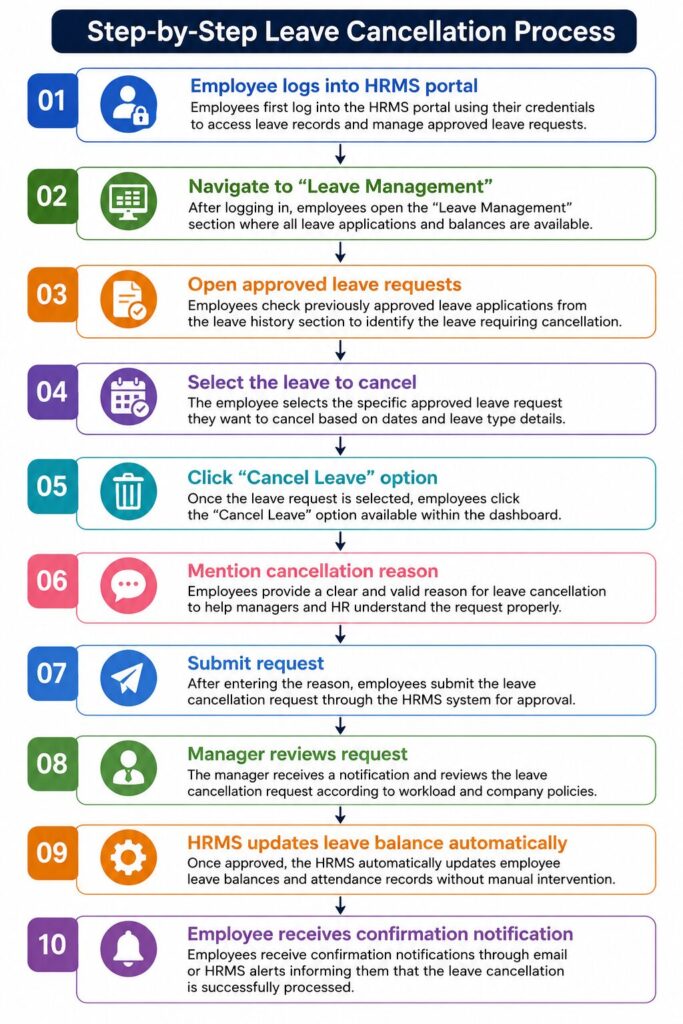
How Leave Cancellation Works in the HR System?
A modern HR system automates the entire cancellation of approved leave process to reduce manual work and errors.
Here’s how it generally works:
1. Leave Request Tracking
The HR system holds all approved leave information in one place, allowing easy access and organization of employee leave information.
2. Automated Approval Workflow
In the event that employees file leave cancellation requests, the HR system notifies managers about it right away, without any delay in the process.
3. Leave Balance Recalculation
The HR system recalculates leave balances after receiving approval from managers automatically.
4. Audit Trail Maintenance
The HR system keeps a complete record of each leave request, including its status, reason, and timestamp.
5. Real-Time Notifications
Instant notifications are provided to all contributors in relation to leave cancellation requests.
6. Policy-Based Controls
HR systems enforce company leave policies by automatically approving leave cancellation requests based on deadlines, hierarchy, rules, and required documentation.
Managing Leave Cancellation Easily with Savvy HRMS
Managing the cancellation of approved leave manually can be time-consuming and error-prone. That’s where Savvy HRMS helps organizations simplify the process.
With Savvy HRMS, businesses can automate leave management while ensuring transparency and policy compliance.
Key Features of Savvy HRMS for Leave Cancellation
1. Easy Employee Self-Service
Employees have the option to cancel approved leave from the employee portal easily.
2. Automated Approval Workflows
Managers get immediate notifications about the request and can approve or disapprove the leave cancellation.
3. Real-Time Leave Balance Updates
Leave balances will be updated automatically after the leave cancellation request is approved.
4. Mobile Accessibility
Employees and managers can approve or disapprove leave cancellation anytime and anywhere using a mobile.
5. Policy-Based Automation
Savvy HRMS enables companies to automate leave cancellation processes according to company policies.
6. Complete Audit Trail
A complete audit trail for each leave cancellation request is maintained for record purposes.
7. Reduced Administrative Burden
HR departments are able to save time as there are no spreadsheets or manual tracking.
Using Savvy HRMS, companies can enhance the employee experience while planning their workforce.
Conclusion
Cancelling approved leaves is a typical yet confusing process at work, which needs appropriate communication and transparency along with adherence to policies. Regardless of whether it’s an initiative taken by the employer or employee, the process of cancellation must be implemented in a professional manner.
Having the best HR policies in place and implementing a good HRMS system, such as Savvy HRMS, would help make the process of cancelling approved leaves easy for companies.
Want to make your leave management process easier?
Discover Savvy HRMS now and get started with automating your complete leave management process.
Book a Demo Today