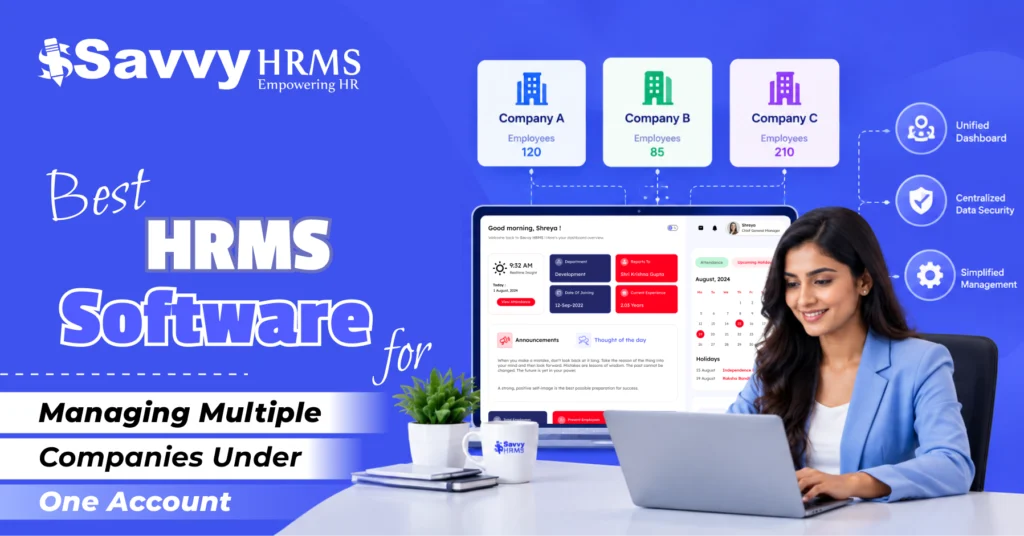
Best HRMS Software for Managing Multiple Companies Under One Account


-
AuthorChandra Shekhar Verma
-
 Last Updated
September 12, 2026
Last Updated
September 12, 2026
-
 Reading Time
17 Mins
Reading Time
17 Mins
Best HRMS software for managing multiple companies under one account allows business owners, HR heads, and group entities to run payroll, attendance, and compliance for several legal entities from a single login. It saves time, removes duplicate data entry, and keeps every company’s HR data organized yet separate.
This guide breaks down what multi-company HRMS software actually means, why growing businesses need it, and which features genuinely matter. You will also find a detailed, criteria-based ranking of the top platforms available in 2026.
Whether you run three branches or thirty subsidiaries, picking the right HRMS can make or break your HR operations. Read on for an honest, side-by-side comparison built specifically to help you choose confidently.
Key Takeaways
- Multi-company HRMS software lets you manage payroll, attendance, and compliance for multiple legal entities from one dashboard.
- Look for role-based access, entity-wise reporting, multi-currency payroll, and centralized employee data before choosing a platform.
- Savvy HRMS, Zoho People, Darwinbox, Zing HR, Deel, and PeopleStrong are ranked here on functionality, scalability, pricing, and support.
- Cost generally depends on employee headcount, number of entities, and the modules you need, not a flat per-company fee.
- The right choice depends on your company size, geographic spread, and how deeply you need entities to stay separated versus unified.
What Is Multi-Company HRMS Software?
Multi-company HRMS software is a human resource management system that lets a single account administer HR functions, payroll, attendance, leave, compliance, and employee records across two or more separate legal entities or business units.
Instead of buying and maintaining a separate HR system for every subsidiary, franchise, or branch, businesses use one centralized platform. Each company’s data stays logically separated, but administrators can switch between entities, pull consolidated reports, and apply group-wide policies without duplicating effort.
This setup is especially useful for holding companies, franchise networks, staffing agencies, and businesses expanding across states or countries, where every entity may have different compliance rules but shares the same parent organization.
Why Do Businesses Need a Single HRMS for Multiple Companies?
Businesses need a single HRMS for multiple companies because managing HR separately for each entity multiplies costs, creates data silos, and makes group-level reporting nearly impossible.
Here’s why a unified system matters:
- Centralized visibility: Leadership gets a consolidated view of headcount, attrition, and payroll cost across every entity without chasing spreadsheets from each branch.
- Reduced software spend: One subscription covering multiple companies is almost always cheaper than licensing separate HR tools for each subsidiary.
- Consistent policies: HR teams can roll out standardized leave, appraisal, or onboarding policies group-wide, while still allowing entity-specific customization where legally required.
- Simplified compliance: Multi-company HRMS platforms generally handle state-wise or country-wise statutory rules automatically, reducing manual compliance tracking.
- Faster employee transfers: Moving an employee from one group company to another becomes a few clicks instead of re-onboarding them from scratch.
- Easier audits: A single source of truth makes internal and statutory audits considerably faster across all entities.
As businesses scale through acquisitions, franchising, or geographic expansion, this single-account approach becomes less of a convenience and more of an operational necessity.
What Features Should a Multi-Company HRMS Have?
A true multi-company HRMS should support entity-wise separation with group-level consolidation, meaning you can view data separately or together depending on the need.
Core features to check before buying:
- Multi-entity architecture: The ability to add unlimited or scalable companies under one master account, each with its own employee database.
- Role-based access control: Admins can be restricted to specific companies, departments, or regions, preventing unauthorized cross-entity data access.
- Entity-wise and consolidated reporting: Reports should be pullable per company or combined across the group instantly.
- Multi-currency and multi-country payroll: Essential if your companies operate across different states or countries with different tax structures.
- Centralized employee database with entity tagging: One employee profile that can be tagged, transferred, or shared across companies without duplication.
- Compliance automation: Automatic handling of PF, ESI, professional tax, labor law, and other statutory requirements per entity’s jurisdiction.
- Single sign-on (SSO): One login for admins managing several companies, instead of separate credentials per entity.
- API and integration support: Connects with accounting, ATS, and finance tools separately for each company if needed.
- Scalable pricing: Cost structures that scale by employee count or module usage, not a flat fee per additional company.
Missing even one of these can turn a “multi-company” HRMS into little more than a single-company tool with extra logins.
How Did We Rank These HRMS Software for Managing Multiple Companies?
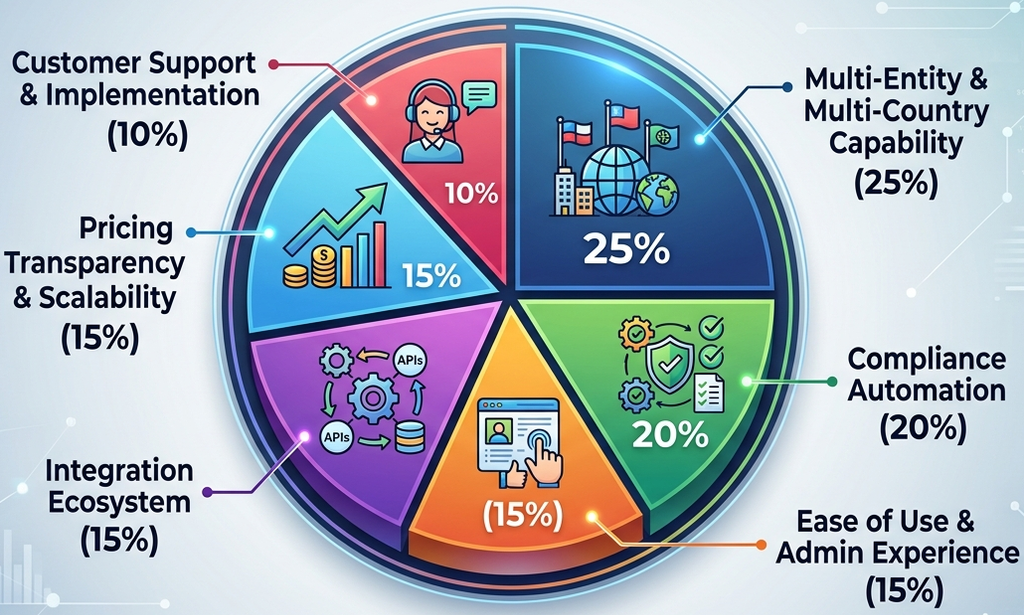
We ranked each HRMS platform using a weighted scoring model across six criteria that matter most for multi-company management: multi-entity capability, compliance coverage, ease of use, integration ecosystem, pricing transparency, and customer support quality.
| Ranking Criteria | Weight (%) | What It Measures |
| Multi-Entity & Multi-Country Capability | 25% | How well the platform separates and consolidates data across companies and geographies |
| Compliance Automation | 20% | Coverage of statutory, tax, and labor law requirements per entity |
| Ease of Use & Admin Experience | 15% | Learning curve, dashboard clarity, and switching between entities |
| Integration Ecosystem | 15% | Compatibility with payroll, accounting, ATS, and finance tools |
| Pricing Transparency & Scalability | 15% | Clarity of pricing per employee/entity and flexibility as you grow |
| Customer Support & Implementation | 10% | Onboarding support, response time, and dedicated account management |
Each platform was scored out of 100 based on publicly available product information, verified user reviews, and feature documentation, then weighted according to the table above to arrive at the final ranking.
At a Glance: Top HRMS Software for Managing Multiple Companies
| Rank | HRMS Software | Best For | Overall Fit |
| 1 | Savvy HRMS | Businesses running multiple entities under one group | ⭐⭐⭐⭐⭐ |
| 2 | Zoho People | Small to mid-sized multi-branch businesses | ⭐⭐⭐⭐ |
| 3 | Darwinbox | Large enterprises with complex multi-country operations | ⭐⭐⭐⭐ |
| 4 | Zing HR | Mid-market companies needing quick deployment | ⭐⭐⭐⭐ |
| 5 | Deel | Global teams and remote-first multi-entity companies | ⭐⭐⭐⭐ |
| 6 | PeopleStrong | Enterprises focused on analytics-driven HR | ⭐⭐⭐⭐ |
1. Savvy HRMS
Overview
Savvy HRMS is built from the ground up for organizations managing multiple companies under a single group structure. It offers dedicated multi-entity architecture rather than treating additional companies as an afterthought bolted onto a single-company product.
The platform allows administrators to toggle between entities instantly, pull consolidated group reports, and still maintain entity-specific compliance settings. This dual capability- separation when needed, consolidation when required, is what sets it apart from most competitors on this list.
Key Considerations
- True multi-entity dashboard with instant company-switching for admins.
- Entity-wise and group-wide payroll processing in one system.
- Role-based access limits visibility to assigned companies only.
- Built-in compliance engine covers state and central statutory rules.
- Employee transfers between group companies without re-onboarding.
- Consolidated analytics across headcount, attrition, and payroll cost.
- Flexible pricing that scales with employees, not per-entity fees.
- Dedicated onboarding support for group and holding companies.
- Strong API support for accounting and finance integrations.
Who Should Choose Savvy HRMS
Savvy HRMS is ideal for holding companies, franchise groups, and businesses with multiple subsidiaries that need both entity-level independence and group-level visibility. If your priority is a purpose-built multi-company structure rather than a modified single-company tool, this platform fits that requirement precisely and scales comfortably as you add more entities over time.
Who Might Not Need Savvy HRMS
Very small businesses operating as a single legal entity with no plans for expansion may find some multi-company features unnecessary. In such cases, a simpler, single-entity HR tool could be more cost-effective and easier to set up initially.
Best For
Indian groups, holding companies, and franchise networks managing three or more legal entities that need centralized control with entity-level flexibility.
2. Zoho People
Overview
Zoho People offers multi-location and multi-branch support within its broader HR suite, making it accessible for businesses already using other Zoho products across their organization.
Key Considerations
- Multi-branch configuration within a single Zoho People account.
- Integrates natively with Zoho Books, Payroll, and CRM tools.
- Affordable pricing tiers suited for small business budgets.
- Limited depth in complex multi-country compliance handling.
- Customizable workflows for leave, attendance, and approvals.
Who Should Choose Zoho People
Businesses already invested in the Zoho ecosystem, particularly small to mid-sized companies with a few branches or subsidiaries, will find Zoho People a natural, budget-friendly extension. Its familiar interface and native integrations reduce the learning curve significantly for existing Zoho users managing multiple business units.
Who Might Not Need Zoho People
Large enterprises with operations across many countries or complex statutory requirements may outgrow Zoho People’s multi-entity depth. Its compliance automation is comparatively lighter than platforms purpose-built for large-scale group structures.
Best For
Small and mid-sized businesses already using Zoho apps that need basic multi-branch HR management without heavy customization needs.
3. Darwinbox
Overview
Darwinbox is an enterprise-grade HRMS designed for large, complex organizations, offering strong multi-country and multi-entity configurations for businesses spread across several geographies.
Key Considerations
- Strong multi-country payroll and compliance framework.
- AI-driven analytics for workforce planning across entities.
- Highly configurable but requires longer implementation timelines.
- Strong mobile app experience for distributed workforces.
- Premium pricing positioned toward enterprise budgets.
Who Should Choose Darwinbox
Large enterprises and multinational groups with operations spanning multiple countries, complex approval hierarchies, and thousands of employees will benefit most from Darwinbox’s depth. Its enterprise-grade compliance and analytics justify the investment for organizations at that scale, especially those already running sophisticated HR processes.
Who Might Not Need Darwinbox
Smaller businesses or those managing just two or three entities in a single country may find Darwinbox overbuilt and expensive relative to their actual needs. The implementation effort can also outweigh the benefit for simpler use cases.
Best For
Large enterprises and multinational corporations managing complex, multi-country HR operations at scale.
4. Zing HR
Overview
Zing HR positions itself as a fast-to-deploy, mobile-first HRMS suited for mid-market companies wanting multi-location support without lengthy implementation cycles.
Key Considerations
- Quick deployment with minimal setup time required.
- Mobile-first design for field and distributed teams.
- Decent multi-location attendance and payroll handling.
- Integration ecosystem smaller than enterprise competitors.
- Competitive pricing for mid-market company budgets.
Who Should Choose Zing HR
Mid-market companies that need to get a multi-location HR system running quickly, without months of implementation, will appreciate Zing HR’s straightforward setup. It suits businesses with field staff or distributed teams that rely heavily on mobile access for attendance and approvals.
Who Might Not Need Zing HR
Enterprises requiring deep, country-specific compliance automation across many entities may find Zing HR’s feature depth insufficient. Businesses needing extensive third-party integrations might also hit limitations sooner than expected.
Best For
Mid-sized companies needing fast, mobile-friendly multi-location HR management without a long rollout period.
5. Deel
Overview
Deel specializes in global payroll and compliance, making it a strong choice for companies managing multiple entities across different countries with remote or distributed teams.
Key Considerations
- Built specifically for global, cross-border payroll compliance.
- Handles contractor and full-time employee management together.
- Strong entity-of-record and employer-of-record options.
- Less focused on traditional HR modules like appraisals.
- Pricing scales per employee across multiple countries.
Who Should Choose Deel
Companies with remote-first teams or multiple entities spread across different countries, especially those hiring contractors alongside full-time staff, will find Deel’s global payroll and compliance infrastructure particularly valuable. It removes much of the legal complexity of hiring across borders under one account.
Who Might Not Need Deel
Businesses operating entirely within one country with straightforward compliance needs may not need Deel’s global infrastructure. Companies wanting deep performance management or appraisal features may also need a supplementary tool.
Best For
Remote-first and globally distributed companies managing multiple entities and contractors across different countries.
6. PeopleStrong
Overview
PeopleStrong combines HRMS functionality with strong workforce analytics, appealing to enterprises that want data-driven insights across multiple business units.
Key Considerations
- Advanced analytics dashboard across multiple business units.
- Talent management modules alongside core HR functions.
- Configurable for mid-size to large multi-entity setups.
- Implementation support varies by contract and package.
- Pricing generally positioned for mid-to-large organizations.
Who Should Choose PeopleStrong
Organizations that prioritize workforce analytics and want data-backed decision-making across multiple companies or business units will find PeopleStrong a strong fit. It suits enterprises that need talent management features bundled with core HR and payroll functionality in one place.
Who Might Not Need PeopleStrong
Small businesses with simple HR needs and limited budgets may find PeopleStrong’s analytics-heavy feature set more than necessary. Companies wanting the lowest-cost entry point should consider lighter alternatives instead.
Best For
Mid-to-large enterprises that want strong analytics and talent management alongside multi-entity HR administration.
| HRMS Software | Best For | Biggest Advantage | Potential Integration | Ideal Employee Size |
| Savvy HRMS | Holding companies & franchise groups | Purpose-built multi-entity structure | Accounting, finance, ATS tools | 50 – 50,000+ |
| Zoho People | Small businesses in Zoho ecosystem | Native Zoho suite integration | Zoho Books, Payroll, CRM | 10 – 500 |
| Darwinbox | Large multinational enterprises | Enterprise-grade multi-country compliance | ERP, finance, ATS systems | 1,000 – 50,000+ |
| Zing HR | Mid-market, fast deployment needs | Quick setup, mobile-first design | Payroll and attendance tools | 100 – 2,000 |
| Deel | Global, remote-first companies | Cross-border payroll & compliance | Accounting and finance software | 10 – 10,000+ |
| PeopleStrong | Analytics-focused enterprises | Deep workforce analytics | HRIS, ERP, ATS integrations | 500 – 20,000 |
How Much Does Multi-Company HRMS Software Cost?
Multi-company HRMS software generally costs between ₹50 to ₹250 per employee per month (or $2 to $10 internationally), depending on the modules selected, number of entities, and whether compliance automation is included.
Pricing generally depends on:
- Employee headcount: Most vendors price per active employee per month, so total cost rises as your combined workforce across entities grows.
- Number of entities: Some platforms charge extra for each additional company or legal entity added to the account.
- Module selection: Core HR is usually cheapest; adding payroll, compliance automation, or performance management increases cost.
- Geographic spread: Multi-country payroll and compliance modules cost more due to the complexity of local statutory requirements.
- Implementation and support: Enterprise-grade platforms often charge separately for onboarding, data migration, and dedicated account management.
Always request a quote based on your actual entity count and combined headcount rather than depending on published starting prices, since multi-company use cases are rarely covered by base tiers.
How to Choose the Best HRMS for Multiple Companies: Step-by-Step
Choosing the right multi-company HRMS involves matching your entity structure, compliance complexity, and budget to a platform’s actual capabilities rather than its marketing claims.
1. Map Your Entity Structure
- List every legal entity under your group, including subsidiaries and branches.
- Note each entity’s location, state, or country of operation.
- Flag whether compliance should be handled separately or shared across entities.
2. Define Your Must-Have Features
- Multi-country payroll if entities operate across different regions.
- Contractor management if you hire both employees and freelancers.
- Multi-branch attendance and leave tracking for simpler, single-country setups.
3. Shortlist Based on Scale
Match each platform’s capability to your combined headcount and total entity count. Avoid enterprise-grade tools built for thousands of employees if your group is still small; you’ll end up overpaying for unused depth.
4. Request Entity-Specific Pricing
- Share your exact number of companies and employees with vendors.
- Avoid quotes based on generic, single-entity starting prices.
- Ask specifically how costs scale as you add more entities.
5. Test the Admin Experience
Book a demo focused entirely on the admin side, specifically switching between entities and pulling consolidated group reports. This reveals whether the platform truly supports multi-company use or just claims to.
6. Verify Compliance Coverage
- Confirm statutory support for every jurisdiction your entities operate in.
- Don’t assume headquarters-location compliance automatically covers other branches.
- Check for state-wise or country-wise updates handled automatically.
7. Check Integration Compatibility
Ensure the HRMS connects smoothly with your existing accounting, finance, and applicant tracking tools across every entity. Poor integration here often creates duplicate work instead of the efficiency you’re trying to achieve.
8. Evaluate Onboarding Support
- Confirm dedicated support for migrating data from multiple entities.
- Ask about general implementation timelines for multi-company rollouts.
- Check if a dedicated account manager is assigned during setup.
Following this sequence prevents the common mistake of choosing a well-known HRMS brand that later turns out to lack genuine multi-entity depth.
What Are the Benefits of Managing Multiple Companies Under One HRMS Account?
Managing multiple companies under one HRMS account delivers cost savings, centralized visibility, and operational consistency that separate systems simply cannot match.
- Lower total software cost: One subscription covering several entities is cheaper than licensing individual tools per company.
- Group-level reporting: Leadership can view consolidated headcount, payroll cost, and attrition trends instantly across the entire group.
- Standardized processes: Onboarding, leave policies, and approval workflows can be unified while still respecting entity-specific rules.
- Simplified employee mobility: Transferring staff between group companies becomes administrative rather than a full re-hiring process.
- Reduced administrative overhead: HR teams manage one system instead of juggling logins, data exports, and reconciliation across platforms.
- Better compliance tracking: Centralized compliance monitoring reduces the risk of missed statutory deadlines across entities.
What Challenges Come With Multi-Company HRMS Management?
The biggest challenge with multi-company HRMS management is balancing data separation with group-level visibility without compromising either compliance or usability.
- Data segregation complexity: Ensuring one entity’s data doesn’t leak into another’s reports requires careful permission configuration.
- Compliance variation: Different entities may fall under different state or country regulations, complicating automated compliance rules.
- Implementation time: Migrating multiple companies’ historical HR data simultaneously takes longer than a single-entity rollout.
- Cost creep: Per-entity or per-module pricing can escalate quickly if not negotiated clearly upfront.
- Change management: Employees and admins across different companies may need separate training on the new unified system.
- Vendor lock-in risk: Migrating away from a deeply integrated multi-entity HRMS later becomes significantly harder than switching a single-company tool.
Multi-Company HRMS vs. Single-Company HRMS: What’s the Difference?
The core difference is that multi-company HRMS supports multiple legal entities with separate compliance and reporting under one account, while single-company HRMS is built for just one entity’s HR operations.
| Aspect | Multi-Company HRMS | Single-Company HRMS |
| Entity Support | Multiple legal entities under one account | One legal entity only |
| Reporting | Entity-wise plus consolidated group reports | Single, unified reports only |
| Compliance | Handles varying rules per entity/jurisdiction | Configured for one jurisdiction |
| Access Control | Role-based, entity-restricted permissions | Simpler, department-level permissions |
| Pricing Structure | Scales by employees and/or entities | Scales by employees only |
| Ideal User | Groups, holdings, franchises, multi-branch firms | Standalone businesses, startups |
If you operate more than one legal entity today, or plan to through expansion or acquisition, a multi-company HRMS is almost always the more future-proof choice, even if the upfront setup takes a little more planning.
Conclusion
Picking the right HRMS for multiple companies really comes down to how your business is structured today and where it’s headed. A few quick reminders before you decide:
- Map your entities and compliance needs first; don’t shop for software before you know what you’re solving for.
- Prioritize platforms with genuine multi-entity architecture, not single-company tools with extra logins bolted on.
- Compare pricing based on your actual headcount and entity count, not generic starting prices.
If you’re running multiple companies under one group and want a platform built specifically for that structure, Savvy HRMS is worth shortlisting first. Platforms like Zoho People, Darwinbox, Zing HR, Deel, and PeopleStrong each serve specific scenarios well, so match their strengths to your business size and geographic spread.
At the end of the day, the “best” HRMS isn’t the most feature-packed one; it’s the one that fits your entities, your compliance load, and your team’s day-to-day workflow without friction.











Ready to simplify HR across all your companies?
Book a free demo with Savvy HRMS today and see multi-entity management done right.
Frequently Asked Questions (FAQs)
1. Can one HRMS manage multiple companies at the same time?
Yes, a multi-company HRMS is specifically designed to manage several legal entities from a single account, with separate compliance handling and consolidated group-level reporting.
2. Is Savvy HRMS suitable for small businesses with just two companies?
Yes, Savvy HRMS scales from small groups with two or three entities to large organizations with thousands of employees, thanks to its flexible, employee-based pricing structure.
3. Do I need separate logins for each company in a multi-company HRMS?
No, most multi-company HRMS platforms, including Savvy HRMS, use single sign-on, letting admins switch between entities from one login instead of maintaining separate credentials.
4. How is multi-company HRMS pricing calculated?
Pricing is typically based on total employee headcount across all entities, plus the modules selected, rather than a flat fee charged per additional company.
5. What’s the difference between multi-company and multi-location HRMS?
Multi-company HRMS manages separate legal entities with distinct compliance needs, while multi-location HRMS typically manages branches or offices under a single legal entity with shared compliance rules.