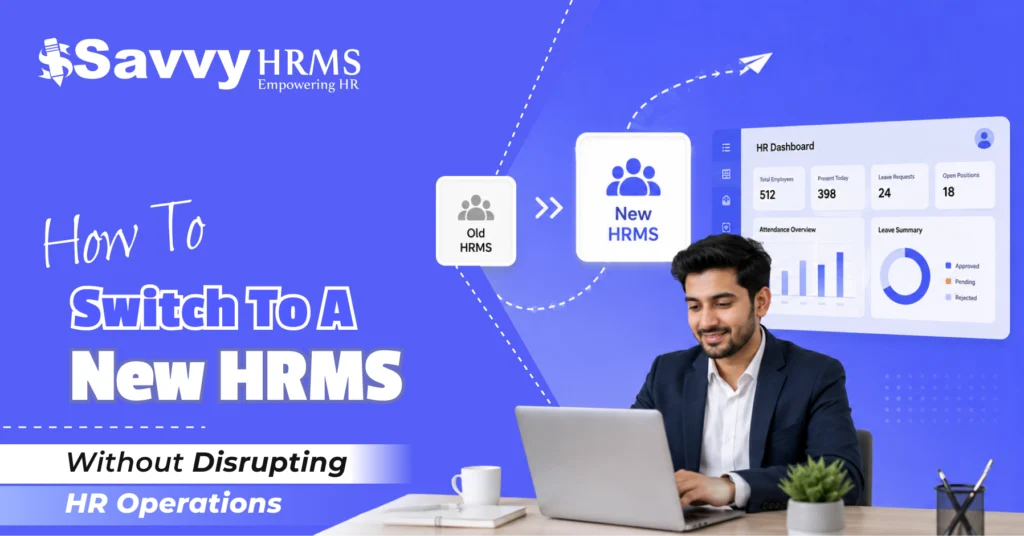
How to Switch to a New HRMS Without Disrupting HR Operations


-
AuthorC.S. Verma
-
 Last Updated
August 31, 2026
Last Updated
August 31, 2026
-
 Reading Time
17 Mins
Reading Time
17 Mins
Wondering how to switch to a new HRMS without disrupting payroll, employee data, attendance, or everyday HR operations? You are not alone. HRMS migration can feel complicated, but with proper planning, data preparation, testing, and communication, businesses can make the transition much smoother.
A new HRMS can help organizations automate repetitive HR tasks, improve employee data accuracy, simplify payroll processing, and provide better workforce visibility. However, moving from an existing HR system to new HR software involves more than transferring data. It requires careful planning, data mapping, testing, employee training, and a controlled go-live process.
The goal of HRMS migration is not simply to move information from one system to another. It is to move to a better HRMS without interrupting critical HR operations. This means keeping payroll accurate, protecting employee data, maintaining attendance and leave processes, and ensuring employees can continue accessing essential HR services throughout the transition.
What Is HRMS Migration and Why Do Businesses Switch to a New HRMS?
HRMS migration is the process of moving employee, HR, payroll, attendance, leave, and other workforce-related data and processes from an existing HRMS to a new HRMS. The process can include data extraction, cleaning, mapping, testing, validation, and final transfer into the new HR system.
Businesses usually consider HRMS migration when their existing HR software no longer meets their operational or business requirements. An HRMS that worked well when a company had a small workforce may become difficult to manage as the organization grows, adds locations, or introduces more complex HR processes.
Some common reasons businesses switch to a new HRMS include:
- Too much manual HR work
- Limited automation
- Payroll processing difficulties
- Poor employee self-service
- Outdated technology
- Limited reporting and analytics
- Lack of integrations
- Complicated approval workflows
- Poor mobile accessibility
- Difficulty managing a growing workforce
- Inaccurate employee data
- Limited customization
- High dependence on spreadsheets
- Lack of scalable HR software
For example, an HR team may initially manage attendance using one application, payroll using separate payroll software, employee records through spreadsheets, and leave requests through emails. As the workforce grows, managing these disconnected processes becomes increasingly difficult.
A modern HRMS can bring these processes together.
However, the migration itself needs to be treated as a business project rather than just a technical data transfer.
The objective should be to move accurate and relevant information into the new system while ensuring that employees, managers, HR teams, and payroll teams can continue their regular activities.
When Is It the Right Time to Switch to a New HRMS?
The right time to switch to a new HRMS is when your existing HR system is creating more limitations than value or can no longer support your organization’s current and future HR requirements.
There is no fixed rule saying that a company must replace its HRMS after a certain number of years. Instead, businesses should look at their current HR processes, workforce size, technology requirements, and business goals.
1. Your HR Team Depends Too Much on Manual Work
If HR employees regularly use spreadsheets, emails, calculators, and separate applications for everyday HR activities, the existing system may no longer be efficient enough.
Manual processes can increase:
- Data entry errors
- Processing time
- Administrative workload
- Duplicate information
- Approval delays
- Payroll discrepancies
2. Payroll Has Become Difficult to Manage
Payroll is one of the strongest indicators that an HR system may need improvement.
If payroll teams spend too much time checking calculations, correcting employee information, reconciling salary data, or preparing reports manually, it may be time to consider more capable payroll software.
3. Your Business Is Growing
An HRMS should grow with your organization.
If your company is expanding into multiple locations, departments, business units, or employee categories, the HR system should be able to manage that complexity without creating additional manual work.
4. Employees Are Not Using the HRMS
A system can have many features, but if employees find it difficult to use, its value is limited.
Low employee adoption may indicate problems with:
- User experience
- Mobile access
- Employee self-service
- Navigation
- Workflow design
- System performance
5. You Need Better Integrations
Modern HR operations often require HRMS integration with:
- Payroll software
- Attendance systems
- Biometric devices
- Accounting systems
- Recruitment software
- Expense management systems
- Banking systems
- Other business applications
If your existing HRMS cannot connect effectively with the tools your business depends on, switching systems may be worth considering.
6. Reporting Is Becoming a Problem
HR teams increasingly need quick access to workforce information. If generating basic employee, attendance, payroll, or workforce reports requires significant manual effort, the current system may be holding the organization back.
A simple question can help:
Is your current HRMS helping your HR team become more efficient, or is it creating more work?
If it is creating more work, it may be time to evaluate a new HRMS.
What Are the Biggest Risks of Switching to a New HRMS?
The biggest risks of HRMS migration include data loss, incorrect data mapping, payroll errors, integration failures, employee resistance, security issues, and operational disruption.
Understanding these risks before migration makes them much easier to manage.
1. Employee Data Loss
Employee records contain important information that HR teams may need for daily operations, payroll, reporting, compliance, and historical reference.
If records are incorrectly transferred, some information may be lost, duplicated, or placed in the wrong fields.
2. Payroll Errors
Payroll requires particular attention during HRMS migration.
Incorrect salary structures, employee classifications, deductions, attendance inputs, or statutory information can affect salary calculations.
Even a small payroll error can create significant employee dissatisfaction.
3. Incorrect Data Mapping
The old HRMS and new HRMS may organize information differently.
For example, the existing system may have one field for “Department,” while the new system may require department, business unit, and cost center separately.
Without proper mapping, data can end up in the wrong location.
4. Integration Problems
Your new HRMS may need to communicate with attendance systems, payroll software, finance systems, recruitment platforms, or other applications.
If these integrations are not tested, an HR process that worked previously may stop working after migration.
5. Employee Resistance
Employees may be comfortable with the existing HR system. Introducing a new one without proper communication and training can lead to confusion and low adoption.
6. Security and Privacy Risks
HRMS platforms contain sensitive employee information. Migration activities therefore need appropriate access controls and secure handling of employee data.
7. Business Disruption
Poorly planned migration can temporarily affect:
- Attendance
- Leave requests
- Employee self-service
- Payroll
- Approvals
- Reports
- HR workflows
The answer is not to avoid HRMS migration. The answer is to plan, test, validate, and control the migration process carefully.
How Should You Plan an HRMS Migration Before Switching Systems?
A successful HRMS migration begins with a detailed migration plan that defines the data, processes, responsibilities, timeline, testing requirements, and go-live strategy.
Do not begin by immediately exporting employee data from your existing system.
Start by understanding what needs to move and why.
Step 1: Define the Migration Scope
Identify which HR processes and data will be migrated.
This may include:
- Employee master data
- Payroll
- Attendance
- Leave
- Recruitment
- Onboarding
- Performance management
- Employee documents
- Expenses
- Organizational structure
- Historical information
Not every piece of historical data needs to be moved. Decide what the new HRMS actually needs to operate effectively.
Step 2: Build a Migration Team
Migration should not be handled by one person.
Depending on the organization, the team may include:
- HR
- Payroll
- IT
- Finance
- Department managers
- HRMS implementation specialists
- Senior management
Each person should have clear responsibilities.
Step 3: Create a Migration Timeline
A practical timeline can follow this sequence:

Give enough time to each stage.
Step 4: Define Success Criteria
Before migration begins, decide how you will determine whether the migration was successful.
For example:
- Employee records are complete
- Payroll calculations are accurate
- Leave balances are correct
- Attendance information is available
- Integrations are working
- Employees can log in
- HR workflows function correctly
- Reports produce accurate information
This prevents the migration from becoming an open-ended project.
How Do You Audit and Clean Employee Data Before HRMS Migration?
Data auditing and cleaning should happen before HRMS migration because transferring inaccurate or duplicate information simply moves existing problems into the new HR system.
Start by reviewing the employee data stored in your existing HRMS.
1. Look for:
- Duplicate employee records
- Incorrect names
- Outdated contact information
- Missing employee IDs
- Incorrect joining dates
- Missing department information
- Incorrect reporting managers
- Incomplete bank details
- Outdated salary information
- Incorrect leave balances
- Duplicate documents
- Inactive employee records
2. Remove Duplicate Records
For example, if the same employee appears twice because of an old data-entry error, determine which record is correct before migration.
3. Standardize Information
Different teams may enter the same information differently.
For example:
- HR
- Human Resources
- Human Resource
- HR Department
All of these may refer to the same department.
Standardizing such information before migration makes reporting and system management easier.
4. Validate Payroll Information
Salary structures, deductions, employee categories, and other payroll-related information should be reviewed carefully.
Payroll data should be checked against approved records before it enters the new payroll software.
5. Review Historical Data
Decide which historical records need to be migrated and which can be retained separately for reference.
The goal is not to migrate the largest possible amount of data.
The goal is to migrate the right data accurately.
How Do You Map Employee Data from the Old HRMS to the New HRMS?
Data mapping connects fields in the old HRMS to the corresponding fields in the new HRMS so that employee information is transferred correctly.
This is one of the most important parts of HRMS migration.
For example:
| Old HRMS Field | New HRMS Field |
| Employee Code | Employee ID |
| Employee Name | Full Name |
| Date Joined | Date of Joining |
| Dept. | Department |
| Reporting To | Reporting Manager |
| Basic Salary | Basic Pay |
| Leave Balance | Available Leave |
The mapping document should ideally identify:
- Source field
- Target field
- Data format
- Required/optional status
- Transformation rules
- Validation requirements
- Person responsible for approval
Pay Attention to Data Formats
The old HRMS may store a date as:
15/08/2026
while the new system may expect:
2026-08-15
The information is the same, but the format is different.
Similar differences can exist in:
- Employee IDs
- Phone numbers
- Salary values
- Department codes
- Leave codes
- Employment types
- Location names
Map Organizational Information
Departments, locations, designations, business units, reporting structures, and cost centers may also require mapping.
A detailed mapping exercise reduces the possibility of incorrect employee data appearing in the new HRMS.
What Employee and HR Data Should You Migrate to the New HRMS?
The data you should migrate depends on your HR processes and business requirements, but most organizations need to evaluate employee, payroll, attendance, leave, organizational, and document data.
1. Employee Master Data
This may include:
- Employee ID
- Employee name
- Contact details
- Address
- Date of birth
- Joining date
- Employment status
- Department
- Designation
- Location
- Reporting manager
- Employment type
2. Payroll Data
Depending on the new payroll software and migration requirements, this may include:
- Salary structure
- Basic salary
- Allowances
- Deductions
- Reimbursements
- Tax information
- Statutory information
- Payment details
- Payroll history
3. Attendance Data
Review whether the new HRMS needs:
- Attendance history
- Shift information
- Work schedules
- Overtime
- Attendance policies
- Regularization records
4. Leave Data
Important leave information may include:
- Leave types
- Opening balances
- Accrued leave
- Used leave
- Pending requests
- Leave policies
5. Employee Documents
Depending on organizational requirements, businesses may migrate:
- Offer letters
- Employment documents
- Identification documents
- Certificates
- Policy acknowledgements
- Other HR records
6. Organizational Data
This can include:
- Departments
- Locations
- Business units
- Designations
- Reporting structures
- Cost centers
However, do not assume that every historical record needs to be migrated.
The right approach is to determine which information is required for current operations, reporting, payroll, compliance, employee services, and future HR processes.
How Can You Test the New HRMS Before Going Live?
The new HRMS should be thoroughly tested before go-live using realistic employee data, HR workflows, payroll scenarios, integrations, and user activities.
Never make the first day of production the first real test of the system.
1. Test Employee Data
Compare migrated records with the old system.
Check:
- Employee count
- Employee IDs
- Names
- Departments
- Designations
- Salary information
- Reporting managers
- Employment status
2. Test HR Workflows
Test common processes such as:
- Leave application
- Leave approval
- Attendance regularization
- Employee onboarding
- Employee profile updates
- Manager approvals
- Document access
- HR reports
3. Test Payroll
Run sample payroll calculations.
Compare:
- Gross salary
- Deductions
- Net salary
- Reimbursements
- Overtime
- Tax calculations
- Statutory deductions
- Payslips
4. Test Integrations
If the HRMS connects with other systems, test the complete flow.
For example:
Attendance System → HRMS → Payroll Software
or:
HRMS → Accounting System
Do not assume that an integration will continue working simply because it worked with the previous HRMS.
5. Conduct User Acceptance Testing
Ask actual HR, payroll, and management users to perform realistic tasks.
This often reveals usability and workflow issues that technical testing alone may not identify.
How Do You Train Employees and Managers Before the New HRMS Goes Live?
Employees and managers should receive practical training before HRMS go-live so they understand how to complete their everyday tasks in the new system.
Even technically excellent HR software can face adoption problems if users do not know how to use it.
1. Train Employees on Everyday Tasks
Employees should know how to:
- Log in
- Update their profile
- Apply for leave
- View attendance
- Regularize attendance
- Download payslips
- Submit HR requests
- Access documents
- View relevant HR information
2. Train Managers on Approvals
Managers may need additional training for:
- Leave approvals
- Attendance approvals
- Team information
- Employee requests
- Performance workflows
- Reports
3. Train HR and Payroll Teams
HR administrators may need deeper training on:
- Employee master data
- Payroll processing
- Attendance rules
- Leave configuration
- Reports
- User permissions
- HR workflows
- System administration
4. Provide Simple Learning Material
Consider preparing:
- Quick-start guides
- Short training videos
- FAQs
- Process guides
- Internal support contacts
Training should focus on practical tasks rather than confusing users with every feature available in the HRMS.
The goal is simple:
Employees should know what they need to do differently from day one.
How Do You Plan a Smooth HRMS Go-Live and Cutover?
A smooth HRMS cutover requires a controlled transition from the old system to the new system, including final data migration, validation, user access, payroll readiness, and post-go-live support.
1. Before Cutover
Complete:
- Final data cleaning
- Final backup
- Final data migration
- Data validation
- Payroll testing
- Integration testing
- User acceptance testing
- Employee communication
- User training
- Access configuration
2. During Cutover
Define exactly:
- When the old HRMS becomes read-only
- When final data extraction occurs
- When data is loaded into the new HRMS
- Who validates the migrated data
- Who approves production readiness
- Who handles urgent issues
3. After Cutover
Immediately check:
- Employee logins
- Employee records
- Attendance
- Leave balances
- Payroll configuration
- Approval workflows
- Reports
- Integrations
- Employee self-service
4. Create a Post-Go-Live Support Team
The first few days after implementation are important.
Employees may encounter:
- Login issues
- Missing information
- Incorrect balances
- Workflow problems
- Permission issues
- Questions about new processes
Having a dedicated support process helps resolve these problems quickly.
A successful go-live should therefore be viewed as the beginning of the stabilization phase, not the end of the migration project.
What Are the Most Common HRMS Migration Mistakes to Avoid?
The most common HRMS migration mistakes include migrating inaccurate data, skipping testing, ignoring payroll, failing to map fields correctly, undertraining employees, and launching without a contingency plan.
1. Migrating Unclean Data
Mistake: Moving all existing information without checking its accuracy.
Better approach: Audit, clean, standardize, and validate employee data first.
2. Migrating Everything
Mistake: Assuming every historical record must be moved.
Better approach: Define which data is genuinely required.
3. Treating Payroll as an Afterthought
Mistake: Focusing on employee records while leaving payroll testing until the end.
Better approach: Include payroll in the migration plan from the beginning.
4. Skipping Data Mapping
Mistake: Assuming the new HRMS will automatically understand the old system’s data structure.
Better approach: Create and approve a detailed field-mapping document.
5. Not Testing Integrations
Mistake: Testing only the HRMS interface.
Better approach: Test every important connection between the HRMS and other business systems.
6. Launching Without Employee Training
Mistake: Expecting employees to figure out the new system themselves.
Better approach: Train employees and managers before go-live.
7. No Contingency Plan
Mistake: Assuming there will be no major issues during cutover.
Better approach: Define escalation, backup, and rollback procedures for critical situations.
8. Ignoring Post-Go-Live Issues
Mistake: Considering migration complete immediately after launch.
Better approach: Monitor the system and resolve issues during the stabilization period.
What Should Be Included in an HRMS Migration Checklist?
An HRMS migration checklist should cover planning, data auditing, data cleaning, data mapping, testing, payroll validation, employee training, go-live, and post-migration monitoring.
Phase 1: HRMS Migration Planning
Define your migration goals, scope, timeline, responsibilities, and critical HR processes before starting. A clear plan helps coordinate HR, payroll, IT, and management teams while reducing confusion during the transition.
Phase 2: Employee Data Audit
Review existing employee records to identify duplicates, missing information, outdated details, incorrect salary data, and incomplete records. A thorough audit ensures only accurate and relevant data moves into the new HRMS.
Phase 3: Data Cleaning
Clean and standardize employee, payroll, attendance, leave, and organizational data before migration. Remove duplicates, correct errors, update outdated information, and ensure important records follow consistent formats for accurate system processing.
Phase 4: Data Mapping
Map every relevant field from the old HRMS to the corresponding field in the new system. Proper mapping ensures employee, payroll, attendance, leave, and organizational information transfers accurately without creating inconsistencies.
Phase 5: HRMS Testing
Test migrated data, HR workflows, payroll calculations, attendance, leave, integrations, reports, and employee access before going live. Thorough testing helps identify errors early and confirms that critical HR operations work correctly.
Phase 6: Employee Training
Train employees, managers, HR administrators, and payroll teams before implementation. Explain essential workflows, system features, approval processes, and employee self-service functions so users can confidently work with the new HRMS.
Phase 7: HRMS Go-Live
Complete final data migration, validate records, confirm user access, check integrations, and communicate the launch before switching systems. A controlled go-live helps minimize disruption and ensures critical HR processes remain operational.
Phase 8: Post-Migration
Monitor the new HRMS after implementation to identify data issues, workflow problems, payroll discrepancies, integration failures, and user concerns. Prompt support and regular validation help stabilize the system and improve adoption.
How Can Businesses Switch HRMS Without Disrupting HR Operations?
Businesses can switch HRMS without disrupting HR operations by using a phased migration approach: plan the transition, audit and clean data, map fields, test the new system, validate payroll, train users, perform a controlled cutover, and monitor the system after go-live.
The safest approach is not to move directly from the old HRMS to the new HRMS without validation.
Instead, follow a structured process:
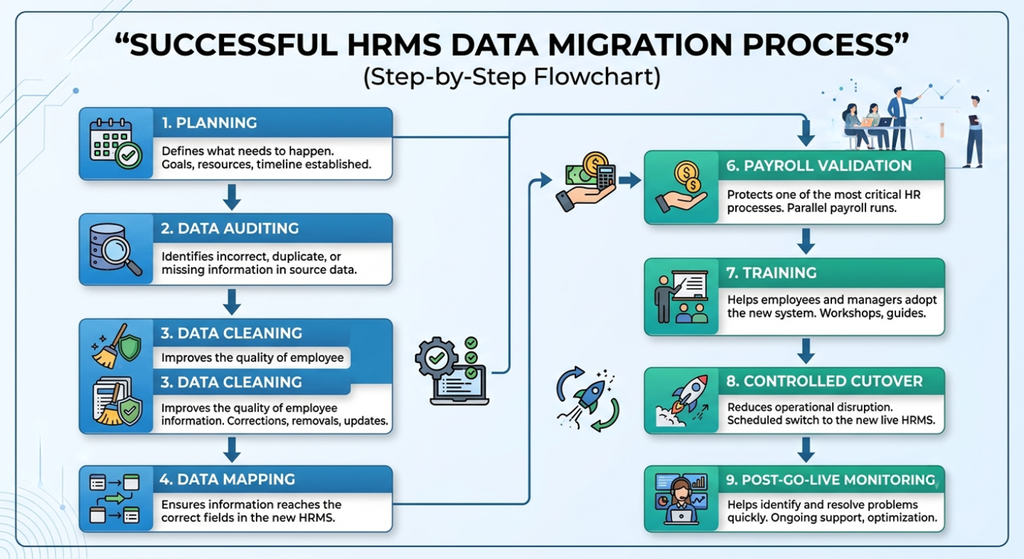
Businesses should also evaluate the new HRMS beyond its basic features. Scalability, payroll capabilities, integrations, reporting, automation, employee experience, security, mobile accessibility, implementation support, and long-term usability all matter.
Most importantly, migration should not be considered complete simply because the data has been imported.
A successful HRMS migration is complete when HR teams, managers, employees, and payroll teams can perform their regular activities accurately and confidently in the new system.
Conclusion
Switching to a new HRMS does not have to mean putting HR operations on hold. With proper planning, clean employee data, accurate mapping, thorough testing, payroll validation, employee training, and a controlled go-live, businesses can transform to modern HR software with minimal disruption.
The goal of HRMS migration is more than transferring employee information. It is about protecting payroll, maintaining HR continuity, improving employee experience, reducing manual work, and creating a stronger foundation for future workforce management.











Ready to simplify your HRMS migration and bring HR, payroll, attendance, leave, and employee management together?
Explore how Savvy HRMS can help your business make the transition to smarter and more efficient HR management.
Frequently Asked Questions (FAQs)
1. What is the best way to switch to a new HRMS without disrupting HR operations?
Businesses can switch to a new HRMS smoothly by planning the migration, cleaning employee data, mapping fields, testing payroll and integrations, training users, and following a controlled go-live process.
2. What data should be migrated when switching to a new HRMS?
The data may include employee master data, payroll information, attendance, leave balances, employee documents, organizational data, and relevant historical records.
3. How can businesses prevent payroll errors during HRMS migration?
Businesses should validate salary structures, deductions, employee classifications, tax information, and payroll calculations. Running sample payroll before go-live can help identify and fix errors.
4. How long does it take to switch to a new HRMS?
The blog does not specify a fixed migration duration. The timeline depends on the organization’s data, HR processes, workforce size, integrations, testing requirements, and migration scope.
5. What are the common mistakes to avoid when switching to a new HRMS?
Common mistakes include migrating unclean data, moving unnecessary historical records, skipping data mapping and testing, treating payroll as an afterthought, failing to train employees, and launching without a contingency plan.