AI Employee Onboarding Automation: Benefits, Process, and Best Practices for 2026


-
AuthorRuchika Rajput
-
 Last Updated
October 27, 2026
Last Updated
October 27, 2026
-
 Reading Time
19 Mins
Reading Time
19 Mins
TL;DR
AI employee onboarding automation helps HR teams simplify onboarding, reduce repetitive work, and provide new employees with a smoother start. It combines AI tools with automated workflows to manage routine tasks and connect onboarding with wider HR operations.
- Automates document collection, reminders, task assignments, and employee record creation.
- Helps new hires to find information, understand company policies, and complete joining formalities.
- Supports role-specific training and learning while ensuring mandatory activities are completed.
- Connects onboarding with attendance, payroll systems, employee records, and employee lifecycle management.
- Helps HR teams choose suitable software with workflow automation, self-service, security, reporting, and reliable integrations.
- Requires human oversight to verify important information, protect employee data, review AI outputs, and handle sensitive decisions.
A new employee’s first few days should focus on understanding the company, meeting their team, and preparing for their role. However, onboarding often involves administrative tasks such as collecting documents, creating employee records, arranging system access, and assigning training. Manual follow-ups can delay these activities and create extra work for HR teams.
That’s where AI employee onboarding automation combines automated workflows with AI capabilities to simplify these tasks. The goal is not to automate every interaction but to reduce repetitive work, improve coordination, and give new employees a more organized start while keeping HR professionals involved in decisions that require human judgment.
In this guide, you will learn how AI employee onboarding automation works, its key benefits and use cases, best practices, and how to choose the right employee onboarding software for your organization.
What Is AI Employee Onboarding Automation?
AI employee onboarding automation uses artificial intelligence and automated workflows to manage repetitive tasks involved in welcoming and preparing new employees for their roles. It can simplify document collection, employee queries, task assignments, and training coordination while allowing HR teams to oversee important decisions.
Workflow automation handles routine tasks like assigning checklists, sending reminders, and notifying teams, while AI answers employee questions, extracts details from documents, and suggests relevant training materials.
For example, an automated workflow can remind an employee to submit a missing document, while an AI assistant can explain which document is required and where to submit it.
The key distinction is that automation follows predefined rules, while AI can help interpret information and generate context-aware responses. Many onboarding processes benefit from combining both, with Core HR teams reviewing sensitive information and handling exceptions.
How Is AI-Powered Onboarding Different From Traditional Onboarding?
AI-powered onboarding uses artificial intelligence to interpret information and support employee queries, while traditional onboarding relies more heavily on manual tasks.
Automated onboarding sits between the two by using predefined rules to assign tasks, send reminders, and track progress without necessarily requiring AI. Let’s explore more about them below:
| Area | Traditional onboarding | Automated onboarding | AI-powered onboarding |
| Task management | HR manually tracks activities | Automatically assigns tasks and sends reminders | Helps understand requests and coordinate tasks |
| Document handling | Employees and HR review documents manually | Forms and rules check for missing details | Extracts and sorts information for HR review |
| Employee questions | HR responds individually | Employees use FAQs or predefined resources | AI answers questions using approved company information |
| Training | Employees receive standard training plans | Training is assigned based on predefined rules | Suggests training based on employee roles and needs |
| Progress tracking | HR follows up manually | Dashboards show task completion | Helps identify delays and common issues |
| Human involvement | HR handles most activities | HR manages exceptions and approvals | HR checks accuracy, handles sensitive decisions, and supports employees |
The best approach combines all three: automation handles routine tasks, AI helps process information, and HR teams provide personal support and make important decisions.
How Does Automated Employee Onboarding Work?
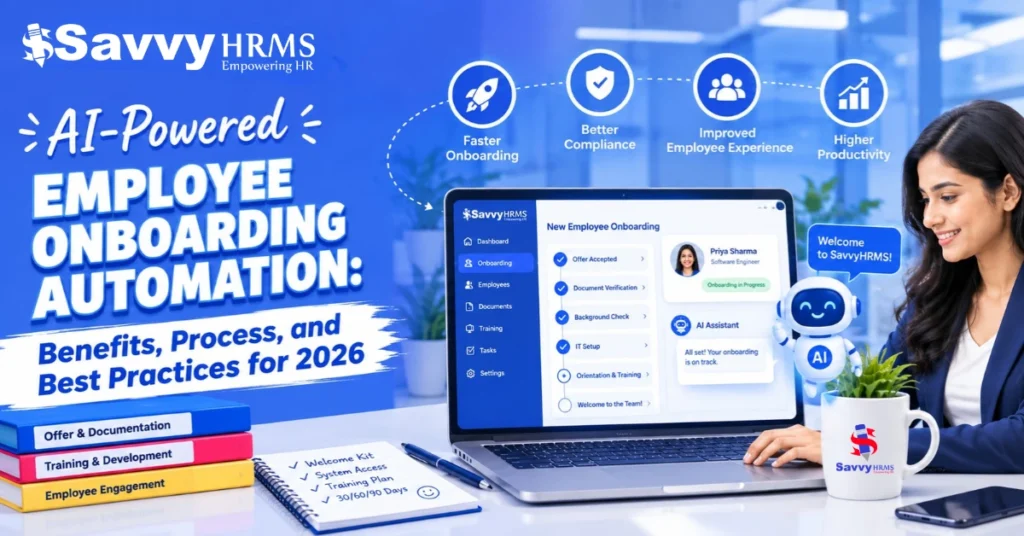
Automated employee onboarding in 2026 connects hiring confirmation, document collection, employee record creation, IT preparation, payroll setup, and training through coordinated workflows. The system assigns tasks, sends notifications, and tracks progress, while HR verifies important information and handles exceptions.
For example, consider a company hiring a new finance executive. The following steps show how automated workflows and AI can work together throughout the onboarding process.
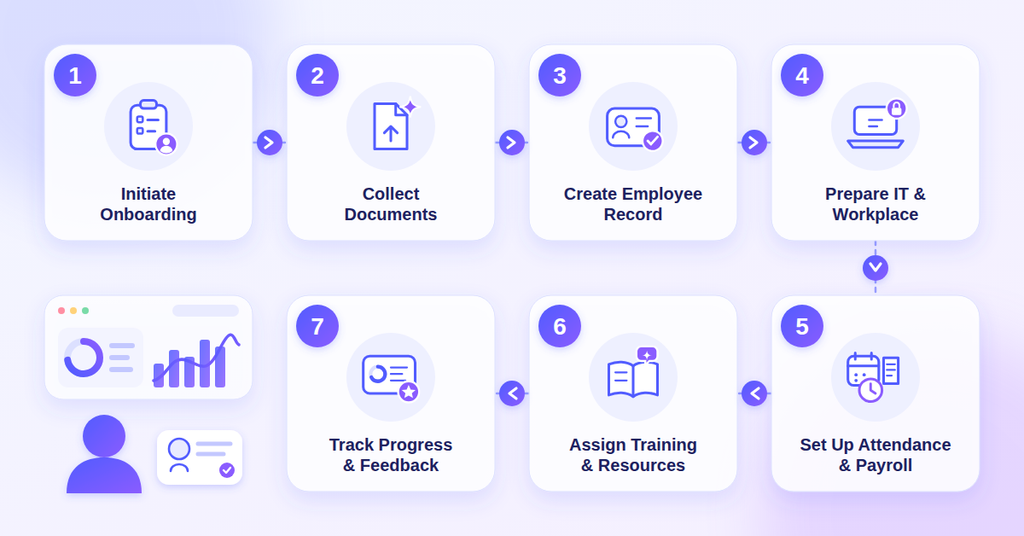
Step 1: Initiate onboarding after hiring confirmation
Once the hiring status is updated, the system automatically creates an onboarding checklist and assigns the required tasks to HR, IT, the hiring manager, and the new employee.
Step 2: Collect employee information and documents
The employee receives instructions to submit the required details and documents. Automated reminders follow up on incomplete submissions, while AI-assisted document processing can extract information and flag missing details for verification.
Step 3: Create the employee record
After the information is reviewed and approved, the details are added to the employee database. HR verifies important information before it is used for payroll or other official processes.
Step 4: Coordinate IT and workplace preparation
Once onboarding begins, the workflow notifies the relevant teams about the employee’s requirements, such as email access, software permissions, equipment, and workspace preparation. This helps ensure the necessary arrangements are completed before the joining date.
Step 5: Configure attendance and payroll information
HR confirms the employee’s details, work schedule, salary information, and other required setup information.
Accurate attendance data also supports payroll preparation after an employee joins. You can read our guide on how AI-powered attendance systems improve payroll to learn how automated attendance tracking can help improve payroll accuracy.
Step 6: Assign training and company resources
The employee receives role-specific learning materials, company policies, and introductory activities. An AI assistant can also help answer routine questions using approved internal documentation, making it easier for the employee to find relevant information.
Step 7: Monitor progress and collect feedback
Throughout the process, HR tracks outstanding tasks, follows up on delays, and resolves exceptions. After onboarding, feedback from the employee can help identify gaps in instructions, training, or coordination.
By connecting these steps, automated employee onboarding makes it easier to track responsibilities, identify incomplete activities, and coordinate different departments. It can also reduce repeated data entry across disconnected systems, provided that integrations are reliable and employee information is verified.
What Are the Benefits of AI Employee Onboarding Automation?
AI employee onboarding automation helps HR teams reduce repetitive administrative work, provide consistent onboarding experiences, and improve visibility into new-hire progress.
It can also help employees find information faster, support role-specific learning, and connect onboarding with wider HR operations.
1. Reduces Repetitive Administrative Work
HR teams often spend time following up on documents, answering recurring questions, and tracking incomplete onboarding tasks.
Automation can handle routine reminders, task assignments, and status updates, reducing the need for manual follow-ups.
This gives HR professionals more time to support new employees, coordinate with managers, and resolve issues that require individual attention.
2. Creates a More Consistent Onboarding Experience
Without a standardized process, new employees may receive different instructions or miss important activities depending on their department, location, or manager.
Employee onboarding software helps HR teams establish consistent checklists, responsibilities, and completion requirements.
At the same time, workflows can accommodate role-specific tasks, helping organizations maintain common standards without treating every employee’s needs as identical.
A positive onboarding experience can also support long-term engagement. Explore our guide to the best employee engagement software to learn how businesses can support employee feedback, recognition, and communication.
3. Helps New Employees Find Information Faster
New hires often need guidance on company policies, workplace procedures, benefits, and internal systems. Delays in finding reliable information can make the transition into a new role more difficult.
AI-powered assistants can help employees find answers through approved company resources which allows them to resolve routine questions more independently.
HR teams can then focus on confidential concerns and situations that require personal guidance.
4. Supports Role-Specific Learning and Preparation
Employees need different information and training depending on their responsibilities. A finance executive may need guidance on accounting systems and approval procedures, while a team leader may need training on performance reviews and people management.
AI can help recommend relevant learning resources based on role and learning needs.
This makes onboarding more relevant to each employee while allowing managers and HR teams to ensure that mandatory training requirements are met.
5. Improves Visibility Into Onboarding Progress
When onboarding activities are managed through separate emails, spreadsheets, and departmental systems, it can be difficult to identify outstanding tasks and delays.
Centralized tracking helps HR teams monitor completion status, pending approvals, and overdue activities.
These insights make it easier to identify recurring bottlenecks, follow up with the right department, and improve the onboarding process over time.
6. Connects Onboarding With Wider HR Operations
Onboarding involves more than welcoming a new employee. Employee records, attendance, leave, payroll, and other HR processes must also be prepared for the employee’s joining date.
Connected HR Manager software can help maintain consistent employee information across these processes and reduce duplicate data entry. For organizations hiring across multiple departments or locations, this can improve coordination and provide a stronger foundation for employee lifecycle management.
However, these benefits depend on accurate data, reliable integrations, and appropriate verification of important employee information.
| Key Advantage: Use a short takeaway about reducing repetitive HR work and giving HR teams more time to support new employees. |
What Are the Most Common Use Cases of AI in Employee Onboarding?
Common use cases of AI in employee onboarding in 2026 include document processing, employee self-service, policy assistance, personalized learning recommendations, task coordination, feedback analysis, and employee record preparation.
These applications combine AI capabilities with automated workflows to reduce manual effort and support a smoother onboarding process.
1. Automated Document Collection and Processing
HR teams often spend time collecting employee documents, entering details, and checking for missing information. Automated workflows can send document requests and reminders, while AI can extract information from supported files and flag missing details.
What HR should check: Verify extracted information before adding it to employee records or using it for payroll and compliance.
2. AI-Powered Employee Self-Service and Policy Assistance
New employees often have questions about leave, reimbursements, company policies, and internal systems. An AI assistant can answer routine questions using approved company documents and help employees find the information they need.
What HR should check: Keep information updated, restrict access to authorized users, and direct unanswered questions to HR.
3. Personalized Training and Learning Recommendations
Different employees need different training based on their roles. AI can suggest relevant learning materials, such as performance management resources for team leaders or accounting-system training for finance employees.
What HR should check: HR and managers should ensure that recommended training does not replace mandatory courses.
4. Automated HR and IT Task Coordination
Onboarding often depends on several teams completing tasks in the right order. HR may need to verify employee details, IT may need to configure system access, and managers may need to arrange introductions or role-specific training.
Automated workflows can assign responsibilities, trigger notifications, and flag overdue tasks when a hiring milestone is reached. AI can help interpret less structured requests, while predefined rules control which actions can be taken.
For example, confirming a joining date can trigger an IT access request and notify the hiring manager to prepare the employee’s first-week schedule.
5. Employee Record and Payroll Setup Support
Employee details may need to be transferred from onboarding systems to HRMS, attendance, and payroll software. Integrations can reduce duplicate data entry, while AI can help extract information from documents.
HR must verify important details, including joining dates, salary information, and payroll inputs, before processing salaries. Work schedules and attendance rules should also match the employee’s role and location.
Attendance system rules and work schedules can also be configured according to the employee’s role and location. The key requirement is reliable data transfer, clear approval responsibilities, and appropriate validation, not AI alone.
What Are the Best Practices for AI Employee Onboarding Automation?
The best practices for AI employee onboarding automation include defining clear workflows, keeping employee information accurate, personalizing onboarding by role, and maintaining human oversight.
HR teams should also test workflows before expanding automation and regularly use employee feedback to improve the process.
1. Keep the Onboarding Experience Human-Centered
You should automate your routine tasks, but keep personal interactions with the new employees so they feel welcomed.
Schedule check-ins with HR and introductions with team members instead of relying entirely on automated messages.
2. Start With Clearly Defined Workflows
Identify repetitive tasks that frequently cause delays, such as collecting documents, assigning checklists, and sending reminders.
Automate these activities first, then introduce AI features where interpreting information or answering employee questions offers a clear advantage.
3. Personalize Onboarding by Role and Department
Create onboarding paths that reflect each employee’s responsibilities, location, and department.
For example, a finance employee may need accounting-system training, while a team leader may require guidance on performance reviews. Ensure that role-specific activities do not replace mandatory onboarding requirements.
4. Keep Employee Information and Policies Up to Date
AI assistants and automated workflows depend on accurate information so review employee records, onboarding instructions, policy documents, and training materials regularly so employees receive relevant guidance and tasks reflect current company procedures.
5. Define Responsibilities for Every Onboarding Task
Assign clear ownership to HR, IT, hiring managers, and other teams involved in onboarding. Set deadlines, approval requirements, and escalation procedures so that a delayed task does not leave the employee waiting without support.
6. Test Workflows Before Expanding Automation
Test automated onboarding with a small group before using it across the company. Check how the process handles missing documents, changes in joining dates, and delays in system access then fix any issues before expanding it.
7. Collect Feedback and Refine the Process
Ask new employees and managers about their onboarding experience. Identify common problems, such as unclear instructions or delayed tasks, and update the process based on their feedback, as regular reviews help keep onboarding effective as business needs change.
How Do You Choose the Right Employee Onboarding Software?
Choose employee onboarding software in 2026 based on its workflow automation capabilities, employee data management, payroll and attendance integrations, self-service features, security controls, and reporting tools.
The right solution should fit your organization’s onboarding requirements and connect smoothly with its existing HR systems.
1. Check Workflow Automation Capabilities
Look for configurable onboarding checklists, task assignments, reminders, approval flows, and completion tracking. The software should support different employee categories and make task ownership clear to HR, IT, and hiring managers.
2. Evaluate Employee Data and Document Management
Check whether the system supports employee information, document collection, record updates, and validation processes. If the software offers AI-assisted document processing then confirm which file formats it supports and how HR can review extracted information.
3. Verify Payroll and Attendance Integrations
Employee information often needs to move from onboarding into employee records, attendance, leave, and payroll systems. Ask vendors whether these connections are built in, available through APIs, or dependent on manual file transfers.
Confirm which information transfers automatically, when updates occur, and whether approval is required before data reaches downstream systems.
4. Look for Employee Self-Service Features
Employees should be able to access onboarding instructions, view pending tasks, submit required information, and find relevant company resources. Self-service features can reduce routine queries and help new hires understand what they need to do next.
If the software includes an AI assistant, check whether it can retrieve information from approved company resources and direct employees to HR when necessary.
5. Review Security and Access Controls
Onboarding systems may handle personal information, employment documents, and payroll-related details. Evaluate role-based permissions, audit logs, data retention practices, and the provider’s approach to protecting employee information.
For AI features, ask how submitted data is processed and whether employee information is used to train external AI models.
| Practical tip: Ask vendors to demonstrate an end-to-end onboarding scenario using a sample employee. Follow the process from document collection through employee record creation and payroll handoff to identify integration gaps that a feature list alone may not reveal. |
How Can HR Automation Software Improve the Onboarding Process?
HR automation software improves onboarding by coordinating repetitive tasks, assigning responsibilities, tracking pending activities, and connecting employee information across HR systems.
It can reduce duplicate data entry and manual follow-ups, provided that workflows are properly configured and employee data is accurate.
For example, a connected onboarding process can:
- Create an onboarding checklist after hiring confirmation.
- Assign document collection and verification tasks.
- Notify IT and the hiring manager about their responsibilities.
- Transfer approved employee information into connected HR systems.
- Track pending attendance and payroll setup activities.
- Send reminders when mandatory tasks are incomplete.
- Provide reports on delays and outstanding approvals.
These capabilities are especially useful when several departments need to act on the same employee record.
However, buying HR automation software does not automatically eliminate manual work. Organizations must first standardize their processes, assign task ownership, maintain accurate employee data, and configure integrations correctly.
What Should You Consider Before Adopting AI Onboarding Software?
Before adopting AI onboarding software, organizations should assess employee data privacy, output accuracy, potential bias, integration reliability, and accountability. Clear security controls, human verification, and escalation procedures help reduce risks when AI supports employee information and onboarding activities.
1. Employee Data Privacy and Security
Onboarding may involve personal details, identity documents, salary information, and bank details. If an AI tool accesses this information without appropriate controls, sensitive data could be exposed or used in unintended ways.
Review the provider’s data processing and retention practices, restrict access to authorized users, and understand whether information submitted to AI features is used to train external models.
2. Inaccurate AI Outputs
AI may read incorrect details from documents, provide outdated policy information, or misunderstand employee questions. These errors can affect employee records, payroll, or system access.
HR should check important information and changes before approving them. If AI cannot answer a question correctly, it should direct the employee to HR for help.
3. Bias and Unfair Treatment
AI may give unfair results if it uses biased data or incorrect assumptions. For example, AI recommendations may not accurately reflect an employee’s skills or performance.
HR should check AI results for bias and avoid using unsupported AI recommendations to make employment decisions. Employees should also be able to raise concerns and request a human review.
4. Unclear Accountability
Automation can make it difficult to identify who is responsible when a task fails or an incorrect update occurs. This is especially important when workflows involve HR, IT, payroll, and other departments.
Assign clear responsibility for monitoring AI tools, correcting errors, approving sensitive actions, and responding to employee concerns. Maintain appropriate records of important changes and decisions so they can be reviewed when necessary.
Ultimately, AI should support onboarding tasks without removing accountability. Human review, reliable information, and clear procedures remain essential when employee records or employment-related processes are involved.
| Important Reminder Emphasize that AI should support routine onboarding activities while humans remain responsible for sensitive decisions and employee support. |
How Does AI Onboarding Fit Into Employee Lifecycle Management?
AI onboarding supports employee lifecycle management by connecting the transition from recruitment to onboarding and subsequent HR activities. When integrated with employee records, attendance, leave system, payroll, learning, and offboarding workflows, it can help reduce repeated data entry and maintain more consistent employee information.
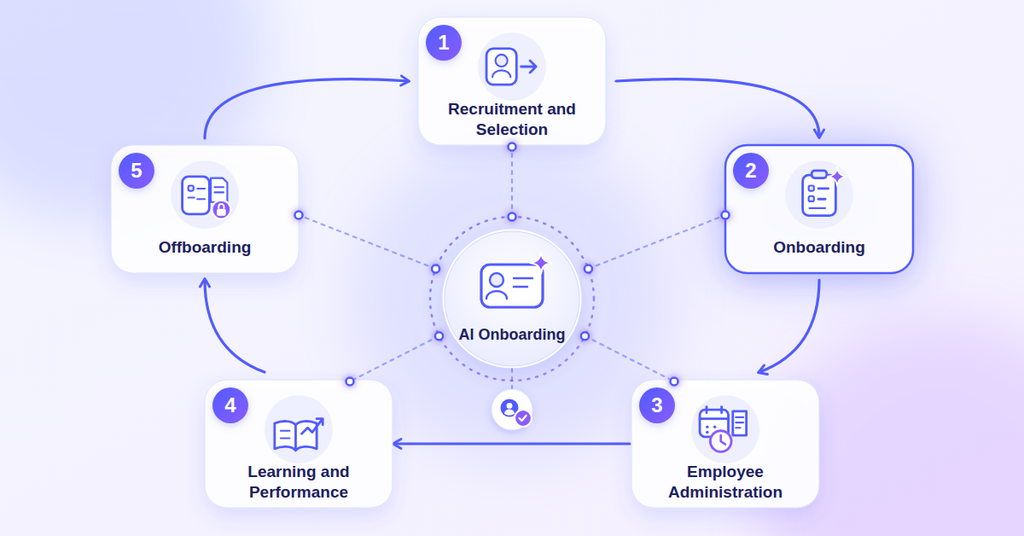
Employee lifecycle management covers several stages, including:
- Recruitment and selection: Candidate information moves from recruitment systems into the onboarding workflow after hiring.
- Onboarding: Automated workflows coordinate document collection, induction schedules, equipment requests, and joining formalities.
- Employee administration: Verified employee records support related processes such as attendance, leave, and payroll setup.
- Learning and performance: Employees receive role-specific learning resources, while managers coordinate training and performance-related activities.
- Offboarding: When an employee leaves, connected workflows can help coordinate exit documentation, access removal, and final settlement activities.
When these stages are connected, HR teams can reduce repeated data entry and maintain more consistent employee records. AI can assist with tasks such as answering policy questions, summarizing feedback, or recommending relevant learning resources. However, sensitive updates and important employment decisions still require appropriate human oversight.
For organizations evaluating employee onboarding software, integration with existing HR systems is therefore important. It helps onboarding become part of a connected employee lifecycle rather than a separate process that ends after the first day.
Conclusion
AI employee onboarding automation in 2026 helps HR teams reduce repetitive tasks, coordinate joining formalities, and give new employees a more organized start. From document collection and employee queries to payroll coordination and role-specific training, automation can make onboarding more consistent and easier to manage.
However, successful implementation depends on accurate employee data, reliable integrations, appropriate security controls, and human oversight. HR teams should start with repetitive tasks, measure the results, and expand automation as their needs grow.











Create a Better Onboarding Experience With Savvy HRMS
Simplify employee onboarding with Savvy HRMS and connect employee records, attendance, leave, and payroll in one platform.
Frequently Asked Questions
1. What Is AI Employee Onboarding Automation?
AI employee onboarding automation uses artificial intelligence and automated workflows to coordinate joining tasks, process information, answer employee questions, and support a more organized onboarding experience.
2. What Is the Difference Between Automated and AI-Powered Employee Onboarding?
Automated onboarding follows predefined rules to complete tasks such as sending reminders and assigning checklists. AI-powered onboarding can also interpret questions, summarize information, and recommend relevant resources based on available data.
3. Can Employee Onboarding Software Automate Payroll Setup?
Yes. Employee onboarding software can transfer verified employee details to payroll systems through integrations, reducing duplicate data entry. HR teams should verify salary details, joining dates, tax information, and other payroll inputs before processing salaries.
4. How Does HR Automation Software Support Employee Lifecycle Management?
HR automation software connects workflows across recruitment, onboarding, attendance, leave, payroll, performance management, and offboarding. Integrations help maintain consistent employee records and reduce repetitive administrative work throughout the employee lifecycle.
5. Which Features Should HR Managers Look for in Employee Onboarding Software?
HR managers should evaluate workflow automation, document management, employee self-service, task tracking, role-based access, reporting, and integrations with payroll and attendance systems. The right features depend on the organization’s workforce size and onboarding requirements.
6. Can AI Replace HR Managers During Employee Onboarding?
No. AI can support repetitive administrative tasks and provide quick answers to routine questions, but HR managers remain responsible for employee support, sensitive decisions, exception handling, and building meaningful relationships with new hires.
7. Is AI Employee Onboarding Automation Suitable for Small and Mid-Sized Businesses?
Yes. Small and mid-sized businesses can automate document collection, joining checklists, reminders, and employee queries. Starting with a few high-volume tasks helps teams assess the value of automation before expanding to more complex workflows.
8. How Can Companies Protect Employee Data When Using AI Onboarding Software?
Companies should review vendor security and data-handling practices, restrict access to authorized users, keep employee information secure, and verify AI-generated outputs before important updates. Clear retention policies and human oversight also help reduce privacy and accuracy risks.