NCP Days in PF: Meaning, Calculation, Rules and Impact on EPF


-
AuthorAmit Kumar Jha
-
 Last Updated
November 17, 2026
-
 Reading Time
14 Mins
NCP days in PF affect how an employee’s monthly wages and Provident Fund (PF) contributions are reported to the Employees’ Provident Fund Organization (EPFO). However, seeing NCP days in your EPF passbook does not mean that money has been deducted from your existing PF balance.
NCP stands for Non-Contributory Period. It refers to the days in a month when an employee is not entitled to wages and PF contributions are therefore not payable on those wages. The employer reports these days to EPFO through the monthly Electronic Challan-cum-Return (ECR).
Understanding NCP days helps employees to check their PF records, helps HR and payroll teams to report wages and contributions correctly. In this guide, we explain what NCP days mean, how to calculate them, when they apply, how they affect PF contributions and pension, and what to do if you find an incorrect entry.
TL;DR
NCP days in PF show how many days in a wage month were treated as non-contributory. Here are the key points to understand:
- NCP stands for Non-Contributory Period.
- NCP days are generally recorded when an employee is not entitled to wages, such as during qualifying unpaid leave.
- Employers report NCP days through the monthly EPFO ECR.
- NCP days may affect the PF wages and contributions reported for that month.
- They do not directly reduce the money already accumulated in an employee’s PF account.
- Employees can check NCP entries in their EPFO passbook and contact their HR or payroll team if they find any mismatch.
What Are NCP Days in PF?
NCP days in PF are the days in a month for which an employee does not get paid. NCP stands for Non-Contributory Period in PF. Since the employee does not receive wages for these days, PF contributions are generally not made for them.
For example, if an employee takes paid leave, they still get their salary for those days. So, paid leave is not counted as NCP.
But if an employee takes leave without pay (LWP) then they do not get a salary for those days, as these days may be counted as NCP in the monthly PF record.
In simple terms, NCP days are the days for which an employee does not get paid and PF contributions are generally not made.
Why Are NCP Days Recorded in EPF?
NCP days are recorded in EPF when an employee has days in a month for which no wages are payable. Since PF contributions are generally calculated on applicable wages, these days are reported separately in the monthly ECR.
Let’s see some common situations in which NCP days may be reported:
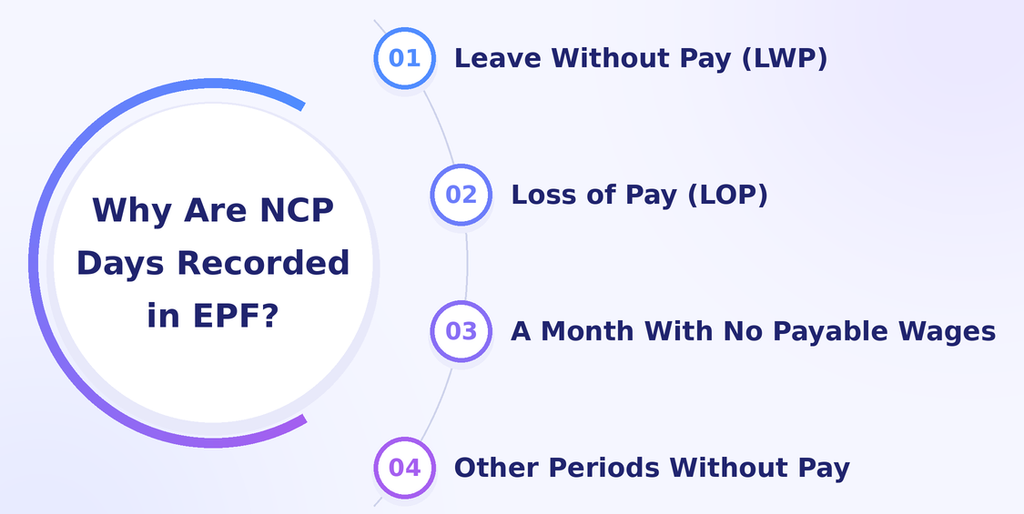
1. Leave Without Pay (LWP)
When an employee takes leave without pay, they do not receive salary for those days. As a result, these days may be counted as NCP days.
For example, if an employee takes three days of unpaid leave in a month and receives no wages for those days, the employer may report three NCP days in the ECR.
2. Loss of Pay (LOP)
Loss of Pay(LOP) occurs when an employee’s salary is reduced because they were absent or did not have paid leave available.
For example, if an employee takes two days off without approval and the company treats those days as unpaid, the days may be considered when calculating NCP.
However, LOP and NCP are not the same. LOP is related to salary deduction, whereas NCP is reported in the employee’s EPF records.
3. A Month With No Payable Wages
Sometimes, an employee may have no wages payable for an entire month. In such cases, the employer needs to report the applicable NCP days according to EPFO’s ECR instructions.
For example, if an employee has no payable wages for a full wage month, the employer should check the applicable reporting requirements before submitting the ECR.
4. Other Periods Without Pay
There may be other situations where an employee is not entitled to wages for certain days. Whether these days count as NCP depends on the employee’s wage entitlement and the applicable EPFO reporting rules.
HR teams should check attendance, leave and payroll records before reporting NCP days. Not every absence or non-working day should automatically be treated as an NCP day.
Difference Between NCP Days, LOP, LWP and Absent Days
NCP, LOP, LWP and absent days are related to attendance and salary processing, but they do not mean the same thing. Let’s see in more detail below:
| Term | Meaning | Where it is used |
| NCP days | Days reported as a non-contributory period in the EPF return | EPF/ECR reporting |
| LOP | Loss of Pay; salary is reduced for days for which wages are not payable | Payroll |
| LWP | Leave Without Pay; approved leave for which the employee does not receive wages | Leave and payroll |
| Absent days | Days when an employee does not attend work | Attendance records |
For example, an employee may be absent for two days. If those days are later approved as paid leave, they would not normally result in a loss of wages but if they are treated as unpaid leave, they may affect salary and the NCP reported for the month.
In simple terms, attendance records show whether an employee was present or absent, payroll checks whether they are entitled to wages, and the ECR reports the applicable NCP days to EPFO.
How to Calculate NCP Days in PF?
To calculate NCP days in PF, subtract the total paid days from the total number of days in the month. Paid days include days worked, approved paid leaves, weekly offs and paid holidays.
Formula:
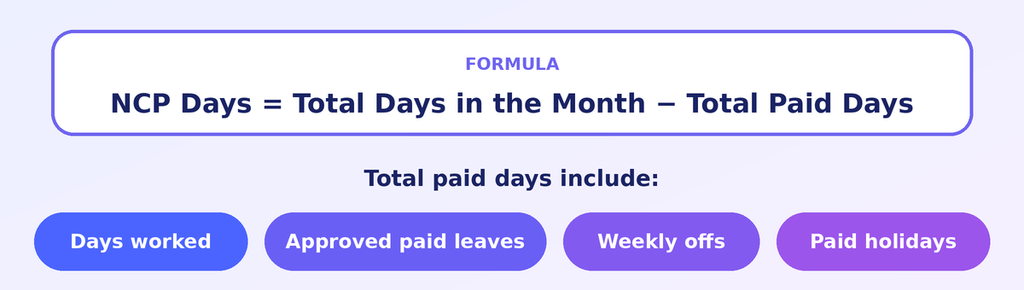
Total paid days include working days, paid leaves, weekly offs and paid holidays.
Let’s understand this formula with a few examples.
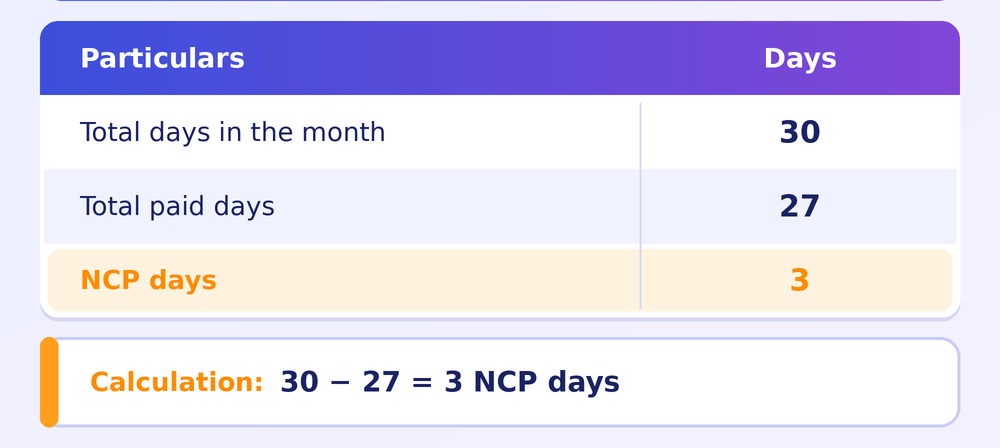
Example 1: NCP Calculation in a 30-Day Month
Suppose an employee has 27 paid days in a 30-day month, including working days and eligible paid leaves.
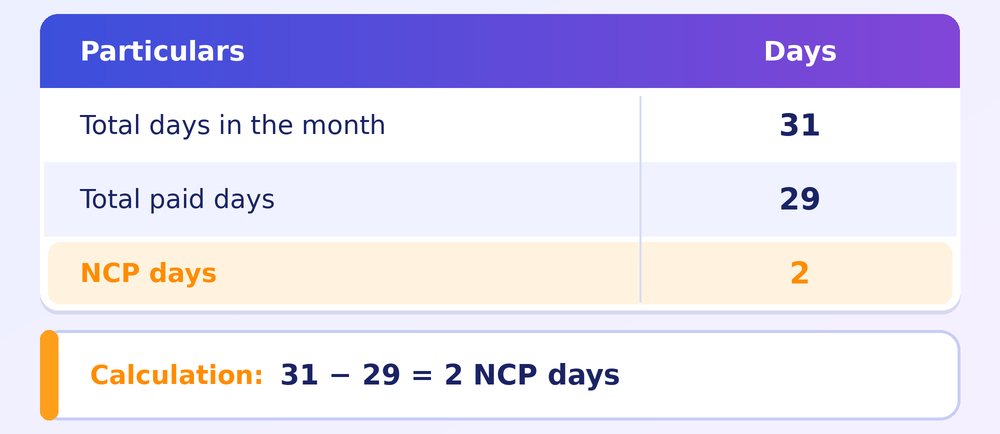
Example 2: NCP Calculation in a 31-Day Month
Suppose an employee has 29 paid days in a 31-day month, including weekly offs and paid holidays.
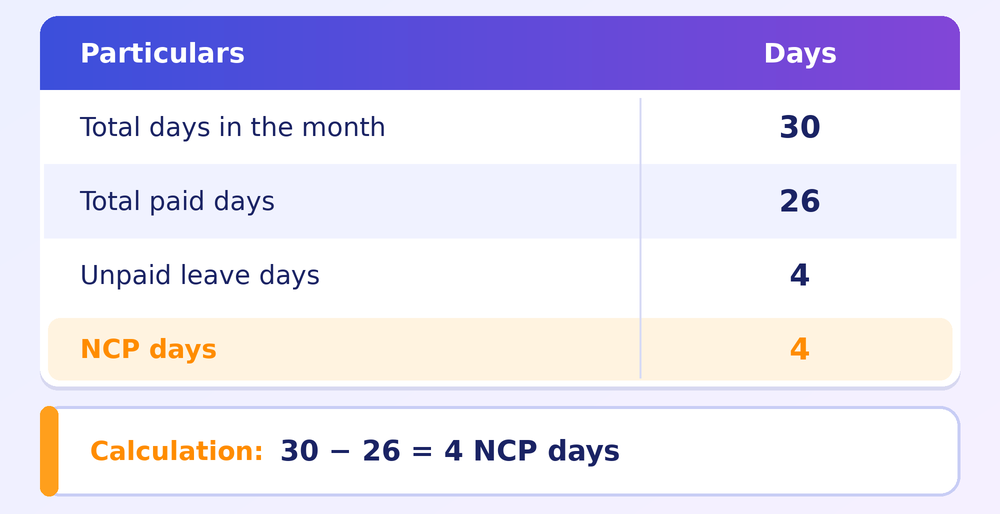
Example 3: Employee Takes Unpaid Leave
Suppose an employee takes four days of unpaid leave in a 30-day month. The remaining 26 days are treated as paid days, including applicable weekly offs and holidays.
Example 4: Employee Receives No Wages for the Entire Month
If an employee has no payable wages for the entire 30-day wage month then the calculation may look like this:
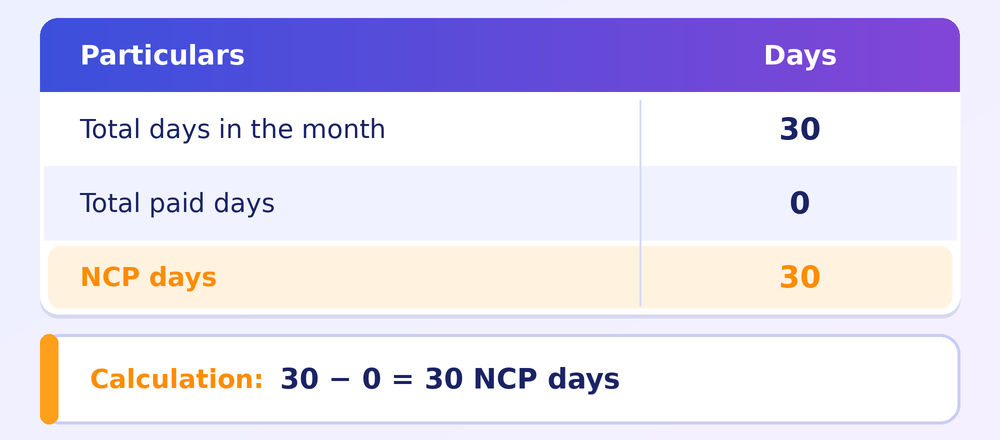
The employer should verify the employee’s status and follow the applicable EPFO ECR instructions before reporting a full-month NCP.
Example 5: Employee Joins or Leaves During the Month
Suppose an employee joins a company on the 12th of a 30-day month. The days before joining should not automatically be treated as unpaid leave. Similarly, days after an employee’s exit should not automatically be classified as NCP.
The employer should consider the actual joining or exit date and the applicable wage and ECR reporting rules before calculating the paid and non-contributory days.
| Important: This formula provides a simple way to understand NCP calculation when paid days and non-contributory days account for the full wage month. Paid days must include eligible paid leaves, weekly offs and holidays. For joining or exit cases and other special situations, employers should verify the applicable EPFO ECR instructions rather than applying the formula mechanically. |
How Do NCP Days Affect PF Contributions?
NCP days can affect the PF contribution for a particular month because they represent days for which an employee is not entitled to wages. When wages are reduced due to unpaid leave, the PF contribution may also be lower for that month.
PF contributions are calculated on the applicable PF wages, not simply on the employee’s full monthly salary. Let’s understand this with an example.
Suppose an employee’s monthly PF wages are ₹18,000. The employee takes two days of unpaid leave, and the PF wages for that month are reduced to ₹16,800.
| Particulars | Amount |
| Usual monthly PF wages | ₹18,000 |
| PF wages after unpaid leave adjustment | ₹16,800 |
| Difference in PF wages | ₹1,200 |
In this example, the PF contribution will be calculated on the applicable wages of ₹16,800, subject to the employee’s PF membership, applicable wage ceiling and contribution rules.
The actual calculation may vary depending on the employee’s wage structure and applicable EPF provisions. The example is only to explain how unpaid leave can affect monthly PF wages.
Do NCP Days Affect EPS and Employee Pension?
NCP days can affect how an employee’s non-contributory period is recorded in EPF and pension-related records. However, it does not mean that every NCP day automatically reduces the employee’s pension by a fixed amount.
To understand this better, it is important to know the difference between EPF and EPS:
- EPF (Employees’ Provident Fund): Helps employees to build their retirement savings through contributions made by the employee and employer.
- EPS (Employees’ Pension Scheme): Provides pension benefits to eligible employees based on the scheme’s rules.
- NCP days: Represent the non-contributory period reported by the employer in the monthly ECR.
EPFO requires employers to report NCP days correctly so that non-contributory periods are not incorrectly counted as contributory periods.
The impact on pension-related service or benefits depends on the employee’s contribution history and the applicable EPS rules. Simply subtracting the NCP days shown in one month’s passbook entry is not enough to determine an employee’s pension eligibility or service period.
How Are NCP Days Reported in EPF ECR?
Employers report NCP days through the Electronic Challan-cum-Return (ECR), which is used to submit employee-wise wage and PF contribution details to EPFO every month.
While preparing the ECR, the employer includes the applicable NCP days along with the employee’s wage and contribution details. The general process is as follows:
- Prepare monthly payroll details: Calculate each employee’s wages, PF contributions and applicable NCP days.
- Prepare the ECR file: Enter the required employee-wise information in the prescribed format.
- Upload the file: Log in to the EPFO employer portal and upload the ECR file.
- Check for errors: Review the validation results and correct any errors in the uploaded data.
- Verify the challan: Check the contribution details and finalize the challan.
- Make the payment: Pay the required PF contributions and keep the payment acknowledgement for records.
Following these steps helps employers to ensure that the wages, contributions and NCP days reported to EPFO are consistent with their payroll records.
Which Field Contains NCP Days in the ECR?
NCP days are included in the employee-wise information submitted through the ECR. However, the field number may vary depending on the ECR format or version being used.
Employers should refer to the latest ECR format and instructions available on the official EPFO employer portal instead of relying on field numbers from older formats.
They should also ensure that the NCP days entered in the ECR match the employee’s attendance, leave and payroll records.
How to Check NCP Days in EPFO Passbook?
Employees can review their PF contribution records through the EPFO Member Passbook portal. The passbook helps them to check monthly contributions and identify entries that may need clarification.
Follow these steps to check:
- Visit the official EPFO Member Passbook portal.
- Log in using your UAN and password.
- Select the relevant Member ID, if more than one is displayed.
- Open the passbook and review the monthly contribution entries.
- Check the wage month and the NCP information displayed for that period.
- Compare the entry with your payslip, attendance and leave records.
If the NCP figure does not match your records, contact your employer’s HR or payroll management team before assuming that the PF contribution is incorrect.
How to Correct Incorrect NCP Days in PF Records?
Employees generally cannot directly edit NCP days in their EPF passbook. The employer is responsible for submitting the employee’s monthly ECR information, so an incorrect entry should first be checked with the employer.
Let’s understand in a step-wise manner to address a discrepancy:
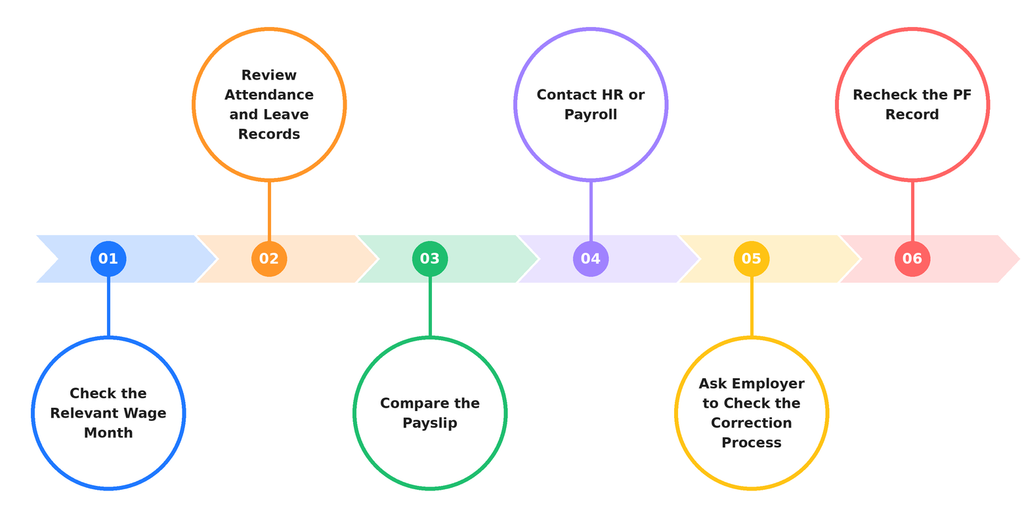
Step 1: Check the Relevant Wage Month
Identify the exact month in which the NCP figure appears but do not compare the figure with a different month’s payslip or attendance report.
Step 2: Review Attendance and Leave Records
Check the attendance register, approved leave applications, LWP records and any attendance corrections for that month.
Step 3: Compare the Payslip
Check whether the employee’s salary was reduced for unpaid leave or another period without payable wages. Also, compare the salary calculation with the attendance records.
Step 4: Contact HR or Payroll
Share the month and the discrepancy with the HR or payroll team. Ask them to verify the NCP days and the wages reported in the ECR.
Step 5: Ask the Employer to Check the Applicable Correction Process
If the employer confirms an error, it should check the correction or revised-return facility and instructions currently available on the EPFO employer portal. The correction process depends on the nature of the error and the status of the return.
Step 6: Recheck the PF Record
After the employer completes the applicable process then review the passbook again to see whether the record has been updated.
If the issue remains unresolved, employees can use the official EPFO grievance portal to raise a grievance with supporting documents.
Common Mistakes HR Teams Should Avoid While Reporting NCP Days
Incorrect NCP reporting can lead to differences between payroll records and EPF returns. HR and payroll teams should avoid these common mistakes:
- Treating every absence as NCP: An absent day is not automatically a non-contributory day. Check whether wages are payable.
- Marking paid leave as unpaid: Approved paid leave should not be treated as NCP simply because the employee did not attend work.
- Ignoring weekly offs and holidays: Check the applicable wage and leave rules instead of applying a blanket rule.
- Using an incorrect month calculation: Reconcile the actual wage period and employment dates before preparing the ECR.
- Reporting zero wages without verification: Confirm the employee’s employment and wage status before submitting a zero-wage record.
- Using an outdated ECR format: Refer to the current format and help file on the EPFO portal.
- Not reconciling payroll with ECR: Verify that the NCP days, wages and contribution figures match the underlying records.
A monthly reconciliation between attendance, leave, payroll and ECR data can help prevent many of these errors.
Conclusion
Overall, NCP days in PF represent a non-contributory period reported for an employee in a particular wage month. They are generally associated with days for which wages are not payable, such as qualifying unpaid leave. However, an absence from work does not automatically become an NCP day.
For employees, checking the NCP figure against payslips and attendance records can help to identify reporting discrepancies. For HR and payroll teams, accurate attendance tracking, leave verification and ECR reconciliation are important to ensure that the reported wages and contributions reflect the employee’s actual wage entitlement.
Understanding NCP days helps both employees and employers to read EPF records more accurately and address discrepancies before they become larger compliance issues.
Frequently Asked Questions
1. What is the full form of NCP in PF?
NCP stands for Non-Contributory Period. In EPF records, it refers to the days in a wage month treated as non-contributory because wages are not payable for that period.
2. What does zero NCP days mean in EPFO?
Zero NCP days generally means that no non-contributory days have been reported for that wage month. It does not necessarily mean that the employee attended work every day; paid leave, weekly offs and holidays may also be part of the wage period.
3. Can NCP days be more than the number of working days?
Yes, NCP days can be more than the number of working days in a month because the calculation is based on the total days in the month, not just working days.
4. Are Sundays counted as NCP days in PF?
No, Sundays are not automatically counted as NCP days. If an employee is entitled to paid weekly offs, Sundays are included in the total paid days and are not counted as NCP days.
5. Do NCP days affect pension?
Yes, NCP days can affect how an employee’s contributory period is recorded. However, their impact on pension depends on the applicable EPS rules and the employee’s contribution history.
6. Can NCP days appear even if an employee received a salary?
Yes, NCP days can appear even if an employee received a salary for that month. This may happen when the employee receives salary for the paid days but also takes leave without pay during the same month.