How can Visitor Management Software help companies track visitors and maintain digital records?


-
AuthorS.K. Gupta
-
 Last Updated
October 14, 2026
Last Updated
October 14, 2026
-
 Reading Time
27 Mins
Reading Time
27 Mins
Think about the last time you visited an office and had to write your name, phone number, company name, and the person you were meeting in a paper register or somewhere else manually. Now imagine the receptionist trying to find that entry a few days later. It could take several minutes, especially if the register contains hundreds of entries. For businesses that welcome visitors every day, managing these records manually can quickly become difficult.
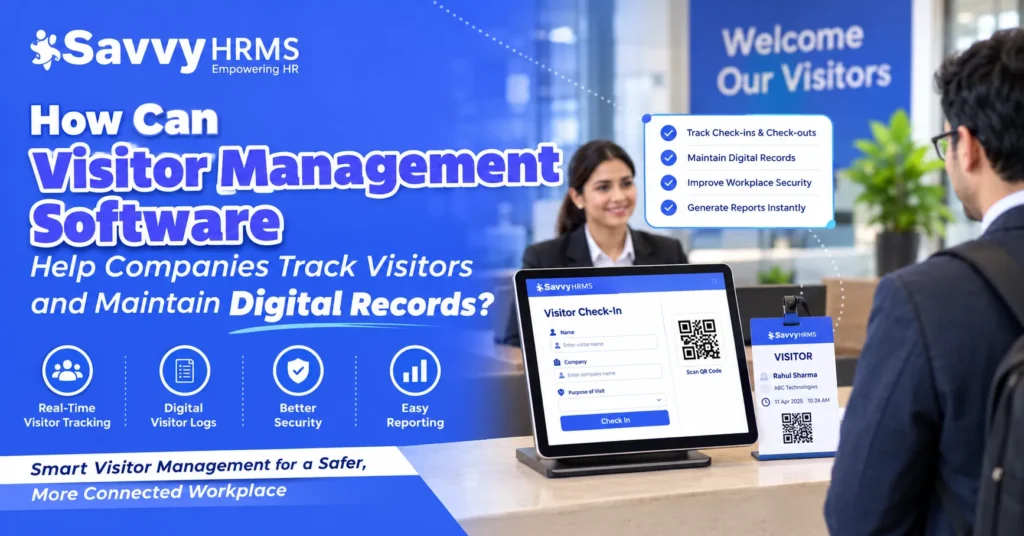
This is where visitor management software makes a difference. It helps companies register visitors digitally, record entry and exit times, notify employees when their guests arrive, and maintain organized visitor records in one place. Instead of depending entirely on paper registers, reception teams can use a digital visitor management system to make check-ins smoother and visitor information easier to retrieve.
But visitor management software is not just about replacing a notebook with a screen. It can also help businesses improve workplace security, manage visitor access, protect sensitive information, and review visitor activity when needed. In this blog, we will explore how visitor management software works, what information it records, how it compares with manual registers, and how businesses can choose the right solution for their needs.
TL;DR
- Tracks visitors digitally by recording check-in and check-out times, visitor details, and visit purposes.
- Maintains digital records that authorized employees can search, retrieve, and review easily.
- Improves workplace security through visitor verification, host approvals, and access control features where supported.
- Reduces paperwork by replacing manual registers with streamlined digital registration processes.
- Simplifies reporting and audits by organizing visitor logs and maintaining accessible records.
- Protects visitor privacy through access permissions, secure data handling, and clear retention policies.
- Supports business efficiency by improving reception workflows and helping companies manage visitors more systematically.
What Is Visitor Management Software and How Does It Work?
Visitor management software is a digital system that helps businesses register, track, monitor, and manage people entering and leaving their premises. It replaces or reduces paper-based visitor registration by maintaining digital records of visitor details, check-in and check-out times, visit purposes, and host information.
Think of it as a digital reception assistant. Rather than asking every visitor to fill out a paper register and depending on employees to communicate their arrival, the software organizes these tasks into a more structured process.
How does a visitor management system work?
The exact process depends on the software, but a general visitor management workflow includes the following steps:
- Visitor registration: The visitor enters the required information using a reception computer, tablet, kiosk, QR code, or online pre-registration form.
- Identity or appointment verification: The receptionist or system checks the visitor’s details or appointment, depending on the organization’s procedures and available features.
- Host notification: The employee being visited receives a notification that their guest has arrived, if this feature is enabled.
- Check-in and access approval: The visitor is checked in, and any required approval or access authorization is completed.
- Digital record creation: The system saves the relevant visitor information, including the arrival time and visit details.
- Check-out: When the visitor leaves, their departure is recorded so the company can maintain a more accurate record of who is on-site.
For example, suppose a vendor arrives at an office to meet the acquisition manager. The receptionist records the vendor’s details, the manager receives a notification, and the visitor is checked in after the required verification. When the vendor leaves, the check-out is recorded in the same system.
The company now has a searchable digital record instead of an entry buried in a paper register.
Manual visitor register vs. digital visitor management
| Activity | Manual register | Digital visitor management |
| Visitor registration | Handwritten entries | Digital forms or assisted check-in |
| Entry and exit times | May require manual recording | Can be timestamped by the system |
| Employee notification | Phone calls or messages | Automated notifications where supported |
| Record retrieval | Search through pages | Searchable logs and filters |
| Visitor reporting | Manual counting and compilation | Reports generated from available records |
| Access management | Separate manual procedures | Can integrate approvals or access controls |
A digital system does not automatically guarantee that every entry is accurate or every visitor is verified. Its effectiveness depends on the information collected, the workflow configured, and how consistently employees use it.
How Does Visitor Management Software Help Companies Track Visitors?
Visitor management software helps companies track visitors by recording their arrival, check-in status, departure, and relevant visit details. Depending on its features, it can also show who is currently checked in, notify hosts about arrivals, and help reception teams identify visitors whose check-out has not been recorded.
This is particularly useful for offices that regularly receive clients, vendors, contractors, interview candidates, delivery personnel, and business partners.
1. Records visitor check-ins and check-outs
Every visit can be associated with a check-in record and, when the visitor leaves, a check-out record. This gives reception teams a clearer view of visitor movement during the day.
For example, if a client arrives at 10:15 AM and leaves at 11:05 AM, the system can retain both timestamps. Authorized staff can later use the record to review the visit.
2. Maintains timestamps for visitor activity
Timestamps help companies understand when visitors arrived and departed. They can also support reviews of appointment schedules, reception workload, and visitor activity.
However, timestamps are only as reliable as the process behind them. If check-out is skipped or a receptionist enters incorrect information, the record may not reflect the actual visit.
3. Sends notifications to employees
When a visitor arrives, the system may notify the relevant employee through an application, email, or another supported channel.
This reduces the need for reception staff to repeatedly call employees and helps visitors avoid unnecessary waiting.
4. Shows who is currently on-site
Some visitor management systems provide a live dashboard showing visitors who have checked in but have not yet checked out.
This can be useful for reception teams, security personnel, and designated emergency coordinators who need an overview of visitor presence. The dashboard must be kept accurate through consistent check-in and check-out practices.
5. Helps manage expected and unexpected visitors
Companies can use pre-registration and appointment details, where available, to prepare for expected guests. Walk-in visitors can be registered through a separate process.
This helps reception staff distinguish between scheduled appointments and visitors who require additional verification or approval.
Example: A manufacturing facility receives 45 contractors and vendors during a working day. A digital visitor tracking system can help the reception team review their recorded entry times, hosts, visit purposes, and departure status without manually searching multiple pages.
The main benefit is not simply collecting more information. It is making visitor activity easier to review and manage.
How Does Visitor Management Software Maintain Digital Visitor Records?
Visitor management software maintains digital visitor records by storing relevant information from each visit in an organized digital system. Instead of keeping handwritten entries in a physical register, organizations can maintain searchable records that authorized employees can retrieve when required.
A digital visitor log can make a big difference when a company needs to confirm whether a particular person visited its premises, identify the employee they met, or review visitor activity on a specific date.
What does a digital visitor log contain?
Depending on the system’s configuration, a digital visitor log may include:
- Visitor name and contact information.
- Company or organization represented by the visitor.
- Visit purpose, such as a meeting, interview, delivery, or maintenance visit.
- Name of the employee or department being visited.
- Check-in date and time.
- Check-out date and time.
- Appointment or pre-registration details.
- Visitor badge number or identification reference, where applicable.
- Approval status and relevant security notes.
- Audit history showing changes to records, if supported.
Not every business needs to collect every field. Companies should determine which information is necessary for their visitor management process and avoid collecting unnecessary personal data.
How are digital visitor records created and stored?
The process generally follows this sequence:
- The visitor or receptionist enters the required details.
- The system validates the information according to configured rules.
- A digital record is created and linked to the visit.
- Check-in and check-out events update the visit status.
- Authorized users can search the records or generate available reports.
- Records are retained or deleted according to the organization’s retention policy and applicable requirements.
Some visitor management solutions store data in cloud-based environments, while others may offer different deployment options. Businesses should check the provider’s storage arrangements, security controls, backup practices, and data access policies before selecting a system.
Why are digital visitor records useful?
Consider a company that receives visitors from different departments throughout the week. A security manager may need to check who visited the office last Tuesday, while the administration team may want to review how many visitors arrived during a particular month.
With a well-configured digital visitor management system, authorized users can search by date, visitor name, company, host, or other available fields. The time needed to find a record depends on the quality of the information and the system’s search capabilities, but digital indexing can eliminate the need to inspect every page of a register.
Digital records can also support more consistent reporting. Instead of manually counting entries, a company may be able to generate a report of recorded visits for a selected period.
What Information Should a Digital Visitor Management System Record?
A digital visitor management system should record enough information to identify a visit, manage the visitor’s arrival, support relevant security procedures, and retrieve the record later. The exact fields should reflect the organization’s size, visitor types, security requirements, and privacy obligations.
Here is a practical breakdown of the information businesses may need.
| Information field | Why it matters |
| Visitor name | Identifies the person visiting |
| Contact details | Supports necessary communication and follow-up |
| Company name | Helps identify the organization represented |
| Visit purpose | Explains why the person is on-site |
| Host employee or department | Connects the visit to the responsible person |
| Check-in timestamp | Records the start of the visit |
| Check-out timestamp | Records the end of the visit when captured |
| Appointment details | Helps verify scheduled visits |
| Verification status | Records whether required checks were completed |
| Visitor badge or access reference | Helps manage identification and access where applicable |
| Approval status | Shows whether the required host or security approval was obtained |
| Audit information | Helps authorized staff review changes where supported |
Should companies collect visitor identity documents?
Only when there is a clear and appropriate business or security need. Some workplaces may need to verify identity, but that does not automatically mean they must retain a complete copy of every visitor’s identity document.
A privacy-conscious visitor management process should distinguish between verifying an identity and storing identity data. Depending on the applicable requirements and system design, recording that a verification check was completed may be sufficient.
Companies should also define who can access visitor information, how long records will be retained, and how personal data will be securely deleted when it is no longer needed.
Example: A visitor record in practice
Imagine a supplier visits a company’s office for a product demonstration. The record might contain the supplier’s name, company, meeting purpose, host employee, check-in time, and check-out time.
When the procurement team needs to review the meeting later, it can search for the supplier or the relevant date. If the system supports appointment linking and audit history, it may also provide additional context about the visit.
This is the real value of digital visitor records: information becomes easier to organize, search, and use for legitimate business purposes.
What Are the Key Benefits of Visitor Management Software for Businesses?
Visitor management software can help businesses save administrative time, improve record organization, simplify reception activities, strengthen visitor oversight, and simplify reporting. The actual benefits depend on the number of visitors, the existing registration process, and how effectively the software is implemented.
1. Saves time at reception
Manual registration often requires visitors to write information by hand and receptionists to review entries or contact employees separately. Digital registration can simplify these steps through electronic forms, pre-registration, and automated notifications where available.
For example, a company that regularly welcomes interview candidates may use pre-registration to collect basic details before candidates arrive. Reception staff can then focus on confirming the appointment rather than repeating the entire registration process.
2. Improves record consistency
Handwriting can be difficult to read, and visitors may enter information in different formats. Digital forms can use required fields and standardized formats to reduce incomplete or inconsistent entries.
This does not eliminate every error. Incorrect information can still be entered, so businesses should configure appropriate validation rules and provide a way to correct records when necessary.
3. Improves the visitor experience
A clear check-in process helps visitors understand what information they need to provide and what happens next.
Pre-registration, QR-based check-in, and host notifications can reduce unnecessary waiting when these features are available and properly configured. A receptionist should still be able to assist visitors who do not have a smartphone or are unfamiliar with digital check-in.
4. Supports better workplace security
Digital visitor records help authorized staff understand who has registered, which employee they are visiting, and whether the visit has been checked out.
When integrated with appropriate verification and access control processes, visitor management software can add another layer of oversight. It should complement, rather than replace, physical security procedures and employee judgment.
5. Makes reporting easier
Digital records can be used to prepare reports about visitor volumes, visit purposes, departmental activity, and recorded check-in or check-out times.
For example, an administration manager could compare the number of recorded visits in September and October to understand changes in reception workload. Such reports are useful only when the underlying records are sufficiently complete and consistent.
6. Reduces dependence on paper records
Paper registers require physical storage, careful handling, and a process for locating older entries. Digital records can reduce the need for physical storage and make authorized retrieval more convenient.
Businesses may still need to retain particular paper documents or follow specific recordkeeping procedures. A digital system should be implemented according to the organization’s actual operational and legal requirements.
7. Supports multi-location administration
Companies operating from several offices may benefit from a common visitor management platform that provides consistent workflows across locations.
Depending on permissions and system architecture, administrators may be able to view records for a particular site or access consolidated reports. Sensitive visitor information should not automatically be available to every employee across every location.
How can businesses measure the benefits?
Rather than assuming a specific percentage of time or cost savings, companies can measure their own results before and after implementation.
Consider this illustrative example, not an industry benchmark:
Suppose a company handles 60 visitor registrations per working day. If its average registration process takes three minutes, the total registration time is 180 minutes per day.
If a digital process reduces the average time to two minutes, the total becomes 120 minutes per day.
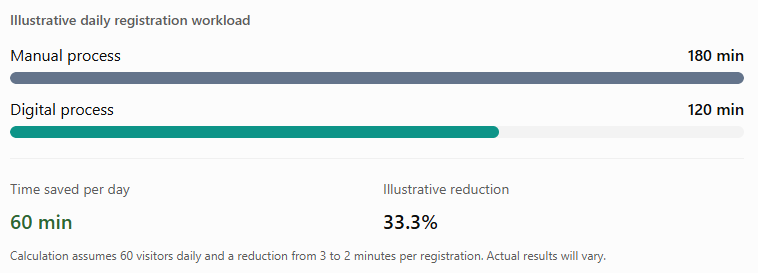
The same approach can be used to track average waiting time, incomplete records, missing check-outs, and the time required to retrieve historical visitor information.
How Does Visitor Management Software Improve Workplace Security and Access Control?
Visitor management software improves workplace security by helping businesses identify visitors, record their purpose, coordinate approvals, and maintain visibility into recorded visitor activity. When connected to compatible access control systems, it may also support more controlled entry to specific areas.
However, registering a visitor is not the same as granting permission to enter every part of a building. Companies should clearly separate visitor registration, identity verification, host approval, and physical access authorization.
1. Visitor verification and host approvals
A company can configure its process to require a visitor to provide relevant details and, where necessary, complete identity verification. A host or security employee may then approve the visit before the visitor proceeds.
For example, an external IT technician arriving to service office equipment may need approval from the IT department. A visitor management system can help record the approval and link it to the relevant visit if the system supports that workflow.
2. Access permissions for restricted areas
Some businesses have areas that require additional authorization, such as server rooms, production floors, laboratories, or document storage facilities.
A visitor management system may support visitor categories, approval workflows, or integration with electronic access control. The company can use these controls to ensure that visitors are directed only to authorized areas.
The availability of these features depends on the solution. A basic visitor log does not necessarily control doors, verify identity documents, or prevent unauthorized physical entry.
3. Alerts and emergency visibility
Notifications can help reception teams and hosts coordinate arrivals. Some systems can also flag incomplete check-outs or display a current visitor list.
During a removal or another emergency, an accurate list of recorded visitors may help designated personnel establish who was expected to be on-site. It should not be treated as a guaranteed headcount, particularly if check-outs are missed or visitors enter through unmonitored access points.
4. A practical visitor security workflow
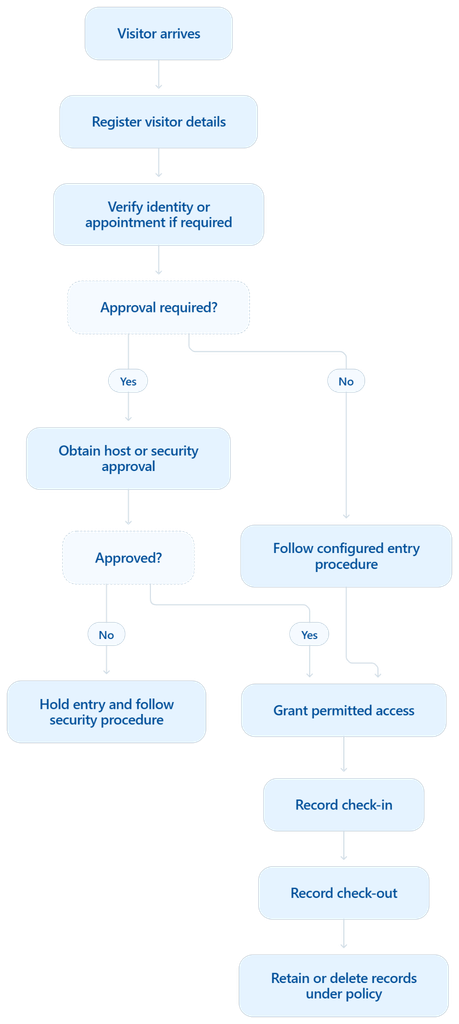
This workflow illustrates a possible process rather than a universal set of software features. Companies should adapt it to their physical security arrangements, visitor categories, and operational requirements.
How Can Companies Search, Retrieve, and Manage Visitor Records Digitally?
Companies can search and retrieve visitor records digitally by using the search, filtering, and reporting tools provided by their visitor management system. Instead of browsing paper registers, authorized users can locate relevant entries using available information such as visitor name, date, company, host, or visit status.
Use search filters to find specific visits
Useful search and filtering options may include:
- Date or date range.
- Visitor name or company.
- Employee or department visited.
- Visit purpose.
- Check-in or check-out status.
- Approval or verification status, where recorded.
For example, if a security manager needs to review visits from a particular vendor during the previous month, the manager may filter records by company name and date range, provided those fields are captured consistently.
Maintain visitor history
Where permitted by the company’s retention policy, digital records can provide a historical view of previous visits. This may be useful when checking appointment history, reviewing recurring contractor visits, or responding to an internal query.
Access to historical data should be limited to authorized personnel. A person’s previous visit history should not become freely available to everyone simply because it is stored digitally.
Generate useful visitor reports
Depending on the software, businesses may be able to generate reports such as:
- Total recorded visitors for a selected period.
- Visitor counts by office or department.
- Visits by purpose or visitor category.
- Average recorded visit duration.
- Entries with missing check-out information.
- Trends in visitor volume over time.
These reports can help administration and security teams plan reception coverage, understand busy periods, and identify weaknesses in registration procedures.
How to keep digital records organized
A few practical measures can improve record quality:
- Standardize visitor categories and required fields.
- Train receptionists and employees to follow the same check-in and check-out process.
- Correct inaccurate entries using controlled procedures.
- Review incomplete records periodically.
- Set retention periods and access permissions.
- Test backups, exports, and record retrieval according to business needs.
A searchable database is useful only if people can trust the information it contains. Consistent processes are just as important as the technology.
Is Digital Visitor Management More Efficient Than a Manual Visitor Register?
For many businesses, digital visitor management is more efficient than a manual visitor register because it can simplify data entry, automate notifications, and make records easier to search. However, the extent of the improvement depends on visitor volume, staff training, system usability, and the organization’s security requirements.
A paper register may be sufficient for a small office that receives only a few visitors each week. A business with frequent deliveries, client meetings, contractor visits, and multiple entrances may benefit more from a structured digital process.
Digital visitor management vs. manual visitor registers
| Comparison factor | Manual visitor register | Digital visitor management |
| Registration | Visitors write details by hand | Visitors enter details digitally or receive assistance |
| Legibility | Handwriting may be unclear | Information is stored in a structured format |
| Check-in timestamps | Must be recorded manually | Can be captured automatically by the system |
| Employee notifications | Usually require calls or messages | Can be automated where supported |
| Searching records | Requires looking through physical pages | May support search and filters |
| Reporting | Usually involves manual counting | May generate reports from recorded data |
| Data access | Physical access to the register | Permissions can restrict electronic access |
| Storage | Requires physical space | Uses the system’s configured storage |
| Initial investment | Often inexpensive | May involve subscription, hardware, and setup costs |
| System dependency | Can work without internet or software | Depends on the deployment and available infrastructure |
Which option is better for small and large businesses?
Small businesses: A simple digital visitor log may be sufficient if the main objective is to maintain searchable records and reduce paperwork. Businesses should avoid paying for advanced features they do not need.
Medium-sized businesses: Automated host notifications, pre-registration, reporting, and standardized check-in procedures may provide greater operational value as visitor numbers increase.
Large enterprises: Multiple locations, restricted areas, contractor management, centralized administration, and integrations with security systems may become more important.
Can digital systems eliminate all visitor management problems?
No. A digital system can still contain inaccurate details, missed check-outs, duplicate records, or incomplete entries. It may also create new risks if accounts are poorly secured or visitor data is retained without appropriate controls.
The most effective approach combines suitable technology with clear policies, staff training, and periodic reviews.
How Does Visitor Management Software Protect Visitor Data and Privacy?
Visitor management software can help protect visitor data by applying access restrictions, secure storage practices, retention policies, and activity logging where those capabilities are available. Businesses must also configure and use the system responsibly because collecting information digitally does not automatically make that information secure.
Visitor records can contain personal information, including names, phone numbers, company details, visit history, and potentially identity information. Companies should treat these records as information that requires appropriate protection.
1. Role-Based Access Permissions
Role-based access controls restrict visitor information to authorized employees based on their responsibilities. For example, receptionists can manage check-ins, while administrators access reports and settings, reducing unnecessary exposure of sensitive data.
2. Secure Storage and Data Transmission
Visitor management software should protect records using safeguards such as encryption, secure authentication, and access controls. Businesses should review vendor security documentation to understand how visitor information is stored, transmitted, and protected.
3. Clear Data Retention Policies
Companies should define how long visitor records need to be retained based on business requirements, security needs, and applicable laws. Unnecessary records should be securely deleted or removed according to established policies.
4. Audit Trails and Accountability
Audit trails help track activities such as record updates, visitor approvals, and administrative changes. When supported, these logs allow authorized personnel to review actions, investigate errors, and improve accountability in visitor record management.
5. Privacy-Conscious Data Collection
Businesses should collect only the visitor information necessary for legitimate operational purposes. Providing clear privacy notices, limiting data sharing, and establishing procedures for handling data requests can help protect visitor privacy and maintain trust.
What should Indian businesses consider?
Indian organizations should assess their visitor data practices against applicable requirements, including the Digital Personal Data Protection Act, 2023, and any rules, commencement provisions, and other legal requirements applicable at the relevant time.
Because legal obligations and implementation timelines can change, companies should verify the current position with authoritative government sources or qualified legal counsel before treating a visitor management process as compliant.
Important: Visitor management software can support responsible recordkeeping, but purchasing a product does not, by itself, establish legal compliance.
Which Industries Benefit Most from Visitor Management Software?
Visitor management software can benefit almost any organization that needs to record, verify, or coordinate people entering its premises. The ideal features vary by industry because an office meeting, a factory maintenance visit, and a hospital appointment involve different operational and security considerations.
| Corporate offices | Offices can use digital visitor logs for client meetings, interviews, vendor appointments, and deliveries. Host notifications and pre-registration may help reception teams coordinate arrivals. |
| IT companies and technology campuses | These organizations may need controlled visitor access, contractor registration, meeting coordination, and stricter procedures around server rooms or other restricted areas. |
| Manufacturing plants | Plants may receive suppliers, transport personnel, maintenance technicians, and auditors. Visitor records can support site entry procedures, safety briefings, and reviews of contractor visits. |
| Hospitals and healthcare facilities | Hospitals may use visitor registration to support ward-specific visiting procedures and coordinate access to designated areas. Healthcare organizations should apply particularly careful privacy and confidentiality controls. |
| Schools and educational institutions | Schools and colleges can record parent meetings, vendor visits, interviews, and other authorized entries. Processes should reflect safeguarding policies and the needs of students and staff. |
| Coworking spaces | Shared offices can use visitor management tools to coordinate guests visiting different members or businesses, maintain reception records, and support building access procedures. |
| Residential and commercial facilities | Apartment complexes, business parks, and commercial buildings may use digital visitor logs for guest registration, delivery personnel, contractors, and service appointments. |
Across all these industries, the key question is the same: does the organization need a reliable, repeatable way to register visitors, monitor their recorded entry and exit, and retrieve the information later?
The answer helps determine which visitor management features are worth investing in.
What Features Should Companies Look for in Visitor Management Software?
Companies should choose visitor management software based on their actual reception, security, reporting, and privacy requirements. A long list of features is not necessarily better if the organization will use only a few of them.
Here are the important capabilities to evaluate.
1. Digital visitor registration
The system should allow visitors or reception staff to enter required details through a digital form. Configurable fields can help businesses collect consistent information without making registration unnecessarily complicated.
2. QR code check-in and pre-registration
QR codes and pre-registration can simplify the arrival process for scheduled visitors. For example, a company could share appointment details before a meeting so that the guest can complete some registration steps in advance.
Businesses should also ensure that visitors who cannot use QR codes have an alternative check-in process.
3. Automatic timestamps and check-out tracking
Look for a system that records check-in and check-out events clearly and makes incomplete records easy to identify. Automatic timestamps can improve consistency, but companies should verify how the software handles corrections, missed check-outs, and duplicate entries.
4. Host notifications and approval workflows
Notifications help employees know when their visitors arrive. Approval workflows can add an extra step for contractors, vendors, or guests visiting restricted areas.
Check whether notifications are available through the channels your employees actually use and whether approval rules can be configured for different visitor categories.
5. Visitor badges and identity verification
Visitor badges can help staff distinguish registered visitors from employees. Some systems also support identity verification or badge printing.
Businesses should verify which features are included and whether additional hardware, subscriptions, or integrations are required.
6. Searchable records and reporting
Search and reporting features are particularly important for organizations that need to retrieve historical records or review visitor activity across different periods.
Look for date filters, visitor search, export options, and reports relevant to your operational requirements.
7. Access control integration
Businesses with restricted areas may benefit from integration with compatible access control systems. Before purchasing, confirm which hardware and software are supported and whether access permissions can be linked to visitor approvals.
8. Data security and privacy controls
Evaluate role-based permissions, encryption, authentication, backup procedures, audit trails, retention settings, and the provider’s data handling policies. Do not assume that all these capabilities are available in every product or subscription plan.
9. Multi-location management and scalability
For organizations with different branches, a centralized system may provide consistent workflows and consolidated reporting. Make sure location-specific permissions can protect records that should not be shared across sites.
10. Ease of use and support
Reception staff need a system they can use confidently during busy periods. Consider the interface, training requirements, customer support, onboarding assistance, and availability of documentation.
A short trial or demonstration can help you understand whether the software fits your real-world workflow.
How Can Businesses Choose the Right Visitor Management Software?
Businesses can choose the right visitor management software by identifying their operational problems first and comparing products against those requirements. The goal is to find a solution that improves visitor tracking and recordkeeping without introducing unnecessary complexity or expense.
Step 1: Identify your current challenges
Start by reviewing the existing visitor registration process.
Ask questions such as:
- Do visitors wait too long at reception?
- Are visitor records difficult to retrieve?
- Are check-out entries frequently missing?
- Do employees need to be contacted manually when guests arrive?
- Do certain areas require additional access approval?
- Does the company need consolidated records across multiple locations?
These answers will help define what the software must solve.
Step 2: Estimate your visitor volume
Consider the average number of visitors per day, the busiest periods, and the number of entrances or locations involved.
A small office may need a straightforward visitor log. A large manufacturing facility may require multiple check-in points, contractor workflows, and integration with existing security systems.
Step 3: Define essential and optional features
Separate must-have features from capabilities that would simply be useful.
For example, searchable digital records and reliable timestamps may be essential, while advanced analytics or complex access control integration may be optional for a small office.
This makes comparisons more objective and prevents businesses from paying for features they do not need.
Step 4: Review privacy and security arrangements
Ask the vendor how data is stored, who can access it, how long it is retained, how it is deleted, and what security safeguards are provided.
Review any contractual commitments and check whether the product supports your organization’s legal and operational requirements.
Step 5: Compare total costs
The software subscription is only one part of the overall cost. Depending on the solution, businesses may also need to budget for tablets, kiosks, printers, visitor badges, integrations, training, and ongoing support.
Compare the total cost of ownership rather than choosing only on the lowest advertised price.
Step 6: Test the actual workflow
Before adopting a solution across the organization, test it with realistic scenarios:
- A scheduled client meeting.
- An unexpected walk-in visitor.
- A contractor requiring approval.
- A visitor who forgets to check out.
- A request to retrieve an older visitor record.
- A request to delete or correct information according to policy.
These tests can reveal gaps that may not be apparent during a standard product demonstration.
Step 7: Measure results after implementation
Choose a few measurable indicators and establish a baseline before introducing the software.
| Performance indicator | What it helps measure |
| Average check-in time | Efficiency of visitor registration |
| Average visitor waiting time | Reception experience |
| Percentage of complete records | Quality of captured information |
| Missing check-out rate | Consistency of departure recording |
| Record retrieval time | Ease of accessing historical data |
| Manual notifications per day | Potential for workflow automation |
Review these measures after implementation and adjust the workflow where necessary. Actual improvements should be measured rather than assumed.
Conclusion
Visitor management software helps companies move beyond paper registers and build a more organized approach to visitor tracking and digital recordkeeping. From recording check-in and check-out times to maintaining visitor history, notifying employees, supporting access control, and retrieving records for internal reviews, it can make everyday reception activities easier to manage. The biggest advantage comes from combining the right technology with consistent procedures, responsible data handling, and clear access permissions.
If your business is looking to improve administrative efficiency and digitize everyday HR and workplace processes, it is worth exploring solutions that complement your existing systems. Savvy HRMS can be considered as part of your broader HR digitalization strategy, alongside an evaluation of the specific visitor registration, tracking, and security capabilities your workplace needs. Choose tools that fit your workflow, protect personal information, and help your team spend less time on repetitive administrative work.











Ready to simplify your workplace operations?
Explore Savvy HRMS to discover how digital HR processes can help your organization simplify employee administration and build a more efficient workplace.
Frequently Asked Questions (FAQs)
1. What is visitor management software?
Visitor management software is a digital solution that helps businesses register visitors, record check-in and check-out times, notify hosts, and maintain organized digital visitor records for easy access and improved workplace security.
2. How does visitor management software track visitors?
It tracks visitors by recording their details, arrival and departure times, visit purposes, and host information. Some systems also provide real-time visitor status, automated notifications, and visitor tracking reports.
3. Can visitor management software replace manual visitor registers?
Yes, visitor management software can replace paper-based registers by digitizing visitor registration, maintaining searchable records, and simplifying reporting. Businesses can reduce paperwork and retrieve visitor information more efficiently.
4. Is visitor management software secure for storing visitor information?
Visitor management software can protect visitor information through access controls, encryption, secure authentication, and retention policies, depending on its capabilities. Businesses should evaluate the provider’s security measures and data privacy practices before implementation.
5. How can businesses choose the right visitor management software?
Businesses should evaluate visitor registration features, digital recordkeeping, reporting capabilities, access controls, data security, integration options, pricing, and customer support. The right solution should match their visitor volume, operational needs, and security requirements.