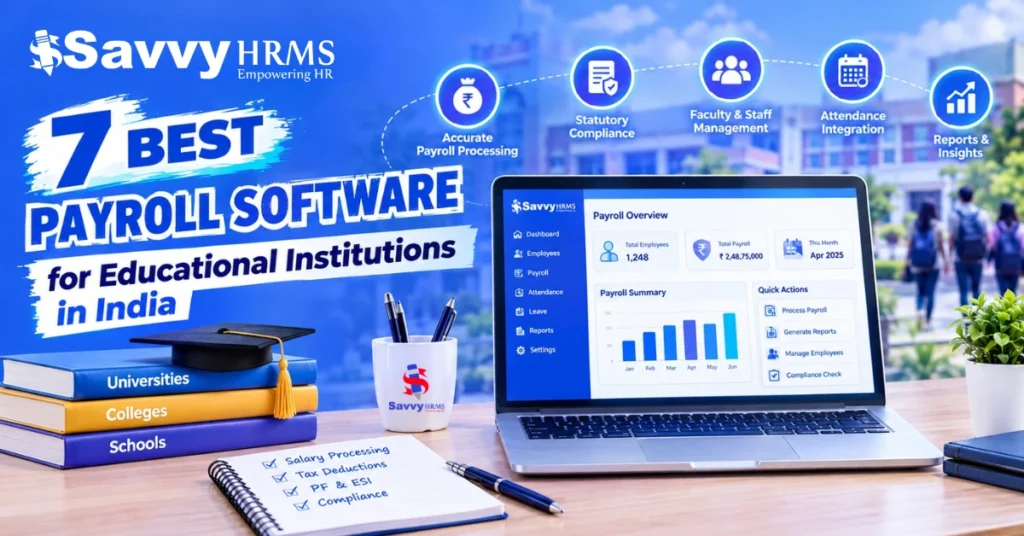
7 Best Payroll Software for Educational Institutions in India


-
AuthorC.S. Verma
-
 Last Updated
October 13, 2026
Last Updated
October 13, 2026
-
 Reading Time
22 Mins
Reading Time
22 Mins
Best payroll software for educational institutions helps schools, colleges, universities, and coaching institutes manage teacher salaries, employee attendance, leave deductions, tax calculations, payslips, and payroll records from one system. Instead of depending fully on spreadsheets and manual calculations, institutions can automate repetitive payroll tasks and maintain more consistent salary records.
Choosing the right payroll management software for educational institutions is important because educational institutions often have different types of staff, including permanent teachers, visiting faculty, administrative employees, contractual workers, and support staff. Each group may have different salary structures, working schedules, allowances, and deduction rules. The right software can help simplify these requirements while connecting payroll with attendance, leave management, and employee information.
In this blog, we compare 7 payroll software options for educational institutions in India: Savvy HRMS, greytHR, Keka, Zoho Payroll, Darwinbox, Pocket HRMS, and HRMantra. You will learn about their features, suitability, pricing considerations, payroll compliance capabilities, and selection criteria to help identify the most suitable solution for your institution.
TL;DR
- Payroll software simplifies salary processing for schools, colleges, and other educational institutions.
- It helps manage employee records, attendance, leave, deductions, and payslips.
- Automated payroll reduces repetitive manual work and improves recordkeeping.
- Institutions should check statutory compliance, reporting, data security, and integration requirements.
- The right solution depends on staff size, salary structures, budget, and institutional needs.
What Is Payroll Software for Educational Institutions?
Payroll software for educational institutions is a digital system that calculates employee salaries, manages deductions, generates payslips, maintains payroll records, and supports applicable statutory reporting. It helps education providers manage monthly salary processing through a structured workflow instead of calculating every employee’s salary manually.
For example, a school may need to process salaries for teachers, principals, accountants, receptionists, transport staff, and housekeeping employees. A college may also need to account for visiting lecturers, researchers, and contractual faculty. Payroll software helps maintain the relevant employee records and apply the correct salary rules to each employee.
How does educational payroll software work?
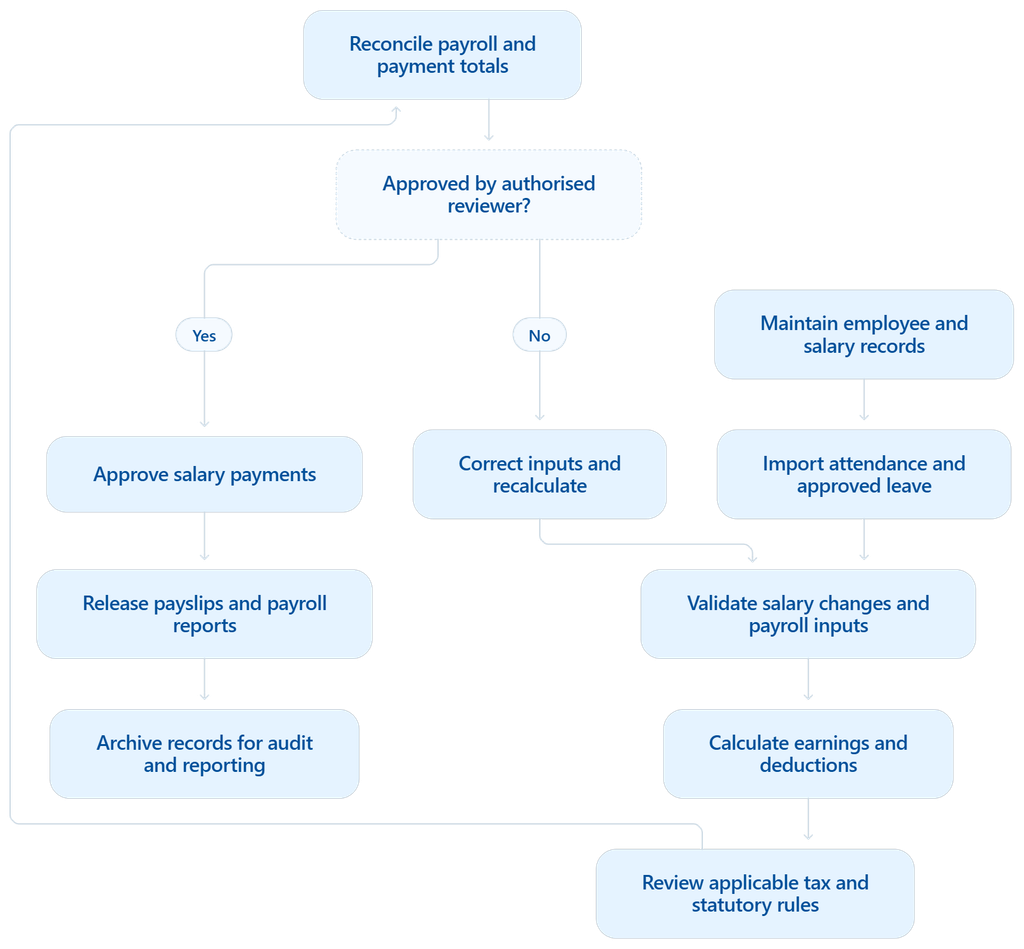
A general payroll management system follows these steps:
- Employee data management: Stores employee details, joining dates, salary structures, bank information, and applicable deduction settings.
- Attendance and leave calculation: Uses approved attendance, leave, overtime, and loss-of-pay records where applicable.
- Salary computation: Calculates earnings, allowances, incentives, arrears, reimbursements, and deductions according to configured rules.
- Payroll compliance: Supports applicable tax deductions and statutory calculations, subject to employee eligibility and current regulations.
- Payslip generation: Creates salary statements for employees to view or download.
- Payroll reporting: Produces salary registers, deduction summaries, reconciliation reports, and other payroll records.
For Indian educational institutions, payroll software can be particularly useful when an organization operates multiple campuses, employs different categories of staff, or needs consistent reporting across departments.
The important distinction is that payroll software calculates and organizes payroll information, but the institution remains responsible for verifying employee data, approving salary payments, and meeting its legal obligations.
What Features Should Educational Institutions Look for in Payroll Software?
The best payroll software for educational institutions should do more than calculate monthly salaries. It should connect employee information, attendance, leave, salary structures, deductions, and payroll reports so that the accounts and HR teams can complete each payroll cycle with fewer manual steps.
Before selecting a payroll management system, evaluate the following features.
1. Automated salary calculation
Educational institutions may use different salary structures for permanent teachers, visiting faculty, administrative employees, and contractual staff. Choose software that supports configurable earnings, deductions, allowances, arrears, and salary revisions.
2. Attendance and leave integration
Attendance data can directly affect payable salary when institutional policies include loss-of-pay deductions, overtime, or attendance-linked payments. Integration between attendance, leave management, and payroll reduces the need to enter the same information repeatedly.
3. Indian payroll compliance
Look for support for applicable income-tax deductions, provident fund (PF), Employees’ State Insurance (ESI), Professional Tax (PT), and Labour Welfare Fund (LWF). Applicability depends on the institution, employee eligibility, location, and current rules.
For salary TDS, the Income Tax Department provides guidance on deductions under Section 192. Payroll teams should verify the current legal framework and relevant filing requirements before processing payments.
4. Payslips and employee self-service
Employees should be able to access their payslips, salary information, and relevant tax documents through a secure portal or mobile application. Self-service can also reduce routine requests to the HR and accounts teams.
5. Multiple salary structures and campuses
A school group with different branches may need campus-wise reports, centralized payroll oversight, and different policies for different employee categories. Check whether the software supports the required entities, locations, payroll groups, and approval workflows.
6. Payroll reports and analytics
Useful reports include:
- Monthly salary registers and department-wise payroll costs.
- Gross salary, deductions, and net-pay summaries.
- Attendance and loss-of-pay reconciliation.
- Employee-wise tax and statutory deduction reports.
- Salary revision, arrears, and reimbursement reports.
- Month-on-month payroll cost comparisons.
These reports help management understand salary expenditure, identify unusual changes, and prepare budgets.
7. Data security and access controls
Payroll contains confidential employee information, including compensation, bank details, and tax records. Look for role-based access, approval logs, secure authentication, backup arrangements, and clearly documented data-protection practices.
Payroll software selection checklist
Evaluate your requirements
Automated salary calculations
Attendance and leave integration
Applicable Indian payroll compliance
Payslips and employee self-service
Multiple salary structures and campuses
Payroll reports and analytics
Role-based access and audit trails
Accounting and ERP integration
Implementation and customer support
Copy checklist
What Are the 7 Best Payroll Software for Educational Institutions in India?
There is no single payroll solution that is best for every school, college, or university. The right choice depends on employee strength, salary complexity, attendance policies, compliance needs, integrations, and budget.
The following shortlist compares seven established payroll and HR software options available in India. The order is an editorial shortlist, not an independently tested ranking. Institutions should confirm education-specific workflows, product availability, and commercial terms with each provider before purchasing.
1. Savvy HRMS
Best for: Educational institutions looking to connect payroll processing with attendance, leave management, employee records, and HR reporting.
Savvy HRMS helps educational institutions manage employee information, salary processing, attendance, leave, and payroll reporting through an integrated platform. Its payroll capabilities include configurable salary structures, loans and advances, statutory reporting, and payroll analytics, helping HR and accounts teams organize salary processing for different employee categories.
Key features to evaluate
- Manage employee earnings, allowances, deductions, and other salary components according to the institution’s approved policies.
- Connect approved attendance and leave information with payroll calculations where the configured rules require it.
- Organize monthly salary calculations and provide a structured review process before payroll approval.
- Evaluate the available reports and calculations for applicable tax deductions and statutory contributions.
- Track relevant employee advances and recoveries through the configured payroll process.
- Review salary expenditure, employee-wise payroll details, deductions, and other relevant payroll information.
- Assess the available options for employees to access payslips and relevant personal or salary information.
- Evaluate how employee records, attendance, leave, and payroll work together to reduce duplicate data entry.
How can Savvy HRMS help educational institutions?
Educational institutions can use an HRMS to organize employee records, connect attendance and leave data with payroll, review salary calculations, and prepare payroll reports. Schools and colleges with various staff categories or multiple campuses should assess whether the system supports their salary structures, reporting needs, and access requirements.
Why consider Savvy HRMS for educational payroll?
The main reason to evaluate Savvy HRMS is the opportunity to manage payroll alongside broader HR operations. When employee data, attendance, leave, and salary processing are connected appropriately, the HR and accounts teams can spend less time transferring information between systems and more time reviewing payroll accuracy and exceptions.
Institutions should still verify the exact workflows, reports, integrations, and compliance requirements supported by their proposed configuration. Payroll automation does not remove the need for human review or legal compliance checks.
2. greytHR
Best for: Institutions prioritising payroll automation and statutory reporting.
greytHR provides payroll processing, configurable salary structures, payslips, statutory calculations, employee self-service, and payroll analytics. Its official product information describes support for PF, ESI, Professional Tax, TDS calculations, and related reporting.
Key features
- Configurable salary structures and payroll calculations.
- Payslips, reimbursements, arrears, and salary settlements.
- Applicable statutory calculations and reports.
- Employee self-service and payroll analytics.
How greytHR Helps Educational Institutions
greytHR helps educational institutions manage employee records, payroll processing, attendance, leave, and HR administration through an integrated platform. Schools and colleges can use these capabilities to organize salary calculations, generate payslips, maintain employee information, and simplify recurring payroll activities for teaching and non-teaching staff.
Why Consider greytHR for Educational Payroll?
Educational institutions can consider greytHR to simplify routine payroll administration and improve coordination between HR and accounts teams. Its payroll and employee management capabilities can help reduce repetitive manual work, organize salary records, and support compliance-related processes, depending on the institution’s requirements and selected configuration.
3. Keka
Best for: Educational institutions looking for payroll with broader HR workflows.
Keka combines payroll processing with HR management capabilities. Its published product information describes configurable salary components, attendance and leave inputs, statutory calculations, payslips, and employee financial information.
Key features
- Automated salary processing and payslip generation.
- Attendance and leave integration.
- Support for applicable PF, ESI, TDS, and Professional Tax calculations.
- Salary revisions, reimbursements, and payroll approvals.
How Keka Helps Educational Institutions
Keka helps educational institutions manage payroll, employee records, attendance, leave, and workforce administration through an integrated HR platform. Schools and colleges can organize salary processing, track attendance, manage employee information, and generate payroll reports for teaching staff, administrative teams, and other employees.
Why Consider Keka for Educational Payroll?
Educational institutions can consider Keka to simplify payroll administration and connect employee data with attendance and leave records. Its integrated HR capabilities can help reduce repetitive manual tasks, improve payroll visibility, and organize employee information, making it worth evaluating for institutions with varied staffing and salary requirements.
4. Zoho Payroll
Best for: Institutions looking for payroll software with published subscription plans.
Zoho Payroll provides salary calculations, payslips, tax-related features, and employee self-service. It can be especially relevant to institutions already using Zoho applications and looking to connect payroll with their existing workflows.
Key features
- Automated salary processing and payslips.
- Tax calculations and relevant statutory features.
- Employee self-service.
- Integration with other Zoho applications.
- Plan-dependent attendance and leave capabilities.
How Zoho Payroll Helps Educational Institutions
Zoho Payroll helps educational institutions manage salary calculations, payslips, employee records, and payroll-related deductions. Schools and colleges can organize monthly payroll, maintain employee salary details, and generate payroll reports, helping HR and accounts teams handle compensation for teaching staff, administrative employees, and support staff more efficiently.
Why Consider Zoho Payroll for Educational Payroll?
Educational institutions can consider Zoho Payroll for structured salary processing and simplified payroll administration. Its payroll tools can help organize employee compensation, manage applicable deductions, and improve recordkeeping. Before choosing it, institutions should verify support for their location, statutory requirements, staffing arrangements, and integration needs.
5. Pocket HRMS
Best for: Institutions evaluating payroll with mobile self-service and broader HR automation.
Pocket HRMS offers payroll and HR management capabilities, including its smHRt Payroll solution. Its published information highlights statutory payroll processing, employee self-service, mobile access, reporting, and integrations.
Key features
- Payroll processing and payslip access.
- Attendance and leave management.
- Support for applicable statutory calculations.
- Employee self-service through web and mobile applications.
- Payroll reports and integration options.
How Pocket HRMS Helps Educational Institutions
Pocket HRMS helps educational institutions manage payroll, employee records, attendance, leave, and routine HR activities through an integrated platform. Schools and colleges can organize salary processing, maintain staff information, track attendance, and generate payroll reports for teachers, administrative employees, and support staff.
Why Consider Pocket HRMS for Educational Payroll?
Educational institutions can consider Pocket HRMS to simplify recurring payroll tasks and connect employee information with related HR processes. Its payroll and workforce management capabilities may help reduce manual administration and improve recordkeeping. Institutions should verify its suitability for their salary structures, compliance needs, and reporting requirements before implementation.
6. Darwinbox
Best for: Larger educational groups and institutions with complex payroll workflows.
Darwinbox offers an integrated payroll platform with India-specific payroll capabilities. Its official product page describes automated attendance and leave inputs, configurable pay groups, finance approvals, payroll reconciliation, statutory reporting, and employee self-service.
Key features
- Integration of attendance, leave, and employee data with payroll.
- Configurable pay groups and payroll processing frequencies.
- Support for applicable PF, ESI, TDS, Professional Tax, and other statutory calculations.
- Payroll verification, finance approvals, and audit trails.
- Payroll cost dashboards and reporting.
- Employee access to payslips and relevant salary information.
How Darwinbox Helps Educational Institutions
Darwinbox helps educational institutions manage employee information, payroll-related processes, attendance, leave, and workforce administration through an integrated HR platform. Colleges and large education groups can use its HR capabilities to organize staff data, simplify employee processes, and improve visibility across departments and campuses, depending on configuration.
Why Consider Darwinbox for Educational Payroll?
Educational institutions can consider Darwinbox when they need a centralized HR platform for complex workforce structures. Its employee management and HR automation capabilities may support institutions with multiple departments or campuses. Before selecting it, verify payroll functionality, Indian statutory compliance, integrations, and suitability for the institution’s specific requirements.
7. HRMantra
Best for: Institutions assessing integrated HR management and payroll workflows.
HRMantra is another platform to consider when comparing payroll with broader HR operations. Its suitability should be assessed against the institution’s required salary calculations, employee categories, attendance processes, reporting, and approval structure.
Key features to evaluate
- Employee records and salary structure management.
- Monthly payroll calculations and payslips.
- Attendance and leave integration.
- Applicable statutory calculations and reporting.
- Payroll approval workflows and management reports.
- Integration and implementation support.
How HRMantra Helps Educational Institutions
HRMantra helps educational institutions manage payroll, employee records, attendance, leave, and other HR operations through an integrated system. Schools and colleges can organize salary processing, maintain staff information, manage workforce data, and generate reports to support payroll administration for teaching, administrative, and support employees.
Why Consider HRMantra for Educational Payroll?
Educational institutions can consider HRMantra for its broad HR and payroll management capabilities. It may help simplify salary administration, reduce repetitive manual work, and organize employee records across departments. Institutions should assess its payroll configuration, statutory compliance support, reporting features, and suitability for their staffing requirements before implementation.
How Do the Best Payroll Software Options Compare for Schools and Colleges?
The best way to compare payroll software is to evaluate each product against the same requirements. A tool with a lower subscription price may not include attendance management, advanced approvals, or multi-campus reporting, while a broader HRMS may offer functions your institution does not need.
Payroll software comparison table
| Software | Main strength to evaluate | Suitable starting point | Pricing approach |
| Savvy HRMS | Configurable payroll and integrated HR processes | All Educational Institutions | Request a quotation |
| greytHR | Payroll and compliance reporting | Schools and colleges | Check current plan pricing |
| Keka | Payroll approvals and HR workflows | Growing institutions | Request a plan quotation |
| Zoho Payroll | Published plans and Zoho integrations | Smaller institutions | Published subscription plans |
| factoHR | Configurable payroll and reporting | Institutions with varied payroll rules | Published plan details; verify current terms |
| Pocket HRMS | Payroll with broader HR automation | Institutions comparing HRMS platforms | Confirm with vendor |
| HRMantra | Integrated HR and payroll workflows | Institutions with broader HR requirements | Confirm with vendor |
This table is a starting point, not a substitute for a product demonstration. Features, integrations, and pricing can vary by plan, so confirm the exact package before comparing vendors.
Which features should carry the most weight?
The following is an illustrative evaluation framework, not a measured ranking of the seven products. It helps an institution decide what matters before it starts vendor demonstrations.
For example, an institution operating five campuses may give greater weight to centralised reporting and multi-location controls. A small coaching centre with 12 employees may prioritise ease of use and subscription cost.
Which Payroll Software Is Best for Different Types of Educational Institutions?
The best payroll software depends on the institution’s size, employee mix, and administrative processes. Rather than choosing a tool simply because it appears first in a list, match its capabilities to your actual requirements.
| Institution type | What to prioritise | Options to evaluate |
| Small school | Simple payroll, payslips, tax calculations, low total cost | Zoho Payroll, greytHR |
| Private school with multiple staff categories | Configurable salaries, attendance and leave integration | Savvy HRMS, Darwinbox, Keka |
| College or university | Faculty categories, salary revisions, arrears, approvals and reporting | Savvy HRMS, greytHR, Keka, HRMantra |
| Coaching institute | Straightforward payroll, employee self-service, flexible salary components | Zoho Payroll, Pocket HRMS, Darwinbox |
| Multi-campus education group | Centralised reports, access controls, entity support and consistent policies | Savvy HRMS, Keka, HRMantra |
| Institution with an existing HR or accounting system | Verified integrations and reliable data transfer | Evaluate the relevant integrations offered by all shortlisted vendors |
These are starting points for evaluation, not definitive product recommendations for each institution type. Actual suitability depends on the selected plan and the institution’s requirements.
Three questions to ask before making a decision
1. How many employees will be included?
A school with 30 employees may need a different plan from a university with 1,000 employees. Include full-time, part-time, contractual, and visiting staff when assessing payroll coverage.
2. How complex are the salary structures?
If different departments use different salary components, allowances, or deduction policies, test those scenarios during the demonstration.
3. Does payroll need to connect with other systems?
If the institution already uses attendance devices, accounting software, or a school ERP, confirm that the payroll product supports the required integration and that the data transfer works as expected.
How Much Does Payroll Software Cost for Educational Institutions in India?
Payroll software pricing in India depends on the employee count, selected modules, salary complexity, number of locations, integration requirements, and level of support. Some providers publish subscription prices, while others prepare customized quotations.
For budgeting purposes, institutions should compare the total cost of ownership, not just the advertised monthly fee.
What pricing models are available?
- Per-employee pricing: The subscription increases with the number of employees covered.
- Fixed monthly subscription: A recurring fee covers a defined employee limit or set of features.
- Tiered subscription: Different plans offer different features, employee limits, and support arrangements.
- Custom enterprise pricing: The vendor provides a quotation based on requirements such as multiple entities, integrations, and implementation.
Illustrative cost calculation
Consider a school with 100 employees evaluating a payroll plan priced at ₹80 per employee per month.
| Calculation | Amount |
| Employees covered | 100 |
| Monthly cost per employee | ₹80 |
| Estimated monthly subscription | ₹8,000 |
| Estimated annual subscription | ₹96,000 |
These figures are an example of the calculation method, not a quotation from a particular vendor. They exclude GST and any additional implementation, integration, or support charges.
What hidden costs should institutions check?
Ask vendors whether the quotation includes:
- Employee onboarding and data migration.
- Attendance device or biometric integration.
- School ERP and accounting integrations.
- Additional campuses or legal entities.
- Advanced payroll reporting.
- Training and implementation support.
- Premium customer support.
- Annual price revisions and renewal terms.
A slightly higher subscription may be more economical if it includes the features the institution would otherwise purchase separately.
How Does Payroll Software Simplify Teacher Salary Processing and Payroll Compliance in India?
Payroll software can help educational institutions bring salary calculations, attendance records, deductions, and payroll reporting into a consistent process. However, automation is only reliable when employee data and configured rules are correct.
1. It simplifies salary calculations
Teachers may receive a fixed monthly salary, while visiting faculty or part-time trainers may be paid according to teaching hours, sessions, or another agreed arrangement. Administrative and support staff may follow different salary structures.
A configurable payroll system can apply the relevant rules to each employee group and calculate earnings and deductions accordingly.
2. It connects attendance and payable salary
Suppose an employee has a monthly salary of ₹30,000 and the institution uses a 30-day payroll basis. If two days are approved as unpaid leave, an illustrative loss-of-pay calculation would be:
- Daily salary: ₹30,000 ÷ 30 = ₹1,000.
- Loss of pay: ₹1,000 × 2 = ₹2,000.
- Salary after this adjustment: ₹30,000 − ₹2,000 = ₹28,000.
This example excludes tax and other deductions and assumes that the institution’s approved policy uses this calculation method. Actual payroll treatment must follow the applicable employment terms and configured policy.
3. It supports payroll compliance
Depending on the organization and employee eligibility, payroll teams may need to manage:
- Salary TDS: Tax deduction calculations and relevant reporting under the applicable income-tax rules. Section 192 provides for tax deduction on salary payments based on estimated taxable salary and the rates in force.
- Provident fund: Applicable employee and employer contribution calculations and associated records.
- ESI: Eligibility checks and contributions where the legislation applies.
- Professional Tax: State-specific deductions where applicable.
- Labour Welfare Fund: Applicable state-specific contributions and reporting.
Institutions should not assume that every deduction applies to every teacher or employee. Applicability can depend on establishment coverage, salary components, thresholds, location, and current legislation. Have the payroll configuration reviewed whenever rules change.
4. It improves payroll reconciliation
Payroll reconciliation compares the amounts calculated by the payroll system with approved salary records, deduction summaries, and payment instructions.
For example, if the approved payroll register totals ₹18,50,000 but the bank payment file totals ₹18,35,000, the ₹15,000 difference should be investigated before final approval. This is an illustrative example of a control, not a claim about general payroll errors.
Useful reconciliation checks include:
- Employees missing from the payroll register.
- Duplicate or unexpected payments.
- Unapproved salary revisions.
- Differences between net salary and payment files.
- Unusual changes in monthly payroll costs.
5. It provides useful analytics
Payroll reports help administrators understand salary expenditure by campus, department, employee category, and month. They can also highlight changes in headcount, overtime, arrears, reimbursements, and deductions.
For example, if payroll costs rise by 8% in one month, the accounts team can investigate whether the increase comes from new hires, annual increments, additional teaching hours, arrears, or a change in the employee mix. The percentage is an illustrative trigger for analysis, not an industry benchmark.
A common educational payroll workflow
How Should You Choose the Right Payroll Software for Your Educational Institution?
Choosing payroll software is a long-term operational decision. The right platform should support your current payroll requirements while allowing the institution to grow without repeatedly rebuilding its processes.
Use the following steps to shortlist and evaluate vendors.
Step 1: Map your employee categories
List the different types of employees you pay, such as permanent teachers, visiting faculty, contractual workers, administrative staff, and support employees. Document the salary rules and payment schedules that apply to each group.
Step 2: Document your payroll process
Identify how your institution currently collects attendance, approves leave, calculates salaries, reviews deductions, releases payments, and generates reports. Note where spreadsheets, duplicate entries, and manual approvals create extra work.
Step 3: Prepare a feature checklist
Separate essential requirements from optional features. For example, automated salary calculations and required compliance reports may be important, while advanced analytics may be a later priority.
Step 4: Test actual payroll scenarios
Ask each vendor to demonstrate at least these five scenarios:
- A new employee joining in the middle of a month.
- An employee taking approved unpaid leave.
- A teacher receiving a salary revision or arrears.
- An employee leaving the institution and requiring final settlement.
- A payroll run requiring review and approval before salary release.
A demonstration using your own scenarios will be more informative than a generic product presentation.
Step 5: Check integrations and security
Verify that the software works with your existing accounting system, attendance devices, or school ERP where required. Review access permissions, audit trails, data export options, backup arrangements, and the vendor’s data-protection practices.
Step 6: Compare the total cost
Request a written quotation that covers the employee count, modules, implementation, integrations, training, support, renewal terms, and applicable taxes. Compare vendors using the same requirements.
Step 7: Run a controlled pilot
If practical, test the software with a representative employee group or a parallel payroll cycle before fully transitioning. Reconcile the results against approved payroll calculations and resolve discrepancies before going live.
A structured evaluation helps the institution select software based on operational fit, rather than depending only on brand recognition or price.
Conclusion
The best payroll software for educational institutions in India is the one that simplifies salary processing, supports applicable payroll compliance, connects attendance and leave data, and provides reliable reports for the institution’s needs. Savvy HRMS, greytHR, Keka, Zoho Payroll, Darwinbox, Pocket HRMS, and HRMantra are options worth evaluating, but the final choice should depend on demonstrated features, implementation requirements, support, and total cost.
Before making a decision, shortlist two or three vendors and test them with your institution’s actual salary structures, employee categories, and payroll approval process. A well-chosen payroll management system can reduce repetitive administrative work, improve payroll visibility, and help HR and accounts teams focus on more important responsibilities.











Looking to simplify payroll and HR management at your educational institution?
Explore Savvy HRMS payroll software to assess its salary processing, configurable payroll structures, attendance integration, statutory reporting, and analytics capabilities.
Frequently Asked Questions (FAQs)
1. What is the best payroll software for educational institutions in India?
The best payroll software for educational institutions depends on staff size, salary structures, attendance requirements, statutory compliance, and budget. Options such as Savvy HRMS, greytHR, Keka, Zoho Payroll, Pocket HRMS, Darwinbox, and HRMantra can be evaluated based on institutional needs.
2. How does payroll software help schools and colleges?
Payroll software helps schools and colleges organize salary calculations, employee records, attendance data, leave adjustments, payslips, and payroll reports. It can reduce repetitive manual work, improve recordkeeping, and support more consistent monthly salary processing.
3. Can payroll software manage different salary structures for teachers and staff?
Yes, depending on the software’s configuration, payroll systems can support different salary structures for permanent teachers, visiting faculty, contractual employees, administrators, and support staff. Institutions should verify support for allowances, deductions, payment frequencies, and other compensation rules before selecting a solution.
4. How much does payroll software cost for educational institutions in India?
Payroll software costs vary depending on employee count, features, deployment model, integrations, and support requirements. Some providers offer subscription-based pricing, while others provide customised quotations. Educational institutions should request current pricing and check implementation fees, taxes, and additional charges before making a decision.
5. How can educational institutions choose the right payroll software?
Educational institutions should compare payroll accuracy, Indian statutory compliance support, attendance integration, payslip generation, reporting, data security, scalability, and customer support. They should also request a product demonstration and verify whether the software can accommodate their employee categories, campus structure, and payroll processes.