



The average small business spends over 40 hours monthly on manual payroll processing. When you multiply that across employee turnover, compliance updates, and error corrections, the true cost becomes staggering – not just in time, but in cash, legal risk, and frustrated finance teams. Cloud-based payroll software promises to eliminate this chaos, but only if you choose the right one.
The problem? Too many companies rush the selection process. They focus on price alone, ignore integration needs, or pick a tool that looked good in the demo but falls apart during real-world use. By the time they realize their mistake, they’ve already relocated data, trained staff, and lost weeks to implementation.
In this guide, we’ll walk through 10 essential questions you should answer before buying any cloud-based payroll software. Think of this as your personal audit checklist, one that helps you evaluate not just features, but whether a solution truly aligns with your business operations, compliance requirements, and growth trajectory. By the end, you’ll know exactly what to look for and what to avoid.
Question 1: Does It Integrate with Your Existing HR and Accounting Systems?
Integration is the silent killer of failed software implementations. You already have systems in place, your accounting software, employee database, leave management tools, and attendance systems. A payroll platform that can’t talk to these tools becomes an isolated island of data, forcing your team to manually re-enter information across multiple platforms.
When evaluating integration, ask specifically:
- Does it connect with your accounting software (QuickBooks, Tally, SAP)?
- Can it pull attendance and leave data automatically from your existing HR system?
- Does it sync employee records bi-directionally so changes in one system reflect everywhere?
- Are integrations pre-built, or do you need custom API development (which costs more and takes longer)?
Payroll software for small businesses often emphasizes ease of use, but genuine ease comes from smooth integration. If your chosen platform requires manual data imports or exports, you’re not saving time; you’re just shifting the workload. Look for solutions that offer what’s called “two-way integration”, where data flows automatically in both directions, keeping everything synchronized.
Question 2: What Security and Compliance Standards Does It Meet?
Payroll data is among the most sensitive information in your company. It contains employees’ Social Security numbers, bank account details, salary information, and tax records. A breach isn’t just an embarrassment; it’s a legal liability that can result in fines, lawsuits, and loss of employee trust.
Before signing any contract, verify:
- Is the platform ISO 27001 certified (international security standard)?
- Does it comply with GDPR if you have any European employees?
- Is data encrypted both in transit (SSL/TLS) and at rest?
- Where are servers physically located, and does that matter for your compliance jurisdiction?
- Does the vendor conduct regular security audits and penetration testing?
- What happens to your data if the vendor goes out of business?
For Indian businesses, check whether the platform complies with India’s localization requirements and data protection rules. Some platforms store data in their home country, which can create compliance issues. Others offer India-based servers specifically for businesses subject to local regulations. This matters; don’t assume all cloud-based payroll software meets your legal standards equally.

Question 3: Is It Truly Scalable as Your Business Grows?
Today you have 50 employees. In three years, you might have 500. The payroll software that feels perfect now could become a bottleneck later. Scalability isn’t just about handling more employees; it’s about whether the platform’s architecture, pricing model, and feature set can grow with you without major disruptions.
Consider these scalability questions:
- How does pricing scale? Does it grow linearly with employee count, or do you hit tiered pricing at certain thresholds?
- Can it handle complex payroll scenarios if you expand into multiple locations or countries?
- Does the system slow down or become unreliable as you add more users?
- Can it manage varying payroll structures (hourly, salaried, contractual, freelance)?
- Will you outgrow its features within 3–5 years, requiring another migration?
Many small company payroll services are built specifically for startups and small teams. They’re excellent until you scale. Then you hit walls – limited user seats, no support for multiple entities, inadequate reporting for larger organizations. Before committing, ask the vendor for a roadmap: what features are coming in the next 12–24 months? Does growth match your business plans?
Question 4: How User-Friendly Is the Interface for Your Team?
Your HR manager will use this tool daily. If the interface is confusing, your team will waste time navigating it, make mistakes, and grow frustrated. User-friendliness isn’t just about aesthetics; it’s about whether your staff can genuinely operate the software without constant training or support tickets.
Test the interface by:
- Requesting a demo where you walk through a real payroll cycle
- Asking if you can access a trial environment for 14–30 days
- Checking whether the platform offers in-app guidance and tutorials
- Reading user reviews on independent platforms (G2, Capterra, TrustRadius), specifically about ease of use
- Understanding whether the learning curve is days or weeks
Payroll services for small businesses often tout simplicity, but “simple” is subjective. A system might be simple for someone with payroll experience, but overwhelming for an HR coordinator handling payroll as one of many duties. The best question to ask is: “Can my least-technical staff member operate this with minimal training?”
Question 5: What Is the Total Cost of Ownership, and Are There Hidden Fees?
Price comparison is the first thing most business leaders do. But payroll software pricing is notoriously opaque. You see a base price, then during implementation, hidden fees emerge: setup charges, per-employee fees, advanced reporting, custom integrations, data migration, compliance add-ons.
When evaluating cost, break down all components:
- Base monthly subscription (how is it calculated? Per employee, per payroll cycle, flat fee?)
- Per-employee surcharge if applicable
- Set up and data migration fees
- Custom integration costs
- Advanced reporting or compliance modules
- Support and training charges
- Renewal fees in year two (sometimes higher)
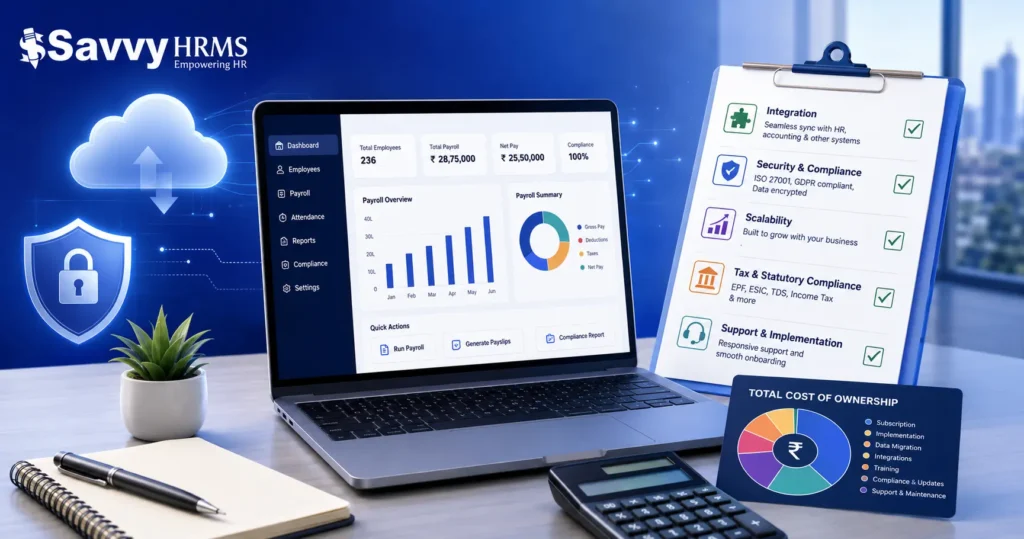
A cloud-based payroll software that costs INR 5,000 monthly might actually cost INR 12,000 once you add features, compliance modules, and integrations. Compare the total cost of ownership over 3 years, not just the monthly price. The cheapest option often becomes the most expensive when you factor in your team’s time spent working around limitations.
Question 6: Does It Handle Your Local Tax and Statutory Requirements?
Payroll compliance is jurisdiction-specific. Tax rules, deduction calculations, statutory compliance, and filing requirements vary by location. A platform built for the US market might not handle India-specific requirements like EPF, ESIC, TDS, income tax, gratuity calculations, and government filing requirements.
This is critical if you operate in multiple locations or deal with complex tax situations:
- Does the platform automatically calculate tax deductions based on current tax slabs?
- Does it handle statutory contributions (EPF, ESIC, NPS, etc.) correctly?
- Can it generate compliance reports required by government bodies?
- Does it stay updated when tax laws change (which happens quarterly or annually)?
- Does it support multiple states’ compliance if you have employees across India?
For payroll software in Delhi or other Indian cities, you absolutely need a solution built for or deeply familiar with Indian labor laws. Global platforms often miss nuances. For example, the EPF calculation thresholds, exemptions, and filing deadlines are unique to India. A generic platform won’t handle these correctly, and errors lead to penalties, employee disputes, and regulatory scrutiny.
Question 7: How Responsive Is Customer Support and Implementation?
When payroll breaks, it’s not a minor inconvenience; it’s an emergency. Employees depend on timely payment. If you hit a problem on Friday afternoon, you need support available then, not Monday morning.
Before buying, evaluate support quality:
- What support channels are available (phone, email, chat, ticket system)?
- What are support hours? Is there 24/7 support, or limited weekday hours?
- What’s the average response time for critical issues?
- Is there a dedicated implementation manager for onboarding, or are you on your own?
- What’s the vendor’s track record? Check reviews on how well they handle issues.
- Is training included in the contract, or does it cost extra?
Implementation quality matters as much as the software itself. A poor implementation can take weeks longer than necessary, delay payroll cycles, and frustrate your team. Ask for references from customers of a similar size and complexity. Talk to them directly about their experience, not just the sales team’s version of the story.
Question 8: What Data Migration and Onboarding Process Does It Offer?
Migrating from your current system to new payroll software is risky. Your historical data, past salaries, deductions, compliance records, and employee histories must transfer accurately. One mistake here can create compliance issues and employee disputes.
During the evaluation, clarify:
- Does the vendor provide data migration services, or is it your responsibility?
- How long does the entire onboarding process typically take?
- What data needs to be manually entered versus imported?
- Will there be any payroll cycles that must be processed in both systems during transition?
- What happens if data doesn’t transfer correctly? What’s the rollback plan?
- Are there cutoff dates where the old system stops, and the new system starts?
Best practice is to run both systems in parallel for one or two payroll cycles to verify accuracy before fully switching. If the vendor doesn’t support this, it’s a red flag. Also, understand whether you’re locked into their onboarding timeline or whether you can phase in features gradually.
Question 9: Can You Customize Workflows and Reports to Match Your Needs?
Every business has unique payroll workflows. One company might need to approve overtime before payment, another might require manager sign-offs on salary changes. Standard, one-size-fits-all software often won’t fit. When this happens, you either adapt your workflow to the software (inefficient) or demand customization (expensive).
Ask about flexibility:
- Can you customize approval workflows (who approves what, in what order)?
- Can you create custom reports for your specific compliance or management needs?
- Can you add custom fields for employee-specific data (project codes, cost centers, etc.)?
- Are there limitations on the depth of customization, or do you hit a paywall?
- Can custom configurations be done through the UI, or do they require developer involvement?
Explore Savvy HRMS’s customization capabilities if you need a solution that truly adapts to your payroll structure rather than forcing your operations into a rigid template.
Question 10: Does It Offer Mobile Access for Remote and Field Employees?
Post-pandemic, many teams are distributed. Your employees might be working remotely, from client sites, or in the field. A payroll platform that only works on desktops limits accessibility and creates bottlenecks. Mobile access matters for several reasons: employees need to verify their payslips anywhere, managers need to approve attendance or leave on the go, and HR teams need dashboard access for emergencies.
Evaluate mobile capabilities:
- Is there a dedicated mobile app (iOS/Android) or just mobile-responsive web access?
- What functionality is available on mobile – full payroll processing, or just self-service portals?
- Can employees view payslips, download documents, and update personal details on mobile?
- Can managers approve leaves, attendance corrections, or expenses on mobile?
- Is the app’s security equal to the desktop version?
- Does it sync data in real-time, or is there a lag?
For businesses with field staff or multiple office locations, mobile access isn’t a nice-to-have – it’s essential. A cloud-based payroll software platform that lacks mobile functionality essentially defeats the purpose of being cloud-based.
Frequently Asked Questions (FAQ)
1. What’s the difference between cloud-based payroll software and traditional payroll software?
Cloud-based payroll software runs entirely online and is accessed through a web browser, with data stored on secure servers. Traditional software is installed on local computers or servers. Cloud-based options offer better accessibility, automatic updates, lower upfront costs, and easier collaboration. You don’t need IT staff to maintain servers or worry about software updates. For most small to mid-sized businesses, cloud-based is the more practical choice.
2. Can cloud-based payroll software replace a full HRMS (Human Resource Management System)?
Implementation timelines vary from 2 to 8 weeks, depending on complexity. Simple setups with minimal integrations might take 2 weeks. Complex implementations with multiple entities, custom workflows, and legacy system integrations can take 6–8 weeks or longer. During implementation, you should run both old and new systems in parallel to verify accuracy before fully switching.
3. How long does it typically take to implement cloud-based payroll software?
Implementation timelines vary from 2 to 8 weeks, depending on complexity. Simple setups with minimal integrations might take 2 weeks. Complex implementations with multiple entities, custom workflows, and legacy system integrations can take 6–8 weeks or longer. During implementation, you should run both old and new systems in parallel to verify accuracy before fully switching.
4. What compliance documents should I verify that a payroll software provides?
Before buying payroll software, ensure it can generate all documents your business needs: employee payslips, annual Form 16, EPF statements (if applicable), salary certificates, bank statements for loan applications, and government compliance reports. Missing even one critical document creates problems during tax season or audits.
5. Is it safe to store payroll data in the cloud?
Yes, cloud-based payroll software from reputable vendors is generally safer than on-premises solutions. Established platforms invest in enterprise-grade security, regular backups, encryption, and compliance auditing. On-premises systems depend on your IT infrastructure, which may lack these protections. However, always verify that your chosen vendor meets security standards (ISO 27001, SOC 2) and complies with data protection laws relevant to your jurisdiction.
Conclusion
Choosing the right payroll software is one of the most impactful HR decisions you’ll make. The right platform saves your team hours every month, reduces compliance risks, and scales with your business. The wrong one becomes a source of frustration, hidden costs, and operational drag.
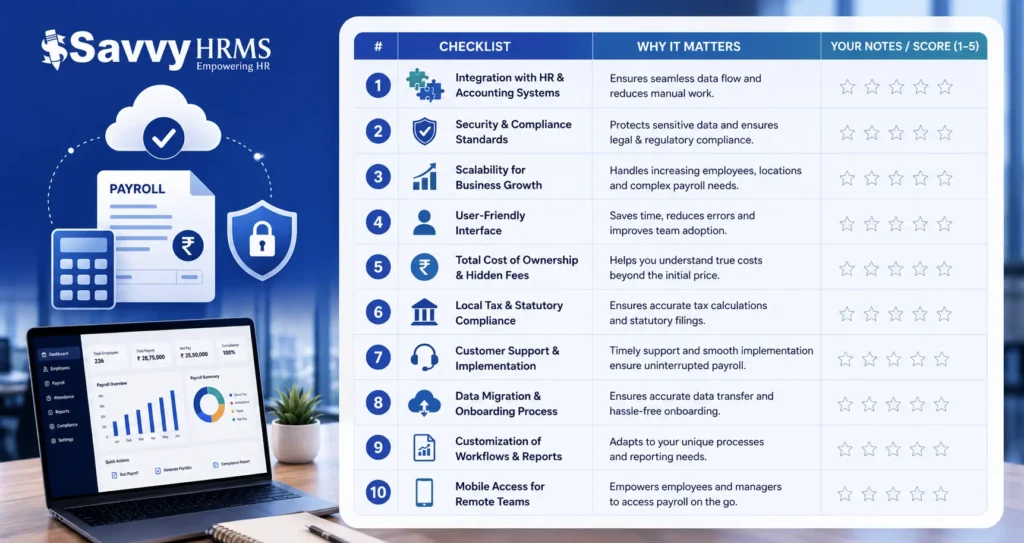
These 10 questions aren’t just a checklist; they’re your framework for genuinely evaluating whether a cloud-based payroll software solution fits your business. Before signing any contract, you should be able to answer all of them with confidence. If a vendor hesitates, avoids, or glosses over any of these questions, that’s a signal to look elsewhere.
The best payroll software for your business is the one built for businesses like yours, with the integrations you need, the compliance features required, and the support quality that matches your expectations. Take time now to evaluate properly. The cost of choosing wrong, in terms of time, money, and employee frustration, far exceeds the effort of a thorough evaluation upfront.
Ready to simplify payroll, compliance, and HR operations?
Discover how Savvy HRMS helps growing businesses manage everything from payroll processing to employee management, all from one powerful cloud-based platform.
Book a Demo Today