Trusted By 1,000+ Clients

Frequently
Asked Question

Utilized to follow the work for long periods of groups and smooth out the finance cycle.

faq-banner-man

HR software is a digital solution that helps businesses manage and automate human resource tasks such as employee records, attendance, leave management, payroll, recruitment, performance management, onboarding, and compliance. It reduces manual work, improves accuracy, enhances employee experience, and enables HR teams to focus on strategic initiatives instead of routine administrative tasks.

  • Automates repetitive HR tasks.
  • Improves payroll accuracy and compliance.
  • Simplifies leave and attendance management.
  • Enhances employee self-service.
  • Provides real-time HR reports and analytics.
  • Saves time and operational costs.

The best HRMS software depends on your organization's size, industry, budget, and specific HR needs. If you're looking for an all-in-one solution, Savvy HRMS is a strong choice, offering payroll, attendance, leave management, recruitment, performance management, statutory compliance, employee self-service, and advanced HR analytics on a secure, scalable cloud platform suitable for businesses of all sizes.

Consider these factors before selecting an HRMS:

  • Business size and future growth.
  • Important HR and payroll features.
  • Ease of use and implementation.
  • Integration capabilities.
  • Data security and compliance.
  • Customer support and pricing.

A comprehensive HRMS should include:

    • Employee database
  • Payroll management
  • Attendance tracking
  • Leave management
  • Recruitment and onboarding
  • Performance management
  • Employee self-service portal
  • Reports and analytics
  • Mobile accessibility
  • Compliance management

Yes. Modern HRMS software integrates payroll, attendance, and leave management into a single platform. This helps automate salary calculations, track employee attendance, manage leave requests, and minimize manual errors.

Yes. HRMS software is designed for organizations of all sizes.

  • Small businesses benefit from automation.
  • Medium businesses improve operational efficiency.
  • Large enterprises manage complex HR processes at scale.
  • Cloud-based solutions can grow as your business expands.

HRMS software pricing varies depending on the number of employees, selected modules, deployment type, and customization requirements. Most providers offer flexible pricing plans suitable for startups, SMEs, and large enterprises.

Yes. Reputable cloud HRMS providers use advanced security measures, including:

  • Data encryption
  • Secure cloud infrastructure
  • Role-based access control
  • Regular data backups
  • Multi-factor authentication
  • Compliance with industry security standards

Most modern HRMS solutions support integrations with payroll, ERP, accounting software, biometric devices, CRM systems, and productivity tools. These integrations simplify workflows, eliminate duplicate data entry, and improve business efficiency.

Implementation usually depends on the organization's size, data migration requirements, customization, and integrations. Basic implementations may take a few days, while enterprise deployments can require several weeks for successful onboarding.

  • Reduces manual HR workload.
  • Improves employee experience.
  • Increases productivity.
  • Ensures statutory compliance.
  • Supports better decision-making through analytics.
  • Enables scalable HR operations.
Core HR manages the fundamental human resource functions that support the entire employee lifecycle. It includes maintaining employee records, managing organizational structures, handling attendance and leave, onboarding employees, managing compliance, and ensuring accurate HR data. Core HR provides the foundation for other HR functions like payroll, performance management, and recruitment.

The seven core HR processes generally include:

  • Recruitment and onboarding
  • Employee information management
  • Attendance and leave management
  • Payroll support
  • Performance management
  • Learning and development
  • Compliance and employee relations

These processes help organizations manage their workforce efficiently while ensuring compliance with labor laws and company policies.

The five primary Core HR functions are:

  • Employee data management
  • Recruitment and onboarding
  • Attendance and leave management
  • Performance management
  • HR compliance and policy administration

Together, these functions simplify HR operations and improve workforce management.

Core HR is a subset of Human Resources that focuses on important administrative functions such as employee records, attendance, leave, and compliance. HR, on the other hand, is a broader function that includes Core HR along with recruitment, payroll, learning and development, performance management, employee engagement, and strategic workforce planning.
Core HR is important because it centralizes employee information, automates routine HR tasks, improves compliance, and reduces administrative workload. A strong Core HR system also enhances data accuracy, supports informed decision-making, and provides a strong foundation for payroll, talent management, and other HR processes.
A modern Core HR software should include employee database management, digital document storage, attendance and leave management, organizational hierarchy, employee self-service, onboarding, compliance management, reporting and analytics, role-based access, and smooth integration with payroll and other HR modules.
Core HR software is suitable for businesses of all sizes, including startups, SMEs, and large enterprises. It is especially valuable for organizations looking to automate HR processes, improve data accuracy, maintain compliance, and enhance employee experience while reducing manual administrative work.
Yes. Most modern Core HR software integrates smoothly with payroll, attendance, recruitment, performance management, learning management, and employee self-service modules. This integration ensures consistent employee data across systems, reduces manual data entry, and improves overall HR efficiency.
Yes. Most Core HR software includes an employee self-service portal where employees can securely view and update personal details, access important documents, manage leave requests, and keep their information up to date, subject to HR approval where required.
Core HR software automates routine administrative tasks, centralizes employee data, simplifies HR workflows, reduces paperwork, and minimizes manual errors. This enables HR teams to focus more on strategic initiatives and employee engagement.

Attendance management software is a digital solution that helps organizations track employee attendance, working hours, shifts, overtime, and absences automatically. It reduces manual effort, improves record accuracy, and simplifies daily workforce management.

Employees can record attendance through:-

Biometric devices,
Mobile apps,
GPS and geofencing,
QR code check-ins,
Facial recognition and
Web-based check-ins.

The system automatically records attendance data and generates reports.

Organizations can improve attendance accuracy, eliminate manual errors, simplify shift scheduling, automate overtime calculations, and gain real-time workforce visibility. It also saves HR teams valuable time while supporting accurate payroll processing.

Yes. It helps:-

Sync attendance with payroll,
Calculate overtime automatically,
Process leave deductions accurately,
Reduce payroll errors,
Ensure timely salary processing

Yes. Employees can use a mobile app to check in and check out from approved locations using GPS, geofencing, or web-based attendance, making it ideal for remote, hybrid, and field-based workforces.

Yes. It supports:-

Multiple shift schedules,
Rotational shifts,
Flexible working hours,
Night shifts,
Custom shift configurations

Yes, Employees can easily access their attendance history, daily working hours, shift schedules, overtime details, and attendance regularization requests through a self-service portal, promoting transparency and reducing routine HR queries.

Yes. Organizations can:-

Track attendance across multiple branches,
Monitor remote employees,
Manage factory and site locations,
Access centralized dashboards,
Standardize attendance policies

Yes, Most modern solutions protect employee data through encryption, role-based access controls, secure cloud infrastructure, and regular backups, ensuring confidential attendance records remain safe from unauthorized access and data loss.

Consider features such as:-

Biometric and mobile attendance,
GPS and geofencing,
Shift management,
Overtime tracking,
Leave management,
Payroll integration,
Employee self-service,
Real-time reports and analytics,
Multi-location support

Leave management software is a digital solution that automates leave requests, approvals, leave balance tracking, and policy enforcement. It simplifies leave administration, reduces paperwork, improves transparency, and helps organizations manage employee leave efficiently.
It helps businesses:-
Automate leave requests and approvals, Reduce manual work, Eliminate calculation errors, Improve policy compliance, Increase transparency, Save HR time
Employees submit leave requests through a web portal or mobile app, managers review and approve them, and the system automatically updates leave balances, attendance records, and approval history for smooth leave management.
Yes, Employees can conveniently apply for leave, check available leave balances, track approval status, view leave history, and receive notifications through a secure web portal or mobile application from anywhere.
Yes, It supports:-
Casual leave, Sick leave, Earned leave, Maternity leave, Paternity leave, Unpaid leave, Compensatory off, Custom leave policies
Yes, It can:-
Sync leave records with attendance, Calculate payable days accurately, Automate leave deductions, Improve payroll accuracy, Reduce manual processing
Yes, Most solutions allow organizations to configure leave rules, approval workflows, accrual methods, carry-forward limits, encashment policies, and employee eligibility criteria to match their unique business requirements.
Yes, Whether you're a startup, SME, or large enterprise, it helps simplify leave administration, reduce administrative workload, improve employee experience, and ensure leave policies are applied consistently across the organization.
Yes, HR teams can:-
Track leave balances, Monitor absenteeism, Analyze leave utilization, Identify leave trends, Generate compliance reports, Support workforce planning
Look for features such as:-
Automated leave approvals, Customizable leave policies, Employee self-service portal, Mobile access, Attendance integration, Payroll integration, Real-time leave tracking, Notifications and alerts, Comprehensive reporting and analytics
Payroll software is a digital solution that automates salary calculations, tax deductions, statutory compliance, payslip generation, and employee payments. It reduces manual effort, minimizes payroll errors, and helps businesses process salaries accurately while ensuring compliance with applicable labor and tax regulations.
Businesses use payroll software to simplify salary processing, reduce administrative workload, improve payroll accuracy, and stay compliant with statutory requirements. It automates repetitive tasks, saves valuable HR time, and ensures employees receive accurate and timely salary payments every payroll cycle.
Employee salaries are calculated based on attendance, leave records, overtime, bonuses, incentives, deductions, reimbursements, and applicable taxes. The system applies predefined salary structures and statutory rules automatically, ensuring accurate payroll calculations while reducing the risk of manual errors.
Yes, Payroll software automatically calculates statutory deductions such as EPF, ESI, Professional Tax (PT), TDS, and other applicable contributions based on current regulations. This helps businesses maintain compliance, reduce calculation errors, and simplify monthly payroll processing.
Yes, Payroll software integrates smoothly with attendance and leave management systems to fetch employee working hours, absences, overtime, and leave records automatically. This eliminates duplicate data entry, improves payroll accuracy, and ensures employees are paid correctly every month.
Yes, Employees can securely access, view, and download their payslips, salary statements, tax documents, and payment history through a self-service portal. This improves transparency, reduces HR queries, and gives employees convenient access to payroll information whenever required.
Yes, Modern payroll software protects sensitive employee and salary information using advanced encryption, role-based access controls, secure cloud infrastructure, and regular data backups. These security measures help prevent unauthorized access while ensuring payroll records remain safe and confidential.
Choose payroll software that offers automated salary processing, statutory compliance management, attendance and leave integration, customizable salary structures, employee self-service, tax calculations, payroll reports, direct bank transfers, and secure cloud access to simplify payroll operations and improve efficiency.
Yes, Modern payroll software supports multiple salary structures, pay grades, allowances, deductions, bonuses, incentives, reimbursements, and department-specific compensation policies. This flexibility enables businesses to manage diverse employee groups while maintaining accurate and consistent payroll processing.
With automated payroll software, payroll processing can usually be completed within a few clicks after verifying employee data. The exact processing time depends on workforce size and payroll complexity, but automation significantly reduces the time and effort compared to manual payroll management.
Statutory Compliance is the process of following government-mandated labor laws, tax regulations, and employment rules applicable to a business. It ensures organizations meet legal obligations, protect employee rights, avoid penalties, and maintain smooth HR and payroll operations.

It helps businesses:

  • Comply with labor laws
  • Avoid penalties and legal disputes
  • Protect employee rights
  • Ensure accurate payroll processing
  • Complete statutory filings on time
  • Build business credibility

Key statutory requirements include:

  • EPF (Employees' Provident Fund)
  • ESI (Employees' State Insurance)
  • Professional Tax (PT)
  • Tax Deducted at Source (TDS)
  • Minimum Wages compliance
  • Payment of Bonus
  • Payment of Gratuity
  • Other applicable central and state labor laws
HR software automates statutory calculations, payroll processing, compliance tracking, report generation, and filing reminders. It minimizes manual effort, reduces calculation errors, and helps businesses stay compliant with changing labor laws and tax regulations.
Yes, An HRMS automatically calculates statutory deductions such as EPF, ESI, Professional Tax, and TDS based on the latest applicable rules. This improves payroll accuracy, minimizes compliance risks, and reduces the need for manual calculations.

It is ideal for:

  • Startups
  • Small and medium-sized businesses (SMEs)
  • Large enterprises
  • Manufacturing companies
  • IT and service organizations
  • Businesses managing employee payroll and statutory obligations
Savvy HRMS automates payroll processing, statutory deductions, compliance monitoring, and report generation from a single platform. It helps businesses stay updated with regulatory requirements, reduce manual work, and simplify ongoing statutory compliance management.

Failure to comply with statutory regulations can lead to:

  • Financial penalties
  • Interest on delayed payments
  • Legal notices
  • Compliance audits
  • Business disruptions
  • Damage to organizational reputation
Yes, Modern Statutory Compliance software is regularly updated to reflect changes in labor laws, tax regulations, statutory contribution rates, and filing requirements. This helps businesses maintain compliance without constantly tracking regulatory updates manually.

Look for features such as:

  • Automated statutory calculations
  • Payroll integration
  • Compliance alerts and reminders
  • Regulatory updates
  • Audit-ready reports
  • Employee record management
  • Multi-state compliance support
  • HRMS and payroll integration
A Travel and Expense Management System helps organizations manage employee travel requests, business expenses, reimbursements, and approvals through a centralized platform. It automates the entire process, reduces paperwork, improves policy compliance, and speeds up reimbursement while providing complete visibility into employee expenses.

An efficient Travel and Expense Management system offers several benefits, including:

  • Faster expense approvals
  • Better cost control
  • Improved policy compliance
  • Reduced manual paperwork
  • Accurate expense tracking
  • Greater transparency
  • Simplified reimbursements

Employees can generally claim:

  • Air, train, and bus tickets
  • Hotel and accommodation expenses
  • Taxi and local transportation
  • Meals during business travel
  • Fuel and mileage
  • Client meeting expenses
  • Other approved business-related expenses
Employees submit expense claims along with supporting documents through the system. The request is automatically routed to the designated manager or approver based on company workflows. After approval, the finance team reviews and processes the reimbursement, ensuring a faster and more transparent approval cycle.

Yes, Most Travel and Expense Management systems allow employees to upload digital documents such as:

  • Receipt images
  • GST invoices
  • Hotel bills
  • Travel tickets
  • PDF invoices
  • Other supporting documents

Yes, Organizations can configure policies based on their business requirements, such as:

  • Expense limits
  • Daily allowances
  • Eligible expense categories
  • Approval hierarchy
  • Required documents
  • Reimbursement rules

Yes. Modern solutions like Savvy HRMS integrate Travel and Expense Management with HR, payroll, and employee records. This helps automate reimbursements, maintain accurate financial records, and reduce manual data entry across departments.

Yes. Managers can monitor expense requests in real time, including:

  • Pending approvals
  • Approved claims
  • Rejected requests
  • Reimbursement status
  • Employee-wise expense history
  • Department-wise expense reports
The system records every expense submission, approval, reimbursement, and supporting document in a centralized database. It ensures company policies are followed, maintains a complete audit trail, reduces unauthorized claims, and simplifies internal and financial audits.
Travel and Expense Management software is ideal for organizations of all sizes, especially those with employees who travel frequently for client meetings, sales visits, field operations, or business events. It helps simplify expense tracking, improve financial control, and simplify reimbursement processes across the organization.
Reimbursement management software is a digital solution that automates the process of submitting, approving, tracking, and reimbursing employee expense claims. It eliminates paperwork, reduces manual errors, speeds up approvals, and ensures company reimbursement policies are followed consistently.

Typically, the process includes:

  • Employee submits an expense claim with supporting receipts.
  • The claim is sent to the reporting manager for approval.
  • HR or finance verifies the claim based on company policy.
  • Approved claims are processed for reimbursement.
  • Employees can track the claim status in real time.
Yes, Employees can submit reimbursement claims through a web portal or mobile app by entering expense details, attaching bills or receipts, and submitting them for approval without any paperwork.

Common reimbursable expenses include:

  • Travel expenses
  • Local conveyance
  • Fuel and mileage
  • Hotel and accommodation
  • Meals and business entertainment
  • Internet and phone bills
  • Medical expenses (as per company policy)
  • Training and certification costs
  • Office-related purchases
Yes, Employees can securely upload invoices, bills, receipts, or supporting documents in multiple file formats while creating reimbursement requests. This simplifies verification and maintains a complete digital record for audits.
Once an employee submits a claim, it is automatically routed to the designated manager or approver based on predefined workflows. Managers can review supporting documents, approve, reject, or request modifications before forwarding the claim for final processing.

Yes, Organizations can configure reimbursement policies based on:

  • Department
  • Employee grade
  • Designation
  • Location
  • Expense category
  • Approval hierarchy
  • Claim limits
Yes, Employees and administrators can monitor every stage of a reimbursement request, from submission and approval to payment, through a real-time dashboard, ensuring complete transparency and reducing follow-up communication.
Yes, Approved reimbursement amounts can be integrated with payroll, so employees receive their reimbursements along with their salary or as a separate payment, depending on the organization's payroll policies.

The software improves efficiency by:

  • Automating approval workflows
  • Reducing manual data entry
  • Enforcing company reimbursement policies
  • Maintaining digital records for audits
  • Preventing duplicate or fraudulent claims
  • Increasing transparency and accountability
  • Speeding up reimbursement processing
Recruitment management software is a digital solution that helps organizations simplify the entire hiring process, from posting job openings and receiving applications to screening candidates, scheduling interviews, and onboarding selected employees. It improves hiring efficiency and enhances the candidate experience.

It simplifies hiring by:

  • Centralizing candidate information
  • Automating job postings
  • Screening applications faster
  • Scheduling interviews
  • Managing approvals
  • Tracking hiring progress
  • Reducing manual administrative work
Yes, Recruiters can publish job vacancies across multiple job portals, career pages, and social media platforms from a single system, helping organizations attract a larger pool of qualified candidates.
The recruitment software provides a centralized dashboard where recruiters can monitor every candidate's status throughout the hiring journey. From application submission to interview rounds, offer release, and final selection, every stage can be tracked in real time.
Yes, Recruiters can schedule interviews, assign interview panels, send automated interview invitations, share meeting details, and notify candidates about any schedule changes, making interview coordination faster and more organized.

Yes, Resume parsing helps recruiters automatically extract candidate details such as:

  • Name and contact information
  • Educational qualifications
  • Work experience
  • Skills
  • Certifications
  • Employment history

This reduces manual data entry and speeds up candidate screening.

Yes, Organizations can configure recruitment workflows based on:

  • Job role
  • Department
  • Business unit
  • Hiring location
  • Approval hierarchy
  • Interview stages
  • Selection process
Yes, Hiring managers and recruiters can collaborate on candidate evaluations, share interview feedback, approve hiring decisions, and monitor recruitment progress through a single platform, ensuring faster and more transparent hiring.
Yes, The software offers detailed recruitment reports and dashboards that help organizations monitor key hiring metrics such as candidate pipeline, source effectiveness, time-to-hire, recruiter performance, interview status, and overall recruitment efficiency.

Recruitment management improves hiring by:

  • Automating repetitive hiring tasks
  • Reducing recruitment time
  • Improving candidate experience
  • Standardizing hiring workflows
  • Enhancing recruiter collaboration
  • Tracking hiring performance
  • Helping organizations make faster, data-driven hiring decisions
An employee asset is any physical or digital resource owned by a company and assigned to employees to perform their job responsibilities. Common employee assets include laptops, mobile phones, ID cards, software licenses, office equipment, and access cards. These assets are tracked to ensure proper usage, maintenance, and timely return.
Employee asset management helps organizations efficiently track, allocate, maintain, and recover company-owned assets throughout their lifecycle. It minimizes asset loss, reduces unnecessary purchases, ensures employees have the tools they need, and simplifies compliance during audits. A well-managed asset tracking process also improves accountability, increases operational efficiency, and simplifies employee onboarding and offboarding.

Assets are generally classified into four main categories:

  • Current Assets: Cash, inventory, and accounts receivable.
  • Non-Current (Fixed) Assets: Buildings, machinery, equipment, and vehicles.
  • Tangible Assets: Physical assets such as computers, office furniture, and equipment.
  • Intangible Assets: Non-physical assets like patents, trademarks, copyrights, software licenses, and goodwill.

Current assets are assets that can be converted into cash or used within one year. Seven common examples include:

  • Cash and cash equivalents
  • Accounts receivable
  • Inventory
  • Marketable securities
  • Prepaid expenses
  • Short-term investments
  • Bills receivable

These assets support a company's day-to-day operations and liquidity.

Five common examples of business assets include:

  • Computers and laptops
  • Office furniture
  • Company vehicles
  • Buildings and office premises
  • Cash and bank balances

Other examples include machinery, software licenses, inventory, patents, and trademarks.

Employee assets in an HRMS are company-owned resources assigned to employees and digitally tracked throughout their lifecycle. HRMS software records asset allocation, transfer, maintenance, return, and replacement, helping HR and IT teams manage assets efficiently. This ensures accountability, reduces manual tracking, and simplifies the employee exit process by confirming all assigned assets have been returned.

Organizations assign various assets depending on job roles. Common employee assets include:

  • Laptops and desktops
  • Mobile phones
  • Tablets
  • ID cards and access cards
  • Headsets
  • Software licenses
  • Office keys
  • Company vehicles
  • Security tokens
  • Office furniture

These assets help employees perform their work efficiently while remaining company property.

HRMS software automates employee asset management by recording asset allocation, tracking ownership, scheduling maintenance, generating return reminders, and maintaining a complete asset history. It improves collaboration between HR, IT, and administration teams while reducing paperwork, preventing asset loss, and ensuring smooth onboarding and offboarding processes.
During the employee offboarding process, all company-owned assets must be returned before the employee's final settlement. HR and IT teams verify returned assets such as laptops, mobile phones, ID cards, access cards, and other equipment. An HRMS asset management system simplifies this process by maintaining an accurate checklist and ensuring no company assets remain unreturned.
Tracking employee assets helps organizations improve accountability, reduce asset loss, optimize asset utilization, and simplify audits. It also enhances operational efficiency by maintaining accurate records of asset allocation, maintenance schedules, warranties, and returns. With a centralized asset management system, businesses can make informed purchasing decisions while ensuring employees always have the resources they need to perform their jobs effectively.
A Performance Management System (PMS) is an HR software solution that helps organizations set goals, monitor employee performance, conduct appraisals, provide continuous feedback, and generate performance reports. It simplifies performance evaluations while improving productivity, transparency, employee engagement, and overall business performance.
The primary purpose of a Performance Management System is to align employee goals with business objectives, track progress, provide regular feedback, and support employee development. It enables fair performance evaluations, identifies skill gaps, recognizes top performers, and helps organizations build a high-performing workforce.
Employee performance should be reviewed regularly rather than only during annual appraisals. Many organizations conduct quarterly, biannual, or continuous performance reviews with frequent feedback sessions. Regular evaluations help track progress, address challenges early, improve employee engagement, and ensure individual goals remain aligned with business objectives.

The five stages of performance management are:

  • Planning and goal setting
  • Monitoring employee performance
  • Providing continuous feedback
  • Conducting performance reviews
  • Rewarding achievements and supporting employee development

These stages create a continuous cycle of performance improvement.

The five key elements of performance management include:

  • Goal setting
  • Continuous feedback
  • Performance evaluation
  • Employee development
  • Recognition and rewards

Together, these elements improve employee engagement, productivity, and overall organizational performance.

The four pillars of performance management are:

  • Goal alignment
  • Continuous feedback
  • Performance measurement
  • Employee development

These pillars help employees understand expectations, improve performance, and contribute effectively to organizational success.

Performance management helps organizations improve employee productivity, align individual goals with business objectives, identify skill gaps, and promote continuous learning. It also supports fair performance evaluations, enhances employee engagement, and enables managers to make informed decisions about promotions, rewards, and career development.
A Performance Management System improves goal tracking, performance reviews, employee engagement, and continuous feedback. It increases transparency, simplifies appraisal processes, supports data-driven decision-making, identifies high performers, and helps organizations develop employees while improving overall business performance.
A good Performance Management System should include goal management, KPI and OKR tracking, continuous feedback, 360-degree feedback, self-assessments, performance appraisals, competency management, performance analytics, development planning, and customizable reports for effective employee performance evaluation.
A Performance Management System improves employee performance by setting clear goals, tracking progress, providing continuous feedback, recognizing achievements, and identifying training needs. It encourages regular communication between managers and employees, helping individuals improve their skills and contribute more effectively to organizational success.
Learning Management Software (LMS) is a digital platform that enables organizations to create, manage, deliver, and monitor employee training programs. It helps businesses improve workforce skills, automate learning processes, track training progress, and ensure employees complete mandatory learning and certification requirements efficiently.
Learning Management Software helps organizations deliver consistent employee training, reduce manual administrative work, improve learning outcomes, and monitor training progress in real time. It also supports compliance, employee engagement, and continuous skill development across teams.
  • Centralizes employee training
  • Reduces training costs
  • Automates learning assignments
  • Tracks employee progress
  • Improves compliance management
  • Supports remote and hybrid learning
  • Enhances employee engagement
  • Generates detailed training reports
An LMS focuses on employee learning, training, and skill development, whereas an ERP system manages core business operations such as finance, inventory, procurement, and manufacturing. Integrating both systems helps organizations simplify workforce development alongside overall business operations.
  • Course creation and management
  • Employee learning portal
  • Online assessments and quizzes
  • Certification management
  • Learning progress tracking
  • Reports and analytics
  • Mobile learning support
  • HRMS integration
Learning Management Software helps organizations reduce training costs, improve employee productivity, accelerate onboarding, ensure compliance, and track learning performance. It provides flexible, self-paced training that supports continuous employee development while improving overall workforce efficiency and business growth.

Yes, Most modern LMS solutions integrate with HRMS platforms to:

  • Sync employee records
  • Assign training automatically
  • Track certifications
  • Monitor learning progress
  • Generate centralized reports
  • Support performance management
Yes, Cloud-based LMS solutions are ideal for startups and small businesses because they are cost-effective, easy to implement, and scalable. They help businesses train employees efficiently without investing in expensive infrastructure or complex training management systems.

An LMS can manage various training programs, including:

  • Employee onboarding
  • Compliance training
  • Technical skills training
  • Leadership development
  • Product training
  • Sales training
  • Soft skills development
  • Customer service training

When choosing an LMS, consider:

  • Ease of use
  • Integration with HRMS
  • Customization options
  • Mobile accessibility
  • Reporting and analytics
  • Security features
  • Scalability
  • Customer support
  • Pricing and licensing
A Loan Management System helps businesses manage loan applications, approvals, disbursements, repayments, interest calculations, and reporting from one place. It reduces manual processes, improves accuracy, and provides better visibility into loan-related activities.
  • Faster loan processing
  • Reduced paperwork
  • Accurate calculations
  • Easy repayment tracking
  • Better record management
  • Automated workflows
Banks, NBFCs, lending institutions, credit societies, financial organizations, and businesses managing employee loans can benefit from a centralized solution for handling applications, approvals, repayments, documentation, calculations, and reports.

Common features include:

  • Loan application management
  • Approval workflows
  • EMI and interest calculations
  • Repayment tracking
  • Document management
  • Automated notifications
  • Reports and analytics
  • Payroll and HRMS integration
Automated workflows can handle applications, approvals, EMI calculations, repayment schedules, notifications, and reports. This reduces repetitive administrative work, minimizes manual errors, and helps teams process loans faster and more efficiently.
Yes, Employee loan requests, approvals, repayment schedules, salary deductions, outstanding amounts, and loan history can all be managed from a centralized platform, making loan administration easier for HR teams.
Yes, Payroll integration can automate employee loan deductions and repayment tracking. This helps eliminate duplicate data entry, maintain accurate deduction records, and ensure loan repayments are properly accounted for during salary processing.
  • Reduces manual calculations
  • Minimizes data-entry errors
  • Standardizes approval workflows
  • Automates EMI calculations
  • Maintains accurate repayment records
  • Provides real-time loan information
Yes, Small businesses can use a centralized system to organize loan records, automate calculations, manage approvals, and track repayments. Scalable solutions can also support changing requirements as the business grows.
Consider features, automation, integrations, security, reporting, customization, scalability, ease of use, and customer support. A product demo can help you understand the capabilities and determine whether the solution matches your business requirements.
A Mobile App allows employees to access important workplace services directly from their smartphones. Employees can manage attendance, leave, payslips, personal information, requests, and notifications without depending on a desktop or visiting the HR team.
  • Mark attendance and check-in/check-out
  • Apply for leave
  • View leave balances
  • Access payslips
  • Check attendance records
  • Update personal information
  • Submit requests
  • Receive notifications
Yes, Employees can mark attendance directly from their smartphones based on the organization's attendance policies. Features such as GPS-based attendance, location tracking, and mobile check-in/check-out can help businesses manage attendance for office, remote, and field employees.
Yes, Employees can submit leave requests, check available balances, view approval status, and receive notifications directly from their smartphones. This makes the process quicker and reduces dependency on emails, paperwork, or manual communication.
Yes, Employees can securely view and download their payslips through the app. Easy access to salary information allows employees to check their payroll details whenever required without repeatedly contacting the payroll or administration team.

Common self-service features include:

  • Attendance tracking
  • Leave applications
  • Payslip access
  • Personal information updates
  • Expense and reimbursement requests
  • Attendance regularization
  • Company notifications
Yes, Managers can review and approve or reject requests such as leave, attendance regularization, expenses, and other employee requests directly from their smartphones, helping organizations speed up everyday approval workflows.
Yes, Employees working remotely, travelling, or operating from different locations can use mobile-based features to manage attendance, leave, requests, notifications, and other workplace activities, helping them stay connected regardless of their location.
Security depends on the solution and its implementation. Important measures can include secure authentication, role-based access, encrypted data transmission, controlled permissions, and secure data storage to help protect sensitive employee and organizational information.
A Mobile App provides convenient access to essential workplace services anytime and anywhere. Features such as mobile attendance, leave management, instant notifications, and payslip access can reduce administrative dependency and make everyday employee processes faster and easier.
A task management system is a software solution that helps individuals and teams create, assign, organize, prioritize, and track tasks. It provides better visibility into responsibilities, deadlines, task status, and work progress, helping teams complete their work efficiently.

The 3-3-3 rule is a productivity technique that helps organize daily work by focusing on:

  • 3 major tasks that require significant attention
  • 3 medium-priority tasks that support daily goals
  • 3 smaller tasks that can be completed quickly
The best task management tool depends on your business requirements, team size, workflow, and budget. Look for features such as task assignment, priority settings, deadlines, reminders, progress tracking, collaboration, notifications, and reporting.
  • Improves task organization
  • Helps prioritize important work
  • Reduces missed deadlines
  • Improves team collaboration
  • Provides real-time task visibility
  • Tracks employee and team progress
A reliable task management system should include task creation and assignment, deadlines, priority levels, status tracking, reminders, recurring tasks, notifications, collaboration tools, file sharing, dashboards, and reporting features. These capabilities help teams manage workloads and maintain productivity.
Task management improves productivity by giving employees a clear understanding of their responsibilities and deadlines. It reduces confusion, helps prioritize workloads, makes progress easier to monitor, and allows employees to focus on completing tasks without losing track of important work.

Yes, Teams can use task management systems to:

  • Assign tasks to specific employees
  • Share files and important information
  • Add comments and updates
  • Track task status
  • Monitor deadlines and progress
Task management systems help users set deadlines, receive reminders, monitor upcoming work, and identify overdue tasks. Managers can also track progress and take timely action when tasks are delayed, helping teams maintain schedules and complete assignments on time.
Task management focuses on organizing and completing individual tasks, while project management covers the complete project lifecycle. Project management may include planning, budgeting, resource allocation, timelines, risks, tasks, and overall project objectives.

A task management system can be useful for:

  • Individual professionals
  • Small and large teams
  • Managers and team leaders
  • Startups and growing businesses
  • Organizations managing multiple projects
A visitor management system is a digital solution that helps organizations manage and monitor visitors entering their premises. It can simplify visitor registration, verification, check-in, check-out, host notifications, visitor badges, and records while improving workplace security.
  • Faster visitor check-in and check-out
  • Improved workplace security
  • Digital visitor records
  • Reduced paperwork
  • Real-time visitor tracking
  • Better reception management
  • Improved visitor experience
A visitor management system generally allows guests to register their details, verify their identity, and check in digitally. The concerned employee or host can receive a notification, while the system records visitor information and check-out details for future reference.

Key features may include:

  • Digital visitor registration
  • Visitor check-in and check-out
  • ID verification
  • Host notifications
  • Visitor badge management
  • Pre-registration
  • Visitor history and reports
  • Real-time visitor monitoring
Yes, Many visitor management systems allow employees or administrators to pre-register expected visitors. The visitor can receive an invitation or registration link in advance, helping reduce waiting time at reception and making the check-in process faster and more organized.
  • Verifies visitor information
  • Maintains visitor records
  • Tracks entry and exit times
  • Notifies hosts about arrivals
  • Helps monitor visitors on-site
  • Supports controlled access procedures
Yes, a visitor management system can record the time a visitor enters and leaves the premises. This creates an organized digital record and helps administrators know which visitors are currently on-site, which can be useful for security and emergency management.
Yes, Depending on the system, visitor badges can be generated or printed during check-in. These badges can display relevant visitor information and help employees and security personnel easily identify authorized visitors within the workplace.

Visitor management systems can be used by:

  • Corporate offices
  • Manufacturing facilities
  • Educational institutions
  • Hospitals and healthcare facilities
  • Co-working spaces
  • Residential communities
  • Government offices
Yes, Visitor information such as registration details, check-in and check-out times, host information, and visit history can be stored digitally, depending on the system. These records make visitor information easier to retrieve, manage, and review when required.
Survey Tool Management Software helps businesses create, distribute, manage, and analyze employee surveys. It enables HR teams to collect structured feedback, understand employee opinions, measure engagement, and use survey insights to improve workplace policies and employee experiences.
Survey management software simplifies the complete survey process, from creating questions to analyzing responses. HR teams can use it to collect employee feedback efficiently, identify workplace concerns, track engagement trends, and make informed people-management decisions.

Savvy HRMS can support different types of employee surveys, depending on the organization's requirements, such as:

  • Employee engagement surveys
  • Employee satisfaction surveys
  • Workplace feedback surveys
  • Pulse surveys
  • Exit or experience surveys
  • Internal HR surveys
Yes. It enables organizations to regularly collect employee feedback, identify concerns, understand workplace sentiment, and track engagement levels. HR teams can use these insights to develop targeted initiatives that improve employee satisfaction, communication, and overall workplace experience.

Key benefits include:

  • Faster survey creation and distribution
  • Centralized employee feedback management
  • Better visibility into employee opinions
  • Easier response tracking and analysis
  • Data-driven HR decision-making
  • Improved employee engagement
  • Reduced manual survey administration
Yes, Survey management software can help HR teams organize and analyze collected responses. Depending on the available features, HR professionals can review response trends, identify common feedback areas, compare results, and use insights to support workplace improvement initiatives.
Yes, It provides HR teams with a structured way to collect employee feedback at scale. Regular surveys can help organizations understand employee expectations, identify recurring issues, evaluate HR initiatives, and create a more responsive and employee-focused workplace.
Savvy HRMS can help organizations simplify survey-related activities by providing a centralized platform for managing employee feedback. This reduces dependence on manual processes and helps HR teams organize survey information more efficiently for better analysis and decision-making.
Employee survey software can make feedback collection more organized and efficient. Compared with manual methods, it can help businesses: Automate survey distribution Centralize responses Reduce administrative work Improve response tracking Analyze feedback more efficiently Maintain organized survey records
Yes, Survey data provides HR teams with measurable insights into employee opinions and workplace experiences. By analyzing survey results, organizations can identify trends, prioritize employee concerns, evaluate initiatives, and make more informed HR and workforce-management decisions.
Separation Management Software helps HR teams manage the employee exit process from resignation and approval to clearance, final settlement, exit interviews, and employee separation. It centralizes separation activities and helps organizations maintain an organized and consistent offboarding process.
It simplifies employee separation by reducing manual work and coordinating different activities involved in offboarding. HR teams can manage resignation requests, approvals, clearance processes, exit formalities, and separation records through a centralized system.

Key benefits include:

  • Simplified employee offboarding
  • Centralized separation records
  • Faster approval workflows
  • Better coordination between departments
  • Reduced manual paperwork
  • Improved tracking of clearance activities
  • More organized exit processes
Yes, Separation Management Software can help employees submit resignation requests digitally and enable HR or designated managers to review and process them. This creates a structured workflow and provides better visibility into the employee's separation status.
Separation software brings important exit activities into one system. HR can track resignation, notice period, approvals, department clearances, exit interviews, final settlement, and other offboarding activities, helping ensure that required steps are completed before separation.
Yes, It can help organizations coordinate clearance requirements across departments such as HR, finance, IT, administration, and other relevant teams. This makes it easier to track pending clearances and identify outstanding responsibilities before an employee leaves.
Depending on the configured workflow, employees can submit resignation requests through the HRMS portal. The request can then be routed to the appropriate manager or HR team for review, approval, and further separation processing.
Separation Management Software can support the coordination of final settlement activities by maintaining relevant separation information and integrating with payroll processes where available. This can help HR teams manage dues, deductions, leave balances, and other settlement-related information more systematically.

Savvy HRMS can help HR teams manage various employee separation activities, including:

  • Resignation management
  • Separation approvals
  • Notice period tracking
  • Exit clearance
  • Exit interviews
  • Separation records
  • Final settlement-related processes
Businesses can use Separation Management Software to make employee offboarding more structured, transparent, and efficient. It helps HR teams track important separation activities, reduce administrative effort, maintain accurate records, and provide a smoother experience for employees and internal stakeholders.
Canteen Management Software is a digital solution that helps organizations manage employee meals, food subscriptions, meal consumption, payments, and canteen operations. It reduces manual work, maintains accurate records, and enables HR and administration teams to manage workplace canteen activities efficiently.
  • Employee meal management
  • Meal booking and subscription
  • Meal consumption tracking
  • Canteen attendance
  • Food preference management
  • Payment and deduction management
  • Canteen reports and analytics
Canteen Management Software simplifies daily canteen administration by automating meal records, employee subscriptions, consumption tracking, and related payments. It improves data accuracy, reduces paperwork, saves administrative time, and provides better visibility into workplace food-service operations.
Yes, the software can record and monitor employee meal consumption. It helps organizations maintain employee-wise meal records, identify usage patterns, monitor daily requirements, and improve planning for food quantities and canteen resources.
Yes, employees can generally book meals or subscribe to available meal plans through the system. This allows canteen administrators to receive updated meal requirements and prepare food quantities based on expected employee participation.
  • Employee-wise meal deductions
  • Meal-related charges
  • Monthly deduction records
  • Payroll-linked deductions
  • Deduction reports
The software automates repetitive canteen activities such as maintaining meal records, tracking consumption, managing subscriptions, calculating applicable charges, and generating reports. This reduces dependency on spreadsheets and manual registers while improving the accuracy and accessibility of canteen-related information.
Yes, it can generate reports related to employee meals, consumption, subscriptions, payments, deductions, and canteen usage. These reports help HR and administration teams monitor operations, reconcile records, identify trends, and make informed decisions.
Yes, Canteen Management Software can integrate with payroll systems to transfer applicable meal charges or deductions. This helps reduce duplicate data entry, simplifies payroll processing, and ensures that employee canteen-related deductions are recorded accurately.
  • Manufacturing companies
  • Corporate offices
  • Educational institutions
  • Hospitals
  • Hotels
  • Large workforce organizations
  • Organizations providing employee meal facilities
Contract Labour Management Software is a digital solution that helps organizations manage contract workers, contractors, attendance, documentation, compliance, payments, and workforce records. It centralizes contract labour information, reduces manual administration, and helps businesses maintain better visibility over their outsourced workforce.
  • Contractor and worker management
  • Contract and document management
  • Attendance tracking
  • Labour deployment tracking
  • Wage and payment records
  • Compliance monitoring
  • Workforce reports
It helps organizations simplify contract workforce administration by maintaining centralized worker and contractor records. Automated tracking of attendance, documents, contracts, and compliance requirements reduces paperwork, improves data accuracy, and makes it easier to monitor contract labour operations.
Yes, It can maintain centralized records of contractors, including company details, contracts, workforce information, required documents, and other relevant details. This makes contractor information easier to access, update, monitor, and manage.
Yes, the software can maintain individual worker records and track important information such as deployment, attendance, contractor association, work location, and employment-related documents. This provides organizations with better visibility into their contract workforce.
  • Labour compliance tracking
  • Contractor document verification
  • License and registration monitoring
  • Compliance records
  • Expiry alerts
  • Audit-ready documentation

Yes, The software can record and monitor contract workers' attendance, working days, shifts, and deployment details. Accurate attendance information can also support wage calculations, contractor billing, and payroll-related processes where applicable.

Yes, Organizations can digitally maintain important contractor and worker documents in one place. This may include contracts, licenses, registrations, identity documents, compliance records, and other required documentation, making document tracking and verification more efficient.
Yes, The software can help organizations maintain attendance and workforce data required for contractor billing and payment processing. By connecting worker attendance and applicable payment information, it can reduce manual calculations and improve payment accuracy.
  • Manufacturing companies
  • Construction organizations
  • Factories and industrial units
  • Logistics companies
  • Infrastructure businesses
  • Large enterprises
  • Organizations employing outsourced or contract workers
Helpdesk Software is a digital solution that helps organizations manage employee or customer queries, complaints, requests, and support tickets from a centralized platform. It enables teams to track issues, assign responsibilities, monitor resolution status, and provide timely support.
  • Ticket management
  • Query and complaint tracking
  • Ticket assignment
  • Priority management
  • Status tracking
  • Notifications and alerts
  • Reports and analytics
Helpdesk Software centralizes support requests and creates a structured process for handling queries. It reduces communication gaps, prevents requests from being overlooked, improves response times, and helps organizations track support performance and employee satisfaction more effectively.
Yes, Employees can submit queries, complaints, or service requests through the helpdesk system. Each request can be recorded as a ticket, allowing the responsible team to review, assign, track, and resolve it systematically.
Yes, tickets can be assigned to specific employees, departments, or support teams based on the nature and priority of the request. This ensures that every issue reaches the appropriate person for timely action.
  • Open
  • Assigned
  • In Progress
  • Pending
  • Resolved
  • Closed
Yes, It can provide a structured channel for employees to submit workplace complaints and concerns. HR or designated teams can categorize, assign, investigate, and monitor complaints while maintaining an organized record of the resolution process.
Yes, Notifications and alerts can inform employees and support teams about newly created tickets, assignments, updates, pending actions, and resolutions. This helps teams respond promptly and keeps requesters informed throughout the support process.
Yes, Helpdesk systems can generate reports covering ticket volumes, response times, resolution times, pending requests, resolved issues, and team performance. These insights help organizations identify recurring problems and improve their overall support processes.
Helpdesk Software helps HR teams organize employee requests related to HR services, policies, payroll, attendance, leave, documents, and other workplace concerns. It creates a transparent support process, improves response tracking, and reduces dependency on emails and manual follow-ups.

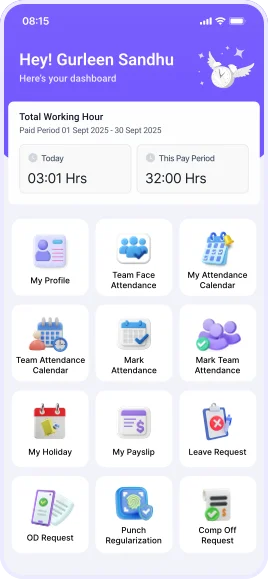
HR at Your Fingertips Smarter, Simpler & Savvier.
👤
Face Recognition Check-In
📍
Geofencing & Real-Time Tagging
📝
Requests & Approvals Made Easy
🎉
Holidays & Instant Salary Slips
🔔
Smart Notifications & Alerts
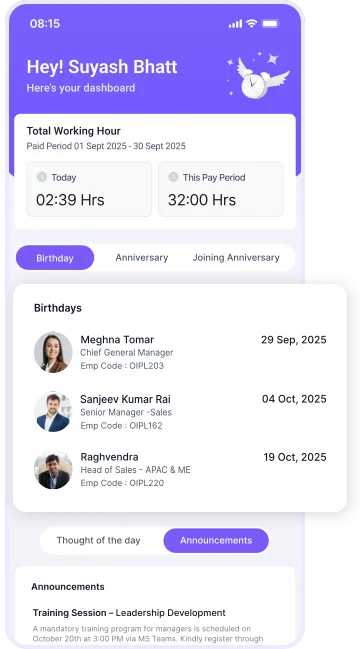
mobile app ads page show employee dashboard
mobile app ads page show employee information about hrms
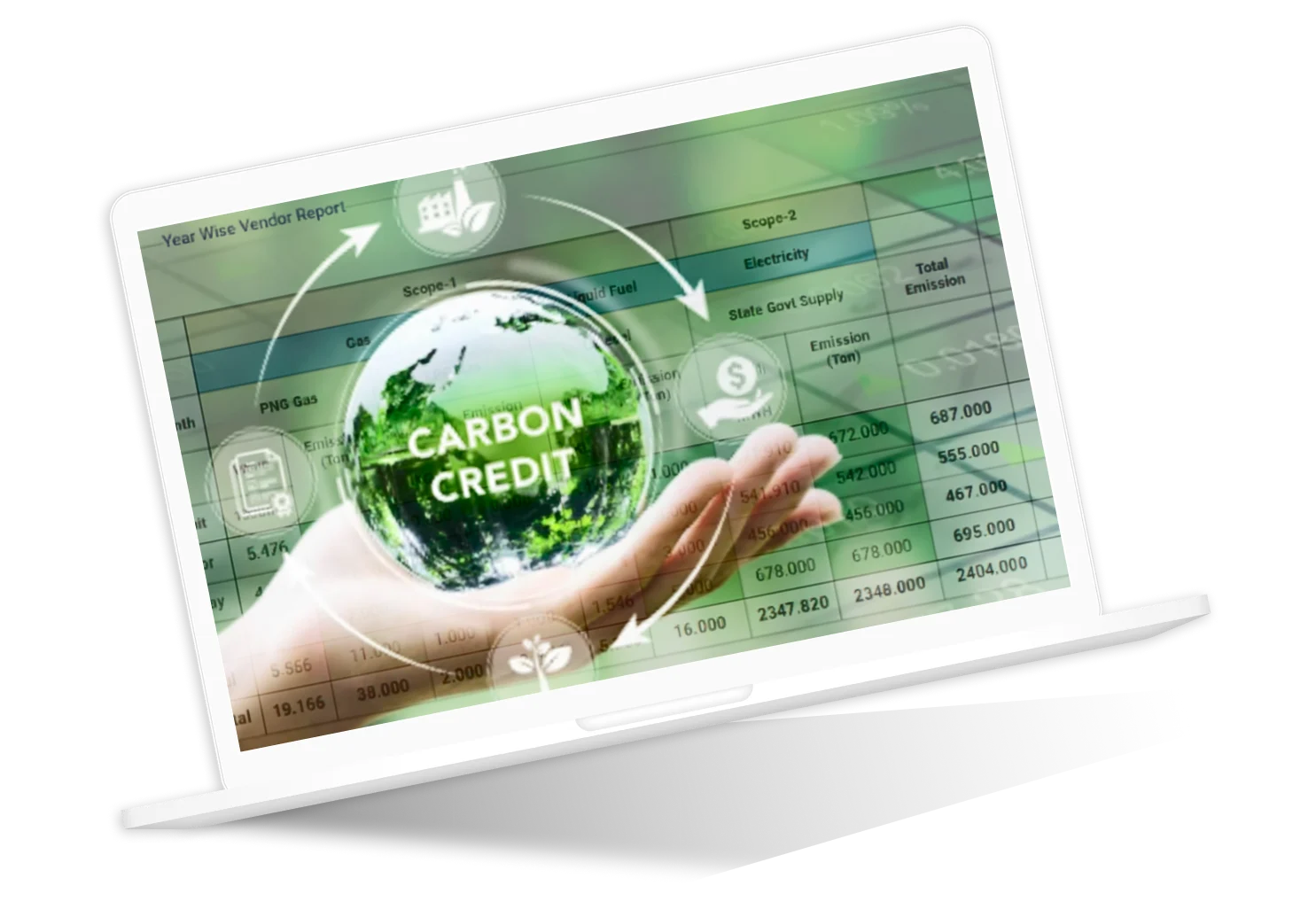
Carbon Emmision with carbon credit

A Greener Tomorrow,
A Smarter Today with
Savvy HRMS

As technological progress continues, our duty to the planet continues. With carbon emissions increasing across all industries, Savvy HRMS is introducing an intelligent carbon-monitoring solution to help factories and manufacturers track, monitor, and reduce their carbon footprint. By combining HR automation with environmental consideration, we help businesses make smarter, cleaner, and more sustainable decisions, creating a future where technology coexists with nature.

Savvy AI

Your Virtual Partner....
Savvy AI Image

Savvy AI
Your Virtual Partner

Premium Add-Ons

Enhance your HRMS experience with these powerful integrations and services

Payroll Outsourcing

Complete payroll processing handled by our experts. Focus on your business while we manage compliance and calculations.

API Integration

Seamless integration with your existing systems. Connect third-party tools and create automated workflows.

AI Face Recognition

A smarter attendance system using face recognition with geo-fencing and anti-spoofing technology to prevent unauthorized access.

Compliance Ready

Stay updated with latest labor laws and regulations. Automatic compliance updates and statutory reports.

JV Integration

Integrate with your accounting software for seamless journal voucher and financial data synchronization.

WhatsApp/SMS Integration

Send notifications, payslips, and updates directly via WhatsApp/SMS for instant employee communication.

Multiple Login Options

SSO, Active Directory, 2FA, QR codes, and biometric login options for enhanced security and convenience.

AI Powered Email Triggers

Automated workflows and notifications based on events. Reduce manual work with intelligent automation.

Login-Free Approvals

Approve requests directly from Email, SMS and WhatsApp notifications without logging into the system.

Data Protection

Enhanced security measures including encryption, backup, and disaster recovery to keep your data safe.

Dojo Training

The Dojo Training Platform enables trainers to evaluate and track the skill matrix of workmen, ensuring the right people are assigned to the right tasks.

Employee Engagement

Rewards and recognition platform to engage and motivate employees. A suggestion box allows employees to share ideas for organizational improvement.

Your Login, Your Way

Access in a way that works best for you, whether you are in the office, at home, or on the go. Experience a simple, flexible, and secure connection to stay connected. You can manage everything you need without barriers or interruptions.

Have secure, seamless, and flexible access to your workspace from any connected device, all while maintaining control and convenience.

Client’s Testimonials

Praises
you can count
on...

Praises you can count on...

★★★★
Prior to utilizing Savvy HRMS, we dealt with manual processes that created errors and took more time than expected. Once we began using their system, the difference was clear; tasks were easier, quicker, and more reliable. It solved bottlenecks and improved efficiency in our HR functions. Savvy has assisted us in achieving results that we once thought we would never see.
★★★★★
Smart HRMS is more than just a product we work with - it has been a trusted partner. From seamless implementation, to quick support when we need it, the team has always been professional, friendly and supportive. For Indiamart, this software has become a fundamental part of our HR organization; allowing us to bring more efficiency and order to everyday activity.
★★★★★
We’ve been using Savvy HRMS since 2021, and it has been a dependable, end-to-end solution for our HR needs. Their strong HR domain expertise, proactive consultants, and highly responsive team have helped us automate processes, reduce manual work, and improve accuracy across attendance, payroll, and leave management. Truly a reliable HRMS partner.
★★★★★
Using Savvy HRMS has been a gratifying experience for us. The product was solid, but what we valued most was their team’s service and support. They never left a question unanswered and quickly solved any issues, which gave us confidence in their team. I highly recommend Savvy HRMS to organizations that are looking for a scalable, trustworthy, and well-supported HR solution.
★★★★
Integrating Savvy HRMS has been a significant leap forward in consolidating all our locations on one platform. With robust functionality and an intuitive design, the system improved workflow in areas that were previously challenging to navigate. We made the right decision to transition to Savvy as it provided structure, consistency, and efficiency to our HR initiatives.
★★★★
For more than eight years, we have been using Savvy HRMS, and it still meets our expectations. Hiring, onboarding, attendance tracking, and compliance for thousands of employees is now seamless. The real-time reporting provides us with full transparency and control. It has streamlined our workflows in a profession with complex concepts, and the reliable system has been a fantastic resource.
★★★★
What I like the most about Savvy HRMS is its ability to be tailored around our needs. The team worked extremely closely with us to develop modules that felt like it was made for us. Their approach was very reassuring, as every ask was met with detail. The software has certainly made things easier to operate and has been a dependable partner.
★★★★
We have been using Savvy HRMS since 2018, enabling a shift from paper-based HR operations. Attendance records are centralised, and leave policies are coordinated across departments. The automated HRMS, integrated with biometric attendance, allows real-time tracking and automated reporting for attendance and leave reports. This has reduced manual effort while improving accuracy and efficiency over earlier methods.
★★★★
With the growth of our organization, managing the HR operations has become challenging for us. Thanks to Savvy HRMS, which simplifies our attendance, leave, payroll, and overtime for over 10,000 employees. Automating complex overtime and compensatory off has reduced manual work and increased accuracy, and our HR team will now have enhanced control, transparency, and efficiency when it comes to administering employee benefits.
★★★★
Savvy HRMS has made our HR functions more simplified by providing solutions for Leave, Attendance, onroll and offroll Employee management, and customized travel solutions. The Staff are professional and provide a friendly environment while providing significant support during the implementation process. By automating all these processes, we have reduced our manual workload and improved our accuracy.
★★★★
Keeping track of our ever-changing staff was once a confusion at our hotels. Using Savvy HRMS, it has completely changed the way we manage travel, tax, and employee assets. The solution they provided has allowed us to manage these procedures in an organized, efficient, and stress-free manner so that our staff can focus on providing first-class hospitality rather than being burdened by the chaos of administrative work.
★★★★
It was always complex for us to manage policies in our old software, but with Savvy HRMS, everything has become clear, organized, and easy to handle. Our team can now manage all HR guidelines efficiently, reduce errors and manual work, save time, and focus more on supporting employees and driving our business forward smoothly.


★★★★
We have been using Savvy HRMS since 2021, which has significantly simplified HR work across our multiple companies and locations. Savvy HRMS has simplified handling leave, attendance, payroll, policies, and centralised management of these operations. We have found that it has greatly improved the efficiency of our HR processes, with features such as multiple-shift support and handling of state-specific compliance for HR.
★★★★
For the past five years, Savvy HRMS has been involved in helping us manage our attendance, leave, and payroll processes. With continued struggles related to proxy attendance and manpower planning, they provide us with the tools to improve our manpower planning, eliminate proxy attendance, and give us access to the Loan Module that will make our HR processes even more efficient and reliable.
★★★★
Working with Savvy HRMS has made managing our HR processes easy. Their smooth integration with SAP and fully customizable learning & development and other modules, combined with dynamic policies and 100% automation, has converted how we handle our HR, making it organized, flexible, and user-friendly for our employees.

★★★★
The team of Savvy HRMS played a key role in ensuring a successful go-live within the agreed timeline, showing patience in handling complex requirements and strong technical expertise in system configuration. They exceeded expectations by delivering tailored reports and best-fit solutions, reflecting deep domain knowledge and a strong commitment to customer success.

★★★★
Our HR operations used to involve complicated manual work, especially with complex shift policies and multiple companies. From the last 8 years, Savvy HRMS has simplified our TDS, compliance, managing shifts, policies, and canteen management, helping us reduce manual work, improve accuracy, and manage our HR functions more productively.

★★★★
With more than 4,000 employees across 12+ locations, integrating SAP data into payroll was one of our biggest challenges and involved significant manual effort earlier. Savvy HRMS has been handling our payroll directly from SAP, along with multiple formula-based salary structures configured as per our policies. Over time, this has helped us bring consistency and accuracy to payroll without constant intervention. The team understands payroll requirements well and has been dependable whenever changes or refinements were needed.
★★★★
For a large manufacturing organization like ours, Savvy HRMS proved to be the right solution. Centralized attendance, smooth biometric integration, and automated payroll significantly reduced processing time, removed paperwork, and provided transparent, real-time reports supporting our workforce management and data-driven decisions.


★★★★
Switching to Savvy HRMS was a game-changer for our HR operations. From automated payroll and compliance to mobile attendance and performance insights, everything is now simplified. Employee queries have reduced significantly, and HR has better data to drive decisions that positively impact our company.

★★★★
What once took days of manual effort is now completed smoothly with Savvy HRMS. Automated attendance, one-day payroll processing, structured performance management, and quick approvals through email reduced HR workload significantly and improved employee experience across all locations.


Discover more about us

Explore Savvy HRMS

Empower your workplace

Work smart, not hard Magically manage your HR functions with the
Savvy HRMS Mobile Application anytime, anywhere.
Scroll to Top

We're just a message
away from transforming your

HR Experiance
Savvy HRMS dashboard showing employee management, attendance tracking, payroll features, and mobile app interface

Trusted By 1,000+ Leading Brands

Indiamart image Savvy HRMS client
Nilkamal Savvy HRMS client image
Haldiram Savvy HRMS client image
Kajaria client image in Savvy HRMS
HPL image of Savvy HRMS client
Hero Motors Savvy HRMS Client
Savvy HRMS LOGO Smarter Faster Reliable
Software suggest badges
Certificates icons of savvyhrms