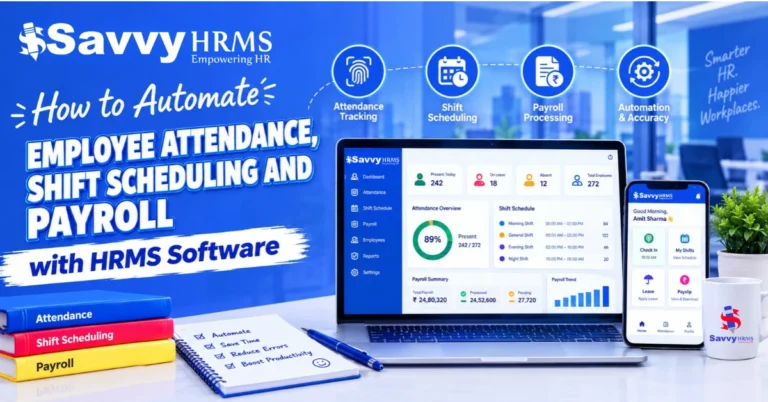
Leave Management vs. Attendance Management: Differences, Features and Use Cases


-
AuthorVikas Negi
-
 Last Updated
October 31, 2026
Last Updated
October 31, 2026
-
 Reading Time
14 Mins
Reading Time
14 Mins
TL;DR
Leave management and attendance management help HR teams manage employee time off and working hours. While both serve different purposes, they work together to maintain accurate employee records and simplify daily HR tasks.
- Leave management handles employee leave requests, approvals, balances, and policies.
- Attendance management tracks working hours, shifts, late arrivals, and absences.
- Leave management records approved time off, while attendance management records employee presence and working time.
- Leave and attendance management software can both reduce manual work, improve workforce planning, and help prevent payroll discrepancies.
- An integrated system helps businesses manage leave, attendance, and payroll-related records in one connected workflow.
Managing employee leave and attendance can become difficult when records are maintained manually. An approved leave request might be missed, attendance details may be incorrect, or HR teams may spend hours checking records before payroll processing.
Leave and attendance management help simplify these everyday tasks. Leave management handles employee time-off requests, approvals, and leave balances, while attendance management tracks working hours, shifts, and daily attendance.
In this blog, we’ll look at how the two differ, their key features and benefits, and when businesses need one or both to manage employee records more efficiently.
What Is Leave Management?
Leave management is the process of handling employee time-off requests, approvals, leave balances, and leave policies. It helps HR teams to maintain accurate leave records and ensures employees follow the organization’s time-off rules.
For example, when an employee requests two days of casual leave, the manager reviews the request, checks team availability, and approves or rejects it. Once approved, the employee’s leave balance is updated according to company policy.
A leave management system handles these activities which reduces the need for manual registers, emails, and spreadsheets.
What Does Leave Management Include?
The main activities involved in leave management include:
- Leave policy management: Define leave types, eligibility, accrual rules, and carry-forward limits.
- Leave requests and approvals: Allow employees to apply for leave and managers to review requests.
- Leave balance tracking: Record available, used, and remaining leave.
- Holiday calendar management: Maintain company holidays and weekly offs.
- Leave history: Keep records of previous applications, approvals, and cancellations.
- Leave reporting: Help HR understand leave utilization and employee availability.
Common leave categories include casual leave, sick leave, earned or annual leave, compensatory off, and unpaid leave, while other categories may apply depending on the organization’s policies and applicable laws.
An effective leave management process helps employees understand their available leave while giving managers better visibility into upcoming absences.
What Is Attendance Management?
Attendance management is the process of recording, monitoring, and managing employee presence and working time. It helps HR teams track when employees start and finish work, how many hours they work, and whether they follow their assigned schedules.
For example, an employee may be scheduled to start work at 9:00 AM. If the employee checks in at 9:20 AM, the attendance system records the actual time and applies the organization’s attendance rules.
An attendance management system automates this process by collecting employee time records and helping HR review exceptions such as late arrivals, missed punches, and unapproved absences.
What Does Attendance Management Include?
The key activities involved in attendance management include:
- Clock-in and clock-out tracking: Record when employees begin and finish work.
- Working-hour calculations: Calculate time worked based on recorded punches and configured rules.
- Shift management: Assign shifts, rotating schedules, and weekly offs.
- Late arrival and early departure tracking: Identify deviations from scheduled working hours.
- Overtime tracking: Record additional working hours for review and shift allowance approval.
- Attendance regularization: Allow employees to request corrections for missed or incorrect punches.
- Absence monitoring: Identify days when employees have not recorded attendance and no approved leave is available.
- Attendance reporting: Generate summaries of working hours, attendance exceptions, and overtime.
Businesses can record attendance through a biometric attendance system, mobile applications, web-based check-ins, or other configured methods. The appropriate method depends on the workplace, workforce structure, and verification requirements.
What Is the Difference Between Leave Management and Attendance Management?
Leave management focuses on employee time off, whereas attendance management focuses on employee presence and working time. Both processes help HR maintain employee records, but they track different activities.
The following table highlights the key differences.
| Comparison factor | Leave management | Attendance management |
| Main purpose | Manage employee time off | Track employee presence and working time |
| Primary activity | Applying for and approving leave | Recording and reviewing attendance |
| Key records | Leave balances, applications, and approvals | Check-ins, check-outs, and hours worked |
| Common rules | Leave eligibility, accrual, and carry-forward | Shift timings, grace periods, and overtime |
| Typical exceptions | Insufficient leave balance or overlapping requests | Missed punches, late arrivals, or incorrect hours |
| Main users | Employees, managers, and HR teams | Employees, managers, HR, and payroll teams |
| Workforce planning | Shows planned employee absences | Shows attendance patterns and time records |
| Payroll relevance | Helps determine paid and unpaid leave | Provides working-time and attendance inputs |
| Main outcome | Accurate leave records | Accurate attendance records |
What Are the Key Features of a Leave Management System?
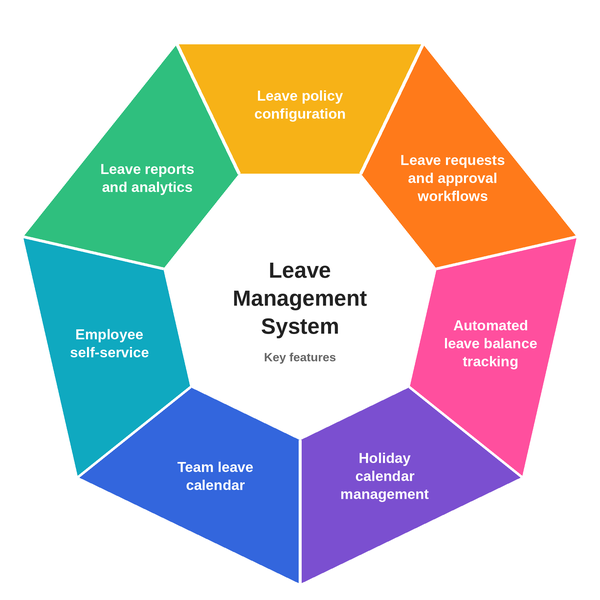
The key features of leave management system help businesses manage leave policies, automate approvals, track balances, and maintain a clear record of employee absences.
Below are some features Core HR teams should look for:
1. Leave Policy Configuration
HR teams can define different types of leave categories and configure eligibility, accrual, carry-forward, expiry, and other policy rules. These settings help businesses apply their leave policies consistently across employee groups.
2. Leave Requests and Approval Workflows
Employees can submit leave requests digitally, while managers can approve, reject, or request changes. Configurable approval workflows help route applications to the appropriate person and reduce manual follow-ups.
3. Automated Leave Balance Tracking
The system updates leave balances based on configured rules and approved transactions. So that employees can check their available balance before applying, while HR teams can review leave usage and correct records when required.
4. Holiday Calendar Management
HR can maintain company holidays, weekly offs, and applicable location-specific calendars. This helps the system calculate leave duration according to configured rules rather than treating every calendar day as a working day.
5. Team Leave Calendar
A shared calendar shows planned absences across teams or departments. Managers can use this information to identify overlapping leave requests and plan work accordingly.
6. Employee Self-Service
Employees can apply for leave, view their balance, review previous requests, and track approval status through a self-service portal or supported mobile application.
7. Leave Reports and Analytics
HR teams can generate reports on leave utilization, remaining balances, absence patterns, and pending applications. These reports help with workforce management and identifying recurring administrative issues.
What Are the Key Features of an Attendance Management System?
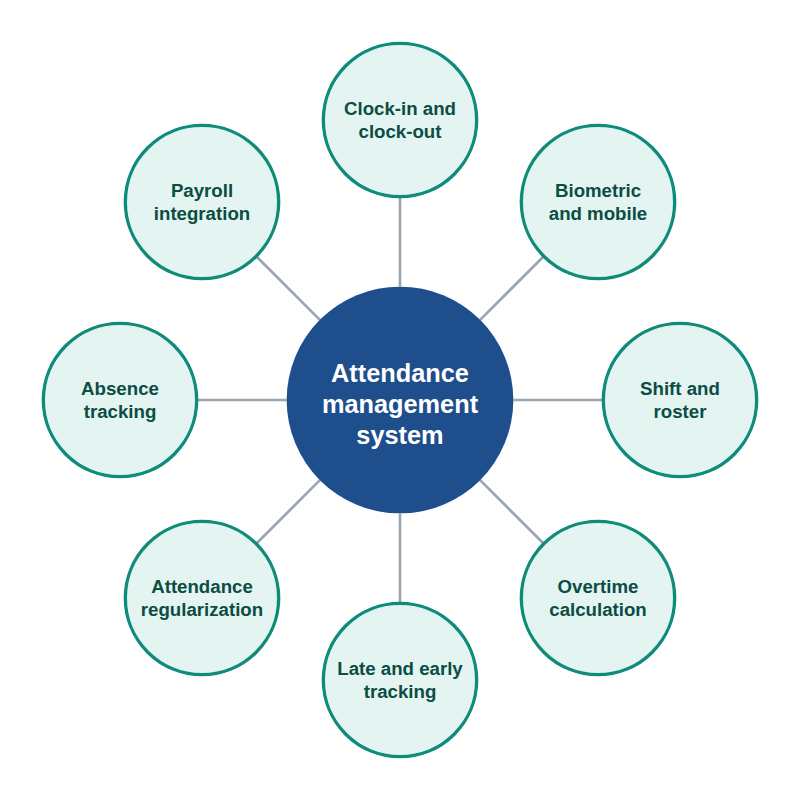
The key features of attendance management system help businesses record employee working time, manage shifts, review attendance exceptions, and prepare reliable attendance reports.
The most useful features include the following.
1. Clock-In and Clock-Out Tracking
The system records when employees begin and finish work via supported attendance methods. These records provide the foundation for calculating working hours and reviewing attendance discrepancies.
2. Biometric and Mobile Attendance
Biometric devices can verify employee identity using supported methods such as fingerprints or facial recognition. Mobile attendance can support employees working across different locations, depending on available GPS, geofencing, or other verification controls.
3. Shift and Roster Management
HR teams can assign fixed, rotating, flexible, or night shifts based on business needs. The system tracks attendance according to each employee’s assigned shift instead of applying the same timings to everyone.
4. Working-Hour and Overtime Calculations
The system calculates working time using recorded attendance and configured rules. It can also support overtime tracking and approval workflows, where available, helping HR and payroll teams review additional hours before processing them.
5. Late Arrival and Early Departure Tracking
Attendance rules help to identify employees who enter the office late or leave before their shift is complete so that HR teams can review these exceptions according to company policies.
6. Attendance Regularization
Employees may occasionally forget to check in, check out, or record a punch correctly. Attendance regularization allows them to request corrections, provide explanations, and submit them for approval.
7. Absence Tracking and Reporting
The system helps HR identify missing attendance records and potential absences. When integrated with leave management, it can distinguish approved leave from other attendance exceptions, depending on its configuration.
8. Payroll Integration
Attendance data can be transferred to payroll to support working-day calculations, overtime processing, and other attendance-related salary inputs. The final calculation depends on the payroll rules and employee salary structure.
How Does Attendance and Leave Management Work Together in HR?
Attendance and leave management in HR work together to maintain a consistent record of employee availability, time off, and working hours. Leave management records approved absences, while attendance management records actual working time and attendance exceptions.
When both processes are connected, HR teams can avoid maintaining separate records and repeatedly reconciling the same information.
Practical Example Attendance and Leave Management
Let’s understand how both leave and attendance work with each other.
Consider an employee who is scheduled to work from Monday to Friday but raises a leave request for Wednesday and Thursday.
- The leave management system records the request, checks the available balance, and routes it for approval.
- Then the attendance management system records the employee’s actual working time on Monday, Tuesday, and Friday. The approved leave can be reflected in Wednesday’s and Thursday’s attendance status.
- Finally, the payroll process uses the relevant approved leave and attendance information, along with applicable salary rules, to calculate payable amounts.
When both systems work together, HR teams can avoid confusing approved leave with unauthorized absence and reduce duplicate data entry.
What Are the Benefits of Leave and Attendance Management Software?
Leave and attendance management software helps HR teams maintain employee records, reduce repetitive administrative work, and coordinate leave, attendance, and payroll-related processes more effectively. Let’s see the benefits of using leave and attendance management software:
1. Less Manual HR Work
Automated leave requests, approvals, attendance records, and reports reduce the need for spreadsheets and paper registers, which helps HR teams to spend less time on routine tasks and focus on other important work.
2. More Consistent Employee Records
Connecting leave and attendance records helps prevent mistakes, such as marking an employee absent when their leave has already been approved. Proper system setup and regular updates also help keep records accurate.
3. Faster Leave Approvals
Digital workflows make it easier for managers to review and approve leave requests, and employees can also check their request status without sending emails or repeatedly following up with HR.
4. Fewer Payroll Discrepancies
When relevant leave and attendance records flow into payroll, HR teams have fewer manual entries to reconcile. This can reduce discrepancies caused by duplicate entries, missing updates, or incorrect attendance classifications.
5. Greater Employee Transparency
A self-service portal allows employees to review leave balances, check attendance records, and submit correction requests as clear records help employees understand how their leave and attendance are being tracked.
6. Better Reporting and Decision-Making
HR teams can use leave and attendance reports to review absence patterns, attendance exceptions, overtime, and workforce availability. These insights can help identify recurring issues and improve planning.
When Should a Business Use Leave Management, Attendance Management, or Both?
The right solution depends on the problems a business needs to solve. Some organizations primarily need structured leave approvals, while others require detailed time tracking, shift management, or an integrated system that supports both.
| Business requirement | Suitable solution | Why it helps |
| Managing leave requests and balances | Leave management system | Centralizes applications, approvals, and leave records. |
| Tracking working hours and missed punches | Attendance management system | Records employee time and highlights exceptions. |
| Managing shifts and overtime | Attendance management system | Compares working time against assigned schedules. |
| Coordinating employee absences and daily attendance | Integrated leave and attendance system | Connects approved leave with attendance records. |
| Preparing payroll from leave and attendance data | Integrated system with payroll system connectivity | Reduces repeated data entry and supports reconciliation. |
Use Case 1: Small Office-Based Businesses
A small business with regular working hours may initially need simple leave applications, approval workflows, and basic attendance records. For this, a combined system becomes more useful when the team grows, or manual tracking starts taking too much time.
Use Case 2: Manufacturing, Retail, and Shift-Based Businesses
Businesses operating multiple shifts may need roster management, attendance tracking, overtime records, and leave coordination. Connecting these functions helps managers plan staffing while maintaining reliable time records.
Use Case 3: Field Employees and Multi-Location Teams
Businesses with employees working across branches or client locations may benefit from mobile attendance, location-based verification, and centralized leave records. The system should support the organization’s operational requirements and applicable privacy rules.
Use Case 4: Businesses With Frequent Payroll Discrepancies
If HR teams regularly correct payable days, investigate missing attendance, or reconcile leave balances before payroll, then an integrated solution may help establish a more consistent process. Before choosing software, identify where discrepancies originate and verify that the proposed system addresses those problems.
What Should You Look for in Leave and Attendance Management Software?
Before selecting leave and attendance management software, businesses should evaluate how well the system supports their policies, workforce structure, and existing HR processes.
Use this checklist when comparing solutions:
- Configurable leave types, eligibility, and accrual rules
- Automated leave applications and approval workflows
- Leave balance tracking and holiday calendars
- Biometric, mobile, or web-based attendance options
- Shift scheduling and roster management
- Attendance correction and regularization workflows
- Overtime and working-hour reports
- Employee and manager self-service
- Payroll integration or reliable data exports
- Support for multiple departments, branches, and employee groups
- Appropriate access controls and data protection
- Reports that help HR investigate exceptions and plan workforce availability
Also consider ease of use, implementation requirements, support, and scalability. A business with a fixed office schedule may not need the same attendance capabilities as a manufacturing company with rotating shifts.
Conclusion
Leave management and attendance management serve different purposes, but both are important for maintaining accurate employee records. Leave management handles time-off requests, approvals, and balances, while attendance management tracks working hours, shifts, and attendance exceptions.
Businesses that struggle with both processes may benefit from integrated leave and attendance management software. By connecting employee leave, attendance, and payroll-related records, HR teams can reduce repetitive administration, improve visibility, and make workforce management more consistent.
The best solution is the one that matches your company’s policies, work schedules, workforce requirements, and existing HR systems.
1. What is the difference between leave management and attendance management?
Leave management handles employee time-off requests, approvals, and leave balances. Attendance management records employee presence, working hours, shifts, and attendance exceptions. Both processes work together to maintain accurate employee records and support payroll preparation.
2. What is a leave management system?
A leave management system is a tool that helps HR teams manage employee leave requests, approvals, balances, and policies. It can automate workflows, maintain leave history, and give employees visibility into their available leave.
3. What is attendance management in HR?
Attendance management in HR involves recording and monitoring employee presence, working hours, shifts, late arrivals, and absences. Businesses use attendance systems to maintain time records, review exceptions, and provide relevant data for payroll processing.
4. What are the key features of an attendance management system?
Key features include clock-in and clock-out tracking, biometric or mobile attendance, shift management, working-hour calculations, overtime tracking, attendance regularization, absence monitoring, and reporting. Some systems also offer payroll integration and location-based attendance verification.
5. What are the features of a leave management system?
Common features include leave policy configuration, leave requests and approvals, balance tracking, holiday calendars, team leave calendars, employee self-service, and leave reports. Advanced systems may also support accruals, carry-forward, encashment, and configurable approval workflows.
6. Can leave management and attendance management be handled in one system?
Yes. Many HRMS platforms combine leave management and attendance management. An integrated system can connect leave approvals with attendance records, reduce duplicate data entry, and provide relevant information to payroll, depending on its features and configuration.
7. How does attendance and leave management software help payroll teams?
It provides payroll teams with relevant attendance records, approved leave information, and other configured inputs. This can reduce manual reconciliation and help identify discrepancies before salary processing. Payroll accuracy still depends on correct policies, employee data, and review procedures.
8. Which is better for a small business: leave management or attendance management software?
The better choice depends on the business’s primary need. A company struggling with leave requests and balances may prioritize leave management, while one tracking shifts and working hours may need attendance management. Businesses facing both challenges can consider an integrated solution.