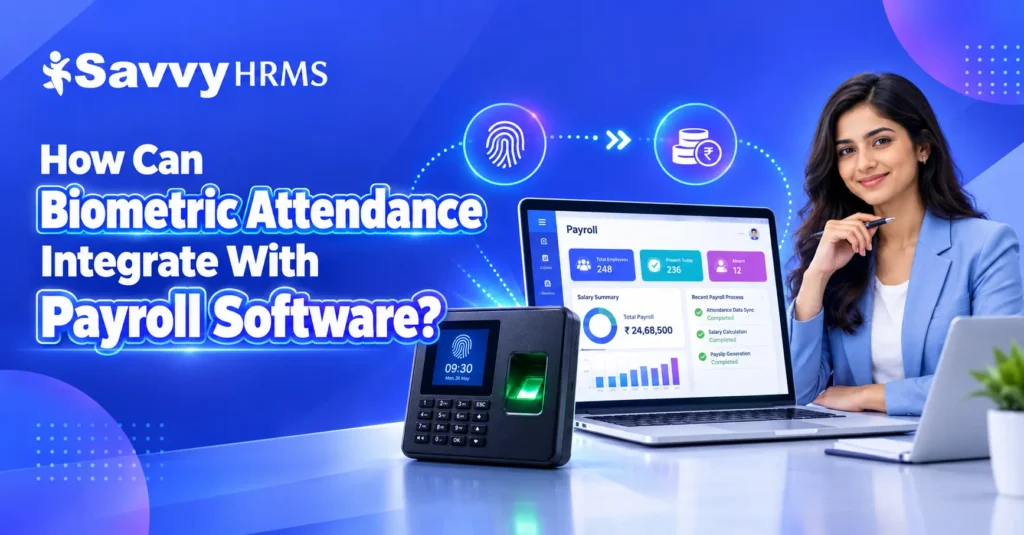
How can biometric attendance integrate with Payroll Software?


-
AuthorRuchika Rajput
-
 Last Updated
October 14, 2026
Last Updated
October 14, 2026
-
 Reading Time
18 Mins
Reading Time
18 Mins
Have you ever wondered how businesses calculate employee salaries accurately when everyone has different working hours, shifts, leaves, and overtime? Managing all this information manually can take a lot of time and result in payroll errors. This is where biometric attendance and payroll software work together to make the process easier.
Biometric attendance systems record employee attendance using fingerprints, facial recognition, or other biometric methods. When connected with payroll software, these attendance records help HR teams calculate working hours, payable days, overtime, and deductions more efficiently. This integration reduces repetitive data entry, improves payroll accuracy, and helps businesses manage employee attendance and salary processing in a more organized way.
So, let’s understand how biometric attendance integrates with payroll software, the steps involved, its key benefits, and how businesses can use this integration to simplify payroll processing.
TL;DR
- Records employee punch-in and punch-out times using fingerprint or facial recognition.
- Transfers attendance records to payroll software through APIs, direct integration, cloud platforms, or data imports.
- Helps calculate payable days, loss of pay, eligible overtime, shift allowances, and attendance-linked deductions.
- Reduces manual data entry, repetitive tasks, and payroll errors.
- Identifies missing punches, late arrivals, early departures, and attendance discrepancies.
- Supports attendance recordkeeping, payroll audits, and applicable working-hour and wage calculations.
- Requires appropriate access controls, data protection, and retention practices.
- HR teams must verify attendance exceptions, approved leaves, overtime, and payroll calculations before processing salaries.
- Check device compatibility, automation features, reporting capabilities, security, and scalability before integration.
How Does Biometric Attendance Integrate with Payroll Software?
Biometric attendance integrates with payroll software by transferring employee attendance records from a biometric device or attendance management system into the payroll system. The payroll software uses these records, along with salary structures, leave policies, shift schedules, and overtime rules, to calculate employee salaries.
In simple terms, the biometric system records when employees arrive and leave, while the payroll software uses the verified attendance information to help determine how much they should be paid.
For example, when an employee scans their fingerprint at the beginning and end of a shift, the attendance system records the punch-in and punch-out times. These records can then be synchronized with payroll software through an API, direct integration, middleware, or an approved data import process, depending on the systems being used.
The integration generally involves the following activities:
- Attendance capture: The biometric device records employee punch-in and punch-out times.
- Data synchronization: Attendance records are transferred to the attendance management or payroll system.
- Attendance validation: The system identifies missing punches, duplicate records, late arrivals, and other exceptions.
- Rule-based calculations: Working hours, overtime, payable days, and eligible deductions are calculated according to configured policies.
- Payroll processing: The payroll software combines verified attendance data with salary information and applicable payroll rules.
- Review and reporting: HR and payroll teams review exceptions and payroll summaries before finalizing salaries.
It is important to understand that biometric attendance integration does not automatically guarantee correct payroll. Accurate results depend on reliable data, properly configured policies, compatible systems, and appropriate HR review.
What Is the Step-by-Step Process of Biometric Attendance and Payroll Integration?
The biometric attendance and payroll integration process connects employee attendance records with salary calculations through a series of steps. Each step helps ensure that attendance data is transferred, checked, and processed correctly before payroll is finalized.
Step 1: Register Employees in the System
First, employees are registered in the biometric attendance system and assigned unique employee IDs. Their records must match the employee IDs used in the payroll software.
Employee information may include department, work location, shift, joining date, and employment status. Keeping these records consistent helps prevent attendance data from being assigned to the wrong employee.
Step 2: Record Daily Attendance
Employees use a fingerprint scanner, facial recognition terminal, or another supported biometric device to mark attendance. The device records the date and time of each punch.
Depending on the system, attendance records may be stored locally, on a central server, or in a cloud-based platform.
Step 3: Synchronize Attendance Data
The attendance system sends punch records to the connected software. Synchronization may happen in real time, at scheduled intervals, or through a manual import, depending on the integration method.
If a device temporarily loses connectivity, the system should have a suitable process for storing and transferring pending records when the connection becomes available.
Step 4: Calculate Working Hours and Attendance Status
The attendance management system processes punch records using configured work schedules and attendance rules. It determines working hours, late arrivals, early departures, absences, and overtime eligibility where supported.
For example, an employee scheduled to work from 9:00 AM to 6:00 PM may have their recorded hours compared with the assigned shift. Breaks, grace periods, and rounding rules must be configured correctly.
Step 5: Apply Leave and Attendance Policies
Attendance records are checked against approved leave, weekly offs, holidays, shift changes, and attendance regularization requests.
This step is important because an employee who is absent from the biometric record may have approved leave or an authorized work arrangement. Attendance data should not be treated as the only source of information about payable days.
Step 6: Process Payroll Calculations
Once the attendance information has been validated, payroll software combines it with employee salary structures and relevant payroll rules.
Depending on the configuration, it may calculate payable days, loss of pay, overtime payments, shift allowances, and other attendance-linked earnings or deductions.
Step 7: Review Exceptions and Approve Payroll
Before payroll is finalized, HR teams review missing punches, unusual working hours, unapproved absences, and other exceptions. Managers may be required to approve attendance regularization or overtime.
Step 8: Generate Payroll Reports and Payslips
After the necessary checks and approvals, the payroll software calculates final salary amounts and generates payroll reports and payslips. The records can also support reconciliation, internal reviews, and applicable statutory reporting.
Biometric Attendance and Payroll Integration Flowchart
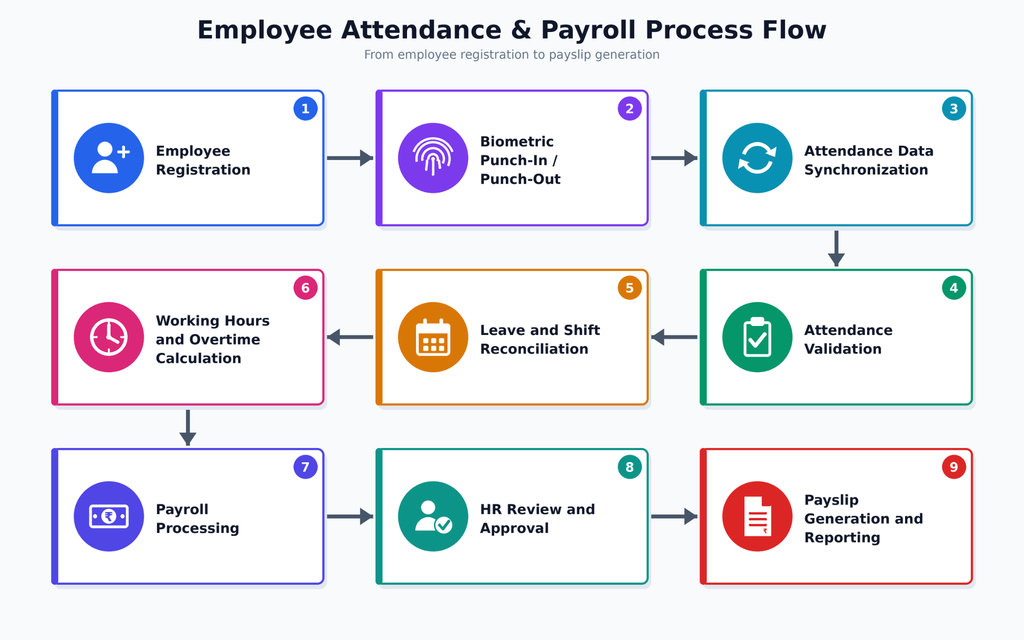
This workflow reduces repeated data entry and creates a more consistent connection between attendance records and payroll processing.
How Does Biometric Attendance Data Affect Payroll Calculations?
Biometric attendance data affects payroll by providing information about when employees work and how their attendance aligns with company policies. Payroll software uses this information to calculate attendance-linked earnings and deductions.
However, biometric punch records alone do not determine an employee’s complete salary. The final calculation also depends on the salary structure, approved leave, employment terms, applicable wage rules, and the organization’s payroll policies.
Here are the main ways biometric attendance can influence payroll calculations.
1. Payable Days and Loss of Pay
Attendance records help determine the number of payable days within a payroll period. Where company policy and applicable law permit, eligible unpaid absences may affect salary calculations.
For example, if an employee has fewer payable days than the applicable salary calculation basis, payroll software may calculate a proportionate adjustment. The exact method depends on the salary structure and applicable rules.
2. Overtime Payments
Biometric attendance can help identify hours worked beyond an employee’s scheduled shift. Payroll software can use approved overtime records to calculate additional payments.
However, recorded time beyond a shift does not automatically qualify as payable overtime in every situation. Eligibility, approval requirements, rates, and limits must follow applicable law and company policy.
3. Late Arrivals and Early Departures
The system can identify late arrivals and early departures by comparing attendance punches with assigned work schedules.
HR teams can then apply the relevant grace periods, regularization rules, and attendance policies. Any salary deduction must follow applicable legal requirements and employment terms.
4. Shift Allowances and Night-Shift Payments
For organizations operating multiple shifts, attendance data can help verify whether employees worked during eligible shift timings. Payroll software may use approved shift information to calculate applicable allowances.
This is particularly useful for manufacturing units, hospitals, logistics companies, retail businesses, and other organizations with rotating shifts.
5. Attendance-Linked Incentives
Some businesses provide incentives based on attendance or specific work schedules. Verified attendance data can support these calculations when the incentive rules are clearly defined and consistently applied.
Illustrative Example of Attendance-Based Payroll
Consider an employee with a monthly salary of ₹30,000 and a payroll calculation basis of 30 days. If the employee has two days of eligible unpaid absence, a simplified illustration would be:
- Monthly salary: ₹30,000
- Calculation basis: 30 days
- Daily salary for this example: ₹30,000 ÷ 30 = ₹1,000
- Eligible unpaid absence: 2 days
- Illustrative adjustment: 2 × ₹1,000 = ₹2,000
- Salary after this adjustment: ₹28,000, before other earnings, deductions, and applicable statutory calculations
This example is only illustrative. Actual salary calculations can differ according to the employee’s salary structure, wage components, payroll method, and applicable law.
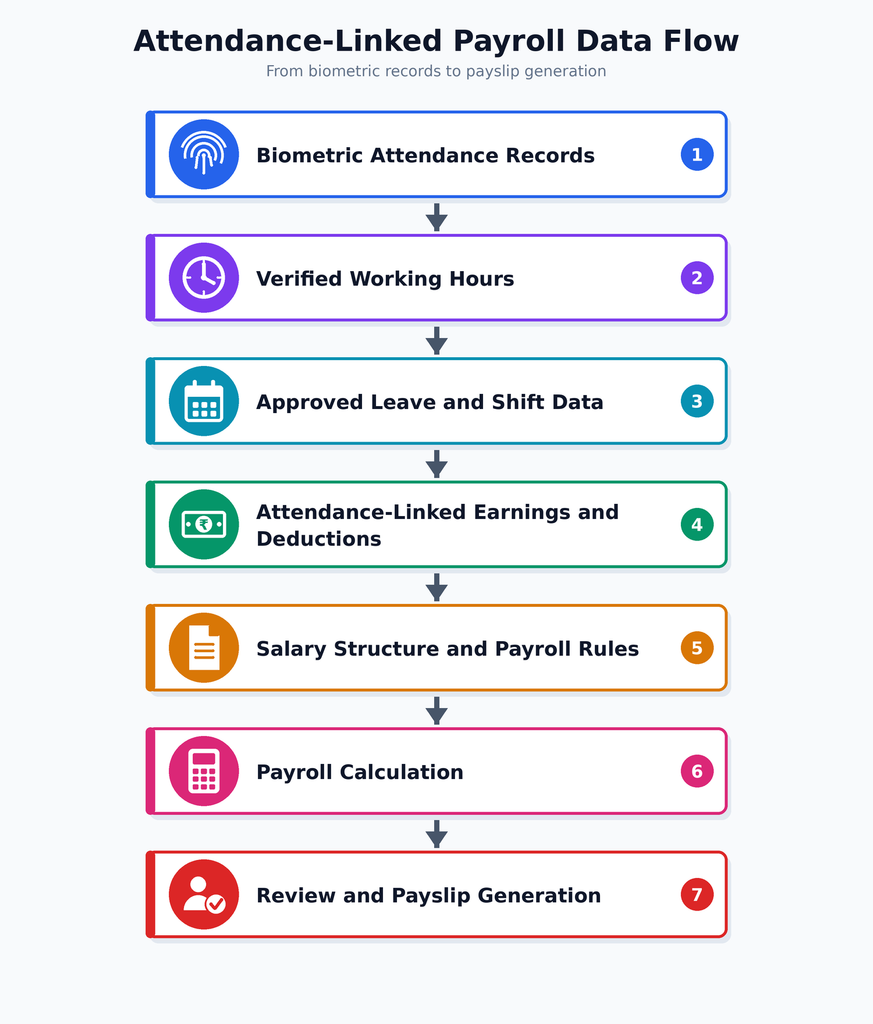
The main takeaway is that biometric attendance provides important input for payroll calculations, while payroll software combines that input with other employee and salary information to determine the final payable amount.
What Are the Different Ways to Connect Biometric Devices with Payroll Software?
Businesses can connect biometric attendance devices with payroll software through different integration methods. The right option depends on the device model, software compatibility, company size, internet connectivity, and the level of automation required.
1. API-Based Integration
API-based integration allows biometric attendance systems and payroll software to exchange attendance data automatically. It supports data synchronization and employee record mapping, depending on API compatibility, permissions, and configuration.
Best suited for: Businesses that want automated data exchange between compatible attendance and payroll platforms.
2. Direct Device Integration
Direct device integration connects compatible biometric attendance devices with payroll software or HRMS platforms. It enables attendance data transfer without a separate custom integration, provided the device and software support each other.
Best suited for: Organizations using supported biometric devices and compatible payroll software.
3. Middleware-Based Integration
Middleware connects biometric attendance systems with payroll software by transferring and converting data into compatible formats. It helps different systems communicate when direct integration is unavailable but requires ongoing monitoring and maintenance.
Best suited for: Businesses connecting different systems that cannot communicate directly.
4. Cloud-Based Integration
Cloud-based integration transfers attendance records from biometric attendance platforms to cloud payroll software through an internet connection. It supports centralized attendance management across locations, with synchronization frequency depending on platform capabilities.
Best suited for: Distributed organizations and businesses that want centralized attendance and payroll management.
5. CSV or Excel-Based Data Import
CSV or Excel-based integration involves exporting attendance records from biometric systems and importing them into payroll software. This method requires manual validation to identify missing entries, duplicate records, and employee ID mismatches.
Best suited for: Small businesses or organizations using systems without direct integration capabilities.
Comparison of Biometric Attendance Integration Methods
| Integration method | Automation potential | Main consideration |
| API-based integration | High | Requires compatible APIs and configuration |
| Direct device integration | High | Depends on device compatibility |
| Middleware | High | Requires an additional integration layer |
| Cloud-based integration | High | Depends on connectivity and platform capabilities |
| CSV or Excel import | Low to moderate | Requires careful data validation |
These are general comparisons rather than guaranteed product capabilities. Cloud-based integration and API integration can overlap, and actual automation levels depend on the implementation.
When evaluating biometric attendance and payroll integration, businesses should prioritize data accuracy, compatibility, security, and the ability to identify and resolve synchronization errors.
What Are the Benefits and Challenges of Biometric Attendance Integration?
Integrating biometric attendance with payroll software helps businesses reduce manual work and connect attendance records with salary processing. However, successful integration requires suitable technology, clearly defined policies, and regular monitoring.
Key Benefits of Biometric Attendance Integration
1. Reduced Manual Data Entry
HR teams do not need to repeatedly enter attendance information into payroll records when the systems support automated synchronization. This saves time and reduces the risk of data-entry errors.
2. More Accurate Payroll Calculations
Verified attendance records help payroll teams calculate working hours, payable days, and attendance-linked adjustments more consistently. Accuracy still depends on correct device data and properly configured rules.
3. Faster Payroll Processing
Automated data transfer and rule-based calculations can reduce the time needed to prepare payroll, especially for organizations with large workforces.
4. Better Attendance Visibility
Managers and HR teams can review attendance patterns, late arrivals, absences, and overtime records more easily when the relevant data is available in a centralized system.
5. Improved Accountability
Biometric punch records create time-stamped attendance entries that can support reviews and investigations of attendance discrepancies. Appropriate access controls and retention policies are necessary to protect these records.
6. Easier Multi-Location Management
Businesses with multiple branches can benefit from centralized attendance reporting when their devices and software support integration across locations.
Common Challenges and Their Solutions
| Challenge | Recommended solution |
| Missing punch records | Provide an attendance regularization process and review exception reports |
| Incorrect employee mapping | Maintain consistent employee IDs across connected systems |
| Device or network downtime | Establish a fallback attendance process and synchronization checks |
| Duplicate attendance records | Configure duplicate detection and reconciliation rules |
| Incorrect overtime calculations | Define shift rules, eligibility criteria, and approval workflows |
| Integration failures | Monitor synchronization logs and assign responsibility for resolving errors |
| Biometric data security risks | Apply access controls, encryption where appropriate, and data minimization |
| Employee concerns about errors | Provide a transparent process to review and correct attendance records |
The most effective approach combines automation with human oversight. Biometric devices can record attendance, but HR teams still need to investigate exceptions and verify unusual records before payroll is approved.
How Can HR Teams Ensure Accurate Payroll After Integration?
Even a well-integrated biometric attendance system needs regular checks to ensure payroll calculations remain accurate. HR teams should establish a clear process for reviewing attendance data, resolving exceptions, and confirming that payroll calculations follow company policies and applicable laws.
1. Maintain Consistent Employee Records
Employee IDs should match across the biometric attendance system, HRMS, and payroll software. Changes in department, location, employment status, or shift assignment should be updated promptly.
This reduces the risk of missing or incorrectly assigned attendance records.
2. Check Attendance Exceptions Regularly
HR teams should review reports for missing punches, duplicate entries, unusually long shifts, unrecorded attendance, and unexplained absences.
Resolving these issues before the payroll cutoff reduces the likelihood of salary corrections after processing.
3. Reconcile Attendance with Approved Leave
Biometric attendance should be checked against approved leave, holidays, weekly offs, and authorized attendance adjustments.
For example, an employee who does not record a biometric punch on an approved leave day should not automatically be treated as absent without checking the leave records.
4. Configure Shifts and Payroll Rules Correctly
The system should reflect the organization’s actual work schedules, breaks, grace periods, overtime eligibility, and salary calculation methods.
HR teams should test changes to these rules before applying them to a live payroll cycle.
5. Establish an Attendance Cutoff Date
Set a clear attendance cutoff before payroll processing. Employees and managers should have enough time to submit corrections and approve regularization requests.
Changes received after the cutoff should follow a documented process for review and adjustment.
6. Monitor Integration Logs
IT or payroll administrators should review synchronization logs and error notifications. They should confirm that records are transferred successfully and that failed transactions are resolved.
7. Conduct Pre-Payroll Reconciliation
Before final approval, compare attendance summaries with payroll inputs. Review unusual variations in payable days, overtime, deductions, and shift allowances.
8. Protect Employee Information
Restrict access to biometric records and payroll information to authorized personnel. Establish suitable data retention, deletion, and incident-handling procedures, and ensure the integration follows applicable privacy requirements.
Pre-Payroll Accuracy Checklist
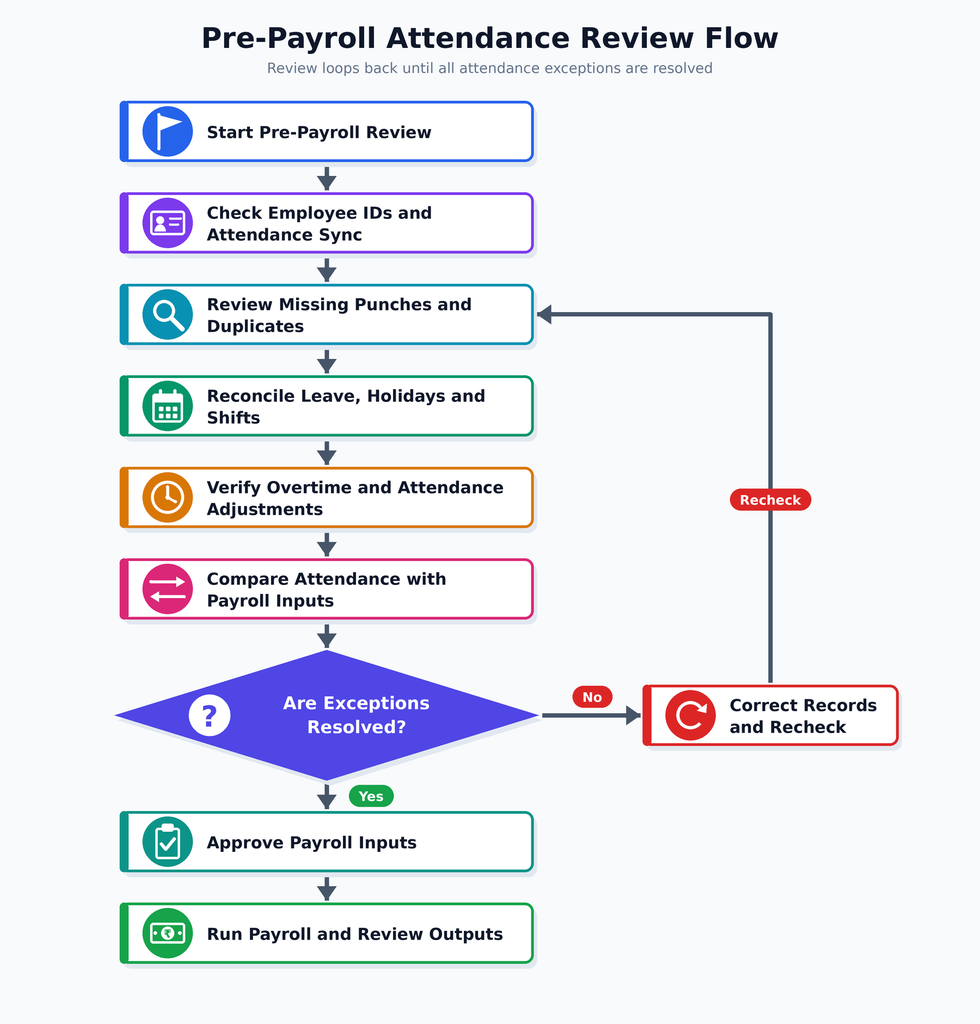
Following a repeatable checklist helps HR teams identify errors before salaries are finalized rather than correcting them after employees receive their payslips.
How Does Biometric Attendance Integration Support Payroll Compliance in India?
Biometric attendance integration can support payroll compliance in India by improving the consistency of attendance records, working-hour information, overtime records, and payroll audit trails. However, integrating biometric devices with payroll software does not, by itself, guarantee legal compliance.
Indian businesses must configure their attendance and payroll processes according to the laws applicable to their establishment, employee categories, state, and industry.
1. Maintaining Reliable Attendance Records
Time-stamped biometric records help businesses maintain organized attendance information, verify payroll inputs, review errors, and document authorized corrections for missing or inaccurate attendance punches.
2. Supporting Working-Hour and Overtime Calculations
Biometric attendance helps payroll teams track working hours and identify potential overtime. Businesses must apply applicable legal requirements, eligibility criteria, payment rates, and approval procedures.
3. Improving Wage and Deduction Accuracy
Verified attendance data helps payroll software calculate attendance-linked salary adjustments. Employers must ensure wage calculations and deductions follow applicable laws, employment terms, and company policies.
4. Supporting Payroll Audits
Integrated systems help businesses trace attendance records to payroll inputs, identify calculation discrepancies, and maintain supporting documentation, approval records, and audit trails for internal reviews.
5. Protecting Biometric and Employee Data
Businesses should protect biometric records through access controls, secure data handling, and appropriate retention policies while complying with applicable Indian data protection and employment laws.
Compliance Practices for HR Teams
- Maintain accurate employee attendance and payroll records.
- Document the rules used to calculate payable days and overtime.
- Review missing punches and employee correction requests promptly.
- Restrict access to biometric and payroll information.
- Keep suitable records of approvals, adjustments, and payroll reconciliation.
- Review applicable central and state requirements regularly.
- Consult qualified legal or payroll professionals when interpreting specific compliance obligations.
The goal is to use biometric attendance integration as a reliable source of payroll information while maintaining the legal checks, documentation, and human review required for compliant payroll processing.
What Should Businesses Look for in Payroll Software with Biometric Attendance Integration?
Businesses should choose payroll software that can connect reliably with their existing biometric attendance devices, process attendance data according to their policies, and support accurate salary calculations. The right solution should simplify payroll management without creating additional administrative work.
Before selecting a platform, evaluate the following features.
1. Biometric Device Compatibility
Check whether the payroll software supports your existing fingerprint scanners, facial recognition devices, or biometric attendance platforms. Confirm the supported models, integration requirements, and any additional costs.
2. Automated Attendance Synchronization
Look for automatic data synchronization through supported APIs, direct integrations, or other suitable methods. Confirm how frequently data updates and how the system handles failed transfers.
3. Attendance and Payroll Rule Configuration
The software should support the attendance and payroll rules relevant to your business, such as shifts, grace periods, approved leave, overtime, and payable-day calculations.
Flexible configuration helps businesses accommodate different employee groups and work schedules.
4. Attendance Exception Management
Choose a platform that can flag missing punches, duplicate entries, irregular working hours, and other attendance discrepancies.
A clear regularization and approval workflow helps HR teams resolve issues before payroll is finalized.
5. Multi-Location Attendance Management
Businesses operating across branches, factories, offices, or retail outlets should check whether the system supports centralized reporting and location-specific attendance policies.
6. Payroll Reporting and Reconciliation
Look for attendance summaries, overtime reports, payroll input reports, and audit trails that help HR teams verify calculations before processing salaries.
7. Data Security and Access Controls
The software should provide appropriate role-based access, secure data transmission, audit logging, and safeguards for employee information. Businesses should also review data retention practices and the vendor’s security documentation.
8. Scalability and Technical Support
Choose a solution that can accommodate workforce growth, additional locations, and evolving payroll requirements. Ask about implementation support, integration maintenance, troubleshooting, and service availability.
Payroll Software Evaluation Checklist
| Feature | What to verify |
| Device compatibility | Support for your existing biometric devices |
| Integration | APIs, direct connectivity, or supported imports |
| Automation | Reliable attendance synchronization |
| Payroll rules | Configurable shifts, leave, and overtime |
| Error management | Exception reports and correction workflows |
| Compliance support | Relevant payroll calculations and reports |
| Security | Access controls and data protection measures |
| Scalability | Support for more employees and locations |
A good biometric attendance and payroll solution should connect attendance data with salary processing while allowing HR teams to review exceptions, verify calculations, and maintain control over the payroll cycle.
Conclusion
Biometric attendance integration with payroll software helps businesses connect employee attendance records with salary calculations in a more organized and efficient way. By automating data transfer, calculating attendance-linked earnings and deductions, and identifying attendance issues, organizations can reduce repetitive manual work and improve payroll accuracy. However, successful integration depends on compatible systems, accurate employee records, properly configured payroll rules, and regular reconciliation.
For the best results, businesses should choose payroll software that supports their biometric devices, simplifies attendance management, provides clear reports, and protects employee information. With the right integration and review processes, HR teams can spend less time managing attendance data and more time improving workforce management.











Looking to simplify attendance tracking and salary processing?
Explore Savvy HRMS to simplify employee attendance, automate HR workflows, and make payroll management easier for your business.
Frequently Asked Questions (FAQs)
1. How does biometric attendance integrate with payroll software?
Biometric attendance integrates with payroll software by transferring employee punch-in and punch-out records into the payroll system. The software processes verified attendance data alongside salary structures, leave records, shifts, and applicable payroll rules to calculate salaries.
2. Can biometric attendance automatically calculate employee salaries?
Yes, compatible payroll software can use biometric attendance data to automate attendance-based salary calculations, including payable days, eligible overtime, and applicable deductions. Accurate results depend on correct system configuration, validated records, and approved payroll policies.
3. What are the benefits of integrating biometric attendance with payroll software?
Integration reduces manual data entry, saves payroll processing time, improves attendance tracking, and helps minimize calculation errors. It also supports better attendance reporting, payroll reconciliation, and workforce management.
4. Can biometric attendance integration help businesses comply with Indian payroll laws?
Yes, biometric attendance integration can support compliance by maintaining attendance records and helping calculate working hours and eligible overtime. However, businesses must configure payroll rules correctly and follow applicable wage, working-hour, data protection, and employment requirements.
5. What should businesses check before integrating biometric attendance with payroll software?
Businesses should verify device compatibility, integration methods, employee ID mapping, attendance synchronization, payroll calculation rules, exception management, data security, and reporting capabilities. Testing the integration before implementation helps identify errors and prevent payroll discrepancies.