



Office meetings, client meetings, training sessions, and even business travels are all activities that take place in a professional workplace. However, the question is: how can businesses track their employee’s presence on these occasions outside their office premises? The answer is OD, which stands for Office Duty.
OD is important for attendance management, processing payroll, and HR activities in general. This blog post will help you understand what is OD full form, how OD is important for businesses, what the different types of OD are, the difference between OD and leave, the impact on salaries and attendance, problems related to OD, and how HRMS helps manage OD effectively.
What Is the OD Full Form?
The OD full form is Office Duty.
OD refers to a situation where an employee is absent from their regular workstation because they are performing an official task assigned by the organization. This may include client meetings, training sessions, field visits, business travel, or company events.
Instead of marking the employee absent or on leave, organizations mark the attendance as OD to indicate official work activity.
Why Is OD Important in Organizations?
OD is important because it helps companies maintain accurate attendance records while ensuring employees can fulfill official responsibilities without affecting their attendance status.
A well-defined OD policy also:
1. Improves Transparency Between Employees and HR Teams
With the use of an efficient OD policy, there will be clarity between the employees and HR personnel concerning attendance records, assignment approval, and reporting.
2. Prevents Attendance Disputes
With the appropriate OD management, there will be clarity with regard to attendance issues because official employee attendance will be recorded, and hence no disputes, mistakes, or errors.
3. Ensures Proper Payroll Processing
Through approved OD data, there will be clarity on the employees who will be participating in official duties, and thus, there will not be any problems with pay cuts and attendance issues.
4. Tracks Employee Productivity During Official Assignments
OD management will assist companies in monitoring and checking whether their employees are engaging in productive official duties.
5. Simplifies Workforce Management
A good OD policy simplifies the process of attendance management, monitoring, and reporting, among other tasks that HR personnel perform with ease.
Common Situations Where Employees Apply for OD
Employees may apply for OD in several professional situations, such as:
1. Attending Client or Vendor Meetings
An employee could apply for OD when he/she is attending meetings with the client or vendors outside the office premises, representing the organization in conducting official business.
2. Participating in Training Programs or Workshops
OD may be granted for employees who attend training programmes, workshops, and other related skill development programs contributing to professionalism and organizational productivity.
3. Business Travel and Official Visits
Travelling employees for carrying out any official purpose, such as discussions or visits to branch offices or projects, fall under the OD category.
4. Campus Recruitment Drives
The HR personnel attending the recruitment drive at corporate campuses for conducting interviews and the talent acquisition process can apply for OD.
5. Company-Sponsored Events or Seminars
Those employees attending any seminars or conferences organised by their organizations would have applied for OD while participating.
6. Fieldwork or Site Inspections
Field officers working at sites for conducting site inspections and visits would be using OD when visiting any other sites for their respective purposes.
7. Official Government or Compliance-Related Work
Employees carrying out governmental duties and official purposes outside the office premises could get OD from the organization.
What are the different Types of OD in Workplace Policies?
Different organizations may categorize OD based on work requirements. Common types of OD include:
1. Field Duty OD
Field duty OD is applied when the employees travel to different client locations, construction sites, or operational grounds other than the office to effectively fulfil official duties assigned.
2. Training OD
Training OD is offered to those employees who participate in workshops, certification training sessions, seminars, or other training programs related to skill enhancement or organizational development.
3. Travel OD
Travel OD is awarded to those employees who travel officially for business purposes, visiting branches, clients, or for any task within or outside the boundaries of the city.
4. Meeting OD
OD for meeting is offered to those employees who participate in any official client meetings, vendor meetings, company seminars, or any conference other than the office premises.
5. Remote Official Duty
Remote Official Duty helps employees in performing any approved official duties other than working in an office without classifying it as working from home.
How Does OD Work in Attendance Management Systems?
Modern attendance management systems allow employees to apply for OD digitally through HRMS portals or mobile applications.
The general OD workflow includes:
1. Employee Submits an OD Request
It starts with the submission of an OD request by the employee containing the details of purpose, time, place, and duration of the official duty.
2. Manager Reviews and Approves the Request
The next step involves the approval of the OD request made by the reporting manager after verifying its necessity from the perspective of organizational policies and work needs.
3. HR Verifies the Details
After receiving the approval, the HR department validates the OD request, the documents supporting it, and the OD guidelines followed in terms of company attendance and OD policy guidelines.
4. Attendance Is Marked as OD
When the request gets approval, it marks the attendance status as OD rather than as absent, as employees will be engaged in performing official duties.
5. Records Are Updated in Payroll and Attendance Systems
The OD details get automatically reflected in the attendance and payroll management system to avoid any salary issues due to incorrect attendance entries.
Benefits of OD for Employees and Employers
Benefits for Employees
1. Protects Attendance Records
OD ensures employees are marked appropriately for official work assignments outside the office, helping maintain accurate attendance records without affecting their work status negatively.
2. Avoids Unnecessary Salary Deductions
Approved OD entries prevent employees from being marked absent, reducing the chances of incorrect salary deductions and ensuring fair payroll processing within the organization.
3. Simplifies Approval Processes
A structured OD process allows employees and managers to handle approvals quickly, reducing manual paperwork and improving efficiency in attendance and workflow management systems.
4. Provides Flexibility for Official Work
OD gives employees the flexibility to attend meetings, travel, training sessions, or field assignments without worrying about attendance issues or leave balance deductions.
Benefits for Employers
1. Better Workforce Visibility
OD management helps organizations monitor employee activities during official assignments, providing managers with better visibility into workforce movements, task completion, and operational planning.
2. Accurate Attendance Tracking
A proper OD system ensures attendance records remain accurate by correctly marking employees performing official duties outside the office instead of showing them as absent.
3. Improved Operational Efficiency
Well-managed OD processes reduce administrative delays, improve coordination between departments, and help organizations maintain smooth workflow operations across teams and business activities.
4. Reduced Attendance Conflicts
Clear OD policies minimize misunderstandings related to employee attendance, approvals, and work assignments, helping organizations reduce disputes and maintain workplace transparency effectively.
5. Simplified HR Operations
Automated OD tracking simplifies HR tasks such as approvals, attendance updates, payroll integration, and reporting, allowing HR teams to manage operations more efficiently.
Common Challenges in Managing OD Requests
| Challenge | Description |
| Delayed Approvals | Slow approval processes can create confusion in attendance records and affect payroll accuracy for employees performing official duties. |
| Lack of Proper Documentation | Missing details or supporting documents may lead to rejected OD requests and difficulties in attendance verification. |
| Manual Tracking Errors | Managing OD requests manually increases the chances of attendance mistakes, duplicate entries, and incorrect payroll calculations. |
| Misuse of OD Policies | Some employees may misuse OD provisions for non-official activities, creating compliance and productivity concerns for organizations. |
| Communication Gaps | Poor communication between employees, managers, and HR teams can delay approvals and create misunderstandings regarding OD requests. |
| Payroll Discrepancies | Incorrect OD entries may result in salary deduction issues, inaccurate attendance reports, and payroll processing complications. |
| Difficulty in Monitoring Field Employees | Tracking employees working outside office premises can become challenging without proper attendance and OD management systems in place. |
| Inconsistent Policy Implementation | Different departments following varied OD practices may create confusion and reduce transparency across the organization. |
Best Practices for Implementing an Effective OD Policy
To manage OD efficiently, organizations should follow these best practices:
1. Create Clear OD Guidelines and Eligibility Rules
Organizations can set up clear guidelines and rules related to the policies regarding OD, the requirements needed for the employees’ eligibility for OD, the criteria for approval, and the documents required for applying.
2. Use Automated HRMS Software for Tracking
Automated HRMS software will allow organizations to track all information regarding OD requests, approval processes, attendance records, and even payrolls more efficiently.
3. Maintain Proper Approval Workflows
Following proper approval procedures allows the organization to have proper documentation regarding OD, which will be useful during audits or any other legal procedures.
4. Encourage Timely OD Submissions
Employees should make their OD requests prior to any work assignment since it will facilitate the process of OD approval and tracking of attendance.
5. Keep Transparent Attendance Records
Transparent attendance records will assist organizations in managing OD effectively and will provide an easier process of handling OD-related issues.
6. Regularly Review OD Reports and Policies
Organizations should review all OD reports along with the existing policies of approval to check whether there is any problem related to the OD.
Role of HRMS Software in OD Tracking and Management
HRMS software simplifies OD management by automating attendance tracking, approvals, and reporting processes.
Key features include:
1. Online OD Application and Approval
Use of HRMS enables both employees to make OD requests online, as well as their supervisors and HR staff members to approve those ODs online.
2. Real-Time Attendance Updates
The process of updating real-time attendance ensures that all OD approvals made in the system are updated in attendance systems as well.
3. Payroll Integration
Integration with payroll systems ensures that all approved ODs are processed through payroll systems to avoid any kind of discrepancies in salaries.
4. Mobile Accessibility
The mobility-enabled HRMS can be used by employees and their managers to initiate OD requests and get approval as well for the ODs from mobile apps.
5. Automated Notifications and Reminders
Automatically generated notifications and reminders can be used for the purposes of informing people about the approval of ODs or any other attendance-related tasks.
6. Centralized Employee Records
The employee records, including ODs, attendances, approvals, etc., are kept in the HRMS centralization database.
With advanced HRMS solutions, companies can reduce paperwork, improve accuracy, and manage OD requests more effectively.
Conclusion
OD, or Office Duty, plays an important role in modern attendance and workforce management by helping organizations track employees performing official work outside the office. A well-structured OD policy improves transparency, ensures accurate attendance records, simplifies payroll processing, and enhances overall operational efficiency.
Managing OD requests manually can often lead to delays, attendance errors, and payroll discrepancies. This is where advanced HRMS solutions become valuable for businesses looking to simplify their HR operations.
With smart automation features, easy approval workflows, real-time attendance tracking, and payroll integration, Savvy HRMS helps organizations manage OD requests efficiently while improving employee experience and HR productivity.

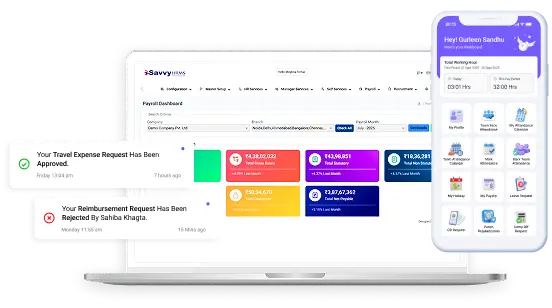









Looking for a smarter way to manage OD, attendance, payroll, and workforce operations?
Explore Savvy HRMS and simplify your HR processes with powerful automation solutions today