HRMS vs HCM vs HRIS: What’s the Difference and Which One Does Your Business Need?


-
AuthorRuchika Rajput
-
 Last Updated
September 14, 2026
Last Updated
September 14, 2026
-
 Reading Time
16 Mins
Reading Time
16 Mins
Confused about whether your business needs an HRMS, HCM, or HRIS? You’re not alone. These terms are often used interchangeably, even though they can refer to different levels of HR technology, features, and business needs. Understanding the difference can make your software decision much easier.
In this guide, we will break down HRMS vs HCM vs HRIS in simple terms, compare their features, explain when each solution makes sense, and look at what small, medium, and large businesses should consider before choosing HR software.
We will also cover whether an HRMS can replace an HRIS or HCM, why integrated HR platforms are becoming increasingly important, and how to decide which solution fits your organization best.
What Are HRMS, HCM, and HRIS?
Before comparing HRMS vs HCM vs HRIS, let’s first understand what each term actually means. While there is some overlap between them, their focus and scope can differ.
What Is an HRIS?
HRIS stands for Human Resources Information System. It is primarily designed to help businesses store, manage, organize, and access employee information digitally.
Think of an HRIS as a centralized employee information system. Instead of maintaining employee records across spreadsheets, folders, and emails, HR teams can manage important information from one platform.
Common HRIS capabilities include:
- Employee records and profiles
- Employee database management
- Attendance information
- Leave management
- Basic reporting
- Organizational information
- Document management
- Employee self-service
An HRIS is generally a good starting point for businesses that want to move away from manual HR administration and create a structured employee information system.
What Is an HRMS?
HRMS stands for Human Resource Management System. An HRMS generally covers employee information management while adding broader HR processes such as payroll, attendance, recruitment, performance management, and workforce administration.
In simple terms, an HRMS can be thought of as a more comprehensive system for managing day-to-day HR operations.
Depending on the platform, an HRMS may include:
- Employee management
- Attendance and time tracking
- Leave management
- Payroll processing
- Recruitment
- Onboarding
- Performance management
- Expense management
- Employee self-service
- HR reports and analytics
- Compliance management
For businesses looking to bring several HR functions together, an HRMS can provide a more integrated approach than maintaining separate systems.
What Is HCM?
HCM stands for Human Capital Management. HCM generally takes a broader, more strategic view of the employee lifecycle.
Instead of focusing only on administrative HR processes, HCM can cover areas such as workforce planning, talent management, performance, learning, succession planning, employee engagement, and workforce analytics.
An HCM platform can help organizations manage employees from recruitment and onboarding through development, performance, career growth, and eventually offboarding.
So, in simple terms:
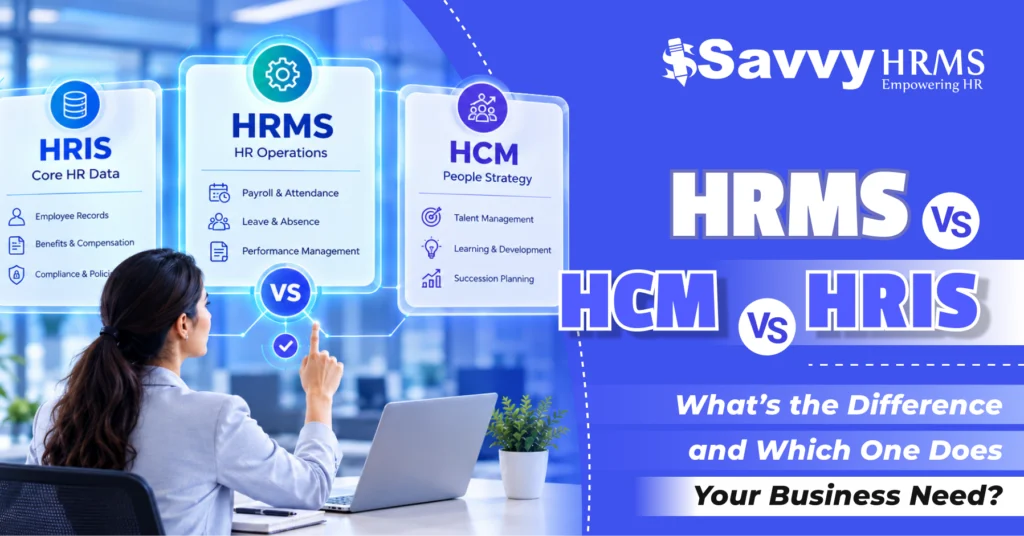
HRIS = employee information and core HR administration
HRMS = broader HR operations and workforce management
HCM = comprehensive employee lifecycle and strategic workforce management
However, these boundaries are not universal. Software vendors may use these terms differently, and many modern HR platforms combine capabilities associated with all three.
What Is the Difference Between HRMS, HCM, and HRIS?
The biggest difference between HRMS, HCM, and HRIS is usually the breadth of functionality and the business problems each solution is designed to address.
An HRIS primarily focuses on maintaining employee information and automating core HR administration. An HRMS generally expands this functionality to cover operational HR processes such as payroll, attendance, leave, recruitment, and performance.
HCM generally goes further by connecting HR operations with talent and workforce strategy. It can help organizations understand not just who their employees are, but also how they are performing, developing, and contributing to long-term business goals.
HRMS vs HRIS
The distinction between an HRMS and HRIS is not always strict.
An HRIS may be sufficient if your main requirement is maintaining employee records, managing basic HR workflows, and giving employees access to essential information.
An HRMS may be more suitable when you want to manage multiple HR processes from one system, particularly payroll, attendance, leave, recruitment, performance, and employee administration.
HRMS vs HCM
An HRMS is often more focused on HR operations and administration, while HCM generally emphasizes the complete employee lifecycle and strategic workforce management.
However, modern HRMS platforms can also include talent management, analytics, performance management, and employee engagement features.
HRIS vs HCM
An HRIS generally focuses on the foundation of employee information and HR administration, whereas HCM generally covers a wider range of employee lifecycle and talent-management processes.
The important thing to remember is that HRIS, HRMS, and HCM are not universally standardized categories. The actual features included depend on the software provider.
HRMS vs HCM vs HRIS: How Do They Compare?
The easiest way to understand the three systems is to compare their general focus, functionality, and ideal use cases.
| Factor | HRIS | HRMS | HCM |
| Primary focus | Employee information | HR operations | Complete employee lifecycle |
| Employee records | Yes | Yes | Yes |
| Attendance | Basic/varies | Yes | Yes |
| Leave management | Yes | Yes | Yes |
| Payroll | Limited/varies | Commonly included | Commonly included |
| Recruitment | Basic/varies | Often included | Yes |
| Performance management | Limited/varies | Often included | Yes |
| Learning & development | Limited | Varies | Commonly included |
| Workforce planning | Limited | Varies | Stronger focus |
| Talent management | Limited | Moderate/varies | Strong focus |
| Analytics | Basic | Moderate/advanced | Advanced/strategic |
| Best suited for | Core HR administration | Integrated HR operations | Comprehensive workforce management |
This table provides a general comparison, but businesses should always evaluate the actual modules and capabilities offered by a particular software platform rather than choosing based only on its label.
For example, one vendor may call its product an HRIS even though it includes payroll and performance management, while another may market a similar platform as an HRMS.
What Features Do HRMS, HCM, and HRIS Generally Include?
The features can overlap considerably, but their general scope differs.
1. Employee Information Management
Employee information management is a core capability across most HR platforms. It allows HR teams to maintain employee profiles, job details, contact information, documents, reporting structures, and other workforce data.
2. Attendance and Time Management
Businesses can track working hours, attendance, shifts, late arrivals, overtime, and other time-related information.
More advanced systems can also support biometric integrations, mobile attendance, geolocation-based attendance, and automated timesheets.
3. Leave Management
Employees can request leave digitally while managers can review and approve requests.
This reduces dependency on emails and spreadsheets while giving HR teams better visibility into employee leave balances and absence patterns.
4. Payroll Management
Payroll functionality helps organizations automate salary calculations, deductions, reimbursements, payslips, and other payroll processes.
Depending on the software, payroll may also support tax calculations and statutory requirements relevant to the organization’s location.
5. Recruitment and Applicant Tracking
Recruitment modules can help HR teams manage job openings, applications, candidate information, interviews, hiring workflows, and onboarding.
This creates a more connected process from candidate sourcing to employee joining.
6. Performance Management
Performance management features can help organizations define goals, conduct performance reviews, track KPIs, provide feedback, and monitor employee progress.
These capabilities are particularly useful for organizations trying to connect employee performance with business objectives.
7. Employee Self-Service
Employee self-service allows employees to perform routine HR activities themselves.
For example, employees may be able to:
- Apply for leave
- Download salary slips
- Update personal information
- View attendance
- Submit expenses
- Access HR documents
- Track requests
This reduces repetitive administrative work for HR teams.
8. HR Analytics and Reporting
Modern HR software can turn employee data into useful reports and insights.
HR teams can analyze metrics such as headcount, attrition, attendance, payroll costs, hiring performance, and employee performance.
HCM platforms often place greater emphasis on strategic workforce analytics, although advanced HRMS platforms can also provide extensive analytics.
9. Learning and Development
Learning management capabilities can help businesses organize training programs, track employee learning, manage courses, and monitor skill development.
These features are particularly relevant for businesses focused on employee growth and talent development.
10. Workforce Planning
Workforce planning helps organizations understand current workforce capacity and plan for future talent requirements.
This can include headcount planning, succession planning, skills analysis, and organizational planning.
When Should a Business Choose an HRIS?
An HRIS may be the right choice when your business primarily needs a centralized system for employee information and essential HR administration.
For example, an HRIS can make sense if your HR team is currently dependent on spreadsheets and wants a more organized way to manage employee data.
You may consider an HRIS when:
- Your employee database is difficult to manage manually.
- HR information is scattered across multiple files.
- Employees need basic self-service capabilities.
- You want centralized employee records.
- Your HR processes are relatively straightforward.
- You don’t need extensive talent-management functionality.
For smaller organizations with simple HR requirements, an HRIS can provide a solid digital foundation without unnecessary complexity.
However, if your business also needs payroll, attendance, recruitment, performance, and other interconnected HR processes, it may be worth considering an HRMS.
When Should a Business Choose an HRMS?
An HRMS is generally a good fit for businesses that want to manage multiple HR processes through one integrated platform.
Suppose your HR team currently uses one tool for attendance, another for payroll, spreadsheets for employee records, and email for leave approvals. Managing all these systems separately can quickly become complicated.
An HRMS can bring many of these processes together.
You may consider an HRMS when:
- Your business has growing HR requirements.
- Payroll and attendance need better integration.
- HR teams spend too much time on repetitive administration.
- Employees need self-service access.
- You want recruitment and onboarding workflows.
- You need centralized HR reporting.
- Your organization wants multiple HR modules in one platform.
For many growing businesses, an HRMS offers a practical balance between administrative efficiency and broader workforce management.
When Should a Business Choose an HCM Platform?
An HCM platform may be more appropriate for organizations with complex workforce and talent-management requirements.
Large organizations may need more than employee records and payroll. They may want to understand workforce skills, employee performance, career development, succession planning, workforce costs, and future talent requirements.
An HCM platform may be suitable when your organization needs:
- Workforce planning
- Talent management
- Succession planning
- Learning and development
- Advanced performance management
- Employee engagement
- Workforce analytics
- Career and skills management
- Complex organizational structures
HCM is particularly relevant when HR is expected to contribute more directly to strategic business decisions.
That said, you shouldn’t automatically assume that HCM is better than HRMS. The right choice depends on your organization’s size, complexity, HR maturity, budget, workforce structure, and specific requirements.
HRMS vs HCM vs HRIS: Which One Does Your Business Need?
There isn’t one universally correct answer to HRMS vs HCM vs HRIS.
The best solution is the one that matches your actual HR requirements.
A simple way to approach the decision is to ask: What problem are we trying to solve?
If your biggest problem is employee data management, an HRIS may be enough.
If you’re trying to simplify payroll, attendance, leave, recruitment, performance, and other HR processes, an HRMS may be a better fit.
If your organization needs sophisticated workforce planning, talent management, learning, succession planning, and strategic workforce analytics, an HCM platform may make more sense.
Choose an HRIS if:
You primarily need centralized employee information and core HR administration.
Choose an HRMS if:
You need integrated HR operations such as payroll, attendance, leave, recruitment, performance, and employee management.
Choose an HCM if:
You need broader employee lifecycle management, talent strategy, workforce planning, and advanced people analytics.
The key is not to choose the platform with the longest feature list. Choose the one that solves your most important HR challenges without adding unnecessary complexity.
How Do HRMS, HCM, and HRIS Differ for Small, Medium, and Large Businesses?
Business size can influence the type of HR software you need, but it shouldn’t be the only factor.
1. Small Businesses
Small businesses often need simple and affordable HR automation.
An HRIS can work well when the main requirement is employee records, leave, attendance, and basic HR administration.
However, a growing small business may benefit more from an HRMS if it wants payroll, attendance, recruitment, performance, and other processes connected within one platform.
2. Medium-Sized Businesses
As businesses grow, HR processes usually become more complex.
A medium-sized organization may have multiple departments, locations, teams, managers, and payroll requirements. Managing these processes manually can become increasingly difficult.
An HRMS can help centralize HR operations and provide better visibility across the workforce.
For organizations with more advanced talent-management needs, an HCM platform may also become relevant.
3. Large Businesses
Large organizations often deal with complex workforce structures, multiple locations, large employee populations, different roles, and sophisticated HR requirements.
They may need advanced HCM capabilities such as:
- Workforce planning
- Talent management
- Succession planning
- Learning management
- Advanced analytics
- Skills management
- Global workforce management
For large enterprises, scalability, integrations, security, customization, analytics, and implementation support become particularly important.
What Should You Consider Before Choosing HR Software?
Choosing HR software shouldn’t start with a list of features. It should start with your organization’s actual problems.
Here are some important factors to evaluate.
1. Business Size and Workforce Complexity
Consider your current employee count, locations, departments, shifts, employment types, and organizational structure.
The software should be capable of supporting your current workforce while allowing room for future growth.
2. Required HR Modules
Create a list of the HR processes you actually need to automate.
For example:
- Employee management
- Payroll
- Attendance
- Leave
- Recruitment
- Onboarding
- Performance
- Expenses
- Employee engagement
- Analytics
Don’t pay for complex modules that your organization is unlikely to use.
3. Integration Capabilities
Your HR platform may need to connect with payroll systems, accounting software, biometric devices, recruitment platforms, communication tools, or other business applications.
Strong integration capabilities can prevent data from becoming fragmented across different systems.
4. Ease of Use
Even the most powerful HR software won’t deliver much value if employees and HR teams find it difficult to use.
Look for intuitive interfaces, employee self-service, mobile accessibility, simple workflows, and clear dashboards.
5. Security and Data Protection
HR software contains sensitive employee information, including salary, contact details, attendance, performance, and other personal data.
Evaluate access controls, authentication, data protection practices, backups, audit trails, and the vendor’s security policies before making a decision.
6. Scalability
Don’t only think about what your company needs today.
Ask whether the system can support your organization as employee numbers, locations, departments, and HR requirements increase.
7. Reporting and Analytics
Consider what HR information your managers and leadership team need to make decisions.
Useful reporting can help you understand workforce costs, attendance, attrition, hiring, performance, and other important HR metrics.
8. Implementation and Support
Implementation can be just as important as the software itself.
Evaluate:
- Implementation timelines
- Data migration support
- Training
- Customer support
- Configuration options
- Product documentation
- Ongoing assistance
A good HR platform should not leave your HR team to figure everything out alone.
9. Total Cost of Ownership
Don’t look only at the subscription price.
Consider implementation, integrations, customization, employee licenses, support, training, migration, and future expansion when calculating the total cost.
Can an HRMS Replace an HRIS or HCM?
An HRMS can replace an HRIS in many situations, but whether it can fully replace an HCM depends on the specific platform and your organization’s requirements.
Modern HRMS platforms can include many capabilities traditionally associated with HRIS and HCM solutions.
For example, an advanced HRMS may provide:
- Employee information management
- Payroll
- Attendance
- Leave
- Recruitment
- Onboarding
- Performance management
- Analytics
- Employee self-service
- Learning and development
However, not every HRMS includes advanced workforce planning, succession management, skills intelligence, or enterprise-level talent capabilities.
So, rather than asking “Can an HRMS replace HCM?”, a better question is:
“Does this HRMS provide the specific HCM capabilities my organization requires?”
The name of the software matters less than its actual functionality.
Why Is an Integrated HRMS Becoming Important for Modern Businesses?
HR teams today are expected to do much more than maintain employee records. They are increasingly responsible for payroll accuracy, employee experience, workforce insights, compliance, performance, recruitment, and business support.
When these processes operate through disconnected tools, information can become fragmented.
For example, an employee’s attendance data may exist in one system while payroll is processed somewhere else. Recruitment information may sit in an applicant tracking system, while performance information is stored separately.
An integrated HRMS software can connect these processes.
This can help businesses:
- Reduce manual data entry
- Minimize duplicate information
- Improve HR data visibility
- Automate repetitive workflows
- Give employees self-service access
- Improve reporting
- Connect HR processes
- Support better workforce decisions
For growing businesses, integration can become especially valuable because HR complexity tends to increase as the organization expands.
An integrated HRMS can therefore serve as a central platform connecting people, processes, payroll, attendance, performance, recruitment, and workforce information.
Conclusion
Choosing between HRIS, HRMS, and HCM doesn’t have to be confusing. Start by identifying what your HR team needs today, then consider where your organization is heading. An HRIS can cover core HR information, while an HRMS can connect broader HR operations.
For organizations with more complex talent, workforce planning, and employee lifecycle requirements, an HCM platform may provide greater depth. The right choice ultimately depends on your workforce size, HR processes, growth plans, budget, and required capabilities.
The most important thing is to look beyond the label. Compare the actual modules, integrations, scalability, security, usability, analytics, implementation support, and total cost. The best HR software is the one that fits your business, not simply the one with the most features.











Looking for an HRMS that grows with your business?
Explore Savvy HRMS and take your HR management to the next level.
Frequently Asked Questions (FAQs)
1. What is the main difference between HRMS, HCM, and HRIS?
An HRIS primarily manages employee information and core HR administration. An HRMS generally covers broader HR operations, while HCM generally focuses on the complete employee lifecycle, talent management, and strategic workforce management.
2. Is HRMS better than HRIS?
Not necessarily. An HRMS is generally broader and may include payroll, attendance, recruitment, performance, and other HR functions. If your business only needs employee information management and basic HR processes, an HRIS may be sufficient.
3. Is HCM the same as HRMS?
No, although the terms can overlap. HRMS commonly emphasizes HR administration and operational processes, while HCM generally has a broader focus on talent, workforce planning, employee development, and the complete employee lifecycle.
4. Which HR software is best for a growing business?
For many growing businesses, an HRMS can be a practical choice because it can bring multiple HR processes into one platform.
Look for:
• Payroll and attendance integration
• Leave management
• Recruitment and onboarding
• Performance management
• Employee self-service
• Reporting and analytics
• Scalability
• Integrations
5. Can a small business use an HCM platform?
Yes. A small business can use an HCM platform, but it should evaluate whether the additional capabilities justify the cost and complexity. If advanced talent or workforce-management features aren’t required, an HRIS or HRMS may be more practical.
6. What should businesses look for when comparing HRMS, HCM, and HRIS software?
Businesses should compare features, scalability, integrations, ease of use, security, analytics, implementation, customer support, customization, and total cost of ownership rather than depending only on whether a vendor calls its product an HRIS, HRMS, or HCM.