EPFO WhatsApp Number: Official Contact Number, Services & How to Use It


-
AuthorRuchika Rajput
-
 Last Updated
November 02, 2026
-
 Reading Time
15 Mins
TL;DR
- Official EPFO WhatsApp number: +91 87964 41800.
- Launched on: November 1, 2026, during EPFO’s 74th Foundation Day celebrations.
- Launched by: Dr. Mansukh Mandaviya, Union Minister for Labour and Employment.
- Available services: PF balance enquiry, EPF passbook access, latest five transaction details and PMVBRY-related guidance.
- How to use it: Save the official number, send “Hi” on WhatsApp and follow the chatbot instructions.
- Mobile number requirement: Use the mobile number registered with your UAN for the account verification process.
- Main benefit: Access selected PF information conveniently through WhatsApp without visiting an EPFO office.
The Employees’ Provident Fund organization (EPFO) has introduced a new WhatsApp-based service to make Provident Fund (PF) information more accessible to employees. With this facility, EPFO members can now access selected PF-related services through WhatsApp instead of depending entirely on online portals or visiting an EPFO office for routine enquiries.
The EPFO WhatsApp number allows members to check their PF balance, view their latest five transactions and access or download their EPF passbook. The service also provides personalised guidance and assistance for certain requirements related to the Pradhan Mantri Viksit Bharat Rozgar Yojana (PMVBRY).
In this blog, we will cover the official EPFO WhatsApp service number, the services available through it, how to check your PF balance step by step, who can use the facility and what information you may need. We will also explain how the WhatsApp service differs from the regular EPFO helpline.
What Is the Official EPFO WhatsApp Number?
The official EPFO WhatsApp service number is +91 87964 41800. EPF subscribers can save this number in their mobile contacts and send a WhatsApp message to access selected information about their Provident Fund accounts.
The Employees’ Provident Fund Organization introduced this interactive service on November 1, 2026, during its 74th Foundation Day celebrations in New Delhi. Dr. Mansukh Mandaviya, Union Minister for Labour and Employment, launched the initiative to make routine PF-related services more accessible through a familiar digital platform.
Through this facility, members can access their PF balance, view their latest five transactions and obtain EPF passbook information. The service also offers personalised guidance and assistance with certain requirements under the Pradhan Mantri Viksit Bharat Rozgar Yojana (PMVBRY).
Official EPFO WhatsApp service details:
| Particulars | Details |
| Organization | Employees’ Provident Fund organization |
| Official WhatsApp number | +91 87964 41800 |
| Service type | Interactive WhatsApp-based service |
| Launched on | November 1, 2026 |
| Launched by | Dr. Mansukh Mandaviya |
| Main services | PF balance, passbook and latest five transactions |
| Additional assistance | PMVBRY-related guidance |
To get started, members can save the official number and send a simple message such as “Hi”. They can also scan the QR code shared by EPFO through its official communication to open the WhatsApp conversation.
It is important to use the verified EPFO WhatsApp account rather than numbers circulated through unknown messages or unofficial social media posts. Since the service provides access to personal PF information, members should follow the authentication instructions and avoid sharing confidential details with unauthorised individuals.
What Services Can You Access Using the EPFO WhatsApp Number?
The new EPFO WhatsApp service allows members to access selected PF-related information through a messaging platform they already use regularly. It aims to simplify routine enquiries and reduce the need to visit an EPFO office for basic account information.
The service currently includes PF balance enquiries, passbook information, the latest five transactions and personalised guidance for certain PMVBRY-related requirements.
Here are the major services available through the EPFO WhatsApp service number.
1. Check Your PF Balance
Members can use the EPFO WhatsApp number to check their Provident Fund balance. This helps employees stay informed about their accumulated PF savings without having to navigate the member portal every time they want to check their balance.
The EPFO WhatsApp number balance check feature makes it easier for employees to monitor their PF savings through a familiar messaging platform.
It is particularly useful for employees who want to keep track of their retirement savings and monitor their PF account regularly.
2. Access and Download Your EPF Passbook
The EPFO WhatsApp service also allows members to access their EPF passbook information and download their passbook through the available chatbot option.
An EPF passbook provides information about employee and employer contributions, interest credits and other account entries. It helps members understand how their PF savings have accumulated over time.
3. View the Latest Five PF Transactions
Members can check details of their five most recent PF transactions through WhatsApp.
This feature can help employees monitor recent account activity and check whether their latest contributions or other transactions have been reflected in their PF accounts.
For example, employees can use this facility to review recent entries without logging in to the EPFO portal for every basic enquiry.
4. Get Personalised Guidance Related to PMVBRY
The new WhatsApp service also provides personalised guidance and assistance to members completing certain requirements related to the Pradhan Mantri Viksit Bharat Rozgar Yojana (PMVBRY).
This can help eligible members understand the requirements and steps involved in completing relevant scheme-related formalities.
5. Access PF Information Through a Familiar Platform
One of the key advantages of the EPFO WhatsApp service is its accessibility. Employees do not need to learn how to navigate a separate digital platform just to access basic PF information.
By sending a message and following the chatbot instructions, members can reach the available service options through WhatsApp.
However, this facility does not replace every EPFO service. Activities such as formal grievance registration, claim processing and other account-management procedures may still require existing EPFO channels.
In short: The EPFO WhatsApp service number provides access to PF balance information, EPF passbook details, the latest five transactions and PMVBRY-related guidance. Members can select the required service through the chatbot menu.
EPFO WhatsApp Service Number: What Makes It Useful for Employees?
The EPFO WhatsApp service number provides an additional way for employees to access PF information without depending entirely on traditional support channels.
Its main advantage is convenience. Employees can initiate a conversation, select the required option and follow the instructions to access available information. This can make routine PF enquiries easier, particularly for members who are more comfortable using messaging applications than navigating online portals.
The service is also useful for employees who want to monitor their PF contributions and recent account activity. However, for more complicated issues involving PF transfers, withdrawals or grievances, members should continue using the relevant official EPFO facilities.
How to Check PF Balance Using the EPFO WhatsApp Number?
Checking your PF balance through the EPFO WhatsApp service is a simple process. Members can start a conversation with the official EPFO WhatsApp account, select their preferred language and follow the chatbot instructions to access their PF information.
You do not need to download a separate application to initiate the WhatsApp conversation. However, you should use the mobile number registered with your UAN and complete the required verification process.
Follow these steps to check your PF balance using the EPFO WhatsApp number.
Step 1: Save the Official EPFO WhatsApp Number
First, save +91 87964 41800 in your mobile phone contacts.
Make sure you enter the correct number before starting the conversation. You can also scan the QR code shared in EPFO’s official announcement to open the verified WhatsApp chat directly.
Step 2: Open WhatsApp and Send “Hi”
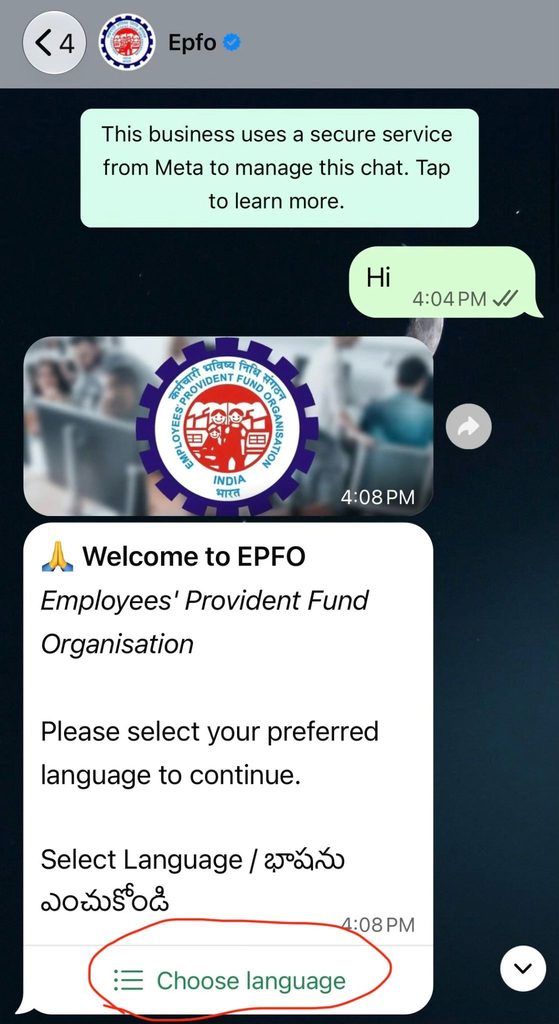
Open WhatsApp on your smartphone and search for the saved EPFO contact.
Send a simple message such as “Hi” or “Hello” to initiate the conversation. The automated chatbot will respond with instructions for accessing the available services.
Step 3: Select Your Preferred Language
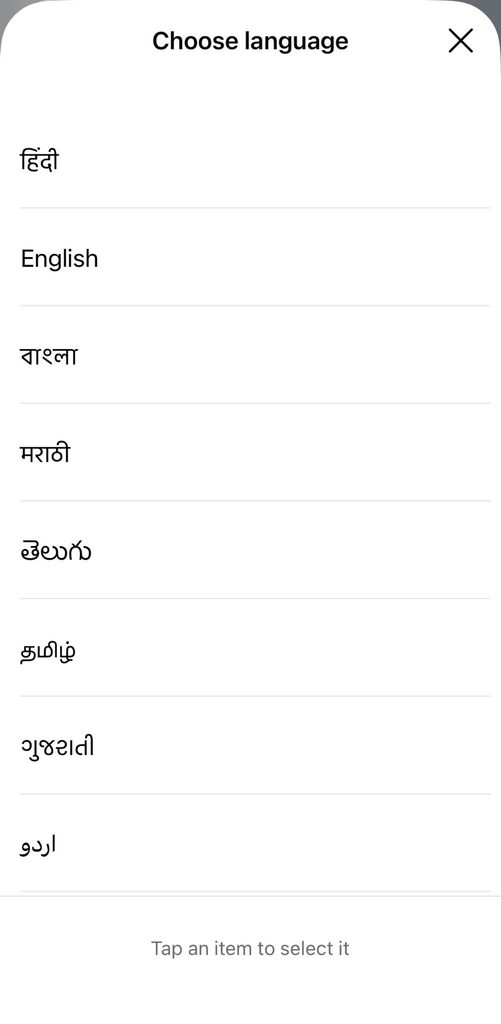
After initiating the conversation, follow the chatbot instructions to select your preferred language.
Selecting a language you are comfortable with makes it easier to understand the available options and complete the required steps.
Step 4: Choose the PF Balance Enquiry Option
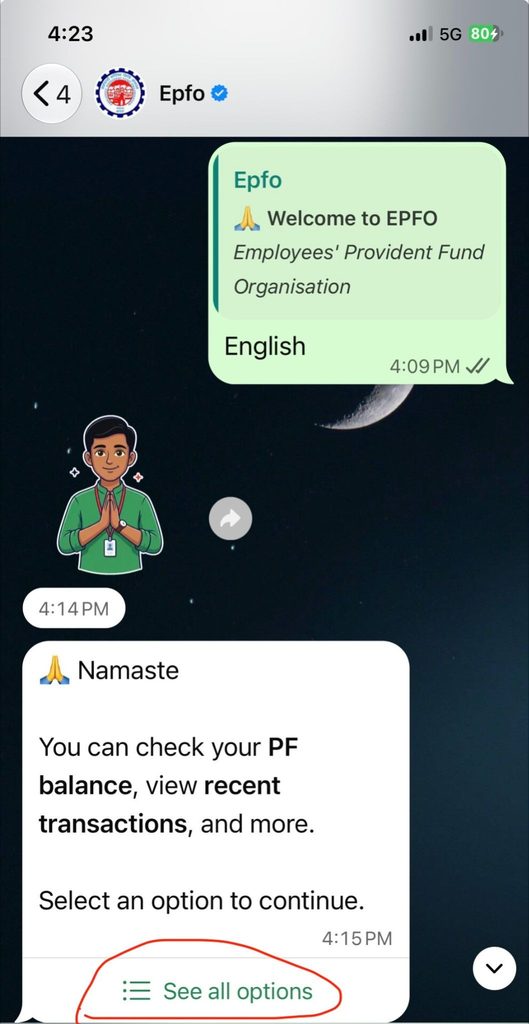
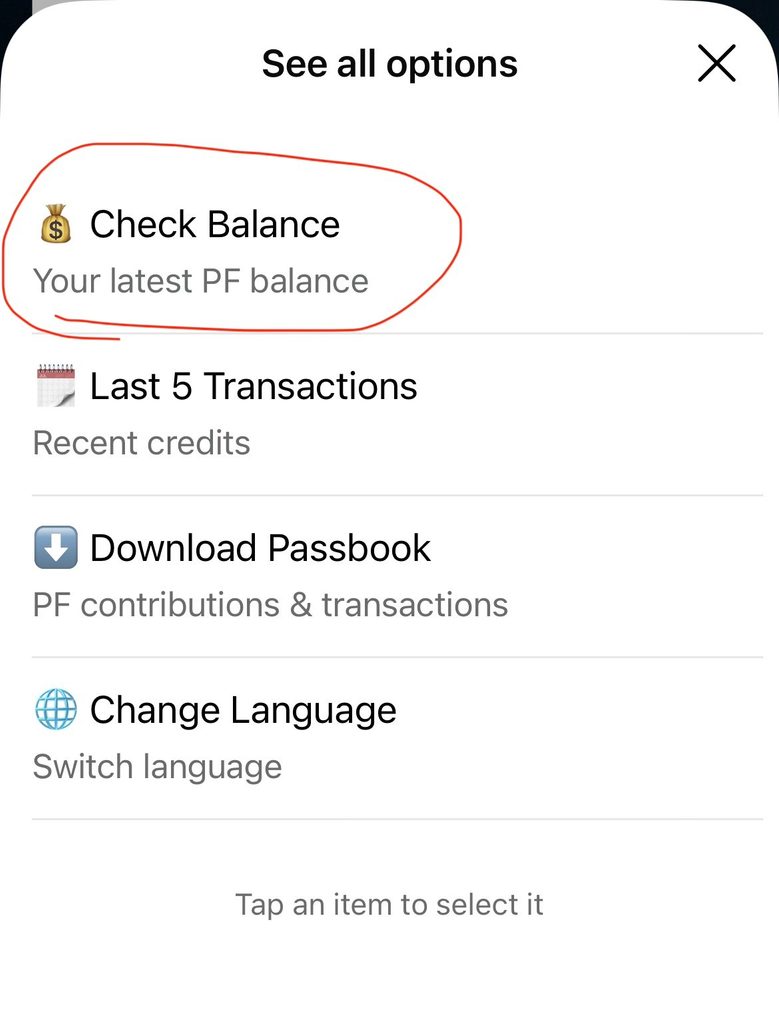
Once the chatbot displays the available services, select the option related to checking your PF balance.
The menu may also provide options for viewing recent transactions, downloading your passbook and changing your preferred language.
Choose the PF balance option to proceed.
Step 5: Complete the Required Verification
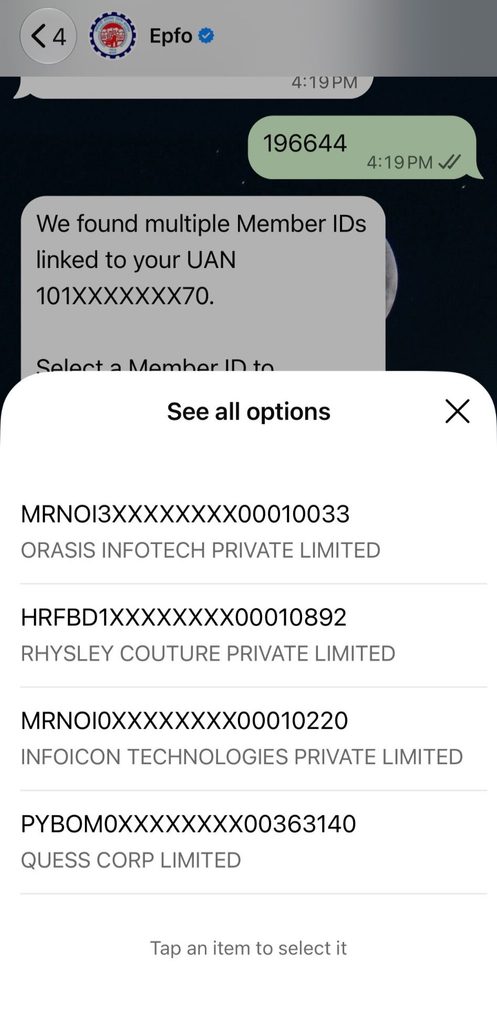
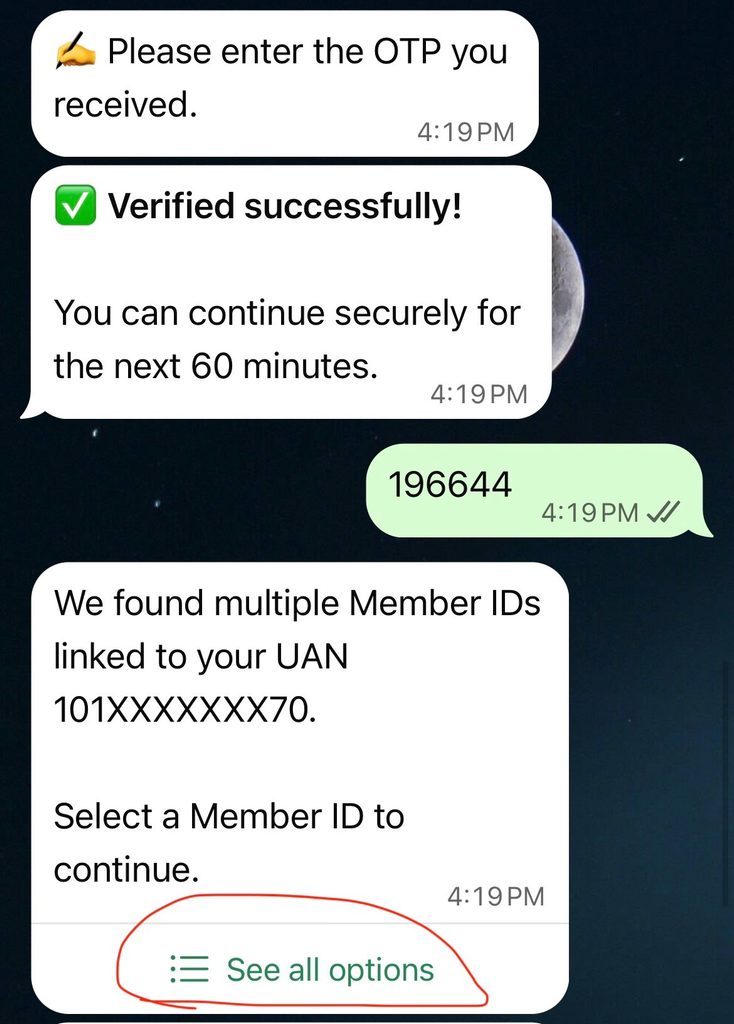
The chatbot will guide you through the authentication process before providing access to your PF account information.
Make sure you are using the mobile number registered with your UAN. Follow the instructions displayed in the conversation and complete any required verification.
This step helps protect members’ personal PF information from unauthorised access.
Step 6: View Your PF Balance
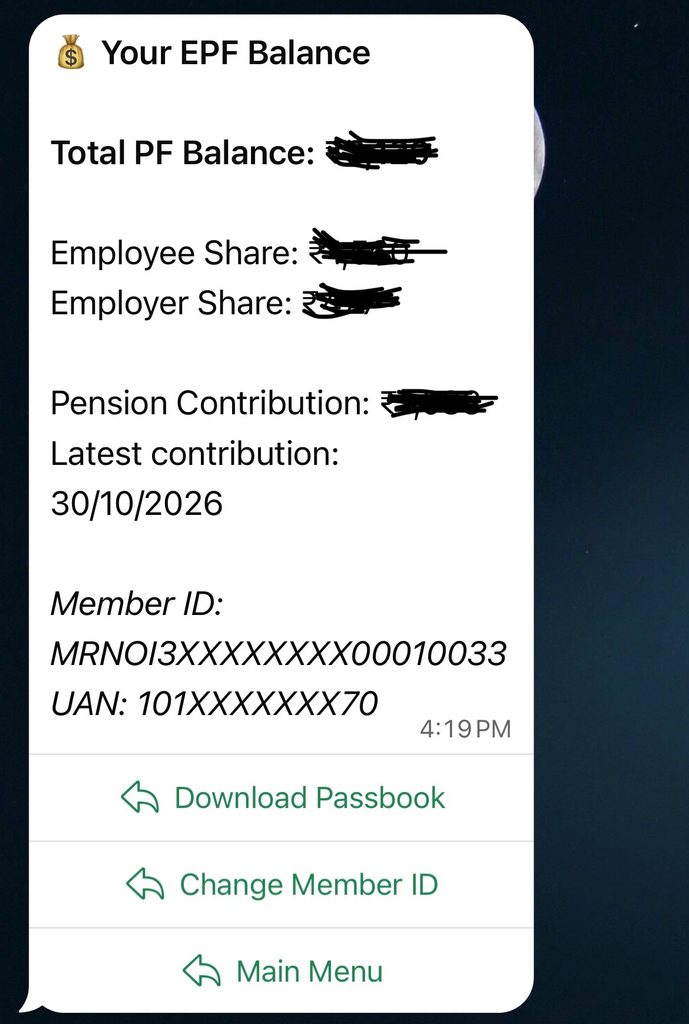
After completing the verification process, follow the chatbot instructions to view your PF balance.
You can also return to the main menu and select other available services, such as viewing your latest five transactions or downloading your EPF passbook.
Note: The exact chatbot prompts and authentication requirements may change as EPFO updates the service. Follow the instructions displayed by the verified account.
Who Can Use the EPFO WhatsApp Service?
The EPFO WhatsApp service is primarily designed for EPF subscribers who want to access selected information about their Provident Fund accounts through WhatsApp.
Employees covered under the EPF framework can use this facility to check their PF balance, view recent transactions and access passbook information, subject to the service’s authentication requirements.
Here are the categories of members who may find this service useful.
1. Salaried Employees
Employees working in organizations covered under the EPF framework can use the WhatsApp facility to access their PF account information.
They can check their accumulated PF balance, review recent transactions and access their passbook without navigating the member portal for every routine enquiry.
2. Existing EPFO Members
Individuals who already have an EPF account and a Universal Account Number (UAN) can use the available WhatsApp services.
They should initiate the conversation using their UAN-registered mobile number and follow the chatbot’s verification instructions.
3. Employees Who Have Changed Jobs
Employees who have switched organizations but continue to hold an EPF account may also find the service helpful.
They can use it to review their available PF information and recent account transactions. However, accessing PF details through WhatsApp does not automatically transfer an old PF account balance to a new employer-linked account.
4. Employees Who Want to Monitor PF Contributions
Employees who want to keep track of their monthly PF contributions can use the service to check their latest transaction details.
This helps them monitor recent account activity and identify entries that may require further clarification from their employer or EPFO.
5. Members Who Prefer Digital Services
The service can be particularly convenient for individuals who are comfortable using WhatsApp and prefer simple messaging-based interactions.
Instead of navigating multiple screens on an online portal, members can initiate a conversation and follow the chatbot instructions to access the available options.
Can Employers Use the EPFO WhatsApp Service?
The new EPFO WhatsApp facility is primarily intended for EPF subscribers. Employers should continue using the designated EPFO employer services for establishment-related activities.
For example, employers need separate facilities for:
- Employee PF registration and UAN-related processes.
- Electronic Challan-cum-Return (ECR) filing.
- Monthly PF contribution submissions.
- Establishment-related compliance requirements.
- Employee contribution and payroll records.
- Employer account and statutory reporting activities.
The WhatsApp service should not be considered a replacement for the EPFO employer portal or other official compliance channels.
Can Pensioners Use the EPFO WhatsApp Service?
The newly announced WhatsApp service is primarily focused on EPF subscriber services, including PF balance, passbook information and recent transactions.
Although EPFO provides separate pension-related facilities, the announcement does not establish that every pension enquiry or pension-related service is available through this WhatsApp number. Pensioners should check the chatbot’s available options or use the relevant EPFO pension support channels for assistance.
What Details Do You Need to Access EPFO Services on WhatsApp?
Before using the EPFO WhatsApp number, members should keep a few basic details and requirements ready. These can help them initiate the conversation and complete the authentication process when requested.
Here are the important things to keep in mind.
1. An Active WhatsApp Account
You need an active WhatsApp account on your smartphone to contact the official EPFO WhatsApp service number.
Make sure your application is working properly and that you have a stable internet connection to receive chatbot responses.
2. Mobile Number Registered with UAN
Your WhatsApp account should be linked to the mobile number registered with your Universal Account Number.
This is important because the service may require mobile-based verification before displaying personal PF account information.
If you are using a different mobile number, you may face difficulties during authentication.
3. Universal Account Number (UAN)
Your UAN is a unique identification number assigned to an EPFO member. It connects different PF member identification numbers associated with an individual.
Keep your UAN accessible in case it is requested during the service or verification process.
4. Access to Verification Messages
Depending on the authentication process, you may need access to your registered mobile number to receive an OTP or complete other verification steps.
Make sure your registered SIM is active and can receive messages.
5. Stable Internet Connection
An internet connection is necessary to send messages, receive automated responses and access the chatbot’s service options.
If the service does not respond, check your connectivity before trying again.
Important Security Precautions While Using the EPFO WhatsApp Number
Since PF information is connected to your employment and financial records, it is important to use the WhatsApp service carefully.
Follow these security precautions:
- Always initiate conversations with the verified EPFO WhatsApp account.
- Never share your UAN password, bank password, ATM PIN or other confidential login credentials with anyone.
- Do not disclose OTPs to individuals claiming to be EPFO representatives.
- Avoid clicking on suspicious links promising instant PF withdrawals or additional benefits.
- Do not install unknown applications or share your mobile screen with strangers for PF-related assistance.
- Never pay unofficial agents to access basic EPFO WhatsApp services.
- If you receive suspicious messages claiming to represent EPFO, verify them through official communication channels.
Remember: The official EPFO WhatsApp service is intended to make PF information more accessible. It should not be used as a reason to share confidential financial information with unknown individuals.
What Is the Difference Between the EPFO WhatsApp Number and EPFO Helpline?
EPFO provides multiple communication channels to help employees access PF information, resolve account-related queries and seek assistance. However, the EPFO WhatsApp number and the regular EPFO helpline serve different purposes.
The WhatsApp service is primarily designed to provide quick access to selected PF account information through an automated conversation. On the other hand, the EPFO helpline provides telephone-based assistance for members who need help with different EPFO-related matters.
Here is a comparison to understand the difference.
| Basis | EPFO WhatsApp Number | EPFO Helpline |
| Contact method | WhatsApp messaging | Telephone call |
| Main purpose | Access selected PF account information | Assistance with EPFO-related queries |
| PF balance enquiry | Available | Guidance through support |
| Passbook information | Available | Guidance on accessing passbook |
| Latest transactions | Last five transactions available | Assistance with account-related queries |
| Communication | Automated chatbot | Telephone-based support |
| Grievance redressal | Not a replacement for formal grievance registration | Can guide members towards grievance channels |
| Accessibility | Requires WhatsApp and internet connectivity | Requires telephone connectivity |
EPFO also provides dedicated telephone support and an online grievance redressal facility. Members should use the relevant official contact details and channels for their particular requirements.
When Should You Use the EPFO WhatsApp Number?
The EPFO WhatsApp service is useful when you want to:
- Check your PF balance.
- Access or download your EPF passbook.
- View your latest five PF transactions.
- Get guidance on supported EPFO services.
- Access basic PF information through a familiar messaging application.
When Should You Contact the EPFO Helpline?
The general EPFO support channels are more appropriate when you need assistance with:
- Problems accessing your EPF account.
- Questions about PF withdrawal or transfer procedures.
- Issues related to UAN activation or account information.
- Guidance regarding employer-related PF contributions.
- Assistance with unresolved service-related issues.
- Information about the appropriate process for raising a formal complaint.
If your issue requires formal action, you can also register a complaint through the EPFiGMS (EPF i-Grievance Management System), which is EPFO’s dedicated online grievance redressal platform.
In simple terms: Use the EPFO WhatsApp number for quick access to supported PF account information, while the EPFO helpline and grievance channels are more suitable when you need additional assistance or want to resolve a specific issue.
Conclusion
The introduction of the EPFO WhatsApp number is another step towards making Provident Fund services more convenient and accessible for employees. Members can now use WhatsApp to check their PF balance, access or download their passbook, view their latest five transactions and receive guidance on selected EPFO-related requirements. This provides an additional digital channel for routine PF enquiries and reduces the need to visit an EPFO office for basic information.
However, employees should always use the verified EPFO WhatsApp contact number and follow the necessary security precautions while accessing their account information. For more complex requirements, such as PF transfers, withdrawals and grievances, they should continue using the relevant official EPFO facilities.
For businesses, simplifying employee services is equally important. Savvy HRMS helps organizations simplify everyday HR operations through integrated solutions for employee information management, attendance, leave and payroll management.



Explore Savvy HRMS to simplify HR processes, improve payroll administration and create a more efficient employee experience.
Frequently Asked Questions (FAQs)
1. What is the new EPFO WhatsApp service?
The new EPFO WhatsApp service is a digital facility that allows EPF members to check their PF balance, access passbook details, view their latest five transactions and receive guidance on selected EPFO-related services through WhatsApp.
2. What is the EPFO WhatsApp number?
The official EPFO WhatsApp service number is +91 87964 41800. Members can save this number, send “Hi” and follow the chatbot instructions to access available PF-related services.
3. How can I check my PF balance through WhatsApp?
Save the official EPFO WhatsApp number (+91 87964 41800), open WhatsApp, send “Hi”, select the PF balance enquiry option and complete the required verification process to view your PF balance.
4. Can I download my EPF passbook through WhatsApp?
Yes, EPFO members can access and download their EPF passbook through the new WhatsApp service. Send “Hi” to the official number, select the passbook option and follow the chatbot instructions to complete the process.
5. Can I check my last five PF transactions through WhatsApp?
Yes, the EPFO WhatsApp service allows members to view their five most recent PF transactions. This helps employees monitor recent account activity and track their PF contributions conveniently.
6. Who launched the new EPFO WhatsApp service?
Dr. Mansukh Mandaviya, Union Minister for Labour and Employment, launched the new EPFO WhatsApp service on November 1, 2026, during EPFO’s 74th Foundation Day celebrations in New Delhi.