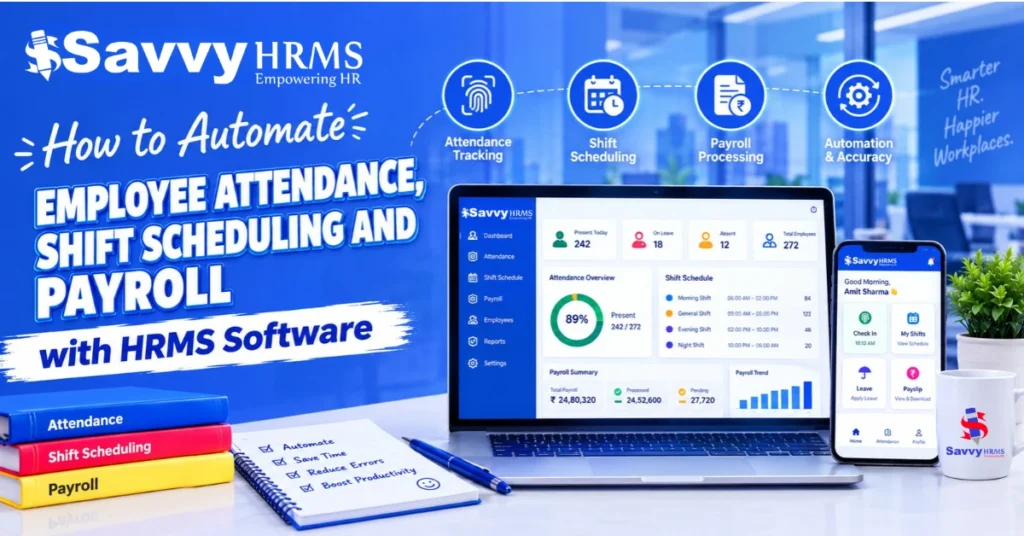
How to Automate Employee Attendance, Shift Scheduling and Payroll with HRMS Software


-
AuthorRaghvendra Bhardwaj
-
 Last Updated
October 31, 2026
Last Updated
October 31, 2026
-
 Reading Time
16 Mins
Reading Time
16 Mins
TL;DR
Attendance and Payroll Software integrated with HRMS helps businesses connect employee attendance, shift scheduling and payroll processing through a centralized platform. It reduces manual work, keeps employee records consistent and helps HR teams process salaries more accurately.
With an integrated system, businesses can:
- Automate employee check-ins, check-outs and working-hour calculations.
- Simplify fixed, flexible, rotational and night-shift scheduling.
- Connect attendance, approved leave and overtime records with payroll.
- Reduce manual data entry and minimize payroll calculation errors.
- Generate payslips, attendance reports and payroll summaries.
- Improve workforce visibility through centralized employee records and self-service features.
Managing employee attendance, shift schedules and monthly payroll can become challenging as a business grows. HR teams may spend hours updating attendance sheets, preparing shift rosters, checking leave records and calculating salaries.
The problem becomes more complicated when employees work across multiple locations, departments or rotational shifts. Even a small mistake in attendance or overtime records can affect monthly salary calculations.
This is where Attendance and Payroll Software integrated with HRMS can help. It connects employee attendance, shift scheduling, leave management and payroll processing through a centralized platform.
In this guide, we will explain how HRMS software automates employee attendance, shift scheduling and payroll, the benefits of connecting these processes, and the key features businesses should consider when choosing a solution.
What Is HRMS Software and How Does It Automate HR Operations?
HRMS (Human Resource Management System) software is a digital platform that helps businesses manage employee information and automate different HR activities through a centralized system.
It brings multiple HR functions together including employee management, attendance tracking, shift scheduling, leave management, payroll processing, performance management and employee self-service.
Instead of maintaining separate spreadsheets for every HR activity, businesses can manage employee engagement information through connected modules.
For example, when an employee is assigned a particular shift, the attendance system can use that schedule to calculate working hours. Once attendance and leave records are verified, payroll processing can use the relevant information.
How Does an Integrated HRMS Workflow Work?
An integrated HRMS connects employee registration, shift scheduling, attendance tracking and payroll processing in one workflow. Instead of managing each activity separately, the system transfers relevant employee and attendance data from one stage to the next.
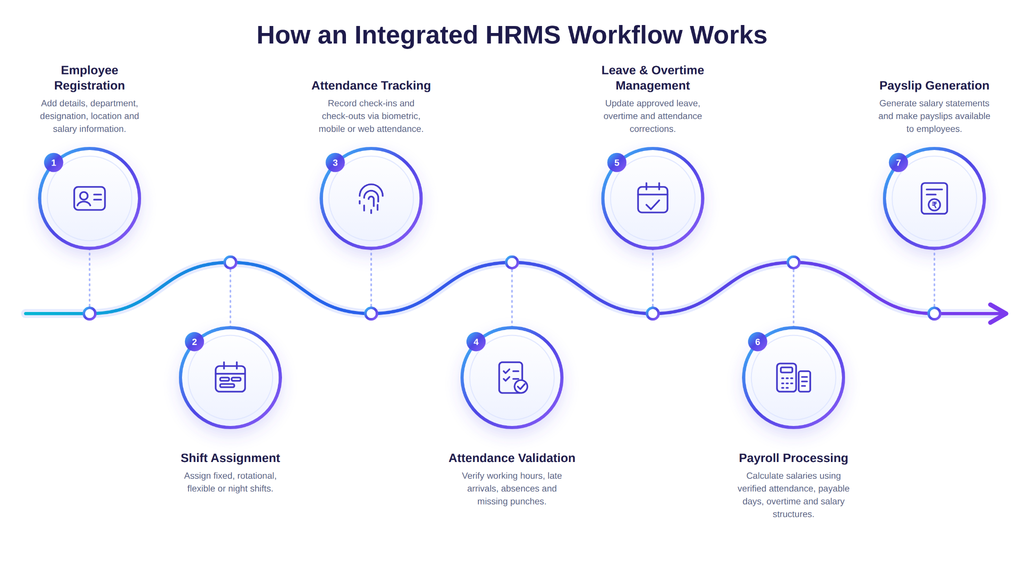
Let’s understand how the integrated system works:
1. Employee registration
HR adds employee details, department, designation, work location and salary structure to the system. These details become the basis for shift assignment, attendance tracking and payroll.
2. Shift assignment
Based on job roles and operational requirements, managers assign employees to fixed, rotational, flexible or night shifts. The assigned schedules define their expected working hours.
3. Attendance tracking
After being assigned a shift, employees then mark their check-ins and check-outs using supported methods such as biometric devices, mobile apps or web portals. These records are linked to their assigned shifts.
4. Attendance validation
The HRMS compares actual punches with scheduled working hours to identify late arrivals, early departures, absences and missing punches. Working hours are calculated according to configured attendance rules.
5. Leave and overtime management
Approved leave, attendance corrections and overtime records are updated in the system to ensure that payroll uses reviewed attendance information rather than unverified entries.
6. Payroll processing
Once attendance records are validated, the system transfers relevant data to the payroll system module. It uses payable days, unpaid leave, approved overtime and employee salary structures to calculate earnings and deductions.
7. Payslip generation
After payroll is reviewed and approved, the system generates payslips and payroll reports, and employees can access their salary details through the employee self-service portal, where available.
By connecting all these activities, HRMS software creates a continuous flow of information from employee registration to salary processing. This reduces repeated data entry, helps avoid mismatches between shifts and attendance, and makes payroll calculations more consistent.
Why Should Businesses Automate Attendance, Shift Scheduling and Payroll?
Manual HR processes may work for a small team, but they become difficult to manage when employee numbers increase, or employees work across multiple shifts and locations.
Automating these activities helps businesses reduce repetitive work and establish a more structured approach to workforce management. Understanding why businesses need to automate them together is very important, as defined below:
1. Reduces Manual Attendance Records
Maintaining paper registers or Excel sheets requires HR teams to collect, verify and update employee attendance regularly.
An automated attendance system records check-in and check-out information digitally. Core HR teams can access attendance records without manually entering every employee’s working hours.
2. Simplifies Shift and Roster Management
Businesses operating morning, evening, night and rotational shifts need a consistent way to assign schedules.
That’s where HRMS software helps managers create shift rosters, assign employees and update schedules when operational requirements change.
3. Reduces Payroll Data Mistakes
When attendance and payroll are managed separately, HR teams must transfer working hours, leave records and overtime information manually.
An integrated system allows verified attendance information to flow into payroll, reducing repeated data entry and reconciliation work.
To learn more about the features and benefits of an integrated system, explore our guide to Attendance and Payroll Software
4. Enhance Overtime Tracking
Employees may work beyond their scheduled hours because of production requirements, customer demand or additional responsibilities.
But automated systems can help to identify additional working hours based on configured shift rules where managers can review and approve eligible overtime before it is included in payroll.
5. Improves Workforce Visibility
HR managers and department heads can access attendance summaries, shift schedules, absenteeism records and payroll reports from a centralized platform.
This makes it easier to identify staffing gaps and understand workforce requirements across different departments.
How to Automate Employee Attendance with HRMS Software?
HRMS software automates attendance through digital tracking and configured policies. It helps businesses calculate working hours, manage missed punches and maintain accurate payroll records.
Let’s understand how to simplify attendance management by automating it, as explained below:
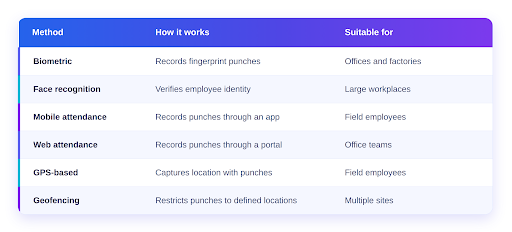
1. Choose the Right Attendance Tracking Method
Select a method based on employee roles and workplace needs as office employees may use biometric devices, while field employees may need mobile attendance.
2. Automate Employee Check-In and Check-Out
The system records check-in and check-out times and links them to employee profiles. Records may include:
- Employee ID and attendance date.
- Check-in and check-out timestamps.
- Assigned shift and attendance status.
- Device or location details, where supported.
HR teams can review records through a dashboard instead of updating spreadsheets.
3. Configure Attendance Rules and Policies
Administrators can configure:
- Working hours and break durations.
- Grace periods for late arrivals.
- Early departure and minimum-hour rules.
- Half-day calculations, weekly offs and holidays.
- Missed-punch corrections and approvals.
4. Automate Working-Hour Calculations
An attendance management system calculates working hours using recorded punches, assigned shifts and break rules.
Example: An employee works from 9:00 AM to 6:00 PM.
| Attendance detail | Time |
| Scheduled check-in | 9:00 AM |
| Actual check-in | 9:05 AM |
| Actual check-out | 6:10 PM |
| Break | 1 hour |
| Net working time | 8 hours 5 minutes |
The system deducts the configured break and identifies late arrivals, early departures and additional hours.
5. Automate Attendance Regularization
Sometimes it happens that employees may forget to mark attendance or record an incorrect punch. An HRMS can manage corrections through a digital workflow:
- Employee submits a correction request.
- The manager reviews and approves or rejects it.
- Approved changes update the attendance record.
An approval history helps HR track changes.
6. Connect Leave Management with Attendance
Approved leave should appear in attendance records so paid leave is not treated as unauthorized absence. An HRMS routes leave applications for approval and updates attendance once approved.
Approved leave is recorded according to company policy which keeps leave balances and payable-day information accurate.
How to Automate Employee Shift Scheduling with HRMS Software?
Managing shifts manually is challenging across departments, locations and round-the-clock operations. Shift scheduling software within an HRMS helps HR teams assign employees, publish schedules and connect shifts with attendance.
1. Create Different Shift Types
Define the shift patterns required by the organization. For example
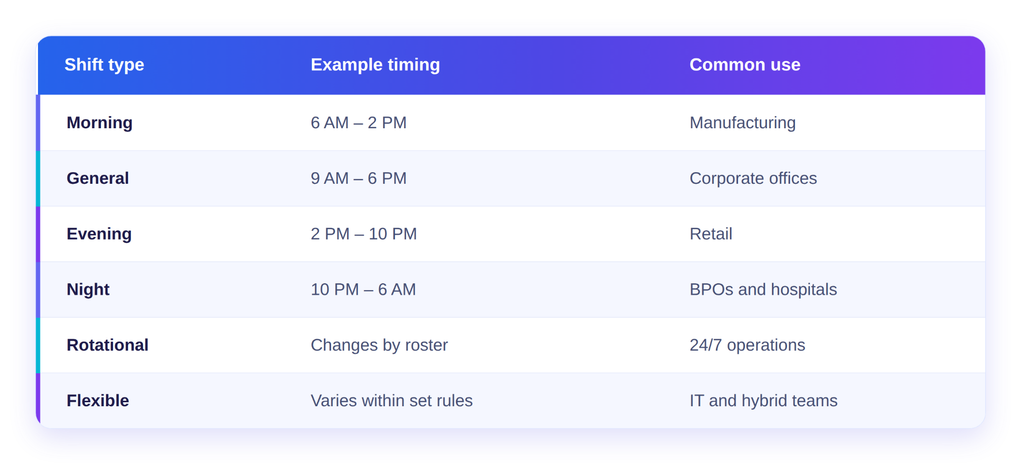
Timings are taken for illustration.
2. Assign Shifts to Employees
Assign employees individually or in bulk.
For example, a manufacturing company may assign:
- Morning shifts to production employees.
- General shifts to administrative employees.
- Rotational shifts to maintenance teams.
- Night shifts to security personnel.
Employees may view schedules through self-service in a simple manner.
3. Automate Shift Roster Management
A shift roster shows who works and when, as manual updates can cause conflicts when shifts change or employees take leave.
An HRMS can help managers create weekly or monthly rosters, assign employees, manage fixed or rotational schedules, configure weekly offs and review availability.
4. Manage Shift Changes and Employee Availability
An HRMS can manage shift requests, leave-related changes and additional staffing through an approval process:
Employee Request → Manager Review → Approval → Updated Shift → Attendance Record Update
Approved changes should update attendance records to prevent outdated shift timings. Managers can also check coverage gaps before confirming the revised roster.
5. Configure Night and Rotational Shifts Correctly
Night shifts often continue past midnight. For example, an employee may start at 10 PM on Monday and finish at 6 AM on Tuesday. The HRMS should record both punches under the same shift.
Businesses should configure:
- Shift start and end times.
- Breaks and weekly offs.
- Attendance and overtime rules.
- Night-shift allowances, where applicable.
Proper configuration helps maintain accurate attendance records and avoid payroll errors.
6. Connect Shift Scheduling Software with Attendance
Connecting scheduling with attendance lets the system compare punches with assigned shift timings. For example
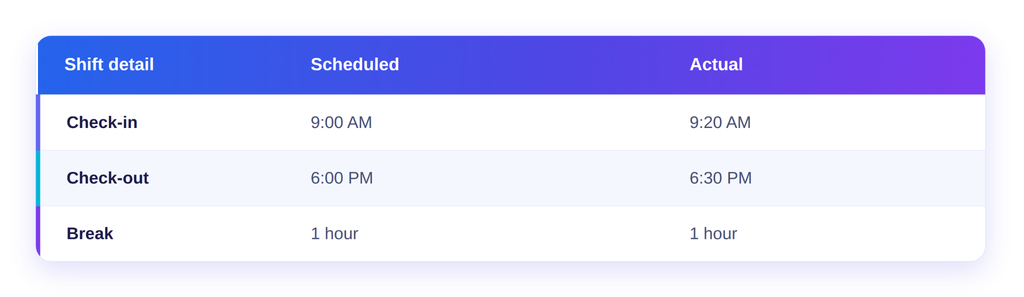
The system can flag late arrivals and extra working hours for managers to check before payroll.
How to Automate Payroll Processing Using Attendance Data?
Payroll processing uses employee salary structures, attendance, approved leave, overtime, allowances and deductions. When these records are managed separately, payroll teams spend time collecting and checking information.
Payroll automation uses verified employee and attendance data to calculate salaries according to configured rules. Let’s understand in depth as explained below:
1. Configure Employee Salary Structures
Start by setting up each employee’s salary structure in the payroll module. Common components include:
- Basic salary and House Rent Allowance (HRA).
- Conveyance and special allowances.
- Variable pay and incentives.
- Applicable employer and employee contributions.
The HRMS uses this structure as the basis for salary calculations.
2. Integrate Attendance Data with Payroll
An integrated HRMS transfers verified attendance information to payroll. This may include:
- Total working and present days.
- Approved paid leave and unpaid leave.
- Absence records and attendance adjustments.
- Approved overtime hours.
This reduces manual attendance summaries and repeated data entry before payroll processing.
3. Automate Loss of Pay Calculations
Loss of Pay (LOP) is a salary deduction for eligible unpaid absence, based on company policy and employment terms.
Example: Suppose an employee earns ₹30,000 per month. If the calculation uses 30 payable days and the employee takes two days of unpaid leave:
- Daily salary = ₹30,000 ÷ 30 = ₹1,000.
- LOP deduction = ₹1,000 × 2 = ₹2,000.
- Salary after LOP = ₹30,000 − ₹2,000 = ₹28,000.
This is just an example for understanding not actual methods may vary. Once rules are configured, the HRMS can calculate deductions using approved attendance data.
4. Automate Overtime Calculations
An integrated system can compare actual working hours with assigned shifts and identify additional hours for review. For example
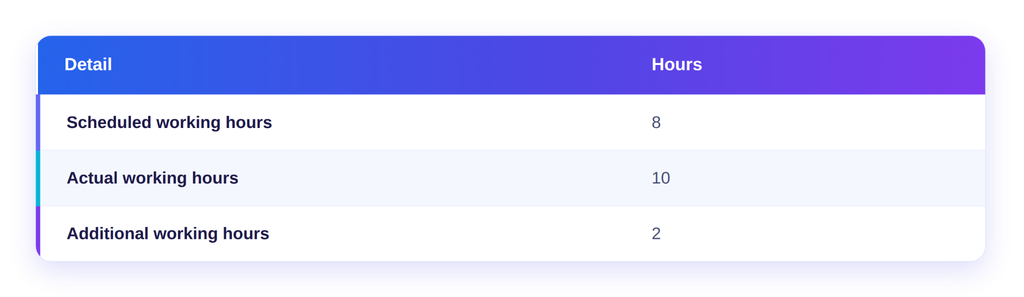
After manager approval, eligible overtime can be calculated using the configured rate. Businesses should follow applicable laws and company policies when setting overtime rules.
5. Calculate Deductions and Statutory Contributions
For Indian payroll, software may support calculations and reports for:
- Employees’ Provident Fund (EPF).
- Employees’ State Insurance (ESI).
- Professional Tax (PT), where applicable.
- Tax Deducted at Source (TDS).
- Labour Welfare Fund (LWF), where applicable.
Eligibility depends on employee details, establishment requirements and applicable state provisions, where HR teams should review configurations and verify payroll outputs before approval.
6. Generate Payslips and Payroll Reports
After payroll is checked and approved, the system can generate payslips showing employee details, salary period, earnings, allowances, deductions, approved overtime and net salary.
How Does Attendance and Payroll Software Connect All Three Processes?
The main advantage of an integrated HRMS is that attendance, shift scheduling and payroll do not operate as isolated activities, as each process shares relevant information with the next one.
Let’s see how the complete workflow works:
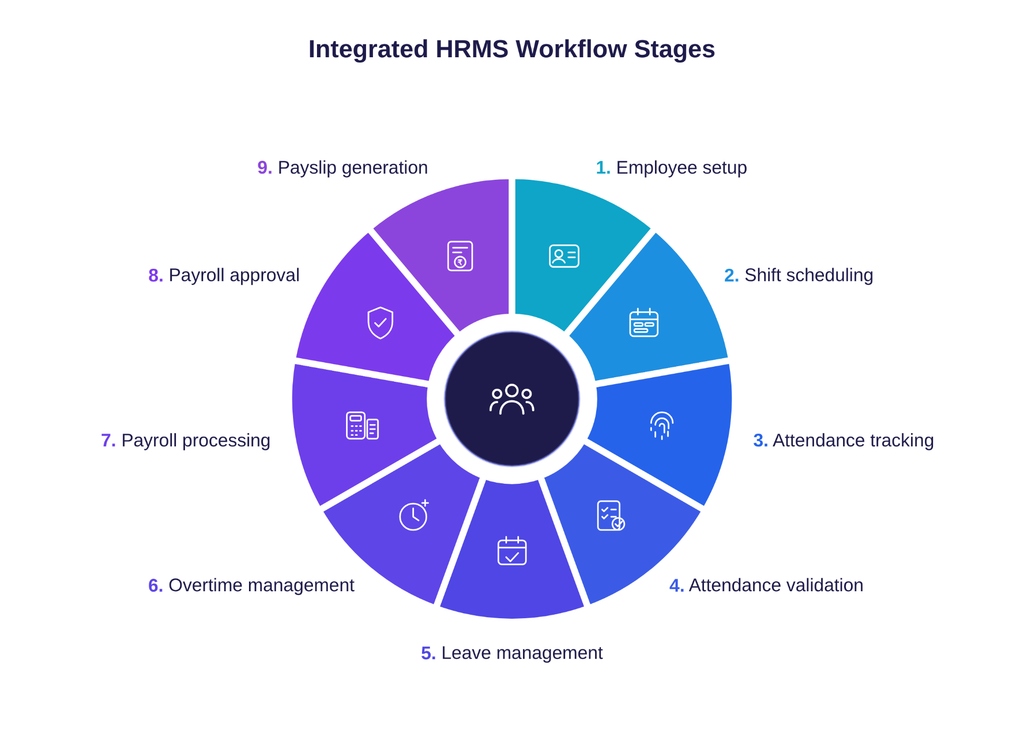
| Stage | HRMS activity | Information generated |
| 1. Employee setup | Employee profile creation | Employee ID, department and salary structure |
| 2. Shift scheduling | Assign shifts and rosters | Scheduled working hours and shift details |
| 3. Attendance tracking | Record check-ins and check-outs | Actual working hours |
| 4. Attendance validation | Apply attendance rules | Late marks, absences and payable days |
| 5. Leave management | Process leave applications | Approved paid and unpaid leave |
| 6. Overtime management | Calculate and approve additional hours | Eligible overtime |
| 7. Payroll processing | Calculate salary components | Earnings and deductions |
| 8. Payroll approval | Review and finalize salary | Approved payroll |
| 9. Payslip generation | Generate salary statements | Employee payslips |
The complete automation workflow:
Employee Setup → Shift Assignment → Attendance Tracking → Attendance Validation → Leave and Overtime Approval → Payroll Calculation → Payroll Approval → Payslip Generation
When these activities are connected, HR and payroll teams can work with consistent employee information rather than repeatedly transferring records between systems.
What Are the Benefits of Using Integrated Attendance and Payroll Software?
Integrated attendance and payroll software can improve HR operations by connecting employee time records with shift schedules and salary processing.
Some important benefits include:
1. Less Manual Administrative Work
Automated attendance capture, shift assignment and salary calculations reduce the need for repetitive spreadsheet updates.
HR teams can spend less time collecting records and more time reviewing exceptions and supporting employees.
2. Better Payroll Accuracy
Payroll calculations depend on accurate attendance, leave and overtime information.
When these records are connected, businesses can reduce errors caused by duplicate data entry and outdated spreadsheets.
3. Better Shift Planning
Managers can view employee schedules and assign shifts according to departmental requirements.
This helps businesses maintain better visibility into shift coverage and staffing availability.
4. Faster Payroll Preparation
Instead of collecting attendance records from different departments, payroll teams can access verified information through connected HRMS modules.
This can simplify monthly payroll preparation and reduce reconciliation work.
5. Improved Employee Transparency
Employees can view attendance records, assigned shifts, leave balances and payslips through self-service features, depending on the software.
This also helps reduce routine queries about attendance and salary information.
6. Centralized Workforce Reports
HRMS software can generate reports covering employee attendance, overtime, absenteeism, shift schedules and payroll information.
These reports help managers understand workforce patterns and identify areas that require attention.
What Features Should You Look for in Attendance and Payroll Software?
Choosing the right attendance and payroll software requires more than checking basic attendance tracking and salary calculations. Businesses should look for features that connect employee attendance, shift scheduling, leave management and payroll processing.
Let’s explore must-have features you should consider when selecting attendance software and payroll software, as explained below:
1. Employee Attendance Management
The software should support digital check-in and check-out through biometric devices, mobile apps or web portals.
Look for features such as fingerprint and face recognition, GPS tracking, geofencing and attendance correction workflows can help businesses record and manage employee working hours more effectively.
2. Shift Scheduling System and Roster Management
Businesses with multiple departments, locations or working schedules should look for software that supports fixed, flexible, rotational and night shifts.
It should also allow managers to assign shifts individually or in bulk, prepare weekly and monthly rosters, manage shift changes and maintain employee schedules across different locations.
3. Leave and Overtime Management
The software should connect leave records with attendance so approved leave is reflected correctly during payroll processing. It should also support online leave applications, approval workflows and leave balance calculations.
For overtime, businesses should check whether the system can track additional working hours, manage approvals and calculate eligible payments using configured rules.
4. Payroll Automation and Statutory Compliance
The payroll module should use verified attendance data to calculate salaries, so look for features that manage salary structures, earnings, allowances, deductions, Loss of Pay (LOP) and overtime payments.
For Indian businesses, the software should also support applicable statutory calculations and reports for EPF, ESI, Professional Tax and TDS, along with payslip generation.
5. Reports, Analytics and System Integrations
Reporting features help HR teams monitor attendance, payroll, overtime and shift-related information. Check whether the software provides department-wise and location-wise reports and allows data exports.
It should also support integration with biometric devices, ERP systems and other business applications used by the organization.
Before selecting a solution, check whether it can handle your workforce size, employee categories, multiple locations and changing operational requirements. The right software should connect attendance, shift scheduling and payroll without creating separate manual processes.
Conclusion
Overall, automating employee attendance, shift scheduling and payroll requires more than replacing manual registers with digital tools. Businesses need connected HR processes that allow attendance records, shift schedules, leave approvals and overtime information to work together.
An integrated HRMS makes this possible by connecting employee time tracking with payroll processing through a centralized platform.
By choosing suitable attendance methods, configuring shift policies, automating approvals and validating payroll calculations, businesses can reduce repetitive HR work and maintain more consistent employee records.
For organizations looking to streamline these activities, Attendance and Payroll Software integrated with an HRMS can provide a structured way to manage workforce operations as the business grows.











Looking for a Smarter Way to Manage Employee Attendance and Shifts?
Get a Free Demo
Frequently Asked Questions
1. How does HRMS software automate employee attendance?
HRMS software automates employee attendance by recording check-ins and check-outs through biometric devices, mobile applications, face recognition or web portals. It calculates working hours, tracks absences, identifies attendance exceptions and maintains digital records that can be used during payroll processing.
2. Can HRMS software automate employee shift scheduling?
Yes. HRMS software can help businesses create fixed, rotational, flexible and night shifts. Managers can assign shifts individually or in bulk, prepare employee rosters and update schedules according to operational requirements.
3. How does attendance data integrate with payroll?
Attendance data is used as an input for payroll calculations. The system can transfer verified working hours, payable days, approved leave, absences and overtime information to the payroll module. Payroll then uses this information with configured salary structures and deduction rules to calculate employee salaries.
4. What is the difference between attendance software and payroll software?
Attendance software focuses on recording employee working hours, check-ins, check-outs, shifts, absences and overtime, while Payroll software focuses on calculating salaries, allowances, deductions, taxes and payslips.
5. Can attendance and payroll software manage night shifts?
Yes. Software with night-shift management can handle schedules that cross midnight, calculate working hours and identify overtime according to configured policies. Businesses should verify how the system handles overnight attendance records and the applicable payroll period.
6. How does payroll automation reduce manual work?
Payroll automation reduces manual work by using employee records, salary structures, attendance, leave and approved overtime information for salary calculations. It can also generate payroll reports and payslips, reducing repetitive data entry and manual calculations.