




The full form of YTD is Year to Date. It refers to the period that starts from the beginning of the current calendar year or fiscal year and continues up to the present date.
In payroll, finance, and accounting, YTD is commonly used to track cumulative figures such as salary, gross pay, net earnings, tax payments, bonuses, deductions, and other financial records. Instead of showing only a single month’s data, YTD gives you a complete picture of everything earned or deducted since the beginning of the year.
For employees, YTD helps understand total income and deductions. For employers, it simplifies Payroll Calculations, tax reporting, compliance, and employee record management.
For example, if the current month is September, your YTD salary represents the total salary you have received from January through September (or from the beginning of your company’s fiscal year).
What Does YTD Mean in Salary?
When you look at your salary slip, you may notice a column labeled YTD. This section shows the cumulative value of different salary components from the start of the year until the current payroll period.
Unlike monthly salary figures, YTD updates every month as new payroll is processed.
1. Gross Pay
Gross pay is the total salary an employee earns before taxes and other deductions are subtracted. It includes the basic salary, allowances, overtime, bonuses, incentives, and other earnings.
For example, if your monthly gross income is ₹60,000, your YTD gross pay after six months would be ₹3,60,000.
2. Net Pay
Net pay refers to the amount credited to your bank account after all deductions have been applied.
The YTD net pay shows the total amount you have actually received throughout the year.
3. Tax Deductions and TDS
The YTD section also displays cumulative deductions such as TDS, Professional Tax, Provident Fund (PF), Employee State Insurance (ESI), and other statutory deductions.
Employees often use this information while filing income tax returns because it reflects the taxes already deducted during the year.
4. Employee Benefits
Many organizations also include cumulative contributions toward retirement funds, insurance premiums, gratuity, leave encashment, or other employee benefits in the YTD section.
This allows employees to monitor their total compensation package throughout the year.
How Is YTD Calculated?
Calculating Year to Date is quite simple. You just add together all the values from the beginning of the year until the current payroll period.
Basic Formula
YTD = Sum of all values from the beginning of the year to the current date
For salary calculations:
YTD Gross Salary = Monthly Gross Salary × Number of Months Worked
YTD Net Salary = Monthly Net Salary × Number of Salary Payments Received
Example of YTD Salary Calculation
Suppose an employee receives the following monthly salary:
- Basic Salary: ₹35,000
- HRA: ₹15,000
- Other Allowances: ₹10,000
Gross Pay = ₹60,000
Monthly deductions:
- PF: ₹2,500
- TDS: ₹2,000
- Professional Tax: ₹200
Total deductions = ₹4,700
Net Pay = ₹55,300
After six months:
| Component | Monthly | YTD (6 Months) |
| Gross Pay | ₹60,000 | ₹3,60,000 |
| PF | ₹2,500 | ₹15,000 |
| TDS | ₹2,000 | ₹12,000 |
| Professional Tax | ₹200 | ₹1,200 |
| Net Pay | ₹55,300 | ₹3,31,800 |
This cumulative information helps employees understand their yearly financial position without manually adding each month’s payslip.
Calendar Year vs Fiscal Year
One important thing to remember is that YTD may be calculated using either the calendar year or the fiscal year, depending on the organization.
- Calendar Year: January 1 to December 31
- Fiscal Year (India): April 1 to March 31
Most Indian payroll systems follow the fiscal year because income tax calculations are based on it.
Where Can You Find YTD on a Payslip?
Almost every modern payroll system displays YTD values directly on the salary slip.
1. Earnings Section
The earnings section usually includes:
- Basic Salary
- House Rent Allowance
- Special Allowance
- Incentives
- Bonuses
Along with the monthly amount, you’ll often find a YTD column showing cumulative earnings.
2. Deductions Section
This section generally includes:
- Provident Fund
- Professional Tax
- TDS
- Loan Recovery
- Other deductions
The YTD figures help employees see the total deductions made during the year.
3. Employer Contributions
Some payslips also display employer contributions toward PF, insurance, gratuity, or pension schemes in the YTD section.
This provides a better understanding of the total employment cost beyond take-home salary.
4. Net Salary Summary
Many payroll systems conclude the payslip with the total YTD net salary, making it easy for employees to review annual earnings at a glance.
Why Is YTD Important in Payroll?
YTD plays an essential role in payroll management because it helps both employers and employees track cumulative salary information accurately.
1. Improves Payroll Accuracy
Maintaining YTD records reduces calculation errors since payroll software continuously updates cumulative values after every salary cycle.
This ensures employees receive accurate salaries while minimizing manual corrections.
2. Simplifies Tax Compliance
Accurate YTD records make it easier to calculate annual tax liabilities, manage TDS, and generate statutory reports.
Payroll teams can quickly prepare year-end tax documents without compiling data manually.
3. Helps Employees Monitor Income
Employees can easily compare monthly earnings with yearly totals to understand income growth, bonuses, deductions, and take-home salary.
This is especially useful during tax planning and financial budgeting.
4. Supports Better Financial Reporting
Finance teams rely on YTD reports for financial performance analysis, budgeting, forecasting, and preparing annual reports.
These reports provide a clear picture of payroll expenses over time.
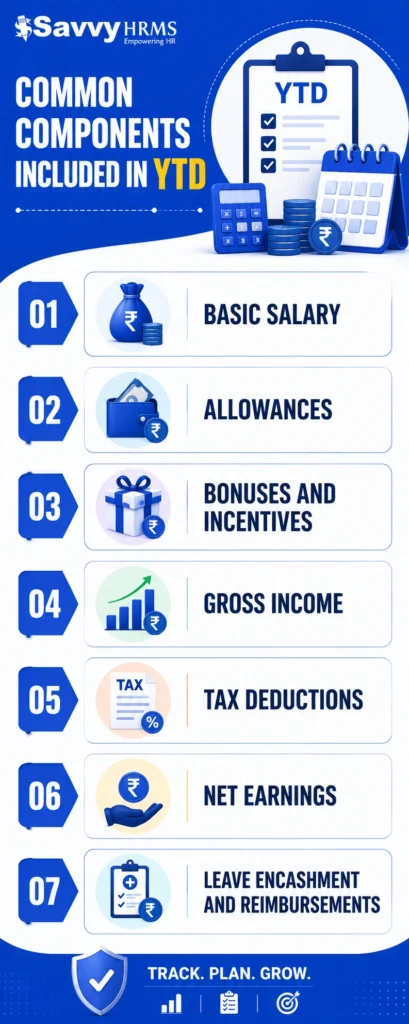
Common Components Included in YTD
The exact YTD components vary across organizations, but most payroll systems include the following information.
1. Basic Salary
The cumulative total of the employee’s basic salary paid during the current year.
2. Allowances
This includes HRA, travel allowance, special allowance, medical allowance, and other salary components accumulated throughout the year.
3. Bonuses and Incentives
Performance bonuses, sales incentives, annual rewards, and one-time payments are also reflected in the YTD figures.
4. Gross Income
The YTD gross income represents the total earnings before deductions from the beginning of the year.
5. Tax Deductions
Cumulative deductions like TDS, Professional Tax, PF, and ESI are shown separately for better tax planning.
6. Net Earnings
YTD net earnings indicate the total amount actually credited to the employee after all deductions.
7. Leave Encashment and Reimbursements
Many organizations also include reimbursements, leave encashment, and other additional payments in their YTD records.
Advantages of Using YTD Metrics
Year-to-Date metrics offer several benefits beyond payroll management. Businesses, finance professionals, and employees use YTD data for better decision-making.
1. Better Financial Planning
Employees can estimate annual income, savings, taxes, and investment opportunities using cumulative salary information.
This makes budgeting much easier.
2. Improved Payroll Management
Payroll professionals can quickly verify cumulative salary records, identify discrepancies, and process corrections before year-end.
3. Easier Investment Analysis
Investors commonly use YTD to compare the performance of stocks, mutual funds, and portfolios from the beginning of the year.
This supports informed Investment Analysis.
4. Performance Tracking
Businesses use YTD reports for Performance Tracking by comparing employee productivity, departmental expenses, and organizational growth throughout the year.
5. KPI Measurement
Organizations monitor important KPIs such as revenue growth, payroll expenses, employee cost, and profitability using YTD reports.
These metrics help management evaluate business performance more effectively.
6. Supports Accounting Processes
In accounting, YTD simplifies reconciliations, financial statements, audits, and budgeting because cumulative records are already maintained.
7. Better Software Integration
Modern payroll software and accounting solutions like TallyPrime integrate YTD calculations automatically, reducing manual effort and improving reporting accuracy.
What Are the Limitations of YTD?
Although YTD is highly useful, it also has certain limitations that should be considered while analyzing financial or payroll data.
1. It Covers Only the Current Year
YTD only includes information from the current calendar or fiscal year.
It cannot be used to compare long-term trends without historical data.
2. Seasonal Variations Can Affect Results
Businesses with seasonal revenue may show misleading YTD performance because sales fluctuate during different parts of the year.
Comparing only YTD figures may not provide the complete picture.
3. Doesn’t Predict Future Performance
YTD represents historical performance only.
It should not be used alone for forecasting future revenue, salary growth, or investment returns.
4. One-Time Payments Can Distort Data
Large bonuses, incentives, or exceptional expenses can temporarily inflate YTD figures, making comparisons less meaningful.
5. Different Year Definitions
Some organizations use the calendar year while others follow the fiscal year.
Without knowing which period is being used, interpreting YTD reports can become confusing.
Conclusion
Understanding the full form of YTD and how it works can help both employees and employers make better financial decisions. Whether you’re reviewing your salary slip, checking tax deductions, or analyzing annual earnings, YTD provides a clear snapshot of your cumulative financial records.
For HR and payroll teams, accurate YTD calculations are essential for maintaining compliance, processing salaries efficiently, and generating reliable reports. Automating these calculations also reduces manual work and minimizes payroll errors.
If you’re looking for a smarter way to manage payroll, attendance, compliance, and employee records, Savvy HRMS offers an all-in-one HR and payroll solution. With automated payroll processing, real-time YTD reporting, statutory compliance, and seamless integrations, Savvy HRMS helps businesses streamline payroll operations with confidence.











Ready to simplify your payroll process?
Book a free demo with Savvy HRMS today and experience faster, more accurate payroll management for your organization.
FAQs
1. Is YTD the same as yearly salary?
No. YTD refers to the cumulative salary earned from the beginning of the current calendar or fiscal year until the current date, whereas yearly salary usually represents the expected salary for the entire year.
2. Why is YTD shown on a payslip?
YTD helps employees track cumulative earnings, deductions, taxes, and net salary throughout the year. It also simplifies tax filing and financial planning.
3. How is YTD different from monthly salary?
Monthly salary shows earnings for a single payroll period, while YTD displays the total accumulated earnings and deductions since the start of the year.
4. Does YTD include tax deductions?
Yes. Most payroll systems include cumulative tax deductions such as TDS, Provident Fund, Professional Tax, and other statutory deductions in the YTD section.
5. Is YTD based on the calendar year or fiscal year?
It depends on the organization. Many Indian companies use the fiscal year (April to March), while some organizations follow the calendar year (January to December).
6. Can YTD be used for investment analysis?
Yes. Investors often use YTD to measure the performance of stocks, mutual funds, and portfolios from the beginning of the year until the current date.
7. How does payroll software calculate YTD automatically?
Modern payroll software continuously adds each month’s earnings, deductions, bonuses, and taxes to cumulative records. This ensures accurate Payroll Calculations without requiring manual updates.