

Pay Stub: Meaning, Components, Format and Pay Slip Download Guide (2027)



-
AuthorSalilendra Kumar
-
 Last Updated
November 27, 2026
-
 Reading Time
15 Mins
Every month, employees receive their salary for the work they do. But do you know how your salary is calculated or why the amount credited to your bank account may be different from your total earnings?
A pay stub helps explain this. It is a document that shows an employee’s salary details, including earnings, allowances, deductions and the final amount received.
In India, a pay stub is commonly called a salary slip or payslip. It helps employees check their salary, understand deductions and keep a record of their monthly income.
Whether you are an employee checking your salary or an HR professional handling payroll, understanding a pay stub can help you keep track of salary payments.
TL;DR
- A pay stub shows an employee’s salary details for a particular month or pay period.
- It includes basic salary, allowances, total earnings and deductions.
- Employees use pay stubs to check their salary and provide proof of income when needed.
- Employees can download their pay slips through an HRMS portal or request them from HR.
- Payroll software helps companies calculate salaries and generate pay slips.
What Is a Pay Stub?
A pay stub is a document that shows how much an employee has earned during a particular pay period and what deductions have been made from their salary.
In India, it is commonly known as a salary slip or payslip.
For example, an employee may have a gross monthly salary of ₹50,000. Their pay stub shows how this amount is divided into different salary components, what deductions are made and how much they receive in their bank account.
A pay stub usually includes:
- Employee name and ID.
- Company name and details.
- Salary month and payment date.
- Basic salary and allowances.
- Gross salary.
- PF and other applicable deductions.
- Tax deductions.
- Net salary or take-home pay.
In simple terms, a pay stub helps employees understand how their salary is calculated and how much they receive each month.
Is a Pay Stub the Same as a Salary Slip?
Yes, a pay stub and a salary slip generally mean the same thing. Both show an employee’s salary details, including earnings and deductions for a particular pay period.
The main difference is the term used. Pay stub is commonly used in the United States, while salary slip or payslip is more commonly used in India.
| Term | Meaning |
| Pay stub | Shows an employee’s earnings and salary deductions |
| Payslip | Provides a breakdown of an employee’s salary |
| Salary slip | Commonly used in India for a monthly salary statement |
| Wage slip | Shows wages earned and deductions made |
Regardless of the name, all these documents help employees understand their salary and keep track of their payments.
What Are the Different Components of a Pay Stub?
A pay stub shows how an employee’s salary is divided into different components and what deductions are made before the final amount is paid. The details may vary depending on the company’s salary structure, employee category and applicable rules.
Most Indian salary slips include the following components:
1. Employee and Employer Details
This section contains basic information about the employee and the company issuing the salary slip.
It usually includes:
- Employee name and ID.
- Designation and department.
- Company name and address.
- PAN or other identification details, where required.
- Salary month or pay period.
These details help to identify whose salary slip it is and which month it belongs to.
2. Basic Salary
Basic salary is the fixed part of an employee’s salary. It forms an important part of the salary structure and is used in calculating certain other salary components and statutory contributions.
For example, if an employee receives a monthly basic salary of ₹25,000, this amount is shown separately on the salary slip.
3. House Rent Allowance (HRA)
House Rent Allowance (HRA) is provided by employers to help employees meet their rental expenses.
It is usually shown separately on the salary slip. Eligible employees may also claim an HRA tax exemption, depending on their salary, rent paid and applicable income tax rules.
4. Dearness Allowance (DA)
Dearness Allowance (DA) is paid to help employees manage rising living costs due to inflation.
It is commonly included in government and some other salary structures. Its availability and amount depend on the employer’s compensation policy.
5. Special Allowance
A special allowance is an additional amount included in an employee’s salary package. Employers use it as part of their salary structure to make up the total compensation.
The amount and tax treatment depend on how the allowance is structured and the applicable tax rules.
6. Other Allowances
Employees may receive additional allowances depending on their job role and company policy.
Some common examples include:
- Transport Allowance: Helps cover travel expenses.
- Medical Allowance or Reimbursement: Covers eligible medical expenses, depending on company policy.
- Leave Travel Allowance (LTA): Helps cover eligible travel expenses, subject to applicable tax rules.
- Internet Allowance: Helps to cover internet expenses.
- Performance Allowance: May be provided based on employee performance.
- Shift Allowance: May be paid to employees working in specific shifts.
These allowances may differ from one employee to another based on their salary structure.
7. Gross Salary
Gross salary is the total earnings an employee receives before deductions are made. It generally includes basic salary, HRA and other applicable allowances.
For example:
- Basic Salary: ₹25,000
- HRA: ₹12,500
- Special Allowance: ₹8,500
Gross Salary = ₹25,000 + ₹12,500 + ₹8,500 = ₹46,000
This means the employee earns ₹46,000 before applicable deductions.
8. Provident Fund (PF)
Provident Fund (PF) is a retirement savings scheme under which eligible employees and employers contribute towards the employee’s PF account.
The employee’s PF contribution is generally deducted from their salary and shown on the pay stub. The employer’s contribution is usually displayed separately.
9. Employees’ State Insurance (ESI)
Employees’ State Insurance (ESI) is a social security scheme that provides eligible employees with benefits such as medical care and financial support under specified conditions.
For employees covered under ESI, a portion of their wages is deducted as an employee contribution. The employer also makes a separate contribution.
10. Professional Tax (PT)
Professional Tax is a tax charged by certain state governments on eligible individuals earning income through employment or professions.
The amount depends on the state in which the employee works and the applicable tax slabs. Not all Indian states levy professional tax.
11. Tax Deducted at Source (TDS)
Tax Deducted at Source (TDS) is the income tax deducted by an employer from an employee’s salary, where applicable.
The amount depends on the employee’s taxable income, selected tax regime, eligible deductions and other relevant tax details.
12. Net Salary or Take-Home Salary
Net salary is the amount an employee receives after applicable deductions are subtracted from their gross earnings.
It is also called take-home salary because it is generally the amount credited to the employee’s bank account.
The calculation is:
Net Salary = Gross Earnings − Total Deductions
For example, if an employee’s gross salary is ₹46,000 and total deductions are ₹4,000, their net salary will be ₹42,000.
Understanding these components helps employees check their salary details and know how much they will receive each month.
What Does a Pay Stub Look Like? (Pay Stub Format)
A pay stub generally follows a structured format that separates employee details, earnings and deductions. Although the design may differ between organizations, the information included is usually similar.
A typical Indian salary slip format may look like this:
| Employee information | Details |
| Employee Name | Rahul Sharma |
| Employee ID | EMP1025 |
| Designation | Software Developer |
| Department | IT |
| Pay Period | January 2027 |
| Payment Date | 31 January 2027 |
Earnings
| Salary component | Amount |
| Basic Salary | ₹25,000 |
| HRA | ₹12,500 |
| Special Allowance | ₹8,500 |
| Gross Earnings | ₹46,000 |
Deductions
| Deduction | Amount |
| Employee PF | ₹3,000 |
| Professional Tax | ₹200 |
| TDS | ₹800 |
| Total Deductions | ₹4,000 |
| Salary summary | Amount |
| Gross Earnings | ₹46,000 |
| Total Deductions | ₹4,000 |
| Net Salary | ₹42,000 |
Note: This is an illustrative pay stub format. The salary components and deductions are hypothetical and will differ based on the employee’s salary structure and applicable rules.
A well-organised salary slip makes it easier for employees to understand their monthly earnings and verify the amount credited to their bank accounts.
How to Read a Pay Stub?
Reading a pay stub helps employees to understand their salary and check whether the earnings and deductions are correct. You can do this by checking your personal details, salary components, deductions and final take-home salary.
Follow these simple steps to read your pay stub:
Step 1: Check your employee details
Start by checking your name, employee ID, department, designation and salary month. Make sure all the details are correct.
Step 2: Check your earnings
Look at your basic salary, HRA, special allowance and other earnings. These details show how your gross salary is calculated.
Step 3: Review your deductions
Check deductions such as PF, ESI (if applicable), professional tax and TDS. Make sure the amounts match the applicable deductions in your salary structure.
Step 4: Check other deductions
Look for any additional deductions, such as loan repayments, salary advances or unpaid leave adjustments. If you find an amount you don’t recognise, ask your HR or payroll team about it.
Step 5: Verify your take-home salary
Finally, check the net salary mentioned on your pay stub and compare it with the amount credited to your bank account. If the amounts do not match, contact your payroll team for clarification.
Checking your pay stub every month helps you understand your salary and spot any errors before they become recurring issues.
How to Calculate Net Salary from a Pay Stub?
Net salary is calculated by subtracting applicable deductions from an employee’s gross earnings. The final amount represents the salary payable to the employee after considering the relevant deductions.
The formula is:
Net Salary = Gross Earnings − Total Deductions
For example, consider an employee whose monthly salary details are as follows:
| Particulars | Amount |
| Basic Salary | ₹25,000 |
| HRA | ₹12,500 |
| Special Allowance | ₹8,500 |
| Gross Salary | ₹46,000 |
| Employee PF | ₹3,000 |
| Professional Tax | ₹200 |
| TDS | ₹800 |
| Total Deductions | ₹4,000 |
| Net Salary | ₹42,000 |
In this example, the employee’s gross salary is ₹46,000 and total deductions are ₹4,000. Therefore, the employee receives ₹42,000 as net salary.
Actual salary calculations may differ based on the employee’s compensation structure, attendance, applicable statutory contributions, tax liability and other deductions.
Why Is a Pay Stub Important?
A pay stub helps employees to understand their salary, check deductions and keep a record of their monthly earnings. It also helps employers maintain clear salary records and manage payroll more effectively.
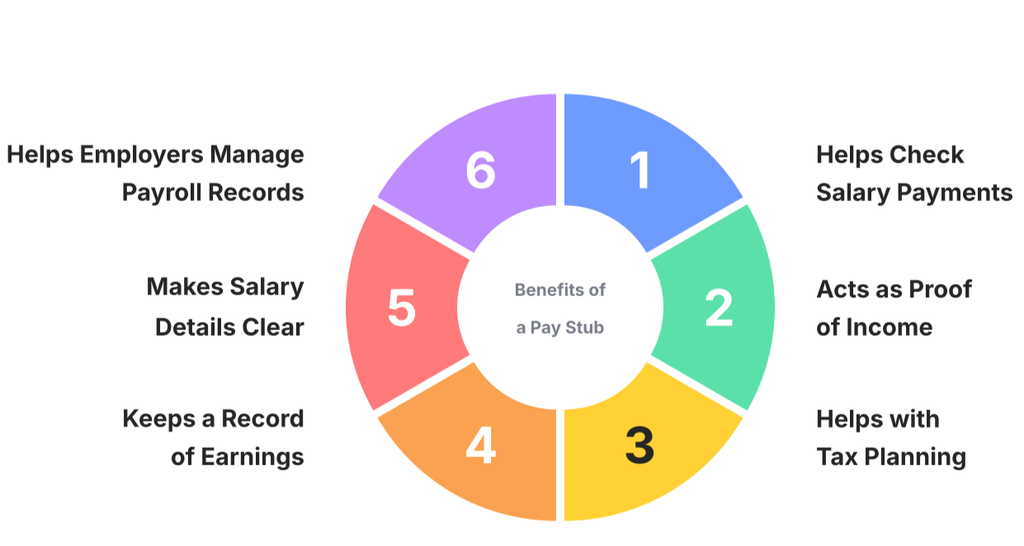
Here are some of the main benefits of a pay stub:
1. Helps Check Salary Payments
Employees can check the earnings and deductions mentioned on their pay stubs and compare the final amount with their bank credit. This helps them identify any mistakes or unexpected deductions.
2. Acts as Proof of Income
A pay stub can be used as supporting proof of income when applying for a home loan, personal loan, credit card or rental accommodation.
Banks and financial institutions may ask for recent salary slips to check an applicant’s monthly income and repayment capacity.
3. Helps with Tax Planning
A salary slip shows the earnings and TDS deducted from an employee’s salary. Employees can use this information to track their tax deductions and review their salary details while planning their taxes.
4. Keeps a Record of Earnings
Employees can save their monthly pay stubs to maintain a record of their salary. These documents can be useful when applying for loans, changing jobs or verifying previous employment income.
5. Makes Salary Details Clear
A pay stub shows how an employee’s salary is divided into different components and what deductions are made. This helps employees understand their take-home salary and avoid confusion about their payments.
6. Helps Employers Manage Payroll Records
Employers can use pay stubs to maintain employee salary records and check payroll calculations. These records can also help during payroll reviews, internal audits and compliance checks.
Overall, pay stubs make salary information easier to understand for employees and help employers maintain organised payroll records.
How to Download Pay Slips Online?
Employees can generally download pay slips online through their company’s HRMS portal or employee self-service system. The exact process depends on the payroll software used by the organization.
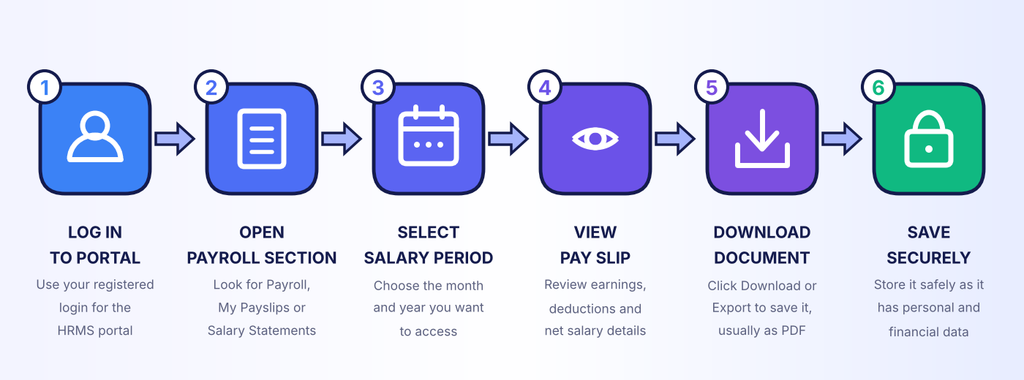
Here is a common process for downloading pay slips:
Step 1: Log in to the employee portal
Visit your company’s HRMS or employee self-service portal using your registered login credentials.
Step 2: Open the payroll section
Look for options such as Payroll, Salary Details, My Payslips or Salary Statements.
Step 3: Select the salary period
Choose the month and year for which you want to access your salary slip.
Step 4: View your pay slip
Open the selected salary slip and review the earnings, deductions and net salary details.
Step 5: Download the document
Click the Download or Export option to save your pay slip, usually in PDF format.
Step 6: Save it securely
Store the downloaded document in a secure location because it contains personal and financial information.
If your organization does not provide an online employee portal, you can request a copy of your salary slip from the HR or payroll department.
Is an Employer Required to Provide a Salary Slip in India?
Employers must follow applicable wage payment, wage record and employment documentation requirements. The specific requirements depend on the employee’s category, establishment and applicable labour laws.
Under India’s wage-related legal framework, employers have obligations concerning wage records and documentation. The Code on Wages, 2019, and the applicable rules provide for wage-related records and payslip requirements for covered establishments and employees.
Employees should check their organization’s salary documentation policy and the applicable rules for their employment category.
Providing a clear salary slip is also a good payroll practice because it helps employees understand their earnings and deductions and allows employers to maintain transparent payroll records.
What Is the Difference Between a Pay Stub and Form 16?
A pay stub and Form 16 are both salary-related documents, but they serve different purposes. A pay stub provides a periodic breakdown of salary earnings and deductions, while Form 16 is a tax certificate issued by an employer to an eligible salaried employee showing salary income and tax deducted at source.
Here are the key differences:
| Basis | Pay Stub | Form 16 |
| Purpose | Shows salary earnings and deductions | Provides details of salary income and TDS |
| Issued by | Employer | Employer |
| Frequency | Generally monthly | Generally annually |
| Information | Basic salary, allowances, deductions and net salary | Salary details, exemptions, deductions and TDS information |
| Main use | Salary verification and income records | Income tax return filing and tax verification |
Both documents are useful for maintaining salary and tax records, but they should not be treated as substitutes for each other.
What Should You Do If Your Pay Stub Contains Errors?
If your pay stub contains incorrect salary details or deductions, contact your HR or payroll department as soon as possible. Reviewing the document and reporting discrepancies can help prevent repeated payroll errors.
Some common pay stub errors include:
- Incorrect basic salary or allowance amounts.
- Wrong attendance or leave deductions.
- Incorrect PF or ESI contributions.
- Unexpected professional tax deductions.
- Incorrect TDS calculations.
- Missing incentives or overtime payments.
- Differences between net salary and the bank credit.
To resolve an issue, compare your salary slip with your employment agreement, attendance records and previous salary statements. Share the discrepancy with the payroll team and request a corrected salary statement if required.
Keeping copies of previous salary slips can also help you identify recurring errors and verify changes in your salary structure.
How Does Payroll Software Help Generate Pay Stubs?
Payroll software helps organizations to manage employee salary calculations and generate pay stubs with greater consistency. Instead of preparing every salary statement manually, HR teams can use payroll systems to process earnings, deductions and other payroll information in a structured manner.
Here is how payroll software can simplify the process:
- Automated salary calculations: Calculates employee earnings based on configured salary structures and payroll inputs.
- Deduction management: Helps manage applicable PF, ESI, professional tax and TDS calculations.
- Attendance integration: Uses relevant attendance, leave and overtime information during payroll processing.
- Payslip generation: Generates individual employee salary slips after payroll processing.
- Employee self-service: Allows employees to access their salary information through an online portal, depending on the system’s capabilities.
- Payroll record management: Helps HR teams maintain employee salary and payroll records.
Frequently Asked Questions (FAQs)
1. What is the purpose of a pay stub?
A pay stub provides a breakdown of an employee’s salary for a specific pay period. It shows earnings, allowances, deductions and net salary, helping employees verify their payments and maintain income records.
2. Is a pay stub the same as a payslip?
Yes. A pay stub and payslip generally refer to the same document. Both show an employee’s earnings, deductions and final salary for a particular pay period. In India, salary slip and payslip are more commonly used terms.
3. What information is included in a pay stub?
A pay stub generally includes employee details, employer information, pay period, basic salary, allowances, gross earnings, statutory deductions, other deductions and net salary.
4. How can I download my pay stub online?
You can generally download your pay stub by logging in to your company’s HRMS or employee self-service portal. Navigate to the payroll or payslip section, select the required month and download the salary slip.
5. Can a pay stub be used as proof of income?
Yes. A pay stub can serve as supporting proof of income when applying for loans, credit cards or rental accommodation. However, the institution requesting the document may also ask for bank statements or other income-related records.
6. What is the difference between gross salary and net salary?
Gross salary is the total earnings an employee receives before applicable deductions. Net salary is the amount remaining after deductions such as employee PF, professional tax and TDS are subtracted from gross earnings.
7. What should I do if my salary slip has incorrect deductions?
Contact your HR or payroll department and explain the discrepancy. Share supporting documents such as previous salary slips, attendance records or relevant salary details so the payroll team can review and correct the issue if required.
8. How long should employees keep their pay stubs?
Employees should retain their salary slips for as long as they may be needed for income verification, tax records, loan applications or employment-related documentation. Keeping digital copies of monthly salary slips is a useful practice.