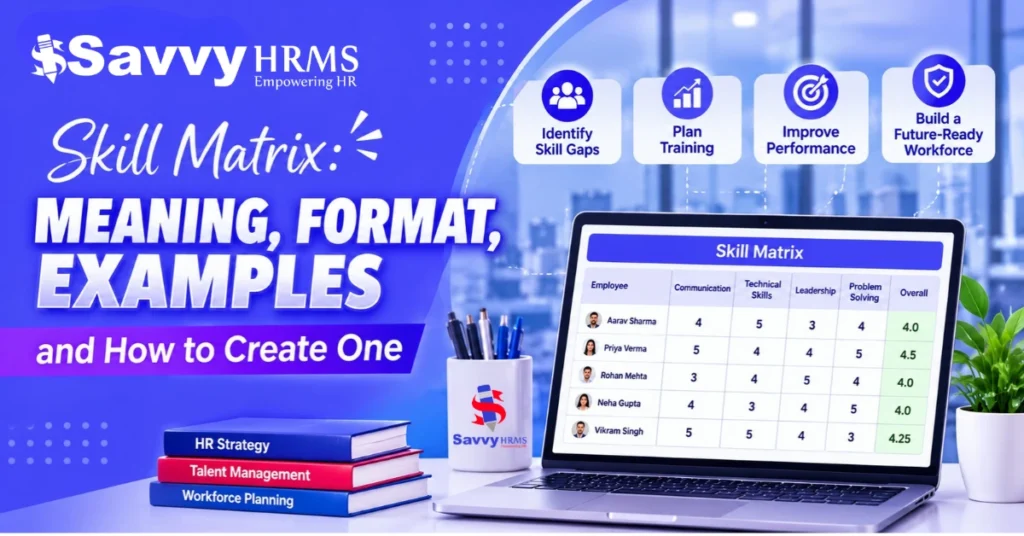
Skill Matrix: Meaning, Format, Examples and How to Create One


-
AuthorRaghvendra Bhardwaj
-
 Last Updated
November 03, 2026
-
 Reading Time
15 Mins
TL;DR
A skill matrix is a simple way to record employee skills and their proficiency levels. It helps organizations understand their team’s capabilities, find skill gaps and plan employee development. Here are the key things a skill matrix helps organizations do:
- List the technical, functional and soft skills needed for each role or project.
- Assess employee skills using a consistent rating scale.
- Compare current skills with role requirements to identify skill gaps.
- Plan training for employees who need additional learning or support.
- Assign work based on employee skills and project requirements.
- Review the matrix regularly as employees develop new skills or job requirements change.
Employees bring different skills and experience to the workplace. However, managers may not always know who has the skills needed for a task, where the team is lacking certain skills or who needs additional training.
A skill matrix brings this information together in one place. It shows the skills employees have and their proficiency levels. This helps HR teams and managers understand their workforce better and make informed decisions about task allocation, employee development and workforce planning.
In this guide, we’ll explain the meaning of a skill matrix, its importance, different types and the key elements of a useful skill matrix format. You’ll also learn how to create one in Excel, explore practical examples and download a free Excel template to get started.
What Is a Skill Matrix?
A skill matrix is a table that shows the skills employees have and how well they can use them in their roles. It helps Core HR teams and managers understand the skills available across an employee, team, department or the entire organization.
In simple terms, a skill matrix answers three key questions:
- What skills are needed? The technical, functional and soft skills required for a role or project.
- Who has these skills? The employees who have the required knowledge or abilities.
- How well can they use these skills? Whether they have basic knowledge, can work independently or can guide others.
A skill matrix is not just a list of employee qualifications. It also shows each employee’s skill level and helps managers identify skill gaps, assign work, plan training and support employee engagement and development.
Why Is a Skill Matrix Important for Organizations?
A skill matrix helps organizations understand employee capabilities, identify missing skills and make better workforce decisions. Some key benefits include:
1. Identifies Employee Skill Gaps
It helps managers compare employees’ current skills with role requirements. For example, if only one marketing employee has advanced data analysis skills, the team can plan training for others.
2. Improves Workforce Planning
Managers can review existing skills and determine whether employees can handle upcoming projects or new responsibilities. This also helps identify when additional hiring is needed.
3. Supports Employee Training and Development
A skill matrix highlights individual learning needs. For example, an employee with basic payroll knowledge may need practical training to manage complex salary processing independently.
4. Helps Allocate Tasks Effectively
Managers can assign responsibilities based on employee capabilities rather than availability alone. This helps match the right skills with project requirements.
5. Identifies Internal Talent
It helps uncover skills employees may not use in their current roles. For instance, a customer support employee with strong analytical skills may be suitable for an internal business analyst opportunity.
Recognizing employee strengths and providing opportunities to develop new skills can also support workplace engagement. Organizations can explore employee engagement software to understand how technology can help improve employee engagement.
6. Supports Succession Planning
Organizations can identify employees who may be ready for future leadership roles and assess where they need development. This helps prepare potential successors through mentoring and training.
How Is a Skill Matrix Different from a Competency Matrix?
A skill matrix and a competency matrix are closely related, but they focus on different aspects of an employee’s abilities.
A skill matrix focuses on specific skills an employee can perform, while a competency matrix looks at a wider set of abilities, including skills, knowledge and workplace behaviour.
| Comparison | Skill Matrix | Competency Matrix |
| Main focus | Specific job-related skills | Overall role-related abilities |
| What it assesses | What an employee can do | How an employee uses skills and behaves at work |
| Examples | Excel, payroll processing, data analysis | Problem-solving, leadership, decision-making |
| Common use | Identifying skills and gaps | Assessing role requirements and employee development |
Businesses can use either matrix based on their needs. A skill matrix works well when they want to assess specific job-related skills, while a competency matrix helps evaluate wider role expectations and workplace abilities.
What Are the Different Types of Skill Matrices?
Organizations use different types of skill matrices depending on whether they want to assess an individual employee, a team or the entire workforce.
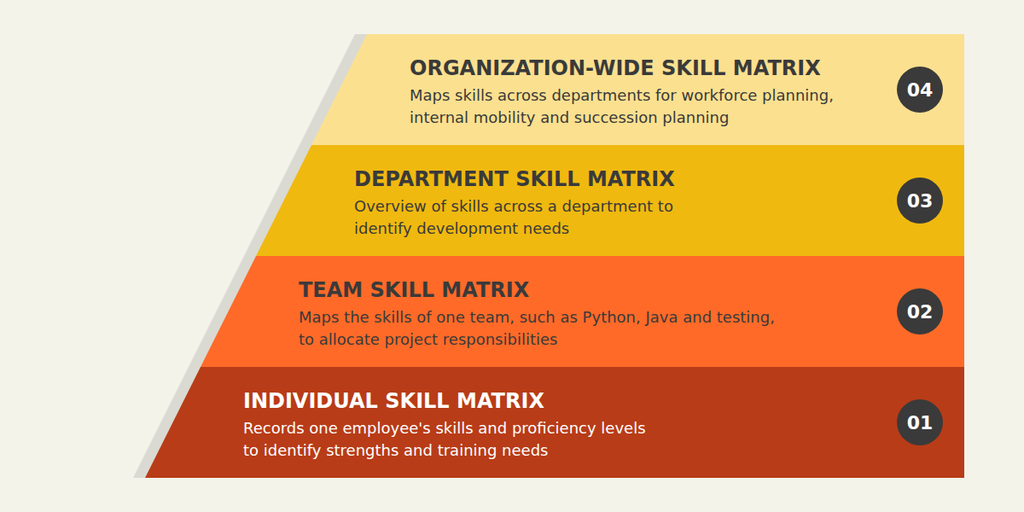
The four common types include:
1. Individual Skill Matrix
It records one employee’s skills and proficiency levels. For example, an HR executive’s matrix may include payroll processing, recruitment, attendance management and HR reporting. This type of matrix helps identify strengths and training needs.
2. Team Skill Matrix
It maps the skills of employees working in a particular team. For example, a software team may assess Python, Java, testing and database management skills. Managers can use it to allocate project responsibilities.
3. Department Skill Matrix
A department skill matrix shows the skills available within a particular department. For example, a finance team may assess skills such as budgeting, taxation, auditing and financial reporting. This helps managers identify skill gaps and plan the right training.
4. Organization-Wide Skill Matrix
An organization-wide skill matrix tracks skills across all departments. It gives HR teams a clear picture of the skills available across the business and helps with workforce planning, internal role changes and succession planning.
What Should a Skill Matrix Format Include?
A useful skill matrix format should contain enough information to assess employee capabilities and identify areas for improvement.
The exact structure depends on the organization’s requirements, but the following components shown in the image provide a practical starting point.
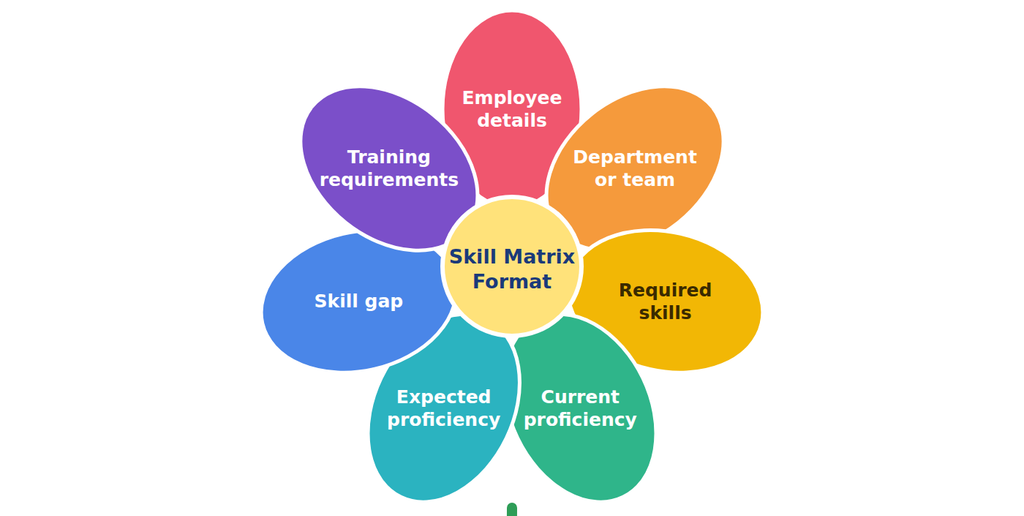
| Tip: Keep the matrix focused on skills that are relevant to the employee’s role or business objectives. Adding too many unrelated skills can make assessments difficult to maintain and the results less useful. |
What Does a Skill Matrix Format Look Like? Practical Examples
A skill matrix usually lists the skills required for a role or team and shows each employee’s proficiency level. The format can vary depending on the department and type of work. Here are three examples of how different teams can use a skill matrix.
Example 1: Skill Matrix for an HR Team
An HR team handles different responsibilities, such as recruitment management, payroll, employee records and engagement. A skill matrix helps the HR manager see which team members have the skills needed for these tasks.
| HR Skills | HR Executive | Recruiter | HR Manager |
| Recruitment | 2 | 4 | 3 |
| Payroll Processing | 4 | 1 | 3 |
| Employee Records | 4 | 3 | 4 |
| HR Reporting | 3 | 2 | 4 |
| Employee Engagement | 3 | 3 | 4 |
This matrix helps the HR manager understand who can handle specific tasks and where employees may need training or support.
Example 2: Skill Matrix for a Software Development Team
Software development teams need different technical skills to build, test and maintain applications. A skill matrix helps managers understand each developer’s strengths and identify skills that may need improvement.
| Technical Skills | Developer A | Developer B | Developer C |
| Python | 4 | 2 | 3 |
| Java | 2 | 4 | 3 |
| Database Management | 3 | 4 | 2 |
| Software Testing | 3 | 2 | 4 |
| Cloud Deployment | 2 | 3 | 4 |
Managers can use this information to assign developers to projects based on their skills and identify areas where technical training may be useful.
| Note: The proficiency ratings in these examples are for illustration only. Organizations should define clear rating criteria based on their job requirements. |
How to Create a Skill Matrix in Excel?
Excel is a starting point for organizations that want to create a skill matrix without using specialized software. It allows HR teams to organize employee details, add skills, record proficiency levels and use basic formatting to identify skill gaps.
Follow these steps to create a skill matrix in Excel.
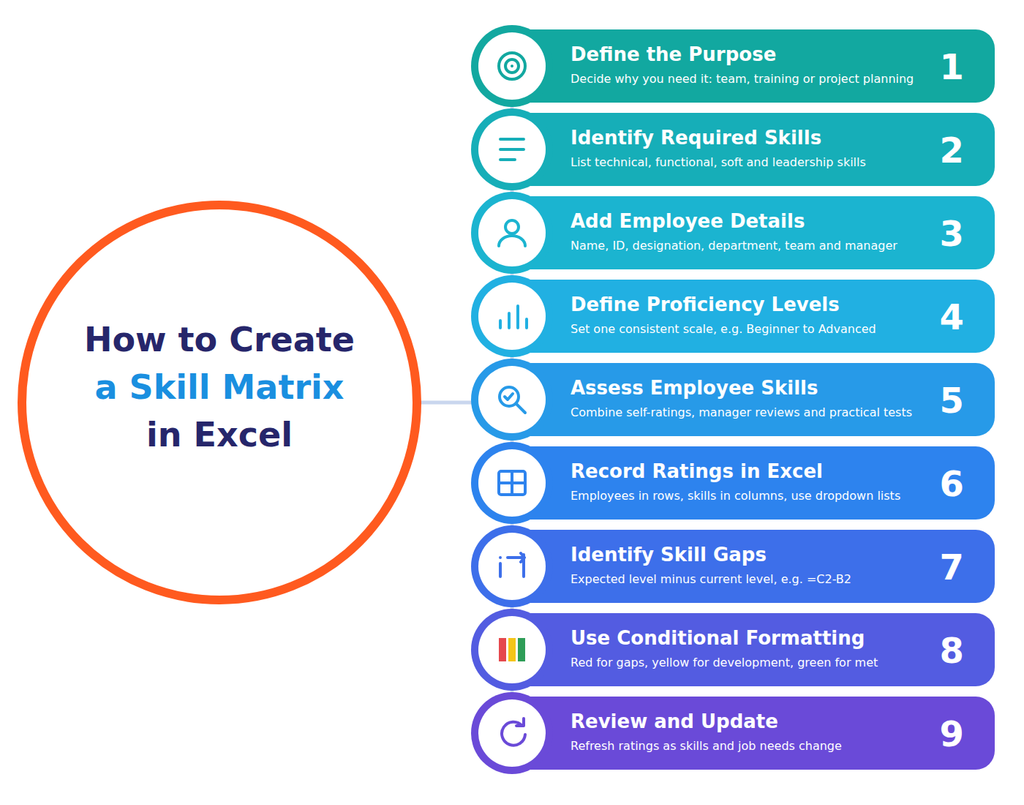
Step 1: Define the Purpose of the Matrix
Start by deciding why you need a skill matrix. The purpose determines which employees and skills should be included.
For example, you may want to:
- Assess the capabilities of a particular team.
- Identify training requirements.
- Allocate employees to upcoming projects.
- Prepare employees for new responsibilities.
- Understand skills available across departments.
A clear objective prevents the matrix from becoming a long list of skills that are difficult to assess and maintain.
Step 2: Identify the Required Skills
List the skills relevant to the selected roles, teams or projects. You can group them into categories to make the matrix easier to understand.
Common categories include:
- Technical skills: Programming, machine operation, data analysis and software proficiency.
- Functional skills: Payroll processing, recruitment, accounting and customer support.
- Soft skills: Communication, teamwork, problem-solving and time management.
- Leadership skills: Decision-making, delegation, conflict resolution and team management.
For example, an HR department may need recruitment, employee documentation, payroll processing and HR reporting skills.
The skills you include should be relevant to actual job responsibilities rather than general assumptions.
Step 3: Add Employee Details
Create the first columns for employee information. Depending on your requirements, you can include:
- Employee name
- Employee ID
- Designation
- Department
- Team or location
- Reporting manager
This makes it easier to filter employee records and review skills across different teams.
Step 4: Define Proficiency Levels
Before assessing employees, establish a consistent rating scale. Without clear definitions, two managers may assign different ratings to employees with similar abilities.
You can use the following four-level scale:
| Rating | Proficiency Level | Description |
| 1 | Beginner | Has basic knowledge but needs regular guidance |
| 2 | Basic | Can perform simple tasks with some assistance |
| 3 | Intermediate | Can perform regular tasks independently |
| 4 | Advanced | Handles complex tasks and can guide others |
This is an example scale, not a universal standard. Organizations can use a three-level, five-level or other scale depending on the complexity of the roles being assessed.
The important thing is to define what each rating means and apply the same criteria consistently.
Step 5: Assess Employee Skills
Once the skills and proficiency levels are defined, evaluate each employee against the selected criteria.
You can collect assessment information through:
- Employee self-assessments
- Manager evaluations
- Practical skill tests
- Work samples and project outcomes
- Certifications and training records
- Peer or customer feedback, where relevant
It is better to combine more than one assessment method instead of relying entirely on employee self-ratings. For example, an employee may rate their Excel proficiency as advanced, but a practical assessment may show that they need further training in advanced formulas or data analysis.
Step 6: Record Ratings in Excel
Create a spreadsheet with employees in rows and required skills in columns. Enter the relevant proficiency rating for each employee.
For example:
| Employee | Excel | Communication | Data Analysis | Reporting |
| Employee A | 4 | 3 | 2 | 4 |
| Employee B | 3 | 4 | 4 | 3 |
| Employee C | 2 | 3 | 3 | 2 |
You can use Excel’s Data Validation feature to create dropdown lists for proficiency ratings. This helps maintain consistency and reduces manual entry errors.
Step 7: Identify Skill Gaps
A skill matrix becomes more useful when it compares current proficiency with expected proficiency.
For example, if an employee needs level 4 Excel skills for their role but currently has level 2 proficiency, the gap is two levels.
You can calculate the difference in Excel using a simple formula:
=Expected Level – Current Level
For example, if the expected level is in cell C2 and the current level is in cell B2, use:
=C2-B2
A positive result indicates a gap, while zero means the employee has met the expected level. If the result is negative, the employee’s current proficiency is above the expected level.
Remember that the numerical difference is an indicator, not a complete assessment of job performance. Managers should also consider the nature and importance of the skill.
Step 8: Use Conditional Formatting
Excel’s Conditional Formatting feature can help managers identify proficiency levels visually.
For example:
- Red can indicate a significant skill gap.
- Yellow can indicate a development area.
- Green can indicate that the expected proficiency level has been met.
Choose a simple and consistent colour scheme. Add a legend so that everyone understands what the colours represent.
Step 9: Review and Update the Matrix
Employee skills change as people gain experience, complete training or move into new roles. Therefore, a skill matrix should not remain unchanged after its initial creation.
Review it periodically and update ratings when employees develop new capabilities or job requirements change.
For example, an employee who completes advanced data analysis training may move from level 2 to level 3 after an appropriate assessment.
Download and Use Free Skill Matrix Template in Excel
Creating a skill matrix from scratch can take time, especially when you need to organize employee details, skills and proficiency ratings. A ready-made Excel template gives you a simple structure to get started.
If you are looking for a skill matrix format in Excel free download, then you can use the template below and customize it according to your team’s requirements. You can download this skills matrix template and customize it to match your team’s roles, required skills and assessment criteria.
[Download the Free Skill Matrix Template in Excel]
What Does This Excel Skill Matrix Template Include?
The template includes the following fields:
| Field | Purpose |
| Employee Name | Records the employee being assessed |
| Employee ID | Helps identify employee records |
| Designation | Specifies the employee’s role |
| Department | Organizes employees by department |
| Skill | Lists the skills being assessed |
| Current Level | Records the employee’s present proficiency |
| Expected Level | Defines the proficiency required for the role |
| Skill Gap | Shows the difference between current and expected levels |
| Training / Action Required | Records the next development step |
The workbook also includes a sample skill matrix and a proficiency-level guide to help you understand the format.
How to Use the Downloaded Template
- Open the Excel workbook and enter employee details.
- Add the technical, functional or soft skills relevant to each role.
- Select the employee’s current proficiency level.
- Enter the expected proficiency level for that skill.
- Review the calculated skill gap.
- Add suitable training or development activities.
- Update the assessment as employees develop new skills.
You can add or remove columns, customize the proficiency scale and create separate worksheets for different departments.
| Tip: Assess employees using clear criteria and, wherever possible, combine manager feedback with practical assessments rather than relying only on self-ratings. |
What Are the Best Practices for Maintaining a Skill Matrix?
Creating a skill matrix is only the first step, as organizations also need a consistent process to keep the information accurate and useful.
Here are some practices to follow to create a better skill matrix:
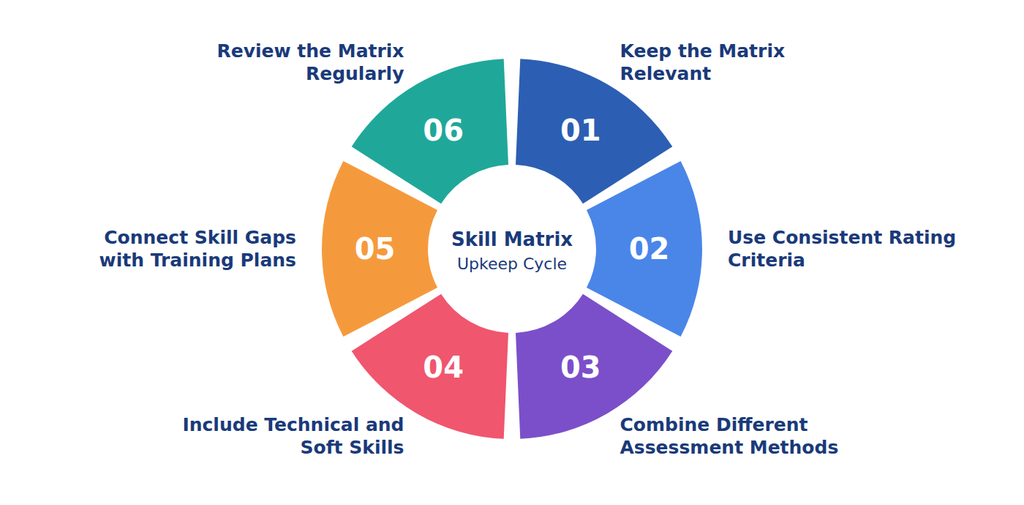
1. Keep the Matrix Relevant
Include skills that are connected to job responsibilities, business goals or upcoming projects. Avoid adding every possible skill, as this can make assessments unnecessarily complicated.
2. Use Consistent Rating Criteria
Define each proficiency level clearly and communicate the criteria to employees and managers which helps reduce differences in how skills are evaluated.
3. Combine Different Assessment Methods
Use self-assessments, manager feedback, practical tests and work outcomes where appropriate. Multiple sources of information can provide a more balanced understanding of employee capabilities.
4. Include Technical and Soft Skills
Technical expertise is important, but employees also need communication, teamwork, problem-solving and other interpersonal skills. Include both categories when they are relevant to the role.
5. Connect Skill Gaps with Training Plans
Identifying a gap is useful only when the organization decides what to do about it. Connect assessment results with training, mentoring, job rotation or practical learning opportunities.
6. Review the Matrix Regularly
Review the matrix at planned intervals and whenever employees change roles, complete training or take on new responsibilities. The review frequency can depend on how quickly job requirements and skills change.
What Are the Common Mistakes to Avoid When Creating a Skill Matrix?
A skill matrix helps organizations understand employee capabilities, but inaccurate assessments or outdated information can reduce its usefulness. Here are common mistakes to avoid.
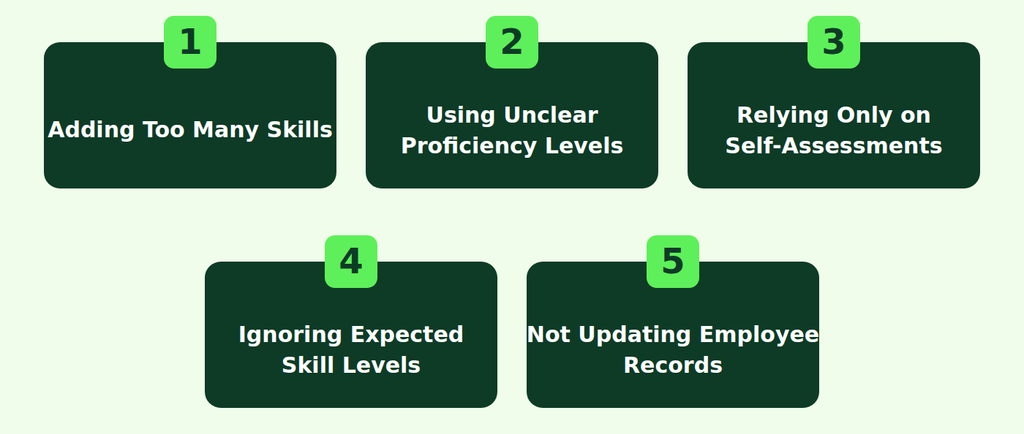
1. Adding Too Many Skills
Including too many skills makes the matrix lengthy and difficult to maintain so try to focus on skills relevant to employees’ roles, team requirements and business goals.
2. Using Unclear Proficiency Levels
Without clear rating definitions, managers may assess similar abilities differently. Define each proficiency level and use consistent assessment criteria across teams.
3. Relying Only on Self-Assessments
Employee self-ratings may not always reflect actual capabilities. Combine them with manager feedback, practical tests, work samples or relevant certifications.
4. Ignoring Expected Skill Levels
Recording current skills without defining role requirements makes it difficult to identify gaps. Compare current and expected proficiency to highlight development needs.
5. Not Updating Employee Records
Employee skills change with experience, training and new responsibilities. Review the matrix regularly to keep information accurate and relevant.
| Remember: A skill matrix should support employee development, not label people as capable or incapable. Use clear criteria and fair assessments to identify opportunities for improvement. |
Final Thoughts
A skill matrix gives organizations a structured way to understand employee capabilities and identify the skills needed to meet business requirements. It helps managers make better decisions about task allocation, employee development, training and workforce planning.
Starting with a simple skill matrix format in Excel can be enough for a small team. As the organization grows, however, maintaining accurate skill records across departments and locations may require a more centralized approach.
The key is to keep the matrix relevant, assess employees using consistent criteria and connect identified skill gaps with meaningful development opportunities. When used regularly, a skill matrix can help organizations make better use of existing talent while preparing their workforce for changing business needs.