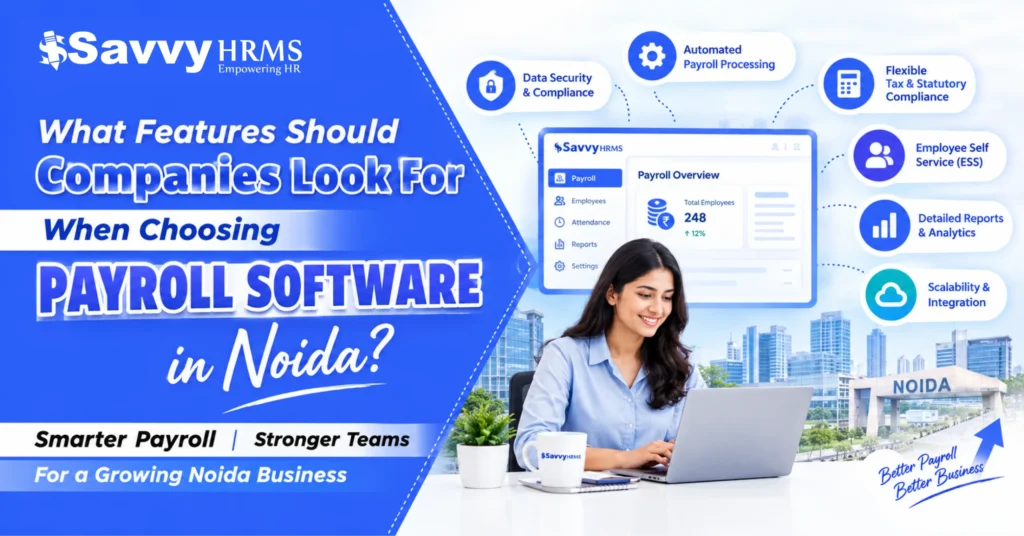
What features should companies look for when choosing payroll software in Noida?


-
AuthorRaghvendra Bhardwaj
-
 Last Updated
October 15, 2026
Last Updated
October 15, 2026
-
 Reading Time
20 Mins
Reading Time
20 Mins
Imagine your company has 150 employees, and salary processing is due in three days. The HR team is still checking attendance records, the finance team is correcting salary calculations, and employees are asking when they will receive their payslips. One incorrect deduction or missed compliance deadline can create unnecessary stress for everyone.
This situation is common in growing businesses that depend on spreadsheets, disconnected HR tools, or manual payroll processes. As employee numbers increase, managing salaries, attendance, tax deductions, reimbursements, and statutory requirements becomes more complicated.
For businesses in Noida, choosing the right payroll software can make these tasks easier. Whether you run an IT company in Sector 62, a manufacturing unit in an industrial area, or a growing service business, the right payroll management software can help improve accuracy, save time, and organize employee data.
But how do you choose the right solution? This guide explains what payroll software is, the essential features to evaluate, how payroll automation supports compliance, what pricing factors matter, and how to compare payroll software providers in Noida. It also includes a practical checklist to help businesses make an informed decision.
TL;DR
- Choose payroll software that automates salary calculations and payslip generation.
- Check support for PF, ESI, TDS, and applicable statutory compliance requirements.
- Look for attendance, leave, and employee self-service integration.
- Prioritize data security, payroll reports, and analytics.
- Compare pricing, implementation, customer support, and scalability.
- Select software that fits your business size and future growth plans.
- Evaluate Savvy HRMS by comparing its available features and pricing with your payroll need.
What Is Payroll Software and Why Do Businesses in Noida Need It?
Payroll software is a digital tool that helps businesses calculate employee salaries, manage deductions, generate payslips, maintain payroll records, and prepare payroll-related reports. Depending on the product, it may also automate attendance processing, leave adjustments, reimbursements, tax calculations, and statutory reporting.
Instead of collecting information from multiple spreadsheets, HR teams can use payroll management software to bring relevant employee and salary information into one system.
For example, consider a Noida-based IT company with 100 employees. Its HR team must track monthly attendance, paid leave, salary revisions, new joiners, resignations, professional tax where applicable, provident fund contributions, and income tax deductions. Managing these activities manually can take considerable time, particularly when information is spread across different files.
Payroll software helps connect these processes and creates a more consistent workflow.
Why is payroll automation important for Noida businesses?
Noida has businesses operating across IT and IT-enabled services, manufacturing, consulting, retail, logistics, and other service industries. Each business may have different salary structures, working schedules, employee categories, and reporting needs.
Payroll software can help these organizations:
- Improve salary accuracy: Apply configured salary structures, allowances, deductions, and approved adjustments consistently.
- Reduce repetitive work: Automate calculations and routine payroll tasks.
- Support statutory compliance: Maintain relevant payroll records and assist with calculations and reporting under applicable requirements.
- Improve employee experience: Provide payslips, tax information, and leave or payroll details through employee self-service features.
- Strengthen financial planning: Generate salary summaries, department-wise payroll reports, and cost analyses.
- Support business growth: Handle increasing employee numbers without depending entirely on manual calculations.
Payroll automation is also relevant because payroll teams face operational challenges beyond salary calculations. According to ADP’s 2025 research, 75% of surveyed Indian businesses reported that payroll services were affected by a shortage of payroll professionals. The research focused on payroll leaders at multinational companies with more than 1,000 employees, so this figure should not be interpreted as a statistic for all Indian businesses.
The takeaway is simple: businesses should look for payroll software that reduces repetitive administrative work while keeping calculations transparent and giving HR teams control over important decisions.
What Features Should You Look for When Choosing Payroll Software in Noida?
The best payroll software is not necessarily the one with the longest feature list. It is the one that addresses your company’s payroll requirements, employee structure, compliance obligations, and budget.
Before comparing vendors, identify the tasks your team performs every month and the problems it wants to solve.
1. Automated Salary Calculation
Automated salary calculation helps businesses process payroll consistently by applying configured salary components, deductions, and approved adjustments. It reduces repetitive calculations and helps HR teams identify discrepancies before salaries are finalized.
Look for software that supports:
- Basic salary, HRA, allowances, bonuses, and incentives.
- Deductions, reimbursements, and unpaid leave adjustments.
- Salary revisions and full-and-final settlements.
- Gross salary, deductions, and net salary calculations.
2. Statutory Compliance Management
Payroll software should help businesses manage applicable Indian statutory requirements by supporting calculations, maintaining payroll records, and generating relevant reports. Choose a solution that provides regulatory updates and helps track important compliance deadlines.
Check whether it supports:
- Provident Fund (PF) calculations and reporting.
- Employees’ State Insurance (ESI), where applicable.
- Salary Tax Deducted at Source (TDS) calculations.
- Applicable state-specific requirements and compliance reports.
3. Attendance and Leave Integration
Integrating attendance and leave management with payroll helps businesses calculate salaries using approved working hours, absences, overtime, and leave records. This reduces duplicate data entry and improves consistency across HR processes.
Prioritize features such as:
- Attendance system and biometric device integration.
- Leave, shift, and holiday management.
- Overtime calculations and loss-of-pay adjustments.
- Attendance validation before payroll processing.
4. Employee Self-Service Portal
An employee self-service portal allows employees to access essential payroll information without repeatedly contacting HR. It improves transparency, provides convenient access to salary records, and reduces routine administrative queries.
Employees should be able to:
- Download monthly payslips.
- View salary and deduction details.
- Access available tax documents.
- Check relevant payroll information through web or mobile access.
5. Payroll Reports and Analytics
Payroll reports help HR and finance teams understand salary expenses, track deductions, and review payroll changes. Choose software that provides accurate, exportable reports to support financial planning, reconciliation, and informed business decisions.
Useful reports include:
- Monthly payroll summaries and salary registers.
- Department-wise employee costs.
- Deduction, reimbursement, and overtime reports.
- Payroll variance reports and audit trails.
6. Data Security and Access Controls
Payroll software handles sensitive employee information, including salary details, bank records, and tax declarations. Strong security controls help restrict unauthorized access, protect confidential data, and maintain accountability across payroll activities.
Evaluate the availability of:
- Role-based access permissions.
- Secure authentication and encryption.
- Data backups and recovery procedures.
- Audit logs and data-retention controls.
7. Integration and Scalability
Payroll software should integrate with your existing HRMS, attendance, and accounting systems wherever required. A scalable solution can accommodate growing employee numbers, additional locations, and evolving payroll processes without unnecessary administrative complexity.
Before choosing, verify:
- HRMS and attendance system compatibility.
- Accounting and supported banking integrations.
- Multi-location and multi-department payroll capabilities.
- Flexible salary structures and approval workflows.
8. Vendor Support and Implementation
Reliable vendor support makes implementation smoother and helps businesses resolve payroll issues promptly. Evaluate the provider’s onboarding process, training resources, response times, and assistance during payroll processing before committing to a long-term subscription.
Ask vendors about:
- Employee data migration and implementation timelines.
- HR and payroll team training.
- Support availability during salary processing.
- Issue escalation procedures and ongoing maintenance.
Quick selection rule: Prioritize payroll accuracy, compliance support, attendance integration, security, and reporting first. Evaluate advanced analytics and other optional capabilities after your essential requirements are covered.
Which Payroll Software Features Are Essential for Accurate Salary Processing?
Accurate salary processing depends on the quality of employee data, the correctness of configured rules, and the controls used to review payroll before payment.
A payroll system should do more than calculate a final salary. It should make calculations understandable and help HR teams identify errors before they affect employees.
Essential salary-processing capabilities
| Feature | Why it matters |
| Configurable salary structures | Supports different employee compensation packages |
| Automated earnings and deductions | Reduces repetitive calculations |
| Attendance-based adjustments | Accounts for approved leave, absences, and overtime |
| Arrears and salary revisions | Handles retrospective changes and revised compensation |
| Full-and-final settlement | Supports final salary calculations for exiting employees |
| Payslip generation | Provides employees with a clear salary breakdown |
| Payroll validation | Helps identify missing or inconsistent information |
| Audit trail | Records important changes and approvals |
| Bank payment file or payment integration | Supports salary disbursement workflows where available |
Example: How payroll software improves salary accuracy
Suppose an employee has a monthly gross salary of ₹50,000 and an approved unpaid absence that results in a hypothetical deduction of ₹2,000. The employee also has ₹3,000 in other deductions.
The illustrative calculation would be:
- Gross salary: ₹50,000
- Unpaid absence adjustment: ₹2,000
- Other deductions: ₹3,000
- Net salary: ₹45,000
This example excludes employer contributions and other possible salary components. Actual calculations depend on the employee’s salary structure, applicable rules, and company policy.
The advantage of payroll automation is that configured rules can be applied consistently. However, automation does not guarantee accuracy if the underlying attendance, employee data, or salary rules are incorrect.
What validation checks should payroll software provide?
Before payroll is finalized, the software should help identify:
- Missing attendance or employee information.
- Unusually high or low salary changes.
- Duplicate or unexpected payroll entries.
- Incorrectly configured deductions.
- Employees with missing bank or tax information.
- Unapproved salary revisions or reimbursements.
- Differences between the current and previous payroll periods.
These checks allow HR and finance teams to investigate exceptions rather than reviewing every calculation manually.
For companies in Noida with multiple departments or locations, exception reports and approval workflows are particularly valuable because they help standardize payroll reviews across teams.
How Does Payroll Software Help With PF, ESI, TDS, and Statutory Compliance?
Payroll compliance is one of the most important considerations when choosing payroll software in India. Businesses must identify which statutory requirements apply to their establishment and employees, calculate the relevant amounts correctly, maintain supporting records, and complete applicable filings and payments within prescribed timelines.
Payroll software can help organize these responsibilities, but it does not automatically make a business compliant. Employers remain responsible for checking applicability, reviewing calculations, and meeting legal obligations.
1. Provident fund (PF) management
Where the Employees’ Provident Fund requirements apply, payroll software should support the relevant employee and employer contribution calculations, salary components, eligibility settings, and payroll records.
Check whether the software can generate useful contribution summaries, reconcile payroll data, and assist with the preparation of relevant records or returns.
2. Employees’ State Insurance (ESI)
For establishments and employees covered by applicable ESI provisions, the system should support relevant eligibility rules, contribution calculations, and reporting.
Ask how the vendor handles changes to applicable thresholds, contribution rates, and other regulatory requirements. Do not assume that one configuration applies to every employee.
3. Salary TDS management
Payroll software should help calculate salary-related tax deductions using the applicable tax framework and employee information. Useful features include investment or deduction declarations where relevant, tax projections, tax-regime settings, adjustments during the year, and tax-related reports.
Tax rules can change. For payroll periods beginning in April 2026, employers should confirm that their software supports the applicable provisions of the Income-tax Act, 2025 and the relevant present guidance. The Income Tax Department provides official information on salary taxation and TDS compliance.
4. Other applicable requirements
Depending on the establishment, location, and workforce, businesses may also need support for professional tax where applicable, labour welfare fund contributions where applicable, bonus calculations, gratuity-related records, and state-specific requirements.
For Noida-based companies, ask vendors how they handle applicable Uttar Pradesh requirements and whether their compliance updates are included in the subscription or billed separately.
Compliance checklist for payroll software
| Requirement | What to verify |
| PF | Eligibility settings, contribution calculations, and supporting reports |
| ESI | Applicable coverage rules, calculations, and records |
| Salary TDS | Tax calculations, declarations, projections, and reports |
| State-specific requirements | Support for applicable Uttar Pradesh rules |
| Regulatory updates | Update frequency and communication process |
| Audit readiness | Historical payroll records and change logs |
| Filing assistance | Exact scope of return preparation, submission, and payment support |
Before purchasing, request a demonstration using a realistic payroll scenario. Ask the vendor to explain which activities are automated, which require HR approval, and which must still be completed by the employer or an authorized professional.
Can Payroll Software Automate Attendance, Leave, and Salary Calculations?
Yes. Payroll software can automate salary calculations based on approved attendance and leave data when the required systems are integrated, and the rules are configured correctly.
This is particularly useful for businesses with shift-based teams, overtime, multiple work schedules, or employees working across different locations.
Consider a manufacturing business in Noida with morning, evening, and night shifts. Its HR team may need to consolidate biometric attendance, shift rosters, overtime approvals, leave records, and absence adjustments before processing salaries. A connected payroll system can reduce the need to transfer these records manually.
How attendance-to-payroll automation works
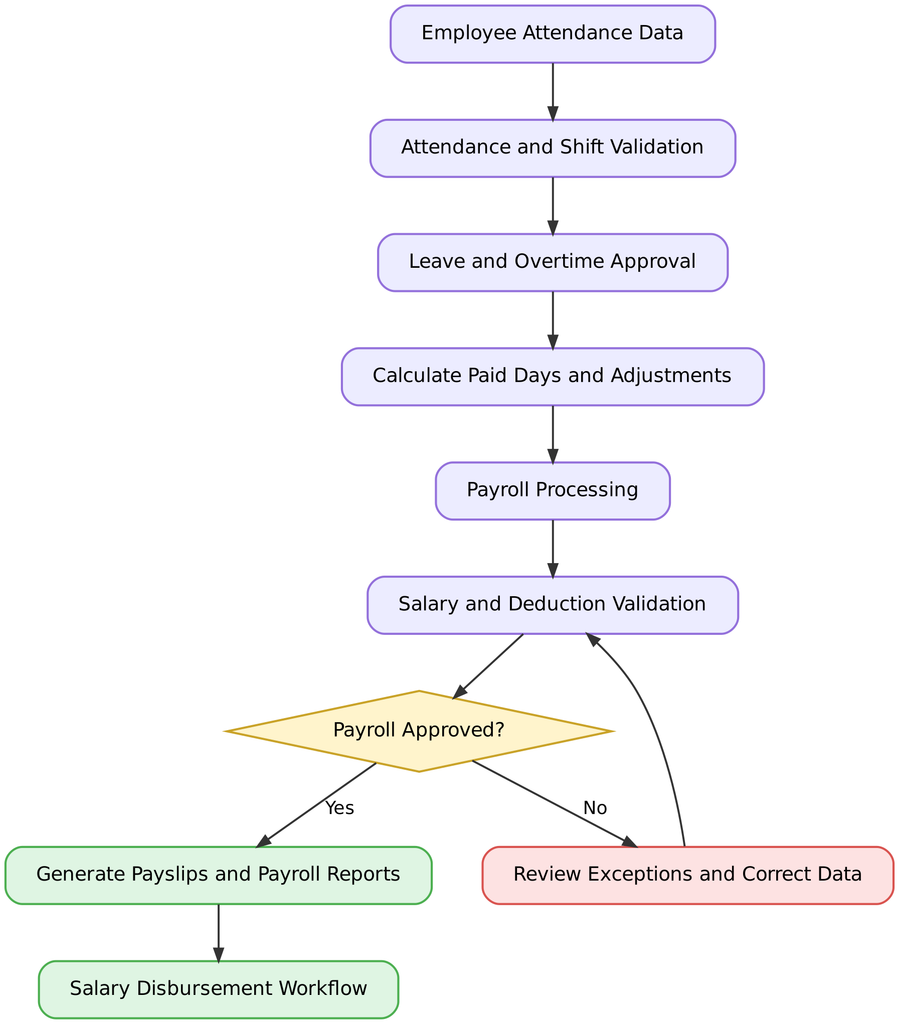
The process starts with attendance records. The system validates those records, applies approved leave and overtime information, calculates relevant salary adjustments, and prepares payroll for review. After approval, the business can generate payslips and complete its salary payment workflow.
What should you check before choosing an integrated solution?
- Does it integrate with your existing biometric or attendance system?
- Can it manage different shifts, weekly offs, and holiday calendars?
- Can authorized managers approve overtime and leave?
- Can HR correct attendance exceptions before payroll processing?
- Does it maintain records of changes and approvals?
- Can the system handle different policies for different employee groups?
For businesses that already use attendance management software, integration quality may be more important than having a second, separate attendance module.
The objective is to create a dependable flow of approved information from attendance to payroll, not simply to automate calculations without checking the data.
What Should Businesses in Noida Consider When Comparing Payroll Software Pricing?
Payroll software pricing depends on the vendor, the number of employees, the features included, the deployment model, and the level of support required. A low-cost plan may work well for a small business, while a company with multiple locations or complex compliance requirements may need a more comprehensive solution.
Instead of comparing subscription prices alone, businesses should calculate the total cost of using the software.
Common payroll software pricing models
| Pricing model | How it works | Best suited for |
| Per-employee pricing | Charges are based on the number of employees covered | Businesses with predictable headcount |
| Monthly or annual subscription | Charges a fixed fee for a defined plan | Small and growing businesses, depending on plan limits |
| Modular pricing | Charges vary according to selected features | Businesses that need specific payroll or HR capabilities |
| Custom enterprise pricing | The vendor provides a quote based on requirements | Large or complex organizations |
These are common software pricing approaches, not verified price quotes from specific Noida vendors. Actual plans and billing terms vary.
What costs should you evaluate?
Before signing a contract, ask for a complete breakdown of:
- Subscription or licence charges.
- One-time implementation and onboarding fees.
- Employee data migration costs.
- Integration charges for attendance, accounting, or banking systems.
- Charges for additional modules or employee records.
- Training and customer support costs.
- Fees for statutory filing assistance, if offered separately.
- Renewal terms and future price increases.
Example: Compare the total cost, not just the subscription
Suppose two vendors offer payroll software for a company with 100 employees.
Illustrative annual cost comparison, hypothetical figures, not actual vendor prices.
| Cost component | Vendor A | Vendor B |
| Annual subscription | ₹48,000 | ₹36,000 |
| Implementation | ₹10,000 | ₹18,000 |
| Required integration | ₹6,000 | ₹12,000 |
| First-year total | ₹64,000 | ₹66,000 |
Although Vendor B has a lower subscription price, its first-year total is higher because implementation and integration cost more.
This example shows why companies should compare the full cost of ownership. They should also evaluate the time saved, accuracy controls, support quality, and potential reduction in manual work.
How can businesses estimate the return on investment?
A simple way to assess payroll software is to estimate the monthly hours currently spent on payroll administration and the expected reduction after automation.
For example, if a team currently spends 40 hours per month on repetitive payroll tasks and automation reduces this to 20 hours, the business saves 20 staff hours per month, or 240 hours per year.
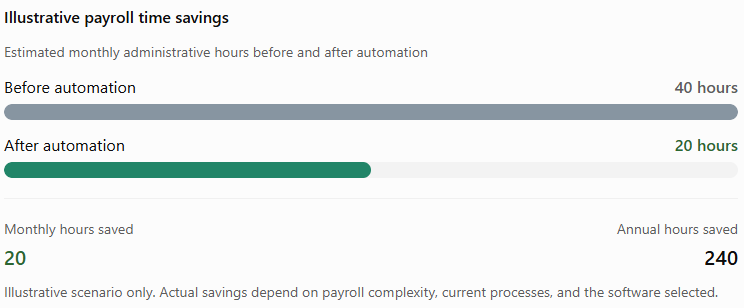
To estimate financial ROI, multiply the hours saved by the relevant hourly employment cost, then compare the resulting annual benefit with the software’s total annual cost. Include other measurable benefits, such as reduced rework, where reliable data is available.
How Do You Compare Payroll Software Providers in Noida?
Choosing payroll software in Noida involves more than finding a provider with a local office. Businesses should compare the product’s capabilities, compliance support, integration options, security controls, customer service, and suitability for their industry.
A vendor that works well for a 30-person consultancy may not be the right choice for a 500-person manufacturing company with multiple shifts and complex attendance rules.
Step 1: Define your payroll requirements
Start by documenting your employee count, salary structures, payroll frequency, attendance systems, statutory requirements, approval processes, and reporting needs.
Separate essential requirements from optional features. This prevents your team from paying for functionality it does not need.
Step 2: Shortlist suitable vendors
Look for payroll software providers that support Indian payroll requirements and can demonstrate the features your organization needs. Review official product documentation, available integrations, support arrangements, and customer references.
For Noida businesses, ask whether the provider can support your operating model and applicable state-specific requirements. A local office may be helpful, but it should not be the only selection criterion.
Step 3: Request a product demonstration
Ask each shortlisted vendor to demonstrate a realistic payroll cycle, including:
- Importing or synchronizing attendance data.
- Processing a salary revision.
- Calculating deductions.
- Reviewing payroll exceptions.
- Generating payslips and reports.
- Correcting an error with a recorded approval.
- Preparing statutory reports relevant to your business.
A practical demonstration is more informative than a presentation showing a long list of features.
Step 4: Evaluate customer support
Ask about implementation timelines, payroll-period support, issue resolution, escalation channels, and the availability of training.
Find out who will help if an integration fails just before salary processing. Also check whether support is included in the quoted price.
Step 5: Compare vendors using a scorecard
Use a weighted scorecard to make the evaluation more objective.
Suggested evaluation weights, adjust them according to your business needs. These are recommendations, not industry benchmark figures.
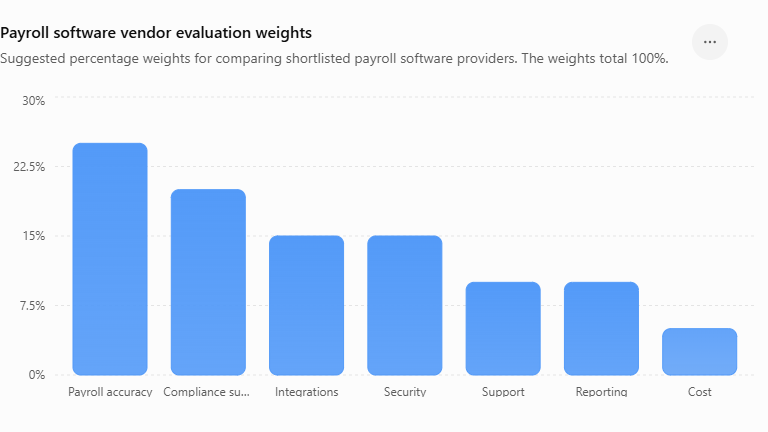
For each vendor, assign a score from 1 to 5 against every category, where 1 means poor, and 5 means excellent. Multiply each score by its category weight and add the results to calculate a weighted score.
Do not select a provider only because it receives the highest numerical score. Security gaps, unsupported compliance requirements, or missing essential integrations should be treated as potential deal-breakers regardless of the total.
Questions to ask during a vendor evaluation
- Can the software handle our current employee count and expected growth?
- Which payroll and compliance processes are automated?
- How are statutory changes communicated and implemented?
- Can we integrate our existing attendance and accounting systems?
- What security controls protect employee salary and bank information?
- What happens if payroll data is incorrect or an integration fails?
- Can we export our data if we change providers?
- What are the total first-year and renewal costs?
Comparing providers through the same checklist makes it easier to identify meaningful differences and select payroll management software that fits your company’s actual needs.
What Questions Should You Ask a Payroll Software Vendor Before Buying?
Before purchasing payroll software, HR, finance, and management teams should understand exactly what the product can do, what it costs, and what responsibilities remain with the employer.
Here are the most useful questions to ask
1. Does the software support Indian payroll requirements?
Ask the vendor to demonstrate salary processing and applicable PF, ESI, TDS, and other statutory calculations. Confirm how regulatory updates are managed and whether your establishment’s requirements are covered.
2. Can the software integrate with our existing systems?
Check compatibility with your attendance system, HRMS, accounting software, and other relevant tools. Ask whether integrations are included or require additional charges.
3. How does the software prevent payroll errors?
Look for validation rules, exception reports, approval workflows, change logs, and the ability to compare payroll periods.
4. How secure is employee payroll data?
Ask about encryption, role-based permissions, multifactor authentication where available, backups, incident response, and data retention. Request relevant security documentation rather than depending only on general assurances.
5. Can employees access their payslips independently?
Check whether the system offers an employee self-service portal or mobile application, and confirm which functions are available in your selected plan.
6. What support is available during salary processing?
Clarify response times, support hours, escalation procedures, implementation assistance, and any additional fees.
7. Can the software grow with our business?
Ask whether the system supports additional employees, locations, departments, salary structures, and approval levels without requiring a complete system change.
8. What happens if we decide to switch providers?
Confirm data export formats, historical payroll record availability, contract termination terms, and any exit charges.
9. Can we test the software before committing?
Request a trial, sandbox, or guided demonstration using representative employee data. Use fictional or appropriately anonymized records rather than exposing sensitive employee information unnecessarily.
10. What exactly is included in the price?
Request a written quotation covering subscription fees, implementation, integrations, support, additional modules, renewals, and any filing-related services.
The answers should be documented and compared across vendors. A clear written agreement reduces the risk of unexpected costs or assumptions about features that are not actually included.
Which Payroll Software Is Best for Small Businesses and Large Enterprises in Noida?
Choosing the best payroll software in Noida depends on your company’s size, workforce, budget, and payroll requirements. A small business may need a simple solution to process salaries, while a large enterprise may require advanced automation to manage payroll across multiple departments and locations.
For Small Businesses
If you run a startup, consultancy, or small company in Noida, you probably want payroll software that is affordable, easy to use, and reduces manual work without making payroll unnecessarily complicated.
Look for features such as:
- Automated salary calculations and payslip generation.
- PF, ESI, and TDS support, wherever applicable.
- Attendance and leave integration.
- Simple payroll reports and employee self-service.
- Affordable pricing with room for business growth.
For Large Enterprises
Large organizations often deal with hundreds or thousands of employees, multiple locations, different salary structures, and more complex approval processes. Their payroll software should handle these requirements while maintaining accuracy, security, and consistency.
Important features include:
- Multi-location and multi-department payroll management.
- Advanced reporting and payroll analytics.
- Role-based access controls and audit trails.
- Integration with HRMS, accounting, and attendance systems.
- Configurable approval workflows and scalable infrastructure.
What About Growing Businesses?
If your company is expanding, consider payroll software that can support your current workforce while accommodating future hiring. An integrated HRMS with payroll, attendance, leave management, and employee records can help reduce duplicate data entry as operations grow.
Before making a decision, compare pricing, implementation support, security, compliance capabilities, and available integrations. Request a product demonstration to see how each solution handles your actual payroll requirements.
Businesses evaluating an integrated solution can also explore Savvy HRMS and assess its available payroll and HR management features against their needs. Confirm the features included in the relevant plan before making a final decision.
Conclusion
Reliable payroll software helps businesses in Noida manage salary calculations, attendance, statutory compliance, data security, and reporting more efficiently. Comparing features, costs, and scalability ensures the solution meets current needs and supports future growth.
Before making a decision, identify your requirements, compare vendors, and request product demonstrations. The right payroll management software can reduce manual work, improve accuracy, and simplify payroll operations for businesses of all sizes.
Frequently Asked Questions (FAQs)
1. What is payroll software, and why do businesses in Noida need it?
Payroll software automates salary calculations, payslip generation, deductions, and payroll reporting. It helps businesses in Noida reduce manual work, improve accuracy, and manage payroll more efficiently.
2. What features should businesses look for in payroll software in Noida?
Key features include automated salary processing, PF, ESI, and TDS support, attendance and leave integration, employee self-service, payroll reports, data security, and scalability.
3. How much does payroll software cost in Noida?
The cost depends on employee count, features, deployment type, and pricing model. Businesses should compare subscription fees, implementation charges, support costs, and additional feature charges before selecting a solution.
4. Can payroll software help businesses manage PF, ESI, and TDS compliance?
Yes. Payroll software can help calculate applicable deductions, maintain payroll records, and prepare compliance-related reports. Businesses should verify that the software supports current requirements and ensure filings and payments are completed correctly.
5. Which payroll software is suitable for small and large businesses in Noida?
Small businesses may prefer affordable, easy-to-use software with essential payroll features. Large enterprises may need multi-location payroll, advanced analytics, integrations, and role-based access. Businesses can also evaluate Savvy HRMS by comparing its available features and pricing with their requirements.