Organizational Chart Template: A Complete Guide for Modern Businesses


-
AuthorHRMS
-
 Last Updated
October 07, 2026
Last Updated
October 07, 2026
-
 Reading Time
8 Mins
Reading Time
8 Mins
Every successful organization, whether it’s a startup or a large company, needs structure. As companies grow, managing teams, departments, reporting relationships, and communication channels becomes more complicated. That’s where an organizational chart template becomes impressively useful.
An organizational chart gives a clear visual representation of your company’s hierarchy. It helps employees understand who reports to whom, how departments are connected, and where responsibilities lie. Instead of confusion and communication gaps, businesses get better transparency, smoother workflows, and improved collaboration.
Modern companies are constantly developing with hybrid work environments, remote teams, and fast-growing departments. Because of this, having a modern and flexible organizational chart is no longer optional; it’s essential.
In this blog, we will cover everything you need to know about organizational chart templates, including their benefits, types, best practices, common mistakes, and how HR software like Savvy HRMS can simplify the entire process.
What Is an Organizational Chart Template?
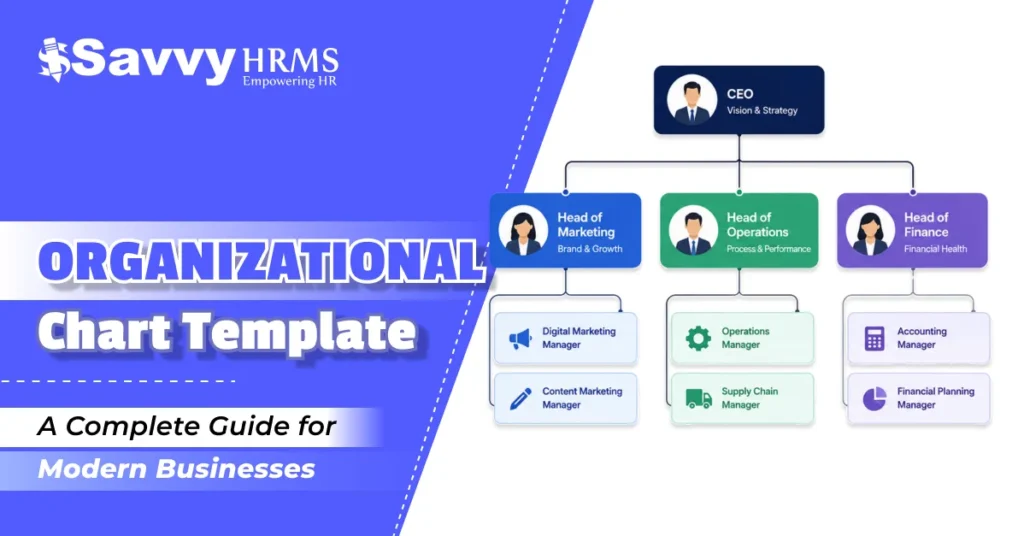
An organizational chart template is a pre-designed layout used to visually display the structure of a company or an organization. It highlights roles, job positions, departments, and reporting relationships in an easy-to-understand format.
Think of it as a roadmap for your business structure.
Instead of creating charts from scratch every time your company grows or changes, businesses can use a ready-made organizational chart template free download option to quickly customize and update their hierarchy.
These templates can be created in:
- Microsoft Word
- Excel
- PowerPoint
- Google Docs
- HR software platforms
- Online diagram tools
Many organizations search for a free organizational chart template in Word format because it’s simple to edit and accessible for teams of all sizes.
Key Elements of an Organizational Chart
A standard organizational chart usually includes:
- Employee names
- Job titles
- Departments
- Reporting managers
- Team structures
- Communication hierarchy
By using a proper organizational chart template, companies can maintain clarity and ensure everyone understands their roles within the organization.
Why Does Your Company Need an Organizational Chart?
Many organizations don’t understand the importance of organizational charts until communication problems start affecting productivity.
Here’s why every company should have one:
1. Improves Communication
Employees know exactly who to contact for approvals, support, or guidance. This reduces confusion and speeds up communication.
2. Clarifies Roles and Responsibilities
An organizational chart clearly defines each employee’s role and reporting manager. This reduces overlap and accountability issues.
3. Supports Business Growth
As your organization expands, maintaining structure becomes difficult. A well-designed organizational chart template helps businesses scale efficiently.
4. Enhances Employee Onboarding
New hires can quickly understand the company structure, departments, and key contacts.
5. Helps HR and Management
HR teams use organizational charts for workforce planning, succession planning, performance management, and restructuring decisions.
6. Increases Transparency
Employees feel more connected when they understand the organizational hierarchy and leadership structure.
Whether you run a small business or a multinational company, using a professional organizational chart creates a more organized and productive workplace.
Different Types of Organizational Chart Templates
Not all companies operate the same way. That’s why there are different types of organizational chart templates designed for different business structures.
1. Hierarchical Organizational Chart
This is the most common type.
It follows a top-down structure where leadership sits at the top, followed by managers and employees below.
Best For:
- Traditional businesses
- Corporates
- Manufacturing companies
2. Matrix Organizational Chart
In a matrix structure, employees report to multiple managers or departments.
Best For:
- Project-based organizations
- IT companies
- Consulting firms
3. Flat Organizational Chart
This structure has fewer management levels and promotes direct communication.
Best For:
- Startups
- Small businesses
- Creative agencies
4. Divisional Organizational Chart
Companies divide teams based on products, regions, or markets.
Best For:
- Large enterprises
- Global businesses
5. Team-Based Organizational Chart
This structure focuses on collaborative teams rather than a strict hierarchy.
Best For:
- Agile companies
- Tech startups
Businesses can easily find an organizational chart template for free download online that suits their operational model.
How to Create an Efficient Organizational Chart Template?
Creating an organizational chart doesn’t have to be complicated. The key is keeping it simple, accurate, and easy to update.
Here’s a step-by-step approach:
Step 1: Identify Your Business Structure
Start by understanding your organizational hierarchy.
Ask questions like:
- Who reports to whom?
- How are departments divided?
- Are there multiple managers?
Step 2: List All Positions and Departments
Create a complete list of:
- Employee roles
- Teams
- Departments
- Managers
Step 3: Choose the Right Format
Select a format based on your business needs.
Popular options include:
- Word templates
- Excel templates
- HR software-generated charts
Many businesses prefer a free organizational chart template in Word because it’s easy to customize.
Step 4: Keep It Simple
Avoid overloading the chart with too much information.
Focus on:
- Names
- Titles
- Reporting lines
Step 5: Use Consistent Design
Maintain consistency:
- Fonts
- Colors
- Shapes
- Alignment
This improves readability and professionalism.
Step 6: Update Regularly
Your company structure will develop over time.
Make sure your organizational chart is updated whenever:
- New employees join
- Teams change
- Departments restructure
Using HR software can automate this process and save valuable time.
Common Mistakes to Avoid When Creating an Organizational Chart Template
| Common Mistake | Problem | Solution |
| Overcomplicated Chart | Difficult to read | Keep it simple |
| Not Updating Regularly | Causes confusion | Update frequently |
| Inconsistent Formatting | Looks unprofessional | Use a consistent design |
| Missing Roles | Creates communication gaps | Include all key positions |
| Wrong Structure | Reduces efficiency | Choose the right chart type |
| Too Many Levels | Makes the chart disorganized | Limit hierarchy levels |
| Ignoring Scalability | Hard to manage growth | Use scalable templates |
| Limited Accessibility | Employees can’t access easily | Share through HR systems |
| Unclear Reporting Lines | Confuses employees | Use clear connections |
| Manual Chart Creation | Time-consuming and error-prone | Use HR software automation |
What Are the Benefits of Using an Organizational Chart Template?
Using a professional organizational chart template offers several business advantages.
1. Better Workforce Management
Managers can easily understand team structures, monitor workloads, assign responsibilities efficiently, and improve overall workforce planning and productivity.
2. Faster Decision-Making
Employees clearly understand reporting structures, approval processes, and responsibilities, helping organizations make quicker and more effective decisions daily.
3. Improved Collaboration
Organizational charts help departments understand connections, improve communication, encourage teamwork, and create smoother collaboration across the entire company.
4. Easier Expansion Planning
Businesses can plan hiring, restructuring, and department growth effectively by understanding current workforce structures and future organizational requirements clearly.
5. Simplified HR Processes
HR teams use organizational charts for recruitment planning, succession management, employee tracking, and improving overall workforce administration processes efficiently.
6. Enhanced Productivity
Clear organizational structures reduce confusion, improve accountability, strengthen communication, and help employees work more efficiently toward organizational goals.
Best Practices for Designing an Organizational Chart Template
1. Keep It Easy to Read
Use clear fonts, proper spacing, and structured reporting lines to make the organizational chart simple and easy to understand.
2. Use Color Wisely
Use colors strategically to highlight departments and teams without making the organizational chart look cluttered or visually overwhelming overall.
3. Focus on Simplicity
Include only important employee details and reporting structures to maintain clarity, professionalism, and better readability across the organization.
4. Make It Accessible
Ensure employees can easily access organizational charts through HR systems, internal portals, or company communication platforms anytime needed.
5. Use Scalable Templates
Choose flexible organizational chart templates that can easily adapt to company growth, restructuring, and future workforce expansion requirements.
6. Leverage Automation
Modern HR software automatically updates organizational charts using employee data, reducing manual effort while improving accuracy and organizational efficiency.
Organizational Chart Template Examples for Different Business Structures
1. Basic Hierarchical Organizational Chart Template
Chief Executive Officer (CEO)
│
├── Human Resources
│ ├── HR Manager
│ └── HR Executives
│
├── Marketing Department
│ ├── Marketing Manager
│ └── Marketing Executives
│
├── Sales Department
│ ├── Sales Manager
│ └── Sales Executives
│
└── Finance Department
├── Finance Manager
└── Accountants
2. Startup Organizational Chart Template
Founder / CEO
│
├── Product Team
│ └── Developers
│
├── Sales Team
│ └── Sales Executives
│
└── Marketing Team
└── Content Creators
3. Matrix Organizational Chart Template
Chief Executive Officer (CEO)
│
├── Project Manager
│
├── Department Manager
│
└── Shared Employee Reporting Structure
4. Divisional Organizational Chart Template
Chief Executive Officer (CEO)
│
├── Product Division A
│ └── Sales Team A
│
├── Product Division B
│ └── Sales Team B
│
└── Product Division C
└── Sales Team C
5. HR Department Organizational Chart Template
HR Director
│
├── Recruitment Team
│ └── Recruiters
│
├── Payroll Team
│ └── Payroll Executives
│
└── Employee Relations Team
└── HR Executives
How HR Software Helps Manage Organizational Charts?
Managing organizational charts manually becomes difficult as companies grow.
That’s why modern businesses are turning to HR software solutions like Savvy HRMS.
1. Automated Organizational Charts
HR software automatically generates charts based on employee records.
No more manual editing.
2. Real-Time Updates
Whenever an employee:
- Joins
- Changes departments
- Gets promoted
- Leaves the company
The organizational chart updates instantly.
3. Better Workforce Visibility
HR managers and leadership teams can quickly understand:
- Reporting structures
- Team sizes
- Department distribution
4. Simplified Employee Management
Employees can easily identify:
- Reporting managers
- Team members
- Department heads
5. Supports Remote and Hybrid Teams
Modern HRMS platforms help businesses maintain visibility across distributed teams.
6. Improved HR Decision-Making
HR software provides insights for:
- Workforce planning
- Talent management
- Succession planning
With tools like Savvy HRMS, businesses can build smarter organizational structures while saving time and improving accuracy.
Conclusion
An effective organizational chart template is more than just a visual diagram; it’s a strategic tool that helps businesses improve communication, productivity, and workforce management.
Whether you are a startup building your first team or a large organization managing various departments, having a well-structured organizational chart creates clarity and supports long-term growth.
Instead of depending on outdated manual charts, modern businesses are choosing automated HR solutions to simplify organizational management.
With Savvy HRMS, you can easily create, manage, and update organizational charts in real time while improving overall HR efficiency.
Ready to simplify your workforce management?
Explore Savvy HRMS today and simplify your organizational structure with smart, automated HR solutions.
Book a Demo Today