HR isn’t stuck on desktops or paperwork anymore. Since employees want faster and easier ways to handle job and life tasks, companies are shifting to better digital tools. Yet how can you stay connected with staff while making HR reachable whenever, wherever? Strong mobile HRMS apps hold that solution.
These mobile-friendly HR tools put key tasks, like tracking hours, requesting time off, running payroll, getting sign-offs, sharing files, or handling extras, right in employees’ pockets. Skip the lines at HR offices with complex computer systems. Why shouldn’t staff get HR support just as fast and smoothly as their favorite everyday apps?
As hybrid jobs grow and employees spread out further, mobile-friendly HR tools aren’t just nice anymore; they’re important. These apps improve output while making chats clearer, also building a smooth day-to-day flow at work. How might an HRMS on your mobile change how your team runs?
Let’s begin by understanding exactly what an HRMS mobile app is.
What is the HRMS Mobile App?
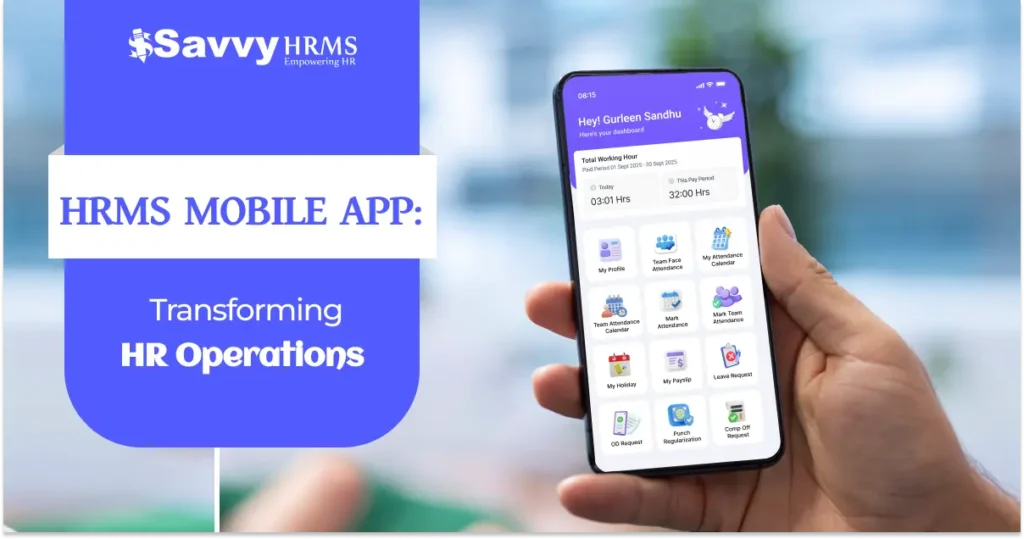
An HRMS mobile app lets you reach your company’s people operations tools right from a phone. Think of it as a tailored version of the broader Human Resource Management System, built specifically for iPhones and Androids. Instead of waiting or logging in through a computer, employees can handle key duties anytime. For instance, they might send in time-off applications while also looking up pay details. Checking work hours gets easier, too, along with editing contact data whenever needed.
Imagine having your whole HR team right in your hand. While HRMS once lived on desktops and notebooks, the phone app opens that door wider, so anyone can handle work stuff anytime, anywhere, even without a computer nearby.
Why the HRMS Mobile App is Important for Every Organization?
Understanding the basic importance of HRMS mobile apps requires examining key benefits that directly affect organizational growth.
1. Accessibility and Convenience
Employees don’t have to schedule office visits or wait for emails from HR teams anymore. Thanks to the HRMS phone app, they can reach HR tools anytime, day or night. They’re able to send time-off requests, check work hours, or change personal details whenever it suits them. Because everything’s always available, HR teams spend less time on paperwork while employees feel more supported.
2. Enhanced Employee Engagement
Today’s employees want tech that works. A solid HR system with phone support shows companies care about their people. If employees get quick access to info and handle tasks on their own, they tend to stay more involved and feel better about work.
3. Real-Time Data Accuracy
With mobile access, employees log hours from their phones anytime. They tap in or out using the app instead of paper sheets. This cuts down mistakes caused by hand-entered data. Info updates instantly in the system. Records move smoothly into pay processing without delays. No more double-checking spreadsheets every week.
4. Operational Efficiency
Using a mobile HRMS cuts down busywork, so HR teams spend time on important goals instead. With automatic vacation tracking, quick alerts, or DIY tools, teams get more breathing room daily.
5. Remote Work Support
As flexible jobs turn normal, top companies prove mobile access matters most. Teams spread out gain a lot through cloud-powered apps, keeping everyone linked no matter where they are.
6. Data-Driven Decision Making
HRMS software on phones gives quick views of reports. Because managers check these stats anytime, they see how work is going right away. Instead of guessing, they use actual numbers from time logs or absences to make choices. This helps them act fast when issues occur.
Key Features Every HRMS Mobile App Should Have
1. Self-Service Leave Management
A key part of any good HRMS tool is handling time-off properly. Employees need to see how many days they have left using their phone. They can ask for time off right from the app, no paperwork needed. After sending a request, they get quick updates on whether it’s approved. Some platforms sort absences into groups like sick or vacation days. These setups also follow rules about getting paid for unused leave. Everything gets recorded, so companies stay audit-ready.
2. Attendance Tracking and Monitoring
A full-featured attendance app on phones keeps track of time correctly. It could use location tracking to clock in, support fingerprint login, and show who’s present right away, while also sending instant warnings if someone arrives late or forgets to log out. That way, there’s no need for paper sheets or spreadsheets; everything gets logged clearly.
3. Payroll Information Access
Employees can check their pay setup, look at monthly pay slips, or see what’s taken out each payday using built-in payroll tools. On phones, the system shows clear details, how taxes are worked out, and summaries when the year ends, helping people get their finances clearer while cutting down on HR questions about pay.
4. Performance Management Integration
Your performance tool needs to connect with the mobile app, so staff can share updates, follow goals, or check review results. Because ongoing input like this improves growth and keeps people involved.
5. Employee Directory and Communication
A searchable staff list with phone numbers helps people talk more easily. Because it connects to chat tools, employees get alerts about news, rule changes, or big updates.
6. Document Management
Keep files like job agreements, welcome notes, or workplace rules safe and easy to reach. Employees can save them on their devices for use without internet, so long as safety steps stay in place.
7. Expense Management
Employees snap receipts using their phones, sending them straight through the app. Since approvals happen fast, employees get paid back quicker.
8. Notifications and Reminders
Smart alerts let staff know when leave requests are pending, deadlines appear, rules change, or reviews come up, so no task slips under the system.
How HRMS Mobile Apps Improve Employee Experience?
1. Instant Problem Resolution
If employees run into problems or need info about HR tasks, they can use the mobile app to quickly reach help pages, support sites, OR chat straight with an HR manager. That cuts down wait times WHILE lifting how happy staff feel.
2. Personalization and Customization
A fresh HRMS phone app gives employees a personal homepage showing what matters to them. Because it fits each person’s job, the tool feels helpful, almost like it knows you. Instead of a one-size-fits-all smoother, people get updates that actually fit their day. That kind of setup keeps teams coming back without feeling forced.
3. Transparency in HR Processes
Mobile access opens up what happens behind HR scenes. Employees see their time-off applications move from start to finish, check progress on reviews bit by bit, also get clear breakdowns of how pay is figured out. Seeing these things helps people feel more confident about company decisions, and trust grows when actions aren’t hidden.
4. Flexibility in Work Arrangements
Remote employees or those on-site gain a lot when HR software works fully on phones. Since they handle key job duties from anywhere, there’s no need to stop by headquarters; this fits today’s transparent work styles.
5. Reduced Administrative Friction
With self-service tools in the HRMS app, employees skip constant messaging here and there. They manage regular jobs on their own, getting things done faster without waiting around.
6. Career Development Support
Training tools, courses to build skills, or ways to track progress right from a phone help employees keep improving. Since people can learn whenever it fits their day, growing at work feels more manageable.
How HRMS Mobile Apps Safeguard Data and Meet Compliance Standards?
1. End-to-End Encryption
Advanced HRMS mobile apps use top-level encryption to protect information while sending or storing it. Besides keeping data safe, they shield employee records, payrolls, and reviews from interference. Security stays strong thanks to powerful coding methods active during every stage of data handling.
Encryption methods protect private HR details while sending or saving them, hitting top safety standards. Industries manage employee info without worry since tech setups block leaks on every connection path.
2. Multi-Factor Authentication
Security steps need more than just passwords; make people confirm who they are in different ways before seeing private HR data. That way, even if login details get stolen, outsiders still can’t get in because they’d need a code from a phone, a fingerprint scan, or something that changes every few seconds.
With several checks in place, companies strengthen protection from stolen logins while keeping entry fast. Thanks to this mix of safety and ease, multi-factor authentication becomes a must-have inside today’s HR mobile systems.
3. Compliance with Data Regulations
Teams using top HRMS tools can stick to privacy rules and meet where-data-lives rules, so employee details stay in approved regions. That matters a lot for clinics, banks, or public agencies since they’ve got to follow GDPR, CCPA, along with regional laws on data safety.
Compliance tools use auto-enforced rules, handle user permissions differently, and also manage where data lives. Companies work without worry in multiple regions since their HR platforms follow local laws on their own, which cuts down legal trouble while showing staff their info stays private.
4. Audit Trails and Activity Logging
Every move in the HRMS app gets logged, showing who looked at data, when edits were made, or when approvals happened. These locked-in logs help meet rules and pass checks by giving clear proof of everything done.
Keeping clear logs works like a safety net while helping teams run smoothly, so supervisors can check who accessed what through regular audits that let compliance staff confirm rules are followed. This openness builds trust by showing actions have consequences, making HR systems tougher against risks over time.
5. Regular Security Updates
Security checks run nonstop, while apps get updated often to face new risks as they pop up. Teams keep an eye on alerts about weaknesses, fixing them fast so hackers don’t get a chance. This shows they truly care about staying secure without waiting around.
A strong update process keeps every live HRMS mobile version secure, rolling out fixes without breaking daily workflows. Thanks to automatic upgrades, companies save effort on hands-on tasks, stay steady, and reduce exposure risks fast.
6. Role-Based Access Control
Some staff don’t require full data access. So, permissions are set by role; managers view team details, but employees get just what’s relevant to them. This keeps things separated, using fine-tuned controls tied to duties and reporting lines.
RBA C keeps data safe by showing only what’s needed for the job instead of giving full access to everyone. So, HR admins set up rights that match company rules and laws, which shield private details while still letting work get done fast.
How to Choose the Right HRMS Mobile App for Your Organization?
Step 1: Assess Your Organizational Needs
Start by checking how your HR team works daily; this helps spot what tools you actually need. Knowing exactly what’s missing stops wasted cash on features you won’t use, while matching the app to real business aims.
It includes the following key steps:
- File showing what HR tasks employees use the most
- Spot problems and weak spots in today’s setups
- Finding what tools the HRMS system needs + picking out its key functions
- Pick features by how much they help the company or matter to staff, balancing both sides carefully while deciding what comes first
Step 2: Evaluate Scalability and Growth
Your setup will change over time, so pick an HR tool that grows smoothly when your team gets bigger. Check whether it keeps running fast even with more people using it or more info stored, without extra charges.
It also involves evaluating scalability through the following steps:
- Assess platform capacity for handling growing employee populations
- Check that things run smoothly when everyone’s using it at once
- Check system limits when handling bigger data loads
- Check price plans fitting growing teams
Step 3: Check Integration Capabilities
Your HRMS mobile app should connect smoothly with tools you already use, like payroll software, time tracking, performance reviews, or other work apps. When everything links up well, it cuts down scattered data while improving how fast teams get things done.
Integration checks include the following steps:
- Check if it works with your existing payroll setup, and also matches up with the accounting software you’re using already
- Link up smoothly with time-tracking and vacation tracking tools
- Check if it’s linked using tools that track how well things work
- Check the API docs and see if help’s offered for setup
Step 4: Review User Interface and Experience
A user-friendly layout improves acceptance while cutting down on learning time. Try out the mobile app design with possible users from various teams, and this checks how well it works, no matter their tech skills.
User experience evaluation includes the following steps:
- Check how simple it is to move around the layout
- Check how fast it works on various phones, and also see if it runs smoothly on different OS versions
- Check access options for staff who have different tech abilities
- Check what users said after trying the beta version across different groups
Step 5:Verify Security Standards
Check full security details before you buy anything. Make sure encryption methods are solid because they protect sensitive data. Look into whether systems meet required regulations; your team’s private info must stay safe. Test how well backup plans work when things go wrong.
Security and compliance checks include the following steps:
- Check how encryption works, along with ways to keep data safe
- Confirm compliance certifications (such as ISO, SOC 2, and GDPR compliance)
- Assess disaster recovery and business continuity capabilities
- Check reports on security checks and test results
Step 6:Compare Implementation Timelines
Think about how long it takes to set up, and whether it’ll mess with daily work, when picking a platform. Most companies see better results with providers that use step-by-step launches along with solid help during transitions.
Implementation and rollout checks include the following steps:
- Check how long setup takes and the overall schedule
- Check how well a step-by-step launch works to reduce daily workflow issues
- Look at how well staff guidance is handled alongside updates. Check if team learning sessions actually help people adjust
- Figure out what you need to launch without issues
Step 7:Evaluate Customer Support and Training
After setup, help really shapes lasting results. Check that they offer solid onboarding, quick tech fixes when issues pop up, or consistent upgrades that match how your team grows. Support doesn’t end at launch; make sure their teams guide you well beyond rollout through steady maintenance and smart adjustments over time.
Support and vendor evaluation include the following steps:
- Check if full onboarding options are ready, along with learning sessions
- Check how quickly tech help replies and when they’re around
- Check how often the platform changes, while also seeing if those upgrades actually work well
- Evaluate the platform’s track record for customer satisfaction and retention
Why Choose Savvy HRMS?
Savvy HRMS is built for Indian companies dealing with tough rules. It offers key HR tools in a mobile-friendly setup. When it comes to time-off tracking, it handles custom policies smoothly, while also working out legal leave amounts on its own. Instead of coordinating spreadsheets, teams use the built-in pay calculator that manages PF, ESI, taxes, and other required cuts without any issue.
The attendance management system in Savvy HRMS uses location tags, biometrics, or live data checks. Managers get clear dashboards showing who’s present when, which helps teams run smoother. Instead of yearly reviews, it supports ongoing check-ins, progress updates, and balanced evaluations so employees grow steadily.
Conclusion
HRMS mobile apps are changing how work gets managed. Organizations skipping this tech might struggle to keep up, yet mobile-based HR systems improve staff involvement, make personal tasks easier, cut through red tape, protect info, and meet rules straight from a device. A solid mobile HR platform reshapes the way businesses handle their top resource employees.
Savvy HRMS fits well with companies wanting a solid HR system that works smoothly on phones. Its easy-to-use design, smart tools, or deep knowledge of India’s labor rules make managing staff simpler. This setup cuts down paperwork while improving how employees feel about their workplace.
When you’re setting up your initial HR software or moving on from an old one, Savvy HRMS gives you a fresh setup that grows as your team expands. Get faster workflows, clearer processes, and happier teams, all built around mobile access.