Managing employees is one of the most complicated jobs in any organization. But are you still depending on confusing spreadsheets and gut feelings to make HR decisions? That’s a problem, and it’s the reason many businesses are still living with it.
Here’s the thing: your workforce data tells a story. Whether it’s rising attrition, static engagement scores, or increasing payroll costs, the signals are all there. But without a centralized view, you’re flying blind.
That’s exactly where an HR dashboard changes the game. Think of it as your employee data command center, giving HR leaders and business managers a clear, real-time picture of everything happening across their workforce. Ready to dive in? Let’s get started by knowing what the HR Dashboard exactly is.
What Is an HR Dashboard?
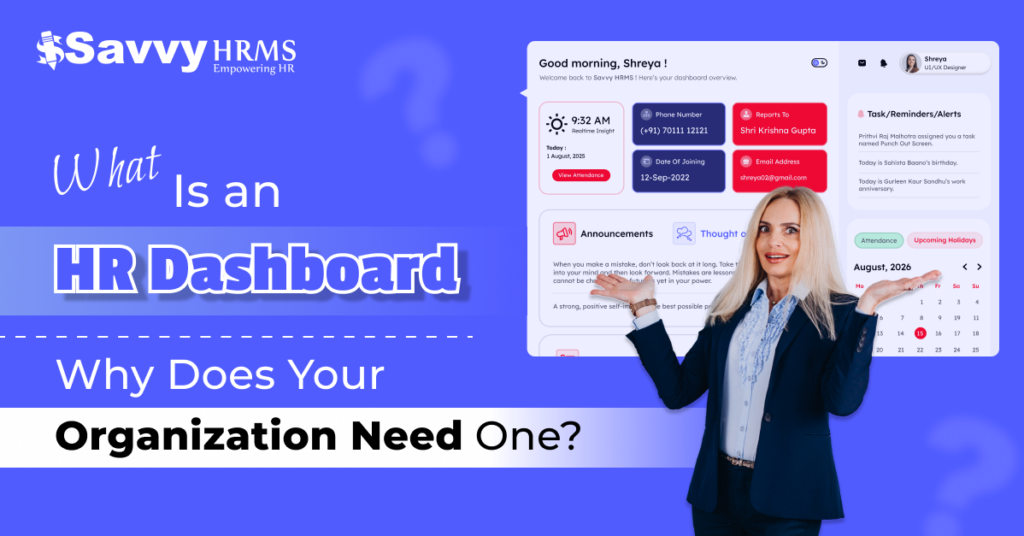
An HR dashboard is a visual, data-driven tool that combines key human resources metrics and KPIs into a single, easy-to-read platform. It pulls data from various HR modules, like payroll, recruitment, attendance, and performance, and presents them in charts, graphs, and scorecards that HR professionals and business leaders can act on instantly.
Unlike traditional HR reports that are static and time-delayed, an HR dashboard is dynamic and real-time. Modern HRMS platforms like Savvy HRMS come with built-in dashboards that integrate smoothly across various modules, from leave management and onboarding to training and compensation, ensuring that your employees’ decisions are always backed by correct, live data.
How HR Dashboards Have Transformed Beyond Traditional Reporting?
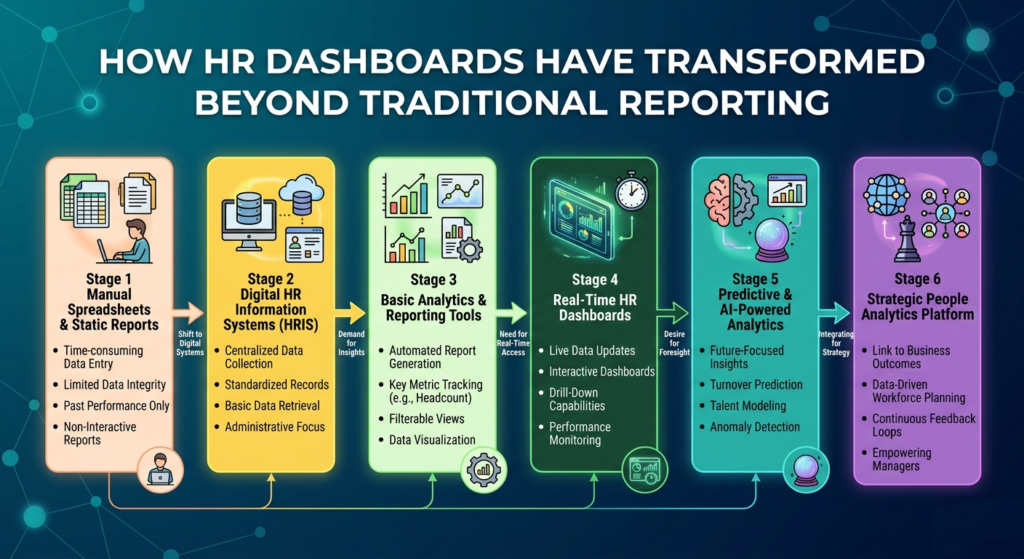
The progress from paper reports to intelligent, AI-powered platforms has been remarkable. Here’s a look at each stage of that journey:
Stage 1: Manual Spreadsheets & Static Reports
HR starts with manual data entry, spreadsheets, and monthly printed reports. Data was stored, outdated, and prone to human error, making real-time insights virtually impossible for any HR team.
Stage 2: Digital HR Information Systems (HRIS)
Organizations adopted HRIS modules to centralize employee records digitally. Data storage improved significantly, but reporting was still largely manual and reactive rather than proactive or predictive.
Stage 3: Basic Analytics & Reporting Tools
Built-in analytics tools within HRIS platforms emerged, enabling HR teams to generate standard headcount and attendance reports. However, customization was limited, and insights remained mostly backward-looking.
Stage 4: Real-Time HR Dashboards
Live dashboards transformed how HR monitored workforce data. For the first time, leaders could see real-time payroll costs, leave balances, and hiring process status, without waiting for the end-of-month report.
Stage 5: Predictive & AI-Powered Analytics
AI-driven dashboards took HR analytics a step further, forecasting attrition risk, identifying high performers, and predicting hiring needs before vacancies became urgent. Data stopped being a record and started being a strategy.
Stage 6: Strategic People Analytics Platform
Modern HR dashboards are completely developed strategic platforms. They align workforce measures with organizational goals, giving CEOs and CHROs a merged view of people performance alongside business results.
What Are the Types of HR Dashboards Used by Organizations?
Not all HR dashboards are created equal. Different teams use different dashboards depending on their function and focus.
Here are the most common types:
1. HR Executive Dashboard
Designed for C-level executives and HR directors, this high-level dashboard tracks organization-wide metrics like total headcount, payroll-to-revenue ratio, attrition trends, and workforce planning KPIs in one combined view.
2. Recruitment & Talent Acquisition Dashboard
Tracks open positions, time-to-fill, cost-per-hire, offer acceptance rates, and candidate process stages, helping talent acquisition teams improve their hiring funnel and reduce overall recruitment costs effectively.
3. Employee Performance Dashboard
Monitors individual and team performance scores, goal completion rates, appraisal cycles, and top performer identification, enabling managers to spot skill gaps and reward high contributors before disengagement sets in.
4. Attendance & Leave Management Dashboard
Gives HR teams visibility into daily attendance records, leave balances, absenteeism patterns, and overtime hours, useful for workforce scheduling and compliance tracking across various shifts and locations.
5. Payroll & Compensation Dashboard
Combines payroll processing status, salary basis, compensation distribution by department, and benefits utilization, helping finance and HR teams stay aligned on total people costs and budget compliance.
6. Training & Development Dashboard
Tracks employee enrollment in L&D programs, course completion rates, certifications earned, and skill development progress, supporting a culture of continuous learning and ensuring mandatory compliance training is completed on time.
7. Employee Engagement & Retention Dashboard
Identifies engagement survey scores, eNPS data, turnover rates by department, and retention risk signals, helping HR act early before disengaged employees quietly start updating their resumes and walk out the door.
What Are the Key HR Dashboard Metrics That Matter for Modern Organizations?
An effective HR dashboard is only as powerful as the metrics it tracks. Here are the 7 must-have HR metrics every modern organization should be monitoring right now:
1. Employee Turnover Rate
This metric tracks the percentage of employees leaving the organization over a particular period. A high turnover rate signals deeper issues like poor management, low pay, or weak company culture that need immediate HR attention.
2. Time-to-Fill & Time-to-Hire
Time-to-fill measures how long it takes to fill a vacant role from job opening to offer acceptance. Tracking this metric helps identify issues in your recruitment module and improve overall talent acquisition speed and efficiency.
3. Employee Absenteeism Rate
Long-term absenteeism directly impacts productivity and team confidence. Monitoring this through your attendance module reveals patterns of disengagement or burnout before they escalate into a much larger, costlier workforce challenge.
4. Training Completion Rate
This KPI tracks what percentage of employees are completing assigned training programs on time. A low completion rate may indicate poor content design, lack of time, or disengagement, all important signals for your L&D strategy.
5. Cost-Per-Hire
Understanding the total cost of bringing one employee on board, including job ads, recruiter time, background checks, and onboarding, helps HR teams justify talent budgets and benchmark efficiency against industry standards correctly.
6. Employee Net Promoter Score (eNPS)
eNPS measures how likely employees are to recommend your workplace to others. It’s a simple but powerful engagement indicator that helps HR scale organizational culture health and predict future retention risks with confidence.
7. Performance Rating Distribution
Tracking how performance ratings are distributed across teams reveals whether your appraisal process is fair and properly determined. It also helps identify departments that may need additional coaching, support, or leadership intervention.
What Are the Benefits of Using an HR Dashboard in Modern Organizations?
Still wondering if an HR dashboard is worth the investment? Here are six compelling reasons organizations across industries are making the switch from static reports to dynamic dashboards:
1. Faster, Data-Driven Decision Making
HR dashboards remove the issue between data collection and decision-making. Leaders get real-time visibility into workforce metrics, enabling them to respond quickly to staffing gaps, compliance risks, and performance issues without waiting for reports.
2. Improved Strategic Workforce Planning
With predictive analytics and trend data at their fingertips, HR leaders can plan hiring cycles, manage succession approaches, and forecast skill shortages, aligning talent strategy with long-term business goals far more effectively.
3. Enhanced Employee Experience
When HR teams can monitor engagement scores, point out burnout early, and track benefits utilization, they can intervene proactively. Better HR intelligence means a more responsive, employee-centric culture that meaningfully drives long-term retention.
4. Greater Operational Efficiency
An integrated HRMS dashboard eliminates the need to pull data from various systems manually. Automating data visualization across payroll, attendance, and performance modules saves HR teams significant hours every single week.
5. Stronger Compliance & Risk Management
Real-time tracking of overtime, leave balances, and contract renewals ensures organizations stay compliant with labor laws and internal policies, reducing the risk of costly penalties, legal exposure, or unresolved employee grievances.
6. Executive-Level Transparency
HR dashboards give C-level executives a single pane of glass to view employee costs, headcount trends, and workforce ROI. This builds stronger alignment between HR and business leadership, helping HR earn its rightful seat at the strategy table.
How to Choose the Right HR Dashboard for Your Organization?
Not every HR dashboard tool is the right fit. Here’s a practical steps framework to help you identify and confidently select the best solution for your organization’s needs:
Step 1: Define Your HR Goals & Priorities
Before you even open a product demo, get clear on what problems you are trying to solve. Are you battling high attrition? Struggling with payroll visibility? Your goals will determine which dashboard modules matter most for your team.
- Point out your top 3 HR pain points before evaluating any tool
- Identify which contributors will use the dashboard daily
- Prioritize whether you need real-time visibility or deep historical trend analysis
Step 2: Assess Your Current HR Tech Stack
Look at what HRIS or HRMS tools you already use. Your new dashboard should integrate smoothly with existing payroll, ATS, and performance management modules to avoid data errors, duplicate entries, and manual reconciliation headaches.
- Check for native integrations with your current HR platforms
- Evaluate API availability for any custom integrations you may need down the road
Step 3: Evaluate Customization & Scalability
Your organization will grow, and your HR dashboard needs to grow with it. Choose a solution that lets you customize metrics, add new modules, and scale user access as your workforce expands across departments, regions, or business units.
Step 4: Prioritize Ease of Use & User Experience
A powerful dashboard that nobody uses is completely worthless. Ensure the interface is user-friendly for both technical HR staff and non-technical managers. Look for clean visuals, drag-and-drop reporting, and mobile accessibility for leadership on the go.
- Request a free trial before making any commitment
- Involve actual end-users, HR managers, and team leads in the evaluation process
- Check for role-based access controls to manage sensitive data visibility appropriately
Step 5: Check Data Security & Compliance Features
Employee data is sensitive. Ensure your HR dashboard provider follows data protection regulations, offers end-to-end encryption, provides detailed audit logs for all data access, and supports local labor law compliance requirements.
Step 6: Evaluate Vendor Support & Implementation Quality
A great product with poor support is a nightmare during execution. Choose a provider that offers dedicated onboarding, complete training resources, and responsive customer support, especially during the important first months post go-live.
Step 7: Calculate Total Cost of Ownership (TCO)
Go beyond the sticker price. Factor in implementation costs, training time, ongoing subscription fees, and any additional charges for extra modules or users. The right HR dashboard should deliver clear, measurable ROI within the first year of use.
Conclusion
In the modern competitive talent landscape, depending on outdated spreadsheets simply isn’t enough anymore. An HR dashboard is no longer a luxury; it’s a strategic necessity. From tracking key HR metrics to enabling smarter workforce planning, the right dashboard empowers your HR team to become true, trusted business partners.
That’s exactly what Savvy HRMS is built for. With powerful, fully integrated dashboard modules like payroll, recruitment, attendance, performance, and more, Savvy HRMS gives your organization the real-time people intelligence it needs to hire better, retain longer, and grow faster. Your workforce deserves smarter HR, and so does your bottom line.
Ready to Transform Your HR Strategy? Book a Free Demo with Savvy HRMS Today!
Frequently Asked Questions (FAQs)
Q1. What is the main purpose of an HR dashboard?
An HR dashboard centralizes workforce data into real-time visuals, helping HR leaders and managers make faster, more informed decisions around hiring, retention, performance, and payroll management across the organization.
Q2. How is an HR dashboard different from a traditional HR report?
Traditional HR reports are static and periodic, while an HR dashboard provides real-time, interactive data views across different modules, enabling proactive decisions rather than reactive, after-the-fact responses to workforce issues.
Q3. Which HR metrics should be tracked on an HR dashboard?
Key metrics include employee turnover rate, time-to-hire, absenteeism rate, cost-per-hire, training completion rate, eNPS, and performance rating distribution, all important indicators for effective strategic workforce management.
Q4. Can small businesses benefit from using an HR dashboard?
Absolutely. Even small businesses gain significant value from HR dashboards by automating data tracking, reducing manual errors, and gaining clear visibility into headcount, payroll costs, and employee engagement trends in real time.
Q5. What should I look for when choosing an HR dashboard tool?
Prioritize smooth integration capabilities, ease of use, customizable modules, strong data security, scalability, responsive vendor support quality, and overall total cost of ownership before committing to any HR dashboard solution.
Q6. How does Savvy HRMS support HR dashboard capabilities?
Savvy HRMS offers an all-in-one HRMS platform with built-in dashboards across payroll, recruitment, attendance, performance, and L&D modules, giving HR teams real-time insights in one powerful, centralized system.