

Best Payroll and HR Software in Chennai: Complete Guide for 2026


-
AuthorRuchika Rajput
-
 Last Updated
June 10, 2026
Last Updated
June 10, 2026
-
 Reading Time
19 Mins
Reading Time
19 Mins
Running the HR system in old ways? Now it won’t happen anymore. If your team still uses Excel for paychecks, writes attendance on notebooks, or burns time adding up tax cuts by hand, cash slips away daily. With companies in Chennai moving fast, old tools don’t fit. Here’s the upside: smart HR tech can maintain how your people proceed, all within a month.
Running a small team of 50 or a big one with over a thousand people? HR software makes handling paychecks, tracking hours, and following rules way easier. That means your teams spend less time on paperwork but more energy shaping workplace vibes or helping employees grow.
In this blog, you will discover everything about HR software built for companies in Chennai- no errors, just real insights. You will see what actually delivers results, what traps to skip, and which systems beat the rest. When you are done reading, you will know exactly how to pick the right fit for your organization.
What Is HR Software?
HR software helps businesses handle employee tasks using tech. Rather than doing things by hand, such as logging work hours, keeping files, checking job performance, or hiring, it brings all those jobs into one place through automation.
Key Features of HR Software:
- Centralized employee database
- Attendance plus time-off monitoring
- Hiring plus team integration solutions
- Performance reviews plus checking progress
- Employee self-service portal
- Document management
- Shift and schedule management
- People data insights or summaries
What Is Payroll Software?
Payroll software handles pay tasks automatically, taking care of salaries, slips, and tax rules, all without mistakes from hand-done math. Employees receive correct amounts each payday since the system reduces errors while simplifying workflows.
Key Features of Payroll Software:
- Automated salary calculation
- Statutory compliance for PF, ESI, TDS, PT
- Payslip creation plus sending out
- Integration with the attendance management system and HR systems
- Refunds or handling costs
- Tax figuring also includes write-offs
- Direct bank transfer support
- Payroll records, along with tracking logs
When do Companies in Chennai need HR Software?
Some companies don’t need HR tools right away, yet spotting even one of these signs means it’s probably time to get started. Though not urgent at first, once things start slipping, a system can help keep up.
1. When Your Team Size Exceeds 50 Employees
- Spreadsheets get confusing, tough to keep up with them
- More likely for people to make mistakes
- Hard to keep up with who’s working, time off, or team details
- HR tools sort tasks neatly while speeding things up through smart setups
2. When Payroll Takes More Than 2 Days Per Month
- Figuring out pay takes up a lot of hours
- Checking who showed up and taking off time drags on forever
- Preparing payslips manually slows down HR
- Payroll tools cut down time; now it’s done in under a few hours, thanks to automation that simplifies steps along the way
3. When Compliance Issues Stress You Out
- PF, ESI, TDS, and PT calculations get complicated
- Fines might happen if you file late or get it wrong
- Mistakes at work result in upset staff
- HR tools handle rules automatically, cutting down on potential issues
4. When Employees Keep Asking HR the Same Questions
- HR ends up burdened by the same questions put up over time
- Teams usually want to know their pay details, time-off left, or how many days they have shown up
- Manual answers consume HR’s productive time
- Self-service sites let employees get what they need right away
5. When Your Business Is Growing Fast
- Hiring fast? Things get messy when new hires arrive
- Finding it tough to handle job offers, contracts, or paperwork
- New employee training often feels messy because it’s poorly planned
- HR tools make starting easier through automatic steps that guide you along
7. When You Manage Multiple Office Locations
- Tough to keep HR tasks in sync between offices
- Keeping up with who’s where across several spots gets tricky
- Running a remote team takes up lots of time
- Cloud HR software centralizes all data in one dashboard
8. When You Want HR to Do Strategic Work
- HR gets stuck doing the same paperwork over and over
- Running out of hours to focus on staff motivation or team spirit efforts
- Work slows down because of too much paperwork
- HR tools take care of daily issues; this way, teams spend more time planning ahead
Top HR Software Providers for Chennai Businesses
Based on features, pricing, local presence, and customer reviews, here are the best options available in 2026.
1: Savvy HRMS, Best Overall Choice for Chennai
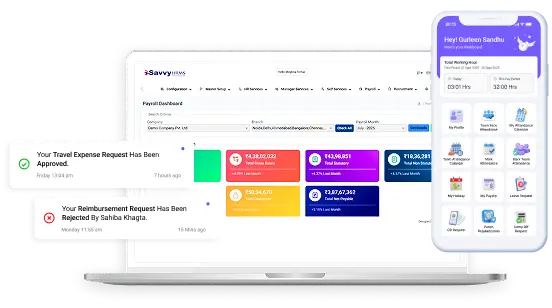
Savvy HRMS is now the go-to HR tool for industries in Chennai. Because it knows local labor rules inside out, especially those affecting Tamil Nadu, it fits right into how businesses operate here. Instead of just offering basic functions, it packs powerful tools while staying budget-friendly, which works well for teams scaling up.
Key Features of Savvy HRMS:
- Savvy AI, your go-to helper online: Works like a smart sidekick for hiring tasks, walks you through daily tasks, and also backs up staff when needed.
- Facial recognition check-in: uses biometrics with artificial intelligence to track who’s present, keeping things precise and safe.
- Smart tools built in: They handle routine HR tasks, so things move faster, using time better this way.
- Smart pay handling: AI takes care of payroll, while auto-calculating PF along with ESI, managing TDS as well as professional tax.
- AI helps new workers join fast: Uses tech so people don’t have to do it all by hand.
- Employee self-service portal: Check your salary slips whenever you want through the team online hub. Use it to apply for time off now and then. Update private details on this platform too.
- Smart review system: AI helps track goals, collect team feedback from all sides, and also checks how well things are going.
- Track attendance patterns & forecast staff exits: Smart tools that help guide team changes while cutting unwanted resignations.
- Private pay slip handling: Automatic creation plus sending of salary records.
- HR Retirement Helper: Smart tools that guide you through leaving work, handling payouts, and care after your job ends.
Pricing: ₹4,500/month (up to 50 employees) and ₹90 per additional employee
Best For: For all organizations in Chennai wanting affordability combined with a complete package of all HR software features
Why Savvy HRMS is Popular in Chennai: Savvy HRMS works well in Chennai because it follows Tamil Nadu’s rules closely. Its support crew, based in India, replies fast. Setup takes just 15 to 20 days, pretty quick. They keep users happy by updating features often.
2: BambooHR
BambooHR puts people first, making HR feel more personal. It looks stands out, clean, friendly, and intuitive. Though built with global teams in mind, plenty of multinationals in Chennai use it daily. Instead of just rules, it supports values like trust and teamwork.
Key Features of BambooHR:
- Good-looking layout: Employees enjoy it because it’s easy to navigate.
- A full staff record system: Manage every detail about employees using personalized sections.
- Time off tracking: Various leave options with auto-updated balances.
- Keep track of the goal: Review progress while collecting input from various people involved. Use regular check-ins instead of one-off reviews. Mix team insights with personal targets for better results.
- Self-service portal: Handle personal details online through a self-service system – no help needed from others. One spot holds pay slips, tax forms, plus updates to contact data using secure login access.
- Mobile app: Works smoothly on iPhone plus Android, built for easy use on the go.
- Reports you can adjust: Live-updated charts that show what’s happening in HR.
Pricing: ₹80-₹100 per employee per month; approximately ₹4,000-₹8,000/month for generally Chennai SMEs
Best For: Industries with a younger employee who prioritizes employee engagement and modern design
3: HR Mantra
HR Mantra works just for Indian companies, getting rules that change by state, like those in Tamil Nadu. It’s well known throughout South India, also picked by plenty of companies based in Chennai.
Key Features of HR Mantra:
- Indian Labor Law Compliance: Know Indian work rules well, cover local laws that change by state. And stay updated on regional differences when needed.
- Payroll handling plus legal cuts: full pay math with auto PF, alongside ESI, along with TDS, and also professional tax.
- Leave and Attendance Management: Take time off or show up for work, pick your leave type, get boss approval, use fingerprint scans, or sign in by hand.
- Employee Database: Teams records are kept in one main spot.
- Pay slips plus bank deposits: auto-created pay records along with direct transfers via NEFT or RTGS.
- Performance checks: follow-up on reviews, along with keeping track of results.
- Mobile Application: Employee and manager apps for on-the-go access
Pricing: ₹4,000-₹10,000/month depending on the size of the organization.
Best For: Small and mid-sized Chennai companies wanting software designed for Indian compliance requirements.
4: PeopleHR
PeopleHR is simple to use yet packed with useful tools. Over time, companies across India depend on it because it handles payroll without glitches. Its name stands out when it comes to smooth HR operations.
Key Features of PeopleHR:
- Simple layout: Users get it fast without much coaching. One look is enough to start using.
- Handling payroll: Correct paychecks, including PF, ESI, plus TDS, along with professional tax cuts.
- Time-off plus check-in control: Various absence options featuring auto-updated limits alongside fingerprint or hand-entered sign-in support.
- Employee Database: Team records kept in one main spot.
- Salary Slip & Bank Transfers: Payslips are made automatic, while bank transfers use NEFT or RTGS files set up without manual help.
- Performance Management: Performance checks happen on a set schedule, while progress gets reviewed regularly instead.
- Mobile App & Self-Service Portal: The Mobile app or self-service site lets staff check pay slips anytime. Employees and managers handle time-off requests from their phones. No need to wait, everything’s ready at hand.
Pricing: ₹4,500-₹12,000/month depending on the size and features of the company.
Best For: Companies wanting dependable and straightforward HR management without any complexity.
5: Deel
Deel handles paychecks and legal tasks, especially in industries working across countries. Lots of businesses in Chennai depend on it when their team is scattered worldwide, also helpful for cross-border hiring. Some pick Deel because managing workers abroad gets messy otherwise
Key Features of Deel:
- Global Payroll Processing: Handling pay for employees around the world, using different systems per region, while keeping records clear. Payments shift based on local rules, with updates sent straight to staff.
- International Compliance: Follow global rules without effort, stays up to date on work and tax regulations across regions by itself. One thing leads to another, so changes happen smoothly, no matter where you operate.
- Multi-Currency Support: Pay in different currencies without hassle; it works smoothly no matter the currency.
- Employee Database: Staff records are stored in one main system worldwide, so everything’s easier to handle.
- Salary Processing & Tax Compliance: Payroll and taxes handled smoothly, auto-calculates wages, pulls out correct deductions for overseas staff. Uses smart rules based on location. No manual errors, keeps things running quietly behind the scenes. Fits local laws without extra hassle each month.
- Link banks directly: smooth pay delivery across countries. Uses real-time connections, no middlemen involved.
- Mobile App & Document Management: Staff can check pay slips, tax papers, or work history using their phone.
Pricing: Customizable according to the number of employees; generally ₹5,000-₹15,000+/month
Best For: Organizations with international operations or remote global teams.
6: Qandle
Qandle offers cloud-based HRMS with a focus on simplicity and affordability. They are known for fast implementation and responsive customer service.
Key Features of Qandle:
- Affordable Cloud-Based HRMS: Budget-friendly and perfect for small and mid-sized businesses.
- Employee Information: Combined employee information management.
- Attendance & Leave Management: Biometric and manual attendance with an approval-based leave management system.
- Payroll Processing & Salary Slips: Basic payroll process with statutory deductions and automatic generation of payslips.
- Mobile App & Self-Service Portal: Employees and managers handle requests, approvals, and all the other data.
- Quick Implementation: Fast implementation within a few days.
- Reports & Compliance Support: Pre-built reports with general Indian compliance features and benefits.
Pricing: ₹3,500-₹8,000/month for generally for Chennai SMEs
Best For: Budget-friendly for companies looking for basic HR functionality
Important HR Software Features for Chennai Businesses
Some HR software works better than others. While checking choices for your Chennai company, make sure they’ve got these must-have functions.
1. Complete Employee Database
- Merged Employee Records: One spot holds every employee’s data.
- Role-Based Access Control: Permissions set by job type keep private data safe using rules that match each person’s work role.
- Strict Salary Privacy: Private salary info kept away from coworkers.
- Secure File Storage: Keeping files safe, like your info, job past, using smart storage that protects what matters without hassle.
2. Attendance and Leave Management
- Smart Attendance: Linked to fingerprint scanners or smartphones, keeps track of who’s present. Uses face scans or phone check-ins, so records stay correct.
- Quick Leave Approvals: Fast sign-off on time-off requests without hassle, smooth from start to finish, using simple steps that work well together.
- Auto Leave Balances: Leave balances refresh on their own; no need to type anything by hand.
- Real-Time Attendance View: See who’s at work right now, what shift they’re on, and while checking their logged hours, it gives you instant updates without delays.
3. Accurate Payroll Processing
- Auto Salary Calculation: Automated salary calculation with PF, ESI, TDS, and professional tax deductions.
- Error-Free Payslips: Faultless pay slip creation each month happens like clockwork without fail.
- Auto Bank Files: Setting up bank transfer documents automatically when paying wages.
- Attendance Synced: Syncs with time-off and check-in records so payments are right.
4. Employee Self-Service Portal
- Instant Payslip Access: Employees get their pay slips whenever they want.
- Easy Requests & Uploads: Filing time-off requests fast, and also handing in papers without hassle.
- Self-Service Profile Updates: Employees can change their own details anytime without help from others.
- Quick Attendance & Shift Info: Get attendance info fast, also see work hours, or check shift specifics.
5. Mobile App Access
- Full Mobile HR & Payroll: Complete HR and pay tools you can reach from your phone.
- On-the-Go Employee Access: Employees get to view pay details, track work hours, also send time-off applications.
- Mobile Manager Approvals: Employees in charge get to OK time off while checking who’s around, all on the spot.
- Smooth Remote Use: Smooth interaction even when you’re away from a computer.
- Anywhere Attendance & Clock-In: Letting teams work from anywhere, clock in easily while out in the field using their mobile devices instead of being stuck at an office desk.
6. Statutory Compliance Support
- Auto Rule Updates: Fresh info rolls in when India’s work rules shift; no need to check manually.
- Built-In Statutory Calculations: Built-in PF, ESI, PT, and TDS compliance calculations.
- Timely, Accurate Filings: Avoids fines through on-time paperwork that’s always correct, using clear steps instead of guesswork.
- Always Rule-Compliant: Makes sure the group follows both local and national rules without fail.
7. Performance Management System
- Clear Goal Setting: Guides you to define targets that match what the business wants. Uses straightforward steps tied directly to team aims instead of unclear ideas.
- Ongoing Performance Tracking: Keeps an eye on how employees are doing now and then, so nothing pops up at the end.
- Continuous 360° Feedback: Fuels round-the-clock insights from supervisors, coworkers, also squads.
- Talent & Support Insights: Finds the best employees, also spots those needing more help.
8. Integration Capabilities
- Smooth Attendance Integration: Works well with time-tracking tools such as fingerprint scanners or facial ID tech.
- Direct Accounting Sync: Works with accounting apps like Tally to keep finances updated, using direct links that stay in step.
- Bank-Linked Payroll: Connects to banks, so pay goes straight into accounts.
- Reduced Manual Work: Teams up with common tools to skip repetitive tasks and cut down on hand-typed data.
Why Savvy HRMS is the #1 Choice for Most Chennai Businesses?
Once we checked every big provider, Savvy HRMS stands out for many companies in Chennai by 2025. Here’s what makes it different:
1. Affordable Pricing
Just ₹4,500 a month, for teams up to 50, gives big-company tools without the high cost. Nobody else offers so much for that price.
2. Built for Tamil Nadu Compliance
Based in India, Savvy HRMS knows Tamil Nadu’s rules well, so it handles pro tax right, follows regional labor policies, yet understands how locals do business differently from big international companies.
3. All-in-One HR Software
Savvy HRMS handles everything, hiring through retirement, all in one place. No more issues, separate apps for each job.
4. Fast Implementation
Setting it up is quick, while others need a month or more; Savvy HRMS gets you going in just two to three weeks. So you start seeing results sooner.
5. Local, Responsive Support
Great help, staff know local needs in Tamil Nadu, so they fix things fast. Or get back right away when problems pop up. Setting it up? Experts take care, since they’ve worked with companies in Chennai before. They’re familiar with how things run there.
6. Transparent Pricing
No hidden fees; prices are clear. Pay only for what you actually need, while skipping extra costs on stuff you won’t even use.
7. Scalable for Any Team Size
Start simple, build up features over time. As your team expands, bring in extra tools that fit. Runs smoothly whether you’ve got 50 staff or 5,000. No slowdowns, no hiccups.
8. Regular Updates
New tasks show up often, and staying on top of rules gets easier when things change. Updates roll out now and then, so you’re never stuck playing catch-up.
9. Trusted Across Tamil Nadu
Savvy HRMS handles HR tasks for hundreds of companies across Chennai and Tamil Nadu, so many already depend on it.
Implementation Strategy: Before, During, and After
Successful implementation needs proper planning and implementation. Follow these steps to ensure smooth adoption.
Before Implementation: Planning Phase (2-3 Weeks)
1. Set clear goals
Note down which issues the program should fix. Figure out how you’ll measure progress, and what signs mean it’s working. Decide on a schedule. Put all this on paper.
2. Bring the team on board
Confused in HR early since they’ll be using it every day, so their feedback matters. Then check with managers to secure permission and make sure funds are set aside.
3. Get your info ready
Sort out the staff details you already have. Check everything’s up to date and nothing’s missing. Spot where data’s lacking ahead of moving it. Line up every document needed for employees.
4. Map out your spending
Add up all ongoing costs, license prices, setup fees, teaching sessions, also linking systems together.
5. Pick a doable deadline
Around three or four weeks should work. Tack on extra days just in case a task pops up. Block out time for your team to get trained. Roll it out step by step, begin with what matters most.
During Implementation: Execution Phase (3-4 Weeks)
1. Data Relocation
Move current team data without errors. Check that everything arrived correctly afterward. Toss out outdated or repeated entries. Try key math using test examples.
2. System configuration
Set up how teams are organized, plus who reports to whom. Adjust time-off rules based on what your business needs. Arrange pay settings along with wage parts. Lay out steps for approvals using automated issues.
3. Training sessions
Run short workshops for HR, about two or three days. Managers get four to six hours covering key tools, using hands-on practice. Task: learn the self-service system in a quick session, roughly two or three hours across. Put together user-friendly handouts plus walkthrough videos so people can look things up later.
4. Integration setup
Hook up the fingerprint scanners first. Then link to payroll apps when required. Connect your bank to the system so payments go out smoothly. Check every connection carefully before launch.
5. Testing and validation
Try everything from start to finish. Run a test payroll to check if the numbers add up. Make sure tax rules are calculated correctly. Check that the app works on various phones and tablets.
After Implementation: Optimization Phase (Ongoing)
1. Gather Feedback Immediately
Collect weekly feedback from employees during the first month. Identify errors and develop processes. List FAQs and create solutions. Plan improvements based on feedback.
2. Phased Feature Rollout
- Begin with core modules in week 1.
- Add performance management in month 2.
- Add recruitment features in month 3.
- Introduce Insights in month 4.
3. Regular Reviews
Take monthly check-ins on key measures. Have quarterly business reviews with your platform. Collect regular feedback from employees. Track ROI and benefits realization.
4. Continuous Improvement
Explore new features released regularly. Customize workflows to match your processes. Create custom reports for your requirements. Automate daily notifications and tasks.
5. Stay Updated
Attend webinars from your HR software provider. Stay informed about new compliance requirements. Update your processes as the business develops. Review regulations regularly.
Conclusion
Choosing the best HR software for your business in Chennai helps clear confusion while improving progress fast. When you’ve got more than 50 employees, using HR tech isn’t a luxury; it keeps paychecks correct, meets Tamil Nadu rules, reduces paperwork time by 50%, also lifts how happy employees feel.
Savvy HRMS works well for some companies in Chennai, keeps pricing, tools, and helps in balance. Getting it running usually needs just two or three weeks, while real gains show up around the half-year mark. Since there are tons of choices locally, use the competition to get better offers, yet move fast, as waiting means losing both cash and hours each month.
Try out the leading tools yourself, examine closely with hard questions instead of just removing. Chat directly with current users for real insights, with no inaccuracy. Good tech shifts HR from endless forms to a smart business edge. Book your demo and get the right software today, consider your options carefully, or check out how many Chennai businesses use Savvy HRMS to handle HR and payroll software faster.