Payroll Software

Run Salary, Statutory Deductions, and Payslips on One Platform

When you do your calculations on spreadsheets, track PF, ESI, and TDS payments manually, and manually send payslips, it invites errors, penalties, and delays in payment each month. Payroll software integrates attendance and leave automatically into salary processing, handles statutory deduction calculations, and generates payslips with a single click, so that every payout is accurate and on time.

Book a Free Demo
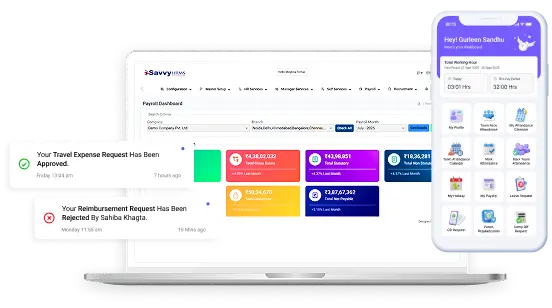
Payroll software dashboard

Payroll Software That Handles Every Salary Component, Deduction and Payout

From salary structure to final settlement, Savvy HRMS payroll software takes care of all components, deductions, and payouts in one cloud-based HRM software, on time

Salary Components and Structure

Build any salary structure once, and apply it to the right people

Employees earn from different elements, and there is no one fixed structure that suits all designations and grades. Savvy HRMS payroll software enables HR to create various salary structures with component-specific rules so every salary breakup is accurate, consistent, and ready to process.

  • Multiple salary components: Set up basic salary, allowances, and other income as separate components; each item can have its own rules.
  • Component-wise mapping: Map components to each salary structure. For example, different grades, different locations, and different roles can follow a different structure.
  • Assign one by one or in bulk: Assign structures to a single employee or upload in bulk in the cloud-based HRM software, saving time during recruitment drives.
  • Automatic salary breakup: Enter CTC or gross salary, and the software automatically divides it.
  • Formula and non-formula calculations: Use formulas where a component depends on others, or fixed values where it does not depend.
  • Statutory eligibility by component: Determine for each component whether it's included in PF, ESIC, professional tax, gratuity, and bonus, as per payroll software in India.
  • Tax-exempt components: Handle tax-exempt components on actual or fixed values, as per your policy.
  • Tax carry forward eligibility: Decide whether you want to allow tax carry forward in coming years; set component-wise tax carry forward eligibility as per your policy.
  • AI-based formula checker: An AI formula checker scans the salary breakup formulas for errors and corrects them before they reach payroll.
Salary components and structure

Salary Processing and Verification

Check every salary before it is paid

Salary errors most often emerge after the salary is paid, and it costs a lot to get it right later on. Savvy HRMS payroll software calculates the salary based on attendance and leave information, and HR is able to validate each value before locking it, so employees receive the right amount.

  • Payday and salary verification: Set paydays and check each salary before you pay, so errors are caught early
  • Excel export for verification: Export salary data to Excel so HR or finance managers can double-check before submitting final approval.
  • Processing with or without TDS: Process salary with or without TDS, according to the requirement of each case.
  • Lock or hold based on approvals: Lock a month's salary when it is approved or hold select salaries while approvals are pending.
  • Bulk payslips by email: Compose one email and send all your employee payslips in a single click directly from the cloud HRM software.
Salary processing and verification

Loans and Advances

Manage employee loans and recoveries inside payroll

Loans & advances tracked in separate files result in missed recoveries and difficulty in reconciling balances. Savvy HRMS payroll software calculates loans, interest, and EMI deductions on the payroll itself, so recoveries are tracked correctly, and employees can view their balances.

  • Employee loan management: Maintain loan and advance balances for employees in one system, making it easier for HR to view balances.
  • Auto interest calculation: Interest or compound interest is calculated automatically, so nobody works it out manually.
  • Fixed or variable EMI deductions: Deducting fixed or variable EMIs from salary each month helps in recovering loans.
  • Multiple deduction conditions: Set up various deduction rules for employee loans so that every loan has its own rules.
  • Loan NOC letter generation: Generate a no-objection certificate (NOC) letter once a loan is cleared, without drafting it manually.
  • Loan ledgers and statements: Create loan ledgers and generate employee loan statement reports in the cloud-based HRM software, accessible when needed for audits and queries.
Loans and advances management

Cost Center

See what payroll really costs, by department, project, or location

Without cost center mapping, finance cannot see where salary money is really spent. Savvy HRMS payroll software maps employees to one or more cost centers, which means every department, every project, and every location has a transparent view of its payroll expenditure.

  • Multiple cost centers: Create as many cost centers for your business as needed, including departments, projects, or plants.
  • Employee mapping to more than one cost center: Allocate the expense of an employee to two or more cost centers, so shared resources are charged fairly.
  • SAP integration: Link cost centres with SAP to send payroll cost data directly to your finance system without having to re-enter the data.
  • Analytical views: Cost center payroll cost analysis in cloud-based HRM software enables finance and leadership to understand the finances more clearly for budgeting purposes.
Payroll cost center mapping

Variable Salary

Link rewards and allowances to results, and pay them accurately

Variable pay that depends on effort, such as incentives, allowances, and reimbursements, can be challenging to process manually. Savvy HRMS payroll software can set up variable pay once and add it to the salary every time, ensuring rewards are fair and payouts are accurate.

  • Performance-based incentives: Link incentives to performance; that means employees performing well are rewarded more, with the amount flowing in the payroll.
  • Allowances and rewards: Set up a reward and allowance as a separate entity, with their own rules and requirements.
  • Perquisites such as car and house allowances: Create multiple perquisites like house and car allowances and assign those to eligible employees.
  • Fixed or variable reimbursements: Reimburse a fixed amount or a variable amount depending on the actual amount of claims, in the cloud-based HRM software.
  • Reimbursement with or without salary: Reimbursements can be paid in addition to salary or can be paid separately, as specified by your policy.
Variable salary and reimbursements

Increments and Promotions

Apply raises and promotions with correct pay and a clear history

Increments and promotion updates arrive frequently, mid-cycle, which can make back pay calculations difficult. Savvy HRMS payroll software applies increments in bulk, calculates arrears automatically, and records history, so that the new pay is accurate.

  • Midyear or year-end promotions: Handle promotions at any time of the year, mid-cycle or year-end, and adjust salary accordingly.
  • Bulk increments: Give increments to several employees at a time in the cloud HRM software, which saves the time required for appraisal.
  • Mid-month salary changes: Set up salary changes that apply in the middle of the month and pay calculated correctly for both periods.
  • Auto arrears for increments: No one does an arrear calculation manually, because when someone gets an increment, the arrear calculation occurs automatically when a back date is used.
  • Promotion and transfer configuration: Create promotions and transfers, so when there's a change to the role, grade, or location, the salary and records update automatically.
  • Complete increment and promotion history: Maintain complete history of all increments and promotions of individuals, available for review and audit.
Increments and promotions

Statutory Compliances

Stay compliant with PF, ESI, professional tax, and TDS, without the paperwork

Statutory payroll means numerous forms, dates, and rules; a single missed filing can result in penalties. Savvy HRMS payroll software India calculates PF, ESI, professional tax, and TDS, and generates challans and reports so HR stays compliant with less effort.

  • PF, ESI, PT and LWF calculations: Calculate provident fund, ESI, professional tax, and labour welfare fund payments where applicable to your employees.
  • Multiple statutory challans: Use cloud-based HRM software to create challans for every statutory payment and filing purpose.
  • Investment declaration uploads and approvals: Employees submit investment declarations and proofs, and the HR team verifies and approves the declaration in the system.
  • Tax computation sheets: Prepare tax computation sheets for all employees, so tax deducted at source is transparent and easy to explain.
  • Statutory reports: View and download reports including muster roll, leave with wages, etc., and other statutory registers whenever you need.
  • Auto-calculated TDS or TDS upload: Let the system calculate TDS for you automatically, or upload TDS values where you need your process to do so.
Statutory compliance for payroll

Payroll Integrations

Connect payroll with the systems your business already runs on

Payroll data has to flow into finance, banks, and other systems, and entering it again introduces errors. Savvy HRMS payroll software integrates with SAP, Oracle, Tally, and many other systems, so salary data flows smoothly and finance runs from the same data.

  • Integration with 20+ software: Connect payroll to 20+ other software products so information smoothly flows between the tools your teams already use.
  • API integrations and data upload: Use APIs to sync data automatically, or upload files where an API is not available.
  • Smooth data processing: Data is transferred to other systems without re-entry, minimizing errors made when manually transferring data.
  • SAP, Oracle, Tally and more: Link the cloud-based HRM system to SAP, Oracle, Tally, and other finance/ERP systems so you don't have to re-enter the payroll data.
Payroll software integrations

Analytical Views

Salary reports and dashboards that make payroll easy to read

Payroll decisions need clear numbers, and building reports manually can take hours. Savvy HRMS payroll software does exactly that, converting salary information to reports, registers and dashboards, so HR, finance and leadership can check expenses and make decisions fast.

  • 100+ analytical reports: Select from more than 100 reports that give details of the payroll data, including salary, deductions, and statutory payments.
  • Advanced search for salary registers: Search and filter by categories including location, department, or grade to get the information you need.
  • Detailed salary registers: Go to the salary register to see a component-wise breakdown of the salary, with details of earnings and deductions.
  • Separate reports for earnings: Receive individual reports of the incentives, allowances, reimbursements, and other details in cloud-based HRM software.
  • Salary and overtime registers: Maintain separate salary register and overtime register so they can be reviewed and published independently.
  • Multiple dashboards: Track payroll costs and trends on several dashboards for improved budgeting and planning.
Payroll analytics and reports

What is payroll software?

Payroll software is a digital system that automatically handles all processes that deal with the calculation of employees’ salaries, payments, and other deductions. The program uses data related to attendance, leave, etc. to calculate salaries and carry out deductions like PF, ESI, professional tax, and TDS, which results in payslips and bank transfer files. This automated software replaces the use of manual spreadsheets, minimizes the chances of errors, which helps the HR department pay their employees timely.

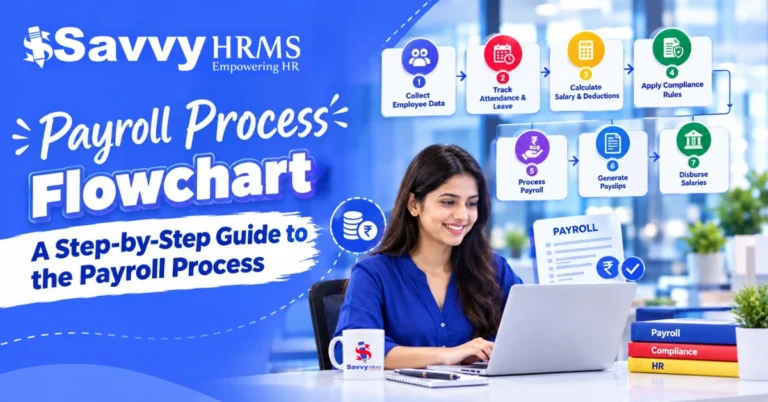
  1. Pull attendance and leave data
  2. Calculate salary and deductions
  3. Verify, lock, and approve
  4. Generate payslips and bank files

Why Choose Savvy HRMS Payroll Software for Small, Medium, and Large Enterprises

When payroll is conducted manually, it can often become slow and difficult to track, especially as the business grows. Savvy HRMS payroll software is a beneficial solution for companies of any size, offering a precise payroll process and ensuring compliance with the law.

Fits Every Business Size

Savvy HRMS payroll software meets the needs of a small team as well as a medium-sized business or a large company. Businesses can conduct payroll for multiple divisions, departments, locations, and companies at once.

Flexible Salary Structures

Set up multiple salary components and structures, assign them one by one and in bulk, and split CTC automatically with formulas as needed, so all grades and roles get the right salary breakup.

Statutory Compliance Built In

Calculate PF, ESI, professional tax, LWF, and TDS, generate challans, and download statutory reports like the muster roll so that HRs don't have to copy data from sheets.

Attendance and Leave Linked

Payroll records the data from attendance management software and leave management software, including LOP, overtime, and leave encashment, so salary reflects the number of actual working days and approved leave without manual re-entry.

Loans, Reimbursements and FBP

Manage EMI deductions against employee loans, fixed or variable reimbursements, incentives, allowances, and flexi benefits under an FBP so that each earning and deduction is set up once and paid accurately.

F&F and Arrears Handled

Process the full and final settlement for exiting employees and automatically generate back pay to calculate arrears for increments, back-dated changes, and LOP reversal so that back pay and exit dues are worked correctly and not manually.

Payslips and Bank Transfers

Check salaries, lock or hold the ones that need approval, generate payslips in bulk with a single click, send them via email, and generate bank transfer files, so paydays run smoothly and employees are paid on time.

Accounts and ERP Integration

Link payroll to SAP, Oracle, Tally, and other systems and upload payroll data into accounts through journal vouchers, thus generating reports directly from the same data and not re-entering the salary data.

Reports and Dashboards

Over 100 analytical reports, comprehensive salary registers, and a range of dashboards displaying payroll costs by element, cost centre, and category provide HR and Finance teams with real-time, accurate data for decision-making.

Built for Indian Businesses

Payroll software in India, including payroll software in Noida and Delhi NCR, must handle local statutory rules and state variations. Savvy HRMS supports them, helping businesses of every size run payroll consistently.

Cloud-Based and Accessible

Our cloud-based HRM software enables HR, finance, and employees to view their payroll in the office or at home, with approvals and payslips available online, so payroll continues smoothly across offices, plants, and remote teams.

8 Key Features of Our Cloud-Based Payroll Software

From salary structure to final settlement, Savvy HRMS takes care of every earning, deduction, and payout on a single platform.

Salary Structure and Components

Salary Structure and Components

Create multiple salary structures with component-wise mapping, allocate them one by one or in bulk, and allow the system to split CTC automatically for payroll with formulas wherever required, with statutory eligibility for each component.

Salary Processing and Payslips

Salary Processing and Payslips

Prior to salary payment, check the salaries, export data to an Excel sheet for review, and lock or hold salary with approvals. Produce the payslips in bulk, email the payslips in one click, and create the bank transfer files for payment.

Loans and Advances

Loans and Advances

Manage employee loans & advances with automatic interest or Compound Interest and fixed or variable EMI deduction option, with custom deduction conditions, then generate NOC letters, loan ledgers & employee loan statements to be ready for audit & employee queries.

Variable Pay and Reimbursements

Variable Pay and Reimbursements

Configure incentives, allowances, perks, and flexi benefits on your FBP. Whether incentive payments are fixed or variable, and made along with salary or in separate transactions, ensure that every variable component is correctly paid through payroll, without any manual follow-ups.

Increments, Arrears and F&F

Increments, Arrears and F&F

Process increments and promotions monthly or quarterly, in advance or in arrears, and automatically calculate a history of all employees. For exiting employees, full and final settlement brings dues, recoveries, and pending payments into one clear, correct payout.

Statutory Compliance and Challans

Statutory Compliance and Challans

Keep up with compliance easily by calculating PF, ESI, professional tax, LWF and TDS, creating challans, managing investment declaration and tax computation sheets, and downloading the statutory reports like the muster roll.

Integrations and Accounts JV

Integrations and Accounts JV

Payroll integrates directly with SAP, Oracle, Tally, and various other systems using APIs or data upload and passes payroll data into accounts via journal vouchers so that finance can depend on the same figures, avoiding rekeying and delays.

Cost Center and Analytics

Cost Center and Analytics

Map employees to one or more cost centres and leverage 100+ analytical reports, comprehensive salary registers and multiple dashboards to have visibility of payroll cost and take more informed decisions on budgets and headcount planning.

Benefits of Using Our Cloud-Based Payroll Software for Every Team

Better payroll helps everyone, from HR and finance to managers, employees and business owners. Savvy HRMS cloud-based payroll software provides accurate salaries, statutory compliance, and payslips that reach employees on time.

Benefits for HR Teams

With Savvy HRMS payroll software, your HR team won't need to use spreadsheets or calculations to process salaries, so they can focus less on correcting errors and more on bettering policies.

  • Salary structures configured once and assigned in bulk
  • Attendance management software and leave management software data feeds salary
  • Verify, lock, or hold salaries based on approvals
  • Auto arrears for increments, LOP reversals and back-dated changes
  • Full and final settlement handled in the same system

Payroll Software That Works the Way Your Industry Does

Every industry pays people in ways from extra hours on a factory floor to rewards in a sales team. Savvy HRMS payroll software changes salary setups, reductions, and payments to match how your employees work.

Industry Description
manufacturing Manufacturing Manufacturing Industries pay for shifts, overtime, and statutory contributions for employees. Savvy HRMS payroll software figures out overtime from attendance records, manages PF, ESI, and professional tax, and processes salaries in batches. This keeps all payouts accurate and on time.
corporate_fare IT and Corporate IT and Corporate teams work with CTCs, flexible benefits, and reimbursements. Payroll software handles salary breakdowns, FBP, investment forms, and TDS. Employees get a view of their pay. HR finishes tasks without depending on spreadsheets.
shopping_bag_speed FMCG FMCG companies pay sales teams using incentives, allowances, and variable pay for various locations. Payroll software sets up incentives and reimbursements, and links cost centers to depots or regions. Keeps all payouts trackable for finance teams.
health_and_safety Healthcare Hospitals run 24/7, so pay includes night shifts, overtime, and allowances based on roles. Payroll software uses attendance data to calculate these. It also automatically computes arrears when salary rates change.
warehouse Logistics Drivers, loaders and field teams earn trip‑linked allowances, advances and reimbursements. Payroll software keeps track of loans and advances, recovering each installment through EMIs. Payroll software also processes all allowances and reimbursements, ensuring that field payouts remain accurate and that recoveries are logged.
sell Retail and Hospitality Stores, hotels and restaurants experience joiners and exits with shift‑based pay. Payroll software calculates salaries in bulk, adds overtime, and settles settlements quickly. Payroll software keeps payslips and bank transfers on schedule for all outlets.
school Educational Institutions Schools and colleges pay teaching and non‑teaching staff on structures with periodic revisions. Payroll software supports salary structures, calculates arrears for revised pay, manages TDS, and provides payslips on time.

Why Savvy HRMS Is a Trusted Payroll Software Provider in India

Payroll errors cost trust, time, and penalties, and we all know how hard it is when payroll mistakes happen. Savvy HRMS payroll software keeps businesses on track, giving accurate salaries, statutory compliance, and clear payslips all in one place so every payday runs smoothly.

Built for India

Savvy HRMS payroll software has been built in accordance with India’s complex payroll regulations, including PF, ESI, professional taxes, LWF, and TDS, enabling businesses to pay salaries accurately regardless of their location.

Attendance-Linked Salaries

Payroll is integrated with attendance management software and leave management software so various kinds of salary deductions, LOP, overtime, and leave balances are included in the payroll calculation automatically, thus relieving HR from the burden of repetitive data entry and corrections.

Compliance Made Simple

Challans, returns, and statutory reports are generated directly from payroll data. This helps HR and finance teams meet filing deadlines without maintaining sheets or tracking numbers across different departments before every due date.

Flexible Salary Structures

The system allows configuring an employee’s cost to the company, revenues, deductions, flexible benefits, and bonuses by taking into account the department of their employment so that all salaries are calculated according to the ever-changing conditions.

Smooth Finance Integration

Bank transfers, joint accounts, and reports on centers of expense create a connection between the payroll and the finance departments. The use of tools for ERP and accounting ensures that salary data is always available for reconciliations and audits.

Employee Self-Service

Employees have access to payslips, income tax calculations, loans, and declarations about investments through HR software hosted on the cloud. This helps minimize payroll-related inquiries from employees, allowing HR experts to give time to more strategy-focused activities.

Local Support in Noida

Savvy HRMS offers Payroll Software in Noida and implementation support for businesses across India. We help teams set up, migrate, and run payroll smoothly with guidance from people who know the product well.

Payroll Software That Works Wherever Your Team Works

Employees may work from offices, homes, fields, and client sites, but salaries need to be accurate everywhere. Savvy HRMS payroll software processes pay, deductions, and payslips consistently, no matter what the work location.

Office-based team working

Office-Based Teams

Payroll is predictable with fixed schedules and structured CTCs. The payroll software automatically pulls attendance and leave details, computes salary, PF, ESI, and TDS, and issues payslips on time, removing the month-end spreadsheet work.

Remote and hybrid employee working from home

Remote and Hybrid Teams

Employees who work from home or on split schedules still need to be paid accurately. Cloud-based HRM software integrates attendance and leave with payroll, and employees can view payslips, tax sheets, and declarations from anywhere.

Field team members at a worksite

Field and On-Site Teams

Field staff are paid allowances and can claim for travel expenses. Payroll software processes salary, reimbursements, loans and advances. On-site employees get paid on time and accurately without waiting for manual approvals.

Shift-based team in a factory

Shift-Based Teams

Rotational shift workers are paid allowances and overtime. Payroll software reads the shift and attendance data, calculates these components automatically, and applies the deductions correctly. This ensures that shift workers get the right pay every month.

Multi-location team planning

Multi-Location Teams

Different states have different professional tax and LWF rules in offices. Payroll software uses statutory settings based on location, maps cost centers, and gives finance a consolidated overview of payroll across all branches.

Contract and temporary team members

Contract and Temporary Teams

Contract workers come and go often, on different pay terms. Payroll software manages multiple salary structures, quick F&F settlements and bank transfers, and keeps short-term and permanent staff payroll in one system.

Payroll Software Built for Data Security and Privacy

It is also important to keep your payroll data secure. Savvy HRMS payroll software does just that; only authorized people can access payroll data in some situations.

Role-Based Access

Payroll software allows you to control access and who can edit or approve salary information. HR, finance, and managers only have access as far as needed, protecting sensitive salary data from unauthorized users and reducing the risks of leaks.

Secure Employee Login

Each employee logs in with their own login credentials to access payslips, tax sheets, and declarations. This means all personal pay details are kept private, and no one can send their pay information through email, open spreadsheets, or messaging apps.

Audit Trails

Any change to the salary structure, deduction, or payout is logged against the user who made it. Audit trails make payroll visible, allowing finance to validate what has been entered and to ensure clear accountability for every change.

Approval Workflows

Salary processing is checked and approved before payslips are issued and payments are transferred to the bank. Checking avoids unauthorized modifications and finds mistakes early on, before payments land in their employee bank accounts, and changes need to be made.

Data Backup and Recovery

Cloud-based HRM software helps keep payroll data in a central location with daily backups. There's no risk of losing this data if you change your device or accidentally delete the wrong spreadsheet. Teams can access previous payslips, reports, and salary records at any time.

Privacy and Confidentiality

Payroll software stores information about employee salary, banking, PF, ESI, and tax details in one regulated location. Your sensitive data will stay safe from any kind of abuse, and the HR team will see it the same way across all branches, teams, and employees.

How Savvy HRMS Payroll Software Is Different From Other Payroll Software Providers

Payroll software is not the same everywhere. See how Savvy HRMS handles attendance, statutory compliance, payouts and reporting differently from typical providers.

Feature Savvy HRMS Payroll Software Other Payroll Software Providers
Attendance and Leave Link Connects with Attendance Management Software and Leave Management Software, so LOP, overtime and leave flow into salary automatically Attendance and leave data often imported manually or through separate files
Salary Structure Configurable CTC, earnings, deductions and FBP for different grades and locations Fixed templates with limited customization
Statutory Compliance PF, ESI, professional tax, LWF and TDS handled with challans and reports Basic deductions, with returns and challans prepared separately
Payouts and Settlements Bank transfers, reimbursements, loans, arrears and F&F settlement in one flow Several of these handled outside the system
Finance Integration Accounts JV, cost center reports and ERP or accounting integrations Limited export options, with reconciliation done manually
Employee Access Payslips, tax sheets and investment declarations on cloud based HRM software Payslips shared by email or accessed through HR
Industry Fit Salary rules adapt to manufacturing, corporate, FMCG, healthcare and logistics teams One generic setup for every industry
Reports and Analytics Payroll reports and cost views available on one dashboard Reports built separately in spreadsheets

Payroll Software in India for Businesses Across Every City

Across Indian Cities

Wherever your business operates, Savvy HRMS payroll software keeps salaries, statutory deductions, and payslips accurate. Find payroll software for your city below.

What Businesses Say About Savvy HRMS

Teams across India use our payroll software to save time and keep records accurate.

For a large manufacturing organization like ours, Savvy HRMS proved to be the right solution. Centralized attendance, smooth biometric integration, and automated payroll significantly reduced processing time, removed paperwork, and provided transparent, real-time reports supporting our workforce management and data-driven decisions.

Mr. Nirbhay Kumar Azad

IT Head, Astemo

Switching to Savvy HRMS was a game-changer for our HR operations. From automated payroll and compliance to mobile attendance and performance insights, everything is now simplified. Employee queries have reduced significantly, and HR has better data to drive decisions that positively impact our company.

Ms. Upasana Sachdeva

Manager HR, Kiwi Tech

What once took days of manual effort is now completed smoothly with Savvy HRMS. Automated attendance, one-day payroll processing, structured performance management, and quick approvals through email reduced HR workload significantly and improved employee experience across all locations.

Mr. Naveen Chaudhary

Head HR, Kalpakaaru

Frequently Asked Questions (FAQs)

1. What is payroll software and how does it work?

Payroll software is a system that calculates salaries automatically, applies statutory deductions, and generates payslips. Savvy HRMS payroll software collects attendance and leave data, applies the salary structure, deducts PF, ESI, professional tax, and TDS, and then generates payslips and payout reports, saving manual work, delays, and errors every single month.

2. How to choose payroll software that complies with Indian tax laws?

Go for payroll software that accommodates PF, ESI, professional tax, LWF, and TDS. Payroll software should also be able to generate challans and reports while proactively updating any changed laws. Investigate whether the application has state-wise settings, provides Form 16 and tax computations, and provides audit-ready data that renders manual tracking within different teams unnecessary.

3. How much does cloud payroll software cost for a mid-sized company?

Pricing depends on the number of employees and features required, and varies from one provider to another. In general, cloud-based payroll software charges per employee per month and may have some initial fees associated. Compare what’s offered in terms of statutory compliance, payslips, and reports, and get an estimate with regard to the number of employees within the company.

4. How do payroll software pricing and features compare for startups?

Startups should not focus on the price of the software but rather make a detailed analysis of the features offered. It is necessary to look for the possibility of salary processing, statutory deductions, payslip generation, attendance linking, and future scalability. Scalable software makes it possible for startups to start using the tool with the essential features required and utilize additional functionalities when the workforce increases.

5. Which payroll software handles GST and PF calculations together?

GST does not apply to employee compensation; therefore, payroll software determines PF, ESI, professional tax, and TDS, while GST accounting is done through accounting software. It is advisable to use payroll software that can post salary entries to accounts using JV as well as integrate with accounting applications. This way, accounting and payroll records can be aligned with each other easily and accurately every month.

6. Which payroll software offers an employee self-service portal?

The payroll software must offer a self-service portal to employees, allowing them to open payslips, loan forms, reimbursement forms, tax computation forms, and anything else on any device at any time. An advanced self-service platform enables staff to obtain information regarding their payroll easily without contacting HR, so that HR departments face fewer repetitive payroll queries every month.

7. What is the best payroll software for managing PF and ESI compliance in India?

The best payroll software automatically performs calculations of PF and ESI contributions using the relevant wage limit and creates relevant challans and returns. The software must be able to deal with employee joining, exits, and arrears. When both payroll and compliance are performed through one program, HR and finance are able to work with one record and ensure timely reconciliation activities.

8. What are the best payroll software options for small businesses in India?

Small businesses require simple and inexpensive payroll software that is also compliant with mandatory regulations such as PF, ESI, TDS, and provides payslip generation as well. Some useful features for a small business payroll software could be the ability to connect attendance and leave days to salaries, as well as scalability. Savvy HRMS payroll software has provisions for small, medium, and large businesses, thus eliminating the need for a change in software later in the course of hiring.

9. Which software is most used for payroll?

According to research in India, companies often make use of a mixture of spreadsheets, accounting tools, and specialized payroll software, depending on their size and industry. For example, with the growth of small-to-medium businesses, a need for dedicated cloud payroll software arises. The latter helps not only automate several processes like deductions, payslips, and compliance but also save time and effort for the finance department in cooperation with Excel.

10. What is the best software for payroll?

When looking for the best payroll software for your company, consider its ability to meet the needs of your workforce and ensure compliance with legal requirements. Look for features such as coverage of statutory requirements, attendance tracking, reporting and self-service options, and good customer support. You should request a trial version so you can see how your payroll is done with the software.

11. Is Excel payroll free?

Excel payroll templates may be downloaded free of charge, but since this product requires a license, the work you do is manual. The process is complicated. Formulas may be corrupted and salaries calculated incorrectly because of changes in the law.

12. Can payroll software integrate with attendance and leave management?

Yes, payroll software can be combined with Attendance Management Software and Leave Management Software so that overtime or leave balances can be automatically included in the payroll calculations. It saves time and reduces duplication of work for people whose job involves payroll processing.

13. Does payroll software handle F&F settlement and arrears?

Reliable payroll software estimates the final amount due to employees who left the company. This amount includes their unpaid wages, leave encashment, and recoveries. Payroll also calculates arrears automatically if an employee’s compensation is calculated retrospectively and involves any salary increases; this means that both transactions can happen without any extra calculations or follow-ups.

14. Can payroll software generate payslips and bank transfers?

Yes. The payroll software generates payslips for each employee and creates the bank transfer file when participations are verified. Manual preparation of payslips is eliminated by this procedure, and all payments become regularized.

15. Does payroll software support professional tax, LWF and TDS?

It is true that the comprehensive payroll software applies the professional tax and labor welfare fund based on the workers' location and calculates the tax deducted at source based on the declaration submitted and tax computation sheets. Using this software simplifies making necessary reports and challans, allowing the human resources department to manage the information properly ahead of each filing process and ensure accurate records throughout the year without proceeding with spreadsheets.

16. Is cloud-based payroll software secure?

Well-known providers of cloud-based payroll software guarantee the safety of the information concerning employees’ salaries using role-based access, reliable login systems, and frequent backups. Always check whether the providers have measures to protect the data and control user permissions and audit trails before making a decision.

17. How does payroll software implementation work?

The implementation process usually includes collecting the data about employees, salary systems and legal specifications, configuration of systems and testing, then performing the parallel running before the launch date. A good vendor facilitating the migration and configuration is able to assist in transferring from spreadsheets without causing any disruptions to salaries, waiting times, or confusion in the whole process of migration.

18. Can payroll software manage loans, reimbursements and flexi benefits?

Yes, payroll software can keep track of loans and additional payments along with the payments of the EMIs; perform reimbursement operations and help manage the benefits under the flexi benefits plan system. These components are included in the salary calculation and thus reflected in the salary slip.

19. Does Savvy HRMS provide payroll software in Noida?

Yes, Savvy HRMS provides payroll software in Noida and assists organizations throughout India. Businesses located in Noida can utilize this tool for payroll management, tax payment, payslip generation, and report preparation, all from a single platform that also ensures guidance during initial implementation and ongoing support from the Savvy HRMS team regardless of the company size or industry.

20. Can payroll software manage multiple locations and cost centers?

Yes, payroll software allows companies to process salaries for multiple branches using the terms of professional tax and LWF based on the specific location. As a result, the finance departments can get a single convenient overview of salaries paid while maintaining consistency in terms of salary processing in all locations.

Related - Articles

SAAVY HRMS is an integrated HR management software that automates and simplifies your key HR operations.

Less Manual Work, More Time for People. Make the Switch to Smarter HR.

Every HR Process. One Platform.


Book a Free Demo Today!
Ready to Simplify Payroll for Your Team?
Scroll to Top

We're just a message
away from transforming your

HR Experiance
Savvy HRMS dashboard showing employee management, attendance tracking, payroll features, and mobile app interface

Trusted By 1,000+ Leading Brands

Indiamart image Savvy HRMS client
Nilkamal Savvy HRMS client image
Haldiram Savvy HRMS client image
Kajaria client image in Savvy HRMS
HPL image of Savvy HRMS client
Hero Motors Savvy HRMS Client
Savvy HRMS LOGO Smarter Faster Reliable
Software suggest badges
Certificates icons of savvyhrms